Kaizen 224 - Quote-driven Deal Reconciliation Using Zoho CRM Functions and Automation

Hello everyone!
Welcome back to another instalment in the Kaizen series.
This post covers quote-driven deal reconciliation, emphasizing Functions and Automation to address practical sales challenges.
Business Challenge
Sales organizations often mark deals as Closed Won before commercial transactions fully conclude. Quotes generate promptly upon closure, yet businesses typically provide a brief window such as one week for renegotiation or payment. During this period, currency fluctuations, payment delays, and risk thresholds can significantly alter the final deal value.
This Kaizen demonstrates how Zoho CRM Functions and Automation work together to reconcile deal financials with quote activity over time. Sales, finance, and operations teams can thus access accurate, policy-compliant values.
Here is a typical sequence:
- Deal closes with Closed Won status
- Quote generates immediately
- Customer receives grace period (e.g., one week) for payment or adjustments
Key factors during this window:
- Exchange rates fluctuate
- Payments may succeed or fail
- Business absorbs limited losses(up to 10%, for example)
- Major variances trigger renegotiation
CRM must reflect actual outcomes rather than initial closure assumptions. Quotes serve as the authoritative commercial record, with final deal values depending on execution timing. This approach captures intermediate and final financial states to enable automated decisions and audits.
Key business scenarios covered
Scenario 1: Payment is made during the grace period
- Quote is generated on day 0
- Customer completes payment on day 7
- Exchange rate has changed since quote generation
Business Requirement
The business wants to calculate the actual payable amount using the exchange rate on the payment day and store it explicitly in CRM.
Outcome
The realized value is captured and stored, ensuring that reports and downstream systems reflect the true commercial result.
Scenario 2: Acceptable loss threshold (10%)
- Exchange rate movement results in a loss
- The business is willing to absorb losses up to 10%
- Loss exceeds the acceptable threshold
Business requirement
If the loss exceeds the defined tolerance, the quote should move to renegotiation instead of being accepted automatically.
Outcome
CRM enforces pricing policy consistently, without manual intervention or subjective judgment.
Scenario 3: Significant currency fluctuations
- Exchange rate volatility is unusually high
- Even if loss is within limits, risk exposure is significant
Business requirement
Large fluctuations should trigger renegotiation, regardless of absolute loss percentage.
Outcome
Financial risk is handled proactively based on measurable criteria.
Scenario 4: No payment after the grace period
- Customer does not pay within the allowed window
- Updated exchange rate is favorable to the business
Business Requirement
If the updated rate is profitable, the quote can be revised and reissued with the new amount.
Outcome
CRM reflects market-aligned pricing while maintaining transparency around why the amount changed.
Why Zoho CRM Functions is the best fit?
This reconciliation pattern requires the following capabilities beyond static configuration.
- Reading and reconciling data across Deals and Quotes
- Applying time-based and threshold-based business rules
- Writing calculated values into dedicated fields
- Supporting multiple decision paths(accept, renegotiate, revise)
- Running logic at specific business moments
Zoho CRM Functions provide the flexibility and control required to implement this logic cleanly, while automation ensures it runs consistently and reliably.
Custom fields used in this post
Deals
- Final Accepted Amount - Currency - Amount finally agreed and accepted
- FX Impact Percentage - Percent - Gain or loss due to exchange movement
- Reconciliation Status - Picklist - Accepted or Renegotiate
- Reconciled On - DateTime- Timestamp of final reconciliation
Quotes
- Quote Reference Amount - Currency - Amount at quote generation
- Quote Exchange Rate - Decimal - Exchange rate used in quote
- Payment Due Date - Date - End of grace period
- Potential Payable Amount - Currency - Recalculated amount at evaluation time
- FX Variance Percentage - Decimal - Difference vs quoted amount
- FX Evaluation Status - Picklist - Pending or Evaluated
- Recalculate FX - Checkbox - Explicit recalculation trigger
These fields capture commercial intent and outcome, not just static numbers.
High level automation flow
- Deal is marked Closed Won
- Workflow triggers a function to generate a Quote
- Business updates evaluation inputs when needed
- User explicitly triggers FX recalculation
- Function
- Calculates financial impact
- Updates quote and deal
- Applies business decisions
- CRM reflects finalized commercial reality
Function 1: Generate a Quote from the Deal
This function creates a Quote automatically when a Deal is closed, ensuring downstream processes start immediately and consistently.
void automation.generateQuoteFromDeal(int dealId) { deal = zoho.crm.getRecordById("Deals", dealId); if(deal == null) return; amount = deal.get("Amount"); exchangeRate = deal.get("Exchange_Rate"); account = deal.get("Account_Name"); productItem = Map(); productItem.put("product", {"id":"<PRODUCT_ID>"}); productItem.put("quantity", 1); productItem.put("list_price", amount); productList = List(); productList.add(productItem); quoteMap = Map(); quoteMap.put("Subject", "Quote for Deal"); quoteMap.put("Deal_Name", dealId); quoteMap.put("Account_Name", account.get("id")); quoteMap.put("Product_Details", productList); quoteMap.put("Quote_Stage", "Draft"); quoteMap.put("Valid_Till", zoho.currentdate.addDay(7)); quoteMap.put("Quote_Reference_Amount", amount); quoteMap.put("Quote_Exchange_Rate", exchangeRate); zoho.crm.createRecord("Quotes", quoteMap); } |
Function 2: Reconcile Deal from Quote
This function calculates payable values, evaluates financial impact, and updates the Deal with finalized financial information.
void automation.reconcileDealFromQuote(Int quoteId) { info "Starting FX reconciliation for Quote ID: " + quoteId; // ------------------------------------------------- // Fetch Quote // ------------------------------------------------- quote = zoho.crm.getRecordById("Quotes", quoteId); if(quote == null) { info "Quote not found"; return; } dealInfo = quote.get("Deal_Name"); if(dealInfo == null) { info "Quote not linked to Deal"; return; } dealId = dealInfo.get("id"); deal = zoho.crm.getRecordById("Deals", dealId); if(deal == null) { info "Deal not found"; return; } // ------------------------------------------------- // Mark FX Evaluation as PENDING // ------------------------------------------------- zoho.crm.updateRecord( "Quotes", quoteId, {"FX_Evaluation_Status" : "Pending"} ); // ------------------------------------------------- // Read required FX inputs // ------------------------------------------------- quotedAmount = quote.get("Quote_Reference_Amount"); quoteRate = quote.get("Quote_Exchange_Rate"); evaluationRate = quote.get("Evaluation_Exchange_Rate"); info "Quoted Amount: " + quotedAmount; info "Quote Rate: " + quoteRate; info "Evaluation Rate: " + evaluationRate; if(quotedAmount == null || quoteRate == null || evaluationRate == null) { info "Missing required FX inputs"; return; } // ------------------------------------------------- // FX Calculations(rounded) // ------------------------------------------------- payableAmount = (quotedAmount * evaluationRate / quoteRate).round(2); fxVariance = (((payableAmount - quotedAmount) / quotedAmount) * 100).round(2); info "Payable Amount: " + payableAmount; info "FX Variance %: " + fxVariance; // ------------------------------------------------- // Decide Quote Stage(Business decision here) // ------------------------------------------------- quoteStage = ""; reconciliationStatus = ""; if(fxVariance <= 10) { quoteStage = "Acceptable FX Impact"; reconciliationStatus = "Accepted"; } else { quoteStage = "FX Impact Exceeds Threshold"; reconciliationStatus = "Renegotiate"; } // ------------------------------------------------- // Update Quote(Final state) // ------------------------------------------------- quoteUpdate = Map(); quoteUpdate.put("Potential_Payable_Amount", payableAmount); quoteUpdate.put("FX_Variance_Percentage", fxVariance); quoteUpdate.put("FX_Evaluation_Status", "Evaluated"); quoteUpdate.put("Quote_Stage", quoteStage); quoteUpdate.put("Recalculate_FX", false); quoteResp = zoho.crm.updateRecord("Quotes", quoteId, quoteUpdate); info "Quote update response:"; info quoteResp; // ------------------------------------------------- // Update Deal // ------------------------------------------------- dealUpdate = Map(); dealUpdate.put("Final_Accepted_Amount", payableAmount); dealUpdate.put("FX_Impact_Percentage", fxVariance); dealUpdate.put("Reconciliation_Status", reconciliationStatus); dealUpdate.put( "Reconciled_On", zoho.currenttime.toString("yyyy-MM-dd'T'HH:mm:ssXXX") ); dealResp = zoho.crm.updateRecord("Deals", dealId, dealUpdate); info "Deal update response:"; info dealResp; info "FX reconciliation completed successfully"; } |
Workflow
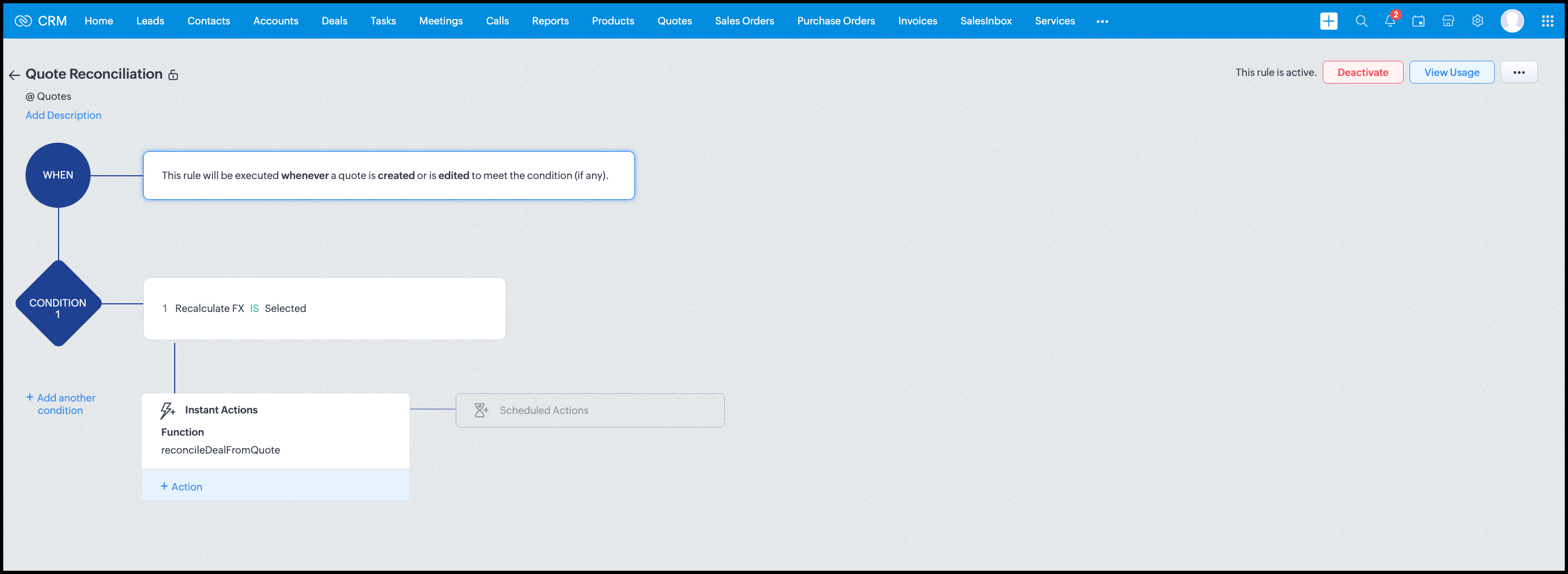
Module: Quotes
Trigger: On create or edit
Condition: Recalculate FX = true
Action: Execute reconcileDealFromQuote
Argument: quoteId -> ${Quotes.id}
All decision logic lives inside the function.
Business Outcome
After implementing this pattern,
- Deals and quotes stay aligned with real-world behavior
- FX risk is measurable and auditable
- Renegotiation is policy-driven
- Reports reflect finalized values, not assumptions
- Sales and finance operate on the same truth.
Summary
Zoho CRM extends beyond static closures by reconciling deals against quote behavior. Functions plus Automation enforce pricing, limit exposure, and capture true outcomes reliably at scale.
The true value of this implementation is not the calculation itself, but the fact that it produces stable, auditable financial states that can be reused across reporting, approvals, integrations, and policy enforcement.
Further extensions
Executive reporting and dashboards
You can build Dashboards that answer questions like
- Total revenue before vs after FX reconciliation
- Total FX gain or loss by
- Region
- Currency
- Quarter
- Sales owner
- Percentage of deals renegotiated due to FX risk
Without the function,
- FX impact is implicit
- Numbers keep changing
- Finance does not trust reports
With the function,
- Final Accepted Amount is stable
- FX Impact % is explicit
- Reconciled On gives a time anchor
Policy enforcement and compliance
Examples
- Automatically flag deals where FX loss > 10% but status = Accepted
- Audit trail for
- Who recalculated FX
- When renegotiation was triggered
- SLA checks when Deals are not reconciled within 'X' days of quote creation
For many companies, FX policy violations are discovered at a later point in time, but you now enforce them at the moment of decision.
Sales coaching and deal hygiene
Unlock insights such as
- Which sales reps close deals with high FX volatility or frequently trigger renegotiation?
- Which regions or currencies produce unstable deals?
- Which deals are consistently over-optimistic at closure?
Other scenarios
- Approval and exception workflows
- Integration with ERP or accounting systems
- Predictive insights to forecast FX risk
- Historical snapshots for audit and analytics
We hope you found this post useful. Let us know your feedback in the comments or write to us at support@zohocrm.com.
Thanks!
=============================================================================

See Also
Topic Participants
Shylaja S
Sticky Posts
Kaizen #226: Using ZRC in Client Script
Hello everyone! Welcome to another week of Kaizen. In today's post, lets see what is ZRC (Zoho Request Client) and how we can use ZRC methods in Client Script to get inputs from a Salesperson and update the Lead status with a single button click. In thisKaizen #222 - Client Script Support for Notes Related List
Hello everyone! Welcome to another week of Kaizen. The final Kaizen post of the year 2025 is here! With the new Client Script support for the Notes Related List, you can validate, enrich, and manage notes across modules. In this post, we’ll explore howKaizen #217 - Actions APIs : Tasks
Welcome to another week of Kaizen! In last week's post we discussed Email Notifications APIs which act as the link between your Workflow automations and you. We have discussed how Zylker Cloud Services uses Email Notifications API in their custom dashboard.Kaizen #216 - Actions APIs : Email Notifications
Welcome to another week of Kaizen! For the last three weeks, we have been discussing Zylker's workflows. We successfully updated a dormant workflow, built a new one from the ground up and more. But our work is not finished—these automated processes areKaizen #152 - Client Script Support for the new Canvas Record Forms
Hello everyone! Have you ever wanted to trigger actions on click of a canvas button, icon, or text mandatory forms in Create/Edit and Clone Pages? Have you ever wanted to control how elements behave on the new Canvas Record Forms? This can be achieved
Recent Topics
Automation #7 - Auto-update Email Content to a Ticket
This is a monthly series where we pick some common use cases that have been either discussed or most asked about in our community and explain how they can be achieved using one of the automation capabilities in Zoho Desk. Email is one of the most commonlyTicket to article and Ticket to template
Hello! I would like to know if it is possible (and how) to do the following actions: 1. To generate an article from a ticket (reply + original message) 2. Easy convert an answer to an email templateIs there API Doc for Zoho Survey?
Hi everyone, Is there API doc for Zoho Survey? Currently evaluating a solution - use case to automate survey administration especially for internal use. But after a brief search, I couldn't find API doc for this. So I thought I should ask here. ThanWindows Desktop App - request to add minimization/startup options
Support Team, Can you submit the following request to your development team? Here is what would be optimal in my opinion from UX perspective: 1) In the "Application Menu", add a menu item to Exit the app, as well as an alt-key shortcut for these menusKaizen #225 - Making Query-based Custom Related Lists Actionable with Lookups and Links
Hello everyone! Welcome back to another post in the Kaizen series! This week, we will discuss an exciting enhancement in Queries in Zoho CRM. In Kaizen #190, we discussed how Queries bridge gaps where native related lists fall short and power custom relatedWebDAV / FTP / SFTP protocols for syncing
I believe the Zoho for Desktop app is built using a proprietary protocol. For the growing number of people using services such as odrive to sync multiple accounts from various providers (Google, Dropbox, Box, OneDrive, etc.) it would be really helpfulNon-responsive views in Mobile Browser (iPad)
Has anyone noticed that the creator applications when viewed in a mobile browser (iPad) lost its responsiveness? It now appears very small font size and need to zoom into to read contents. Obviously this make use by field staff quite difficult. This is not at all a good move, as lots of my users are depending on accessing the app in mobile devices (iPads), and very challenging and frustrating.[Free Webinar] Learning Table Series - AI-Enhanced Logistics Management in Zoho Creator
Hello Everyone! We’re excited to invite you to another edition of Learning Table Series, where we showcase how Zoho Creator empowers industries with innovative and automated solutions. About Learning Table Series Learning Table Series is a free, 45-60Customizable UI components in pages | Theme builder
Anyone know when these roadmap items are scheduled for release? They were originally scheduled for Q4 2025. https://www.zoho.com/creator/product-roadmap.htmlFeature Request - Set Default Values for Meetings
Hi Zoho CRM Team, I would be very useful if we could set default values for meeting parameters. For example, if you always wanted Reminder 1 Day before. Currently you need to remember to choose it for every meeting. Also being able to use merge tags toHow to use Rollup Summary in a Formula Field?
I created a Rollup Summary (Decimal) field in my module, and it shows values correctly. When I try to reference it in a Formula Field (e.g. ${Deals.Partners_Requested} - ${Deals.Partners_Paid}), I get the error that the field can’t be found. Is it possibleZoho Creator to Zoho CRM Images
Right now, I am trying to setup a Notes form within Zoho Creator. This Notes will note the Note section under Accounts > Selected Account. Right now, I use Zoho Flow to push the notes and it works just fine, with text only. Images do not get sent (thereCRM gets location smart with the all new Map View: visualize records, locate records within any radius, and more
Hello all, We've introduced a new way to work with location data in Zoho CRM: the Map View. Instead of scrolling through endless lists, your records now appear as pins on a map. Built on top of the all-new address field and powered by Mappls (MapMyIndia),Error Logs / Failure logs for Client Scripts Functions
Hi Team, While we are implementing client scripts for the automation, it is working fine in few accounts but not working for others. So, it would be great if we can have error Logs for client scripts also just like custom functions. Is there any way thatAutomate pushing Zoho CRM backups into Zoho WorkDrive
Through our Zoho One subscription we have both Zoho CRM and Zoho WorkDrive. We have regular backups setup in Zoho CRM. Once the backup is created, we are notified. Since we want to keep these backups for more than 7 days, we manually download them. TheyZoho Books blocks invoicing without VeriFactu even though it is not mandatory until 2027
I would like to highlight a very serious issue in Zoho Books for Spain. 1. The Spanish government has postponed the mandatory start of VeriFactu to January 1st, 2027. This means that during all of 2026 businesses are NOT required to transmit invoicesProblem : Auto redirect from zoho flow to zoho creator
Hi there, I've been waiting for zoho team to get back on this for last couple of days. Anyone else have the problem to access zoho flow? everytime I click on zoho flow it redirects me to zoho creator. I tried incognito mode but it still direct me to zohoTrouble with using Apostrophe in Name of Customers and Vendors
We have had an ongoing issue with how the system recognizes an apostrophe in the name of customers and vendors. The search will not return any results for a name that includes the mark; ie one of our vendors names is "L'Heritage" and when entering theWhy am I seeing deleted records in Zoho Analytics syncing with Zoho CRM?
I have done a data sync between Zoho CRM and Zoho Analytics, and the recycle bin is empty. Why do I see deleted leads/deals/contacts in Zoho Analytics if it doesn't exist in Zoho CRM? How can I solve this problem? ThanksHow to use MAIL without Dashboard?
Whenever I open Mail, it opens Dashboard. This makes Mail area very small and also I cannot manage Folders (like delete/rename) etc. I want to know if there is any way to open only Mail apps and not the Dashboard.Peppol: Accept Bill (Belgium)
Hi, This topic might help you if you're facing the same in Belgium. We are facing an issue while accepting a supplier bill received by Peppol in Zoho Books. There is a popup with an error message: This bill acceptance could not be completed, so it wasZoho Books is now integrated with Zoho Checkout
Hello everyone, We're glad to be announcing that Zoho Books is now integrated with Zoho Checkout. With this integration, you can now handle taxes and accounting on your payment pages with ease. An organization you create in Zoho Checkout can be added to Zoho Books and vice-versa. Some of the key features and benefits you will receive are: Seamless sync of customer and invoice data With the end-to-end integration, the customer and invoice details recorded via the payment pages from Zoho CheckoutSync Issue
My Current plan only allows me with 10,000 rows and it is getting sync failure how to control it without upgrading my planAdd Zoho PDF to Zoho One Tool Applications
It should be easy to add from here without the hassle of creating a web tab:JOB WISE INVOICE PROCESS
I WANT TO ENABLE JOB WISE TRACKING OF ALL SALES AND PURCHASEPDF Template have QTY as first column
I want to have the QTY of an item on the sales orders and invoices to be the first column, then description, then pricing. Is there a way to change the order? I went to the Items tab in settings but don't see how to change the order of the columns onRAG (Retrieval Augmented Generation) Type Q+A Environment with Zoho Learn
Hi All, Given the ability of Zoho Learn to function as a knowledge base / document repository type solution and given the rapid advancements that Zoho is making with Zia LLM, agentic capabilities etc. (not to mention the rapid progress in the broaderWelcome to the Zoho ERP Community Forum
Hello everyone, We are thrilled to launch Zoho ERP (India edition), a software to manage your business operations from end to end. We’ve created this community forum as a space for you to ask questions, comment answers, provide feedback, and share yourIn App Auto Refresh/Update Features
Hi, I am trying to use Zoho Creator for Restaurant management. While using the android apps, I reliased the apps would not auto refresh if there is new entries i.e new kitchen order ticket (KOT) from other users. The apps does received notification but would not auto refresh, users required to refresh the apps manually in order to see the new KOT in the apps. I am wondering why this features is not implemented? Or is this feature being considered to be implemented in the future? With theConsolidated report for multi-organisation
I'm hoping to see this feature to be available but couldn't locate in anywhere in the trial version. Is this supported? The main aim to go to ERP is to have visibility of the multi-organisation in once place. I'm hopeful for this.IMAP mail after specify date
Hi My customer's mail server is on premise and mail storage is very huge. So It never finish sync. and finally stop sync. Cloud CRM have a option like zoho mail sync mail after some date.Claude + MCP Server + Zoho CRM Integration – AI-Powered Sales Automation
Hello Zoho Community 👋 I’m excited to share a recent integration we’ve worked on at OfficehubTech: ✅ Claude + MCP Server + Zoho CRM This integration connects Zoho CRM with Claude AI through our custom MCP Server, enabling intelligent AI-driven responsesNotes badge as a quick action in the list view
Hello all, We are introducing the Notes badge in the list view of all modules as a quick action you can perform for each record, in addition to the existing Activity badge. With this enhancement, users will have quick visibility into the notes associatedSearch Bar positioning
Why is the Search bar on the far right when everything is oriented towards the left?The Social Playbook - January edition: Getting started with content creation
Social media isn’t just about posting some random content. It’s about why certain content works, how brands stand out, and what makes people pause mid-scroll. The Social Playbook is a monthly community series where we break all of that down. Through realImport Error: Empty values for mandatory fields - Closing Date
Hello, I've tried multiple times to import a CVS Potential list from another Zoho account. But the error message I get is: Empty values for mandatory fields - Closing Date There are valid dates in this field, so I don't understand why this error messagesAdding custom "lookup" fields in Zoho Customization
How can I add a second “lookup” field in Zoho? I’m trying to create another lookup that pulls from my Contacts, but the option doesn’t appear in the module customization sidebar. In many cases, a single work order involves multiple contacts. Ideally,Feature Requests - Contact Coloured Picklist Visibility & Field Visibility During Ticket Creation
Hi Desk Team, I have 2 feature requests for you. Since Coloured Picklists are now available in Desk, It would be great if the colours were visible on the Related Details (Contact Information) when creating a ticket. In the screenshot below, I have 2 fieldsHow to integrate XML with Zoho CRM
Hi, I have an eCom service provider that gives me a dynamic XML that contains order information, clients, shipments... The XML link is the only thing I have. No Oath or key, No API get... I want to integrate it into Zoho CRM. I am not a developer norFeature Request - Ability to Customise Contact Info Card on Ticket Details View
Hi Desk Team, I've added a "Contact Priority" and "Account Prioirty" field and it would be very useful to agents if they could see that information in the Contact Info card on the Ticket Details view. It would be great if we could choose some fields toNext Page