Keep your forms spam-free with CAPTCHA
Is your online form getting loads of unwanted responses? Tired of spam ruining your valuable form data? CAPTCHA is the solution you are looking for.
CAPTCHA (Completely Automated Public Turing test to tell Computers and Humans Apart) is a simple yet effective security measure that helps protect your online form from spam and automated submissions. Bots disrupt the data collection process by flooding the form with multiple spam responses. Placing an CAPTCHA prevents these unwanted responses by using simple tests to distinguish between humans and bots. Zoho Forms offers three different types of captcha to keep spam responses at bay. They are:
-
Zoho Forms CAPTCHA
-
Google reCAPTCHA v2 (I'm not a robot)
-
Google reCAPTCHA v2 (invisible reCAPTCHA badge)
Zoho Forms CAPTCHA - Contains distorted numbers and letters that the user must type correctly to submit the form.
Google reCAPTCHA v2 (I'm not a robot) - Users are presented with a checkbox labeled "I'm not a robot". It validates by analyzing the underlying mouse movement, browser history, and typing pattern to determine the likelihood of a bot. If the system suspects a bot, additional challenges like image verification might be presented.
Google reCAPTCHA v2 (Invisible reCAPTCHA badge) - Similar to Google reCAPTCHA v2, but without any explicit checkbox. It validates the user using mouse movements and cookies stored by the browser. If still unable to determine whether the user is a human, it provides tests like image recognition to prevent spam responses.
How to add CAPTCHA?
To add a CAPTCHA to your form,
-
In your form builder, navigate to Settings.
-
Under Spam Control, select CAPTCHA.
-
From the dropdown, select the CAPTCHA version you want to add to your form and configure it.
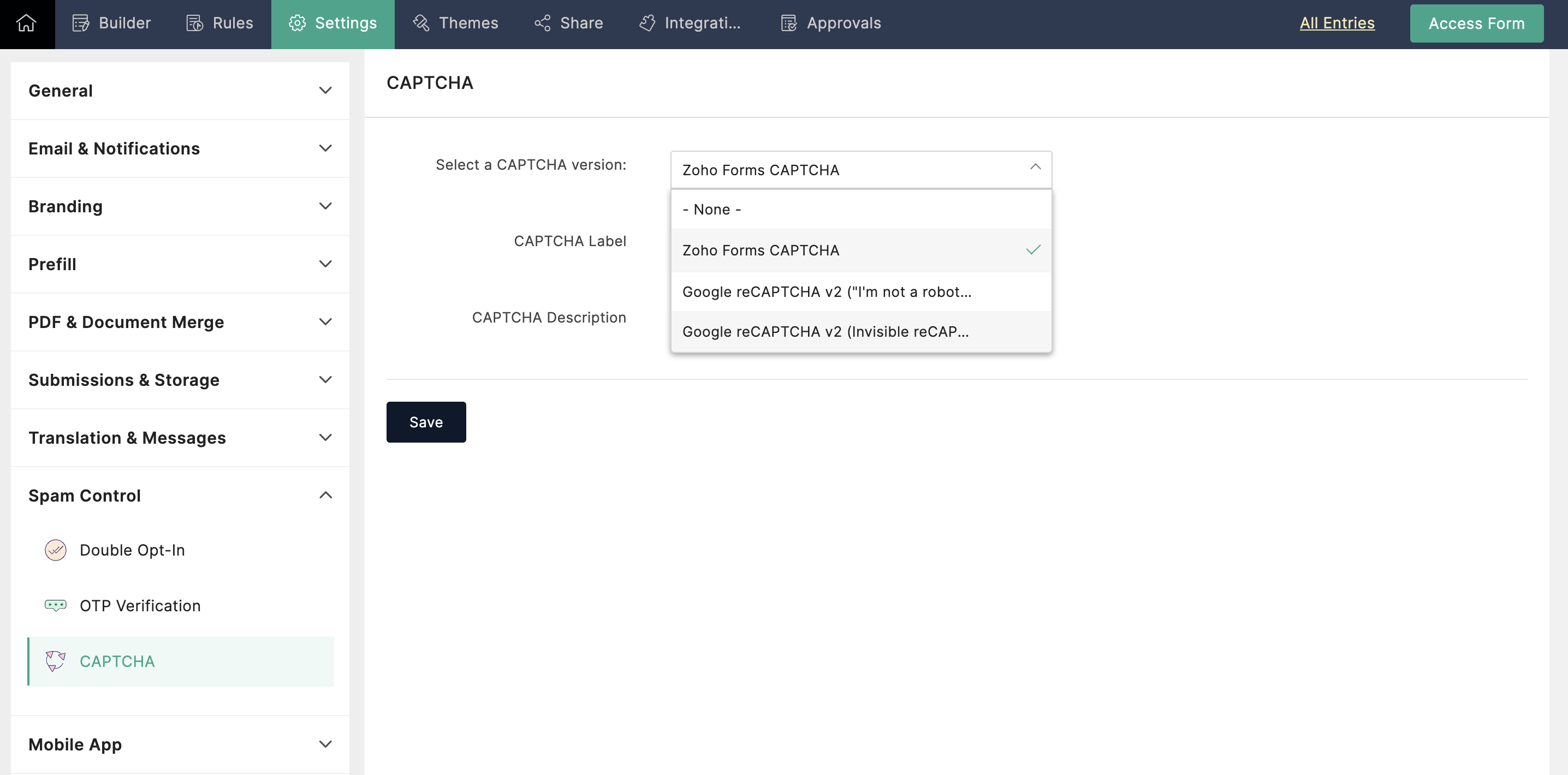
When to use CAPTCHA?
High spam volume: If your form is receiving a significant amount of spam, CAPTCHA can be a valuable tool to filter out automated submissions.
Sensitive data: For forms collecting sensitive information (e.g., contact details, financial information), adding CAPTCHA can provide an extra layer of security.
Embedded Forms: Forms placed directly on websites are more vulnerable to spam and require CAPTCHA for added security.
Which CAPTCHA to choose?
-
If you are looking for a straightforward solution that provides security while maintaining a familiar user experience, then opt for Zoho Forms CAPTCHA.
-
If user experience is top priority and you have a low bot traffic risk, the invisible badge can be a smooth option.
-
If clear user feedback and strong bot protection are crucial, the "I'm not a robot" checkbox might be the better choice.
-
Few CAPTCHA can present challenges for users with disabilities. Prioritize accessible CAPTCHA options or explore alternative verification methods to ensure inclusivity.
While CAPTCHA is a valuable tool for combating spam, it's essential to recognize its limitations. No CAPTCHA is entirely foolproof, but they can significantly deter bots. Carefully consider your form's needs and audience to effectively implement CAPTCHA to protect your data without compromising user satisfaction. For optimal protection, use CAPTCHA with other security measures.
Topic Participants
Ramya A
Sticky Posts
Easily track referrals with Zoho Forms
Referral tracking can be a powerful way for businesses to understand where their leads are coming from. With Zoho Forms, tracking the referral sources of your leads is an easy and straightforward process. Here are some tips to help you make the most of9 Ways to use Zoho Forms this Navratri
Hello form builders!Navratri is almost here! It is a time for celebration and culture in the Indian community, and organizing such a grand event can be overwhelming. But with the right tools, you can streamline the process and focus on creating unforgettableThe secret to collecting data from valid users
Collecting accurate data is crucial for making informed decisions. Zoho Forms offers two efficient ways to validate user data and ensure that you collect entries exclusively from valid users. Double Opt-in: Double Opt-in is a privacy feature that ensuresStorage space in Zoho Forms: The ultimate guide to efficiently managing your data
Are you using Zoho Forms for data collection? As with any data-intensive application, understanding how storage space is calculated is essential. That's why we've created this guide— to show you everything you need to know about managing storage spaceLinking primary form submissions to a second form submission
Let's imagine you have a form that you use to request a minimal amount of data from your users. To collect additional information, you redirect them to another form either automatically or based on a condition. During the course of redirection, you can
Recent Topics
Adding external users to Zoho Social under Zoho ONE licence - how to best achieve this
My client has a small business, and we are looking to implementing Zoho ONE with a single flexible user licence as that is all they really need and offers the best pricing for the range of modules we eventually wish to set them up with, one of which willThis mobile number has been marked spam. Please contact support.
Problem Description: One of our sales agents in our organization is unable to sign in to Zoho Mail. When attempting to log in, the following message appears: This mobile number has been marked as spam. Please contact support at as@zohocorp.com @zohocorpWhat’s New in Zoho Inventory | April 2025
Hello users, April has been a big month in Zoho Inventory! We’ve rolled out powerful new features to help you streamline production, optimise stock management, and tailor your workflows. While several updates bring helpful enhancements, three major additionsPass current date to a field using Zoho Flow
I am trying to generate an invoice automatically once somebody submits a record in Zoho CRM. I get an error in the invoice date. I have entered {{zoho.currentdate}} in the Date field. When I test the flow, I get "Zoho Books says "Invalid value passedAPI: Mark Sales Order as Open + Custom Status
Hi, it's possible to create Custom Status (sub-status actually) states for the Sales Order. So you have Open, Void. Then under Open you can have Open, and create one called Order Paid, Order Shipped, etc etc...which is grouped under Open. I can use theZoho Quartz Screen Recording
Hello, can we get access to Quartz, please, as a standalone solution? It would be great for creating training videos for current and future staff on how to use Zoho software according to our company requirements. Thank youTip 26: How to hide the "Submit" button from a form
Hi everyone, Hope you're staying safe and working from home. We are, too. By now, we at Zoho are all very much accustomed to the new normal—working remotely. Today, we're back with yet another simple but interesting tip--how to hide the Submit button from your forms. In certain scenarios, you may want to hide the submit button from a form until all the fields are filled in. Use case In this tip, we'll show you how to hide the Submit button while the user is entering data into the form, and thenHow do I move Notes around within a Group?
It says here: " You can now sort notes by title (alphabetically), or by date modified and date created. You can even organize your notes by dragging and dropping them into a particular order. To sort your notes, simply go to Settings and tap “Sort By.” Please note: all sort settings will be saved and synced across devices, except for custom sorting. Custom sorting will be device specific."However, I am unable to 'custom sort' in either Notebook for Mac or on the Web. In addition, I can't find theZoho Sign: need to leave document pending for up to a year, or maybe there's a better way?
I have zoho one, maybe there's a better way to do this with another service than sending a zoho sign template from zoho crm. At the end of the day this requirement is due to regulations, no matter how dumb it may seem. I'm just looking for a way of gettingSeparate Items & Services
Hi, please separate items and services into different categories. Thank youUnable to edit or delete email address
I signed up for free Zoho today. I usually am pretty good at understanding and configuring things like this, but your interface baffles me, and your online help is cryptic to say the least. I have spent hours just trying to set up a couple of email accounts in Zoho before pointing my domain MX records to Zoho. I solved some other issues on my own, but I can't figure out this latest problem: I have created two email addresses in Zoho. Let's call the first one myname@mydomain.com and the second oneMastering Zia Match Scores | Let's Talk Recruit
Feeling overwhelmed by hundreds of resumes for every job? You’re not alone! Welcome back to Let’s Talk Recruit, where we break down Zoho Recruit’s features and hiring best practices into simple, actionable insights for recruiters. Imagine having an assistantWe are unable to process your request now. Please try again after sometime or contact support@zohoaccounts.com
I cannot sign up and return the error of we are unable to process your request now. Please try again after sometime or contact support@zohoaccounts.comMulti-currency - What's cooking ?
Hi, We have been doing this feature for sometime and we would like to give you some glimpses of it. Working with Multi Currency : Multicurrency support gives you the ability to handle business transactions in multiple currencies. You can define a base currency for your organization and add more currencies with exchange rates based on the base currency. Setup : From the setup page, you can manage all the currencies supported by your organization. Currencies pageHow to reduce programmatically the image uploaded by user?
I need a function that will automatically reduce the pixel dimension to 800 x 600 pixels / 180 resolution or (approx. 1.37MB) of image uploaded by user from digital camera, for example, 2271 x 1704 pixels /180 resolution or approx. 11.1MB. After the user selected the image, the function will able to detect if pixels is above 800x600, process the photo (crop/ reduce) and resume upload. Need help...Dark mode for Zoho Creator / Zoho CRM Code editor
Hi Team, Is there any plans for Dark mode in Zoho creator / Zoho Crm code editor and development pages in pipeline?Is there a way to make a button scroll down?
Looking to have a button on a landing page scroll down to another section on the page. Any recomendations outside of coding?ZOHO Android Client
Hi, I installed the Android app, but it had an issue, so I reinstalled it. I was able to add multiple accounts, but now when I add the next account, it just duplicates the one I already have and will not even allow me to enter the info for another account.I'd like to suggest a feature enhancement for SalesIQ that would greatly improve the user experience across different channels.
Hello Zoho Team, Current Limitation: When I enable the pre-chat form under Brands > Flow Controls to collect the visitor’s name and email, it gets applied globally across all channels, including WhatsApp, Messenger, and Instagram. This doesn't quite alignEnhance Barcode/QR Code scanner with bulk scanning or continuously scanning
Dear Zoho Creator, As we all know, after each scan, the scanning frame closes. Imagine having 100 items; we would need to tap 100 times and wait roughly 1 second each time for the scanning frame to reopen on mobile web. It's not just about wasting time;Managing Rental Sales in Zoho Inventory
I am aware that Zoho Inventory is not yet set up to handle rental sales and invoicing. Is anyone using it for rentals anyway? I'd like to hear about how others have found work arounds to manage inventory of rental equipment, rental payments, etc. ThZoho Flow to Creator 3001 Respoonse
I have updated my Flows with the new V2 connection to Zoho Creator, but now some Flows do not work. They take in data from a Webhook and are supposed to create a record in Creator, however creator returns a 3001 message along with a failure, but I cannotFile Upload to Work Drive While Adding Records in Zoho Creator Application
Hi I am trying to set a file attachment field in zoho creator form, to enable the user to upload a scanned document from their local pc. The file should be uploaded to zoho workdrive and not to the default zoho creator storage. The file link should beWhy not possible to generate?
Using this https://desk.zoho.com/DeskAPIDocument#TicketCount#TicketCount_Getticketcountbyfield on my ZML script url :"https://desk.zoho.com/api/v1/ticketsCountByFieldValues?departmentId=XXXXXXXXXXX&accountId!=XXXXXXXXX&customField1=cf_country_1:XXXXXX&field=overDue"email
Hi My crm email is not working, can you check, I have zoho one account.Need option to see Mass Emails & Cadences in Gmail Outbox OR a dedicated Zoho Outbox
Hi everyone, Right now, when we send 1:1 emails from gmail (with gmail API connected to Zoho CRM), those emails appear both in gmail's sent folder and in Zoho CRM. That works well. But when we send Mass Emails or Cadence emails form Zoho CRM, they areI can't found API for Sales Receipts
Hello May you please help me to find an API document for Sales Receipts to get data and retrive a custom fields like Invoice and credit notes RegardsKaizen #205 - Answering Your Questions | Managing Picklists and Enabling History Tracking via Zoho CRM APIs
Hello everyone! Welcome back to another post in our Kaizen series. In this post, we will look at how you can manage picklist fields in Zoho CRM using APIs. This topic was raised as feedback to Kaizen #200, so we are taking it up here with more details.Multiple Vendor SKUs
One of the big concerns we have with ZOHO Inventory is lack of Vendor Skus like many other inventory software packages offer. Being able to have multiple vendor skus for the same product would be HUGE! It would populate the appropriate vendor Sku forInternally created tickets
Hi there When tickets are created internally on-behalf of customers - there is nothing to show that the ticket was created by an internal agent. This means, that it's easy for our agents to confuse tickets which were created by internal team members andAutomatically change website passwords
Hi everyone, We just switched to a Professional package to also use the "Automatically change website passwords" function. But I cannot find anything about it, how to use it, anywhere. Does anyone know how I can use this function? Best, CasparChange Invoice Prices for an Effective Date
Hi, It would be a really good feature to be able to change the prices on invoices/recurring invoices from an effective date in the event of price increases. For instance, I am in the process of increasing prices that will be effective from a specific"Other Current Asset" accounts as "Paid Through" accounts in Expense
It would be incredibly useful to be able to assign accounts of type Other Current Asset as Paid Through accounts in Expense. Currently, Other Current Liability are permitted as Paid Through Accounts. This makes sense, as Credit Cards are current liabilities.Multi column open text questions that allows respondents to add rows for additional information
I need to create a question that has 2 columns with open text, but I also need to allow respondents to click a "+" button, or something similar, so that they can add additional information if they choose to. I've tried using the Multiple Textboxes typeBot Filtering & Apple Mail Privacy Protection Compliance in Zoho Campaigns
Dear Campaigns Users, The wait is over! We’re excited to announce that the enhanced bot filtering feature is now live in Zoho Campaigns. This update brings greater accuracy to your email campaign reports by distinguishing real user engagement from automatedDécouvrons les détails qui simplifient vos journées de travail avec Trident
Nous nous installons dans des routines efficaces et rodées avec le temps. Chaque matin, nous ouvrons nos e-mails, passons aux messages, consultons notre agenda, puis attaquons nos tâches. Ce processus nous semble maîtrisé, mais est-il réellement optimiséIssue with Purchase Rate Showing as “0” After Importing Items List
Dear Zoho Books Support Team, Good day. I’m reaching out regarding an issue I’m facing while importing my items list into Zoho Books. Despite mapping all fields correctly and including the purchase price for each product in my Excel file, the PurchaseAPI for Task Entity in Zoho Books
I’m working on automating task creation in Zoho Books via a custom button in the Bills Module. The goal is to create a task in the Tasks Module and assign it to the Finance Team, so they can track progress efficiently. While reviewing Zoho Books documentation,create invoice in zoho books from the zoho forms
Is there a native way to have create invoice in zoho books, when zoho form is completed?Email undelivered
GOod Day I am always receiving an uncategorized-bounce to my email. I am not sure why this is happening.Next Page