Smart Prompt is now powered by Zia
Hello everyone,
We're excited to announce the launch of natively hosted Large Language Model (LLM) to power our AI offerings.
What is LLM?
LLM stands for Large Language Model, a powerful AI technology that processes and generates human-like text based on context. The natively hosted LLM has been specifically designed to enhance Zoho CRM's AI capabilities, offering secure, accurate, and efficient solutions for various business needs.
To begin with, the LLM will be implemented for the Smart Prompt feature which has so far integrated Zia with OpenAI to provide generative AI solutions to user prompts to help streamline your daily sales processes, enhance productivity, and simplify decision-making. By analyzing the context of your CRM data, Smart Prompt delivers actionable insights for tasks like drafting emails, summarizing notes, or gathering record-specific information.

You can now choose between the in-house LLM and OpenAI’s ChatGPT for processing Smart Prompts, giving you the flexibility to select the AI engine that best suits your business needs.
So how does the introduction of our LLM impact your operations? The functioning of the Smart Prompt feature remains the same, but there are a few key differentiators.
- Zia processes data within Zoho’s secure environment, aligning with stringent data protection standards, resulting in a more optimized data handling.
- Using Zia requires no external accounts or API keys—just your Zoho CRM account.
- Whether you choose Zia or ChatGPT, the Smart Prompt feature continues to function seamlessly, offering contextual suggestions and generative responses to streamline your sales processes.
Why this matters
Zia is designed to provide users with an AI experience that is fully integrated into Zoho CRM. Being a CRM-oriented LLM, it simplifies the setup, enhances productivity, and streamlines your sales activities.
To enable Zia for Smart Prompt, simply navigate to the Smart Prompt settings in your CRM setup and select your preferred AI engine. Read more on our help documentation.
Whether you choose Zia or ChatGPT, the flexibility is now in your hands.
The Zia for Smart Prompt is the first step in establishing our own generative AI cases. Going forward, we have some exciting updates coming up:
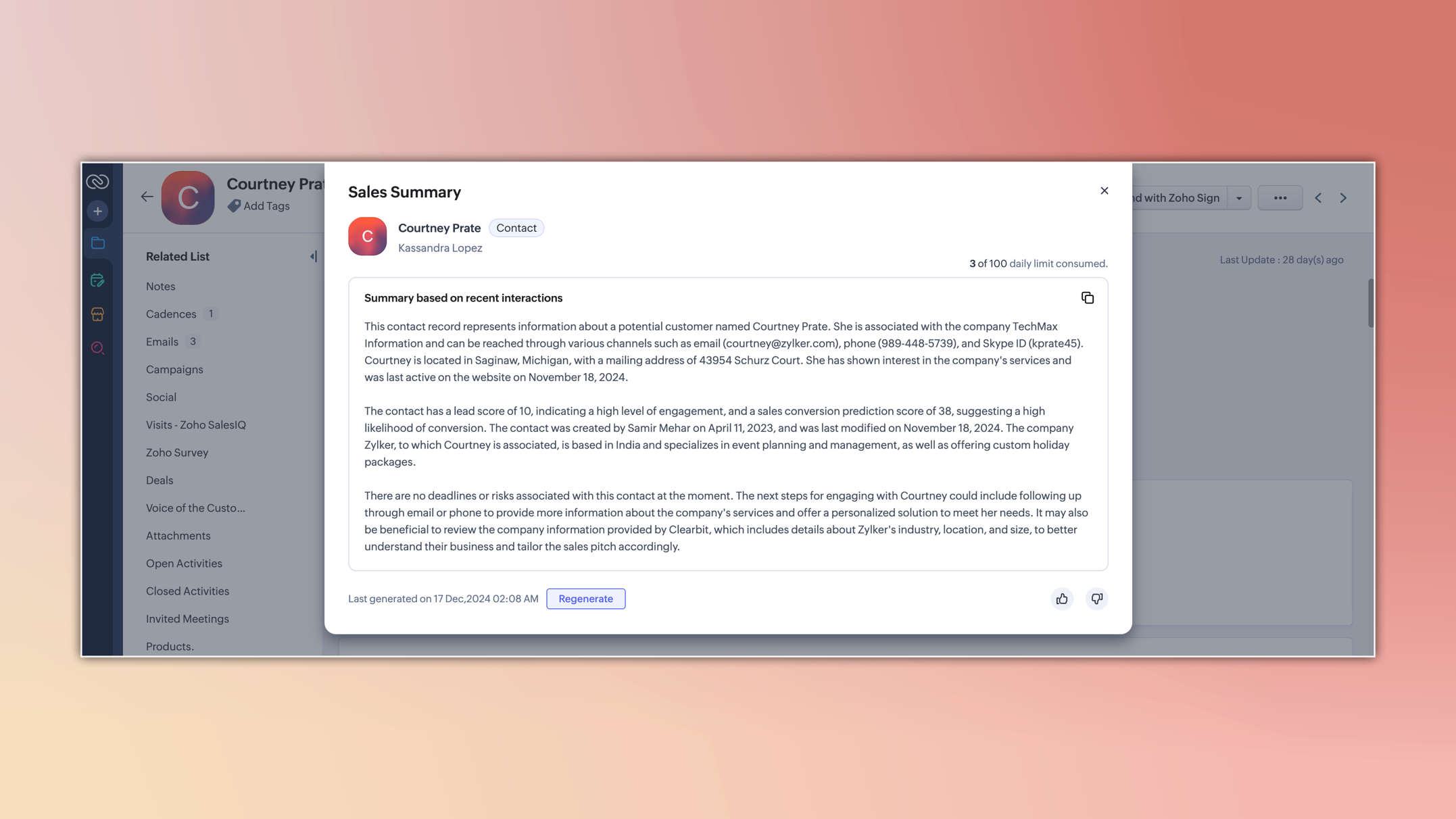
- Record summary - The record summary provides a comprehensive overview of important record information, including deal status, related tasks, recent interactions, and other key details—all presented in one convenient location. This enables users to efficiently make informed decisions without having to navigate through the entire record. Read more.
- Prompt builder - The prompt builder feature allows users to create, customize, and manage AI-powered prompts that can provide personalized responses in the CRM. This feature leverages Zia's generative AI capabilities to assist users in interacting more efficiently with CRM data, performing tasks, and automating responses. More on this will be shared soon.
As we keep marching ahead, so shall our LLM keep expanding to handle our entire AI operations.
That's all for this announcement. Let us know your feedback and suggestions in the comments below.
Feature availability
- Smart Prompt with OpenAI (ChatGPT): Available to all Enterprise users and above, across US, EU, IN, AU, CA data centers.
- Smart Prompt with Zia: Accessible to all Enterprise and Ultimate, for English-only usage. Currently available in the US data center.
Thanks,
Nizamuddin
Topic Participants
Nizamuddin Sohel SK
Andres
Subhash Kumar
Vigneshvar Priyan
Castillorganization
Sticky Posts
Introducing Multiple Sandbox Types and Support for Module's Data Population
Register here for the upcoming Focus Group webinar on Multiple Sandbox | Help documentation to learn more about the new enhancements Hello everyone, Sandbox in CRM is a testing environment for users to create and test new configurations like workflowGood news! Calendar in Zoho CRM gets a face lift
Dear Customers, We are delighted to unveil the revamped calendar UI in Zoho CRM. With a complete visual overhaul aligned with CRM for Everyone, the calendar now offers a more intuitive and flexible scheduling experience. What’s new? Distinguish activitiesVoC in Zoho CRM is now data savvy: Explore response drilldown, summary components and participation in CRM criteria
VoC has all the goods when it comes to customer intelligence—which is why we're constantly enhancing it. We recently added the following: A customer drilldown component that shows you the list of prospects and customers behind a chart's attribute ExpandedWrapping up 2025 on a high note: CRM Release Highlights of the year
Dear Customers, 2025 was an eventful year for us at Zoho CRM. We’ve had releases of all sizes and impact, and we are excited to look back, break it down, and rediscover them with you! Before we rewind—we’d like to take a minute and sincerely thank youPresenting ABM for Zoho CRM: Expand and retain your customers with precision
Picture this scenario: You're a growing SaaS company ready to launch a powerful business suite, and are looking to gain traction and momentum. But as a business with a tight budget, you know acquiring new customers is slow, expensive, and often delivers
Recent Topics
Enable Backgrounds and Video Filters for 1:1 Cliq Calls Across All Zoho Entry
Hello Zoho Cliq Team, We hope you are doing well. We would like to request an enhancement related specifically to 1:1 video calls in Zoho Cliq. Current Behavior Zoho Cliq currently provides background and video filter options in the following scenarios:Zoho Flow: Stripe a Zoho Marketing Automation
Hola! Quiero hacer un flujo con Zoho Flow, para que cuando se haga un pago en Stripe, añada el lead en Zoho Marketing Automation. Lo he configurado, configurando el disparador como "Payment created" y mapeando el campo de Stripe "Receipt email address".Need Customer Item Inward Module along with QC
Need Customer Item Inward Module along with QC 1. Using Transfer Orders hit the item balance sheet 2. Items without inventory it becomes difficult for tracking purpose. 3. Custom Modules become tedious to capture multiple items, item subforms are notLESS_THAN_MIN_OCCURANCE - code 2945
Hi I'm trying to post a customer record to creator API and getting this error message. So cryptic. Can someone please help? Thanks VarunZoho email
I need a list of email addresses of all contacts on my zohoShift-Centric View for Assigning and Managing Shifts in Zoho People
Hello Zoho People Product Team, Greetings and hope you are doing well. This feature request is related to Zoho People - please don't move it to zoho one! We would like to submit a feature request regarding the shift assignment and management view in Zohocant upload images in signature- urgent help needed. ta!
HI, I have been trying to insert the company logo in the signature. i have tried it several times since yesterday, the longest I waited was 1 hour and 12 minutes for the pop up window to upload a 180 KB .jpg file. what am i doing wrong.. an urgent replyAdd Ticket button in Home view
When I go to the My Tickets or the Knowledge Base view in our Help Centre, the Add Ticket button is available, but not in the Home view. I would really like for it to be displayed in the Home view as well. Is this possible? Thanks.Problem using Zoho Desk API
Goodmorning, I am trying to use the Zoho Desk API to create a dashboard in Grafana, but I am having a problem. Following the instructions in the API documentation, I created the API Console application (server-based application). Then I created the stringAdd zoho calendar to google calendar
Hi I keep seeing instructions on how to sync Zoho CRM calendar with google calendar but no instructions on how to view Zoho calendar in my google calendar.How to print a label from zoho creator app?
Hello, I would like to print a label from zoho creator app record similar to attached one. Size 74mm x 102mm. I tried record template. It leaves plenty of space around the content and also I couldn't set the height of the page. So it is not printing properly. Could someone please direct me to right direction for this requirement?City field suggestion in Zoho Books
Hi team, We are using Customers module in Zoho Books. In the Address section, we want to understand whether the City field can show suggestions while typing using any API or built-in feature. For example, if a user types “Mum”, can the system suggestNon-responsive views in Mobile Browser (iPad)
Has anyone noticed that the creator applications when viewed in a mobile browser (iPad) lost its responsiveness? It now appears very small font size and need to zoom into to read contents. Obviously this make use by field staff quite difficult. This is not at all a good move, as lots of my users are depending on accessing the app in mobile devices (iPads), and very challenging and frustrating.How can I check all announce?
Hiii, May I ask how can I check all the announce based on broadcast date instead of reply date based So that I will not will miss out any new functionWhat are the create bill API line item requiered fields
While the following documentation says that the line items array is requiered it doesn't say what if any files are requiered in the array. Does anyone know? API documentation: https://www.zoho.com/inventory/api/v1/bills/#create-a-bill I'm trying to addThis user is not allowed to add in Zoho. Please contact support-as@zohocorp.com for further details
Hello, Just signed up to ZOHO on a friend's recommendation. Got the TXT part (verified my domain), but whenever I try to add ANY user, I get the error: This user is not allowed to add in Zoho. Please contact support-as@zohocorp.com for further details I have emailed as well and writing here as well because when I searched, I saw many people faced the same issue and instead of email, they got a faster response here. My domain is: raisingreaderspk . com Hope this can be resolved. Thank youCannot connect to imap.zoho.eu on iOS26
Hey, I recently migrated to another iPhone and since then use iOS26. Every since then, I was not able to connect to "imap.zoho.eu" from Apple Mail. I tried deleting the account and adding it again, did not work. I tried creating an app password, didn'tPersonalize your booking pages with Custom CSS
Greetings from the Zoho Bookings team! We’re introducing Custom CSS for Zoho Bookings, designed to give you complete control over the look and feel of your booking pages. With this new feature, you can upload your own CSS file to customize colors, fonts,Marketer's Space: Plan smarter with Zoho Campaigns' Calendar
Hello Marketers, Welcome to another post! Today, we'll talk about a discreet yet significant feature that's neatly tucked inside Zoho Campaigns: the calendar. It might look like an optional but somewhat unnecessary feature that you can use occasionally,User
If user is already part of manage engine endpoint central , what hapens when i try to add them to another Zoho org / directory? Are these users added as external users?Create static subforms in Zoho CRM: streamline data entry with pre-defined values
Last modified on (9 July, 2025): This feature was available in early access and is currently being rolled out to customers in phases. Currently available for users in the the AU, CA, and SA DCs. It will be enabled for the remaining DCs in the next coupleOutlook - Zoho CRM Calendar Integration
I'm facing an issue integrating Outlook with Zoho CRM. Has anyone successfully connected their Outlook to Zoho, and are all your meetings and emails being captured correctly in the CRM? Any insights or troubleshooting tips would be appreciated【Zoho CRM】ポータル機能のアップデート
ユーザーの皆さま、こんにちは。コミュニティチームの藤澤です。 今回は「Zoho CRM アップデート情報」の中から、ポータル機能のアップデートをご紹介します。 ポータル管理の新機能「自動招待」により、Zoho CRMからポータルへの招待を自動化できるようになりました。これまで必要だった、ユーザーごとの手動設定は不要になります。設定した条件に基づいて、対象ユーザーに自動で招待が送信されます。 ポータルの新機能 条件に基づく自動招待:指定した条件を満たすユーザーに、自動で招待を送信 招待設定:招待メールの言語を選択し、言語ごとに条件を設定可能Contact data removes Account data when creating a quote
Hi, Our customer has address fields in their quote layout which should be the address of the Account. They prefill the information, adding the account name - the address data is populated as per what is in the account - great. However when they then addExport all of our manuals from Zoho Learn in one go
Hi, I know there's a way to export manuals in Zoho Learn, but I want to export everything in one go so it won't take so long. I can't see a way to do this, can I get some assistance or is this a feature in the pipeline? Thanks, HannahAutomation#31: Automate Splitting Names for New Contact Records
Hello Everyone, This week, we present to you a custom function, which allows you to split the first and last names from the user's email ID based on the separator used in the ID. Having grown into a large firm, Zylker Techfix aims to optimize its processes,Automatically remove commas
Team, Please be consistent in Zoho Books. In Payments, you have commas here: But when we copy and paste the amount in the Payments Made field, it does not accept it because the default setting is no commas. Please have Zoho Books remove commas automProject Change Orders and Additions
We are in the process of migrating from QuickBooks Online to Zoho Books. We have Zoho One and like the ability to sync all of our data across everything. And I like that projects work in a way that's less dumb than QuickBooks. I'm trying to figure outZOHO Desk - Description of slave ticket disappeared after Merge
Dear Support, On Zoho Desk the description of a ticket disappeared after merging two ticket. The one which was the slave one completely disappeared. The problem that in this description there was an image which i had only on Desk in that ticket. CouldHow do I insert a cross-reference link to a different section within one Knowledge Base article using Zoho Desk?
I would like to insert a link within a Knowledge Base article to a different section of that same article. The section I want to link to is formatted with the Heading 3 style and is displayed within my TOC. However, I do not see any way to add a linkProblem Adding Facebook Account
Hi, I'm new here, I'm having trouble setting up my Facebook account as a social channel. I think the issue is down to how my Facebook is set up, which is pretty confusing. I have a personal Facebook account (let’s called it A) which is my main FacebookZoho Desk Teams App is not loading
Hi Zoho Desk support. Need an assistance on the Zoho Desk Teams app. Once I click View Ticket, it isn't showing anything. Kindly refer to attached: ZohoDesk Teams App_View Ticket Error.jpg For our Dashboard, we are still experiencing the same issue. KindlyZoho People - Retrieve the Leave Details - get("LeaveCount")
Hi, Zoho People I need to collect all of an employee's leave requests for the calendar year and check how many half-days they have taken. If I run the script on the query he just modified, I can retrieve the information related to that query and use theMapping a new Ticket in Zoho Desk to an Account or Deal in Zoho CRM manually
Is there any way for me to map an existing ticket in Zoho desk to an account or Deal within Zoho CRM? Sometimes people use different email to put in a ticket than the one that we have in the CRM, but it's still the same person. We would like to be ableWhich WhatsApp API works seamlessly with Zoho CRM?
I’m exploring WhatsApp API solutions that integrate seamlessly with Zoho CRM for customer communication, lead nurturing, and automation. I would love to hear insights from those who have successfully implemented WhatsApp within Zoho CRM. My Requirements:Allow people to sign a zoho form by using esign or scanned signature
Allow people to sign a zoho form by using esign or scanned signatureButton to Reapply Filters on Sheet(s)
I wrote a macro that I attached to a button to reapply the filters on all my sheets and it says it works, but it doesn't actually do anything. What is wrong with it? Is there another way? Or even make it work for one sheet? Sub UniversalFilterRefresh()Integrate Multiple ZohoBooks organization with zoho projects
We have successfully connected our Zoho Books with Zoho Projects for synronizing timesheet data. Our Business specialty is, that the staff of the Main company (A) is working on several projects, but the Clients are sometimes contracted and paying to aZoho OAuth Connector Deprecation and Its Impact on Zoho Desk
Hello everyone, Zoho believes in continuously refining its integrations to uphold the highest standards of security, reliability, and compliance. As part of this ongoing improvement, the Zoho OAuth default connector will be deprecated for all Zoho servicesHow do I add todays date to merge field
I don't see any selection of todays date when creating a letter. Surely the date option of printing is standard? JohnNext Page