Team Modules in Zoho CRM: Empower Every Team, Break Silos and Boost Collaboration
Hello Everyone,
The ultimate goal of every business is to achieve customer delight—and achieving customer delight cannot happen with the effort of a single person or team. At Zoho CRM, we believe that it’s a shared mission that spans across your entire organization. From Sales and Pre-sale to Marketing, Onboarding, and beyond, every team plays a role in shaping the customer's experience.
While sales teams are the champions that lead customer conversions and make the tough negotiations with prospects, the ultimate clinching of a business deal is the result of cumulative efforts of multiple minds. So instead of limiting Zoho CRM's capabilities to just one team, we introduced Teamspaces to onboard multiple customer-facing teams onto the CRM platform.
However, how do these teams work in the CRM system?
Presenting Team Modules, a powerful new way to empower all customer-facing teams with the tools they need to manage relationships and contribute to business success.
With Team Modules, each department within a team can build and manage their own processes directly within Zoho CRM; there will be no need to rely solely on central admins. This enables cross-functional teams to work in sync toward a common goal: delighting your customers, every single day.
In this post, we’ll walk you through how Team Modules fit into Zoho CRM, the availability of automation within them, manage team users, and enable seamless coordination through requests.
How do Team modules fit into Zoho CRM?
In traditional CRM setups, the authority to configure processes across all teams typically rests with central admins — a necessary measure to ensure data privacy and consistency. However, this often creates bottlenecks, delaying essential internal processes.

With Zoho CRM for Everyone, we’ve changed that. Now, multiple customer-facing teams can operate from within their dedicated Teamspaces and each teamspace can have its own Teamspace Admin, who oversees the activities and workflows specific to that team. Learn more.
Within every Teamspace, processes can be configured and executed through Team Modules. Team modules are customizable modules that enable teams to set up their own workflows and manage data independently. Learn more.
Let's take the example of the Sales team. They may handle multiple processes such as Customer Conversions, Sales Administration, Renewals, and more. Each of these processes is typically managed by different departments. These departments with their own processes and responsibilities can be captured via Team Modules.
To ensure data security and integrity, Team Modules come with module-level access controls that let you manage permissions with precision. Team Modules include different types of users or roles:
- Team module admins,
- Managers,
- Members,
- Participants, and
- Requesters.
From our example above, the department heads for each sales process in the sale team can be assigned as team module admin. Team members from the department can be assigned with other types of users or personas depending on their roles and responsibilities.
Each role or type of user in the team module have specific permissions, ensuring that they perform their tasks without compromising data access or privacy. Learn more.

In conclusion, while a central admin will certainly continue to operate at the highest level to take care of company-wide priorities and governance, team module admins now have the flexibility to configure and run their own modules — leading to faster, more efficient operations.
The image below depicts a CRM system built for an ecommerce industry where there are multiple teams within their teamspaces, having multiple processes captured in a team module and each process will be managed by a team module admin.

Automation in Team Modules
Empowering teams to build their own processes means giving them the tools to automate those processes too. Team module admins or users with Create Team Module permissions enabled can set up automations for their team.
Team Module Admins or users with the appropriate permissions can:
- Create workflow rules, blueprints, approval processes, and assignment rules
- Design canvas pages, webforms, layout rules, validation rules, and wizards
This lets them handle a huge set of use cases when it comes to common tasks like assignment, approval, process compliance, notifications, etc. Learn more.
Let's look at an example of automation configured in a case study team module of the Marketing Team:
- An assignment rule to assign enterprise case studies to marketing managers automatically
- A workflow rule to send notifications to customers to keep them in the loop.
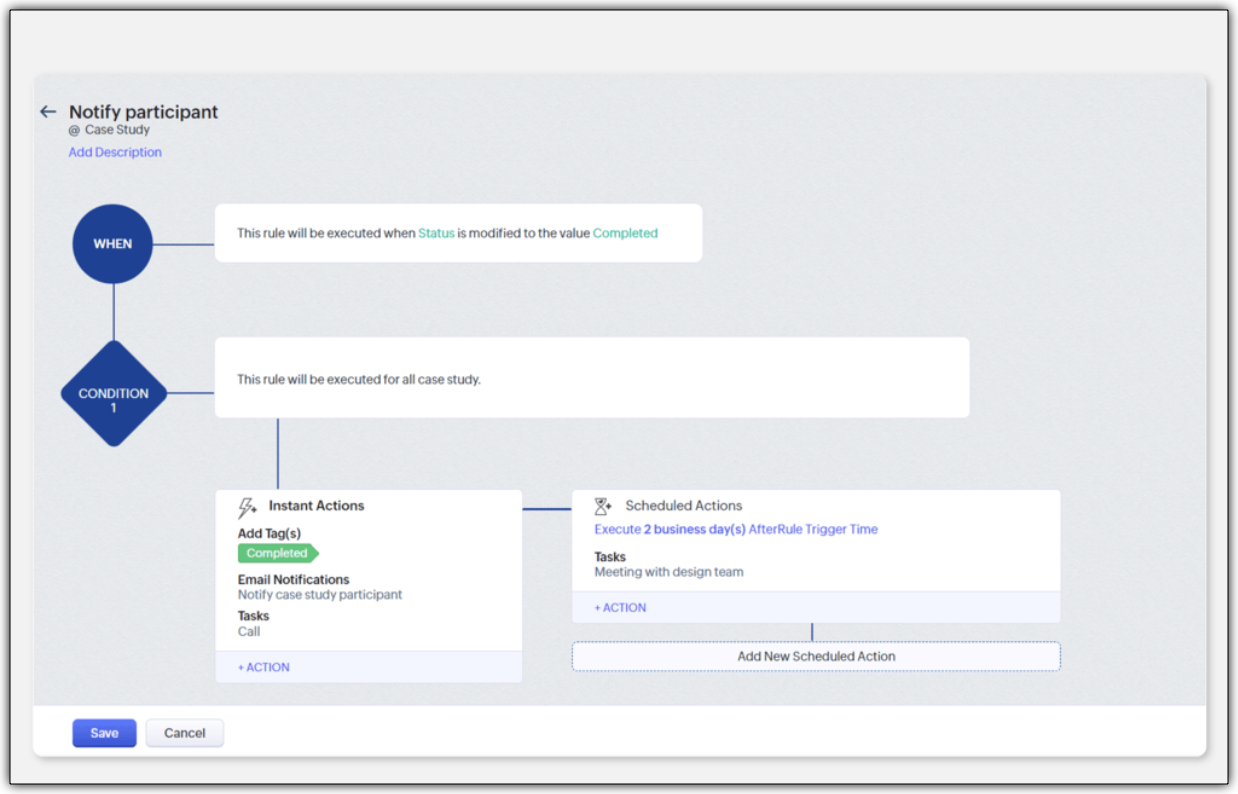
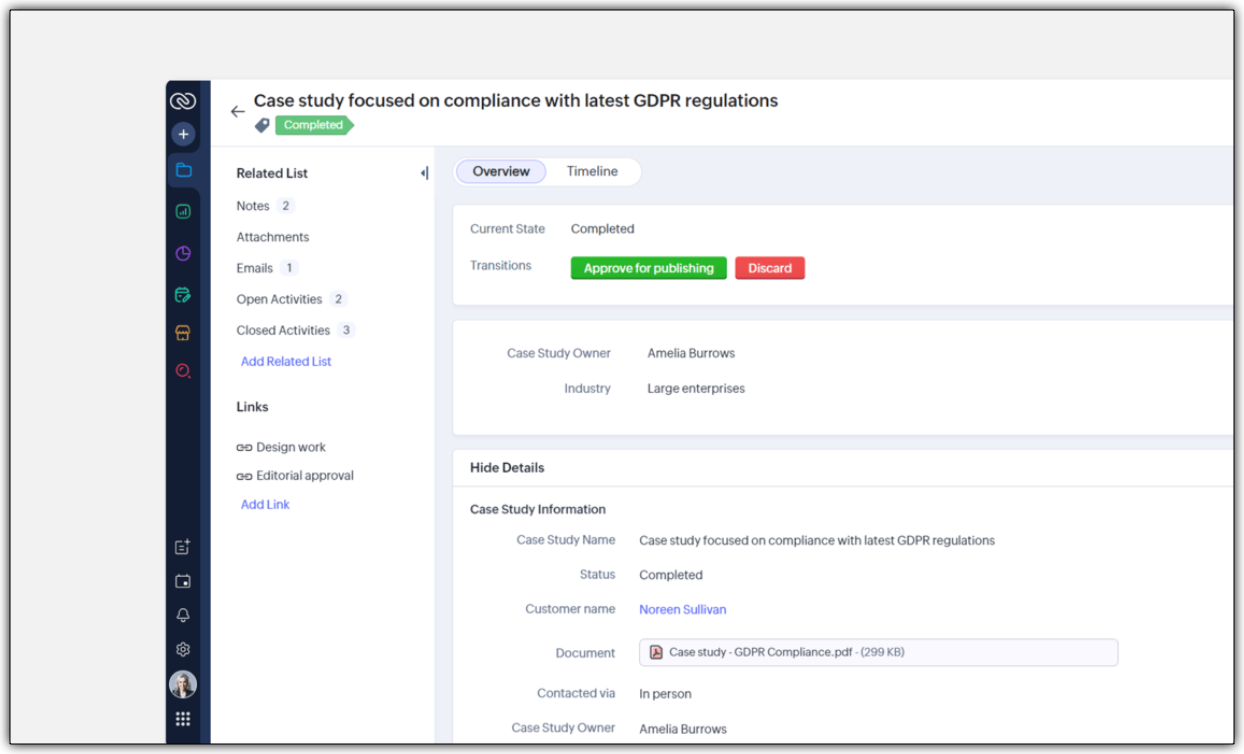
- A blueprint to streamline the case study publishing process
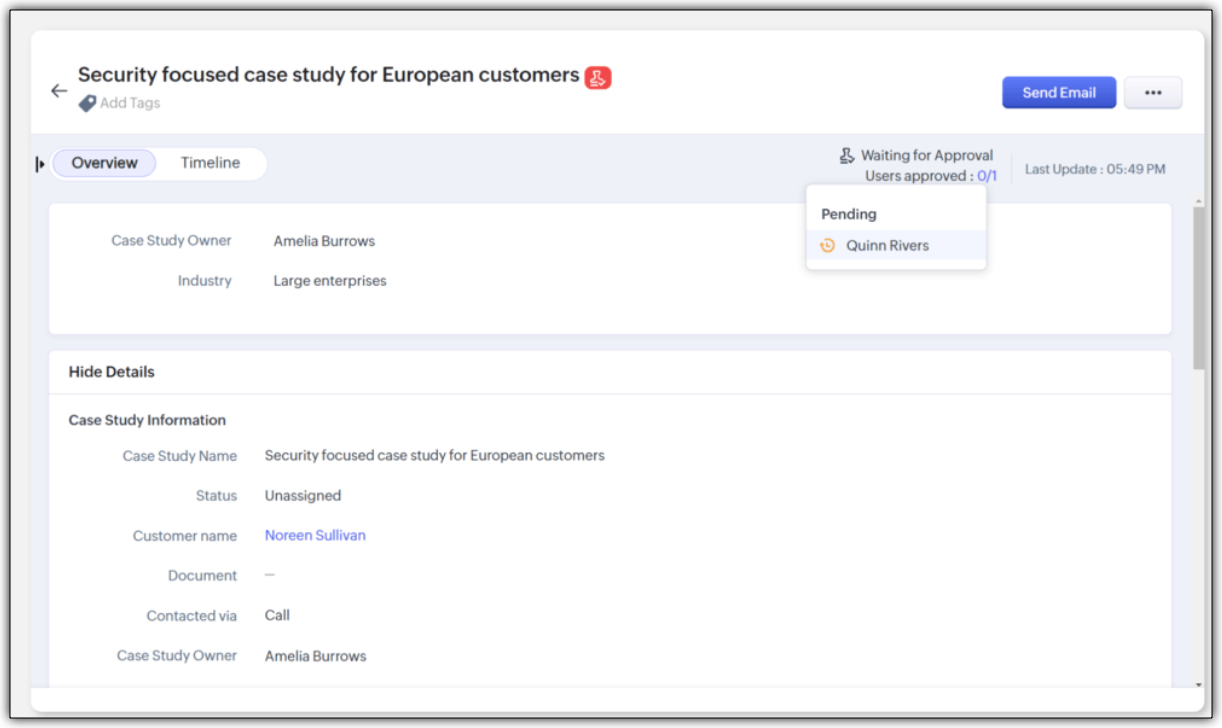
- An approval process to ensure that case studies are signed off by a team module manager
Improving Team Coordination
Winning a customer is often like running a relay race where one team hands off to the next until the goal is achieved. With multiple customer-facing teams onboard, how can they coordinate to achieve their goal - in case of any industry, it would be to close a deal successfully.
For example, in a typical SAAS industry, there would be multiple customer-facing teams : Sales team, Marketing team, Pre-sales team, Onboarding team and a Training team. Once all the teams are onboarded onto the CRM platform, teams would require information from each other during a sales process. Example,
- While the sales team is negotiating their next big deal, they may have to request supporting material like case studies from the marketing team.
- If a marketer wants to write a better case study, in turn, they may like to raise a request for customer implementation from the solutions experts team and so on.
In our current-day CRM system, these requests or the need for information between teams happen outside the CRM ; via chats, emails, or spreadsheets, thus leading to disconnects and inefficiencies.

CRM for Everyone addresses this challenge by making team coordination a seamless part of the user interface by introducing Requesters.
Each team could register a need for a deliverable from another team in order to move ahead in the process by raising what we call a "request". In the above case, the sales team is the "Requester" for Marketing, Presales, and Legal teams requesting different materials and action items in order to close a sale. Learn more

They can keep a track of their requests without being privy to their other teams' internal operations directly from the "My Requests" tab. The Requesters can also be kept informed once their requests have been met. In our example, when ultimately the case study does arrive, the sales team that "requested it" can follow it up, not via chat or email, but in the CRM itself.

How can users be assigned as Requesters?
Team Module Admins can assign Requesters in three ways:
- Individually : Add specific users when setting up a Team Module.
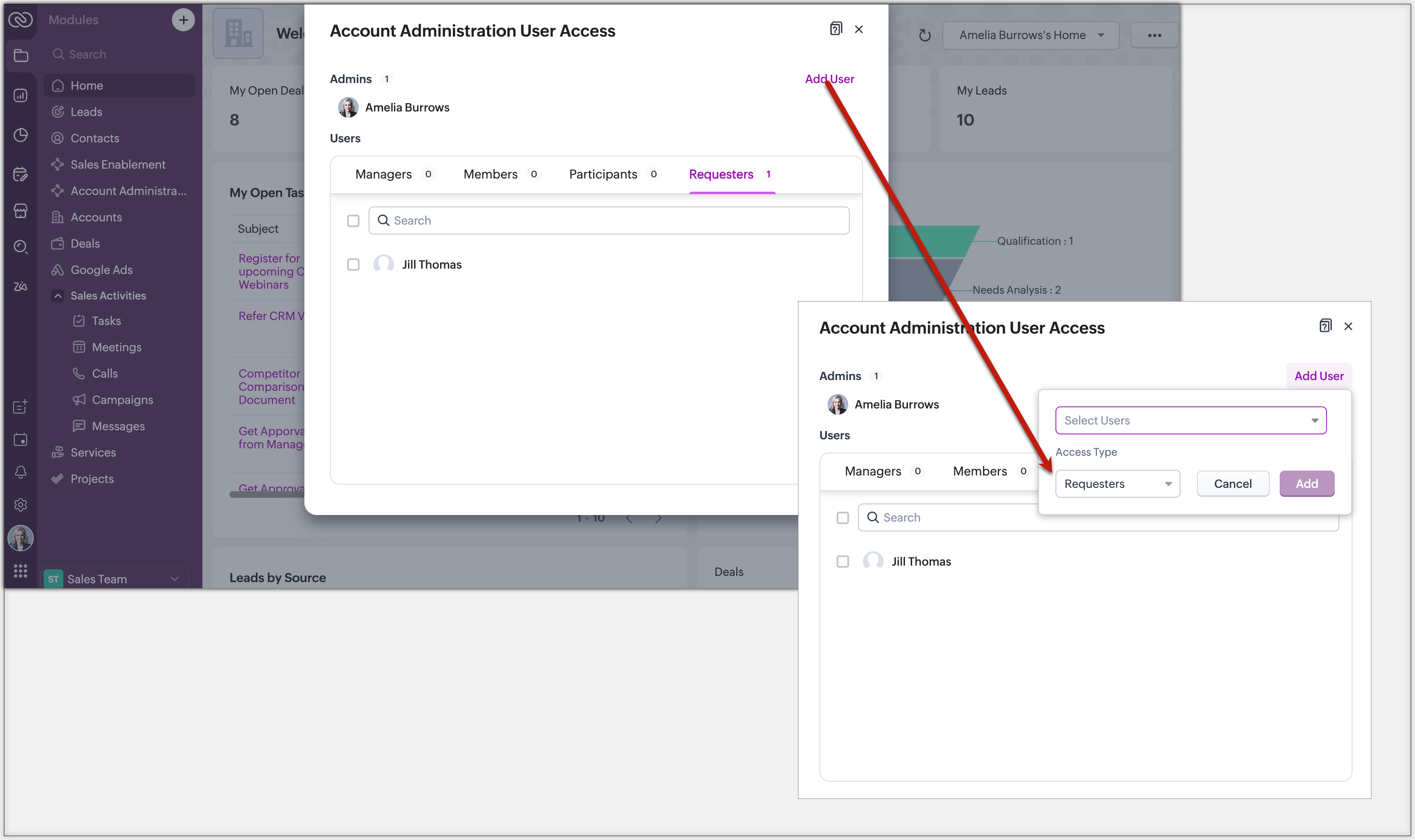
- QR Code or Link : Generate a link or code from requester settings. Anyone with access can instantly join and submit requests, no manual effort needed.
Example: Marketing can embed a QR code in an internal newsletter to allow regional sales reps to submit campaign briefs easily.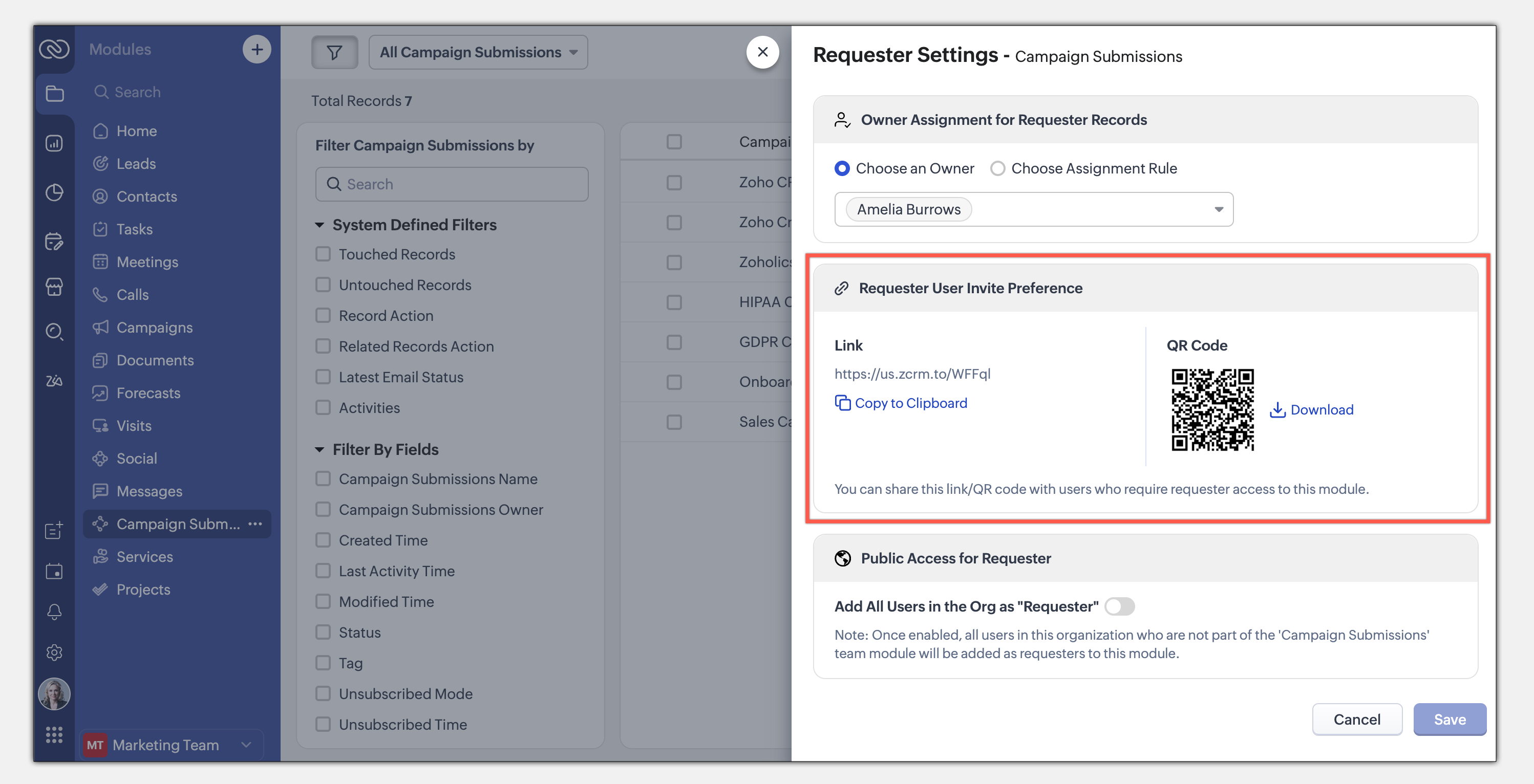
- Enable All Users : Allow all users in the organization to become requesters in a given module.
Example: A Sales Enablement module can be accessed by Product, Marketing, or Training teams to submit requests for sales insights.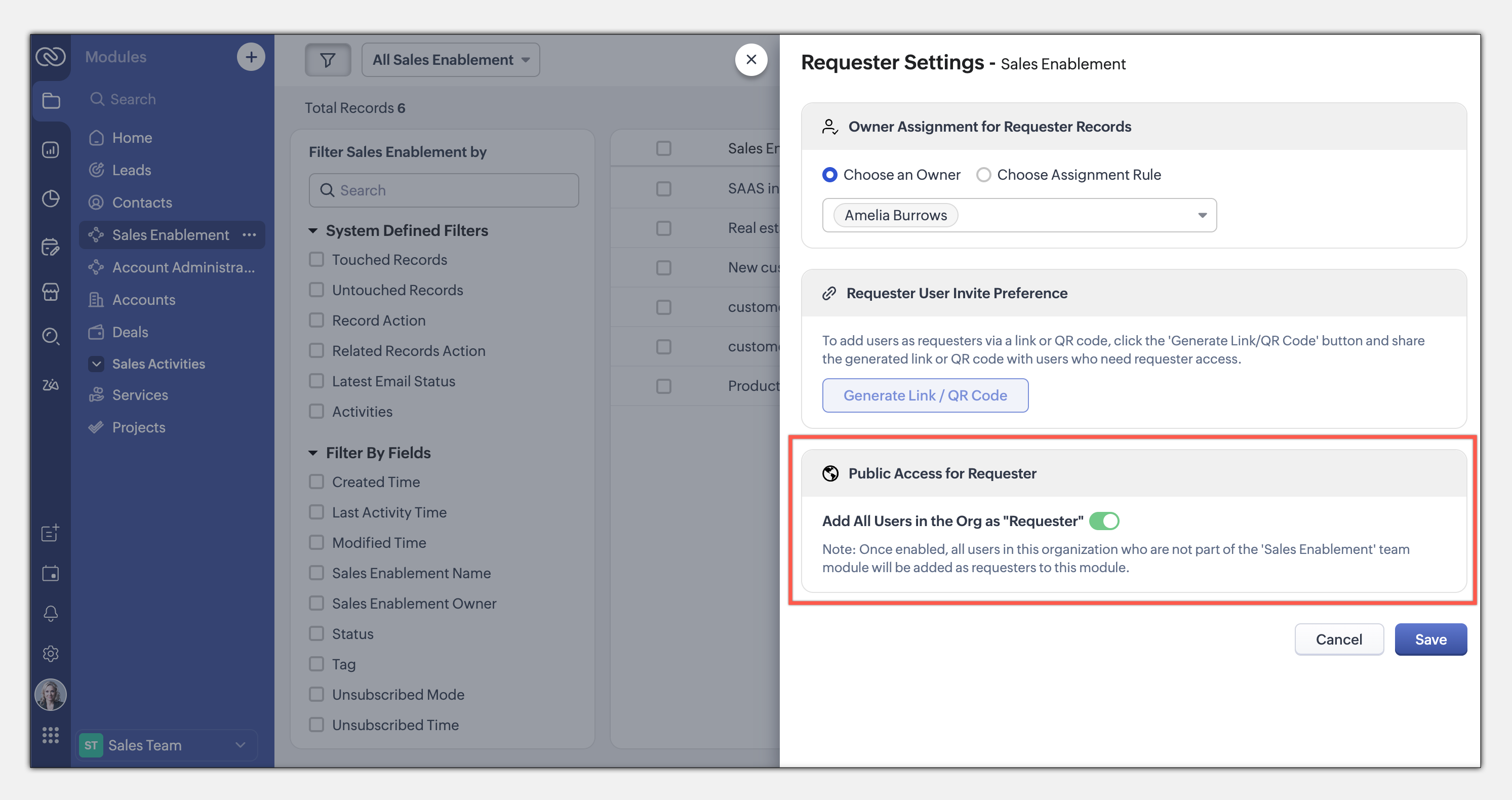
This seamless, integrated request system ensures teams can collaborate efficiently while maintaining privacy and process control. Learn more
This entire loop of requests and coordination between teams to meet a common goal is woven into the CRM interface as an integral part of the system, thus eliminating communication silos. This also puts us a good step closer to improving the adoption of CRM by several teams across the organization.
The details and nitty-gritty of who can manage what, who can view which data sets, etc., have to be carefully decided and managed. So CRM for Everyone also packs in an easy interface for each team to organize and manage their team modules.
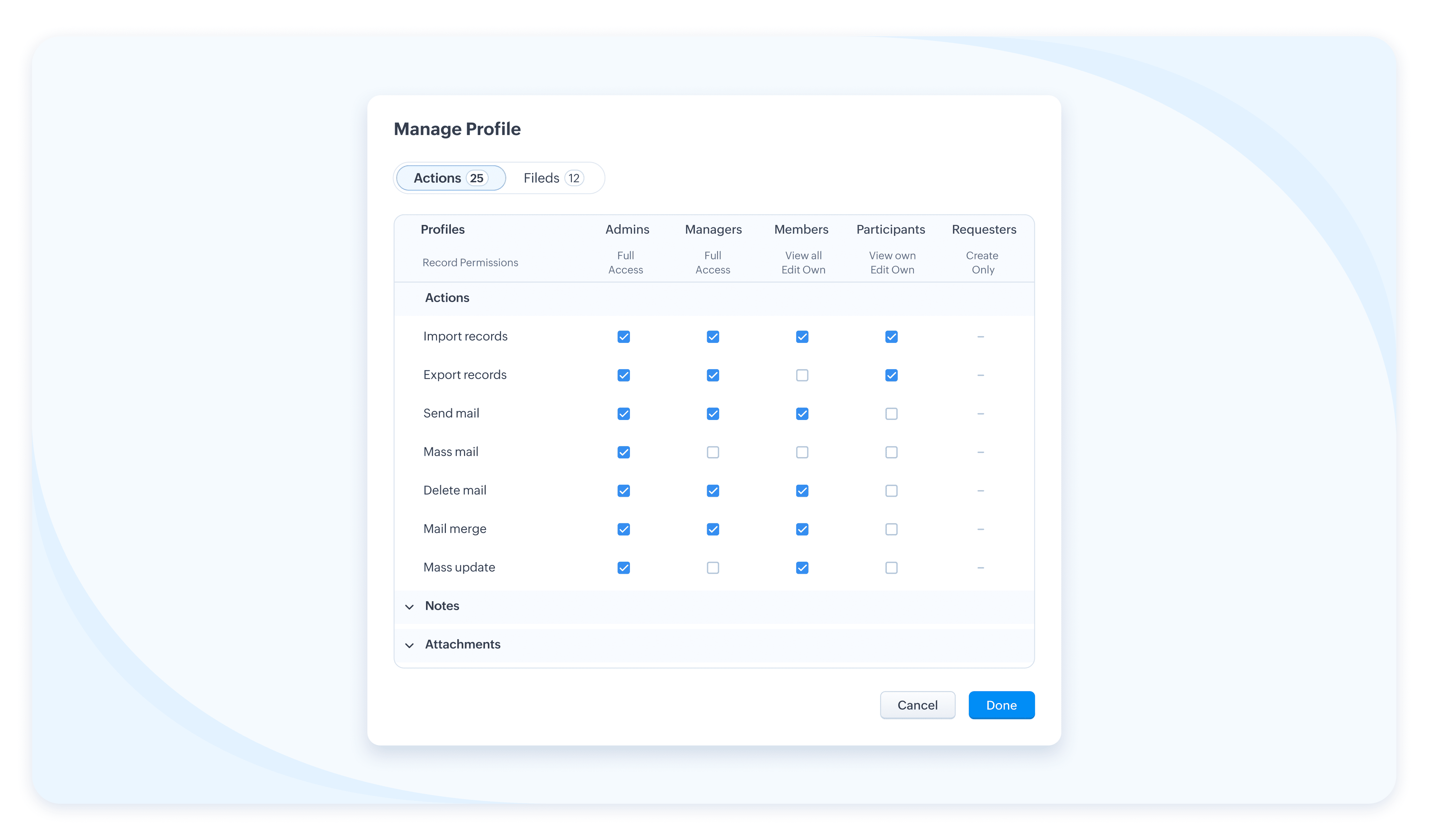
The details and nitty-gritty of who can manage what, who can view which data sets, etc., have to be carefully decided and managed. So CRM for Everyone also packs in an easy interface for each team to organize and manage their team modules.
Team Users For Team Modules
When we aspire to democratize the system and empower various non-sales teams, we hear you thinking, how do we take it from being an aspiration to ground level implementation? What motivates an organization to bring, most likely a large number of non-sales users, on to Zoho CRM? What’s their incentive?
Well, so far, the non-sales teams have probably not had the opportunity at all, to be a part of the same CRM system where all the customer data and processes are housed. The fact that Team Module will now give them that opportunity to be a part of this crucial system and simplify their work management is an incentive in itself, so to speak.
Of course, there is also a cost-related incentive. Since the non-sales team members will typically not need access to all of CRM, we have created a new type of user license to encourage their access to CRM— called the Team User license, which is priced lower than a regular CRM user license, and by design will allow only limited access to CRM.
With the introduction of Team User licenses, we will now have two types of CRM users:
➤ Organization User
➤ Team User
Well, so far, the non-sales teams have probably not had the opportunity at all, to be a part of the same CRM system where all the customer data and processes are housed. The fact that Team Module will now give them that opportunity to be a part of this crucial system and simplify their work management is an incentive in itself, so to speak.
Of course, there is also a cost-related incentive. Since the non-sales team members will typically not need access to all of CRM, we have created a new type of user license to encourage their access to CRM— called the Team User license, which is priced lower than a regular CRM user license, and by design will allow only limited access to CRM.
With the introduction of Team User licenses, we will now have two types of CRM users:
➤ Organization User
➤ Team User
- The Organization User is your regular power CRM user who will need access to all CRM data and most functionalities. Typically, a sales team member.
- A Team User is typically a non-sales team member, whose work could be managed in CRM alongside sales, as they have a part to play in the entire customer-oriented process. For example: A presales executive who needs to step in to give a product demo to a customer right after a salesperson's pitch. Alternatively, a Legal team member might have to process contract signatures while closing a deal. Additionally, a Training team member who will take up a training request for a customer on-demand.
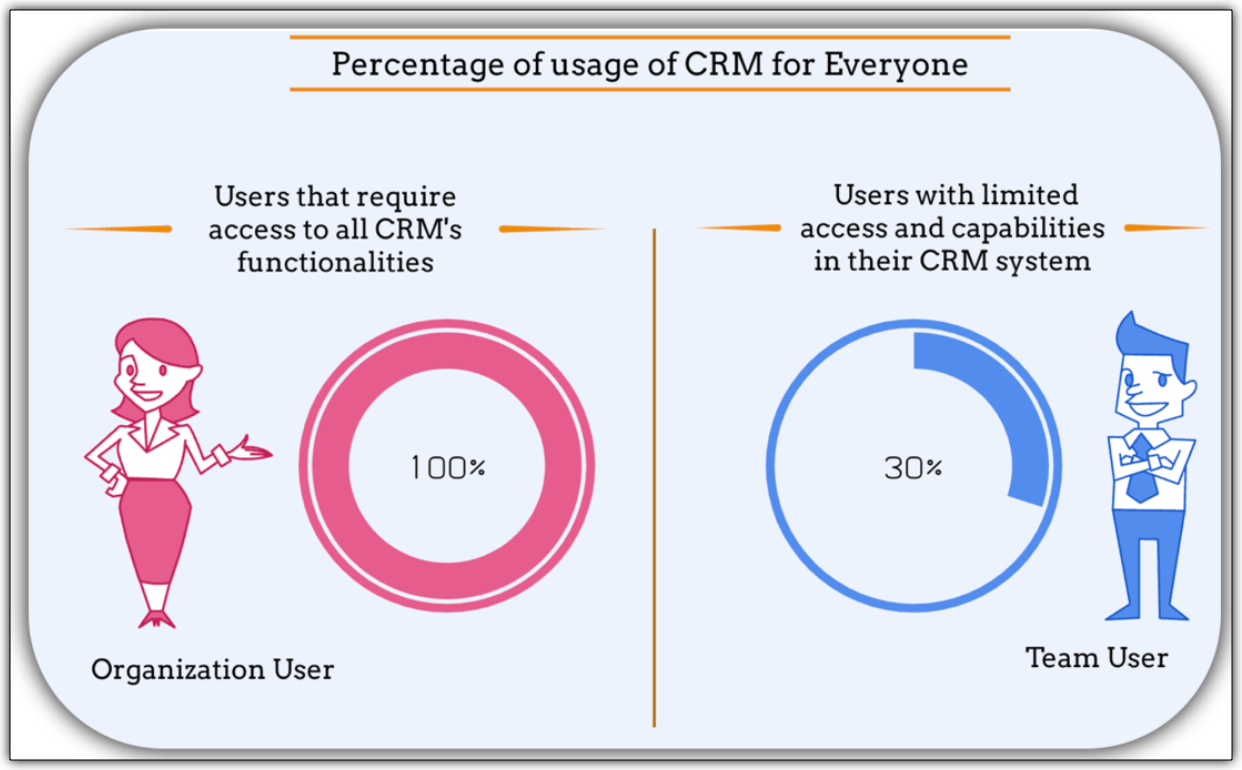
The legal team members, trainers, or pre-sales executives can make contributions only in their respective Team Modules. They don't require the entire range of features in the CRM system. In fact, they won't even need access to some key organization modules. They log into the system to fulfil their responsibilities, complete their deliverables, and then log out.
Such users are your ideal candidates for Team User Licenses.
Such users are your ideal candidates for Team User Licenses.
What is the cost of a Team User license?
Team User licenses are priced significantly lower than a regular CRM license and enable you to have cost savings, depending on how you want to distribute the Org Vs Team licenses among your users.
A Team User License costs:
➤ $9/ team license/ month (if paid annually)
➤ $11/ team license / month (if paid monthly)
For instance, Zylker Corp has onboarded 50 members of their sales team to the Zoho CRM Enterprise edition. They now wish to add an additional 30 non-sales customer operations members as Team Users. The distribution of licenses for these 80 users (on the Enterprise edition) will be as follows:
Organization Users - 50 users * 40 $ = 2000 $
Team Users [Annual ] - 30 users * 9 $ = 270 $
-----------------------------------------------------------------
Total Cost - 80 users = 2270 $
Let's see how much they would have to pay without this license in case they have to onboard all users using the regular CRM Org License :
All users as Organization users, therefore, 80 users * 40 $ = 3200
Thus, Zylker Corp's total savings with the Team User License is 930 $ which is significantly lower than regular CRM licenses.
A Team User License costs:
➤ $9/ team license/ month (if paid annually)
➤ $11/ team license / month (if paid monthly)
For instance, Zylker Corp has onboarded 50 members of their sales team to the Zoho CRM Enterprise edition. They now wish to add an additional 30 non-sales customer operations members as Team Users. The distribution of licenses for these 80 users (on the Enterprise edition) will be as follows:
Organization Users - 50 users * 40 $ = 2000 $
Team Users [Annual ] - 30 users * 9 $ = 270 $
-----------------------------------------------------------------
Total Cost - 80 users = 2270 $
Let's see how much they would have to pay without this license in case they have to onboard all users using the regular CRM Org License :
All users as Organization users, therefore, 80 users * 40 $ = 3200
Thus, Zylker Corp's total savings with the Team User License is 930 $ which is significantly lower than regular CRM licenses.
Team Modules in Zoho CRM make it easier for all your customer-facing teams to manage their own work, collaborate smoothly, and stay aligned. With CRM for Everyone, you can break down silos, speed up processes, and deliver better customer experiences—together.
It’s a smarter, more connected way to use CRM across your organization.
Start using Team Modules today and bring every team closer to your customers.
Regards,
Serena Woolridge
Resources