Tip #8: Cómo integrar Whatsapp con Zoho Desk

Tip #8: Cómo integrar Whatsapp con Zoho Desk

Este artículo es una adaptación de la versión en inglés

Hace unas semanas presentamos las novedades de Zoho Desk para 2023. Ahora queríamos entrar más en detalle de una de las actualizaciones más esperadas por todos los usuarios de Zoho Desk. Se trata de la integración con Whatsapp business.  
WhatsApp es la aplicación de mensajería instantánea más utilizada del mundo, con aproximadamente 2.000 millones de usuarios. La presencia de esta aplicación es razón suficiente para que empresas de todos los tamaños la consideren un canal de atención al cliente. Si tus clientes contactan con frecuencia con tu empresa a través de WhatsApp, te resultará muy beneficioso integrar tu cuenta de WhatsApp Business con tu portal de Zoho Desk.

Algunos requisitos previos  
Los siguientes son los requisitos previos para integrar WhatsApp con tu cuenta de Zoho Desk:
  • Una cuenta de Facebook Business Manager
  • Un negocio verificado
  • Una cuenta de WhatsApp Business
  • Una línea de crédito de prepago para tu cuenta de WhatsApp Business
  • Un número de teléfono registrado para acceder a la API de WhatsApp Business
Notas:
  • Después de verificar tu negocio, se revisará para comprobar que cumple las Condiciones de servicio de WhatsApp y la Política de comercio de WhatsApp.
  • Si has cambiado la marca de tu dominio, debes habilitar las cookies de terceros en tu navegador antes de iniciar la integración.
  • No puedes utilizar números de teléfono de WhatsApp que se estén utilizando actualmente en otros productos. Sólo se pueden utilizar para la integración números de teléfono no utilizados y registrados.
  • Aún no es posible migrar los números de teléfono existentes.
 
El proceso de incorporación
El flujo de incorporación e integración de WhatsApp consta de cuatro pasos. Consistirá en vincular tus cuentas de Facebook y WhatsApp Business, crear tu perfil de WhatsApp Business, verificar tu número de WhatsApp Business y configurar WhatsApp como canal. Asegúrate de haber iniciado sesión en tu cuenta de Facebook en el mismo navegador.
 
      1. Accede a tu cuenta de Zoho Desk con privilegios de administrador.
      2. Haz clic en el icono Configuración de la barra superior.
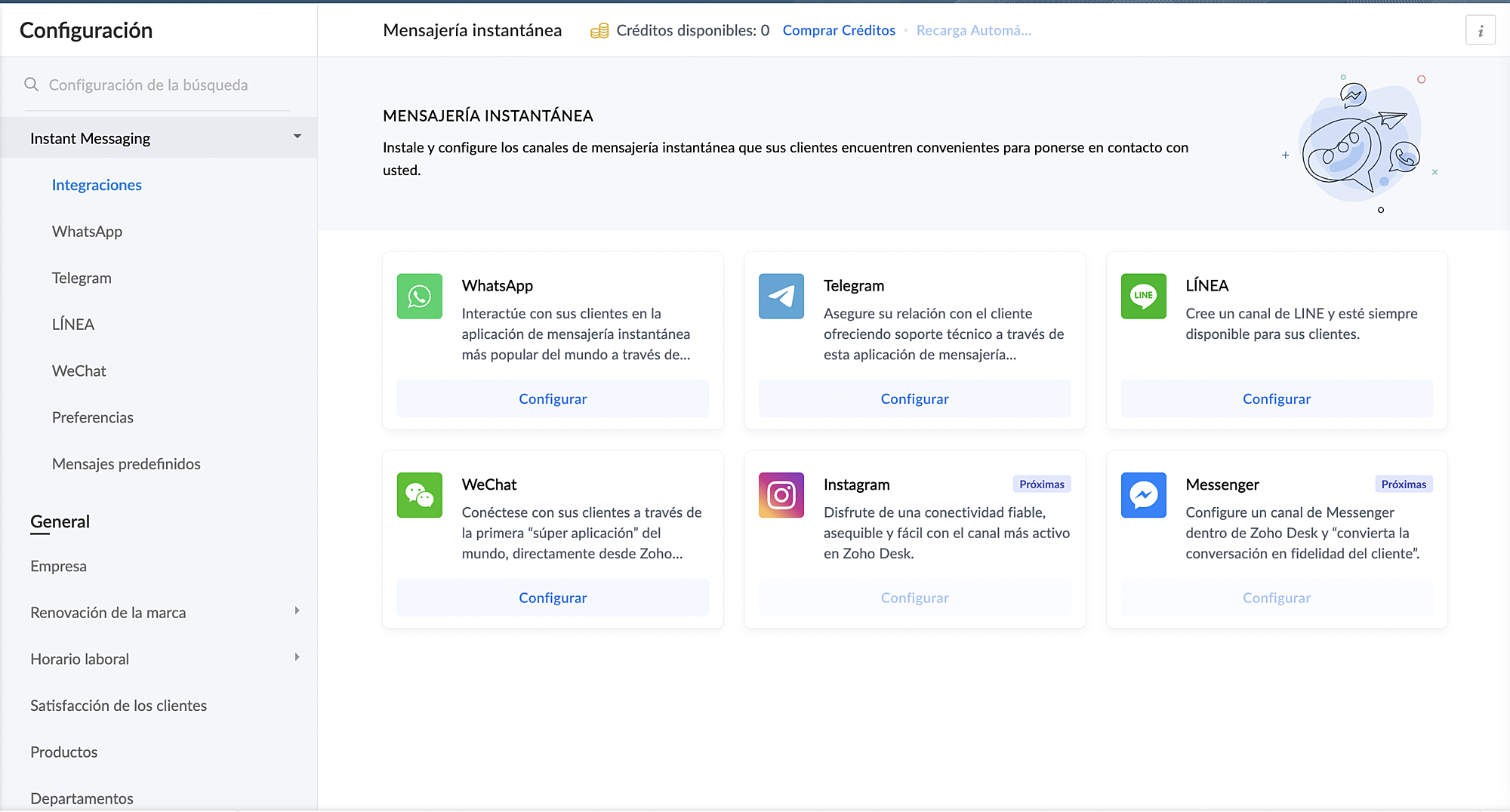

3. En Canales, haz clic en Mensajería instantánea.
4. Haz clic en Configurar correspondiente a WhatsApp en la página Mensajería instantánea.

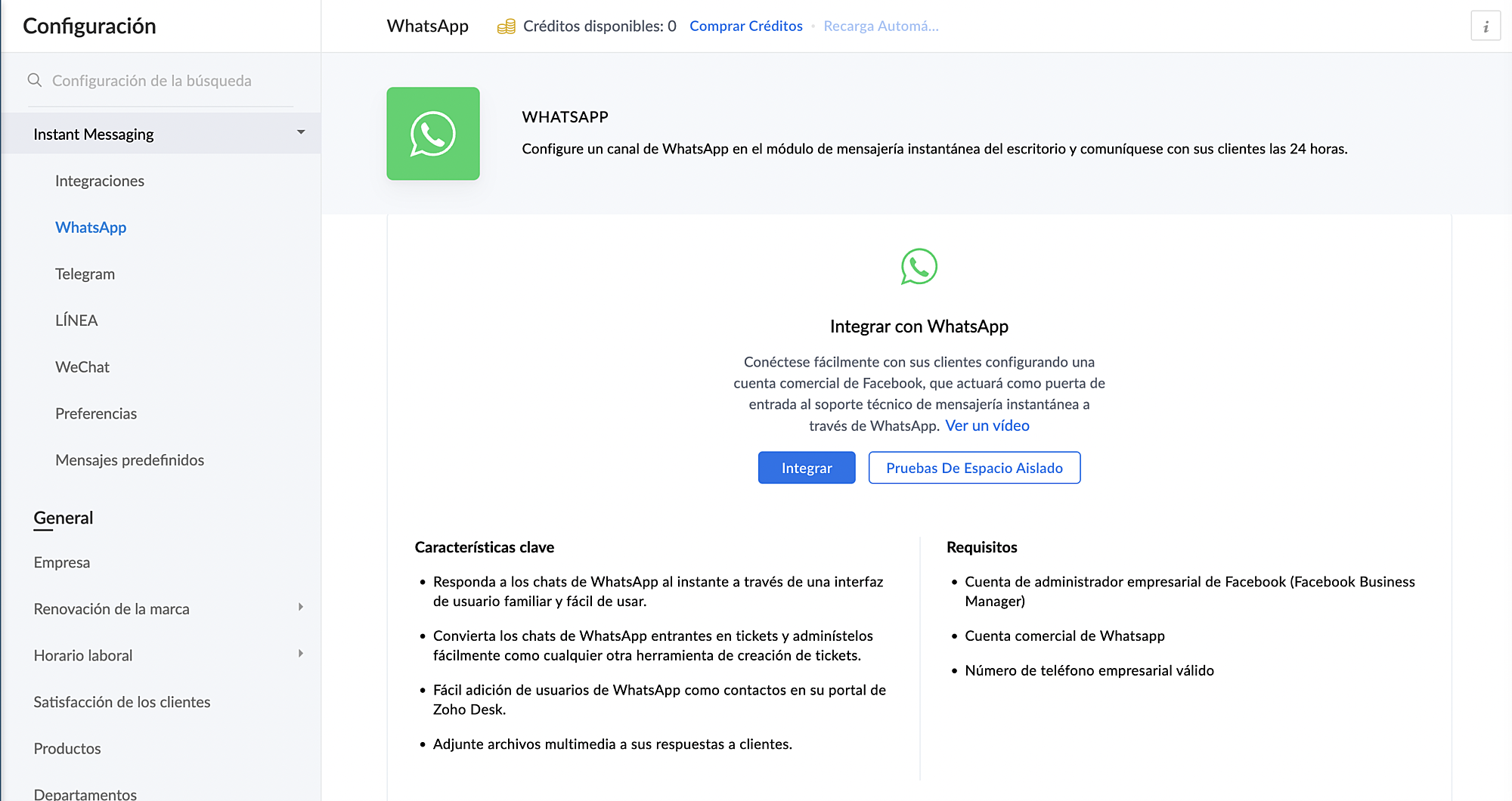
5. Haz clic en Integrar en la página de WhatsApp.
      Se abrirá el cuadro emergente de autenticación de Facebook.

 6. Vincula tu cuenta de Facebook y WhatsApp Business:
      a. Haz clic en Continuar para vincular tu cuenta de Facebook con Zoho Desk.
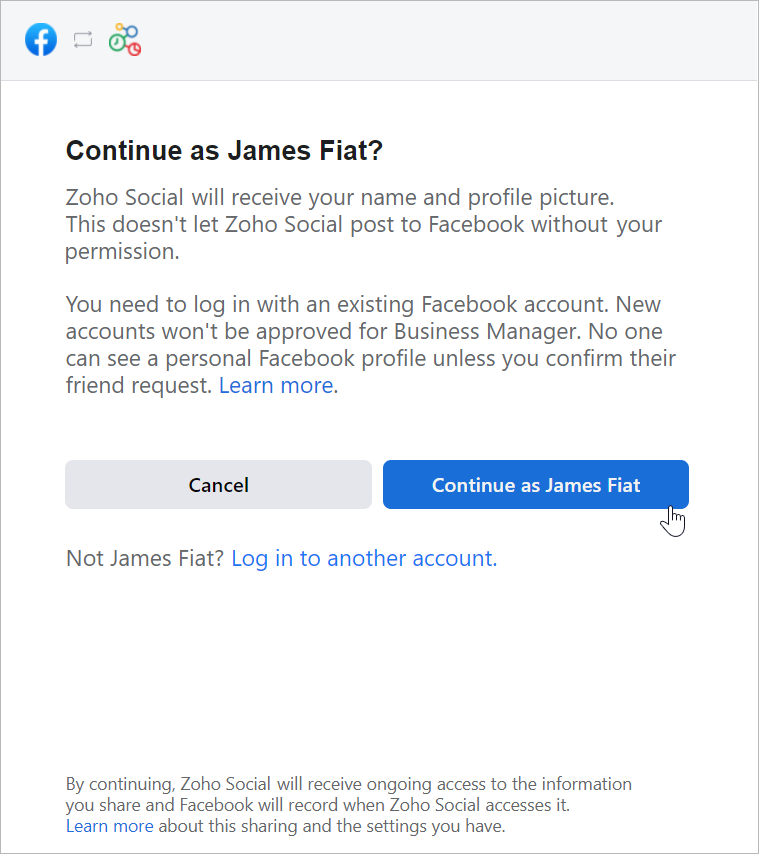


      b. Haz clic en Empezar en la ventana Chat para usuarios de WhatsApp.
      c. Haz clic en Continuar en la ventana Conectar tu cuenta a Zoho Corporation.
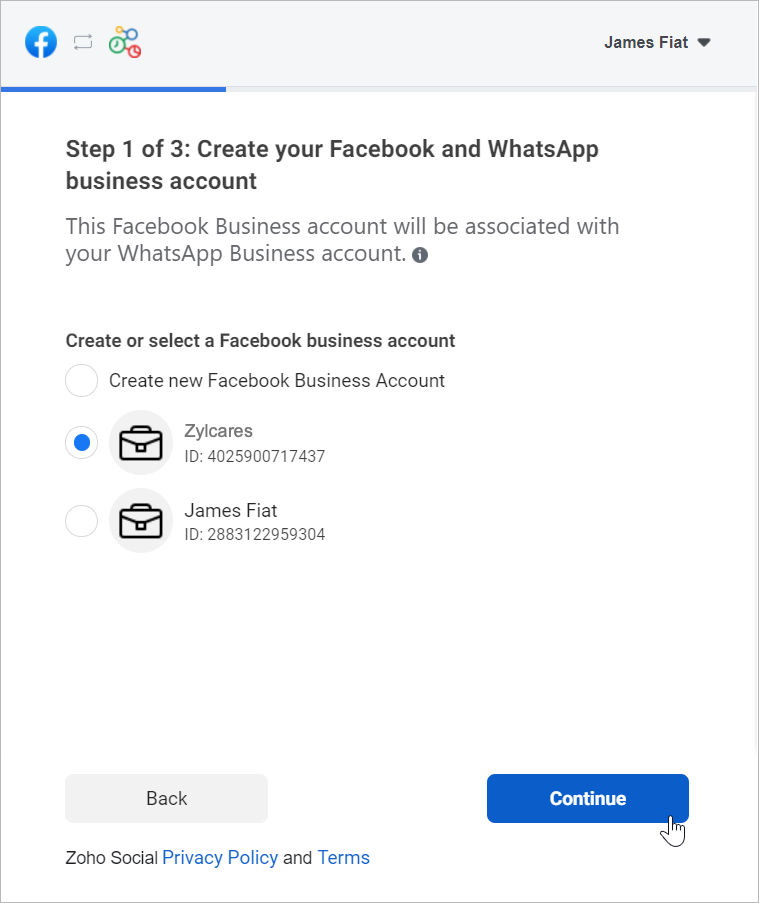


      d. Selecciona la cuenta de Facebook Business que deseas vincular y, a continuación, haz clic en Continuar.
      e. Selecciona la cuenta de WhatsApp Business vinculada a tu cuenta de Facebook Business y, a continuación, haz clic en Continuar en la siguiente pantalla.
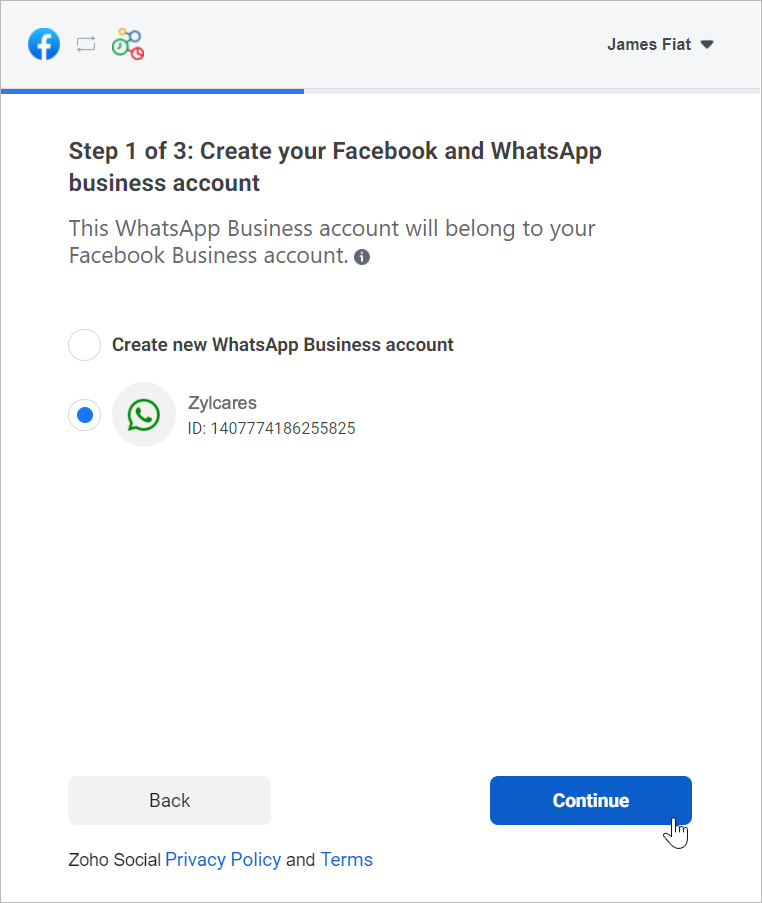


      f. Haz clic en Continuar con el paso 2.
1. Crea tu perfil de WhatsApp Business:
      a. Introduce el nombre para mostrar de WhatsApp Business que utilizaras para enviar mensajes a los clientes y haz clic en Continuar.
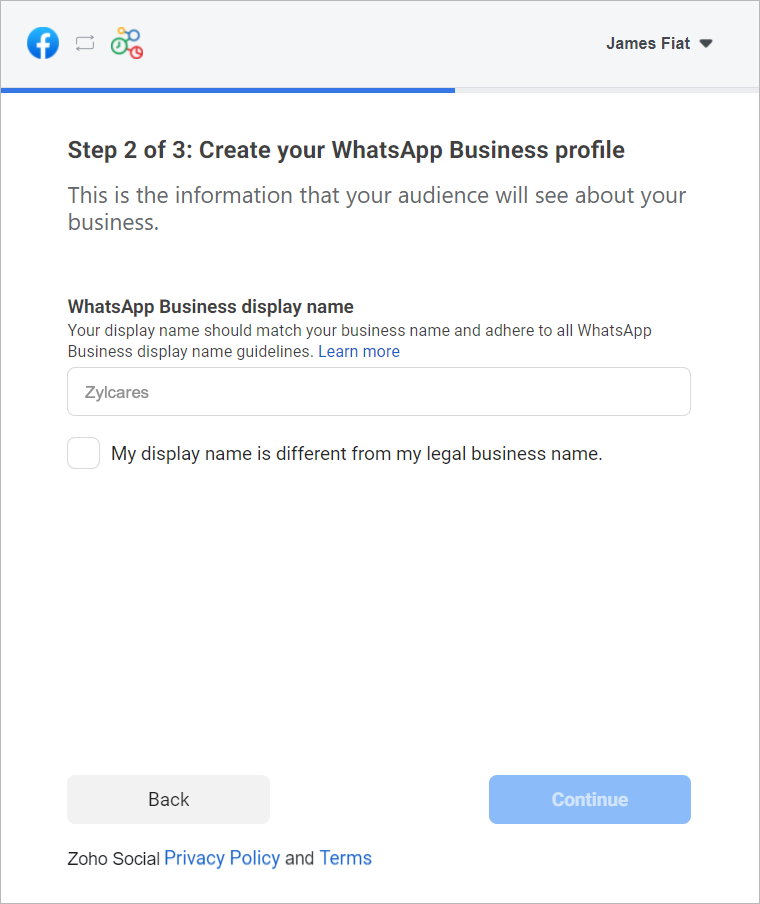

Asegúrate de que el nombre para mostrar cumple las directrices mencionadas aquí.
      b. Selecciona la categoría de tu negocio en el menú desplegable.
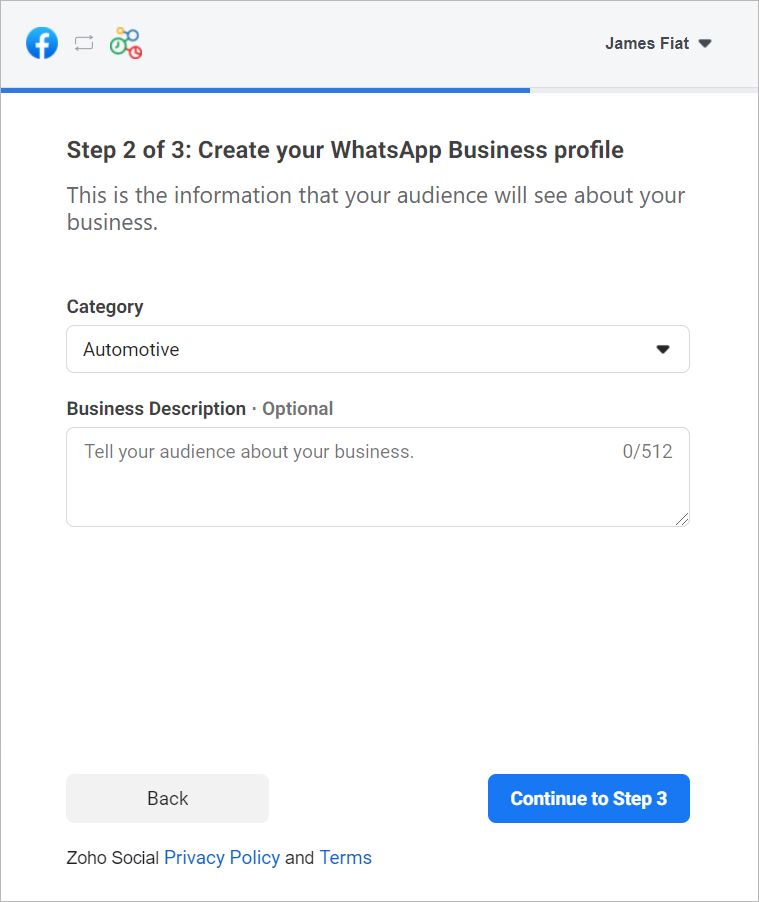

      c. Introduce una breve descripción de tu empresa.
Tanto la categoría como la descripción de la empresa serán visibles para los clientes que envíen mensajes a tu empresa.
      d. Haz clic en Continuar con el paso 3.

2. Verifica tu número de WhatsApp Business:
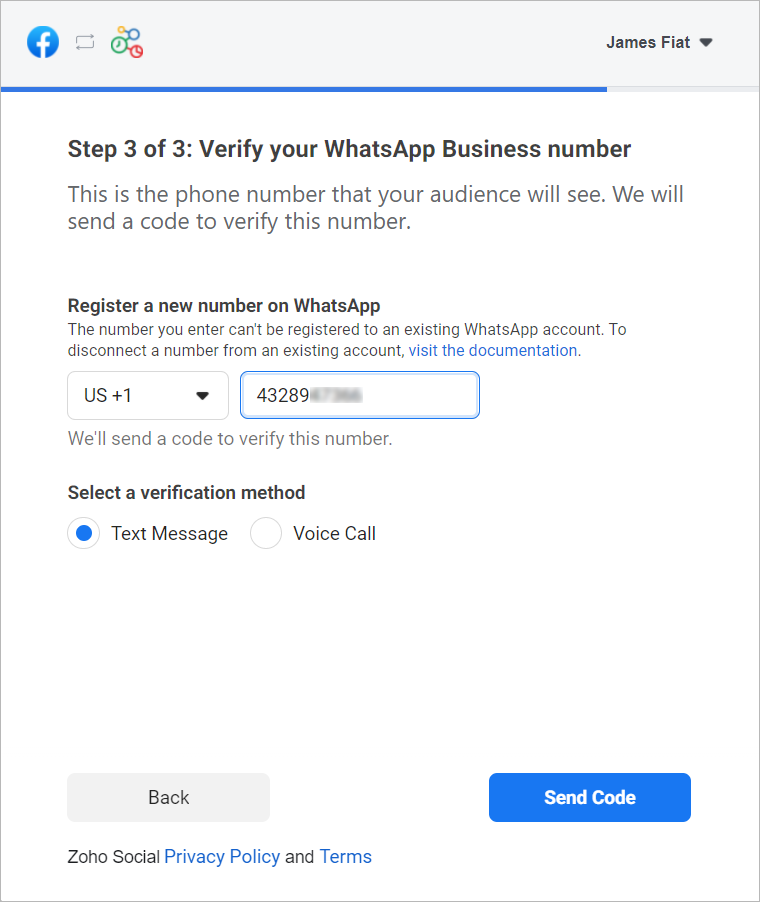
      a. Selecciona un número de WhatApp Business existente o introduce un número nuevo para registrarlo.
Nota: No puedes registrar un número que ya esté registrado en WhatsApp Messenger o en la aplicación WhatsApp Business.

      b. Selecciona el método de verificación que prefieras. Puedes elegir entre Mensaje de texto o Llamada de voz.
      c. Haz clic en Enviar código.
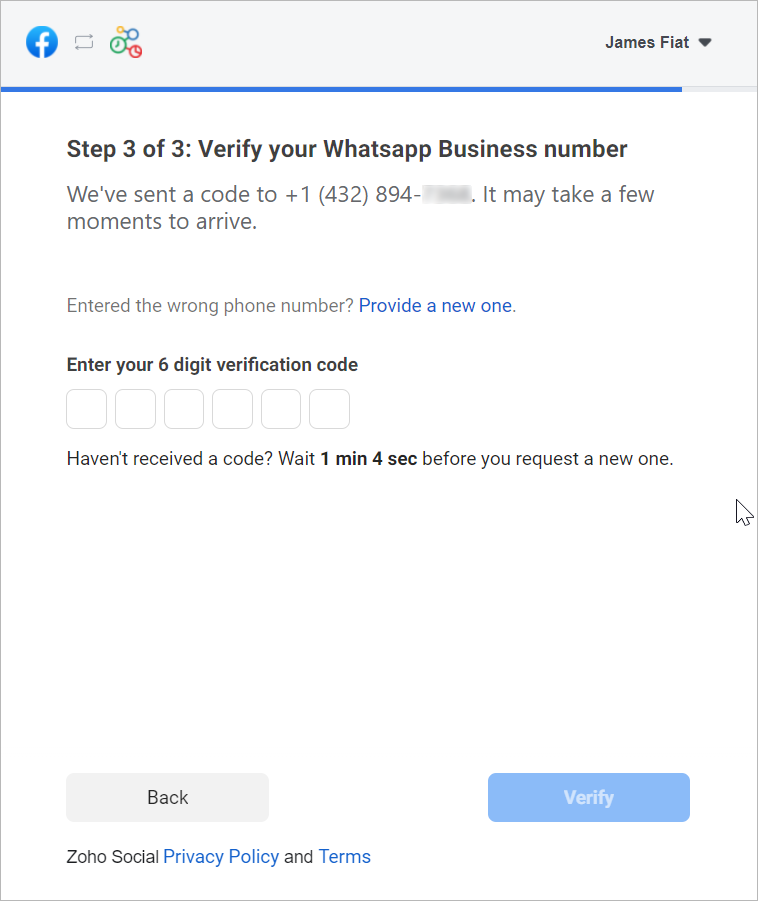


      d. En la siguiente ventana, introduce el código de verificación de 6 dígitos recibido en tu número de teléfono de Whatsapp Business.
      e. Haz clic en Verificar.
 
3. Configurar canal de WhatsApp:
      a. De vuelta en la página de ajustes de WhatsApp, haz clic en Crear canal.
Nota: El número de canales que crees no puede superar los departamentos de tu cuenta.
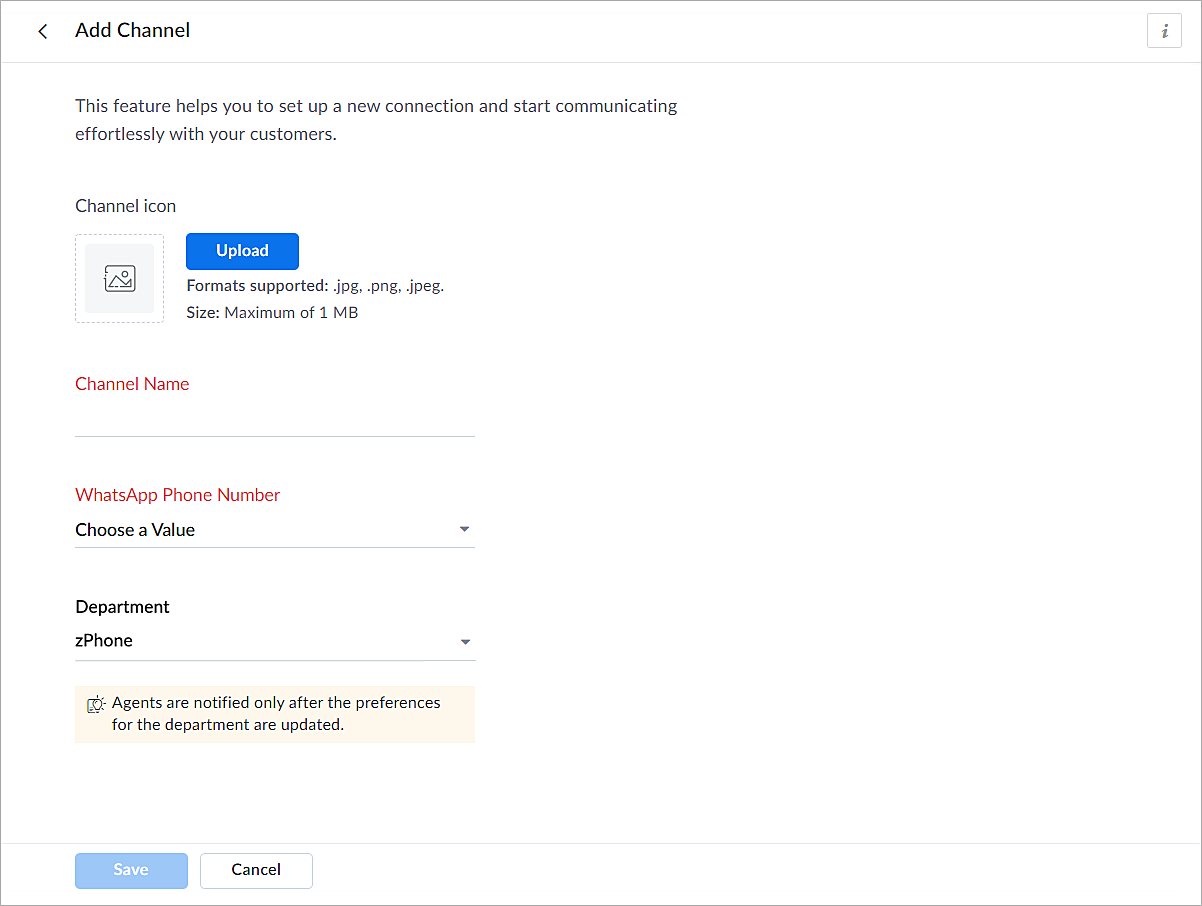


      b. En la página Añadir canal, sigue los pasos que se indican a continuación:
i. Carga un icono para el canal.
Nota: El tamaño del icono no puede superar 1 MB y debe estar en formato .jpg, .png o .jpeg.
ii. Introduce un nombre para el canal.
iii. Selecciona el número de teléfono de Whatsapp añadido en el paso 3.
iv. Selecciona el departamento en el que desea recibir los mensajes.
v. Haz clic en Guardar.
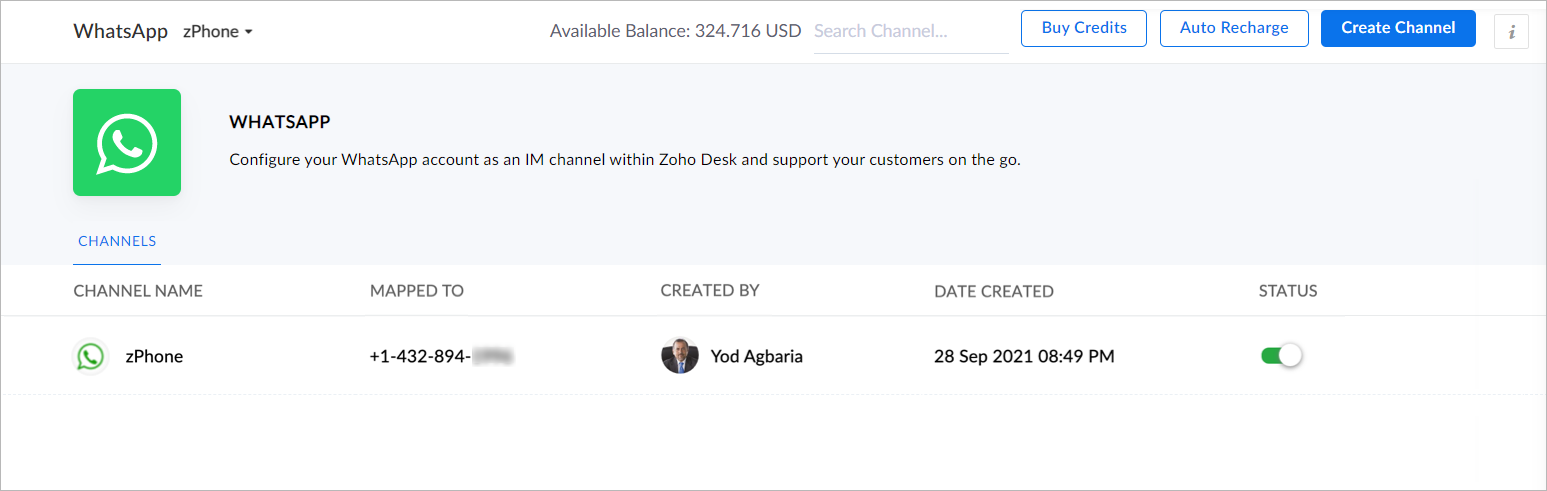


4. Ya has completado el proceso de configuración y estás listo para utilizar la experiencia de prueba.

Verificación empresarial
Durante la experiencia de prueba no verificada, solo podrás enviar mensajes iniciados por la empresa a dos números de teléfono y mantener hasta diez conversaciones iniciadas por clientes durante los primeros 30 días. Transcurridos 30 días, ya no podrás enviar mensajes hasta que completes la verificación de empresa y superes todas las comprobaciones de Whatsapp.
 
Para establecer una plataforma de conversación en directo de mensajería instantánea de pleno derecho, debes verificar tu cuenta de Facebook Business Manager proporcionando todos los documentos necesarios, incluida la prueba de entidad jurídica y la prueba de acceso a la empresa. Sólo entonces se habilitará tu versión de prueba ampliada, que permite una conversación bidireccional entre tú y un cliente con 1500 mensajes iniciados por el cliente. Recuerda que una conversación es una sesión de 24 horas de mensajería ilimitada con un número de teléfono determinado.
 
Para desactivar un canal
  1. Haz clic en el icono Configuración de la barra superior.
  2. En Canales, haz clic en Mensajería instantánea.
  3. Haz clic en WhatsApp en la página Mensajería instantánea.
Aparecerán los canales creados en su cuenta.
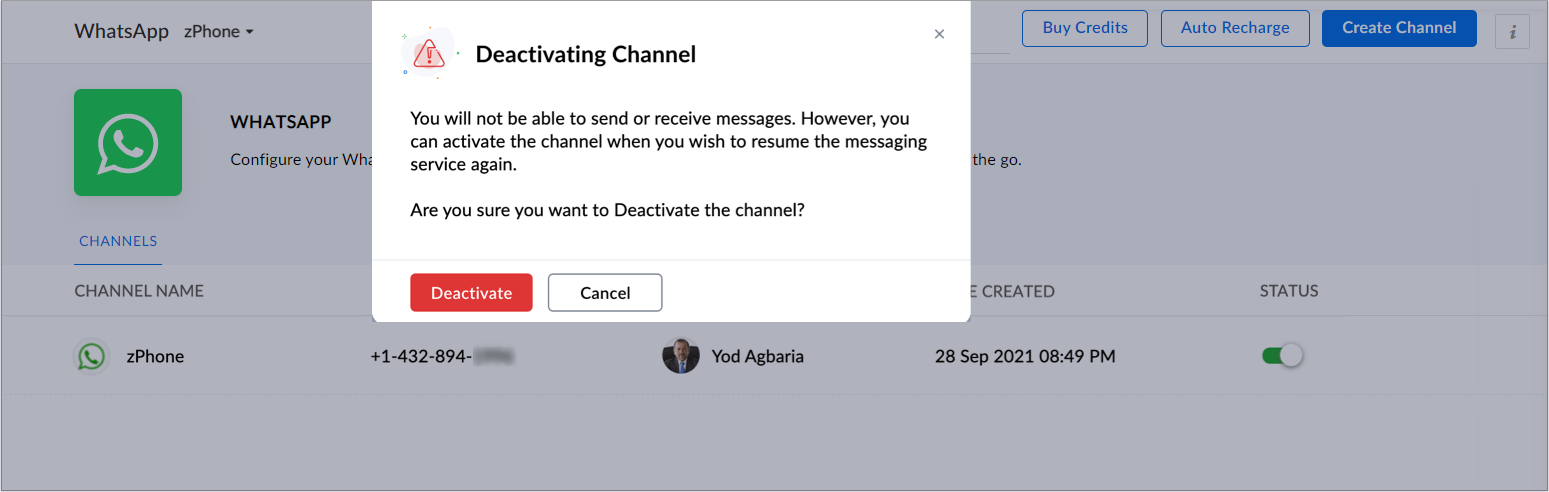
 
      4. Desactiva el botón correspondiente al canal que deseas desactivar.
      5. Haz clic en Desactivar en el cuadro de diálogo de confirmación.
El canal quedará desactivado.
 
Si te ha gustado este pequeño truco y te interesa conocer más trucos sobre el uso de Zoho Desk puedes encontrar más en nuestro foro y puedes darle a seguir en el apartado de Trip and Tricks de Zoho Desk.
 
¡Nos vemos a la próxima en el foro de Español Zoho Community!


    • Recent Topics

    • What's new in Zoho Sheet: Simplify data entry and collaboration

      Hello, Zoho Sheet community! Last year, our team was focused on research and development so we could deliver updates that enhance your spreadsheet experience. This year, we’re excited to deliver those enhancements—but we'll be rolling them out incrementally
    • #7 Tip of the week: Delegating approvals in Zoho People

      With Zoho People, absences need not keep employees waiting with their approval requests. When you are not available at work, you can delegate approvals that come your way to your fellow workmate and let them take care of your approvals temporarily. Learn more!
    • Admin Tip: Manage sub-domain emails using sub-domain stripping

      As an admin, you may need separate domains for different departments such as sales, support, and marketing. While this approach offers flexibility, creating and managing multiple domains can quickly become overwhelming, especially since each domain requires
    • Bring Zoho Shifts Capabilities into Zoho People Shift Module

      Hello Zoho People Product Team, After a deep review of the Zoho People Shift module and a direct comparison with Zoho Shifts, we would like to raise a feature request and serious concern regarding the current state of shift management in Zoho People.
    • Quick Copy Column Name

      Please add the ability to quickly copy the name of a column in a Table or Query View. When you right-click the column there should be an option to copy the name, or if you left-click the column and use the Ctrl+C keyboard shortcut it should copy the
    • Ability to Edit YouTube Video Title, Description & Thumbnail After Publishing

      Hi Zoho Social Team, How are you? We would like to request an enhancement to Zoho Social that enables users to edit YouTube video details after the video has already been published. Your team confirmed that while Zoho Social currently allows editing the
    • How do I remove a data source from Zoho Analytics?

      I am unable to find a delte option on a datasource that i put in the system as an error. On teh web it refers to a setup icon but I do not see that on my interface?
    • Add Employee Availability Functionality to Zoho People Shift Module

      Hello Zoho People Product Team, Greetings and hope you are doing well. We would like to submit a feature request to enhance the Zoho People Shift module by adding employee availability management, similar to the functionality available in Zoho Shifts.
    • Bigin, more powerful than ever on iOS 26, iPadOS 26, macOS Tahoe, and watchOS 26.

      Hot on the heels of Apple’s latest OS updates, we’ve rolled out several enhancements and features designed to help you get the most from your Apple devices. Enjoy a refined user experience with smoother navigation and a more content-focused Liquid Glass
    • Really want the field "Company" in the activities module!

      Hi team! Something we are really missing is able to see the field Company when working in the activities module. We have a lot of tasks and need to see what company it's related to. It's really annoying to not be able to see it.🙈 Thx!
    • Delay in rendering Zoho Recruit - Careers in the ZappyWorks

      I click on the Careers link (https://zappyworks.zohorecruit.com/jobs/Careers) on the ZappyWorks website expecting to see the job openings. The site redirects me to Zoho Recruit, but after the redirect, the page just stays blank for several seconds. I'm
    • Is Desk Down?

      Across department - always an error. [Status Mode] - error [Table View and the rest] - working
    • We Asked, Zoho Delivered: The New Early Access Program is Here

      For years, the Zoho Creator community has requested a more transparent and participatory approach to beta testing and feature previews. Today, I'm thrilled to highlight that Zoho has delivered exactly what we asked for with the launch of the Early Access
    • Can the Product Image on the Quote Template be enlarged

      Hello, I am editing the Quote Template and added ${Products.Product Image} to the line item and the image comes up but it is very tiny. Is there anyway that you can resize this to be larger? Any help would be great! Thanks
    • How do I change the wording of the tile of SignForm?

      When my user opens a SignForm url, the title that is presented is always "SignForm signer Information" and a form is displayed asking for the username and email address. This can be confusing to the end user. How can I change the title at least (Or at
    • How to link tickets to a Vendor/Vendor Contact (not Customer) for Accounting Department?

      Hi all, We’re configuring our Accounting department to handle tickets from both customers and vendors (our independent contractors). Right now, ticket association seems to be built around linking a ticket to a Customer / Customer Contact, but for vendor-originated
    • Problem with CRM Connection not Refreshing Token

      I've setup a connection with Zoom in the CRM. I'm using this connection to automate some registrations, so my team doesn't have to manually create them in both the CRM and Zoom. Connection works great in my function until the token expires. It does not refresh and I have to manually revoke the connection and connect it again. I've chatted with Zoho about this and after emailing me that it couldn't be done I asked for specifics on why and they responded. "The connection is CRM is not a feature to
    • Automatic Matching from Bank Statements / Feeds

      Is it possible to have transactions from a feed or bank statement automatically match when certain criteria are met? My use case, which is pretty broadly applicable, is e-commerce transactions for merchant services accounts (clearing accounts). In these
    • Clone Recurring Expenses

      Our bookkeeping practices make extensive use of the "clone" feature for bills, expenses, invoices, etc. This cuts down significantly on both the amount of typing that needs to be done manually and, more importantly, the mental overhead of choosing the
    • Unify Overlapping Functionalities Across Zoho Products

      Hi Zoho One Team, We would like to raise a concern about the current overlap of core functionalities across various Zoho applications. While Zoho offers a rich suite of tools, many applications include similar or identical features—such as shift management,
    • Automation #7 - Auto-update Email Content to a Ticket

      This is a monthly series where we pick some common use cases that have been either discussed or most asked about in our community and explain how they can be achieved using one of the automation capabilities in Zoho Desk. Email is one of the most commonly
    • Ticket to article and Ticket to template

      Hello! I would like to know if it is possible (and how) to do the following actions: 1. To generate an article from a ticket (reply + original message) 2. Easy convert an answer to an email template
    • Is there API Doc for Zoho Survey?

      Hi everyone, Is there API doc for Zoho Survey? Currently evaluating a solution - use case to automate survey administration especially for internal use. But after a brief search, I couldn't find API doc for this. So I thought I should ask here. Than
    • Windows Desktop App - request to add minimization/startup options

      Support Team, Can you submit the following request to your development team? Here is what would be optimal in my opinion from UX perspective: 1) In the "Application Menu", add a menu item to Exit the app, as well as an alt-key shortcut for these menus
    • Creating Parent Child relationship in Accounts

      We have customers with multiple locations, I setup the HQ as an account, then I setup the different sites marking the HQ as the parent to that location. If I then do a Deal for one of the locations, is there a way to show by looking at the parent account
    • Kaizen #225 - Making Query-based Custom Related Lists Actionable with Lookups and Links

      Hello everyone! Welcome back to another post in the Kaizen series! This week, we will discuss an exciting enhancement in Queries in Zoho CRM. In Kaizen #190, we discussed how Queries bridge gaps where native related lists fall short and power custom related
    • WebDAV / FTP / SFTP protocols for syncing

      I believe the Zoho for Desktop app is built using a proprietary protocol. For the growing number of people using services such as odrive to sync multiple accounts from various providers (Google, Dropbox, Box, OneDrive, etc.) it would be really helpful
    • CRM x WorkDrive: We're rolling out the WorkDrive-powered file storage experience for existing users

      Release plan: Gradual rollout to customers without file storage add-ons, in this order: 1. Standalone CRM 2. CRM Plus and Zoho One DCs: All | Editions: All Available now for: - Standalone CRM accounts in Free and Standard editions without file storage
    • Non-responsive views in Mobile Browser (iPad)

      Has anyone noticed that the creator applications when viewed in a mobile browser (iPad) lost its responsiveness? It now appears very small font size and need to zoom into to read contents. Obviously this make use by field staff quite difficult. This is not at all a good move, as lots of my users are depending on accessing the app in mobile devices (iPads), and very challenging and frustrating. 
    • [Free Webinar] Learning Table Series - AI-Enhanced Logistics Management in Zoho Creator

      Hello Everyone! We’re excited to invite you to another edition of Learning Table Series, where we showcase how Zoho Creator empowers industries with innovative and automated solutions. About Learning Table Series Learning Table Series is a free, 45-60
    • Learner transcript Challenges.

      Currently i am working on a Learner Transcript app for my employer using Zoho Creator. The app is expected to accept assessment inputs from tutors, go through an approval process and upon call up, displays all assessments associated with a learner in
    • Customizable UI components in pages | Theme builder

      Anyone know when these roadmap items are scheduled for release? They were originally scheduled for Q4 2025. https://www.zoho.com/creator/product-roadmap.html
    • Feature Request - Set Default Values for Meetings

      Hi Zoho CRM Team, I would be very useful if we could set default values for meeting parameters. For example, if you always wanted Reminder 1 Day before. Currently you need to remember to choose it for every meeting. Also being able to use merge tags to
    • Analytics <-> Invoice Connection DELETED by Zoho

      Hi All, I am reaching out today because of a big issue we have at the moment with Zoho Analytics and Zoho Invoice. Our organization relies on Zoho Analytics for most of our reporting (operationnal teams). A few days ago we observed a sync issue with the
    • How to use Rollup Summary in a Formula Field?

      I created a Rollup Summary (Decimal) field in my module, and it shows values correctly. When I try to reference it in a Formula Field (e.g. ${Deals.Partners_Requested} - ${Deals.Partners_Paid}), I get the error that the field can’t be found. Is it possible
    • Zoho Creator to Zoho CRM Images

      Right now, I am trying to setup a Notes form within Zoho Creator. This Notes will note the Note section under Accounts > Selected Account. Right now, I use Zoho Flow to push the notes and it works just fine, with text only. Images do not get sent (there
    • CRM gets location smart with the all new Map View: visualize records, locate records within any radius, and more

      Hello all, We've introduced a new way to work with location data in Zoho CRM: the Map View. Instead of scrolling through endless lists, your records now appear as pins on a map. Built on top of the all-new address field and powered by Mappls (MapMyIndia),
    • Error Logs / Failure logs for Client Scripts Functions

      Hi Team, While we are implementing client scripts for the automation, it is working fine in few accounts but not working for others. So, it would be great if we can have error Logs for client scripts also just like custom functions. Is there any way that
    • Automate pushing Zoho CRM backups into Zoho WorkDrive

      Through our Zoho One subscription we have both Zoho CRM and Zoho WorkDrive. We have regular backups setup in Zoho CRM. Once the backup is created, we are notified. Since we want to keep these backups for more than 7 days, we manually download them. They
    • Zoho Books blocks invoicing without VeriFactu even though it is not mandatory until 2027

      I would like to highlight a very serious issue in Zoho Books for Spain. 1. The Spanish government has postponed the mandatory start of VeriFactu to January 1st, 2027. This means that during all of 2026 businesses are NOT required to transmit invoices
    • Next Page