What's New - March 2025 | Zoho Backstage

What's New - March 2025 | Zoho Backstage

Hello there,
 
We’re thrilled to introduce a much-awaited lineup of powerful features and enhancements designed to fulfill your event management needs. Here's a round-up of the latest updates that will enhance your experience with Zoho Backstage this month.

Offer Tickets 

Early bird and limited-time offers are powerful tools to boost ticket sales and generate early revenue. With the new Offer Tickets feature, you can create multiple offers as tiers within a single ticket class, making the process more streamlined and automated.

Previously, you had to create separate ticket classes for each offer and manually manage their availability. Now, you can:
  • Add multiple offers under a single ticket class
  • Automate the offer start and stop conditions
  • Reduce manual intervention
Key benefits
 
  • Increased marketing impact: Time-sensitive discounts create a sense of urgency, encouraging faster ticket purchases.
  • Early revenue and cash flow: Early sales provide immediate cash flow to cover event expenses like venue deposits, marketing, and logistics.
  • Leverage Psychological Triggers:
    • FOMO (Fear of Missing Out): Limited-time availability compels attendees to act quickly.
    • Perceived Savings: Attendees feel they are getting a deal, making them more likely to buy.
How to use
 
Setting up offers


You can add offers as tiers within a ticket class and configure their availability based on:
  • Time: Set specific start and end dates for the offer.
  • Quantity: Define the number of tickets available at the offer price.
Flexible offer progression
 
From the second offer onward, you can choose to automatically start the next offer when the previous one ends. Or, set a custom start date for the new offer.

Customizing offer display

You can customize how offers are displayed on your event website using the Website Designer. The offer card can show:


  • Current Offer
  • Previous Offer
  • Next Offer
  • Both Previous and Next Offers
This flexibility helps you highlight the most relevant deals and enhance visibility.
 
Good to know 
  • During the ticket purchase process, the offer name appears alongside the ticket class name. The order summary clearly displays the applied offer.
  • After attendees purchase their tickets, the "Your Orders" section displays the offer name along with the ticket class name. The invoice also reflects the offer name for transparency.
  • When manually adding an order, any valid offers associated with the ticket class are applied automatically. There's no need for manual price adjustments.
  • During check-in, only the original ticket class amount is displayed.
  • Offer-tiered tickets cannot be selected during manual check-in.
Click here to learn more. 

Tax Rules - Canada (Early access)

Accurate tax calculation is essential for ensuring compliance and transparency in event management. With the new Tax Rules feature for Canada, you can automatically apply the correct tax rates based on your event location, making tax management simpler and more efficient. Zoho Backstage now allows you to create tax rules for all 10 provinces and 3 territories, which can be selected and applied to an event automatically, ensuring the correct tax rates are applied without manual adjustments. This feature supports in-person, hybrid, and online events, offering flexibility and accuracy.
 
The Canadian tax rule engine covers 10 provinces, 3 territories, multiple tax agencies, and 12 sales tax rates, providing a comprehensive solution for handling event-related taxes.


How do taxes work on Canadian events?  
 
For in-person and hybrid events, the tax rate is determined by the event’s physical location, based on the Place of Supply, in compliance with Canada Revenue Agency (CRA) regulations. This ensures attendees are charged the appropriate tax rate according to the province or territory where the event takes place.
 
For online events, where no physical venue exists, the tax is calculated based on the attendee’s location. This ensures the correct sales tax is applied, even when attendees purchase tickets from different provinces or countries.
 
How to use
 
To enable Canada Tax Rules, configure your organization’s location:
  1. Go to Portal Settings > Payments and Tax.
  2. Select Canada as the organization location. 
Once configured, the system automatically populates:
  • 12 default tax rates covering all provinces and territories.
  • 13 tax rules (one for each region).
  • A default rule for online events, applying the correct tax based on the attendee’s location.
  • 5 tax agencies for accurate tax handling. 
You can create new tax rates, groups, and authorities to meet your event’s specific needs. Additionally, you can add custom tax rules for both in-person/hybrid and online events, giving you full control over how taxes are applied.
 
Applying Tax Rules to In-Person and Hybrid events  
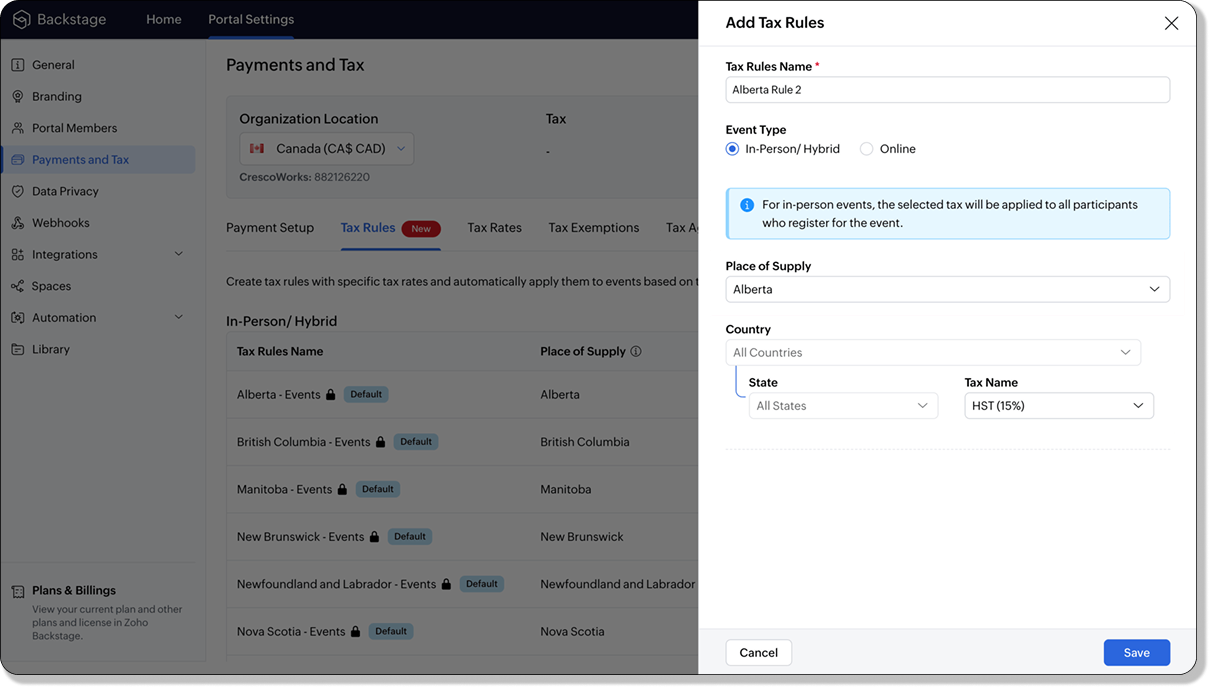

 
For in-person and hybrid events, Zoho Backstage automatically suggests tax rules based on the event location. The 13 default tax rules cover all Canadian provinces and territories. If the event location changes, the system automatically updates the relevant tax rules to reflect the new region’s rates.
 
You can also create custom tax rules by selecting a specific province or territory and applying a custom tax rate, offering greater flexibility for managing event taxes.
 
Applying Tax Rules to Virtual events
 
For online events, the system uses a default tax rule that covers all Canadian provinces and territories. Taxes are applied based on the attendee's location.
 
Canadian attendees are charged the applicable provincial tax rate.
International attendees are assigned a zero tax rate by default.
 
If you need to apply taxes to international attendees, you can create new tax rules tailored for online events, ensuring compliance with international tax regulations.
Info
  • Tax rules in Zoho Backstage are flexible and dynamic. You can modify them at any time during your event setup. However, changes will only apply to new transactions. Existing transactions will retain the original tax rule, ensuring previous purchases remain unaffected.
  • If you select a non-Canadian location for your event, the Canada Tax Rule will not be applied. This ensures taxes are only charged where applicable, preventing errors in cross-border events.

Event Category  


Categorize and filter events based on custom classifications for organizers and attendees to find and manage events easily. This new addition is aimed at improving event management by giving organizers the flexibility to create, manage, and filter events using custom categories. Organizers can now create up to 100 custom categories when setting up an event, giving them the freedom to define categories that suit their specific needs.
 
Previously, categories selected in Event Info were not utilized elsewhere, and there was no option to add new/manage categories.
Now, organizers can tailor categories to their specific needs and filter them on the Event Directory.

To access: 
  • While Creating an Event: On the Event Info page.
  • For Category Management: Under Portal Settings > Branding > Event Category.
Permissions:
 
Portal Owners & Admins:
  • Add, edit, and delete custom categories.
  • Cannot edit or delete default categories.
Event Organizers:
  • Can only add new categories.
  • Cannot edit or delete existing custom or default categories.


Other Enhancements 

Floor plan Focus Area 


The Focus Area in the floor plan refers to designated spaces within the event venue that are visually highlighted to draw attention to specific sections, such as booths, stages, or key locations. These areas allow organizers to emphasize important spots, making navigation easier for attendees and improving the overall flow of the event. Focus areas help guide visitors to essential parts of the venue, enhancing their event experience.

Custom Dates for  ticket classes (Early access)

In cases where smaller sessions or events (like welcome events, after-event parties, etc.) occur before or after the main event, this feature allows organizers to assign specific dates to separate ticket classes, ensuring tickets are only valid for the selected dates.
Info
Custom dates can be set within 30 days before or after the main event.

New WhatsApp triggers and templates 

The WhatsApp Integration, designed to enhance communication and engagement with all event stakeholders, now includes new triggers and templates to facilitate messaging and ensure timely updates for everyone.
 
For Purchasers:
  • Send Registration Confirmation: Instantly confirm registration to enhance the attendee experience.
  • Order Canceled: Notify purchasers promptly in case of any order cancellations.
For Speakers:
  • Welcome Speaker: Extend a warm welcome to our speakers and set a positive tone for their participation.
  • Speaker Added to a Session: Inform speakers when they’re added to a session, ensuring they are well-prepared.
  • Speaker Removed from a Session: Provide timely updates should there be any changes to their session involvement.
For Sponsors:
  • Thank a Sponsor Before Website is Live: Show appreciation early on, fostering positive relationships with sponsors.
  • Welcome and Thank Sponsor After Website is Live: Acknowledge sponsors publicly once the event website goes live.
  • Deny Sponsor Proposal: Deliver sensitive information with professionalism and clarity.
  • Acknowledge Sponsor Proposal: Confirm receipt of sponsor proposals, keeping communication open and transparent.
For Participants:
  • Event Canceled: Quickly inform participants in the event of cancellations, ensuring they’re kept in the loop.
We are continuously refining Zoho Backstage to make your event management experience even more powerful and intuitive. Stay tuned for more updates in the coming months!
 

If you have any questions, please contact support@zohobackstage.com
    • Recent Topics

    • Widget shows error

      Hi, May I ask why below characters will be auto added into the widget link and how to solve this error? As my widget shows 404 error now. ?serviceOrigin=https%3A%2F%2Fcrm.zoho.com&frameorigin=https%3A%2F%2Fcrm.zoho.com
    • "Spreadsheet Mode" for Fast Bulk Edits

      One of the challenges with using Zoho Inventory is when bulk edits need to be done via the UI, and each value that needs to be changed is different. A very common use case here is price changes. Often, a price increase will need to be implemented, and
    • Dropshipping Address - Does Not Show on Invoice Correctly

      When a dropshipping address is used for a customer, the correct ship-to address does not seem to show on the Invoice. It shows correctly on the Sales Order, Shipment Order, and Package, just not the Invoice. This is a problem, because the company being
    • Different Company Name for billing & shipping address

      We are using Zoho Books & Inventory for our Logistics and started to realize soon, that Zoho is not offering a dedicated field for a shipping address company name .. when we are creating carrier shipping labels, the Billing Address company name gets always
    • What's New in Zoho Inventory | Q2 2025

      Hello Customers, The second quarter have been exciting months for Zoho Inventory! We’ve introduced impactful new features and enhancements to help you manage inventory operations with even greater precision and control. While we have many more exciting
    • Make Packages from multiple sales order of a single customer

      Our customers sends orders to us very frequently, some times what customer wants is to ship items from 5 to 6 sales orders in a single shipment. it will be very nice if, zoho can implement this function, in which we can select items from other sales orders of the customer.
    • Update CRM Price Books to include volume discounts as per Zoho Books/Inventory

      Once again, Zoho has 3 great products that all store information in different ways (which is not helpful when you attempt to integrate the 3 products - one of the best features of Zoho). Zoho CRM Price Books are basic at best. Zoho Books/Inventory Price
    • Print a price list or price book

      Hi Community. Am I right in concluding that Zoho has no functionality to print a price list from either Zoho CRM, Zoho Inventory or Zoho Books? I won't get stuck on the fact that Zoho doesn't sync price books between Zoho CRM and Books/Inventory (more
    • Start Workflow from Deluge Script

      I have developed a customized process from our CRM that leverages a deluge script to create a statement of work document. Once the document has been created via the merge and store function, I would like the ability to start a workdrive review & approve
    • Add System Pre-Defined Lookup Field to Subform?

      Hi there! New to using Zoho, so this may already exist, but I'm having trouble figuring it out. Is there a way to get the system pre-defined Account Lookup field (in our case, renamed to Company Name), as the starting point for a subform? In our company,
    • Global lists for Multi select

      It would be great if I could select a global list to use for a multi select dropdown filed.
    • Pageless mode needed to modernise Writer

      When we switched from GSuite to Zoho, one of the easiest apps I found to give up, was Docs. In many ways, Writer has always been more powerful than Docs, especially in terms of workflows/fillable forms/etc. However, I went back into Docs because I notice
    • Show Custom Button in Portal Listview Canvas

      I have created a custom button that shows in a list view of deals (internally I can see it). I have permissions to allow this button on the portal. But it is not displaying in the canvas list? Before I do too much leg work, is this function allowed?
    • Zoho Survey Enhancements

      We love Survey. We use it a ton. It needs some enhancements. Maybe some of these are already on the roadmap? API - this is crucial. We have some complex surveys that take place and need to update records, trigger other functions/automations, etc. I would
    • Work Order Assignment for Engineers Handling Their Own Requests

      I’m setting up FSM for a business where there are multiple engineers, but each engineer handles their own process end-to-end receiving the service request, creating the work order, and completing the field service job. I noticed that I must create an
    • Zoho Sites "pages" management page

      I have 80 plus pages on zoho sites. When I go to the "pages" link to view and edit pages, They are not in any kind of order, so I spend lots of time searching for pages when I need to edit or create new. How can I change the view order of all my pages
    • AI feature in Zoho Desk suggesting answers based on past ticket threads

      Hi I would like to suggest something that would be very useful : instead of suggesting answers based on the Knowledge Base, I think it would be great if Zia could analyze the history of all customer and agents threads, to suggest answers in new tickets.
    • Advanced Customization of the Help Center using JavaScript

      Hello everyone, The Help Center in Zoho Desk can be customized by using HTML and CSS to provide structure and enhance the page's appearance—but what if you want to add interactive and dynamic elements? You can add these effects with JavaScript, a programming
    • Using a CRM Client Script Button to create a Books Invoice

      Hello, I need help handling error messages returned to my client script from a function. The scenario I have setup a client script button which is available from each Deal. This CS executes a crm function, which in turn creates an invoice based on the
    • Using IMAP configuration for shared email inboxes

      Our customer service team utilizes shared email boxes to allow multiple people to view and handle incoming customer requests. For example, the customer sends an email to info@xxxx.com and multiple people can view it and handle the request. How can I configure
    • Synchronise item image between Zoho Commerce and Zoho Books/Inventory/CRM

      Here is a blindingly simple idea to tie several Zoho products together. Zoho - please include a method to synchronise the item image (or images) from one Zoho application to another. For example, if you upload an item image in Zoho Inventory, a user should
    • Introducing Zoho POS for the Kingdom of Saudi Arabia

      Hey everyone, We are excited to kick-start December with a completely personalized edition of POS for retail businesses in Saudi Arabia to help run your operations with ease. It offers four different subscription plans—Free, Standard, Professional, and
    • Whatsapp Connection Status still "Pending" after migration

      Hello, I migrated my WhatsApp API to Zoho from another provider a day ago. So far the connection status is still “Pending”. There is a problem? How long does it usually take?
    • Unveiling Zoho Sites 2.0 - A new dimension in website building

      Dear Zoho Sites Users, We are thrilled to announce the launch of Zoho Sites 2.0 today! This refresh represents a significant step forward in the capabilities of Zoho Sites and is crucial for creating a lasting and positive impact on our customers' businesses.
    • Subform edits don't appear in parent record timeline?

      Is it possible to have subform edits (like add row/delete row) appear in the Timeline for parent records? A user can edit a record, only edit the subform, and it doesn't appear in the timeline. Is there a workaround or way that we can show when a user
    • Script Editor not an option

      I am trying to apply a script to a sheet and Script Editor is not an option. I don't want to go outside Sheets to do this (like Creator) if it can be done inside Sheets.
    • Zoho CRM - Writing Assistant Tone

      Hi Zoho CRM Team, Text in my emails often gets underlined in yellow because I tend to use a more informal tone with my client's, like using "I'm" instead of "I am". Is there some way for me to tell the system that this is my preferred writing tone, so
    • Not able to link email text.

      Kindly check Zoho Sites. I am unable to turn a text into a email link. The save button does not work. Kindly try yourself to see it not responding to save.
    • Adding Multiple Files to a Zoho Vault Entry

      There is a old blog post talking about adding multiple file attachments to one Zoho Vault Secret: https://www.zoho.com/blog/vault/introducing-new-features-in-zoho-vault-powerful-password-sharing-wider-storing.html Is that still possible, I can see how
    • Migrate data from old to new account

      Hy, Have one Old Zoho Notebook Account with Data , want to migrate that whole Data to New Zoho Notebook Account which is in Zoho One . Is that possible ? If Yes then how?
    • Option to Customize Career Site URL Without “/jobs/Careers”

      Dear Zoho Recruit Team, I hope you are doing well. We would like to request an enhancement to the Career Site URL structure in Zoho Recruit. In the old version of the career site, our URL was simply: 👉 https://jobs.domain.com However, after moving to
    • Zoho Analytics Regex Support

      When can we expect full regex support in Zoho Analytics SQL such as REGEXP_REPLACE? Sometimes I need to clean the data and using regex functions is the easiest way to achieve this.
    • Automating Employee Birthday Notifications in Zoho Cliq

      Have you ever missed a birthday and felt like the office Grinch? Fear not, the Cliq Developer Platform has got your back! With Zoho Cliq's Schedulers, you can be the office party-cipant who never forgets a single cake, balloon, or awkward rendition of
    • RTL Support for Webforms in Zoho CRM

      Dear Zoho CRM Support Team, We are writing to request an enhancement to the webform builder functionality within Zoho CRM. Currently, to create a webform in a right-to-left (RTL) language, the entire CRM instance must be set to RTL, which can be inconvenient
    • Zoho Projects - Visual improvement to parent and sub-task relationship

      Hi Projects Team, My feature request is to improve sub-task visibility. Please see screenshot below. I really think parent child relationships could be visually improved. Even if the first letter of the parent task was inline with other same level tasks
    • Add Custom Reports To Dashboard or Home Tab

      Hi there, I think it would be great to be able to add our custom reports to the Home Tab or Dashboards. Thanks! Chad
    • MCP > Creator connection failing with Claude

      I'm trying to get claude to access any of my Zoho Creator apps and it keeps failing. I have enabled all tools for creator and ensured in claude settings that everything is authorised. Here is what claude says : Unfortunately, the error messages I'm receiving
    • Pricing Strategies: #1 Nuances in Pricing

      When Clara first opened her digital printing shop, pricing was simple. She sold handmade greeting cards, planners, business cards, and other physical items at fixed label prices, individually and in bulk. One SKU, one price, one bill, and that's all it
    • [Free Webinar] Learning Table Series – Education Management in Zoho Creator

      Hello Everyone! We’re excited to invite you to another edition of Learning Table Series, where we showcase how Zoho Creator empowers industries with innovative and automated solutions. About the Learning Table Series The Learning Table Series is a free,
    • Channel Configuration and Default Channels

      There are some of the default fields that cannot be removed or changed. Examples are the social media ones, such as Facebook. It would be nice to be able to remove these fields as it would be confusing if someone selected this but it's not configure
    • Next Page