E-commerce has been a game changer for the past decade. It has drastically influenced the way people purchase. This pandemic broke all the existing rules by embracing automation and making the customer experience more personalized. Chatbots play a crucial role in automation as it focuses on conversational marketing. Over the last two years, chatbots in the e-commerce business have become popular due to their 2-way communication with customers. If you're looking to find out how chatbots help the e-commerce business, look no further. This post will help you to explore how to use SalesIQ's chatbot (Zobot) in different ways and increase sales and retention.
Emerging trends in e-commerce:
- Personalized way of marketing and engagement.
- Making the shopping experience more flexible.
- Providing instant support
With the increased demands and competition, you have to find a way to meet your customers' expectations and needs. Zobot provides a strong engagement strategy as it acts as a new channel to drive more sales by recommendation, instant support, and more. In addition, it leverages the concept of conversational commerce. Now that we know how the trends have evolved let's explore how to use Zobot and engage in a smart way.
Providing personalized suggestions and offers:
Visitors/customers may find it difficult or feel lost as there are countless options for similar products. Even though there is a way to sort and filter, it's still hard to decide. So, providing personalized suggestions based on their visitors' interests and tastes would help them avoid confusion and focus on what they really want.
However, personalization requires data. Zobot can help to capture information about visitors' interests and preferences from recent purchases, chats, activities, and more. Then, you can provide a personalized recommendation to your visitors using the
Criteria router and
link cards.
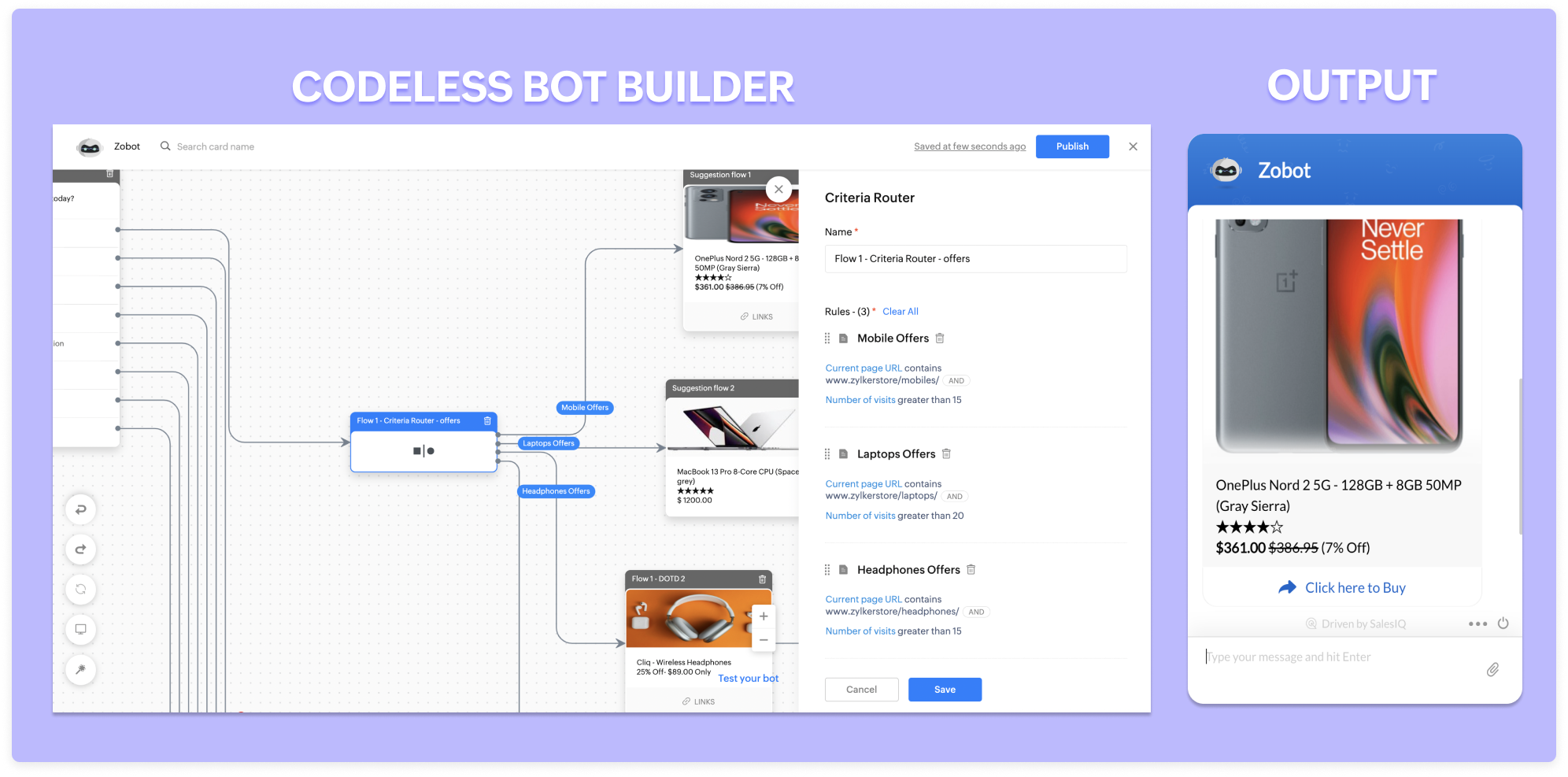
Similarly, you can provide customized offers to your visitors based on their recent activities on the site, CRM lead score, location, and more. For example, suppose a visitor is visiting one particular product more than ten times. In that case, you can give them 5% to 10% off and convert them.
Available 24/7:
A recent survey states that around 46% of customers would like to talk to an expert before making a purchase. That's because the concept of buying has changed completely. In the olden days, we would go to a store, see the product, feel it, question it, and finally make a purchase. But it's entirely upside down with online shopping. Zobots can help visitors talk with your operators instantly at any time based on the operator's availability.
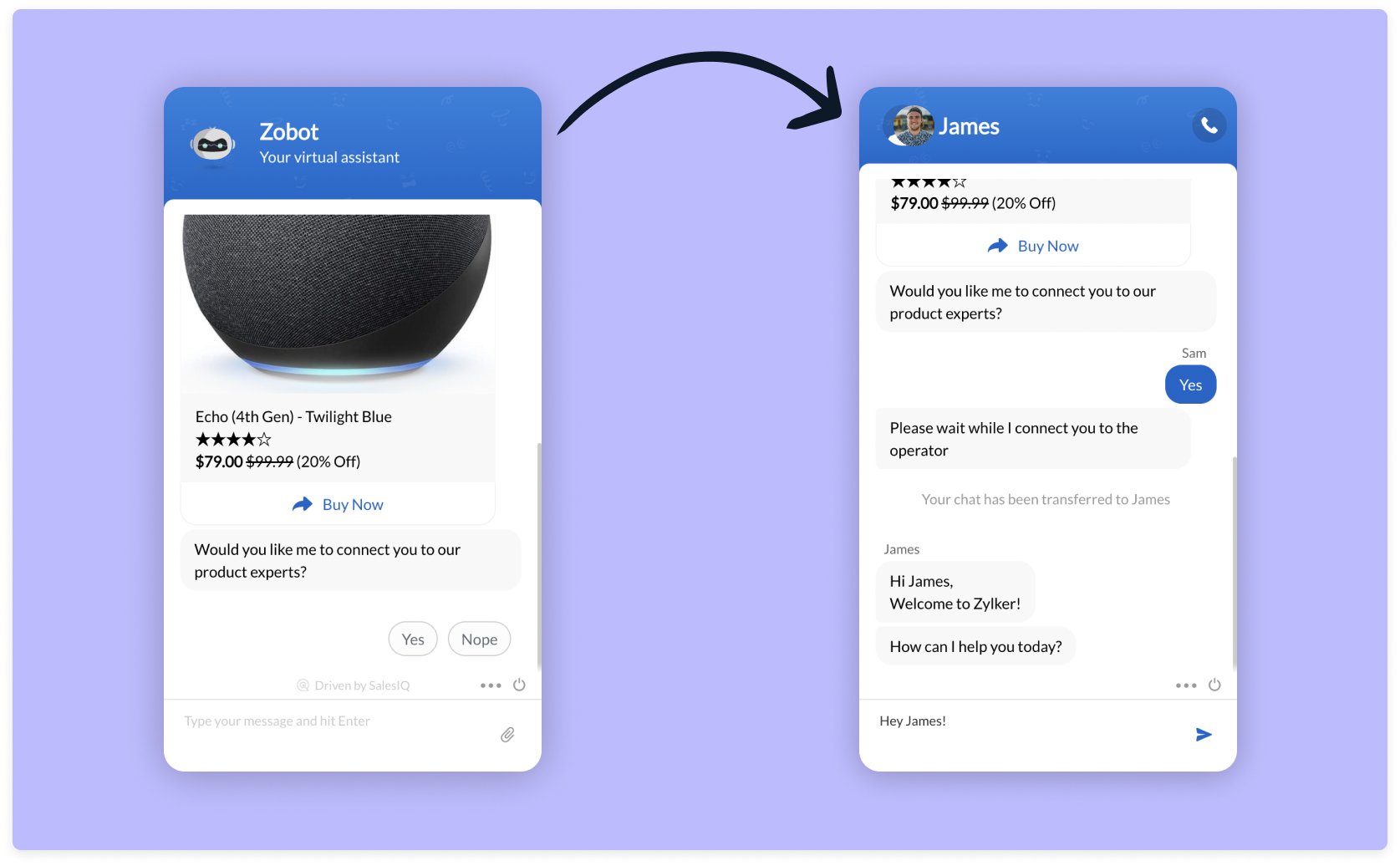
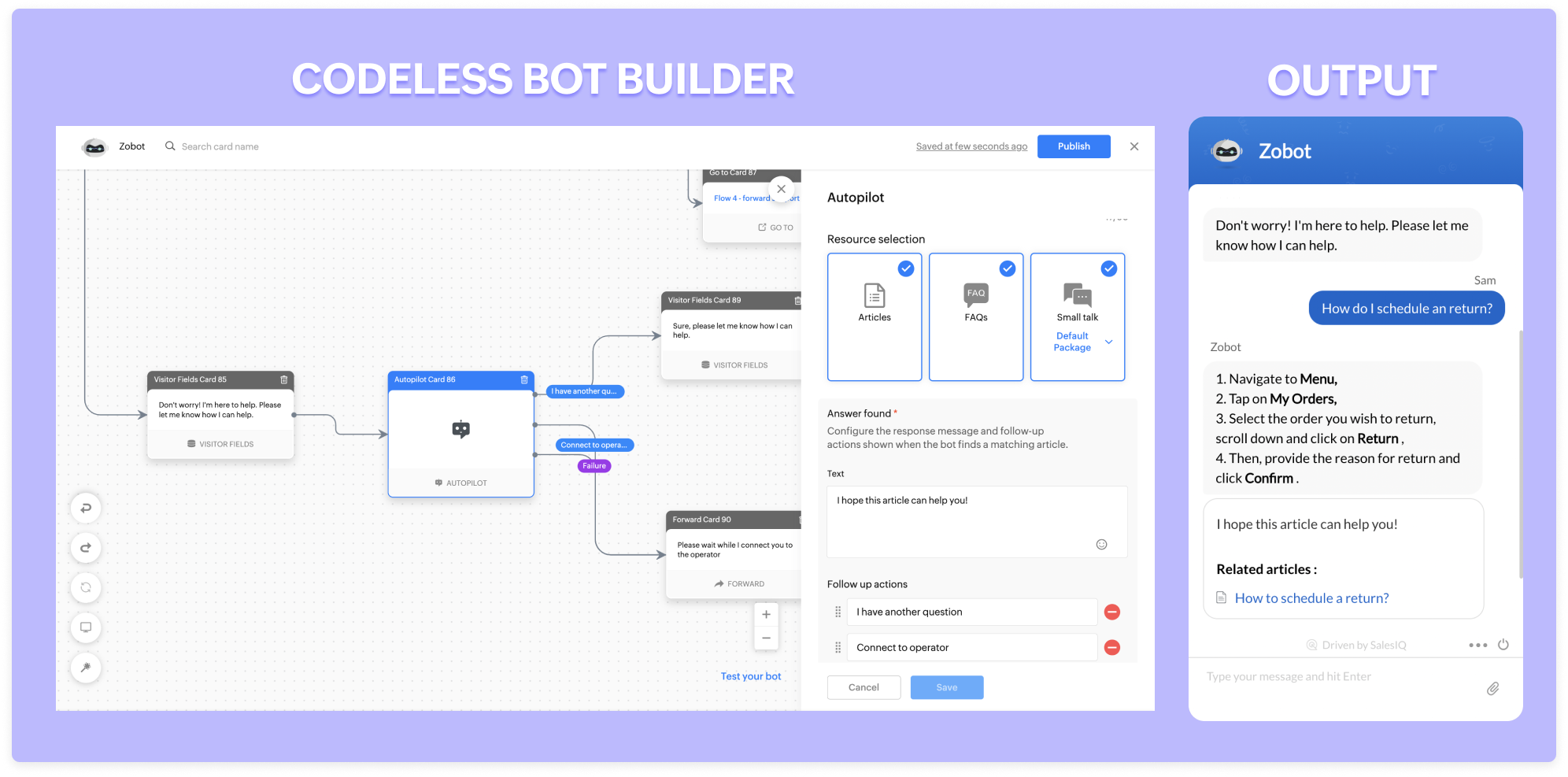
Zobot can stay available 24/7 throughout the year. They will assist and engage with every single visitor simultaneously without missing anyone. They go an extra mile and take messages for you when operators are unavailable. With our new addition, the
autopilot (NLP functionality), lets Zobot answer all the general, routine questions and save your operators time for only complex problems.
Recover abandonment carts:
One of the significant problems in the e-commerce business is cart abandonment during checkouts. The possible reasons might be,
- Additional costs such as taxes, shipping charges
- Lack of information (Return policy/estimated delivery date)
- Complicated checkout process
- Inadequate payment methods
- Less pricing availability
These are not the only reasons for cart abandonment. People often get distracted easily and forget about the cart. Zobots can help with three to four problems listed above. They can proactively remind visitors about the cart and necessary details when visiting again. You can go a step ahead and offer some discounts while checking out. This way, visitors are likely to end up checking out their cart.
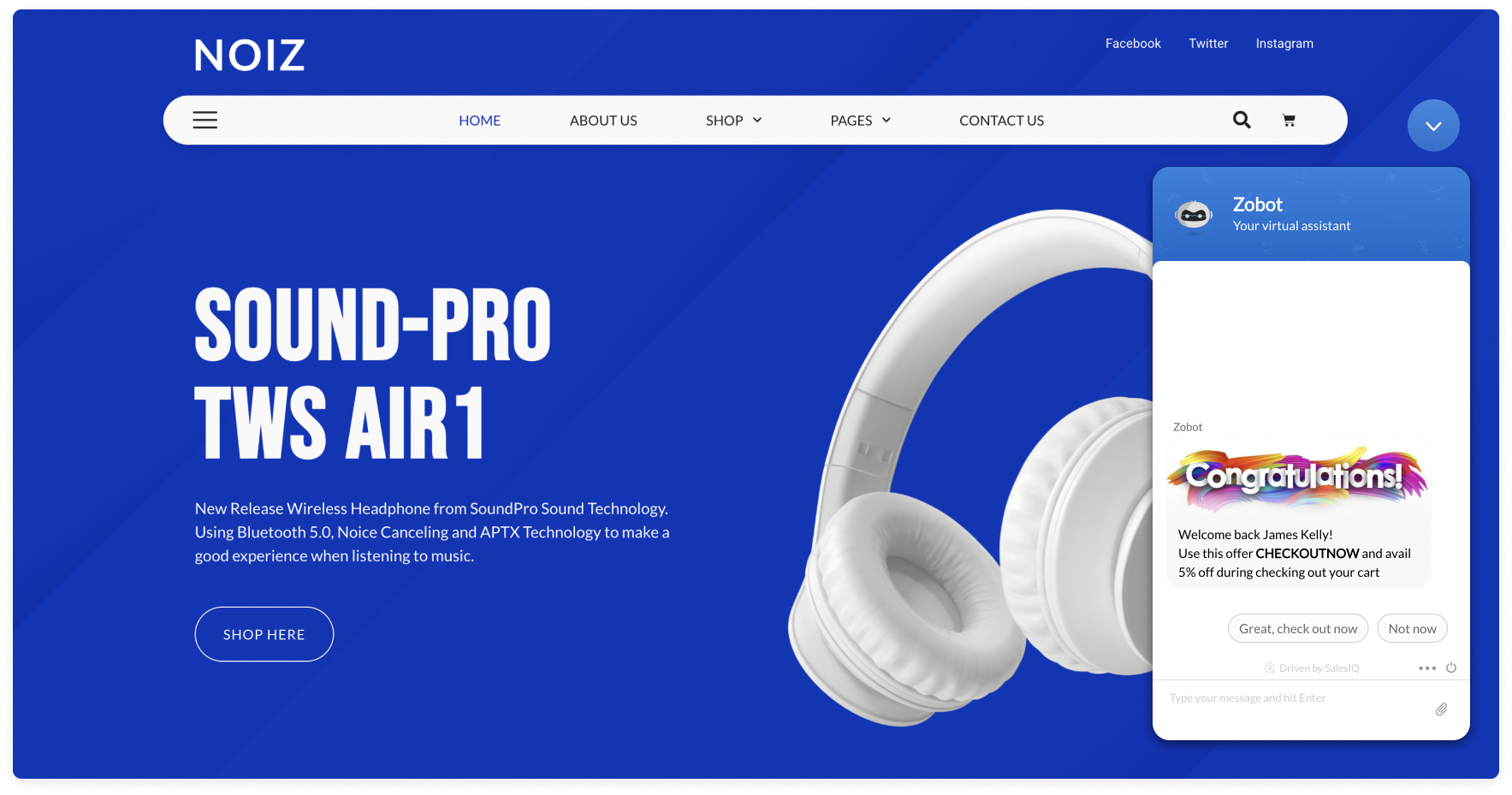
With the
Plugs in the
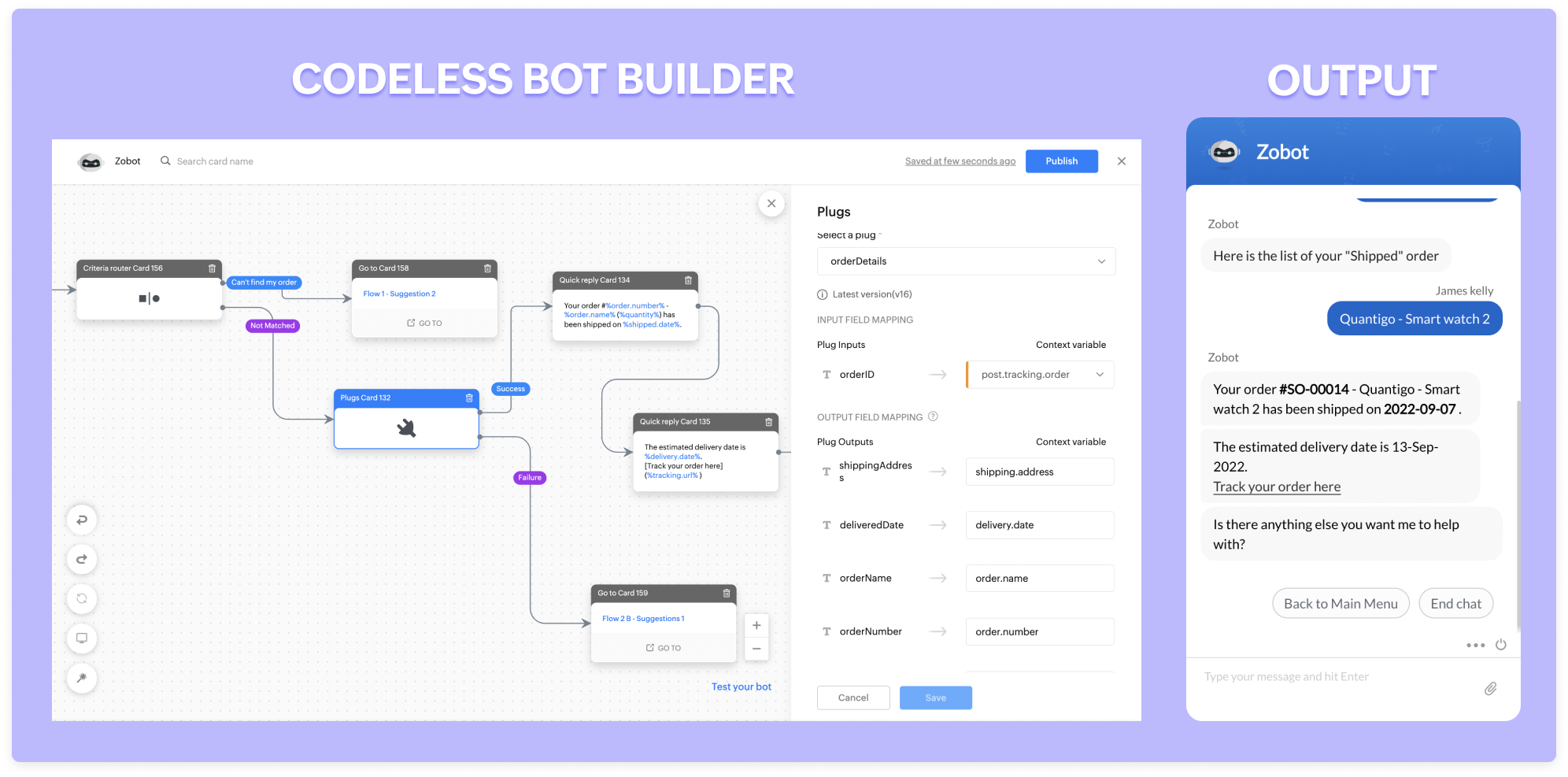
Codeless bot builder, you can check if there is any product listed on their cart and if yes, you can trigger a reminder to your visitors.
Manage your orders:
Zobot comes in handy for managing orders. They can pull information about your order status and help track your orders by providing tracking URLs. Furthermore, they can change the shipping/billing address, request to postpone delivery dates, and even cancel/return the orders (if your service supports them).
If your wish-listed or interested product goes out of stock, Zobot will notify you when the stock is available during your visits.
Other advantages:
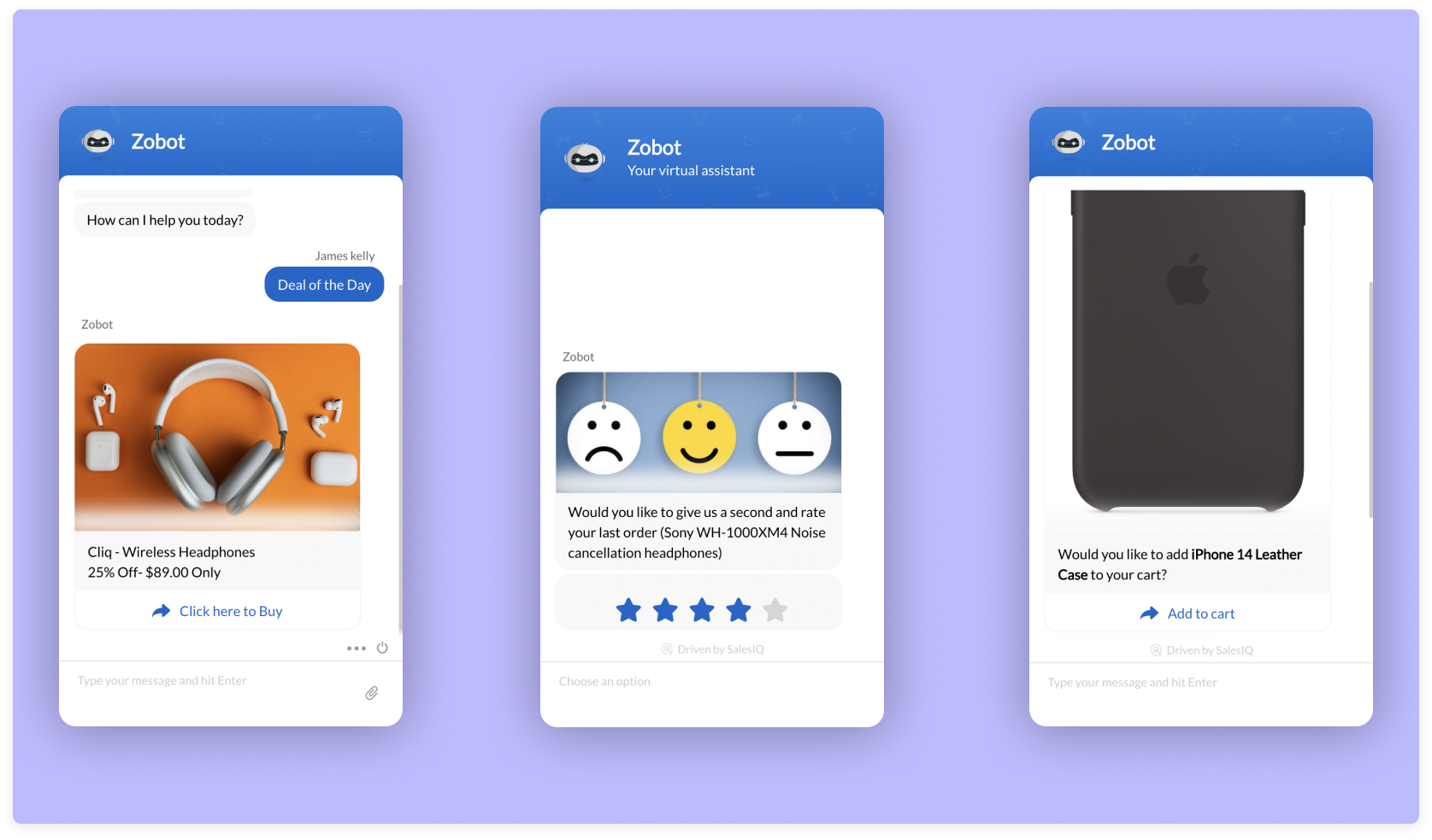
- Zobots are great at collecting feedback. Using a feedback widget, you can set them to capture product ratings and reviews within seconds.
- They act as an excellent way to showcase your offers and deals! You can even set them proactively and let your visitors know about your great deals.
- They can be also help in up-selling. For example, they can recommend mobile cases when you buy a phone.
Here is a webinar
recording exclusively for building zobot for e-commerce businesses. Use Zobots, engage with your visitors in a smart way, and power up your e-commerce business.
Regards,
Sasidar Thandapani
Recent Topics
How do I create an update to the Cost Price from landed costs?
Hi fellow Zoho Inventory battlers, I am new to Zoho inventory and was completely baffled to find that the cost price of products does not update when a new purchase order is received. The cost price is just made up numbers I start with when the product
How to change Zoho Vault password
I am searching where I can change the Vault Password after having changed the Zoho account password. I don't see this option anywhere in my account. It should be simple and accessible! Please help. Thanks!
Zoho Workdrive - Communication / Chat Bar
Hi Team, Please consider adding an option to allow admins to turn on or off the Zoho Communication Bar. Example of what I mean by Communication Bar: It's such a pain sometimes when I'm in WorkDrive and I want to share a link to a file with a colleague
From Zoho CRM to Paper : Design & Print Data Directly using Canvas Print View
Hello Everyone, We are excited to announce a new addition to your Canvas in Zoho CRM - Print View. Canvas print view helps you transform your custom CRM layouts into print-ready documents, so you can bring your digital data to the physical world with
Prefered Bin Missing in android APP
Andoroid app dosent show preferred bin in the picklist. The workaround support reccomend is to use the computre to create the picklist. it shuld be information to be shown aas basic for the pciker.
Where to Add Machines as Products to Map with Assets in Zoho FSM?
implementing Zoho FSM for a clinical equipment supply company. The business sells and installs clinical machines in hospitals and clinics, and they also handle service requests, scheduled maintenance, calibration visits, and general machine upkeep. In
Changing Department often causes the Firefox tab to freeze
Title, it doesn't seem to happen with neither Opera nor Chrome. And even in Firefox, sometimes it just lets me change the department I'm in no problem, even to All Departments which is probably the most, like, resource heavy? But most of the time, the
Show Zoom Link in Recipient's Calendar
We set up meetings within a record, selecting the "Make this an online meeting". We use Zoom. Most of the recipients go to their calendar (usually Gmail or Outlook, corporate) to join the Zoom meeting, but there is no Zoom link in the calendar. Can this
Creating multiple CRM leads from a Zoho Forms subform
Hi all, We have a heavily used intake form that is used for new leads as a part of our intake. There is a subform that allows the lead to add additional team members, their titles and other basic info. That form submission creates a new Lead and the subform
Passing the CRM
Hi, I am hoping someone can help. I have a zoho form that has a CRM lookup field. I was hoping to send this to my publicly to clients via a text message and the form then attaches the signed form back to the custom module. This work absolutely fine when
Zoho CRM for Everyone's NextGen UI Gets an Upgrade
Hello Everyone We've made improvements to Zoho CRM for Everyone's Nextgen UI. These changes are the result of valuable feedback from you where we’ve focused on improving usability, providing wider screen space, and making navigation smoother so everything
Zoho Bigin - should be able to link a "contact" to multiple "companies"
Hello Support, I called into telephone support and was told that a contact can only be linked to one company. We have situations were director are contacts of and directors of multiple companies so that seems a basic weakness in Bigin. When go to add
Does Thrive work with Zoho Billing (Subscriptions)?
I would like to use Thrive with Zoho Billing Subscriptions but don't see a way to do so. Can someone point me in the right direction? Thank you
Using IMAP configuration for shared email inboxes
Our customer service team utilizes shared email boxes to allow multiple people to view and handle incoming customer requests. For example, the customer sends an email to info@xxxx.com and multiple people can view it and handle the request. How can I configure
Open a record to edit based on another form being edited
Hi all, I am trying to edit a record based on another record being edited. It works out like this: When I create a Monthly_Update and then submit I open the Monthly_Levels form and pass the ID from the Monthly_Update to a field called mu. I want it to
Radio button data won't update
Wondering if anyone is experiencing the same problem. I tried bulk updating our data on Zoho Creator using API and noticed that the radio button field wasn't updated. I have tried updating it manually, it didn't work. When I tried updating a text field
Synchronise item image between Zoho Commerce and Zoho Books/Inventory/CRM
Here is a blindingly simple idea to tie several Zoho products together. Zoho - please include a method to synchronise the item image (or images) from one Zoho application to another. For example, if you upload an item image in Zoho Inventory, a user should
Using a CRM Client Script Button to create a Books Invoice
Hello, I need help handling error messages returned to my client script from a function. The scenario I have setup a client script button which is available from each Deal. This CS executes a crm function, which in turn creates an invoice based on the
Accessing shared mailboxes through Trident (Windows)
Hi, I have a created a couple of shared mailboxes. The mailboxes are showing up on the browser based Zoho workplace, but I cannot seem to figure out how to access my shared inboxes through Trident (Windows). Am I missing something or is this feature not
Uploading a signed template from Sign to Creator
Good day, Please help me on how to load a signed document back into Creator after the process has been completed in Sign. Below is the code that I am trying, pdfFile = response.toFile("SignedDocument_4901354000000372029.pdf"); info pdfFile; // Attach
MCP > Creator connection failing with Claude
I'm trying to get claude to access any of my Zoho Creator apps and it keeps failing. I have enabled all tools for creator and ensured in claude settings that everything is authorised. Here is what claude says : Unfortunately, the error messages I'm receiving
No Ability to Rename Record Template PDFs in SendMail Task
As highlighted previously in this post, we still have to deal with the limitation of not being able to rename a record template when sent as a PDF using the SendMail Task. This creates unnecessary complexity for what should be a simple operation, and
New in CPQ: Smarter suggestions for Product Configurator by Zia, and additional criteria in Price Rules
Hello everyone! CPQ's Product Configurator in Zoho CRM allows sales teams to define structured product bundles through configuration rules, ensuring that the right product combinations are applied consistently in quotes. Admins set up these configurations
Feature Request: Dynamic Dimension Control for zc_LoadIn Popups
As detailed in this community discussion, Zoho Creator's zc_LoadIn parameter is a vital tool for opening components (forms, reports, or pages) in modal dialogs via HTML snippets, Notes, or Rich Text Fields. While powerful, this feature suffers from a
Introducing Multi-Asset Support in Work Orders, Estimates, and Service Appointments
We’re excited to announce a highly requested enhancement in Zoho FSM — you can now associate multiple assets with Work Orders, Estimates, and Service Appointments. This update brings more clarity, flexibility, and control to your field service operations,
Process between CRM and Campaigns to ensure double opt-in contacts?
I would like to ask for a few clarifications to ensure we fully comply with best practices and legal requirements: According to the documentation (Zoho Campaigns CRM sync – Default option), the best and recommended way to sync contacts is by using the
Zoho Books - New Interface keep details with PDF View
Hello, The Zoho Books Interface has changed for estimates etc... One thing is causing issues though. Before the change, in PDF view you could see the detail information including custom fields entered for the estimate. Now, you have to switch between
Zoho CRM Kiosk issues
Firstly this is for a system on the AU servers if that makes a difference. Issues are as follows (For Kiosk): 1. Re-ordering fields in the screen builder is broken. The fields seem to be re-ordering themselves, unless you order everything by moving the
Tip #52- Zoho Assist Downloads: Everything You Need in One Place- 'Insider Insights'
Looking to start remote support sessions faster, manage unattended devices effortlessly, or join sessions without any hassle? The Zoho Assist Downloads Center has all the tools you need—across desktop, mobile, IoT, and browser environments. With our range
Condition based aggregate fields in subforms
Hello everyone, We're excited to inform you about the latest enhancements made to our aggregate field capabilities in subforms; create aggregate fields based on conditions! An aggregate field is a column on which a mathematical function has been applied.
Presenting ABM for Zoho CRM: Expand and retain your customers with precision
Picture this scenario: You're a growing SaaS company ready to launch a powerful business suite, and are looking to gain traction and momentum. But as a business with a tight budget, you know acquiring new customers is slow, expensive, and often delivers
SalesInbox
Sorry for saying this but SalesInbox is a really mess. BIG FAIL. Bad UX and VERY bad IMAP sync. I don't know how can someone use this to be more productive. It's just the oposite. I'm trying to use SalesInbox for a while but sales people do not have just sales activities so we still have to came back to the mail app anyway. Folders of SalesInbox are not in sync with folders of mail server (wich syncs Ok to mobile) and vice-versa wich leads to double work as now you have to cleanup 3 inboxes (Mail
Print labels on selected view
How can I print labels for select view. Always defaults to ALL contacts when I select View = Mailing Labels. Thanks!!
Update CRM Price Books to include volume discounts as per Zoho Books/Inventory
Once again, Zoho has 3 great products that all store information in different ways (which is not helpful when you attempt to integrate the 3 products - one of the best features of Zoho). Zoho CRM Price Books are basic at best. Zoho Books/Inventory Price
Change in Zoho CRM API?
Hello, I am using the Zoho API trough the PHP SDK v2.1 Since few days, I noticed that I have to change the way I pass the data to the API when I create, update, or upsert a record. Dates Before I was passing a PHP date object to "$record->addKeyValue(...)",
All new Address Field in Zoho CRM: maintain structured and accurate address inputs
The address field will be available exclusively for IN DC users. We'll keep you updated on the DC-specific rollout soon. It's currently available for all new sign-ups and for existing Zoho CRM orgs which are in the Professional edition. Latest update
Tip #40- Strengthen Remote Support with IP-based Restrictions in Zoho Assist– ‘Insider Insights’
Protecting sensitive data and preventing unauthorized access is a top priority for any organization. With IP-based restrictions in Zoho Assist, you can ensure that only users from trusted networks can initiate remote support sessions. Say your IT team
Printing Client Lists
I was looking for a way to print out client lists based on the account. For example if I want all my contacts from company A on one sheet, how would I do this. Moderation Update (3rd December 2025): There are two challenges discussed in this thread. 1.
Qwen to be the default open source Generative AI model in Zoho Desk
Hello everyone, At Zoho Desk, we will make the latest Qwen (30B parameters) the default LLM for our Generative AI features, including Answer Bot, Reply Assistant, and others. As a subsequent step, we will discontinue support for Llama (8B parameters).
ZOHO Blueprint and Workflow
Hi, Correct me if i'm wrong, Blueprint triggers when a record that meets the criteria is created. It follows a specific transition that you will be setting up. Does blueprint work if the first state was triggered by a workflow? For example, In my custom module 1, I have a field named status. The statuses are 1, 2, 3 and 4. As soon as I create a new record, a workflow triggers that updates the status field to 1. Can a blueprint start from 2? My other concern is, can blueprint transitions work at the
Next Page