Building extensions #2: Creating extensions for Zoho Projects using a CLI
In our previous post, we noted the two ways to create extensions for Zoho Projects— using the cloud editor and using the command line interface (CLI). We also shared how to create an extension using the Sigma cloud editor. In this post, we'll take a closer look at creating an extension using the CLI.
You'll learn how to create an extension project template with the CLI, test it, upload the zipped project while creating an extension, and then edit or change it. Let's go over each of these steps in detail.
Building an extension project using the CLI
- To create an extension project, we must first set up the development environment, which involves:
➤ Downloading Node.js: Node.js acts as the base platform as well as the JavaScript environment in which the JavaScript code is executed.➤ Installing ZET CLI: Zoho offers a command line interface called Zoho Extension Toolkit (ZET) which enables you to build, test, and pack your extension project.Please follow the steps in this link to download Node.js and install ZET CLI.
- Once the development environment is ready, use the basic ZET commands to create, validate, pack, and test your extension project.
➤ zet init: Create a new project and add the necessary folder structure and resources➤ zet validate: Validate the entire project➤ zet pack: Pack the project to get a zipped file that will later be associated as the connected app➤ zet run: Run the internal Zoho server to test the project locally
Now, let's use these commands to create and manage an extension project.
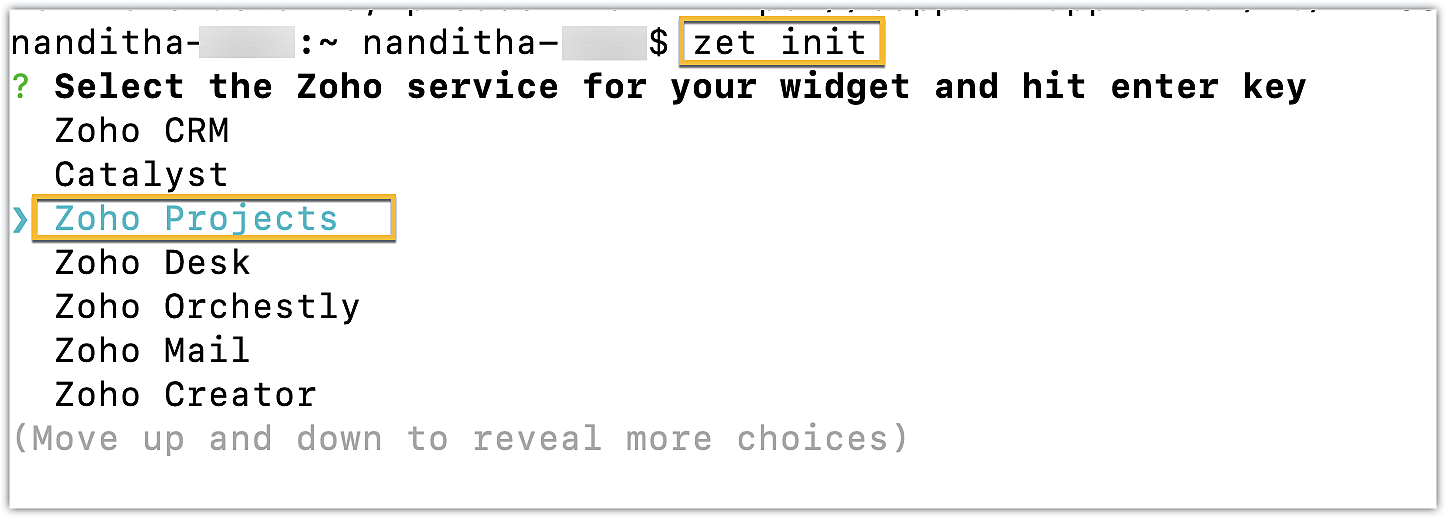
- First, use the zet init command. Select Zoho Projects as the Zoho service from the dropdown list.
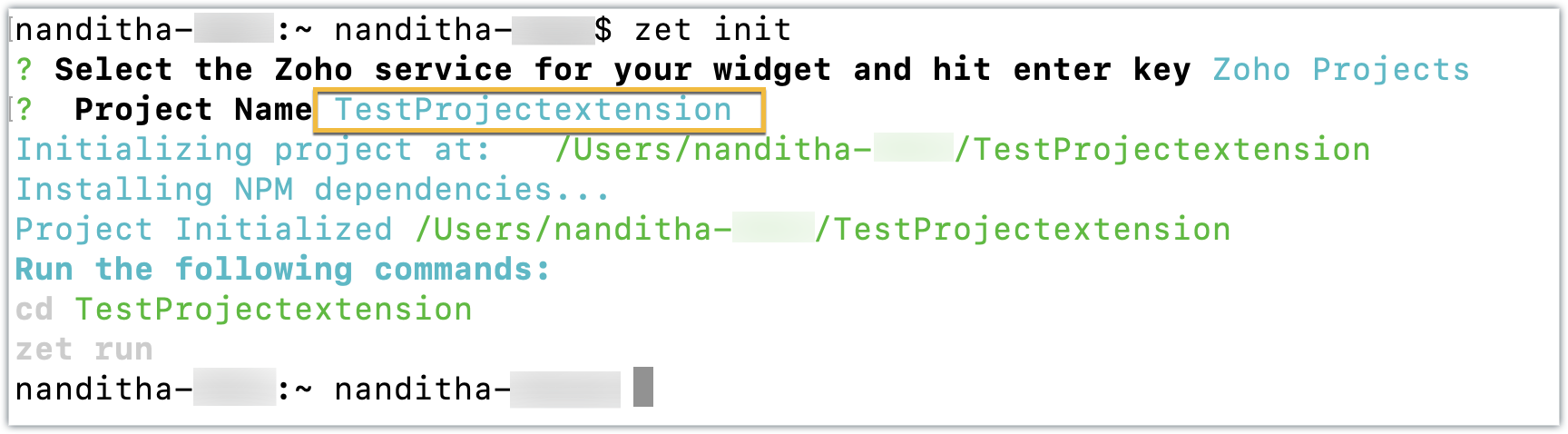
- Enter a name for the extension. An extension with the directory structure required for a sample Zoho Projects extension is created automatically.
- This directory structure contains an app folder and a plugin-manifest.json file, both of which are similar to those created by the Sigma cloud editor detailed in the last post.
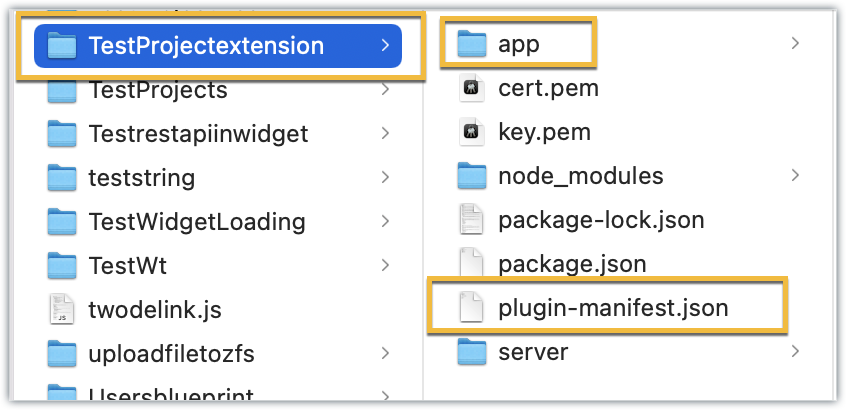
- The app folder can be used to manage all the important resources required for your extension. By default, itincludes an index.html file, which serves as the UI for a sample widget.
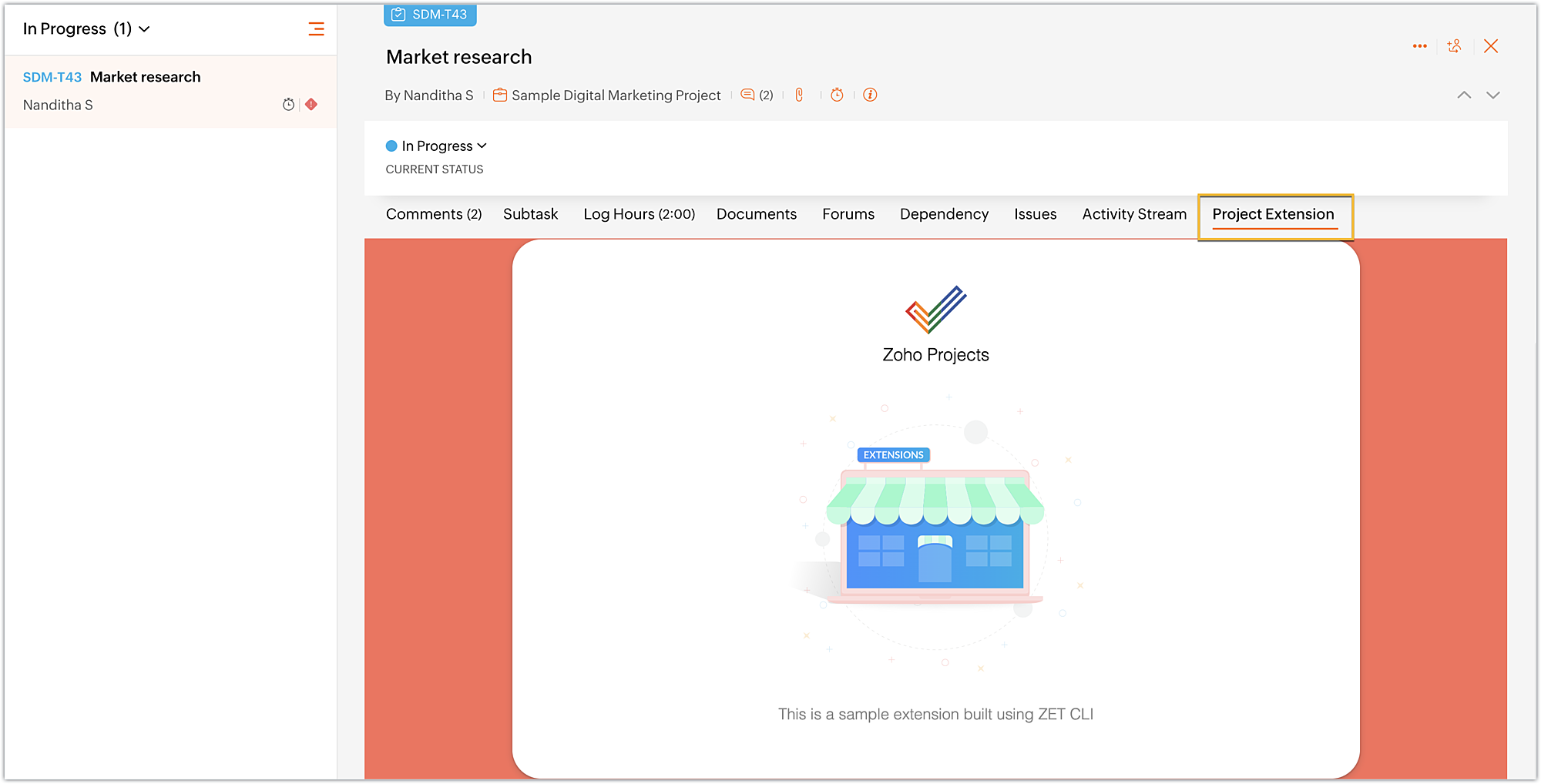
- The plugin-manifest.json file helps with extension configuration. It includes a widgets key configured with a default sample widget named, "Projects Extension" in the default location as the task details tab, along with the URL as the location of the index.html file.
Now that the extension project has been created, lets go ahead and test it in the Zoho Projects portal.
Testing an extension project using the CLI
- To test a sample Zoho Projects extension created with the ZET CLI, use the Change Directory command to navigate to the project folder. Then, run the zet run command.
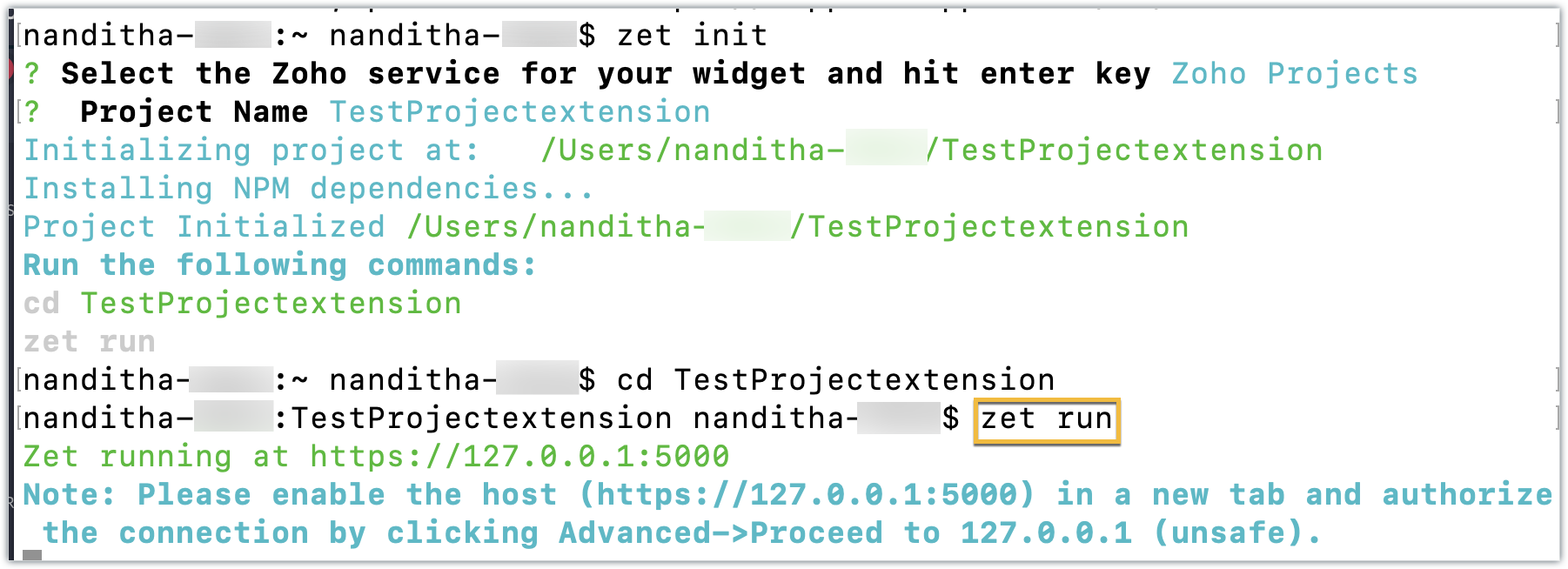
- This command starts a local server and enables you to test your extension locally.
- Now, navigate to your Zoho Projects portal. Click the Setup icon.
- Select Developer Space from the left panel. Click Enable Developer Mode.
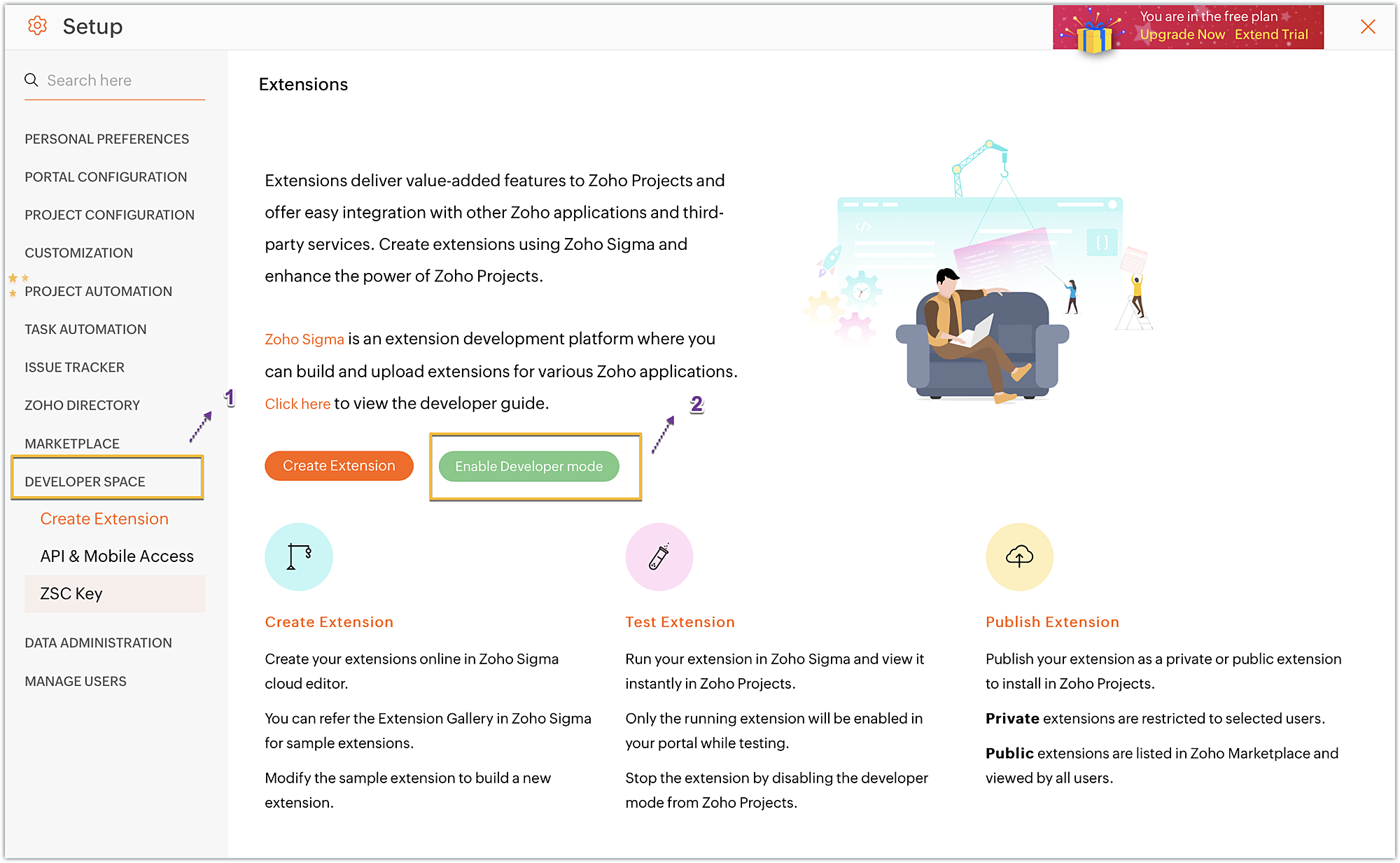
- Developer Mode will be enabled and the page will automatically refresh.
- You may now test your extension functionalities in the Zoho Projects portal.
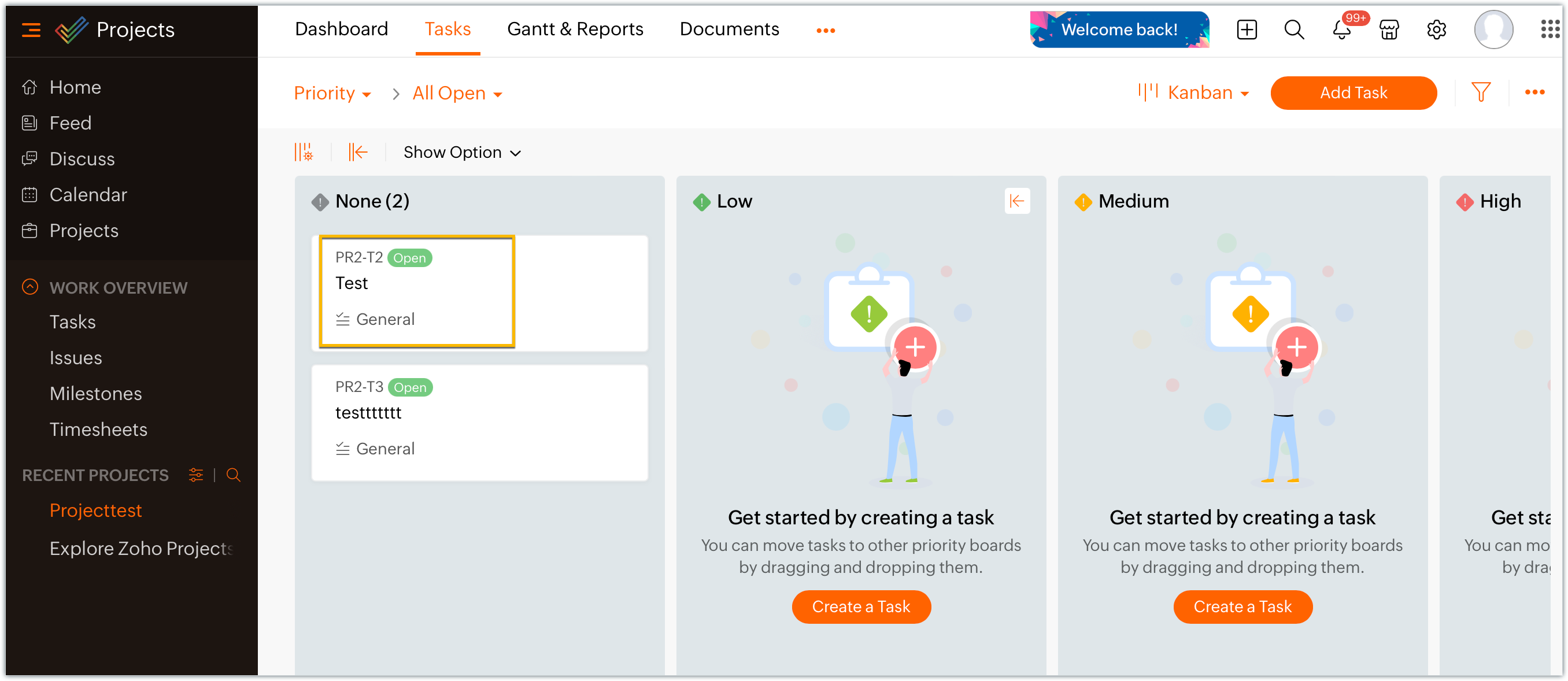
- Since the sample extension had a default widget called, "Projects Extension" configured on the Task Details page, choose and enter a project task in your portal.
- Click on the Projects Extension tab on the Task Details page, and you will see that the widget has loaded.
- Once you have finished testing your extension's functionality, use the zet pack command. This command adds a dist folder to the directory structure, zips the extension project, and places the zipped file inside the newly created dist folder.
Uploading the zipped file to your Sigma extension
Now that we have created the extension project and tested its functionalities locally, lets go ahead and create an extension in Sigma.
- Log into or sign up for developer.zoho.com. Go to Sigma and access your workspace.
- Once you enter your Sigma workspace, click the New Extension button to build a new extension.
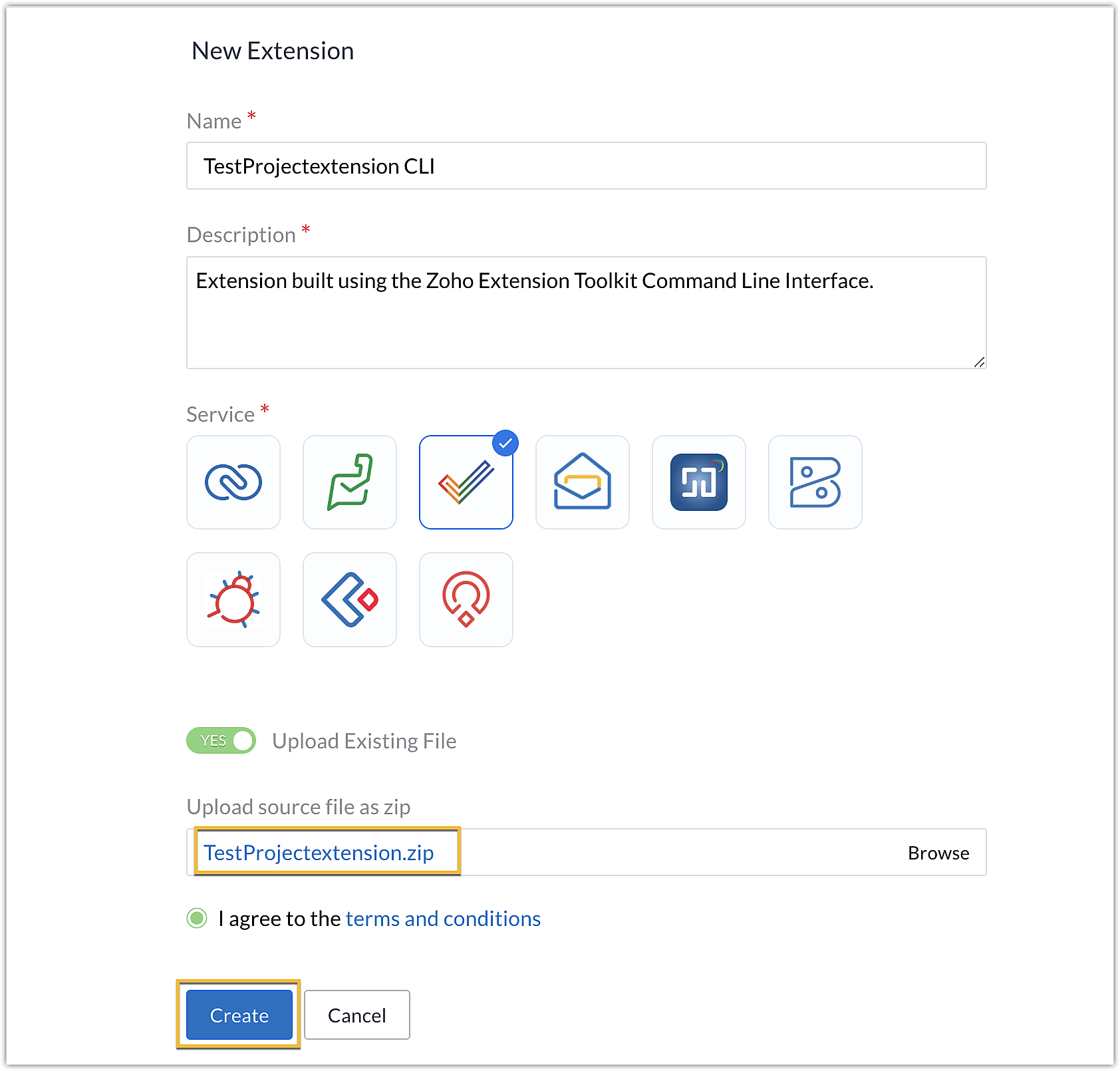
- Enter a name and description for the extension. Choose Zoho Projects for the service.
- Toggle Upload Existing File to Yes.
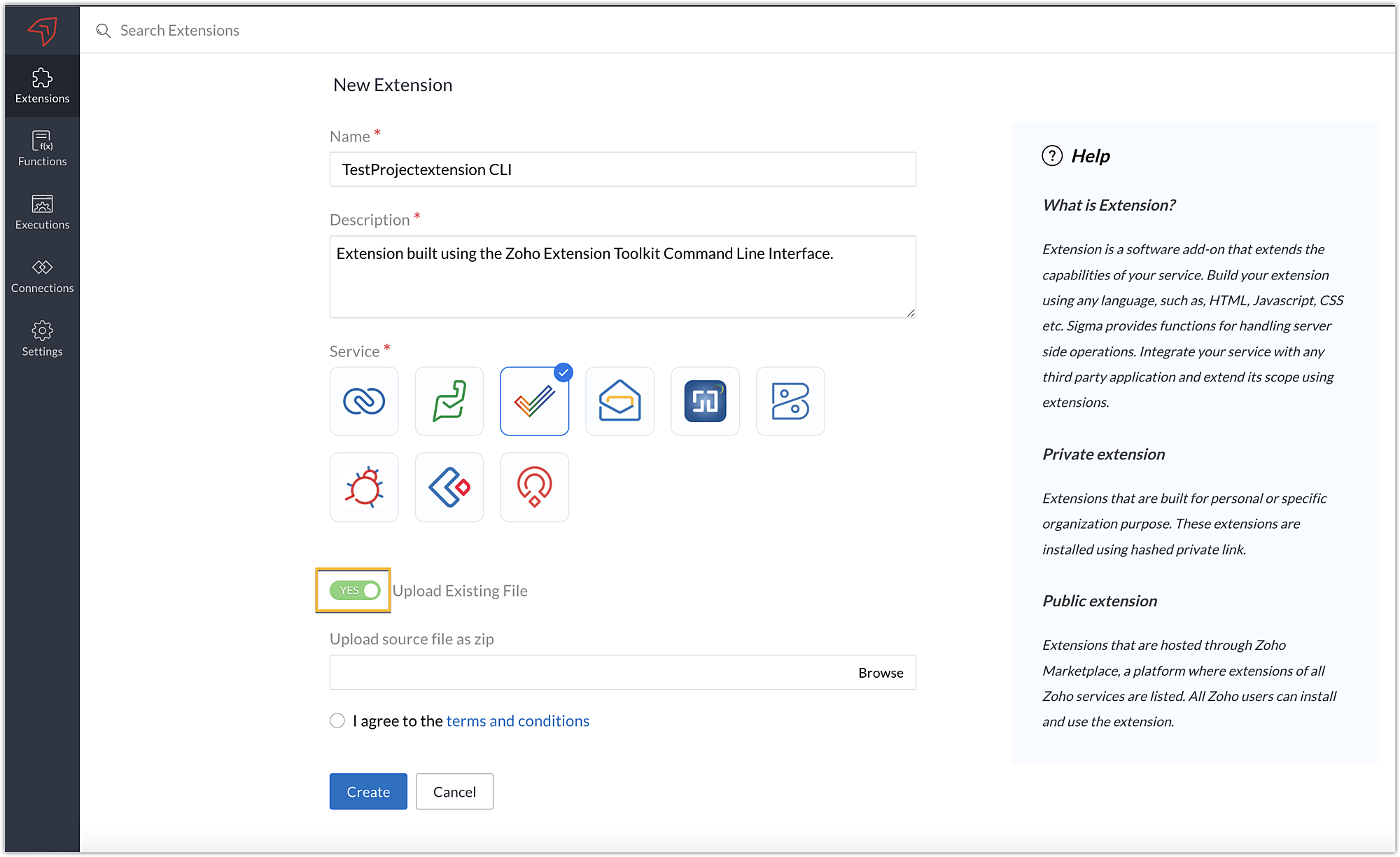
- Click Browse to locate and upload the extension project's zipped file, accept the terms and conditions, and click Create.
- You will be redirected to the cloud editor. The directory structure of your CLI extension project will be automatically populated with the project's contents.
Editing an extension created with the CLI
- You can make edits or changes to your extension code directly from the cloud editor.
- If you wish to make changes to a file or its contents in the directory structure of your CLI extension project, please be sure to pack the extension project again using the zet pack CLI command.
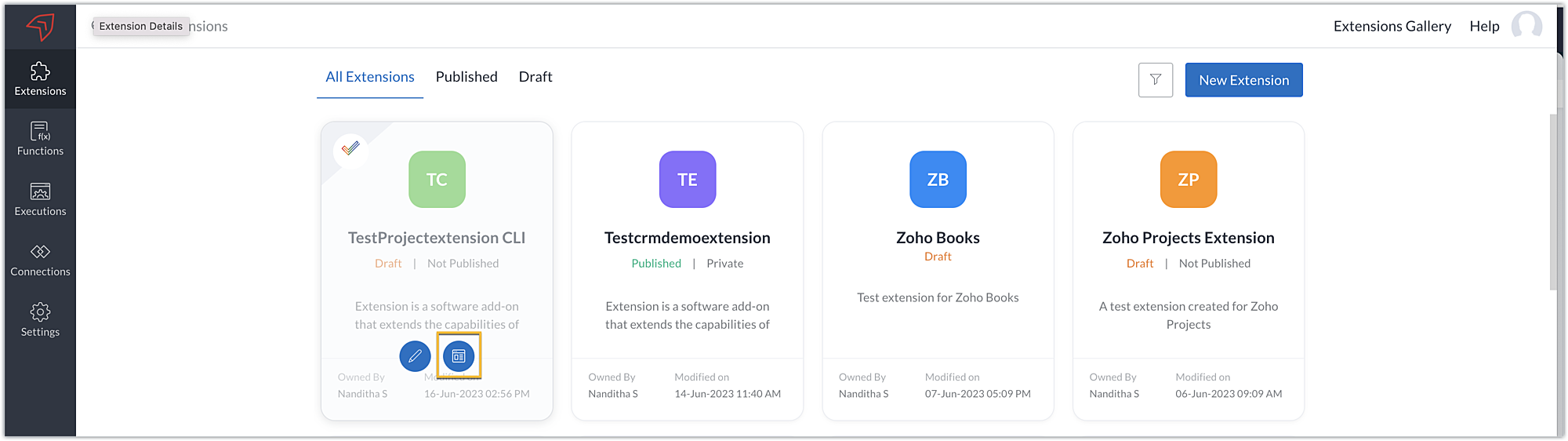
- Go to Sigma. Click the Extension Details icon of the extension you wish to edit.
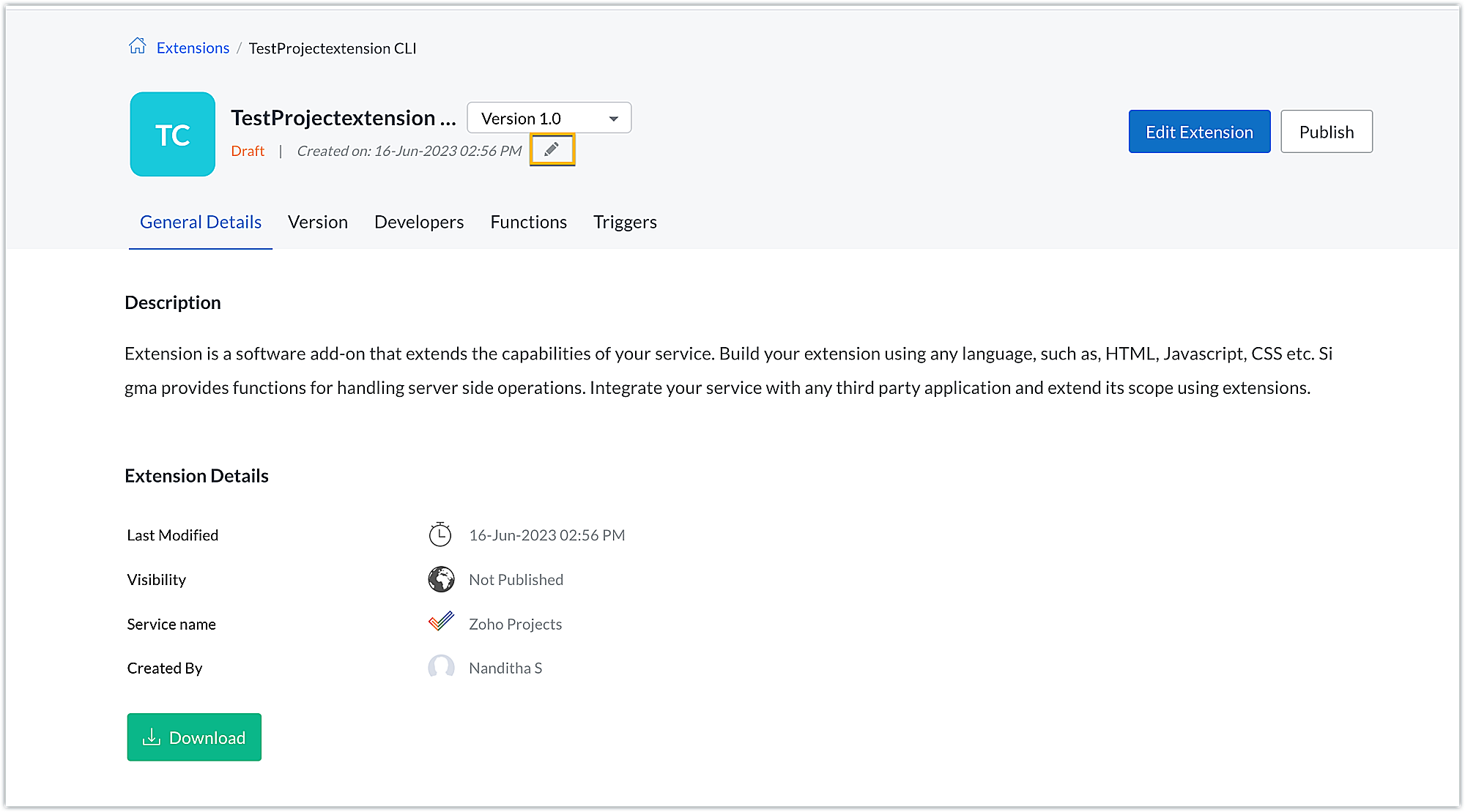
- Click the Edit icon under the extension name.
- Browse for and upload the new zipped file, accept the terms and conditions, and click Update.
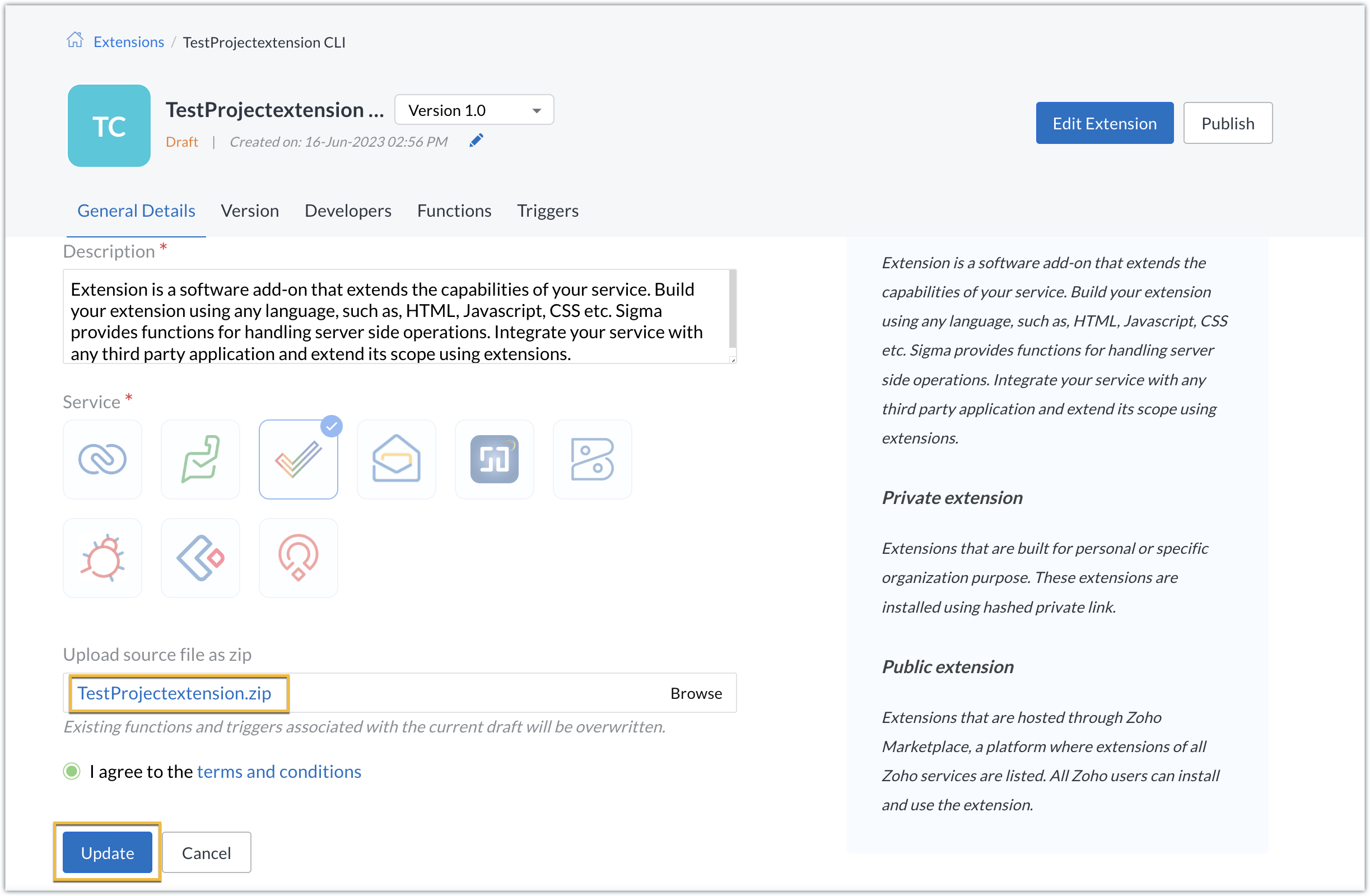
- The extension will be updated to reflect the changes you have made.
In this post, we have covered the process of creating an extension for Zoho Projects through ZET CLI. We hope you found this information useful. Keep following this space for more information!

Sign up for a Zoho Developer account and start developing extensions for Zoho products using Sigma.
SEE ALSO
Topic Participants
Nanditha Somasundaram Somasundaram
Sticky Posts
Building extensions #10: Fetch customized user inputs, store them globally at the app level, and access them across entities
This data storage concept enables you to store data related to your extension for both entity properties and extension properties. In our previous piece, we looked at how to store data for entities using entity properties. In this post, we'll look atBuilding extensions #9: Store, retrieve, and access entity-specific data in widgets using data storage
Data storage - Overview Storing data related to the extension you are working on is essential. It can be saved as key-value pairs for an entity or extension, known as entity and extension properties, respectively. Data can be saved for the following entitiesBuilding extensions #7: Create custom widgets for a simplified end-user experience
Discover the benefits of using widgets! We explored the significance of widgets, prerequisites, and the availability of JS SDK methods as part of our previous post. In this post, let's go over a detailed example of using widgets along with certain ZohoBuilding extensions #6: Custom user interfaces with Widgets
Welcome to our post on Widgets for Zoho Projects! In our last post, we explored the significance of the connections feature, showed how to use it, and provided an example use case. In this article, we'll look at the importance of widgets, another featureBuilding extensions #5: Integrating applications with Zoho Projects through Connections
In our last post, we discussed the essential features that a Zoho Projects extension can provide. Starting with this post andin every subsequent post going forward, we'll go through each of those features in depth, one by one, with an example use case.
Recent Topics
On Zoho Flow, Record deleted trigger from Zoho Creator
On creating flow in Zoho Flow, when we select app Zoho created, it provides 3 trigger options - Record created, Record updated and Record created or updated We need trigger on "Record Delete" as well, We have a use case to fire our system api if recordZoho Flow Switch On Not Working
I have created a flow which is when the mailbox address received the email that meet the condition will auto fetch the contact, account and finally create the ticket by using Zoho Desk. When I do a test and debug on my flow it work well as what I expectMS Teams Flow Integration Question
Where can I find the chat ID for the "Post message to chat" target?Zoho Flow - Access denied to recover recording from call module - OpenAI
Hi, I am trying to build a Flow to recover recoding when a new call is saved in my CRM. I have integrated my CRM with ringcentral and the recordings are saved in the event. Trigger: When new module entry Step 2: Fetch module entry (Zoho CRM says "permissionUnable to send price in big commerce from zoho flow.
I am creating a flow from zoho flow to create a product in zoho inventory and sending this to big commerce. But the problem is like when ever i send the price its getting error. it require decimal format value if i am sending ${trigger.sales_rate} theNot sending mail to new lead in zoho flow
I have created a flow in zoho flow and triggered an action to send email notification when the new lead is created but even after user entering the mail id the email is not going to themAccess query string from incoming webhook URL in Zoho Flow
I have a fairly straightforward use case, but cannot find anything conclusive on this subject. How can I simply access the query string of the incoming webhook request in Zoho Flow? I am attaching the Deal ID to the end of the request like: https://flow.zoho.com/762439902/flow/webhook/incoming?zapikey=1001.0dec2d7dd15080c464a13925275f0129.448c23ee219c545c89f5a178456cfc8b&isdebug=false&dealID=${Deals.DealUnable to access my Zoho forms account
For some days now, I haven't had access to my Zoho Forms account. I keep getting an error that says, "You are an inactive user in your organization" via the mobile app and "You don't have permission to access this organization" via the web. I was removedIdentify Unused Deluge Functions in Zoho CRM
Hello Zoho Support Team, I would like to request a feature that helps administrators identify unused or rarely used Deluge functions in Zoho CRM. Currently, Deluge functions are distributed across different areas, and there is no centralized overviewUser Automation: User based workflow rules & webhooks
User management is an undeniable part of project management and requires adequate monitoring. As teams grow and projects multiply, manual coordination for updating users & permissions becomes difficult and can give way to errors. User automation in ZohoUpdate on V2 API End-of-Life Timeline
Dear Users, Earlier this year, we shared the launch of the V3 APIs and requested users to migrate from the older V2 APIs by December 2025. We have received valuable feedback from our users and partners regarding their migration timelines. We are happyRun a workflow after record merge
Hello, We are wondering if there is a way to trigger a workflow after two records are merged? We have a sms service that use to text back and forth with Prospects and Contacts. To make it easy for our users, we automatically create them in this otherLive webinar | The Evolution of Zoho Show: 2025 Feature Recap
2025 has been a year of exciting updates and features for Zoho Show. From advanced design and formatting tools to smarter presentation delivery, enhanced collaboration, and AI-powered features—along with the launch of our desktop apps, Show has continuedBatch Tracking custom function
Hi fellow zoho users, We have our ecommerce site setup to shopify. I have some products I want to add batch tracking too, my only issue is that it breaks our shopify workflow (create sales order, invoice, payment, package) because it requires us to manuallyInclude Suggested Articles in New Ticket Email
When someone creates a new ticket, is there any way to include recommended knowledge base articles (like the ones Zia Suggests) in the email notification to the user? When they're waiting for a reply, it would be nice to have sent them some recommendedItem Bulk Edit - Allow for Reorder Level
We're implementing a process for using the Reorder Level field for Items, and I have to go through and add this value to a huge chunk of our Items. It's driving me bonkers that I have to do this individually through the UI rather than bulk updating. ItSharing my portal URL with clients outside the project
Hi I need help making my project public for anyone to check on my task. I'm a freelance artist and I use trello to keep track on my client's projects however I wanted to do an upgrade. Went on here and so far I'm loving it. However, I'm having an issue sharing my url to those to see progress. They said they needed an account to access my project. How do I fix this? Without them needing an account.Zoho Flow + QuickBooks Estimates – Line items not created from CRM subform
Hi everyone, I’m trying to create QuickBooks Estimates from Zoho CRM Quotes using Zoho Flow. I’m aware that Zoho Flow’s native “Create Estimate” action does not support multiple line items, so I followed the community guidance for Invoices using a customSAP S/4 HANA Integration via ZOHO Flow
Hi How do I change the SAP Client ID while creating a new connection ? MY client ID is 421. I believe the client id should be an input field for length 3 numbers rather then a drop down to select from a fixed set of values. ThanksVLOOKUP FUNCTION PROBLEM
Hello, i have a problem with the VLOOKUP function in my sheet http://public.sheet.zoho.com/public/tonimoreno/indicemasacorporal2 in cell D2. This function doesn't work correctly and always returns the last content of the range. Can you help me?Zoho Flow Completely Broken?
Since December 13th, 100% of our flows have stopped working completely. Nothing is working or triggering??? I called support & sat on the line with them for 2 HOURS until they finally concluded it was a back-end problem on their end?? Now i'm callingPrint / Export full Dashboard page
Hello Zoho team, It is currently only possible to print/export one component of a dashboard at a time. Requesting the option to print/export a full dashboard page with all components to a pdf or picture. Doing through the browser doesn't give good results.emails duplicated in my outlook client
Hello I am just new here and I have a litle problem that I do not find how to solve. I sumarise here after. Your help would be very appreciated. I have just recently contracted this zoho mail servicesservices as an initial evaluation yesterday night. I then: - opened a free account - created 1 initial email address ..........@domain.com - created a second email address ..........@domain.com - proceeded with the config instructions (checking the ownership of my domain, changing MX etc... ) asHow to check task starting time in zoho mobile app?
I am using the Zoho mobile app on my iPhone, and I am not able to see the task's starting and finishing times. When opening the Task information / Details, I can only see the Task start date and due date, but not the time. Is there any way to check aCreating an extension in Sigma: Zoho CRM isn't selectable as a service
I have 2 Zoho accounts which are part of 2 different workplaces. One workplace is able to select 'Zoho CRM' as a service option when creating a new extension, the other one is not. I'm not sure what the exact differences are between them. What do I needList of packaged components and if they are upgradable
Hello, In reference to the article Components and Packaging in Zoho Vertical Studio, can you provide an overview of what these are. Can you also please provide a list of of components that are considered Packaged and also whether they are Upgradable?How to track a list of ALL the items that ONE customer bought?
Hello, I am interested in getting a list of all the items that only ONE of my customers bought, and the invoices are what show up instead. It's very tedious to go through every single invoice when we sell a lot of items to this customer. Surely thereRouteIQ for Zoho FSM
Beste, Zou wel top zijn dat we een RouteIQ hebben voor FSM aangezien we constant moeten zien wat de beste route is voor onze monteurs. Nu moeten we een speciale aparte programma hebben om de beste route te berrekenen voor onze monteurs aangezien de planningExport Tickets from the Help Center
Hello everyone! We are now allowing end users to export tickets directly from the help center. The ticket export allows users to: Filter tickets by Department, Priority, and Account before exporting. Download files from Export History (Setup > Data administrationIs it possible to remove filtering options?
My CRM has a lot of custom fields that should not be used in filters or views. Fields that are automated and exist only to store temporary values that get used in functions. These create a lot of noise in the list of fields to filter. Isn't there anyFunction #18: Associate invoice templates automatically based on customer language
For businesses dealing with a diverse linguistic clientele, it becomes crucial to send out invoices in the customer's preferred language to ensure effective communication. This requirement can be handled in Zoho Books by creating invoice templates inChanging field types
Question im a Zoho CRM user and curious, if I change a flied type from single or multi line text to a URL field type will i lose the data in the field or will it be converted to website link automatically. ThanksQuote PDF – Header image stopped rendering suddenly
Hello Zoho Support Team, We are facing an issue with Quote PDF templates in Zoho Books. Previously, images added inside the Quote header HTML were rendering correctly. However, recently the header image is no longer appearing, while header text stillChanging Default PDF Name
Is it possible to change the default name of a PDF? As of right now, all of my quotes are named 'QT_$QuoteNumber' (i,e: 'QT_19803471298374) - would it be possible to change this to: '$CompanyName - $AccountName - $QuoteNumber' for instance?Tip 2: Recursive functions in Deluge: How to dynamically run a function for a specified number of times.
Hi folks, As part of the Zoho Creator - Tips and Tricks series every fortnight, we are back today with a new tip on Recursive functions. Let us first quickly understand what Recursive functions are: A function that calls itself one or more times is known as a Recursive function. That is, you can execute a function to perform a particular action a specific number of times. And, at the end of each iteration, a new output is generated. Recursive functions are commonly used by programmers as it enablesFunction #48: Manage fixed installment payments using Zoho Books
Hello everyone, and welcome back to our series! Businesses offer installment payment options to their customers, particularly for expensive purchases, to ease the financial burden on them. By breaking down the total cost into smaller, more manageableSpotlight series #6: The Show app for Android TV has a new look!
Hello everyone! We are delighted to introduce our revamped and redesigned Show app for Android TV. Smart TVs are exploding in popularity. Android TV alone has over 110 million active monthly devices. Zoho Show, as part of a constant effort to improveCan’t create alias “Email alias already exists”
Hi, I’m trying to create the following alias for my domain email. contact@ personal@ private@ But I get a email alias already exists. I had a soho account previously which I deleted which I suspect is causing the issue. Can someone assist? Kind RegaZoho Books integration sync from Zoho CRM does not work
Hi Zoho Community & Zoho Support We just tried to get a sync some products into Zoho Books from CRM using the native sync and we're getting an error: "It looks like some mandatory fields you're trying to map are empty. Please provide valid field namesAppraisals - Order of Previous Reviews Should Be Newest to Oldest
The new Zoho People layout generally does a decent job at providing the necessary information for performing appraisals of employee performance. One example of this is the Previous Reviews section: This information is helpful when conducting a review.Next Page