Introducing Appointment Title Customization
Hi all,
We're delighted to announce an exciting feature, Appointment Title Customization, which you can use to personalize your appointment title according to your business's specific needs and preferences.
An appointment title provides a glimpse of the appointment, and having a customized title is more efficient as it gives a concise overview of the appointment without opening the summary. Having an appropriate title saves time and ensures efficiency by providing a quick brief, eliminating the need to check each appointment individually. You can include variables to design a dynamic title that can include participant or service names for quick identification.
Imagine this: Kevin is managing multiple appointments simultaneously, and he wants an approach to know the big picture of all the appointments in a glance. He would like to view the appointment duration in the title so that there will be no need of checking each appointment when it is booked.
He adds variables to populate the title in the below format:
<Appointment Duration><Service Name> with <Customer Name>
which will yield him calendar titles like below:
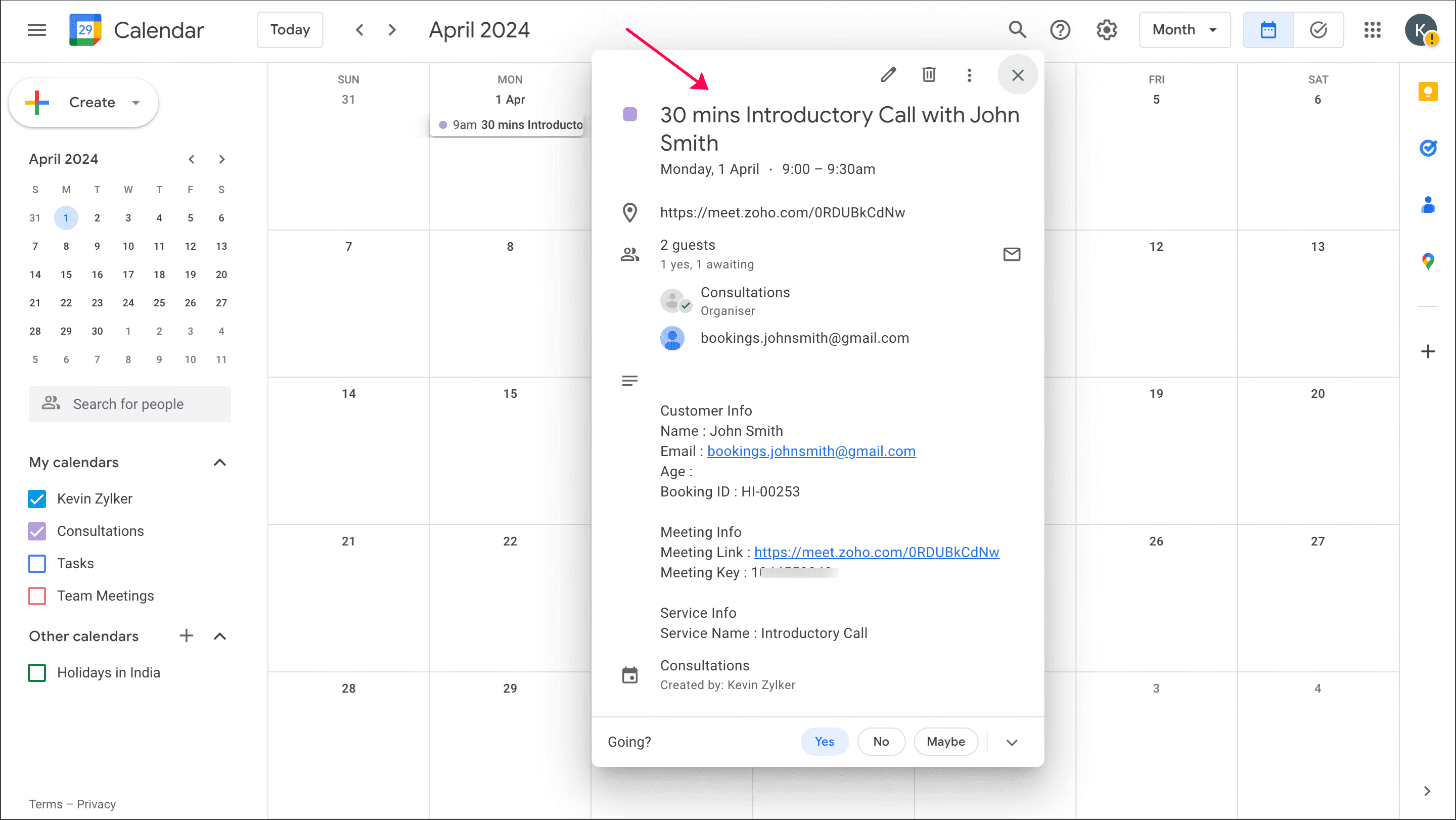
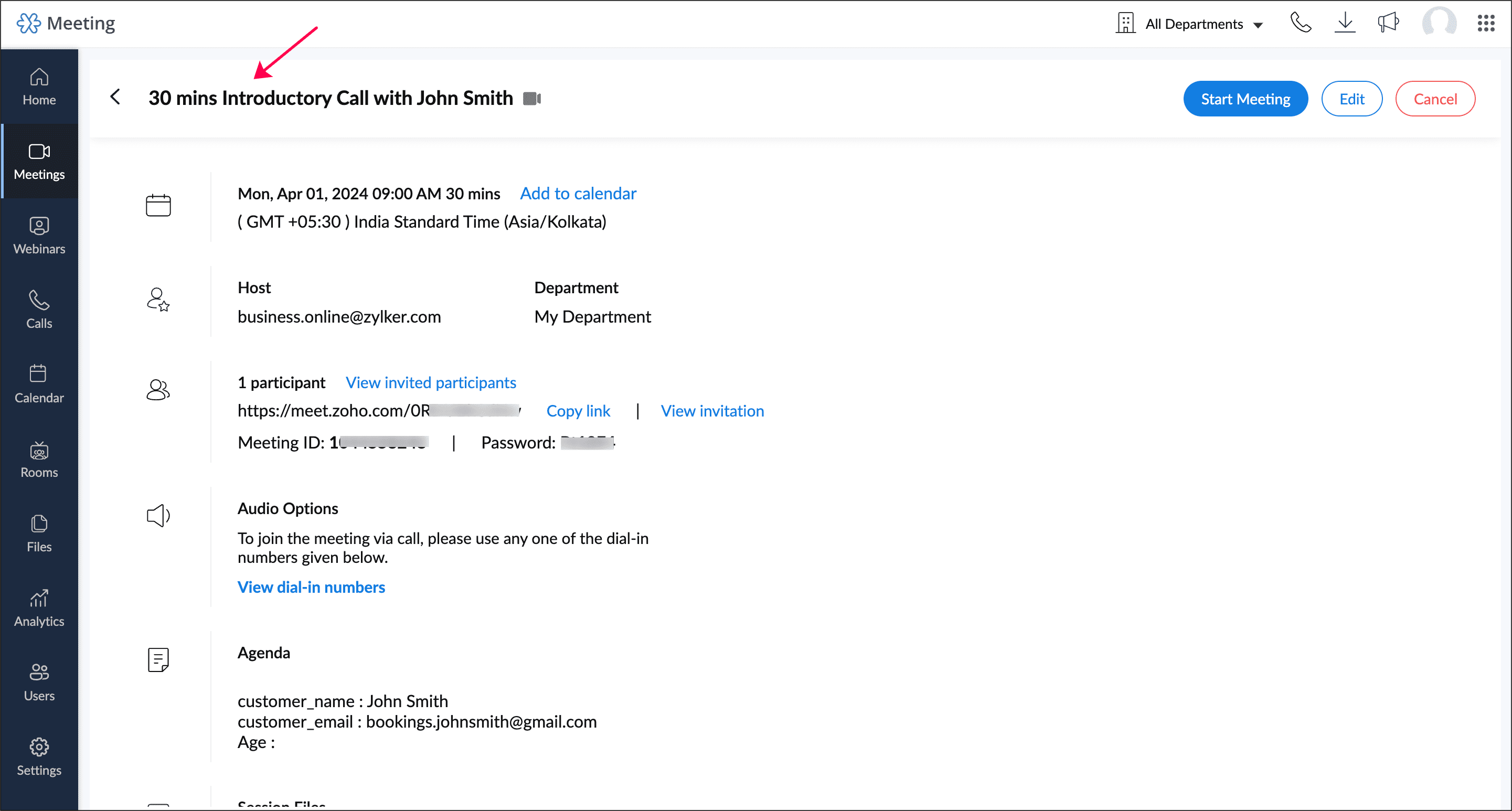
30 mins Introductory Call with John Smith
1 hour 15 mins Sales Meeting with Sophia
Likewise, users can have descriptive titles that reflect the topic and purpose of the appointment.
 Info: This will be used as the event title in your calendar invites when your appointment gets added to any calendar. It will also be used in titles of online meetings, Zoho Assist sessions and ICS files.
Learn how to customize appointment title
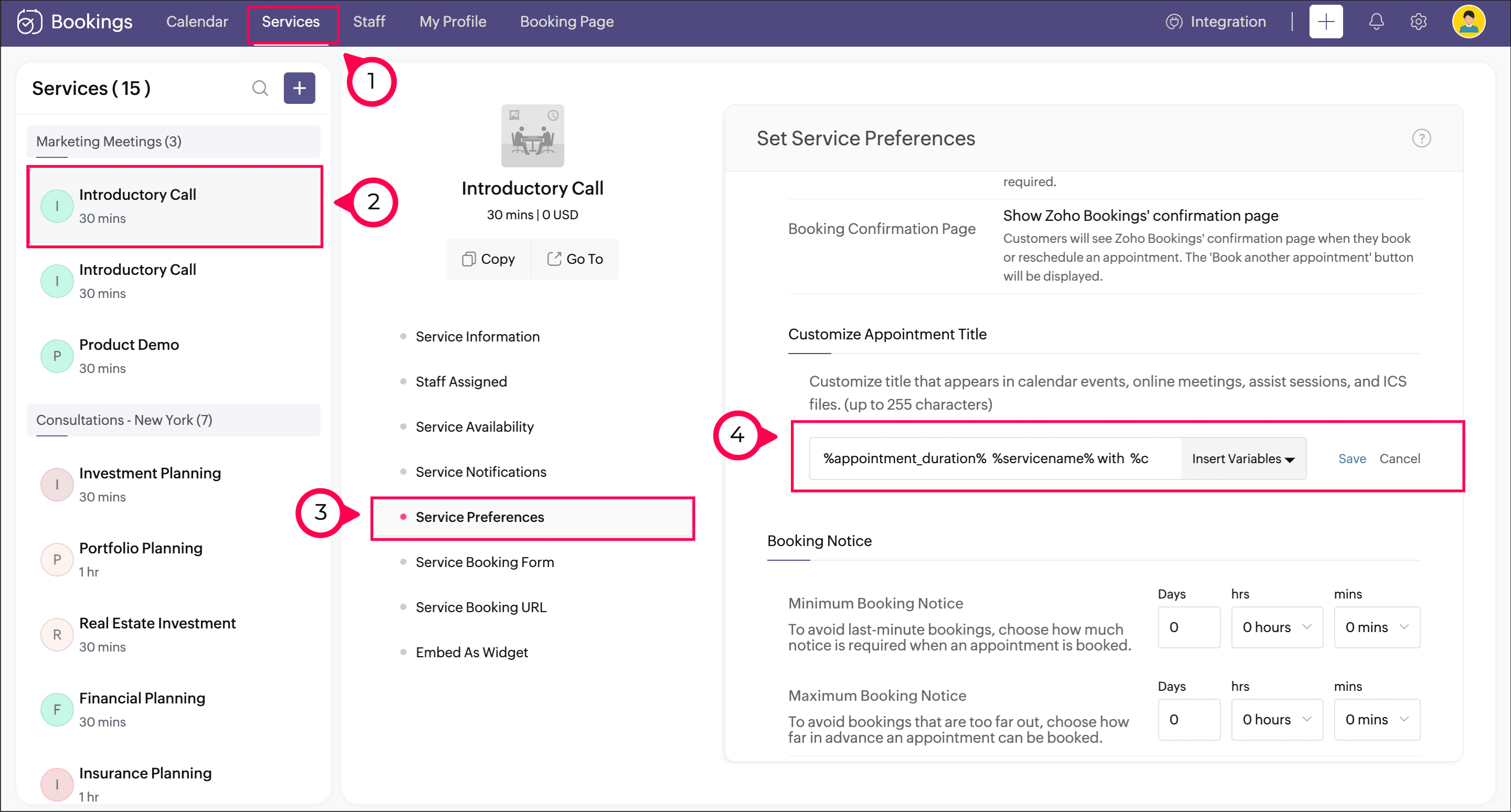
Navigate to Services > Service Preferences.
Under the General section, you can see the Appointment Title Customization option. In the text box, add the required text.
Click Insert Variable to the right of the text box to include variables in the title.
Click Save.
See how it works
The calendar event created for an appointment will have the title that you've customized.
This title will be used in online meetings like Zoho Meeting, Google Meet, Zoom Meeting, Microsoft Teams, and Zoho CRM Calendar.
This title will be applied in all integrations like Zoho Assist session and ICS file.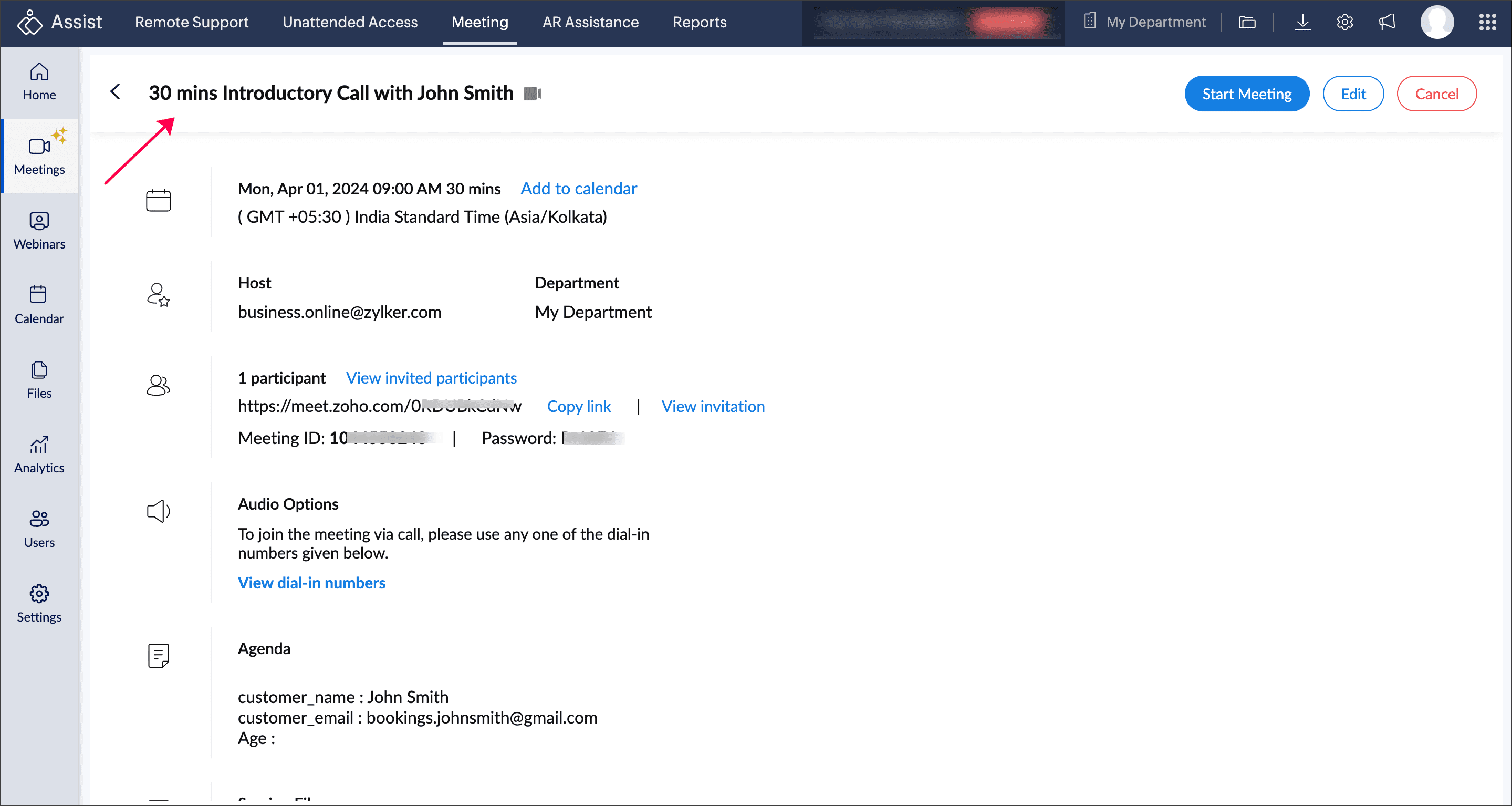
Help documentation
Check out this help page to learn more about this feature.

Availability
This feature is available for all paid plans.
Super admin and admin can access this feature. Managers can view it, while staff will not have access to it.
Hope this feature eases your scheduling process. Please leave your questions and feedback in the comment section or write to us at support@zohobookings.com.
The Zoho Bookings Team
Topic Participants
Praveena Chandran
Bernard Tomlin
Robert
Hans-Joachim Leptig
Sticky Posts
New feature: Invite additional guests for your bookings
Hello everyone, Greetings from Zoho Bookings! We are happy to announce the much-awaited feature Guest Invite, which enhances your booking experience like never before. This feature allows additional participants to be invited for the bookings to make📣📣 Zoho Bookings Schedulathon 2025 is here!
Hey Zoho Bookings fam, We're excited to invite you to our first-ever hackathon: Yes, Zoho Bookings Schedulathon 2025 is live now. This is a virtual event and you can participate anywhere from the world. Businesses should be able to set up meetings from📣 [Webinar] Spikra shows how businesses leverage Zoho Bookings to increase revenue
[Webinar] Spikra shows how businesses leverage Zoho Bookings to increase revenue Hi all, Service-based businesses need to be on top of their client experience game to stay ahead. Spikra, one of our Advanced Zoho Partners, has been helping businesses deliver📣📣 Zoho Bookings - Feature Roadmap 2024
Hi Everyone, Thank you for all the support you have been showing Zoho Bookings. We had a fabulous 2023, with a bunch of new features and over 60K new users. In 2024, our prime focus will be on user experience, and we have a few vital features coming inAttention: Important updates to the payment gateway integrations
Greetings from the Zoho Bookings team! We have a few important updates to the payment gateway integrations that allow you to collect online payments for your appointments. The following payment gateways will be updated, and we encourage you to make the
Recent Topics
Auto tagging
Some of the articles I enter into Notebook get there when I enter them in Raindrop.io and IFTTT copies the articles in Notebook. When this happens the notes are tagged but instead of useful one word tags with topic the tag pertains to the specific articleZoho Sheet for Desktop
Does Zoho plans to develop a Desktop version of Sheet that installs on the computer like was done with Writer?WebDAV support
I need WebDAV support so that I can upload/download (and modify) documents from my local file system. Is anything planned in his direction?Constant refresh required in lots of Zoho tabs
"Hey Zoho, if you can sync my notification bell across 15 tabs using a BroadcastChannel, why can't you send a 'Data Refresh' signal the same way? We don't need a browser reload—we just need the data to sync without us clicking F5 like it's 1999." "PS:What's New in Zoho Billing | January 2026
Excited about the latest enhancements in Zoho Billing? Our January updates bring an intelligent AI assistant, smarter subscription management, and improved tax compliance, saving you time and reducing manual work. Dive into the details below to see howCliq iOS can't see shared screen
Hello, I had this morning a video call with a colleague. She is using Cliq Desktop MacOS and wanted to share her screen with me. I'm on iPad. I noticed, while she shared her screen, I could only see her video, but not the shared screen... Does Cliq iOS is able to display shared screen, or is it somewhere else to be found ? RegardsInserting images into Articles or Knowledgebase
Hi, Are there any plans in improving the Knowledgebase text editor so it would allow inserting images through Windows clipboard via copy-paste? Say for example I took a screenshot using the snipping tool in Windows and I'd like to insert that image toLinks not functioning in Zoho mail
Links that are included in emails I receive are not activating. Nothing at all happens when I click on them. I have researched FAQs and this forum to no avail. Any suggestions?Zoho Mail iOS app update: Manage folders and tags
Hello everyone! In the most recent version of the Zoho Mail iOS app, we have brought in support to manage(create, edit and delete) the folders and tags. Create folders Create Tags Edit/ Delete folder In addition to this, we have also brought in support[Important announcement] Zoho Writer will mandate DKIM configuration for automation users
Hi all, Effective Dec. 31, 2024, configuring DKIM for From addresses will be mandatory to send emails via Zoho Writer. DKIM configuration allows recipient email servers to identify your emails as valid and not spam. Emails sent from domains without DKIMZoho CRM Feature Requests - SMS and Emails to Custom Modules & Time Zone Form Field
TLDR: Add Date/Time/Timezone form field, and be able to turn off auto timezone feature. Allow for Zoho Voices CRM SMS Extension to be able to be added to custom modules, and cases. Create a feature that tracks emails by tracking the email chain, ratherOur Review Of Zoho CRM after 60 Days
The purpose of this is to just share with Zoho why I love their product, but ultimately why I could not choose Zoho CRM for our next CRM. About two months ago we begun a CRM exploration process for our financial planning firm, based in Texas. We alreadyLink Purchase Order to Deal
Zoho Books directly syncs with contacts, vendors and products in Zoho CRM including field mapping. Is there any way to associate vendor purchase orders with deals, so that we can calculate our profit margin for each deal with connected sales invoicesExtend the Image Choice Field
Hi, The New Yes/No field is great for what it does, and the Image Choice Field is good but could be better with some functions from the Yes/No field. Take an example, rather than just Yes/No you want Yes/No/Maybe (Or more than 3 choices), but unlike theCRM x WorkDrive: File storage for new CRM signups is now powered by WorkDrive
Availability Editions: All DCs: All Release plan: Released for new signups in all DCs. It will be enabled for existing users in a phased manner in the upcoming months. Help documentation: Documents in Zoho CRM Manage folders in Documents tab Manage filesZoho Desk: Macro to assign Ticket to self
Hello, We are using macros in Zoho Desk to set some fields and send a response. I would also like to assign the ticket to myself (or whoever applies the macro). I can only set a fixed agent in the macro, so I would have to create one for every agent.Turn off Knowlege Base Follow options and Follower lists
Is there a way to hide or turn off the option in the Knowledge Base for users to follow specific departments/categories/sections/articles? If not, is there a way to turn off the public list of followers for each of those things? Otherwise, customer namesEnterprise Data management solutions
I'm on the hunt for the perfect Data management solution for my organization. I've been doing a ton of research across different websites, but honestly, it's just left me more confused! A friend suggested I check here, so I'm hoping someone can pointNew Feature: Audit Log in Zoho Bookings
Greetings from the Zoho Bookings team! We’re excited to introduce Audit Log, a new feature designed to help you track all key actions related to your appointments. With Audit Log, you can maintain transparency, strengthen security, and ensure accountability.Automated Task reminder
First question: If a task does not have a reminder set, will it still send an email notification that the task is due today? If not, how can I set up an automated reminder to send the task owner an email that it is due on a certain date?Zoho Support - contract notifications
Hi, I have a few questions about using Zoho support. Is there a way to add custom contract notifications like (90 days before expiry send notification e-mail to agent and customer, then another 60 days before expiry and another 30 days.). And is it possibleKaizen #230 - Smart Discount-Based Quote Approvals Using CRM Functions and Approval Process
Hello everyone! Welcome back to the Kaizen series! Discount approvals are a standard part of sales governance. Most organizations need something like this: Discount % Required Action < 10% Auto-approve 10–19.99% Sales Manager approval ≥ 20% VP Sales approvalHow to create a new Batch and update Stock via Inventory?
Hi everyone, We are building an automation where a user enters batch details (Batch Number, Mfg Date, Expiry, and Quantity) into a Custom Module. I need this to trigger an API call to Zoho Inventory to: Create the new batch for the item. Increase theOAuth2 Scope Error - Incorrectly defaulting to CRM instead of Analytics.
Hello Zoho Team, I am trying to connect n8n to Zoho Analytics API V2 for a simple automation project. Despite using the correct Analytics-specific scopes, my OAuth handshake is failing with a CRM-related error. The Problem: The authorization screen shows:Archive Option in Conversation View
Hello, I have a suggestion\request to add an "Archive Thread" button in conversation view of Zoho Mail. The best suggestion I have is to put an "Archive Thread" button next to the "Label Entire Thread" button in conversation view. Most users don't justIs it possible to create a meeting in Zoho Crm which automatically creates a Google Meet link?
We are using Google's own "Zoho CRM for Google" integration and also Zoho's "Google Apps Sync" tools, but none of them provide us with the ability to create a meeting in Zoho CRM that then adds a Google Meet link into the meeting. Is this something thatTrigger a Workflow Function if an Attachment (Related List) has been added
Hello, I have a Case Module with a related list which is Attachment. I want to trigger a workflow if I added an attachment. I've seen some topics about this in zoho community that was posted few months ago and based on the answers, there is no triggerHow can I link Products in a Deal Subform to the Products Module
Hello, I have a pricing subform on our Deals page and use a lookup field to associate a product with each line. I want to be able to look at a product page within the Products module and see a list of the deals connected to that product. I have this workingEmail Field Validation Incorrectly Rejects RFC-Compliant Addresses (Forward Slashes)
I've encountered a validation issue with Zoho Creator's Email field that rejects RFC-compliant email addresses containing forward slashes, and I'm hoping the Zoho team can address this in a future update. The Issue When entering an email address containingCall result pop up on call when call ends
I’d like to be able to create a pop up that appears after a call has finished that allows me to select the Call Result. I'm using RingCentral. I have seen from a previous, now locked, thread on Zoho Cares that this capability has been implemented, butZOHO.CRM.UI.Record.open not working properly
I have a Zoho CRM Widget and in it I have a block where it will open the blocks Meeting like below block.addEventListener("click", () => { ZOHO.CRM.UI.Record.open({ Entity: "Events", RecordID: meeting.id }).catch(err => { console.error("Open record failed:",Payment system for donations management
I manage an organization where we receive donations from payers. Hence, there is no need to first create invoices and then create payments received against the invoices. What are the recommended best practices to do this in ZohoBooks?Recording the deducted TDS on advance received from Customer (Zoho Books India)
Hi, How can we record the tds that has been deducted by my customer for the advance that he has paid to me. 1) My customer has paid Rs 10000 to me as advance (Rs 9800 as cash and deducted Rs 200 as TDS). I am not able to record the tds that has been deductedChanging Account Type in Chart of Accounts
Does anyone know how to change/edit the account type for an Account name in Chart of Accounts. Zoho will not let me do this for some reasonBulk bank rule creatioin
Hi team, I am exploring Option to create a multiple bank rule. Could please suggest the option to implement this?Zoho books aide
Bonjour, je rencontre un problème avec Zoho Books. J’ai effectué une demande de support via l’interface prévue à cet effet, mais je n’ai jamais de retour. Je ne reçois ni email de confirmation, ni information concernant la prise en charge de ma demande,Smart Data, Smarter Contracts — Ensuring Consistency Between Metadata and Documents
In contract management, data accuracy is not just a nice-to-have—it is essential. A single mismatch between what your system shows and what is written in the contract can ripple into approval delays, compliance risks, and broken trust in your data. ImagineJoin Zoho Meeting only via Web browser and not with Zoho Meeting App
Dear Zoho team, according to the documentation [1], Zoho Meeting only offers web view for Chrome and Firefox on a desktop. For other browsers and devices, participants can only join a Zoho Meaning with the Zoho Meeting App installed. This is a big hurdleCRM gets location smart with the all new Map View: visualize records, locate records within any radius, and more
Hello all, We've introduced a new way to work with location data in Zoho CRM: the Map View. Instead of scrolling through endless lists, your records now appear as pins on a map. Built on top of the all-new address field and powered by Mappls (MapMyIndia),Manage control over Microsoft Office 365 integrations with profile-based sync permissions
Greetings all, Previously, all users in Zoho CRM had access to enable Microsoft integrations (Calendar, Contacts, and Tasks) in their accounts, regardless of their profile type. Users with administrator profiles can now manage profile-based permissionsNext Page