Introducing Configure, Price, Quote (CPQ) in Zoho CRM | Public early access 2023
Greetings Customers!
We're excited to announce that the CPQ feature will soon be available in Zoho CRM and accessible to all accounts using the Professional, Enterprise, and Ultimate editions. We've opened this feature to select customers, and it'll be available to all within a week. As we move ahead, you can expect further enhancements and added functionalities.
Please note that while the CPQ feature will be enabled to all customers, one of its components, called Guided Selling, will be available upon request. Guided Selling is a holistic way of filtering the product selection to meet the customer's requirements. It presents a series of product-specific questions and narrows down a list of products based on the user's responses.
-------------EDIT As on 17/10/2023--------
Guided Selling in CPQ, which was available on Request-based Early Access, has now been released to all eligible users across DCs. Guided Selling is as accessible as other features in CPQ. Please learn more about Guided Selling from here: https://help.zoho.com/portal/en/kb/crm/cpq/articles/guided-selling
-------------------------------------------------------
What is Configure, Price, Quote (CPQ)?
CPQ is a sales tool that helps you share customized and accurate quotes with customers in just a few clicks. Pre-configure product combinations and price rules and create bespoke quotes, along with applicable taxes and discounts. This is a transformative tool for businesses with multiple product lines. Please note that currently, the CPQ feature only supports Zoho CRM's native inventory modules.
How to access CPQ in Zoho CRM
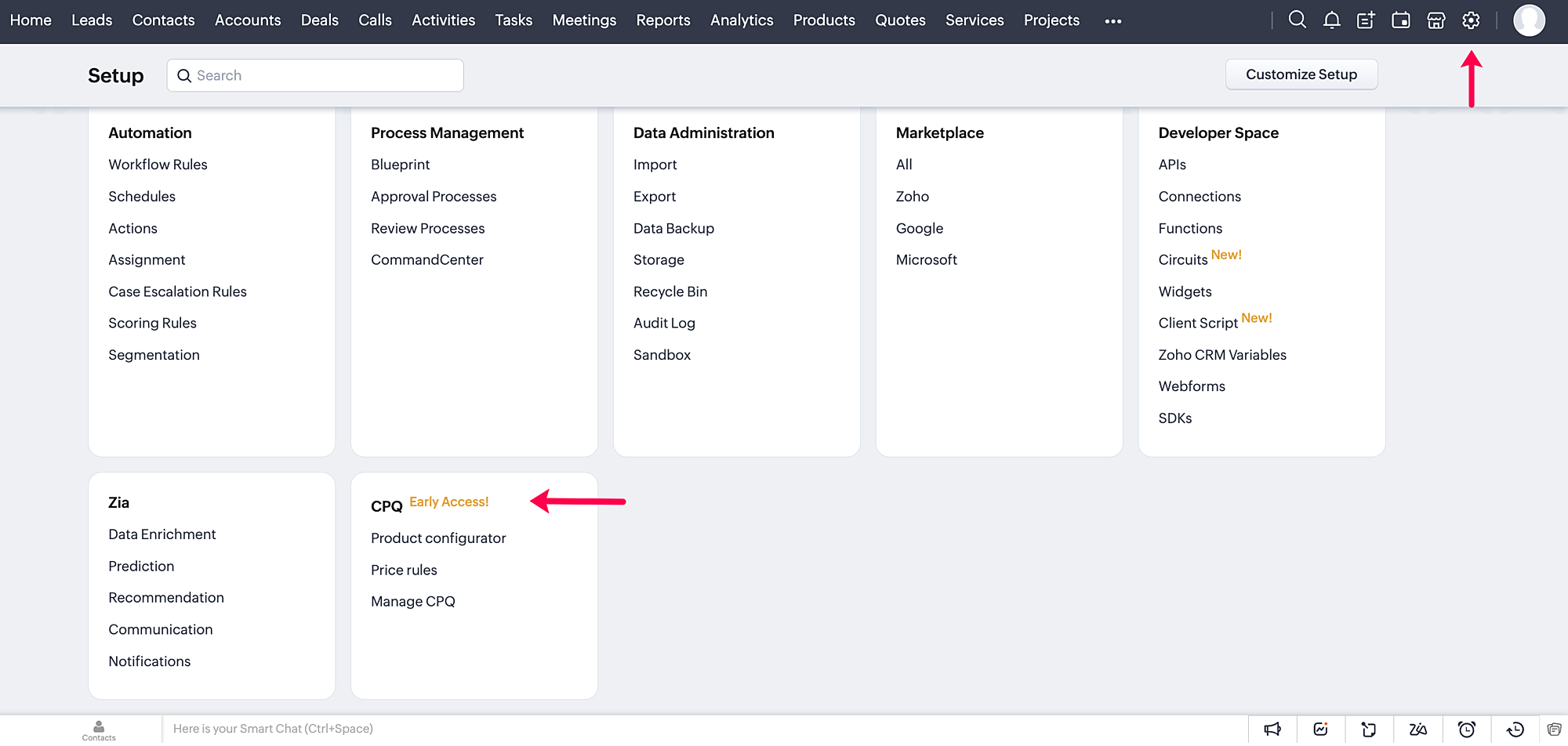
Click on the gear icon in the top-right corner of your Zoho CRM account. On the Setup page, you can access your CPQ settings and configure your product and price rules.
How does CPQ in Zoho CRM work?
CPQ centralizes the pricing and product inclusions in quotes salespeople generate, allowing them to sell more quickly and efficiently. In addition to Zoho CRM's built-in inventory management, CPQ expedites quote creation and enhances the customer's purchase journey. The two building blocks of the CPQ solution are the Product Configurator and Price Rules.
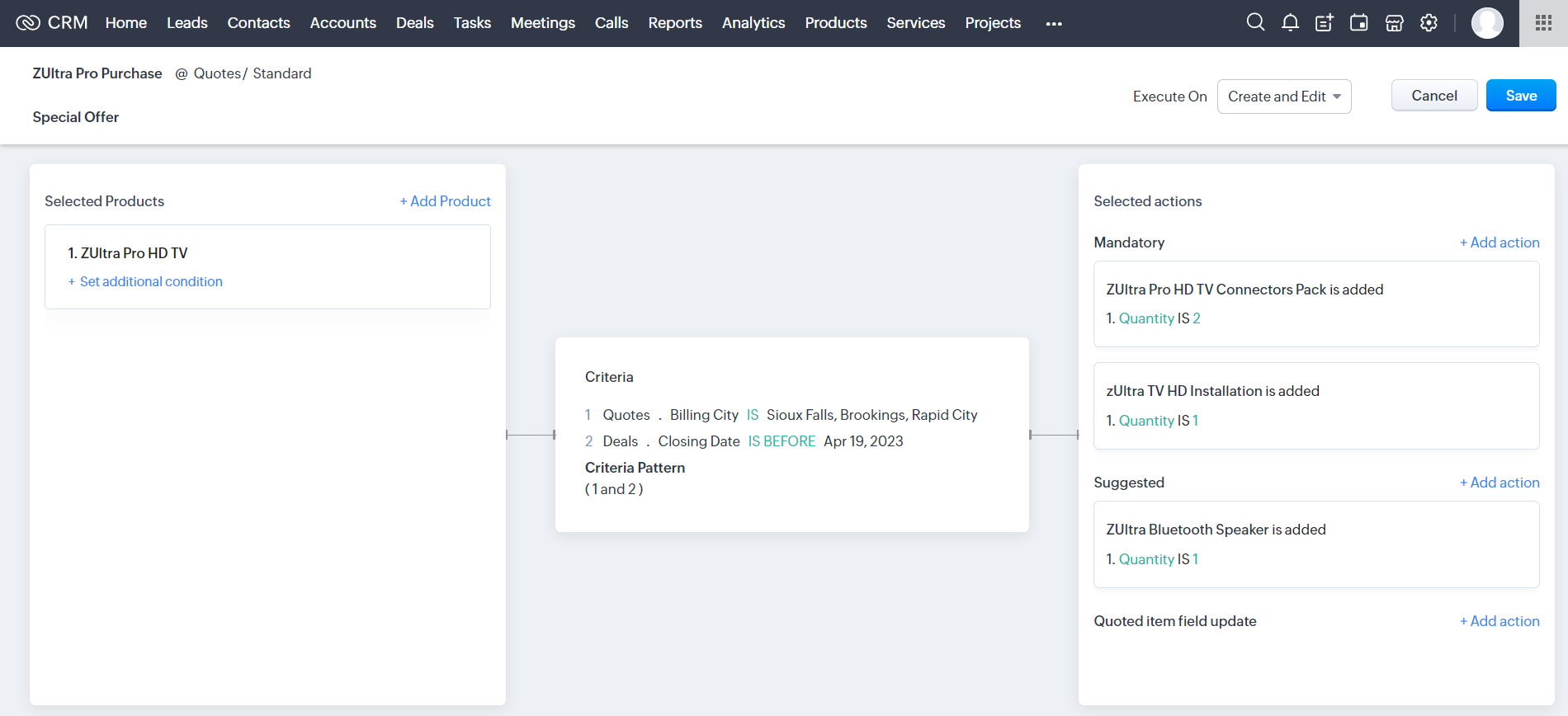
The Product Configurator enables you to pre-define automated actions like product additions, suggestions, and field updates for a single product or a combination of products. You can set multiple criteria to qualify these product rules across various modules in CRM. This cross-module capability enables salespeople to customize quote generation by including different record types, such as deal amount, region, vendors, and so on.
Price Rules help to accommodate conditional pricing; i.e., you can pre-set list prices and discounts for products that meet specific conditions. It can also qualify price rules according to cross-module conditions.
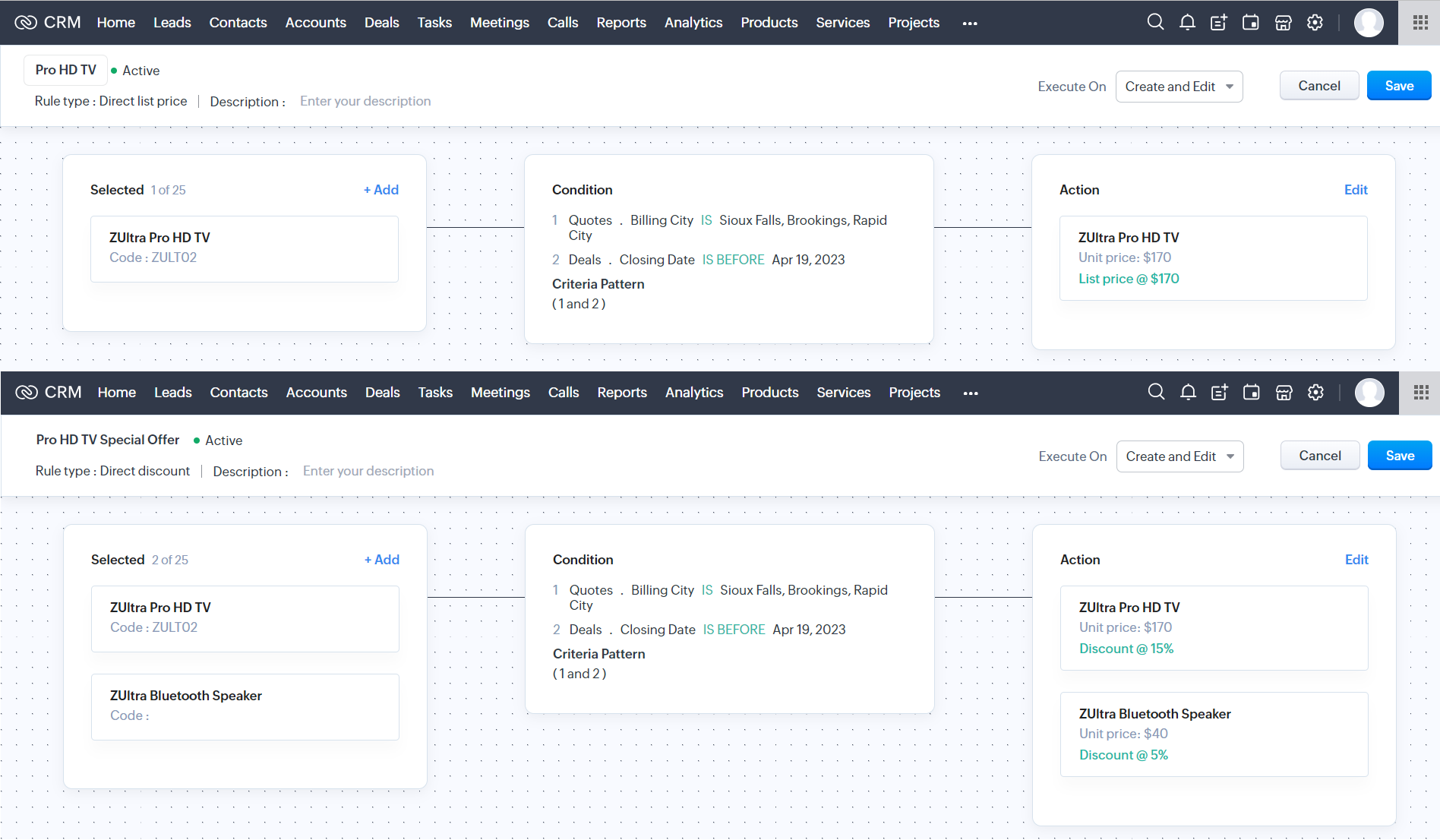
After you configure your rules in CPQ, the pre-defined actions are executed automatically when your salespeople create quotes in Zoho CRM. Watch this video for a quick overview of CPQ:
Guided Selling
Guided selling in CPQ quickly refines the results from the product catalogue based on the customer's requirements. For this, you just have to create a series of sequential questions and map the input answers to appropriate fields across various CRM modules—namely, the Contacts, Accounts, Deals, and Products modules. So during quote creation, salespeople just have to specify the product requirements, and the Guided Selling functionality in CPQ suggests the right product.
How can you benefit from a CPQ solution?
It's essential for businesses today to keep up with prospects' evolving needs and offer solutions quickly before they move on to other alternatives. One aspect of sales conversion is sending a customized quote to your prospect while making necessary modifications when required. And relying on outdated legacy systems and manual effort can only lead to more errors and delays. A CPQ solution ensures your salespeople can generate customized quotes quickly and thereby enhance the purchase experience.
- A CPQ solution, along with Zoho CRM's built-in inventory management functionalities, enables you to build a more comprehensive sales cycle.
- It expedites your quote management process, enabling your salespeople to save time and effort.
- It minimizes the risk of errors due to misinformation or typos during quote calculation.
Watch our recorded webinar to get an overview of Zoho CRM's CPQ feature and how it works.
Resources: Help docs
Topic Participants
Ankitha Nair
Kevin Flynn
sundeep mohana
Ivan Staykov
Chester Hull
Sticky Posts
Announcing Early Access to "Zoho CRM for Everyone" — A new and exciting update to Zoho CRM
Update : Zoho CRM For Everyone's Nextgen Interface gets an upgrade! Hello everyone, We’ve updated the Zoho CRM for Everyone Nextgen interface based on your feedback. The UI is now simpler with a unified sidebar, a more visible global search and features[Early Access] Voice of the Customer (VoC) for Zoho CRM
Happy new year, everyone! We have an exciting addition to our suite of features and would like to introduce you to VoC (Voice of the Customer) for Zoho CRM, powered by Zia. 2023 is definitely the best time to be a customer with rapid innovations and advancementsAdding calls as a channel in Voice of the Customer
Dear All, We hope you're well! It's been almost a year since we opened Zoho CRM's Voice of the Customer solution up for early access. We are grateful for the reception and support you have been showing us with regards to its adoption and feedback. Since
Recent Topics
CRM
Is anyone else experiencing this issue? Our company is not moving out of using Gmail's web app. It just has more features and is a better email program than Zoho Mail. Gmail has an extension (Zoho CRM for Gmail) that we're using but we've found some seriousSyncing with Google calendar, Tasks and Events
Is it possible to sync Zoho CRM calendar, task and events with Google Calendar's tasks and events. With the increasing adoption by many major tool suppliers to sync seamlessly with Google's offerings (for instance I use the excellent Any.do task planningHow can i view "Child" Accounts?
It can be very useful in our field of business to know the parent-child account relationship. However, there seems to be a shortcoming in the parent account view: no child account list. How can we view the child accounts per each account?Ability to assign Invoice Ownership through Deluge in FSM
Hi, As part of our process, when a service appointment is completed, we automated the creation of the invoice based on a specific business logic using Deluge. When we do that, the "Owner" of the invoice in Zoho FSM is defaulted to the SuperAdmin. ThisEasily perform calculations using dates with the new DATEDIF function
Hey Zoho Writer users! We've enhanced Zoho Writer's formula capabilities with the new DATEDIF function. This allows you to calculate the difference between dates in days, months, and years. Function syntax: =DATEDIF(start_date, end_date, unit) Inputs:Adding Comments Using Workflows - How to Change User Attributed
We have worklflows in Desk where a comment is added to a ticket based on certain criteria. It seems that the comment added is always attributed to the user who last edited the workflow. This does not make sense for us because: - It's misleading to otherAdd Attachment Support to Zoho Flow Mailhook / Email Trigger Module
Dear Zoho Support Team, We hope you are well. We would like to kindly request a feature enhancement for the Mailhook module in Zoho Flow. Currently, the email trigger in Zoho Flow provides access to the message body, subject, from address, and to address,Conect chat of salesiq with zoho cliq
Is there any way to answer from zoho cliq the chat of salesiq initiated by customers?Les dernières avancées en saisie de données et collaboration
Après une année dédiée à la recherche et au développement, notre équipe est prête à dévoiler des améliorations majeures pour Zoho Sheet. Ces nouveautés seront lancées par étapes afin d’en assurer une prise en main optimale. Nous commençons avec des fonctionnalitésDeluge Learning Series – Client functions in Deluge | January 2026
We’re excited to kick-start the first session of the 2026 Deluge Learning Series (DLS) with Client functions in Deluge. For those who are new to DLS, here’s a quick overview of what the series is all about: The Deluge Learning Series takes place on theRich Text For Notes in Zoho CRM
Hello everyone, As you know, notes are essential for recording information and ensuring smooth communication across your records. With our latest update, you can now use Rich Text formatting to organize and structure your notes more efficiently. By usingImplement Meeting Polls in Zoho Bookings
Dear Zoho Bookings Support Team, We'd like to propose a feature enhancement related to appointment scheduling within Zoho Bookings. Current Functionality: Zoho Bookings excels at streamlining individual appointment scheduling. Users can set availabilityZoho Bookings and Survey Integration through Flow
I am trying to set up flows where once an appointment is marked as completed in Zoho Bookings, the applicable survey form would be sent to the customer. Problem is, I cannot customise flows wherein if Consultation A is completed, Survey Form A would beService Account Admin for API Calls and System Actions
Hello, I would like to request the addition of a Service Account Admin option in Zoho product. This feature would allow API calls and system actions to be performed on behalf of the system, rather than an active user. Current Issue: At present, API callsHow to apply customized Zoho Crm Home Page to all users?
I have tried to study manuals and play with Zoho CRM but haven't found a way how to apply customized Zoho CRM Home Page as a (default) home page for other CRM users.. How that can be done, if possible? - kipi Moderation Update: Currently, each user hasPlease can the open tasks be shown in each customer account at the top.
Hi there This has happened before, where the open tasks are no longer visible at the top of the page for each customer in the CRM. They have gone missing previously and were reinstated when I asked so I think it's just after an update that this featureHow to Customize Task Creation to Send a Custom Alert Using JavaScript in Zoho CRM?
Hello Zoho CRM Community, I’m looking to customize Zoho CRM to send a custom alert whenever a task is created. I understand that Zoho CRM supports client scripts using JavaScript, and I would like to leverage this feature to implement the alert functionality.Send Whatsapp with API including custom placeholders
Is is possible to initiate a session on whatsapp IM channel with a template that includes params (placeholders) that are passed on the API call? This is very usefull to send a Utility message for a transactional notification including an order numberConfigurable Zoho Cliq Notifications for Zoho People Alerts
Hello Zoho People Product Team, Greetings and hope you are doing well. We would like to request an enhancement to Zoho People notifications, enabling a native delivery via Zoho Cliq with admin-level control, similar to the notification settings availableAdd Israel & Jewish Holidays to Zoho People Holidays Gallery
Greetings, We hope you are doing well. We are writing to request an enhancement to the Holidays Gallery in Zoho People. Currently, there are several holidays available, but none for Israel and none for Jewish holidays (which are not necessarily the sameKeep Zoho People Feature Requests in the Zoho People Forum
Hello Zoho People Product Team, Greetings. We would like to submit a feature request regarding the handling of feature requests themselves, specifically for Zoho People. Issue: Feature Requests Being Moved to Zoho One Zoho People feature requests areZO25: The refreshed, more unified, and intelligent OS for business
Hello all, Greetings from Zoho One! 2025 has been a remarkable year, packed with new features that will take your Zoho One experience to the next level! From sleek, customizable dashboards to an all-new action panel for instant task management, we’veIntroducing Multi-Asset Support in Work Orders, Estimates, and Service Appointments
We’re excited to announce a highly requested enhancement in Zoho FSM — you can now associate multiple assets with Work Orders, Estimates, and Service Appointments. This update brings more clarity, flexibility, and control to your field service operations,[Product Update] Locations module migration in Zoho Books integration with Zoho Analytics
Dear Customers, As Zoho Books are starting to support an advance version of the Branches/Warehouses module called the Locations module, users who choose to migrate to the Locations module in Zoho Books will also be migrated in Zoho Analytics-Zoho BooksIntroducing Schedules for smarter availability management
Greetings from the Zoho Bookings team! We’re excited to introduce Schedules, a powerful enhancement to manage availability across your workspace. Schedules are reusable working-hour templates that help you define and maintain consistent availability acrossWhy Zoho Contracts Prefers Structured Approvals Over Ad-hoc Approvals
Approvals are one of the most important stages in a contract’s lifecycle. They determine whether a contract moves forward, gets revised, or needs further discussion. The approval process also defines accountability within the organization. Zoho ContractsWhatsapp Connection Status still "Pending" after migration
Hello, I migrated my WhatsApp API to Zoho from another provider a day ago. So far the connection status is still “Pending”. There is a problem? How long does it usually take?Kaizen #226: Using ZRC in Client Script
Hello everyone! Welcome to another week of Kaizen. In today's post, lets see what is ZRC (Zoho Request Client) and how we can use ZRC methods in Client Script to get inputs from a Salesperson and update the Lead status with a single button click. In thisHow to Filter timewise question to check uploaded one month or two months before in these community question ?
i want to find the question that is asked some month or before any particular year, so how can i filter it ?Proposal for Creating a Unique "Address" Entity in Zoho FSM
The "Address" entity is one of the most critical components for a service-oriented company. While homeowners may change and servicing companies may vary, the address itself remains constant. This constancy is essential for subsequent services, as it providesWorkflow Down/Bug
We have a workflow that sends an email to one of our internal departments 10 minutes after a record is created in a custom module. The workflow actually works correctly. However, we have now noticed that on January 8, between 3:55 p.m. and 4:33 p.m.,Service Locations: Designed for Shared Sites and Changing Customers
Managing service addresses sounds simple—until it isn’t. Large facilities, shared sites, and frequently changing customers can quickly turn address management into an operational bottleneck. This is where Service Locations deliver clarity and control.Can I re-send the Customer Satisfaction Survey after a ticket closure?
Hello, Some customers does not answer the survey right after closure, is it possible to re-send after a few days or weeks? Best Regards!Filter contacts based on selected category in Zoho Desk ticket
Hello community, I’m setting up the Tickets module in Zoho Desk and I need help implementing the following: When a category is selected in a ticket, I want the Contact field to be filtered so that it only displays contacts that are related to that category.Mapping a new Ticket in Zoho Desk to an Account or Deal in Zoho CRM manually
Is there any way for me to map an existing ticket in Zoho desk to an account or Deal within Zoho CRM? Sometimes people use different email to put in a ticket than the one that we have in the CRM, but it's still the same person. We would like to be ableAssign Income to Project Without Invoice
Hello, Fairly new user here so apologies if there is a really obvious solution here that I am just missing... I have hundreds of small deposits into a bank account that I want to assign to a project but do not want to have to create an invoice every timeTracking Non-Inventory Items
We have several business locations and currently use zoho inventory to track retail items (sales and purchase orders). We were hoping to use zoho inventory to track our non-inventory items as well (toilet paper, paper towels, etc). I understand that weProfile Page View Customization
I need to change the fields, sections from the profile view of an emplyoyee.Zoho Desk Android app update: Filter, Sort and Saved filters Enhancements
Hello everyone! We are excited to introduce the below features on the Android version Zoho Desk mobile app: 1. Filter & Sort support has been introduced for the Contacts and Accounts modules. 2. Sort options is now available in Custom Modules as well.Accessing shared mailboxes through Trident (Windows)
Hi, I have a created a couple of shared mailboxes. The mailboxes are showing up on the browser based Zoho workplace, but I cannot seem to figure out how to access my shared inboxes through Trident (Windows). Am I missing something or is this feature notNext Page