Kaizen #175 - Leverage Settings Widget for Zoho CRM Extensions

Howdy, innovators!
Welcome back to a fresh week of Kaizen.
This week, we will delve into configuring a Settings widget in Zoho CRM for the effective functioning of extensions. It centralizes around key configurations that will be carried out to various integrations in an extension. A user-friendly settings widget enhances the usability and flexibility of your extensions.
Why use a Settings Widget?
A Settings Widget plays a crucial role in making extensions user-friendly and adaptable to specific business needs. Following are a few key advantages of using the settings widget:
- Seamless Setup Post-Installation: Users can configure critical parameters right after installing the extension.
- Dynamic Customization: Users can revisit and modify configurations at any time, ensuring that the extension adapts to changing needs without re-installation or development
- Improved User Experience: Allows the end-users to control how the extension interacts with their workflows and data.
- Enhanced Control: Provides an overview and centralized control, making maintenance, troubleshooting, and updates simpler and faster.
Business Scenario: Notification Settings for Lead Import Extension
Let’s take a real-world use case to understand the value of this settings widget.
Imagine an organization named Zylker, using Zoho CRM along with a lead import extension. This extension pulls in leads from multiple sources like web forms, social media, or third-party marketing tools.
Requirement
Whenever a new lead enters a Zoho CRM organization through this extension, the sales team wants to receive an instant notification on a specific Zoho Cliq channel for that organization. This ensures they never miss a lead.
Solution
By adding a Settings Widget to the extension, users can:
> Select a Preferred Zoho Cliq Channel: From the settings page, users can choose the channel where notifications should be sent.
> Modify the Channel Anytime: Based on team restructuring or communication preferences, users can revisit the settings and update the channel as needed.
With this setup, the settings widget becomes the control center, ensuring the efficient functioning of both the extension and the sales process.
Building a Settings Extension Widget
Let us create a sample settings widget for the above business scenario.
Create a Private Extension Widget
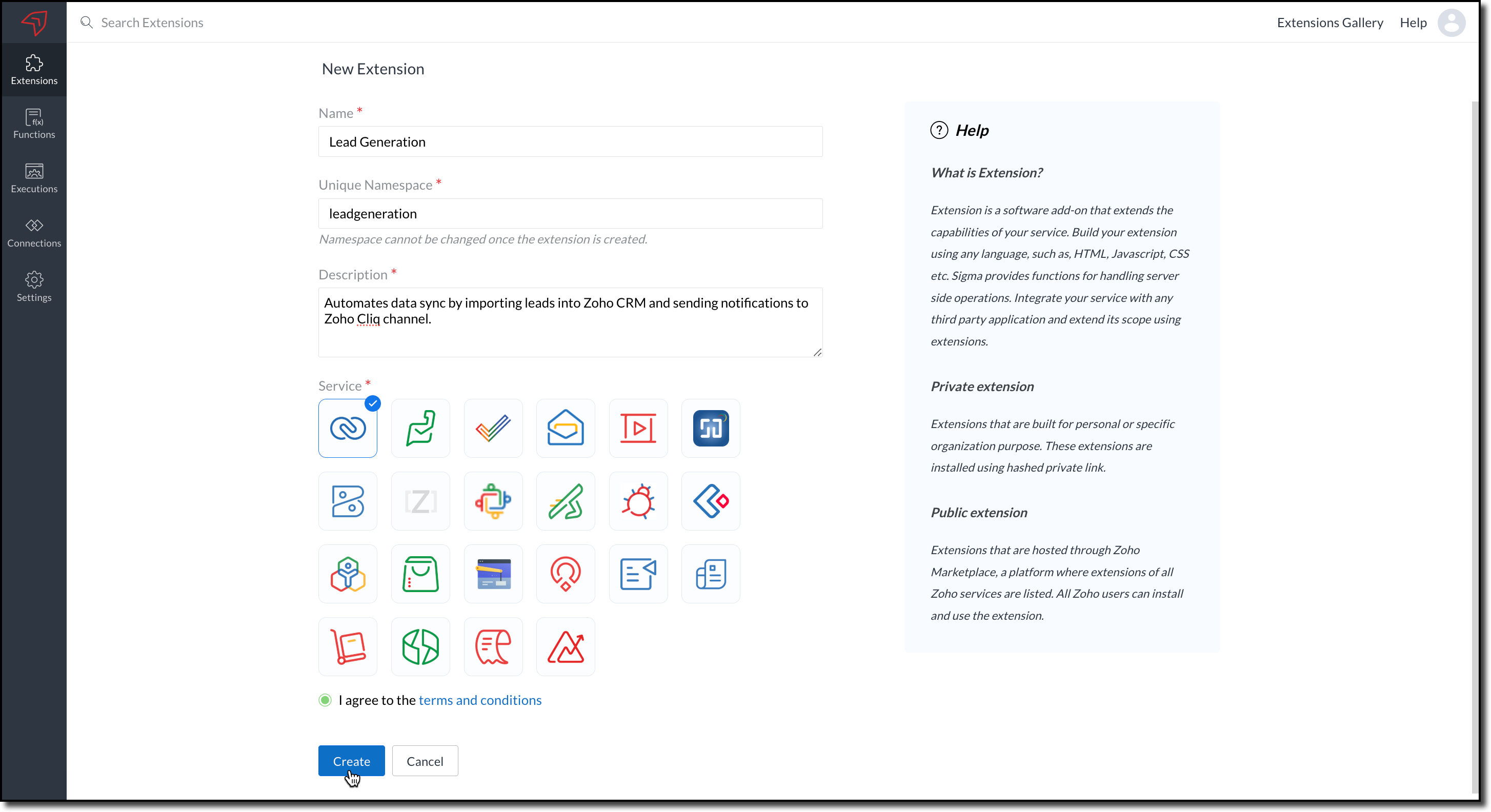
1. Log into Zoho CRM, navigate to Setup > Marketplace > Extension Builder, and create a new extension by selecting Zoho CRM as the service.
2. The private extension that you have created will be listed in the Extensions page. Choose your extension and click the edit icon.
You will then be redirected to the Zoho Developer Console.
Dependency Configuration
Now, let us configure a couple of dependencies required for this use case in the developer console.
Connectors
To notify a Zoho Cliq channel, Connectors authorize the end user's Zoho Cliq account with the extension and grant access to the necessary data. Follow these steps to create a connector with the required APIs for the widget.
3. In the console, navigate to Utilities > Connectors on the left-side menu.
4. Click Create Connector and provide the required details using the guidance available on the Server-based Application help page.
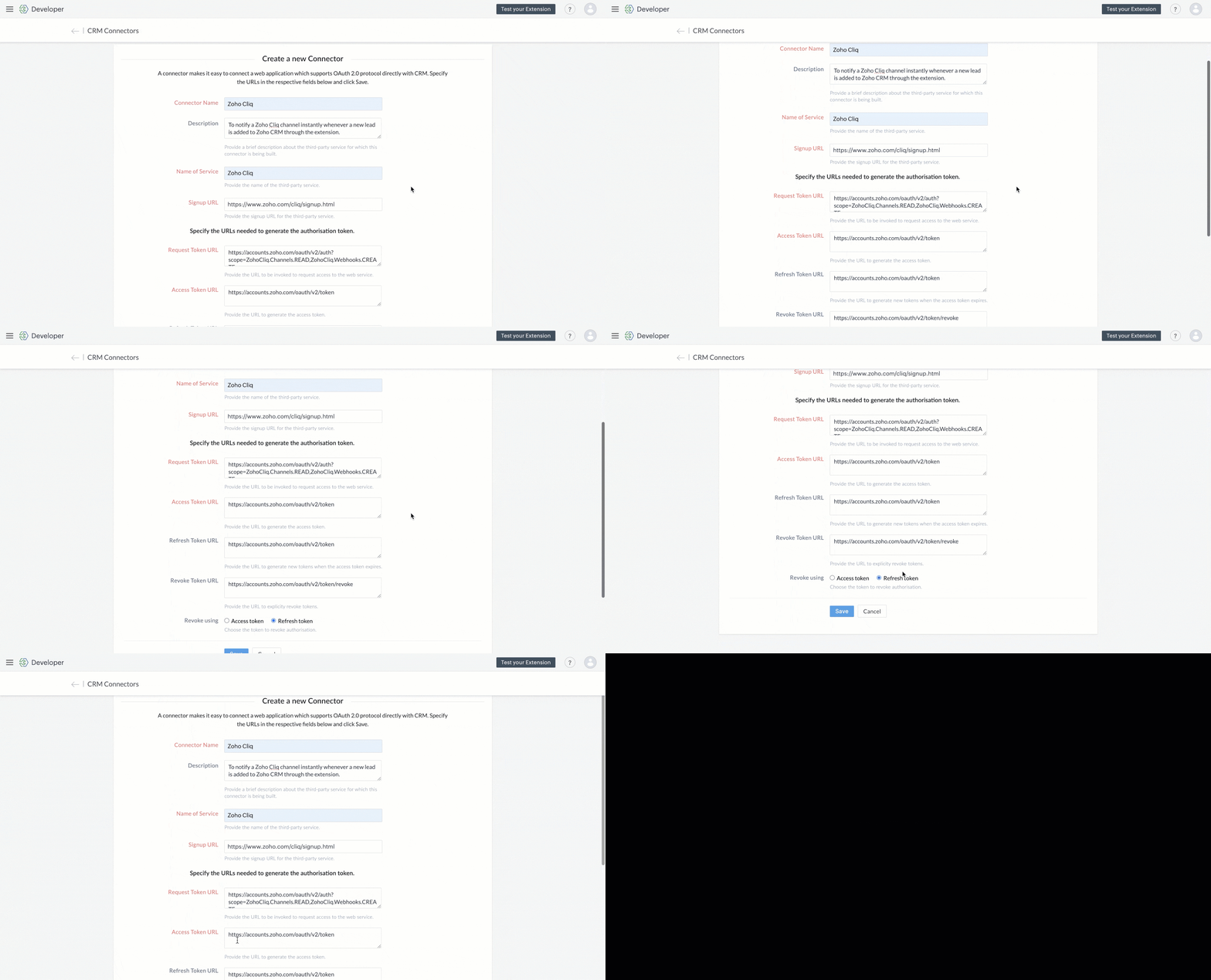
5. Use the generated Redirect URL to register your application in Zoho's API Console. After registration, enter the Client ID and Client Secret in the developer console.

6. Create Connector APIs for the following:
- GET List of all Channels to fetch all the available channels from your Zoho Cliq Account.
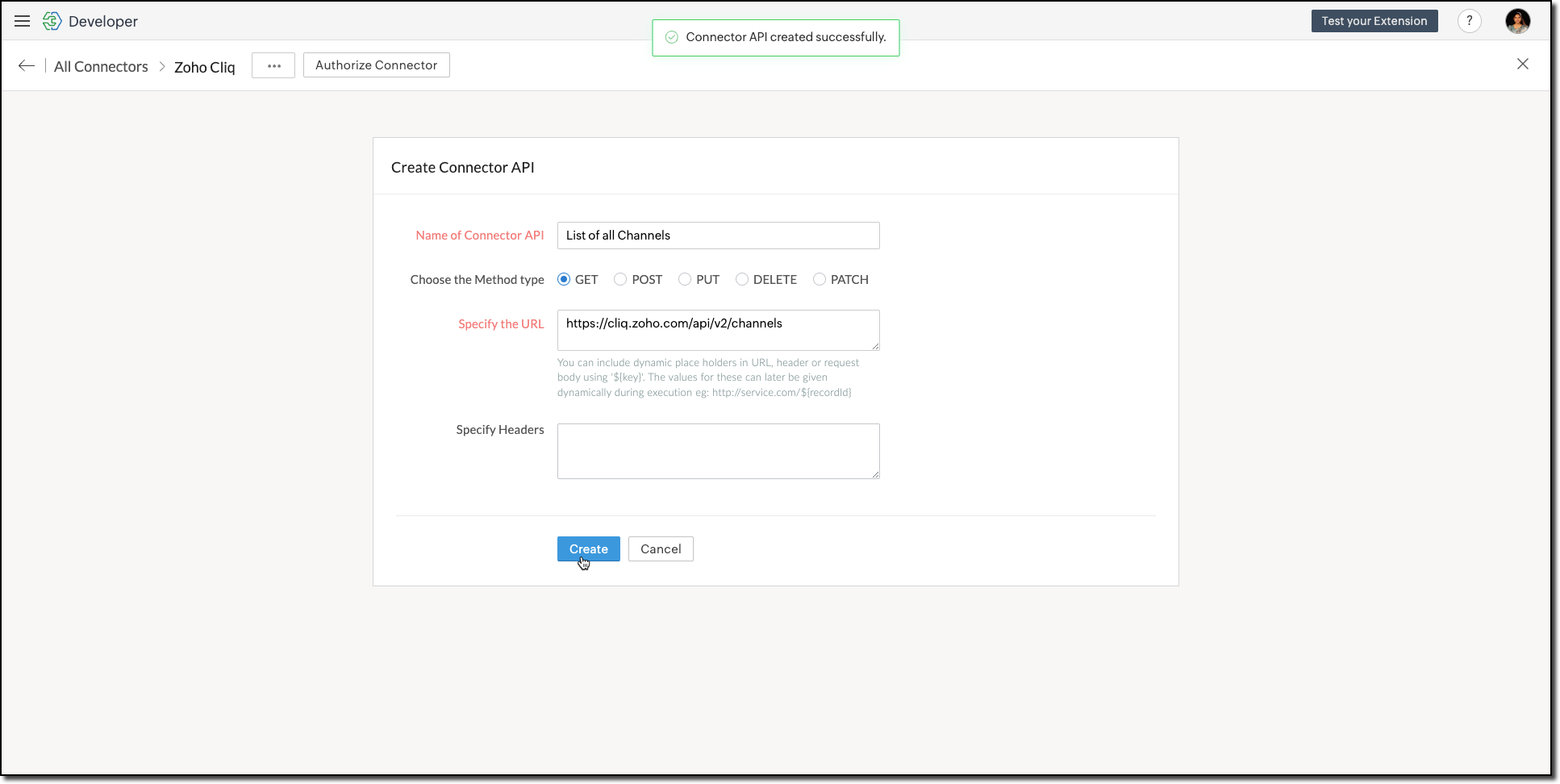
The Authorization header is automatically added to all the Connector APIs. - POST Message in Channel to notify the incoming leads in the channel.
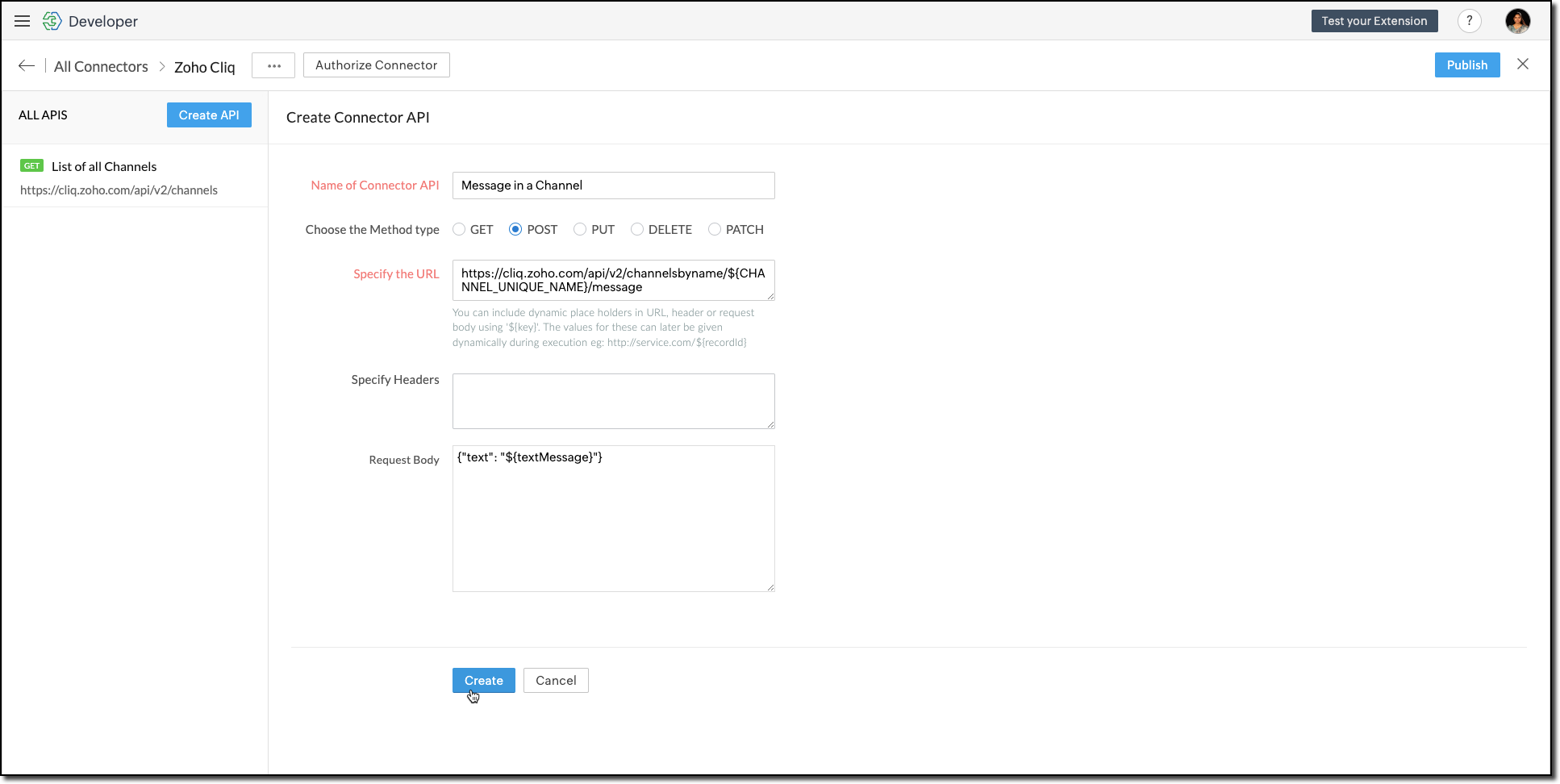
You can include dynamic place holders in the URL, header, or request body using this format ${place_holder}.
7. Once the APIs are configured, publish and associate the connector with the extension.

Refer to the Connectors help document to learn more.
Variable
Variables are required to store the admin's preferred channel details and retrieve them when a lead enters Zoho CRM through the extension. Upon installing the extension, this variable is automatically created in your Zoho CRM org.
8. Go to Build > Custom Properties and create a variable.

Set the variable's permission to Hidden to prevent the CRM users from accessing/modifying the variable data from the Zoho CRM Variables page. This ensures that variables can only be configured through the extension.
For more information, refer to the Custom Variables help document.

Tip
In your Zoho CRM, go to Setup > Security Control > Profiles and restrict permissions for your extension to prevent unauthorized access to the settings page.
In your Zoho CRM, go to Setup > Security Control > Profiles and restrict permissions for your extension to prevent unauthorized access to the settings page.
Building a Connected App
9. In the console, go to Utilities > Connected Apps on the left-side menu.
10. Follow the steps provided in this kaizen to create a new Zoho CRM widget for this use case.
Code Logic for the Settings Panel
- Create a drop-down field called Select Cliq Channel to the settings panel. This dropdown should dynamically list the channels from your Zoho Cliq account by invoking the GET Cliq Channels API. Follow the given Invoke Connector method to execute Connector APIs.
// Initialize Zoho Embed SDK ZOHO.embeddedApp.on("PageLoad", function () { fetchCliqChannels(); }); ZOHO.embeddedApp.init(); // Fetch Cliq channels async function fetchCliqChannels() { const channelDropdown = document.getElementById("cliqChannel"); try { console.log("Fetching channels from Zoho Cliq..."); const req_data = { "parameters": {} }; const response = await ZOHO.CRM.CONNECTOR.invokeAPI("leadgeneration.zohocliq.listofallchannels", req_data); console.log("Response from Zoho Cliq:", response); const parsedResponse = JSON.parse(response.response); const channels = parsedResponse.channels; if (channels && Array.isArray(channels)) { channelDropdown.innerHTML = channels.map(channel => `<option value="${channel.unique_name}">${channel.name}</option>`).join(''); } else { throw new Error("Invalid response structure"); } } catch (error) { console.error("Error fetching channels:", error); if (error.code === '403') { console.error("Authorization Exception: Please check your API permissions and authentication."); } channelDropdown.innerHTML = '<option value="">Failed to load channels</option>'; } } |
- Add a Save Configuration button that stores the selected channel name and channel ID in the variable created earlier. To save the selected data into the variable, use the invokeAPI() function, with the namespace as crm.set.
// Save configuration async function saveConfiguration(event) { event.preventDefault(); const channelDropdown = document.getElementById("cliqChannel"); const selectedChannelUniqueName = channelDropdown.value; const selectedChannelName = channelDropdown.options[channelDropdown.selectedIndex].text; if (!selectedChannelUniqueName) { alert("Please select a channel."); return; } const settings = { unique_name: selectedChannelUniqueName, name: selectedChannelName }; const data = { "apiname": "leadgeneration__Cliq_Channel", "value": JSON.stringify(settings) }; try { const response = await ZOHO.CRM.CONNECTOR.invokeAPI("crm.set", data); console.log("Updated settings:", response); document.getElementById("setupStatus").innerText = "Configuration saved successfully!"; } catch (error) { console.error("Error saving configuration:", error); document.getElementById("setupStatus").innerText = "Failed to save configuration."; } } |
- When a lead enters Zoho CRM through the extension, it should trigger a function that:Retrieves the saved channel details:
> Retrieves the saved channel details: Uses the Get Organization Variable JS SDK to call the Zoho CRM GET Variable API to fetch the saved channel details.
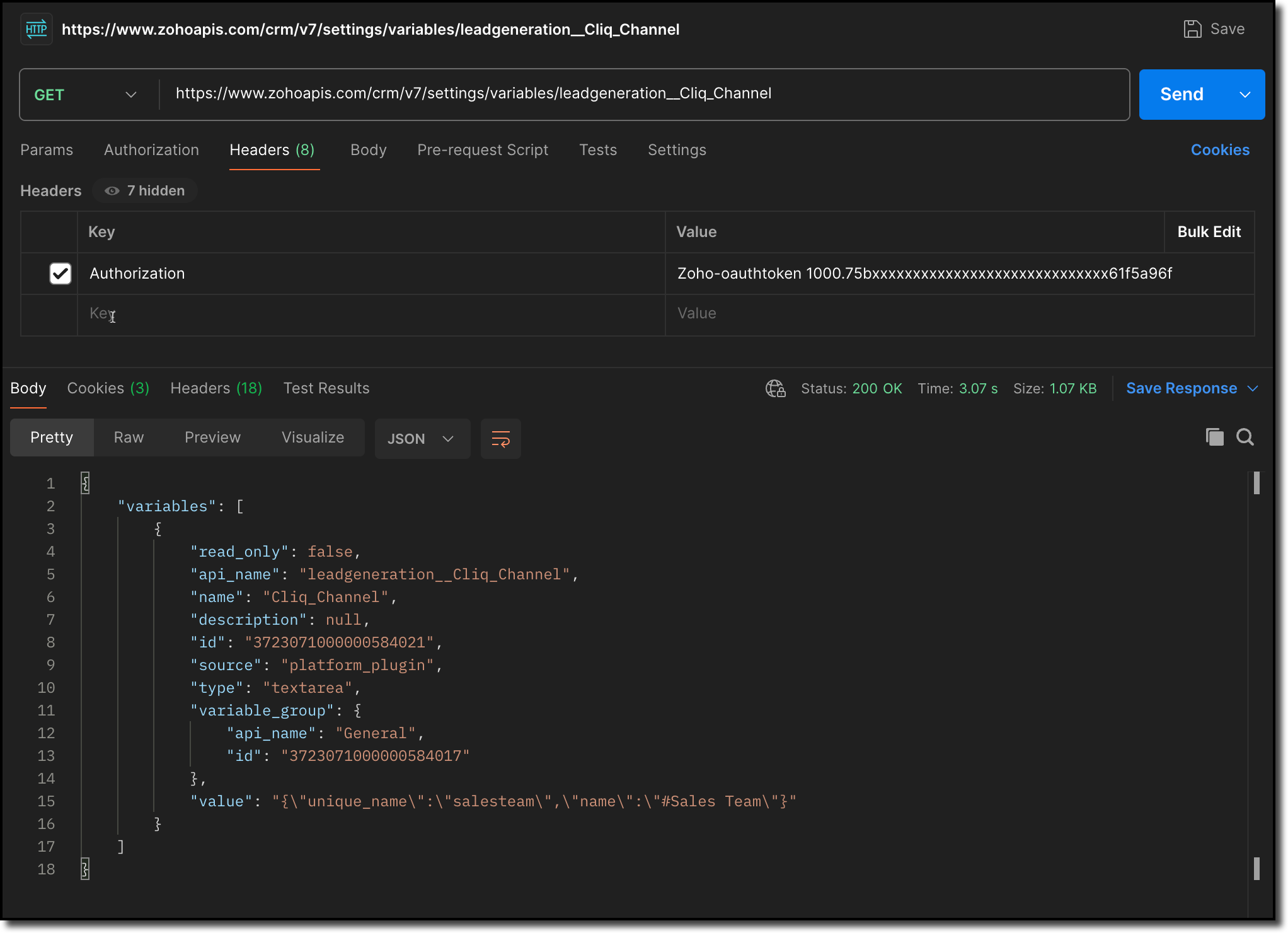
> Notifies the channel: Sends a message to the retrieved channel using the Post Message API.

Info
-> A complete working code sample for the use case is attached at the end of this post for your reference.
-> The test function for triggering notifications is also included in the attachment. You can use the same snippet in your extension to initiate the notification process.
-> Ensure to replace the unique names of your Connector APIs and Variable.
11. Fill in the details of the application as shown in this image and upload the widget ZIP file packed using the Zoho CLI command.
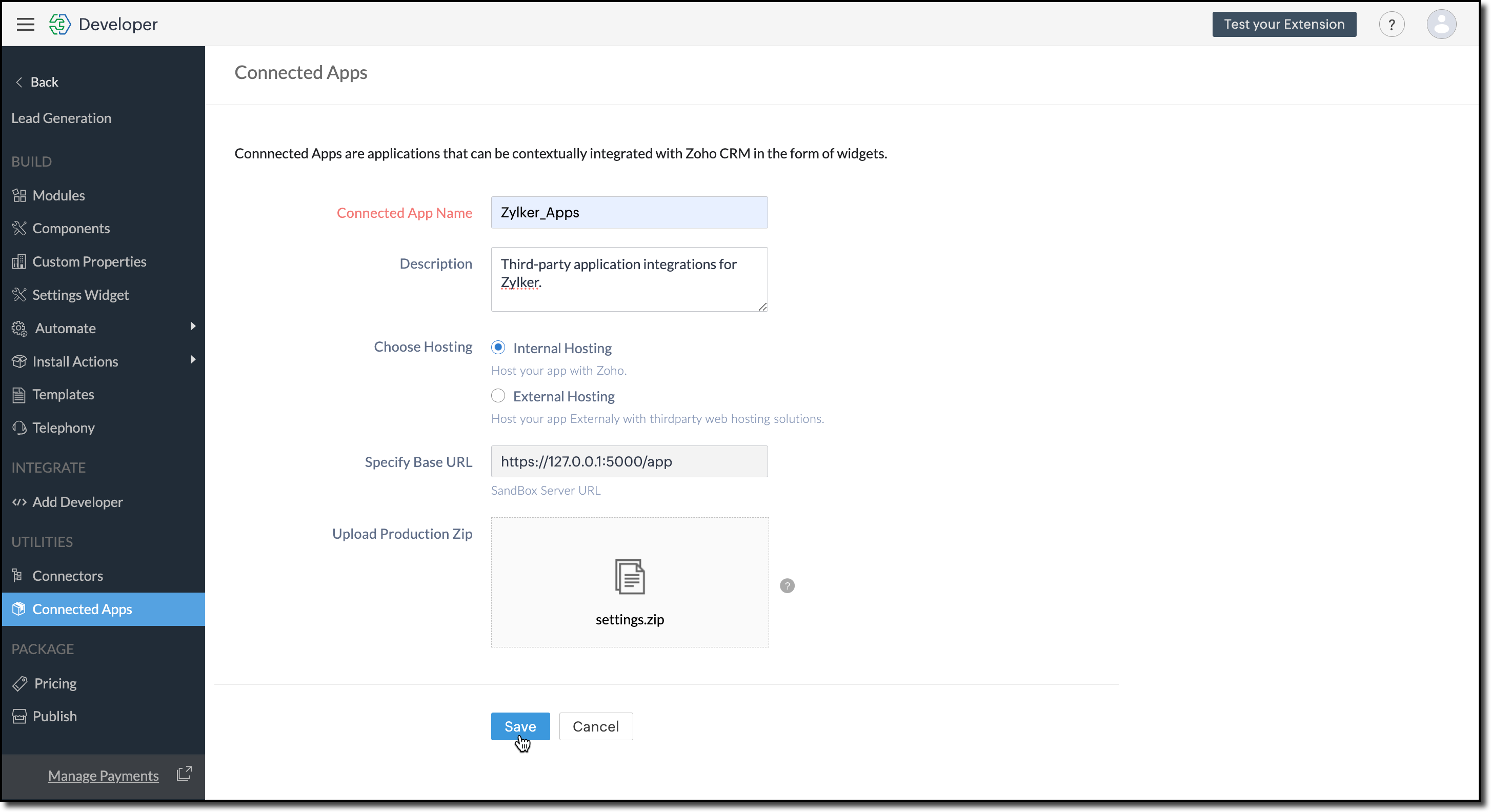
12. Click Save.
Configure the Settings Widget
13. Navigate to Build > Settings Widget in the left menu.
14. Provide a Name and the Resource Path of your widget.
15. Click Save.

The Settings Widget for Extension is available upon request. Contact support@zohocrmplatform.com to enable it for your account.
Packaging, Publishing and Deploying
16. Go to Package > Publish on the left-side menu and publish the extension.
17. The review process for listing an extension in the Marketplace will take from three weeks to one month.
For the demo, we will proceed with deploying the extension using the private plugin deployment link.

18. Now, replace the URL of your Zoho CRM page with the deployment link from the Developer Console and approve the extension installation.
Try it Out!
Once installed:
> A pop-up will appear, prompting you to authorize Zoho Cliq for the required configurations.
If you do not already have a Zoho Cliq account, you can sign up directly from the pop-up and proceed with the authorization.
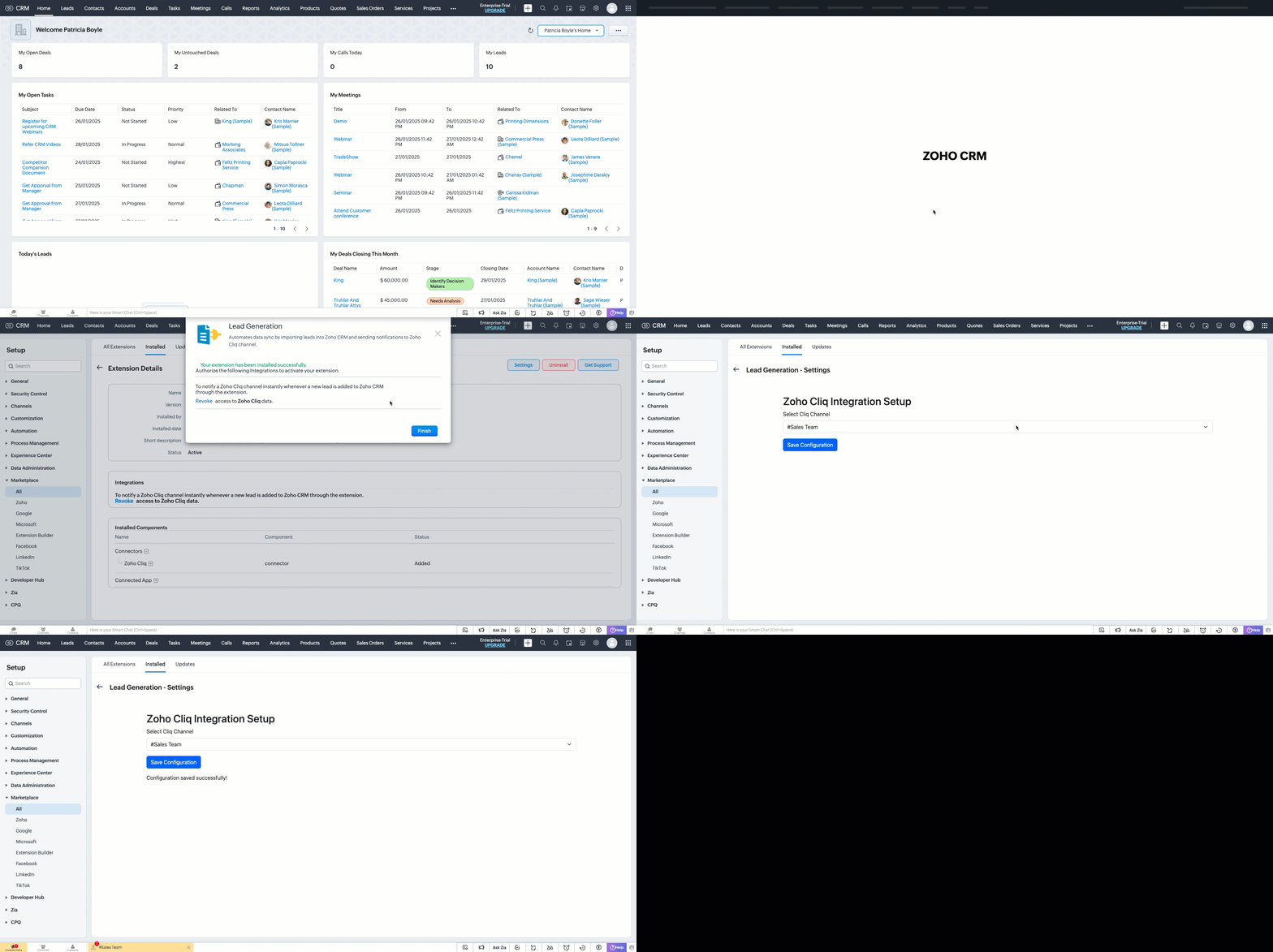
> After authorization, you will be redirected to the Settings widget page, where you can select and save your preferred Cliq channel.
> If you need to update the settings later, you can find them on the Installed Extensions page under the respective extension.


Note
The demo videos above use a testing function to notify the channel. You can deploy it anywhere in your extension to trigger a notification whenever a lead enters a Zoho CRM organization through the extension.
Find the function in the attachments at the end of this post.
Similar Scenarios
- Sales Territory Management: An extension that auto-assigns incoming leads to sales reps can use a settings widget to allow managers to define territories and sales rep mappings dynamically.
- Custom Field Mapping: For extensions that sync data between Zoho CRM and external systems, a settings widget can let users map CRM fields to external system fields.
- Automated Email Preferences: In email automation extensions, the settings widget can allow users to specify email templates, recipients, or trigger conditions for follow-ups and campaigns.
Adding a Settings Widget to your Zoho CRM Extensions not only enhances user experience but also boosts the flexibility and efficiency of your extension. Whether it is notifying sales teams or customizing field mappings, a well-designed settings page is a game-changer for your extensions.
Explore the Widget section in our Kaizen collection to try out various widget types and discover their unique use cases.
If you have any queries or a topic to be discussed reach out to us at support@zohocrm.com or drop your comment below.
Until next time, keep innovating!
Cheers!
----------------------------------------------------------------------------------------------------------------------------------------
Related Reading
- Zoho CRM Widget - An Overview, Installation and Creation, Mobile Compatibility, Telephony Widget Extension, and other Kaizens.
- Widget SDKs - An Overview, Invoke Connector and Get Organization Variable.
- Zoho Developer Console - An Overview, Creating Extensions, Building Connected Apps, and A Quick Start Guide.
- Zoho Extensions - Custom Variables and Connectors
- Zoho Cliq - GET List of Channels and POST Message in Channel.
- Zoho Marketplace - An Overview
----------------------------------------------------------------------------------------------------------------------------------------
Previous Kaizen: Kaizen #174 - Client Script Commands | Kaizen Collection: Directory
More enhancements in the COQL API are now live in Zoho CRM API Version 7. Check out the V7 Changelog for detailed information on these updates.
Topic Participants
Kiruthiga G
Sticky Posts
Kaizen #198: Using Client Script for Custom Validation in Blueprint
Nearing 200th Kaizen Post – 1 More to the Big Two-Oh-Oh! Do you have any questions, suggestions, or topics you would like us to cover in future posts? Your insights and suggestions help us shape future content and make this series better for everyone.Kaizen #226: Using ZRC in Client Script
Hello everyone! Welcome to another week of Kaizen. In today's post, lets see what is ZRC (Zoho Request Client) and how we can use ZRC methods in Client Script to get inputs from a Salesperson and update the Lead status with a single button click. In thisKaizen #222 - Client Script Support for Notes Related List
Hello everyone! Welcome to another week of Kaizen. The final Kaizen post of the year 2025 is here! With the new Client Script support for the Notes Related List, you can validate, enrich, and manage notes across modules. In this post, we’ll explore howKaizen #217 - Actions APIs : Tasks
Welcome to another week of Kaizen! In last week's post we discussed Email Notifications APIs which act as the link between your Workflow automations and you. We have discussed how Zylker Cloud Services uses Email Notifications API in their custom dashboard.Kaizen #216 - Actions APIs : Email Notifications
Welcome to another week of Kaizen! For the last three weeks, we have been discussing Zylker's workflows. We successfully updated a dormant workflow, built a new one from the ground up and more. But our work is not finished—these automated processes are
Recent Topics
Zoho Books - How to Invoke a Custom Function in Schedulers
We have multiple schedulers that send emails to customers in batches. Currently, we are maintaining the same code across several schedulers. Is it possible to use a custom function inside a scheduler script? If yes, how can we invoke the custom functionSpecial characters (like â, â, æ) breaking when input in a field (encoding issue)
Hey everyone, We are currently dealing with a probably encoding issue when we populate a field (mostly but not exclusively, 'Last Name' for Leads and Contracts). If the user manually inputs special characters (like ä, â, á etc.) from Scandinavian languages,Set Custom Icon for Custom Modules in new Zoho CRM UI
Notes badge as a quick action in the list view
Hello all, We are introducing the Notes badge in the list view of all modules as a quick action you can perform for each record, in addition to the existing Activity badge. With this enhancement, users will have quick visibility into the notes associatedIs Zoho Live Chat compatible with WordPress CMS?
Hello, I have a website called www.jjrlab.com and I'm interested in using Zoho Chat on it. Does it support WordPress CMS? Thanks.Introducing spam detection for webforms: An additional layer of protection to keep your Zoho CRM clean and secure
Greetings all, One of the most highly anticipated feature launches—Spam Detection in webforms—has finally arrived! Webforms are a vital tool for record generation, but they're also vulnerable to submissions from unauthenticated or malicious sources, whichBring your CRM and Desk app inside SalesIQ with widgets
Have you ever been confused and frustrated with multiple open tabs and switching back and forth from SalesIQ to other apps to perform your business-specific operations? How effective would it be to have all the required tools and data of the apps youSpeak Your Customers' Language: SalesIQ's chatbots now support 30 languages 🤖
We're unveiling some major upgrades to our chatbot that are set to revolutionize your experience! Now SalesIQ support 30 languages for both Zobot and Answer bot. By speaking your customers' language, you can enhance engagement, improve customer satisfaction,Repeat Column merge in ZOHO writer columns doesn't allow to set max columns per row
I'm using ZOHO writer to merge data from a ZOHO CRM subform and I want it to make a table. We're using Insert Table for Column Repeat, because this is what we need. (Name of column (Teamname) and underneath that a list of names of teammembers). It worksPersisting email signals to contact timeline?
Hello there. Regarding the email signals that are logged when a contact opens an email, am I correct that these signals are not logged to a contact's timeline? Ideally, I would like to have this context available for future follow-ups, if the contactTrouble with using Apostrophe in Name of Customers and Vendors
We have had an ongoing issue with how the system recognizes an apostrophe in the name of customers and vendors. The search will not return any results for a name that includes the mark; ie one of our vendors names is "L'Heritage" and when entering theReally want the field "Company" in the activities module!
Hi team! Something we are really missing is able to see the field Company when working in the activities module. We have a lot of tasks and need to see what company it's related to. It's really annoying to not be able to see it.🙈 Thx!Upcoming update to Google Drive integration in Zoho Creator
Hello everyone, We're writing to inform you about an upcoming update to how Zoho Creator integrates with Google Drive. In Zoho Creator, during actions like importing files to create an app or attaching files to fields, you can choose files directly fromManaging Scheduled Replies
Communication is most effective when the intended message reaches the right person at the right time. However, this can be challenging when communication occurs across different time zones. By scheduling replies, businesses can ensure that responses reachShow price book list price
When using price books, once you add products to the price book in the Products related list you can display the Unit price which is the default list price; however, there is no option to show the price book list price. To see the price book list priceAllow Attaching Quartz Recordings to Existing Zoho Support Tickets
Hi Zoho Team, We would like to request an enhancement to how Zoho Quartz recordings integrate with Zoho Support tickets. Current Behavior: At the moment, each Quartz recording automatically creates a new support ticket. However, in many real-world scenarios:Can I hide empty Contact fields from view?
Some contacts have a lot of empty fields, others are mostly filled. Is there a way I can hide/show empty fields without changing the actual Layout? I would like to de-clutter my view, and also be able to add information later as I am able. I would beManage user roles and profiles from the Bigin app (iOS and macOS)
Hello everyone! We're happy to announce that you can manage user roles and profiles from the Bigin mobile app. The Users & Controls section has three subsections: Users, Profiles, and Roles. Users Employees who belong to your Bigin organization are calledSupport Bots and Automations in External Channels
Hello Zoho Cliq Team, How are you? We actively use Zoho Cliq for collaboration, including with our external developers. For this purpose, external channels are a key tool since they work seamlessly within the same interface as all of our other channelsForm to PDF template
I am looking to create a Form and when information is inputted, it will merge it into a PDF template we already have. There could be multiple lines in the form and each line inputs information into a new page of a PDF template.Please verify my account
Hi, We have just launched our website and received media coverage in our country. Hundreds of users are signing up for our platform every day. We would like to send them a welcome email, but we are unable to do so because our ZeptoMail account has notSubject character limit increase
We have an occasional user case where subject lines exceed 500 characters which is the ZeptoMail imposed limit. While I understand long subject lines are not "best practice", these are particular notification emails with specific information for clientAccount blocked
Yesterday I got my Zeptomail account blocked due to too many hard bounces. My account is used exclusively for sending transactional emails (eg. your order has been shipped, a form has been filled, etc) and the sudden blocking impacted hundreds of websitesNested notebooks
Dear Sir/Madam, I would like to know if it is possible to nest notebooks. It would be very helpful when there are too many, as it would improve organization. Thank you for your response. Best regards.Cannot see correct DNS config for mail after moving domain to another provider
I have moved my domain from one provider to another and after that zoho mail stopped working (expected). Problem is, zoho mail admin panel still shows (10 hours after move) that all records are correct while I haven't changed anything in my domain DNSProactive Alert for Existing Open Tickets per Contact / Account
Hello Zoho Desk Team, Greetings, and hope you’re doing well. We would like to submit a feature request aimed at improving agent awareness and efficiency when handling tickets in Zoho Desk. Use case When an agent opens a ticket (new or existing), it isTicket resolution field - can you add links, video, and images?
Seems like the ticket resolution fields is just a text field. Any plans to add the ability to add links, images...the same functionality in the problem description box? I would like to send the customer a link to a KB article, a link to our Wiki, embedTicket Resolution - Add rich formatting, screenshots and attachments
The resolution field only allows plain text at the moment. Many of our resolutions involve posting screenshots as evidence, it would be great for us to be able to have rich text formatting, be able to paste screenshots and add attachments in the solutionKaizen #140 - Integrating Blog feed scraping service into Zoho CRM Dashboard
Howdy Tech Wizards! Welcome to a fresh week of kaizen. This week, we will look at how to create a dashboard widget that displays the most recent blog post of your preferred products/services, updated daily at a specific time. We will leverage the potentialConvert Lead Automation Trigger
Currently, there is only a convert lead action available in workflow rules and blueprints. Also, there is a Convert Lead button available but it doesn't trigger any automations. Once the lead is converted to a Contact/Account the dataset that can be fetchedI'm getting this error when I try to link an email to a deal inside the Zohomail Zoho CRM extension.
When I click "Yes, associate," the system displays an "Oops!! Something went wrong" error message. I have attached a screenshot of the issue for reference.Zoho Sheet - Desktop App or Offline
Since Zoho Docs is now available as a desktop app and offline, when is a realistic ETA for Sheet to have the same functionality?I am surprised this was not laucned at the same time as Docs.ZOHO add-in issue
I cannot connect ZOHO from my Outlook. I am getting this error.Marketing Automation
L.S. Marketing Automation is and has always been part of the Zoho One bundle - according to the information provided on the Zoho Website. Why when I open Marketing Automation do I get the following message?: "Your trial has expired. We hope you enjoyedWhat's New in Zoho Analytics - January 2026
Hello Users! We are starting the year with a strong lineup of updates, marking the beginning of many improvements planned to enhance your analytics experience. Explore the latest improvements built to boost performance, simplify analysis, and help youTranslation from Chinese (Simplified) to Chinese (Traditional) is not working. It randomly translated. Google Translate accurately but zoho translate is not working at all
Hi friends, The newly added language for translation. https://www.zoho.com/deluge/help/ai-tasks/translate.html "zh" - Chinese "zh-CN" - Chinese (Simplified) "zh-TW" - Chinese (Traditional) my original text: 郑这钻 (and it is zh-CN) translated traditionalThe Social Playbook - January edition: Getting started with content creation
Social media isn’t just about posting some random content. It’s about why certain content works, how brands stand out, and what makes people pause mid-scroll. The Social Playbook is a monthly community series where we break all of that down. Through realSupport for Custom Fonts in Zoho Recruit Career Site and Candidate Portal
Dear Zoho Recruit Team, I hope you're doing well. We would like to request the ability to use custom fonts in the Zoho Recruit Career Site and Candidate Portal. Currently only the default fonts (Roboto, Lato, and Montserrat) are available. While theseAdding bank details to the contact through API
How to add bank-related information to the contact while creating it using API? The account number needs to be encrypted before sending it through API but not sure how to encrypt and get those values. Please guide me in this.Font breakage in Zoho Mail Desktop Lite application for Mac
Dear Zoho Mail and Workplace Community, With the latest update of macOS Sequoia and macOS Tahoe, there has been font breakages in the email preview of Zoho Mail Desktop Lite application for Mac. This breakage is due to the corruption of the System fontsNext Page