Kaizen #188 - Building a Timer and Worklog Widget (Part 2)

Welcome back, Tech Wizards!
In Part 1, we developed a Timer Widget that logs active work sessions into the Timer Entries module.
Now, let's enhance this functionality by transferring these entries into the Work Log subform within the Cases module using a workflow with Deluge function and APIs. We will also explore how to generate insightful reports from the Timer Entries module data.
Here is a consolidated view of the outcomes we aim to achieve through these sequential posts.

The following data model illustrates the modules and subforms involved in this use case to help you understand the structure more clearly.

Learn more about the Data Model and how it helps to simplify the understanding of complex processes.
Auto-Syncing Timer Entries to Case Work Logs
For automating the data transfer from the Timer Entries module to the Work Log subforms within Cases module, we will create a workflow rule with an instant action defined in Deluge function.
Prerequisites
Create a subform named Work Log in the Cases module with the following fields.
Field Name | Data Type |
Actual Time Taken(in mins.) | Aggregate (sum of Total Duration (in mins.) field in related case ) |
End Time | DateTime |
Related to Case | Lookup to Cases |
Related to Current Case | Checkbox |
Start Time | DateTime |
Timer Entry | Lookup to Timer Entries |
Total Duration | Aggregate (sum of all the Total Duration (in mins.) field ) |
Total Duration (in mins.) | Number |
Work Description | Multi Line |
Follow the Building a Subform and Working with Custom Fields help pages for creating the subform and fields in Zoho CRM UI, or you can also make Post Custom Fields API calls to create the custom fields in the subform.
Step 1: Create a Workflow
- Login to your Zoho CRM and go to Setup > Automation > Workflow Rules and click Create Rule.
- Choose the Timer Entries module from the dropdown. Provide name and description for the workflow rule.
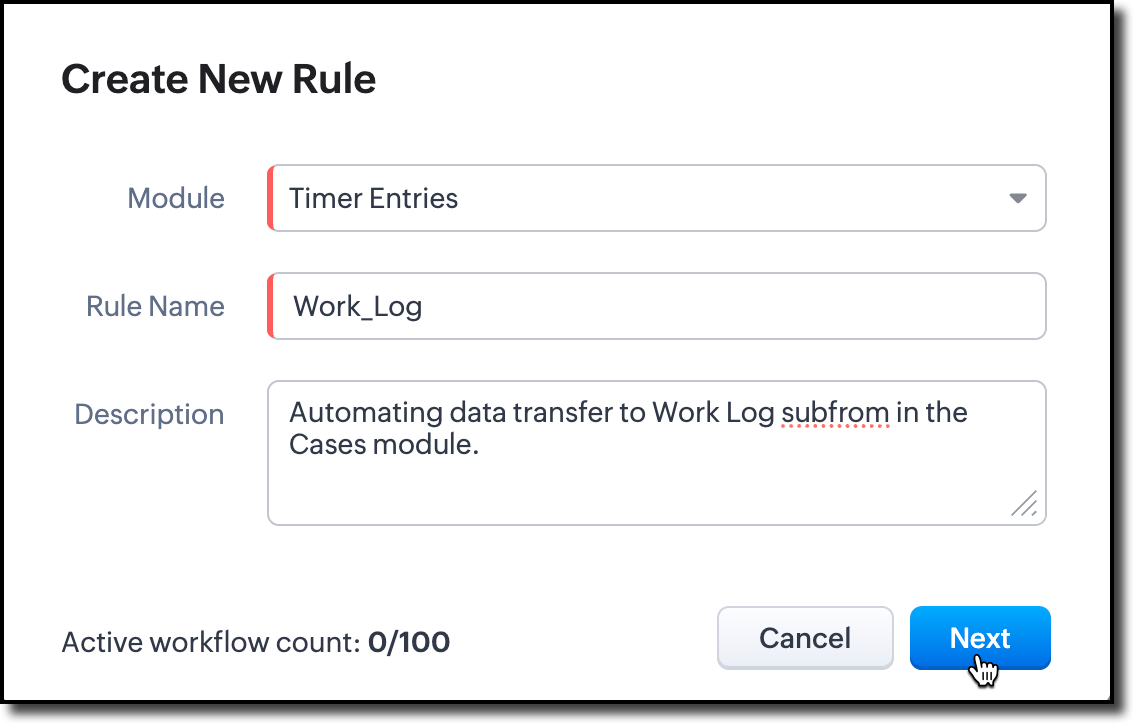
- In the 'When' section of the workflow, choose the trigger as Record Action. In record action, define the trigger as when the End Time field is modified to any value.
- In the 'Condition' section, choose all timer entries. In the 'Instant Actions' section, select Function and choose Write your own.
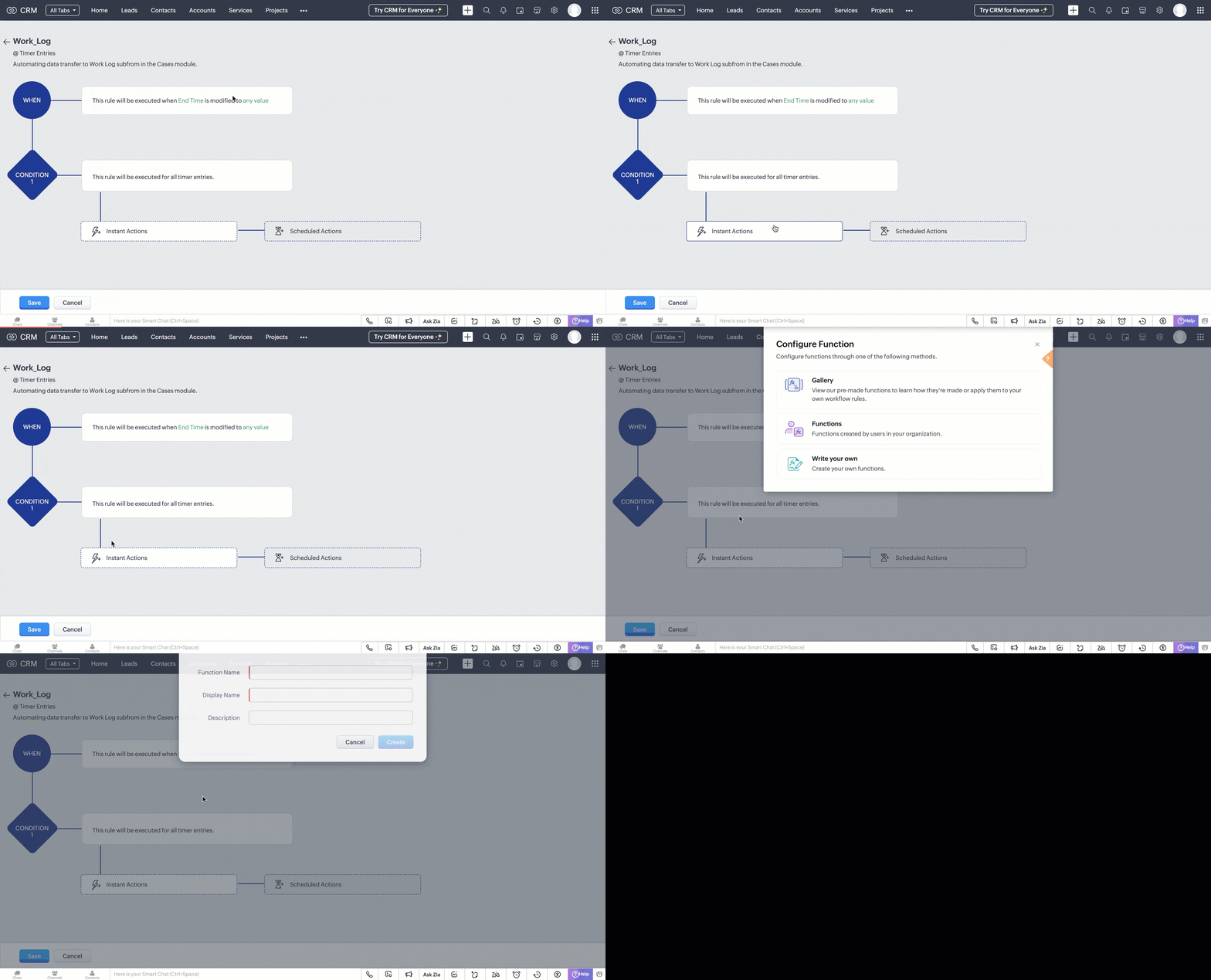
Step 2: Create a Deluge Function
- In the pop box that appeared after choosing to write your own function. Fill in the following details as shown in the image and click Create.
- A code editor will open, where you have to define the data transfer logic in Deluge.
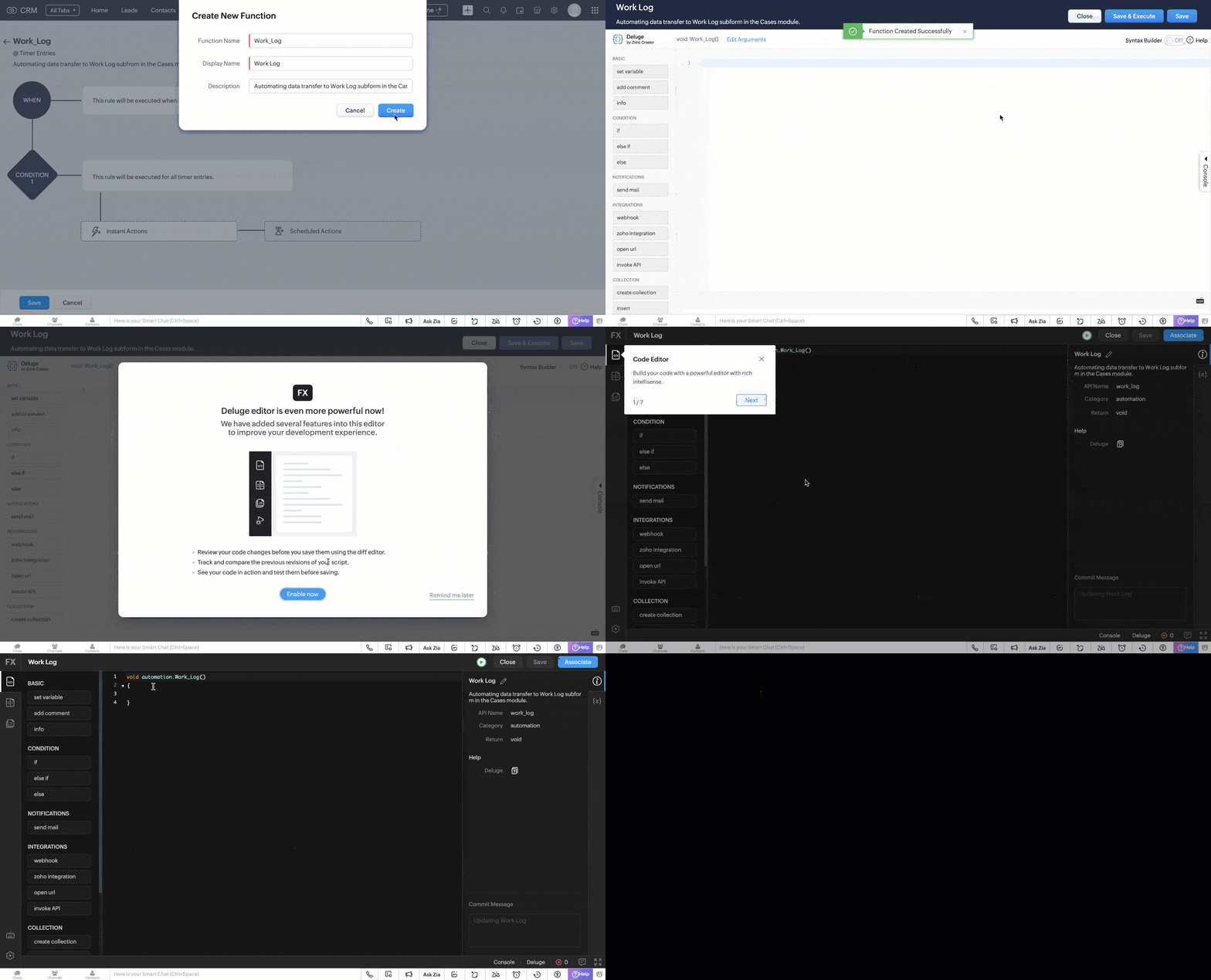
Code logic
The UpdateDataInWorkLog function automates the process of syncing a completed Timer Entry with its associated Cases in Zoho CRM by populating the Work_Log subform for each case.
Fetches Target Case Records
The function uses a predefined custom view (cvid) that we created in Part I of this post to retrieve a list of Case records that are eligible for update. It extracts their record IDs and prepares them for bulk processing.
paramMap = Map(); paramMap.put("cvid","5545974000011183885"); getRecordsResponse = invokeurl [ type :GET parameters:paramMap connection:"crm_oauth_connection" ]; responseDataArray = getRecordsResponse.get("data"); idList = List(); for each item in responseDataArray { idList.add(item.get("id")); } caseRecordsToUpdate = idList; |
Retrieves Timer Entry Details
The selected Timer Entry (identified by recordId received through workflow trigger) is fetched to extract its key details like, Start and end times, Total time spent (duration), Work description, the Case it’s directly related to (if any).
record = zoho.crm.getRecordById("Timer_Entries",recordId,Map(),"crm_oauth_connection"); startTime = record.get("Start_Time"); endTime = record.get("End_Time"); totalTime = record.get("Total_Duration"); workDescription = record.get("Work_Description"); relatedToCaseId = ""; if(record.get("Related_to_Case") != null) { relatedToCaseId = record.get("Related_to_Case").get("id"); } |
Prepares Work_Log Subform Entries
For each retrieved Case, a new subform entry is created in the Work_Log subform. This entry contains the time details, work description, and a reference to the Timer Entry. A flag (Related_to_Current_Case) marks whether the Timer Entry is directly associated with the Case.
caseRecordIds = caseRecordsToUpdate; if(!caseRecordIds.isEmpty()) { recordUpdateArray = List(); for each caseRecordId in caseRecordIds { TimerArray = List(); TimerObj = Map(); TimerObj.put("Work_Description",workDescription); TimerObj.put("Timer_Entry",recordId); TimerObj.put("Related_to_Case",relatedToCaseId); TimerObj.put("Start_Time",startTime); TimerObj.put("End_Time",endTime); TimerObj.put("Actual_Duration_in_mins",totalTime.toNumber()); info totalTime; TimerObj.put("Related_to_Current_Case",caseRecordId == relatedToCaseId); TimerArray.add(TimerObj); recordUpdateObj = Map(); recordUpdateObj.put("id",caseRecordId); recordUpdateObj.put("Work_Log",TimerArray); recordUpdateArray.add(recordUpdateObj); } |
Bulk Updates Case Records
All Case records are updated in bulk via the Update Records API. Each gets its Work_Log subform updated or appended with the latest Timer Entry details.
updateRequestBody = {"data":recordUpdateArray}; updateResponse = invokeurl [ type :PUT parameters:updateRequestBody + "" connection:"crm_oauth_connection" ]; } |
Once done, click Save and associate the merge field (Timer Entry ID) with the function.

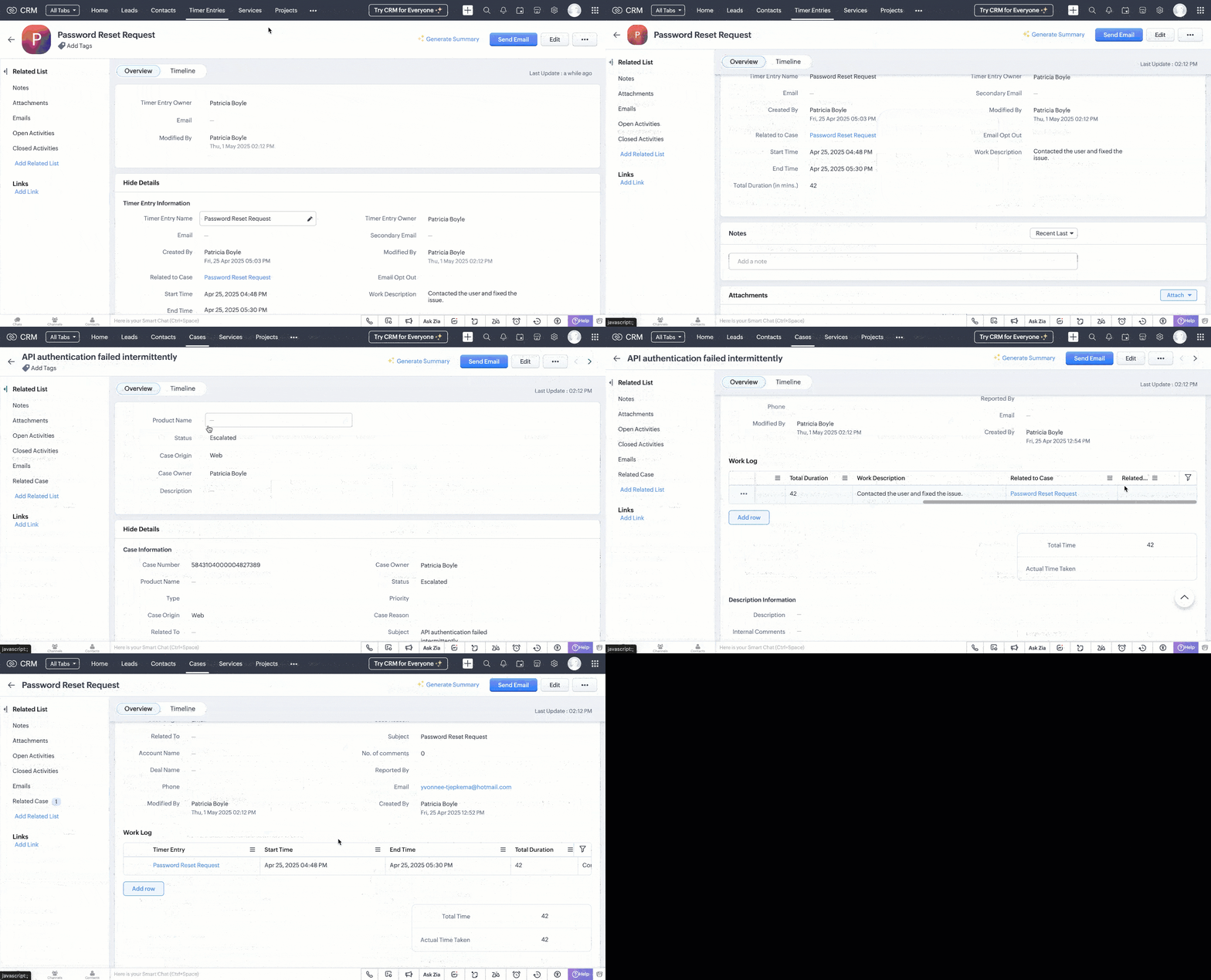
This workflow is triggered when the timer widget is stopped and the end time is updated in the corresponding timer entry record.
Following is a GIF that illustrates how the data sync reflects in the case records.
Generating Reports from Timer Entries
With the Timer Entries and Work Log data in place, you can create comprehensive reports to analyze work patterns, SLA adherence, and productivity trends.
- Navigate to the Reports module and click Create Report.
- Choose Cases as the primary module and include the Work Log subform.
- Select the desired fields like Case Subject, Start Time, End Time, Total Duration, and Work Description.
- Group data by fields like Case Owner or Status to gain insights into workload distribution and case progress.
- Apply filters as needed, such as date ranges or specific case statuses.

Refer to the Understanding and Building Report help page for more details.
With the Timer Widget, automated data transfer to Work Logs, and insightful reporting, we have established a robust system to track and analyze multiple active work times within Zoho CRM.
If you have specific scenarios or challenges you'd like us to address in future Kaizen posts, feel free to share them in the comments or reach out to us at support@zohocrm.com.
Cheers!
------------------------------------------------------------------------------------------------------------------
Additional Reading
- Subforms and Fields - Building Subforms and Working with Custom Fields
- Core APIs - POST Custom Fields, GET Records, POST Records and UPDATE Records
- Workflow - An Overview and Configuring Workflow Rules
- Functions - An Overview, Setting Up Functions, Functions IDE, FAQs
- Deluge - An Introduction
------------------------------------------------------------------------------------------------------------------

Previous Post: Kaizen #187 - Building a Timer and Worklog Widget (Part 1) | Kaizen Collection: Directory
Topic Participants
Kiruthiga G
Sticky Posts
Kaizen #198: Using Client Script for Custom Validation in Blueprint
Nearing 200th Kaizen Post – 1 More to the Big Two-Oh-Oh! Do you have any questions, suggestions, or topics you would like us to cover in future posts? Your insights and suggestions help us shape future content and make this series better for everyone.Kaizen #226: Using ZRC in Client Script
Hello everyone! Welcome to another week of Kaizen. In today's post, lets see what is ZRC (Zoho Request Client) and how we can use ZRC methods in Client Script to get inputs from a Salesperson and update the Lead status with a single button click. In thisKaizen #222 - Client Script Support for Notes Related List
Hello everyone! Welcome to another week of Kaizen. The final Kaizen post of the year 2025 is here! With the new Client Script support for the Notes Related List, you can validate, enrich, and manage notes across modules. In this post, we’ll explore howKaizen #217 - Actions APIs : Tasks
Welcome to another week of Kaizen! In last week's post we discussed Email Notifications APIs which act as the link between your Workflow automations and you. We have discussed how Zylker Cloud Services uses Email Notifications API in their custom dashboard.Kaizen #216 - Actions APIs : Email Notifications
Welcome to another week of Kaizen! For the last three weeks, we have been discussing Zylker's workflows. We successfully updated a dormant workflow, built a new one from the ground up and more. But our work is not finished—these automated processes are
Recent Topics
Using Zoho Forms vs Zoho Survey
Hello - I'm looking for advice on whether to use Zoho Survey or Zoho Forms for our small non-profit. We have a Zoho One subscription, so have access to both. The main use case at the moment is application forms for our professional development programs.Kaizen #200 - Answering Your Questions | Authentication using Zoho CRM Python SDK
We’re incredibly excited to bring you the 200th post in our Kaizen series! This journey has been as much about listening as it has been about sharing. And today, we’re making both count. Over the past few weeks, we’ve collected your feedback through theZoho CRM sync
Just wondering if the plan is for the Zoho CRM implementation to always be just an import and not a sync? At the very least, a one-way sync that kept the data in Tables up-to-date would increase the amount of usecases, but ideally the option to two-wayAdd serial number in print page list
How can i add serial number in print page for every entries?Trying to Delete records from Creator not found in CRM
Hi, In the following script, I am trying to delete records from Creator not found in CRM, but I am getting the error message "Error at line number: 55 Improper Statement Error might be due to missing ';' at end of the line or incomplete expression". PleaseREST API for Branch and Budget
Hi Team, Can you please guide me with the appropriate rest API documentation for fetching Branch and Budget details?STOP FRAUDULENT TRANSACTION IMMEDIATELY
I DID NOT AUTHORIZE THIS TRANSACTION OR RENEWAL, STOP IMMEDIATELY CHARGING MY CARD I CAN NOT CONTACT SUPPORT, NO ONE IS AVAILABLE ON CHAT PAYMENT ID RPCW2003260759193Best way to handle a credit card download fiasco
Hi there, hoping that someone knowledgable with book keeping can give me the answer here. One of my credit cards has been integrated with Zoho books and we have been downloading transactions with no issue. The credit card got compromised and was usedWhen Opening Zoho Mail I always get a Tab with an error (See attached image)
Everytime I open Zoho mail I get this. It is trying to open a deleted email. I already tried going to Settings > While Starting up Changed that option back and forth but this persists. Its annoying. Other than that I love this. Any help would be appreciated.Pre-Registration - Suggestion
Suggest to add a Pre-Registration feature for non-scheduled events. Scenario is that we have a training academy and would like to collect pre-registrants prior to an actual scheduled event so we can use this as a basis for demand management and scheduling of new events for those expressing interest.Not all messages showing in folders in iOS mail.app
I have a bunch of emails filed in various folders. Those folders are showing all of the emails in them on Zoho.com and in the Zoho Mail app on my iPhone and my iPad. They also all show up fine in Mail.app on my Mac. The problem is that certain (not all)Where do the 'Archived' mails go?
I have hit 'Archive' on quite some mails I still needed, but didn't want in my inbox anymore. I obviously thought 'Archive' is not the same as 'Delete', since they don't even pass the trash folder this way, and right now I was looking for one of thoseSignature image size changing on replied emails
Hi, Sometimes I see the size of the image I use as signature changes when I open replied emails. Do you know why is this happening? It doesn't seem to happen when I send emails to Gmail though. Signature should look like in attachment "Signature_normal.jpg"Não consigo enviar emails. "Razão:533"
Não consigo enviar emails. "Razão: 533 Relaying disallowed. Invalid Domain" aparece e me impede de enviar emails... Como resolver o problema?Error when setting up IMAP access in Gmail
Hi I set up POP3 access via Gmail for my Zoho-hosted domain email. I just tried to change it to IMAP access, however when inputting the settings I received the following error message from Gmail "Missing +OK response upon connecting to the server: * OKZoholics Europe 2025: Unlocking the Power of Zoho CRM : A Hands-On Workshop
Why should you attend? At Zoholics Europe 2025, Zoho’s official user conference, you’ll have the opportunity to connect directly with experts and explore powerful tools that help businesses elevate customer experiences. Be sure to attend one of the mostHow do I delte a mailbox alias
Hi everyome, I have created a mailbox alias on one of my accounts, but I can't figure out how to delete it again. When I go into the control panel on my super-admin account and click on user details and the settings for the user, I can see the mailboxAllowing vendors to Upload Purchase Invoices against Purchase Order
Work Flow: Once Project is executed, We send Purchase order to every Vendors asking them to Share the invoice against the same. Most of the time Vendors Send invoices through Mails but our Finance Team miss to book those Purchase Invoices in Zoho Books.Deluge - forward incoming email with original attachments and content but new subject
I'm working in ZohoMail with a 10GB paid account. Using a filter and a custom function, I can send a new mail with the original email content and a new subject, but I'm struggling to find how to attach the original attachment to a new mail - or even toError: "The conversation window has expired." on WhatsApp
Hello, I would like to know why this error appears in the messages within WhatsApp from the CRM: "The conversation window has expired." The question arises because a potential client sent us a message at 11:00 PM and we are responding the next day atHow to Sync Desk KB and Sales IQ KB?
Hi, we have just started to use Desk and are using the SalesIQ Chat. Ideally I'd like to use the 'FAQ' feature on chat (which uses SalesIQ KB) and also allow our customers to use the self-service KB that comes with Desk. Unfortunately they are two differentNeed help! Unable to send message; Reason: 554 5.1.8 Email Outgoing Blocked.
Hi Zoho team My account name is senpai.atelier, it’s been few days I can’t send Emails with the same error messages. I’ve raised the issue to support@zohomail.com that doesn’t respond to my query. I wonder if you may help troubleshooting soon.Zoho arrives to Spam on all Microsoft Accounts (Outlook, Hotmail, Microsoft 365)
I believe this is a very serious issue. All my email accounts in Zoho arrives straight to SPAM. Thing is, a lot of clients rely on email arriving to Inbox, specially on Microsoft Accounts since it is used a lot both for business and personal email sending.Registeration
I just added the TXT code. What next?Cannot receive password protected zip files
Hello, I cannot received a password protected attachments. Also all my members in the same domain has the same problems. Can you please help me? Best regradsERROR 554 5.1.8 Sender Address Blocked code(554)
We have an email with Zoho ( comercial@bruiser.com.br), but, when we try associate the account in GMAIL, the server shows this message: 554 5.1.8 Sender Address Blocked code(554) I see this error appear when the limits of returns exceded 10 messages,Zoho mail stopped receiving emails
Our email are stopped to receive outsider email. i have checked the DSN, it's pointed to ZOho mail. Can anyone help me to fix this issue urgently? Thankssend email from web application
Hello, I'm experiencing an issue with sending emails from my web application. Here are the configuration parameters currently in use: ini Copia Modifica quarkus.mailer.from=noreply.sedis@mondonovo.net quarkus.mailer.host=smtp.zoho.com quarkus.mailer.port=465Custom CSS in Zoho Form
Hi, Please let me know, how we can add custom css in Zoho Form. ThanksZoho Recruit
Getting this issueMissing Email
We recently started using ZohoMail we migrated our users from google workspaces. The migration process seemed to have gone smoothly however not all emails are showing in the inbox folder. For example: If I sort the inbox folder from old to new. (OldestClient Script Quality of Life Improvements #1
Since I'm doing quite a bit of client scripting, I wanted to advise the Zoho Dev teams about some items I have found in client script that could be improved upon. A lot of these are minor, but I feel are important none-the-less. Show Error on SubformAccount blocked after accessing via VPN
All my accounts are blocked after using a VPN. I have submitted multiple support tickets without response. It’s critical that my email be restored asap Can you please provide a way to unblock my accountsCourses without signup
Can I create "real" public courses where no signup is needed?Espace Sandbox – Votre environnement de test sécurisé dans Zoho Projects
Zoho Projects propose un sandbox sécurisé pour tester des configurations, des personnalisations et des modifications sans compromettre les données en production. Note : Disponible avec le plan Enterprise le plus récent basé sur les utilisateurs (y comprisDescargas en learn
Buenos dias, yo en mis cursos para no tener que cargar los archivos que utilizare en las lecciones decidi utilizar la opcion de bloques para añadir un enlace de mi workdrive con el video que deseo para que sea todo mas organizado, pero hay un problema.Mail delivery
I initially had a problem sending any outgoing mail and was able to fix it on my own, given Zoho support never got back to me. However, despite being able to send emails now, none of my mail to different Gmail addresses are arriving, and they are notMermaid Support & Zoho Learn
Hi Zoho Team, I’m currently working with Zoho Learn and was wondering if there’s any way to add support for Mermaid syntax to create flowcharts, sequence diagrams, and other visual elements within articles or lessons. Mermaid is widely used in technicalBlocked due to VPN
Hi My account outgoing mails and IMAP access have been blocked due to using a vpn being interpreted as suspicious logins. I’ve tried to mail support but not sure if this is also blocked. This is extremely frustrating as I’m using a vpn because I’m travellingreset admin access.
I am a user under the domain @lanutraceuticals.com. I do not have admin access. Kindly let me know the administrator contact or help me reset admin access.”Next Page