Kaizen #188 - Building a Timer and Worklog Widget (Part 2)

Welcome back, Tech Wizards!
In Part 1, we developed a Timer Widget that logs active work sessions into the Timer Entries module.
Now, let's enhance this functionality by transferring these entries into the Work Log subform within the Cases module using a workflow with Deluge function and APIs. We will also explore how to generate insightful reports from the Timer Entries module data.
Here is a consolidated view of the outcomes we aim to achieve through these sequential posts.

The following data model illustrates the modules and subforms involved in this use case to help you understand the structure more clearly.

Learn more about the Data Model and how it helps to simplify the understanding of complex processes.
Auto-Syncing Timer Entries to Case Work Logs
For automating the data transfer from the Timer Entries module to the Work Log subforms within Cases module, we will create a workflow rule with an instant action defined in Deluge function.
Prerequisites
Create a subform named Work Log in the Cases module with the following fields.
Field Name | Data Type |
Actual Time Taken(in mins.) | Aggregate (sum of Total Duration (in mins.) field in related case ) |
End Time | DateTime |
Related to Case | Lookup to Cases |
Related to Current Case | Checkbox |
Start Time | DateTime |
Timer Entry | Lookup to Timer Entries |
Total Duration | Aggregate (sum of all the Total Duration (in mins.) field ) |
Total Duration (in mins.) | Number |
Work Description | Multi Line |
Follow the Building a Subform and Working with Custom Fields help pages for creating the subform and fields in Zoho CRM UI, or you can also make Post Custom Fields API calls to create the custom fields in the subform.
Step 1: Create a Workflow
- Login to your Zoho CRM and go to Setup > Automation > Workflow Rules and click Create Rule.
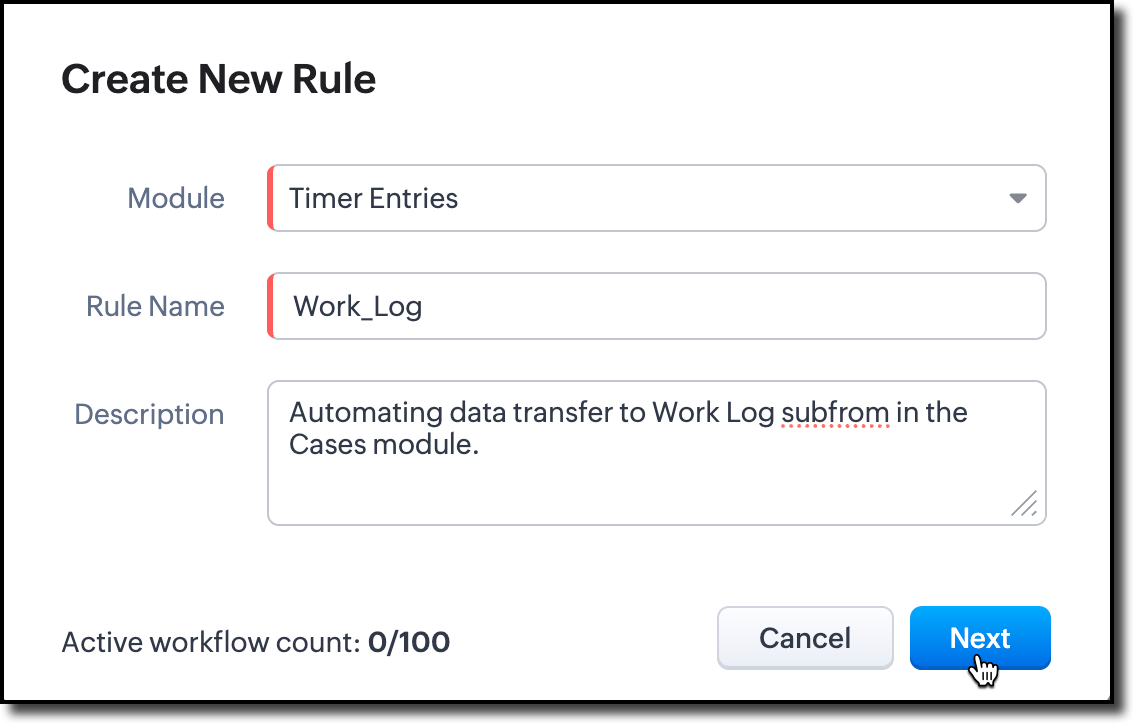
- Choose the Timer Entries module from the dropdown. Provide name and description for the workflow rule.
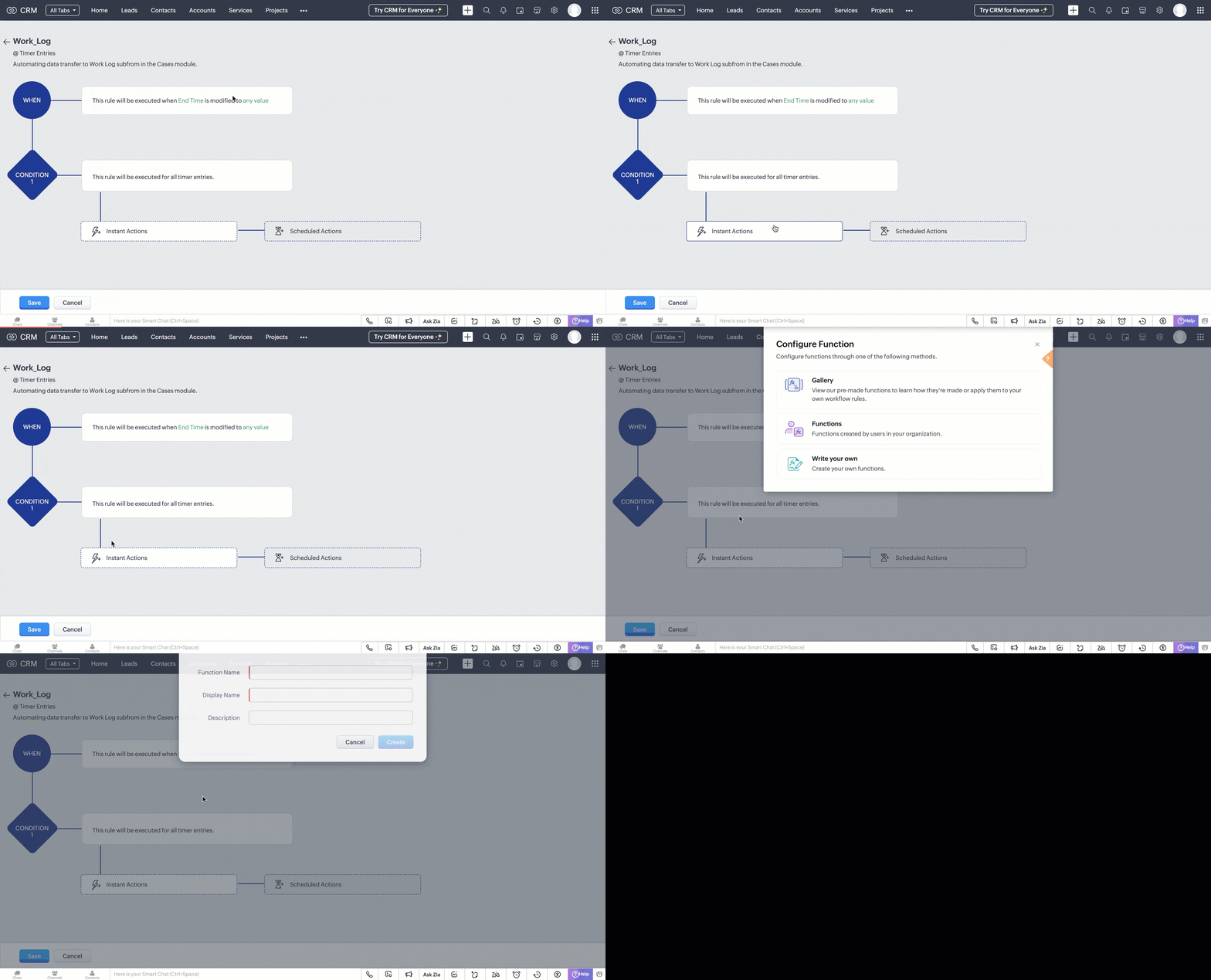
- In the 'When' section of the workflow, choose the trigger as Record Action. In record action, define the trigger as when the End Time field is modified to any value.
- In the 'Condition' section, choose all timer entries. In the 'Instant Actions' section, select Function and choose Write your own.
Step 2: Create a Deluge Function
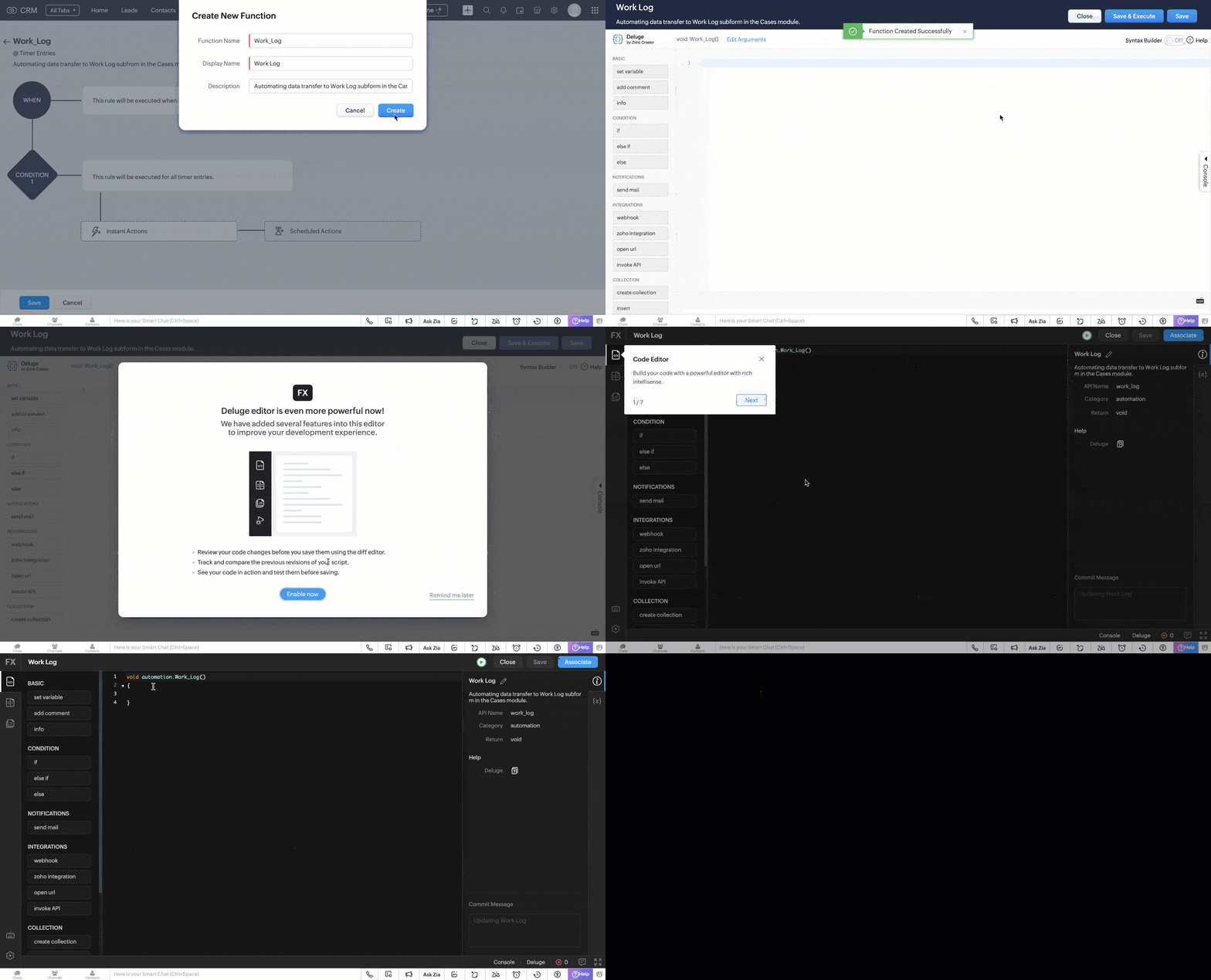
- In the pop box that appeared after choosing to write your own function. Fill in the following details as shown in the image and click Create.
- A code editor will open, where you have to define the data transfer logic in Deluge.
Code logic
The UpdateDataInWorkLog function automates the process of syncing a completed Timer Entry with its associated Cases in Zoho CRM by populating the Work_Log subform for each case.
Fetches Target Case Records
The function uses a predefined custom view (cvid) that we created in Part I of this post to retrieve a list of Case records that are eligible for update. It extracts their record IDs and prepares them for bulk processing.
paramMap = Map(); paramMap.put("cvid","5545974000011183885"); getRecordsResponse = invokeurl [ type :GET parameters:paramMap connection:"crm_oauth_connection" ]; responseDataArray = getRecordsResponse.get("data"); idList = List(); for each item in responseDataArray { idList.add(item.get("id")); } caseRecordsToUpdate = idList; |
Retrieves Timer Entry Details
The selected Timer Entry (identified by recordId received through workflow trigger) is fetched to extract its key details like, Start and end times, Total time spent (duration), Work description, the Case it’s directly related to (if any).
record = zoho.crm.getRecordById("Timer_Entries",recordId,Map(),"crm_oauth_connection"); startTime = record.get("Start_Time"); endTime = record.get("End_Time"); totalTime = record.get("Total_Duration"); workDescription = record.get("Work_Description"); relatedToCaseId = ""; if(record.get("Related_to_Case") != null) { relatedToCaseId = record.get("Related_to_Case").get("id"); } |
Prepares Work_Log Subform Entries
For each retrieved Case, a new subform entry is created in the Work_Log subform. This entry contains the time details, work description, and a reference to the Timer Entry. A flag (Related_to_Current_Case) marks whether the Timer Entry is directly associated with the Case.
caseRecordIds = caseRecordsToUpdate; if(!caseRecordIds.isEmpty()) { recordUpdateArray = List(); for each caseRecordId in caseRecordIds { TimerArray = List(); TimerObj = Map(); TimerObj.put("Work_Description",workDescription); TimerObj.put("Timer_Entry",recordId); TimerObj.put("Related_to_Case",relatedToCaseId); TimerObj.put("Start_Time",startTime); TimerObj.put("End_Time",endTime); TimerObj.put("Actual_Duration_in_mins",totalTime.toNumber()); info totalTime; TimerObj.put("Related_to_Current_Case",caseRecordId == relatedToCaseId); TimerArray.add(TimerObj); recordUpdateObj = Map(); recordUpdateObj.put("id",caseRecordId); recordUpdateObj.put("Work_Log",TimerArray); recordUpdateArray.add(recordUpdateObj); } |
Bulk Updates Case Records
All Case records are updated in bulk via the Update Records API. Each gets its Work_Log subform updated or appended with the latest Timer Entry details.
updateRequestBody = {"data":recordUpdateArray}; updateResponse = invokeurl [ type :PUT parameters:updateRequestBody + "" connection:"crm_oauth_connection" ]; } |
Once done, click Save and associate the merge field (Timer Entry ID) with the function.

This workflow is triggered when the timer widget is stopped and the end time is updated in the corresponding timer entry record.
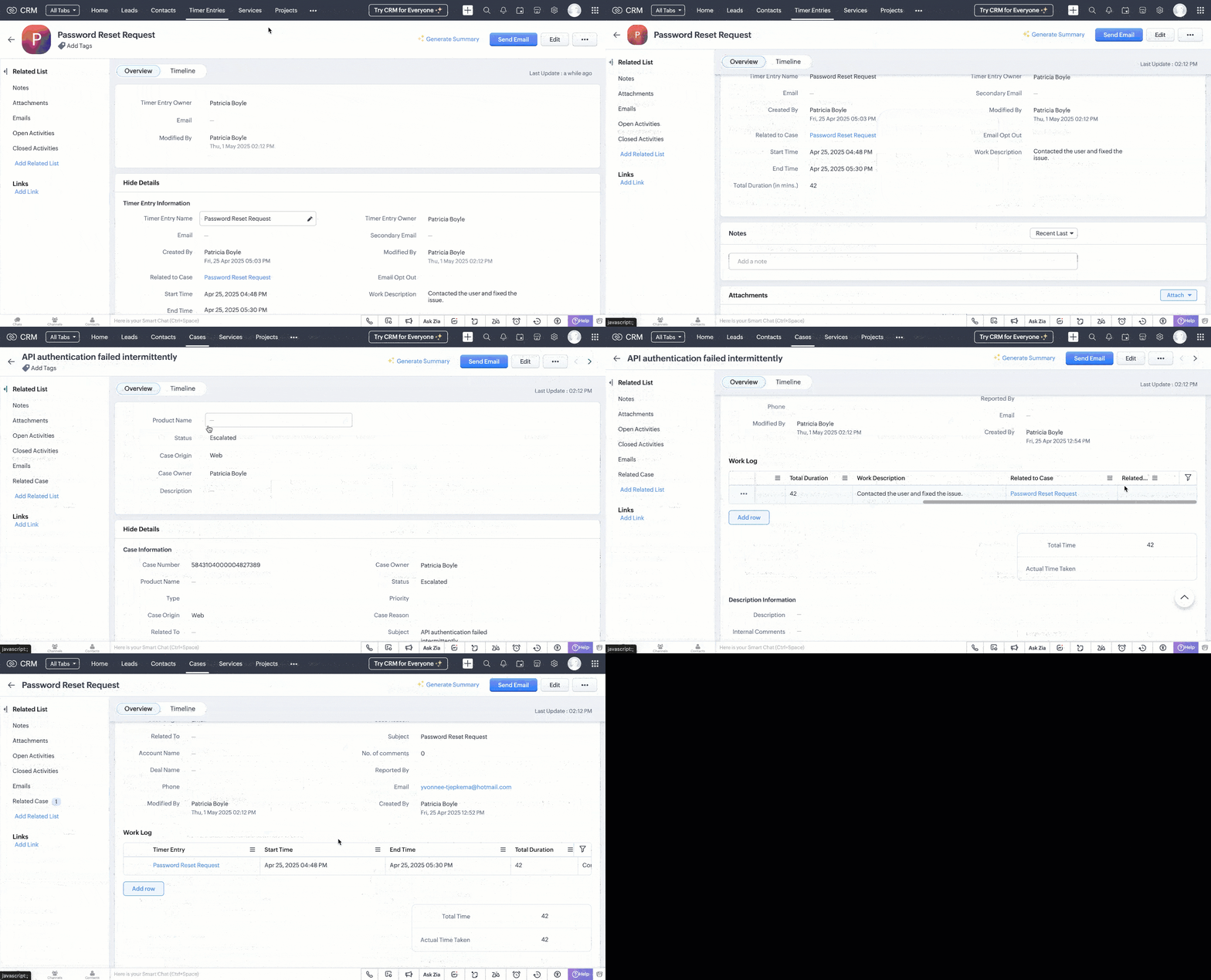
Following is a GIF that illustrates how the data sync reflects in the case records.
Generating Reports from Timer Entries
With the Timer Entries and Work Log data in place, you can create comprehensive reports to analyze work patterns, SLA adherence, and productivity trends.
- Navigate to the Reports module and click Create Report.
- Choose Cases as the primary module and include the Work Log subform.
- Select the desired fields like Case Subject, Start Time, End Time, Total Duration, and Work Description.
- Group data by fields like Case Owner or Status to gain insights into workload distribution and case progress.
- Apply filters as needed, such as date ranges or specific case statuses.

Refer to the Understanding and Building Report help page for more details.
With the Timer Widget, automated data transfer to Work Logs, and insightful reporting, we have established a robust system to track and analyze multiple active work times within Zoho CRM.
If you have specific scenarios or challenges you'd like us to address in future Kaizen posts, feel free to share them in the comments or reach out to us at support@zohocrm.com.
Cheers!
------------------------------------------------------------------------------------------------------------------
Additional Reading
- Subforms and Fields - Building Subforms and Working with Custom Fields
- Core APIs - POST Custom Fields, GET Records, POST Records and UPDATE Records
- Workflow - An Overview and Configuring Workflow Rules
- Functions - An Overview, Setting Up Functions, Functions IDE, FAQs
- Deluge - An Introduction
------------------------------------------------------------------------------------------------------------------

Previous Post: Kaizen #187 - Building a Timer and Worklog Widget (Part 1) | Kaizen Collection: Directory
Topic Participants
Kiruthiga G
Sticky Posts
Kaizen #198: Using Client Script for Custom Validation in Blueprint
Nearing 200th Kaizen Post – 1 More to the Big Two-Oh-Oh! Do you have any questions, suggestions, or topics you would like us to cover in future posts? Your insights and suggestions help us shape future content and make this series better for everyone.Kaizen #226: Using ZRC in Client Script
Hello everyone! Welcome to another week of Kaizen. In today's post, lets see what is ZRC (Zoho Request Client) and how we can use ZRC methods in Client Script to get inputs from a Salesperson and update the Lead status with a single button click. In thisKaizen #222 - Client Script Support for Notes Related List
Hello everyone! Welcome to another week of Kaizen. The final Kaizen post of the year 2025 is here! With the new Client Script support for the Notes Related List, you can validate, enrich, and manage notes across modules. In this post, we’ll explore howKaizen #217 - Actions APIs : Tasks
Welcome to another week of Kaizen! In last week's post we discussed Email Notifications APIs which act as the link between your Workflow automations and you. We have discussed how Zylker Cloud Services uses Email Notifications API in their custom dashboard.Kaizen #216 - Actions APIs : Email Notifications
Welcome to another week of Kaizen! For the last three weeks, we have been discussing Zylker's workflows. We successfully updated a dormant workflow, built a new one from the ground up and more. But our work is not finished—these automated processes are
Recent Topics
Is it possible to Bulk Update 'Product Name' in Zoho Desk?
Is it possible to Bulk Update 'Product Name' in Zoho Desk? I cannot see that option now. Kindly help how we can do it.Change visable Subform fields
I have a form with 4 subforms in it. I added another field to each of the subforms in my main form. Now, how do I update the subforms to show the new fields that I added?Trial Extenstion/ 2nd Go!
Hi, Recently trialed FSM bit didnt get a chance to try out the most recent features is it possible to get another trial to try the new features and see if I can make it work for me?Weekly Tips : Take Control of Your Sent Emails using Outbox Delay
Ever clicked “Send” on an email, then instantly realized you forgot something—like a file, an attachment, or even made a small typo? It happens more often than you'd think. Wouldn’t it be helpful if your email waited a little before actually going out?Format of data after export to spreadsheet
Dear Zoho, can you explain to me what is the point of a report exporting to XLSX if the format of the amounts that will be created there is in text format and not suitable for anything? Why do I need data in a sheet with which nothing more can be doCustomer Payment
Seprate voucher required for cash and bank .You can not authorized any one to enter cash payment .In statement clearly shown is it bank receipt or cash recipt .how to add previous month purchase bill and claim ITC
Hello we have a unclaimed ITC bill of April (we didn't claim it in may as seller didn't uploaded his gstr1 ) when we trying to file gstr 3b in june month we noticed the bill has been uploaded (april bill) .how to change the filing month of that aprilDeluge security enhancements
Hello everyone, At Deluge, security is a top priority, and we're continuously working to enhance the platform's safety and reliability. As part of our ongoing commitment to secure coding and industry best practices, we're rolling out key updates to howHow do I set users up to only send emails using org emails?
We run marketing campaigns for multiple clients and strictly send emails using the official organization addresses provided by each client. However, we've encountered several instances where users unintentionally send emails from their own company accounts—aopen multiple notes at a time.
Hey there, New to Notebook and liking it, but one thing that's really a bother is not being able to open more than one note at a time, either in a new window or in a new tab. Often times, I like to copy/paste from one note to another or compare draftsLet’s Talk Recruit: Forms that think before you do!
Welcome back to our Let's Talk Recruit series. In our previous post, we shared highlights from our community meetups held across India. This time, we’re talking about something that often gets overlooked but makes a huge difference once you set it upPEPPOL Support Needed for Zoho Books in Europe
I'm reaching out to discuss the urgent need for PEPPOL support in Zoho Books for European users. With Belgium mandating B2B e-invoicing via PEPPOL starting in 2026, many of us are struggling to manage invoices without this integration. While Zoho BooksAllow Equity Accounts to be Used for Expenses
Currently, when entering an Expense or Bill, the Expense Account (account to be debited) allows for accounts in any of these categories to be chosen: COGS Expense Other Current Liability Fixed Asset Other Current Asset Noticeably missing are Equity Accounts.メール一括配信の未送信のメールについて知りたい
メール一括配信の後の、未送信のメールの数は添付のようにシステムから連絡がくるのですが それらの対象者を知りたい。レポートなど一覧で知りたい。 また配信対象者なのに(担当者、リード)の メールの履歴に配信したメールの件名でさえ表示されないのはどう理解したらよいのか知りたいです。 また、これらの人をレポートで一覧で出す方法を教えてください。把握したいためです。How do I add the time zone for the each recipient/subscriber
Hi, I've read that Zoho allows for emails to be sent at a certain time based on the recipient's time zone. How do I add the time zone for the each recipient/subscriber? Thanks!Zoho Formsから獲得した見込み客をSaleIQでトラッキングし、そのトラッキング情報をCRMに集約することは可能でしょうか?
Zoho formsを活用しています。 Zoho CRM、Zoho SalesIQと連携するよう設定しており、Zoho formsから獲得した見込み客の情報はCRMに連携されるのですが、トラッキング情報はZoho CRMの見込み客データ内の 関連リスト 訪問-Zoho salesIQ にデータが反映されません。※添付画像参照ください 考えられる原因や対策などありましたら教えていただけないでしょうか。 よろしくお願い致します。Marketer’s Space: Using Zoho CRM Data for Dynamic Content and Personalization in Zoho Campaigns
Hello Marketers! Welcome back to Marketer’s Space. Do you want to send emails or SMS that feel less like mass messages and more like one-on-one conversations? By integrating Zoho CRM with Zoho Campaigns, you can pull in rich customer data and use it toAdd Attendees to Session months before the Event
I need to manually add Attendees to Sessions right away for an event that's taking place in 6 months so that the Speaker can communicate with them in advance of the event. How can this be done?Switching hosts while meeting is occuring
We had a team meeting in Zoho Meetings this morning, but the person listed as the host had to leave the meeting early. We looked for an option to set me to host, but didn't see the option, and we incorrectly assumed that it would be like Zoom in thatRefund Form Can’t Reverse “Bank Charges” Line — Throws Off Reconciliation
Zoho, When we pay a vendor, the Payment screen lets us add a “Bank Charges” amount (we post a $1 processing fee there). Perfect. But on the Refund popup there’s no matching field, so the refund can only return the net expense. If our processor sends backTrigger for Validation Rules
Currently in Zoho CRM we can set a trigger for workflows, blueprints etc in a custom deluge function But Validation Rules are missing For example if I run a custom function to update a record, it bypasses the validation rules It would be really beneficialZOHO Desk blocking emails from creating tickets
Hi We have been noticing some issues since last week ZOHO Desk is not creating a ticket which is still in our affiliate mail box.how to install desk
how to install deskHow to turn off ability to share Knowledge-base article with social networks
Is there a way to deactivate the link at the bottom of a Knowledge-base article so that it can not be shared via Facebook or Twitter?Automatically Hide Unauthorized Sections from Agent Interface in Zoho Desk
Hello Zoho Desk Team, We hope you're doing well. We’d like to submit a feature request regarding the user experience for agents in Zoho Desk who do not have permission to access certain sections of the system. 🎯 Current Behavior At present, when an agentBe more selective of which chats you want to convert as requests
Greetings from Zoho SalesIQ! We hope you are all in the pink of health. We're happy to announce that we have an update with respect to the SalesIQ-Desk integration that can make your customer engagement more efficient. By combining the power of Zoho SalesIQ with Zoho Desk, you can create a wholesome help desk solution for businesses and take your customer service and support to new heights.This delivers a complete view of all your support interactions in one, organized database. Zoho SalesIQ andIs there a way to prevent a user from removing a payment method on a live, recurring subscription?
As it stands, if you allow users to remove payment methods, they can do so on live subscriptions. This leaves the sub without a payment method. The user should be able to REPLACE the card with a new one, but not remove all payment methods. We have hadAssistance Required: Report Export to Excel and WorkDrive Upload via Deluge
I'm working on automating a scheduled workflow in Zoho Creator that needs to run weekly. The goal is to: Export a report from Zoho Creator in Excel (.xls or .xlsx) format, and Upload the exported file to a specific folder in Zoho WorkDrive using a DelugeUseful enhancements to Mail Merge in Zoho CRM
Dear Customers, We hope you're well! We're here with a set of highly anticipated enhancements to the Mail Merge feature in Zoho CRM. Let's go! Mail Merge in Zoho CRM integrates with Zoho Writer to simplify the process of customizing and sharing documentsHow can I see the actual copy sent to the specific contact?
I have setup a journey in Marketing Automation and created addition of contact in a specific list as the trigger, emails are sending to the contacts, but I can't see the actual copy sent to any specific contact in the list. Please guide me, where canClient Script for Task Module
When do we expect the client script for the tasks module?Formula Fields inside of Blueprint Transitions
We would like to have formula fields inside of blueprint transitions. We type in currency fields and would like to see the result inside of a formula field. Our use case: Send out a price for XY 1. Filling out cost fields 2. See gross profitinventory based on bills and not physical stock
Hello, I have noticed a very annoying issue with zoho books/inventory. I use composite items. If I have an sub assembly item on back order, I am unable to make up the composite item, even when I have received the goods and it is in my stock. I have to convert the PO into a BILL in order for the item to show as 'Accounting Stock'. The problem is that the supplier Invoice is not shipped with the goods, but can follow even a week later. So I have to make the bill have a 'dummy name and number' untilUsing Zoho Inventory for managing Item compatibilities
Use case: Using Zoho Inventory for managing (as an example) aftermarket car parts, where a single part can suit many makes, models and years. How do most businesses assign and manage compatibility for each part? Do ZI users typically do this using multi-selectUnable to enter manual journal entries in AR/AP.
Hi there, i am facing some problem relating to AR/AP. I want to make some entries in AR/AP through manual journal. for example. some time I send cash 500 to Mr. A (Customer) for any purpose and then after 2 or 3 days Mr. A returned back 700 to me andQuestions regarding WorkDrive
Here are my questions regarding WorkDrive: Does WorkDrive have a limit on the number of downloads? What will happen if a file is downloaded excessively? Does WorkDrive have any restrictions on download speeds? Are there any limitations on downloadingHow to record tips from customers
I run a cleaning service business and on occasion customers include a tip with their check payment. How can I record the amount paid for service and the tip separately? Any amount over the invoice is looked at as an overpayment and suggest a credit noteMulti-currencies in Zoho Books
I'd like to request multiple currencies in Zoho Books. I have customers paying in USD, CAD, CNY. I need to bill customers in these currencies too. I can set up a base currency, and then set up a exchange-rate table to convert these currencies.I want refund of Zoho standard subscription on WEB payment
Hi, Kindly help to refund the WEB payment made on 13/07/2025 for Zoho standard annual subscription. I didn't find the software useful for my project. RegardsIs Conditional display of field(s) possible in a Canvas Customer Portal?
Is Conditional display of field(s) possible in a Canvas Customer Portal? How?Next Page