Kaizen #194 : Trigger Client Script via Custom buttons

Kaizen #194 : Trigger Client Script via Custom buttons


Hello everyone!

Welcome back to another interesting and useful Kaizen post.

We know that Client Scripts can be triggered with Canvas buttons and we discussed this with a use case in Kaizen#180. Today, let us discuss how to trigger Client Script when a Custom Button is clicked. Using this, you can execute Client Script when a custom button is clicked.

In this post,


1. Event Details 
2. Supported Pages
3. Use Case - Export Subform Rows to Zoho Sheet in a Single Click!
4. Solution
5. Summary
6. Related Links


Client Script support for Custom Buttons opens up possibilities for automation, personalization, and enhanced user interactions in Zoho CRM when a custom button is clicked.
Here is a detailed walkthrough to help you understand it better.

1. Event Details 

The Button event triggers the Client Script when a custom button is clicked. Each time this event is invoked, the context argument is passed to the Client Script. The context contains information about the page from which the button was clicked.
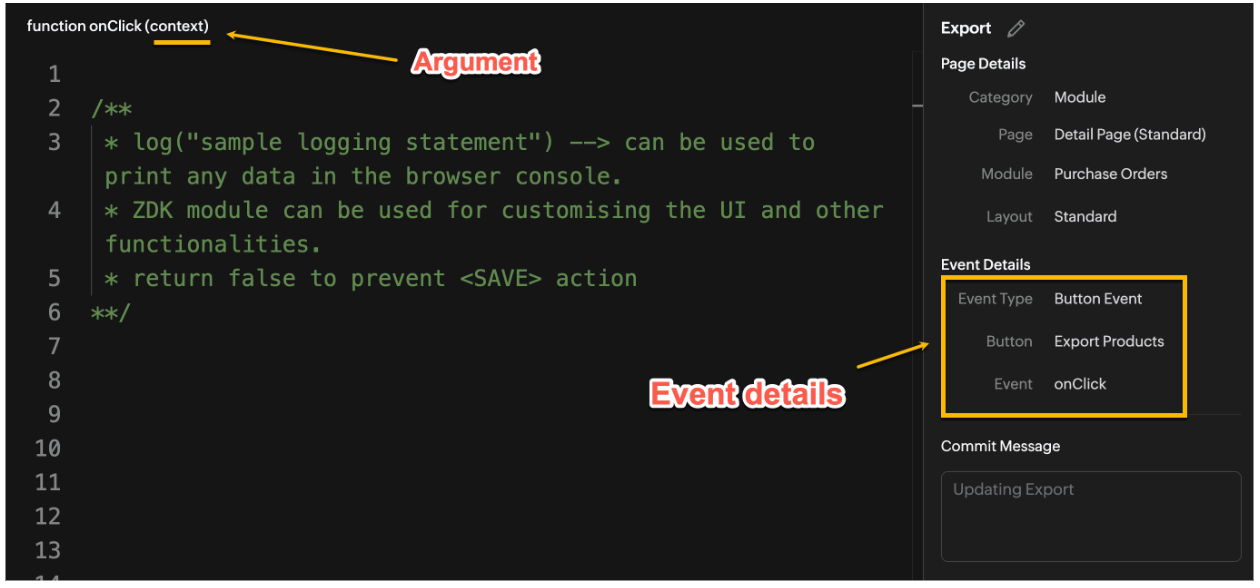

Click here to know more about Client Script Events.

2. Supported Pages

A Custom Button can be placed in different positions based on the Page.
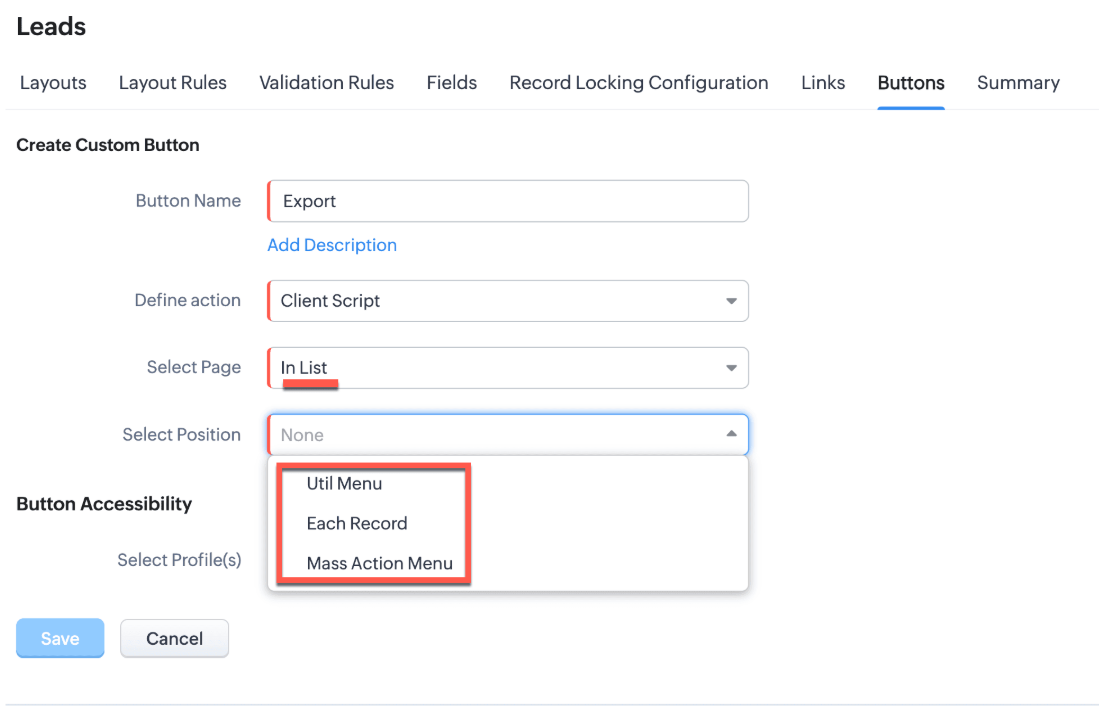

You can add a  custom button in the Util Menu, in Each Record or in the Mass Action Menu of the List Page.
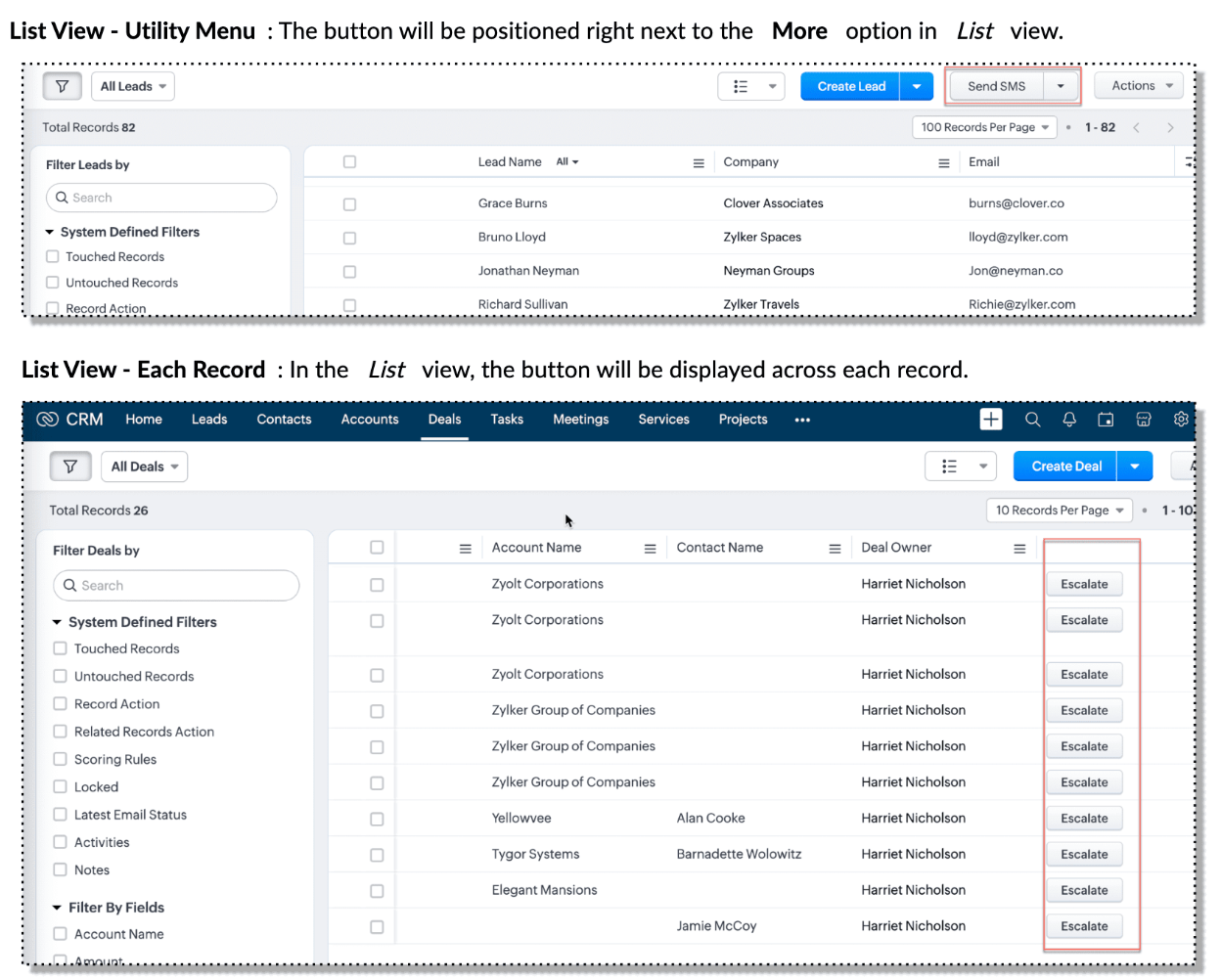

Also, a Detail Page can have a custom button either In Record or in the Related List. Click here for more details about the different possible positions of a custom button.

The following table lists the supported pages and the corresponding context argument, which provides different details based on the page type.


To create a Client Script and make it trigger when a custom button is clicked, first create a Custom button and associate it with a Client Script as shown in the following image.


 Click here to view the steps to create a custom button and configure a Client Script. 

Note:

You can configure the Client Script only from the Buttons page to trigger it when a user clicks a custom button, and not the usual way of Creating Client Script via setup page. Once a script is created, it can be edited and updated from the Client Script setup page

3. Use Case - Export Subform Rows to Zoho Sheet in a Single Click!

Zylker manufactures medical instruments, and its sales representatives frequently need to share bulk order details with distributors and hospital partners using Zoho Sheets. These details such as product names, quantities, and prices are captured in a Subform on the Purchase Order Detail(Standard) Page.
To simplify this, the admin wants to add a custom button called "Export Products" on the Purchase Order Detail Page. When clicked, it should export the Purchase Items from the Subform and move the content to the specified sheet.

4. Solution

To export subform rows to Zoho Sheet with a single click, you can add a custom button to the Detail Page of the record. When clicked, a Client Script will be triggered to fetch the subform data from the Detail Page and pass it to a Function that uses zoho.sheet.createRecords() to insert data into Zoho Sheet.

Here’s how to implement this:

  • Add  “Export Products” custom button on the Detail Page.
  • Add the script to collect subform rows which invokes the Function.
  • Write a Function to create entry in Zoho Sheets  

A. Add “Export Products” custom button on the Detail Page.

  • Go to Setup → Modules and Fields under Customization.
  • Select a Module as Purchase Order.
  • Click on Buttons → Then click + New Button.
  • Enter Button Name and select Action Type as "Client Script"
  • Choose Button Position and Layout details as shown in the following image.
  • Click Create in Configured Client Script, enter the script, and click Add.
  • Select the profiles for which these buttons should be visible.
  • Click Save.


B. Add the Script to collect subform rows and invoke the Function

Use the following Client Script when you configure the custom button.

  1. var casesheetid = ZDK.Client.getInput([{ type: 'text', label: 'Enter the Sheet ID' }], 'Sheet details', 'OK', 'Cancel');
  2. if (casesheetid == null) {
  3.         ZDK.Client.showAlert("Enter the *Case Sheet ID - Import* to import data");
  4.  }
  5. var purchase_items = ZDK.Page.getField('Purchase_items).getValue();
  6. ZDK.Client.showLoader({type: 'page', template:'spinner', message: 'Export in progress, please wait'});
  7. var c=1;
  8. if (sheetid == null) {
  9.     ZDK.Client.hideLoader(); 
  10.     ZDK.Client.showAlert("Enter the *Case Sheet - Export* ID to export data");
  11. }
  12. purchase_items.forEach((r,i) => {
  13.             try {
  14.                resp = ZDK.Apps.CRM.Functions.execute("csvWrite", { "Product_Name": r.Product_Name.name, "List_Price": r.List_Price, "Discount": r.Discount, "Total": r.Total,"Sheetid":casesheetid }); }
  15.             catch (error) {
  16.                 c = 0;
  17.                  ZDK.Client.hideLoader(); 
  18.                 ZDK.Client.showAlert("Unexpected issue occured while adding data in row number "); }
  19.     });
  20.     ZDK.Client.hideLoader(); 
  21.     if (c) {
  22.         ZDK.Client.showMessage("Export completed. Please check the Sheet");
  23.     }
  24.     else
  25.     {
  26.        ZDK.Client.showMessage("Unexpected error "); }}

In this code, several ZDKs are used for various purposes. Click on the ZDK hyperlinks to learn more.


Note

The Client Script you intend to link with the button will be saved only after the custom button is saved.

C. Write a Function to create entry in Zoho Sheets 

  • Go to Setup > Developer Hub > Functions.
  • In the Functions page, click + Create New Function.
  • Choose the category as Button.
  • Click Create.
  • In the Create Function page, enter a name as csvWrite and description for your function.
  • Enter the following function code and click Save.
  1. string standalone.csvWrite(String product,String qty,String up,String amt, String Sheetid){
  2. queryData = Map();
  3. writeData = Map();
  4. header = Map();
  5. writeData.put("Product",product);
  6. writeData.put("Quantity",qty);
  7. writeData.put("Unit_Price",up);
  8. writeData.put("Amount",amt);
  9. SheetData = zoho.sheet.createRecords("Sheetid","Sheet1",writeData,queryData,"sheetconnection");
  10. return SheetData;
  11. }

Click here to know more about zoho.sheet.createRecords().

In the code above:
  • sheetconnection refers to the name of the Zoho Sheet connection, which must have the scopes: ZohoSheet.dataAPI.UPDATE and ZohoSheet.dataAPI.READ.
  • Click here to know how to create a Connection with the required scopes.
  • sheetid is the unique identifier of the Zoho Sheet, available in the sheet’s URL.
  • Sheet1 represents the name of the worksheet (i.e., the tab name shown at the bottom of the Zoho Sheet).
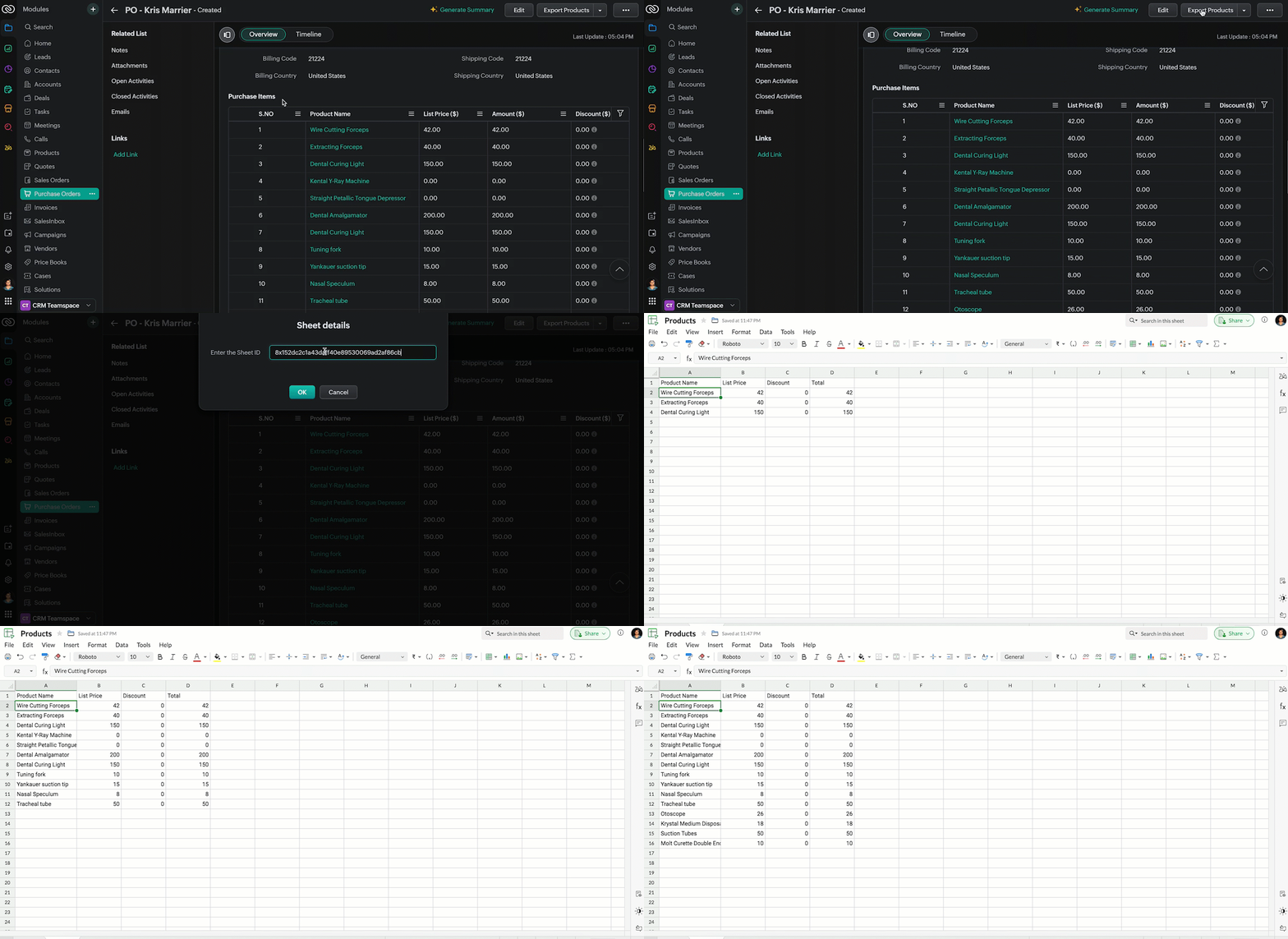
  • Now, when the custom button is clicked, the Client Script is triggered. It prompts for the Sheet ID, fetches the contents of the Purchase Order subform, and invokes a function that writes the content to the Sheet.
Here's how the Client Script works.


5. Summary

In this post we have seen,
  • What is a Button event?
  • How to configure Client Script for a custom button
  • How to write data into Zoho Sheets from Client Script
  • How to create a Function and call it from Client Script

6. Related Links


We are thrilled to be nearing the 200th post in our Kaizen series. As we approach this exciting milestone, we would love to hear from you. Do you have any questions, suggestions, or topics you would like us to cover in future posts? Your input helps us improve and shape the series to serve you better.

Please take a moment to share your thoughts using ✨ this form 

We hope you found this post useful!

Happy Client Scripting! 😊
    • Sticky Posts

    • Kaizen #198: Using Client Script for Custom Validation in Blueprint

      Nearing 200th Kaizen Post – 1 More to the Big Two-Oh-Oh! Do you have any questions, suggestions, or topics you would like us to cover in future posts? Your insights and suggestions help us shape future content and make this series better for everyone.
    • Kaizen #226: Using ZRC in Client Script

      Hello everyone! Welcome to another week of Kaizen. In today's post, lets see what is ZRC (Zoho Request Client) and how we can use ZRC methods in Client Script to get inputs from a Salesperson and update the Lead status with a single button click. In this
    • Kaizen #222 - Client Script Support for Notes Related List

      Hello everyone! Welcome to another week of Kaizen. The final Kaizen post of the year 2025 is here! With the new Client Script support for the Notes Related List, you can validate, enrich, and manage notes across modules. In this post, we’ll explore how
    • Kaizen #217 - Actions APIs : Tasks

      Welcome to another week of Kaizen! In last week's post we discussed Email Notifications APIs which act as the link between your Workflow automations and you. We have discussed how Zylker Cloud Services uses Email Notifications API in their custom dashboard.
    • Kaizen #216 - Actions APIs : Email Notifications

      Welcome to another week of Kaizen! For the last three weeks, we have been discussing Zylker's workflows. We successfully updated a dormant workflow, built a new one from the ground up and more. But our work is not finished—these automated processes are
    • Recent Topics

    • Inventory batch details

      Hi there, I'm trying to get the batch details of an item, here's what I've done so far. I've sent cUrl request to the below endpoint and I get a successful response. Within in the response I find the "warehouses" property which correctly lists all the
    • Zoho Trident Windows - Streams Not Visible

      Namaste We’re having an issue with Streams not being visible in Trident (Windows), which is important for us as we share many emails internally. It appears that the feature to show Streams above the Inbox folder, as seen in the default mailbox view, is
    • Search through email contents

      Is there a way to search through the email history of a lead? Meaning if among the 50 emails to a lead about different topics I want to find all the ones with the word "pizza" in the body of the email, is that possible? Thanks for your help, Hanan
    • Adding Multiple Products (Package) to a Quote

      I've searched the forums and found several people asking this question, but never found an answer. Is ti possible to add multiple products to a quote at once, like a package deal? This seems like a very basic function of a CRM that does quotes but I can't
    • Early Access: Check Printing in Zoho Books

      Hello Everyone,   Are you constantly writing checks to pay your vendors?   We've got a great news to share with you! You can now pay your vendors by writing and printing a check directly from Zoho Books. The feature is ready and we'll be rolling it out to our customers in phases.  It is available in the  US Edition of Zoho Books and also in the Global edition, where the country is selected as USA and the currency is USD.   Here’s a summary of what’s possible:   1. Write and print a check. 2. Make
    • Trash - Delete All

      We use 6 inbox shared (via IMAP). The Trash bin contains a lot of messages. Is it possible to delete them all permanently? Is there a rule to empty trash bin after xx days? Deleted permanently message in TeamInBox are deleted permanently in the related
    • Internal mails on our company domain (managed by Zoho) do not get delivered

      Hi last week Thursday and Friday a colleague had sent me two emails which did not show up at all in my inbox, spam or anywhere else. What this a problem with Zoho mail in general or did this affect just us? From the forum is reads like many problems had
    • Paste Options don't work

      I've always wondered about this, as I've experienced this issue for quite some time now. Why don't the right-click Paste options work properly in Zoho Writer? I can use Ctrl + V without any issue, but if I right-click and use one of the Paste menu options,
    • What's New - April 2026 | Zoho Backstage

      Hello everyone, April has been focused on improving speed, reliability, and overall platform performance. Here are a few updates from this month. Safaricom M-PESA for event payments in Kenya Organizers hosting events in Kenya can accept payments through
    • Enrich your contact and company details automatically using the Data Enrichment topping

      Greetings, I hope you're all doing well. We're happy to announce the latest topping we've added to Bigin: The Data Enrichment topping, powered by WebAmigo. This topping helps you automatically enhance your contact and company records in Bigin. By leveraging
    • Consolidate your workflows and be more productive - Introducing Multiple Conditions in Workflow Rules

      Workflow rules in Zoho CRM helps you automate your routine tasks and save time. Usually, while creating a workflow rule, you'd provide the basic details of the rule, specify when the rule should be triggered and associate set of actions to be executed whenever the rule criteria is met. And you’d create a new workflow rule for every new automation that you required.  Not anymore! You can now combine multiple conditions and the corresponding actions to follow in a single workflow rule. Let’s look at
    • How has Zoho still not resolved Daylight Savings Time?

      According to these forums Zoho has been working on DST for 12 years. Totally unacceptable. Am I missing something? Why are other customers who observe DST not screaming for this to be fixed? Are there reasonable workarounds? This is a must-have for
    • Overview on users IMAP settings

      We have about 30 users who all have the channels/email/email configuration/IMAP integration/O365 enabled and emails are synchronized. Here my problem: Passwords for the email accounts are expiring on individual bases and most of the users forget to update
    • Digest Avril - Un résumé de ce qui s'est passé le mois dernier sur Community

      Chers utilisateurs, Un nouveau mois riche en nouveautés vient de filer à toute vitesse chez Zoho Community France ! Jetons un œil à ce qu’il s’est passé. Des webinaires à votre image avec Zoho Webinar Vos pages d’inscription sont souvent le premier point
    • Introducing SlyteUI : From Idea to a Working Interface in Minutes

      SlyteUI is now live across all DCs as of 4th May 2026! Hello everyone! Are you spending hours building basic UIs? Does even the smallest customization feel like a major task? CRM customization should feel intuitive and straightforward, not time consuming
    • Updates to native forms in Zoho LandingPage

      Hello all, We have a couple of updates to native forms in Zoho LandingPage that we think you will find useful. Country code on phone number fields You can now enable a country code dropdown on the phone number field. Visitors select their country code
    • Import KB template OR Export template for zoho desk?

      Greetings. Can you tell me if there is a way to get an EXPORT of my KB articles? OR is there a template you supply for importing KB articles into my zoho desk? I am looking for a method of understanding what fields can be imported, and what their possible
    • [Bug] WebAuthn passkey registration blocked on rpIds with TLDs longer than 6 characters (.accountant, .technology, etc.) — isValidDomain regex too strict

      Hi, Filing on behalf of an enterprise customer where Zoho Vault is deployed across the company. The Chrome extension blocks WebAuthn passkey registration on legitimate sites whose Relying Party ID (rpId) has a TLD longer than 6 letters. This affects every
    • Customer Support Portal

      Hi, As I am dealing with and waiting for help with a serious Zoho Mail issue, I tried to submit requests and manage my requests by logging into the Customer Support Portal, but it keeps saying that I do not have a valid email address and cannot login.
    • Can not send or reply to mails

      Hello, I can not send mails or reply. If I try to send a mail i get "Unable to send message;Reason:553 Replaying disallowed. Invalid Domain - invata-programare.ro" Can you help me, please? Thank you!
    • Urgent: Subscription Correction Needed - Org ID 805493328

      Dear Zoho Billing Team, I am writing to request an urgent correction regarding a recent renewal for my account, Master Bed Trading (Organization ID: 805493328). Due to a mistake during the checkout process, I accidentally renewed our Zoho Forms subscription.
    • Zoho Sites Designer/Developer

      Hello, Besides Upwork, are there any other places to find experienced Zoho Sites designers/developers? I couldn't seem to find a page on Zoho that lists these professionals that are certified with Zoho Sites.
    • HTML PDF Templates / Build From Scratch option not visible for Custom Modules

      Hi everyone, I am working with Zoho Books Custom Modules and trying to create a custom 4x4 package label PDF template using HTML/CSS. According to the official Zoho Books documentation for HTML PDF Templates, there should be an option like: Settings →
    • Marketing Tip #32: Improve SEO and customer confidence with an FAQ section

      Before making a purchase, customers often have simple questions about delivery times, returns, product usage, or sizing. If they can’t quickly find answers, they may leave your store without buying. Adding a clear FAQ (Frequently Asked Questions) section
    • Activate python application

      Is it possible for a deluge code to activate a python application ? Say i create a deluge program, in that deluge program, i need it to activate a python application stored on my drive Would that be possible, and if so, what would the code look like
    • Execution Trace & Root Cause Analyzer in Zia

      Integrating this capability into Zia would significantly enhance debugging and transparency. 1. Execution Trace Timeline A visual, step-by-step timeline of system activity for any event (e.g., form submission), including: Sequence of triggered workflows
    • Has anyone integrated Zoho with Go High Level (GHL)? Looking for guidance

      Hi everyone, I’m exploring the possibility of integrating Zoho applications with Go High Level (GHL) and wanted to check if anyone in the community has experience with this. Specifically, I’m interested in understanding: Whether a direct integration is
    • Add Ability to Reset Help Center User MFA in Zoho Desk

      Hello Zoho Desk Team, First of all, thank you for recently adding support for Multi-Factor Authentication (MFA) in the Zoho Desk Help Center. We’re very happy to see this enhancement go live, especially since this was a highly requested security feature.
    • Allow 2 logos for Branding, one for Light Mode and one for Dark Mode?

      Our logo has a lot of black text on it. If we leave the background transparent, per recommendation of Zoho, when a user is viewing a file and turns on dark mode, our logo is not really visible and looks really weird. It would be really great if we could
    • Very limited support for MCP

      Has anyone else noticed how limited the MCP support for Zoho People currently is? Right now only a small set of read-only actions (exactly 15) seem to be available. At the same time Zoho CRM supports over 700+ functions. It makes it almost impossible
    • ZOHO Desk attachments support

      Hi I just setup MCP with claude, it works well, but it can't read attachments... which makes it kind of useless... Will you be adding attachment capabilities anytime soon?
    • HOW I CAN GET BETA VERSION FOT TESTING

      HI. ZOHO I AM INTERESTED IN YOUR BETA SOFTWARE TO EXPERIENCE NEW FEATURES.
    • How to Generate Separate Labels for Each Invoice SKU Line Item in Zoho Books?

      Hi everyone, I’m trying to implement a requirement in Zoho Books where separate labels need to be generated for each SKU/item from an invoice. Scenario: One invoice can contain multiple products/SKU items Each item/box should have its own separate label
    • Updating Sales orders on hold

      Surely updating irrelevant fields such as shipping date should be allowed when sales orders are awaiting back orders? Maybe the PO is going to be late arriving so we have to change the shipment date of the Sales order ! Not even allowed through the api - {"code":36014,"message":"Sales orders that have been shipped or on hold cannot be updated."}
    • Direct Integration Between Zoho Cliq Meetings and Google Calendar

      Dear Zoho Team, We’d like to submit the following feature request based on our current use case and the challenges we’re facing: 🎯 Feature Request: Enable meetings scheduled in Zoho Cliq to be automatically added to the host's Google Calendar, not just
    • billable_expense_id in Invoice API does not set invoiced=true on bill line items — causes duplicates in Projects > Create Invoice

      Hi Zoho Community, We are running an automated batch invoicing system using the Zoho Books API and have hit two critical bugs that are causing duplicate invoice risk in production. Raising this here for visibility alongside a support ticket already filed.
    • New fields : radio button

      Hi, when customizing a module (eg: Candidates), we are able to select different types of fields (check box, currency, list, ...). However there is no "radio-button" component. This type of fields is often used in Web pages and will be certainly a plus-value
    • Choice Availability Reset

      If an entry is deleted which included a response to a field with choice availability enabled does that increase the number of remaining times the choice can be selected?
    • [Heads Up] Upcoming update to field values in Zoho Books - Zoho Analytics integration

      Hello Users, We'd like to inform you of an upcoming update to the Account Type field values in the Zoho Books integration for Zoho Analytics from June 1, 2026. What's Changing? The following values under the Account Type field are being renamed to align
    • Important update: Migrate to the new SalesIQ live chat widget before May 15, 2026

      The old SalesIQ live chat widget will be deprecated on May 15, 2026. This is a final reminder to migrate to the new SalesIQ live chat widget before this date. After May 15, 2026, the old widget will no longer be maintained, which can lead to slower performance
    • Next Page