Kaizen #71 - Client Script ZDKs for Detail (Canvas) Page
Hello everyone!
Welcome back to another interesting Kaizen post. In this post, we can discuss Client Script ZDKs support for Detail (Canvas) Page.
What is Detail (Canvas) Page?
A Detail(Canvas) Page allows you to customize the record detail page to your preference by letting you add background color to each field, arrange them in a different order, use custom buttons instead of field names, use different font styles, and a lot more. This view is available in all the modules, including the custom modules.
Canvas is a powerful design platform that aims to transform your Zoho CRM user experience, from a visual as well as functional perspective. To customize a record detail page using Canvas, you can select any pre-designed template from the gallery and customize them according to your requirements, or create your design template from scratch with the help of design tools.
The following are the ZDK Functions related to the Detail(Canvas) Page in Client Script.
- getBlueprintTransitionByID() - To get blueprint transition by id
- getBlueprintTransitions() - To get blueprint transitions in page
- addTag() - To add a tag to the page
- removeTag() - To remove a tag from the page
- getTags() - To get the list of tags in the Page as array of objects
- openMailer() - To open Mailer component
- scrollTo(element_id) - To scroll the page to the given element's location
- highlight(config) - Using this ZDK you can highlight an element
- getElementByID(element_id) - To get the UIElement object.
- mask() - To mask the field value
- initiate() - To initiate a transition in Blueprint
- click() - To initiate link click event
- disable() - To disable the link
- enable() - To enable a link
- setVisibility() - To show or hide an element
- addToolTip(config) - Use this ZDK to add tooltip for an element
- removeToolTip() - Use this ZDK to remove tooltip for an element
- addStyle(config) - To apply CSS styles for an element
- freeze(value) - To freeze a particular element
- setImage(value) - To set image for the image element
- setActive() - To set active tab in a container
- setContent(value) - To set text content for the text element
Note: Apart from these ZDKs, you can use all the other ZDK functions which are not tagged.
Use Case
ABC is a hardware manufacturing company. Let us consider that you want to achieve the following using Client Script. The Detail (Canvas) Page has the fields Category, Products, Phone Number and there are two images added to the Detail (Canvas) page currently. One corresponds to Ignition System and the other corresponds to Gauges and Meters. The following is the Detail (Canvas) Page of Orders Module.
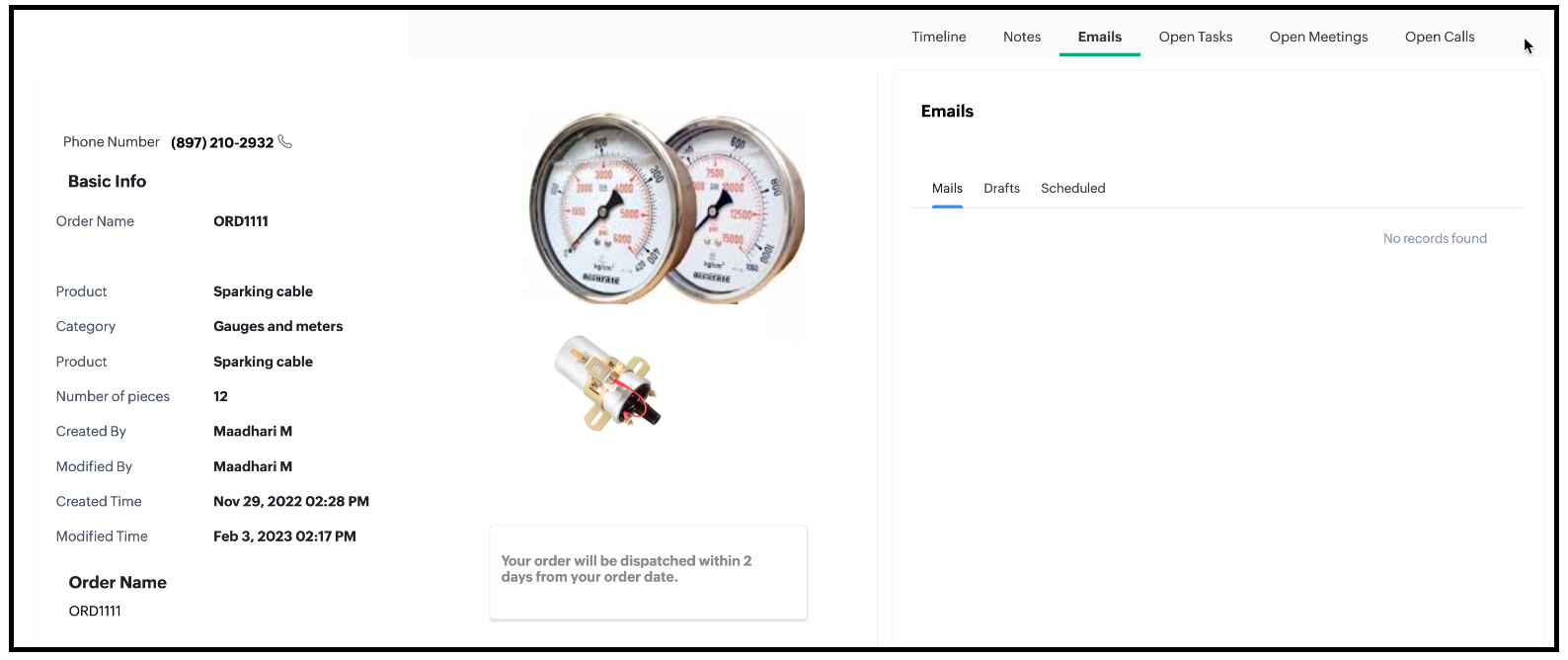
1. Based on the Category of the order, display the image.
- If the Category is Ignition System then the image corresponding to Ignition System should be displayed.
- If the Category is "Gauges and Meters" then the image corresponding to "Gauges and Meters" should be displayed.
2. The image should have a tooltip.
- The Ignition System image should have the tooltip as "Ignition System".
- Gauges and Meters image should have the tooltip as "Gauges and Meters".
3. The Detail (Canvas) page has a text element. The background colour of the text box should be blue and the text should be grey.
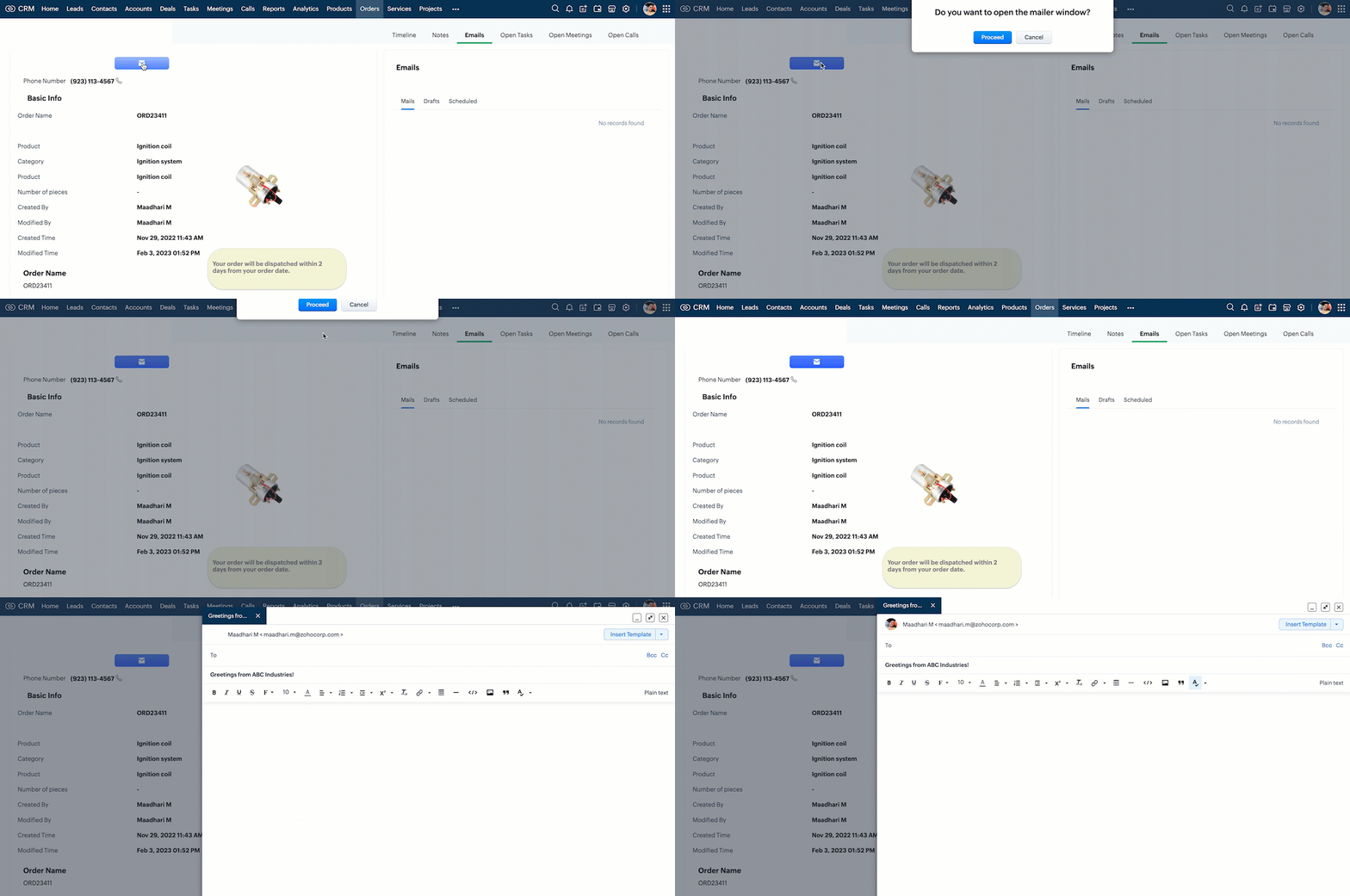
4. Create a custom button in the Detail (Canvas) Page. When the user clicks this, ask for confirmation, and open the mailer box.
5. Mask the last 5 digits of the phone number for all profiles other than the administrator.
Solution using Client Script
All the requirements are for the Detail (Canvas) page of Orders module. For the requirements 1, 2, 3 and 5, you need to create a Client Script with onLoad page Event.
For requirement 4, you need to create a Client Script with Canvas Button Event type and onClick Event. So create two scripts as follows.
1. Client script 1 for requirements 1,2,3 and 5.
2. Client script 2 for requirement 4.
1. Client script 1 for requirements 1,2,3 and 5.
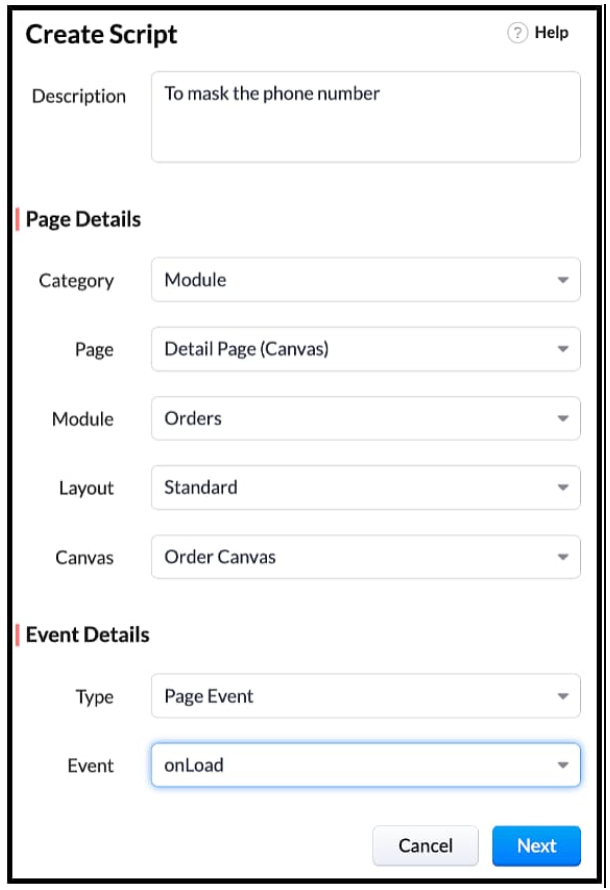
- Go to Setup > Developer Space > Client Script. Click +New Script.
- Specify the details to create a script and click Next.
- Enter the following script and click Save.
// Tooltip for images var ignitionImage = ZDK.UI.getElementByID('iImage') ignitionImage.addToolTip({ text: 'Ignition System' }); var guageImage = ZDK.UI.getElementByID('gImage') guageImage.addToolTip({ text: 'Guages and Meters' }); log(category_name); // Visibility of Images if (category_name == "Gauges and meters") { ignitionImage.setVisibility(false); } else if (category_name == "Ignition system") { guageImage.setVisibility(false); } // Style textbox var elem = ZDK.UI.getElementByID('Section') elem.addStyle({ 'background-color': 'blue', color: 'white', 'border-radius': '40px' }) //Mask phone Number var user = ZDK.Apps.CRM.Users.fetchById($Crm.user.id); log(user); var field_obj = ZDK.Page.getField('Phone_Number'); log(field_obj.getValue()); log("Profile name of the user is "+ user.profile.name); if(user.profile.name != 'Administrator') { field_obj.mask({ character: '*', length: 5, reverse: true }); } var category_name = ZDK.Page.getField('Category').getValue(); |
- $Crm is a constant supported by Client Script, using which you can get the org related information and use it in your script.
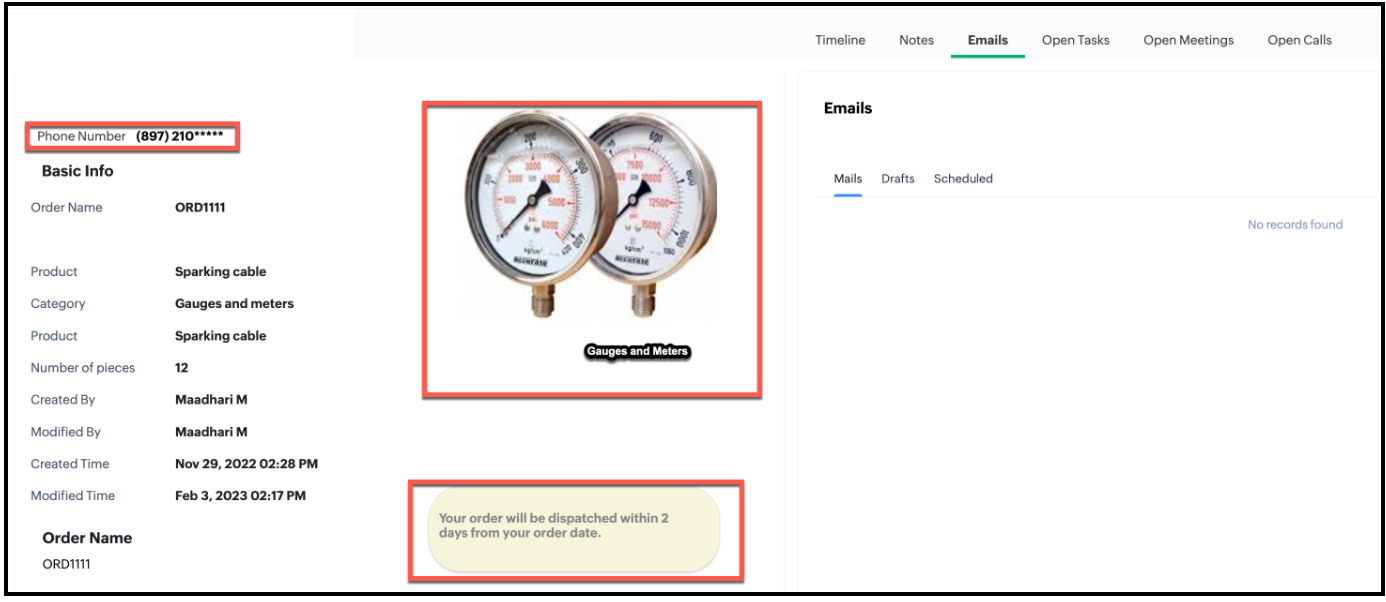
- Here is the impact of Client Script in Detail (Canvas) page for a Standard user.
- Here is the impact of Client Script in Detail (Canvas) page for Administrator.
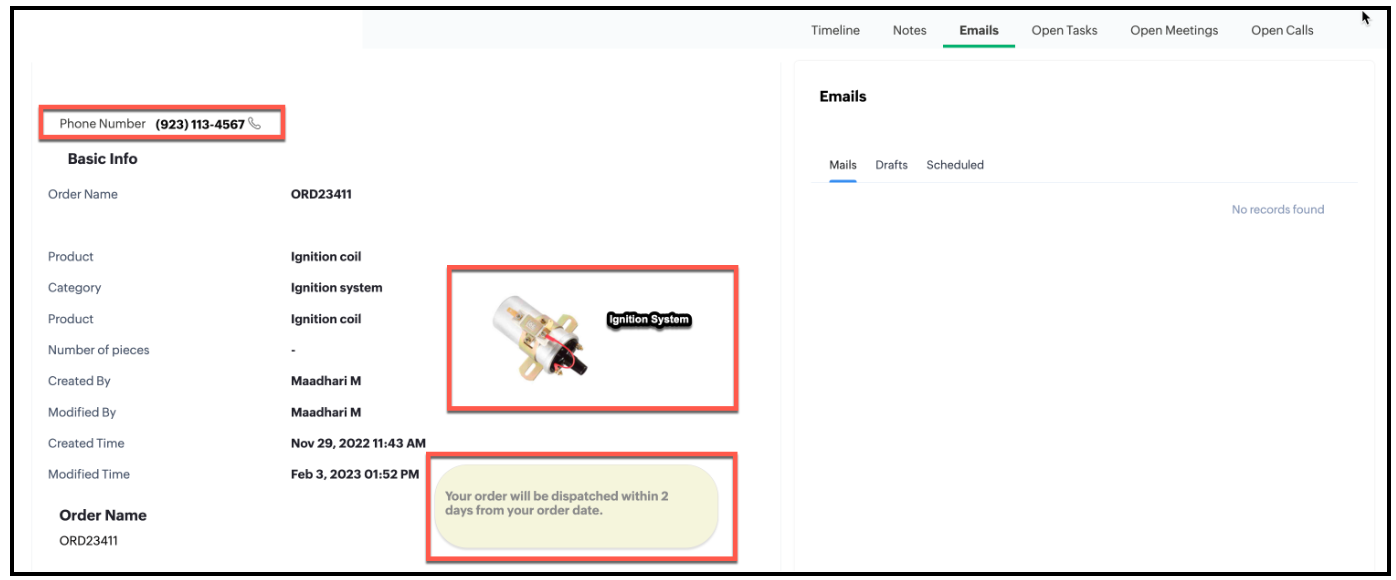
- You can see that the Phone Number is partially masked when you view the order canvas page as a Standard User and not masked when you view the order canvas page as an Administrator.
2. Client Script 2 for requirement 4
- First, you need to add the button to the Detail(Canvas) page.
- Go to Setup > Customization > Canvas.
- Right click the Canvas page for Accounts module and click Edit.
- Click Elements, drag and drop the button wherever required and specify a label for the button.
- Right click on the button, select Add Element ID and enter the ID of the button in the pop up that appears.
- Once the button is created, you can configure Client Script in two ways:
- Right click on the button--> Add Client Script--> onClick. The Client Script IDE appears with the event type as Canvas Button Event. (or)
- Go to Setup > Developer Space > Client Script. Click +New Script.
- Specify the details to create a script and click Next.
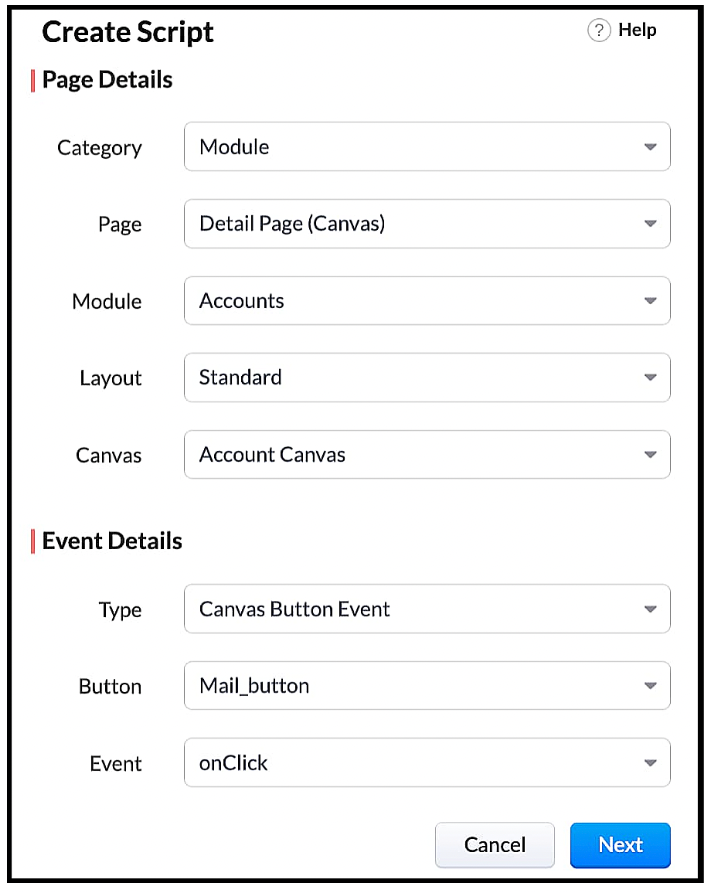
- Enter the following script and click Save.
var isProceed = ZDK.Client.showConfirmation('Do you want to open the mailer window?','Proceed','Cancel'); if (isProceed) { ZDK.Client.openMailer({ from: '', to: [{ email: '', label: 'ABC Industries' }], cc: [{ email: '', label: 'ABC Industries' }], subject: 'Greetings from ABC Industries!', body: ' ' }); } |
- The showConfirmation() function will return a Boolean value based on the user selection. You should get this Boolean value using a variable and write the actions based on the Boolean value returned. Here the variable isProceed will capture the user response and based on that Boolean value, the mailer box will get displayed.
- Here is how the Client Script works.
We hope you found this post useful. We will meet you next week with another interesting topic! If you have any questions or if you want a Kaizen post on a particular topic let us know in the comments.
Topic Participants
Maadhari M
nick
Athul P
PJ
Sunderjan Siddharth
Sticky Posts
Kaizen #217 - Actions APIs : Tasks
Welcome to another week of Kaizen! In last week's post we discussed Email Notifications APIs which act as the link between your Workflow automations and you. We have discussed how Zylker Cloud Services uses Email Notifications API in their custom dashboard.Kaizen #216 - Actions APIs : Email Notifications
Welcome to another week of Kaizen! For the last three weeks, we have been discussing Zylker's workflows. We successfully updated a dormant workflow, built a new one from the ground up and more. But our work is not finished—these automated processes areKaizen #152 - Client Script Support for the new Canvas Record Forms
Hello everyone! Have you ever wanted to trigger actions on click of a canvas button, icon, or text mandatory forms in Create/Edit and Clone Pages? Have you ever wanted to control how elements behave on the new Canvas Record Forms? This can be achievedKaizen #142: How to Navigate to Another Page in Zoho CRM using Client Script
Hello everyone! Welcome back to another exciting Kaizen post. In this post, let us see how you can you navigate to different Pages using Client Script. In this Kaizen post, Need to Navigate to different Pages Client Script ZDKs related to navigation A.Kaizen #210 - Answering your Questions | Event Management System using ZDK CLI
Hello Everyone, Welcome back to yet another post in the Kaizen Series! As you already may know, for the Kaizen #200 milestone, we asked for your feedback and many of you suggested topics for us to discuss. We have been writing on these topics over the
Recent Topics
Address labels
Hi, we've been searching for a long time for a simple way for our employees to print address labels using a Dymo Label Writer 450. We came up with two alternatives that work, bur aren't really optimal. First one is WebMerge. Webmerge is a great application that does 100% what we need but it is way too expensive for our needs. We only need to print a couple of labels per month. The second one is the integrated print tool in Zoho CRM, (Print preview) You would think this is the obvious way to do thisThis domain is not allowed to add. Please contact support-as@zohocorp.com for further details
I am trying to setup the free version of Zoho Mail. When I tried to add my domain, theselfreunion.com I got the error message that is the subject of this Topic. I've read your other community forum topics, and this is NOT a free domain. So what is thePrint Labels
How can I configure my address to print my labels like this: Name Mailing Address Mailing City, Mailing State Mailing Zip Country Instead of: Name Mailing Address Mailing City Mailing State Mailing Zip Country Thanks!!!!Mailing labels - Improperly formatted
All I'm trying to do is print one, properly formatted, mailing label. I'm in the Contacts module. In the default "list view" for mailing labels I selected a single client, hit the "more actions" drop down and selected print mailing label. Unfortunately,Printing mailing labels
The ability to print mailing labels would seem to be an important, basic, function of a good CRM. I find it very surprising that this has still not been addressed adequately by Zoho. When trying to use the existing "mailing label" included: 1. the dataPageless mode needed to modernise Writer
When we switched from GSuite to Zoho, one of the easiest apps I found to give up, was Docs. In many ways, Writer has always been more powerful than Docs, especially in terms of workflows/fillable forms/etc. However, I went back into Docs because I noticeZoho Projects - Visual improvement to parent and sub-task relationship
Hi Projects Team, My feature request is to improve sub-task visibility. Please see screenshot below. I really think parent child relationships could be visually improved. Even if the first letter of the parent task was inline with other same level tasksAI Interview Insights: Turn Recorded Interviews into Quick Transcripts & Summaries
Evaluating interviews shouldn’t require replaying long recordings or taking manual notes. With AI Interview Insights, you can now review complete transcripts and AI-generated summaries of your One-way (Recorded) interviews right inside Zoho Recruit. ThisAPI method to get activity feed in Recruit
Hi community, I'm trying to figure out - is there any API method tto get information about datetime when Recruit/Candidates record tag where added?Printing Mailing labels
Is there any way to adjust the size of the printing labels? or product would I use to print labels from Zoho? Thanks, Josef Krieger Moderation Update (14th April 2025): We have another post discussing the same topic with votes and feedback from users.Default to Current Date
I'm importing data from a excel spread sheet that does not have date column and I'd like the date column in the Zoho Database to default to the current date. Any way I can do this?"Spreadsheet Mode" for Fast Bulk Edits
One of the challenges with using Zoho Inventory is when bulk edits need to be done via the UI, and each value that needs to be changed is different. A very common use case here is price changes. Often, a price increase will need to be implemented, andDifferent Company Name for billing & shipping address
We are using Zoho Books & Inventory for our Logistics and started to realize soon, that Zoho is not offering a dedicated field for a shipping address company name .. when we are creating carrier shipping labels, the Billing Address company name gets alwaysWhat's New in Zoho Inventory | Q2 2025
Hello Customers, The second quarter have been exciting months for Zoho Inventory! We’ve introduced impactful new features and enhancements to help you manage inventory operations with even greater precision and control. While we have many more excitingMake Packages from multiple sales order of a single customer
Our customers sends orders to us very frequently, some times what customer wants is to ship items from 5 to 6 sales orders in a single shipment. it will be very nice if, zoho can implement this function, in which we can select items from other sales orders of the customer.Update CRM Price Books to include volume discounts as per Zoho Books/Inventory
Once again, Zoho has 3 great products that all store information in different ways (which is not helpful when you attempt to integrate the 3 products - one of the best features of Zoho). Zoho CRM Price Books are basic at best. Zoho Books/Inventory PricePrint a price list or price book
Hi Community. Am I right in concluding that Zoho has no functionality to print a price list from either Zoho CRM, Zoho Inventory or Zoho Books? I won't get stuck on the fact that Zoho doesn't sync price books between Zoho CRM and Books/Inventory (moreStart Workflow from Deluge Script
I have developed a customized process from our CRM that leverages a deluge script to create a statement of work document. Once the document has been created via the merge and store function, I would like the ability to start a workdrive review & approveShow Custom Button in Portal Listview Canvas
I have created a custom button that shows in a list view of deals (internally I can see it). I have permissions to allow this button on the portal. But it is not displaying in the canvas list? Before I do too much leg work, is this function allowed?Zoho Survey Enhancements
We love Survey. We use it a ton. It needs some enhancements. Maybe some of these are already on the roadmap? API - this is crucial. We have some complex surveys that take place and need to update records, trigger other functions/automations, etc. I wouldWork Order Assignment for Engineers Handling Their Own Requests
I’m setting up FSM for a business where there are multiple engineers, but each engineer handles their own process end-to-end receiving the service request, creating the work order, and completing the field service job. I noticed that I must create anZoho Sites "pages" management page
I have 80 plus pages on zoho sites. When I go to the "pages" link to view and edit pages, They are not in any kind of order, so I spend lots of time searching for pages when I need to edit or create new. How can I change the view order of all my pagesAI feature in Zoho Desk suggesting answers based on past ticket threads
Hi I would like to suggest something that would be very useful : instead of suggesting answers based on the Knowledge Base, I think it would be great if Zia could analyze the history of all customer and agents threads, to suggest answers in new tickets.Advanced Customization of the Help Center using JavaScript
Hello everyone, The Help Center in Zoho Desk can be customized by using HTML and CSS to provide structure and enhance the page's appearance—but what if you want to add interactive and dynamic elements? You can add these effects with JavaScript, a programmingUsing a CRM Client Script Button to create a Books Invoice
Hello, I need help handling error messages returned to my client script from a function. The scenario I have setup a client script button which is available from each Deal. This CS executes a crm function, which in turn creates an invoice based on theUsing IMAP configuration for shared email inboxes
Our customer service team utilizes shared email boxes to allow multiple people to view and handle incoming customer requests. For example, the customer sends an email to info@xxxx.com and multiple people can view it and handle the request. How can I configureIntroducing Zoho POS for the Kingdom of Saudi Arabia
Hey everyone, We are excited to kick-start December with a completely personalized edition of POS for retail businesses in Saudi Arabia to help run your operations with ease. It offers four different subscription plans—Free, Standard, Professional, andWhatsapp Connection Status still "Pending" after migration
Hello, I migrated my WhatsApp API to Zoho from another provider a day ago. So far the connection status is still “Pending”. There is a problem? How long does it usually take?Unveiling Zoho Sites 2.0 - A new dimension in website building
Dear Zoho Sites Users, We are thrilled to announce the launch of Zoho Sites 2.0 today! This refresh represents a significant step forward in the capabilities of Zoho Sites and is crucial for creating a lasting and positive impact on our customers' businesses.Subform edits don't appear in parent record timeline?
Is it possible to have subform edits (like add row/delete row) appear in the Timeline for parent records? A user can edit a record, only edit the subform, and it doesn't appear in the timeline. Is there a workaround or way that we can show when a userScript Editor not an option
I am trying to apply a script to a sheet and Script Editor is not an option. I don't want to go outside Sheets to do this (like Creator) if it can be done inside Sheets.Zoho CRM - Writing Assistant Tone
Hi Zoho CRM Team, Text in my emails often gets underlined in yellow because I tend to use a more informal tone with my client's, like using "I'm" instead of "I am". Is there some way for me to tell the system that this is my preferred writing tone, soNot able to link email text.
Kindly check Zoho Sites. I am unable to turn a text into a email link. The save button does not work. Kindly try yourself to see it not responding to save.Adding Multiple Files to a Zoho Vault Entry
There is a old blog post talking about adding multiple file attachments to one Zoho Vault Secret: https://www.zoho.com/blog/vault/introducing-new-features-in-zoho-vault-powerful-password-sharing-wider-storing.html Is that still possible, I can see howMigrate data from old to new account
Hy, Have one Old Zoho Notebook Account with Data , want to migrate that whole Data to New Zoho Notebook Account which is in Zoho One . Is that possible ? If Yes then how?Zoho Analytics Regex Support
When can we expect full regex support in Zoho Analytics SQL such as REGEXP_REPLACE? Sometimes I need to clean the data and using regex functions is the easiest way to achieve this.RTL Support for Webforms in Zoho CRM
Dear Zoho CRM Support Team, We are writing to request an enhancement to the webform builder functionality within Zoho CRM. Currently, to create a webform in a right-to-left (RTL) language, the entire CRM instance must be set to RTL, which can be inconvenientAdd Custom Reports To Dashboard or Home Tab
Hi there, I think it would be great to be able to add our custom reports to the Home Tab or Dashboards. Thanks! ChadMCP > Creator connection failing with Claude
I'm trying to get claude to access any of my Zoho Creator apps and it keeps failing. I have enabled all tools for creator and ensured in claude settings that everything is authorised. Here is what claude says : Unfortunately, the error messages I'm receivingPricing Strategies: #1 Nuances in Pricing
When Clara first opened her digital printing shop, pricing was simple. She sold handmade greeting cards, planners, business cards, and other physical items at fixed label prices, individually and in bulk. One SKU, one price, one bill, and that's all itNext Page