Revenue Management: #3 Revenue Recognition Simplified
In continuation of the previous post on how to compute revenue recognition, let's explore a solution that helps businesses handle real-world complexities. While the Accounting Standards provide a clear framework for recognizing revenue, the real challenge lies in implementing that guidance in daily practice. Managing multiple contracts, bundled offerings, and varying billing models can quickly complicate things and delay financial reporting.
To bridge the gap between the guidelines and the actual business routine, you need a tool that can automate the entire process. Zoho Billing brings the five-step model to life through its full-fledged, automated revenue reporting.
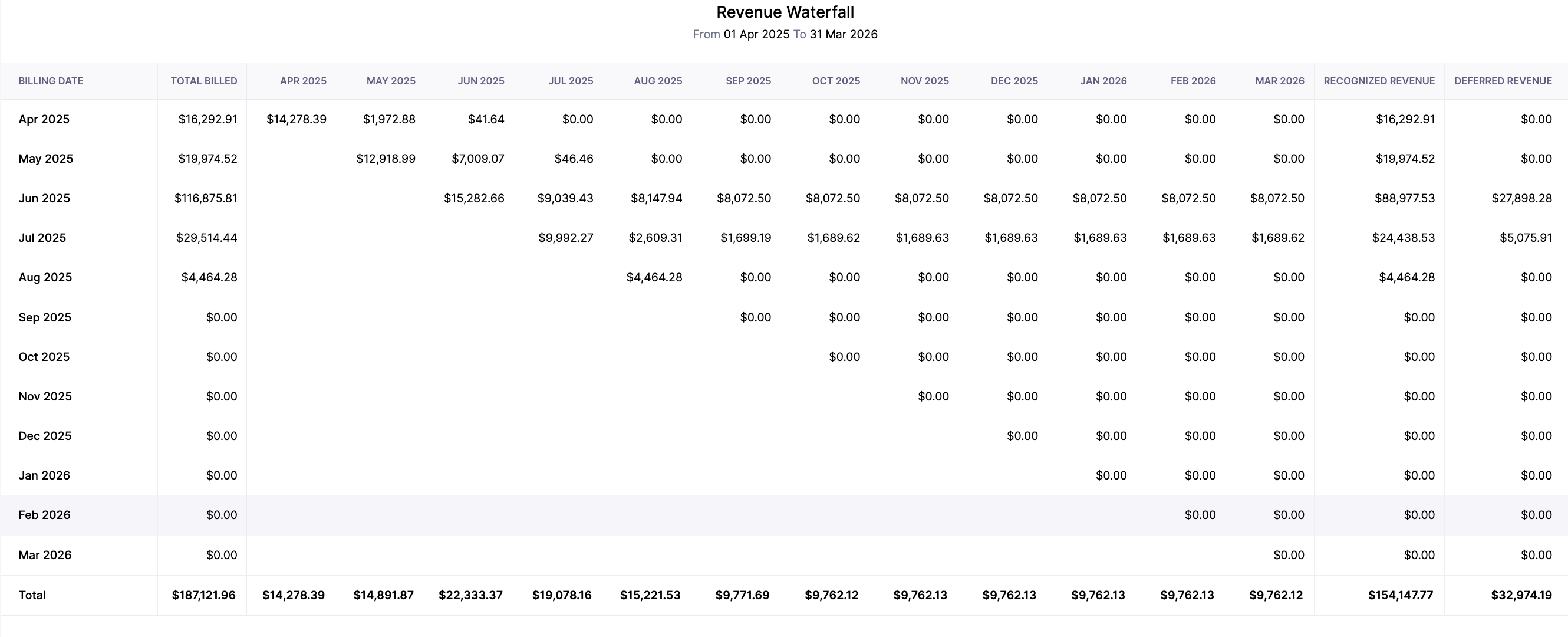
Zoho Billing flexes into Revenue Recognition reporting by adopting the Accounting Standards of IFRS 15 and ASC 606. With Zoho Billing, one can define when and how revenue can be recognized. Its reporting provides businesses with a detailed breakdown of when revenue is recognized, when it is kept as deferred, and its projections.
In Zoho Billing, you can define a "Recognition Rule" where you can create and assign different rules for your services. The attributes, while configuring the rules, are:
Recognition Period:
Define how often you wish to recognize your revenue.
Monthly: The revenue will be recognized every month. This is ideal for subscription-based services that offer monthly or weekly renewals.
Quarterly: Revenue will be recognized every three months, which aligns with most businesses' standard financial reporting cycle.
Yearly: The revenue will be recognized after every year. This is suitable for long-term contracts and high-value payments.
Once: The revenue will be recognized once and for all. This is suitable for milestone-based businesses or one-time service deliveries.
Recognition Method:
This will help you determine what and how revenue is recognized. For your simple understanding, we will provide one example for each of these recognition methods.
Daily: Total revenue is divided over the service period and recognized based on the number of days in the service period.
Evenly Distributed: Total revenue is divided evenly across the subscription or recognition period.
Evenly Distributed (with Prorated Values): Revenue that is recognized will be prorated based on the start date of the subscription.
Recognition Time:
Businesses need to define when to recognize revenue. You can determine whether revenue is recognized at the period's start or end.
If you choose,
Period Start: Revenue will be recognized when the service period begins. Prepaid subscription-based services commonly follow this. In this way of recognition, January's revenue is recognized in January itself.
Period End: Revenue will be recognized when the service period ends. This is suitable for contacts who bill quarterly.
These rules ensure that the revenue is recognized automatically and periodically as and when the service is delivered.
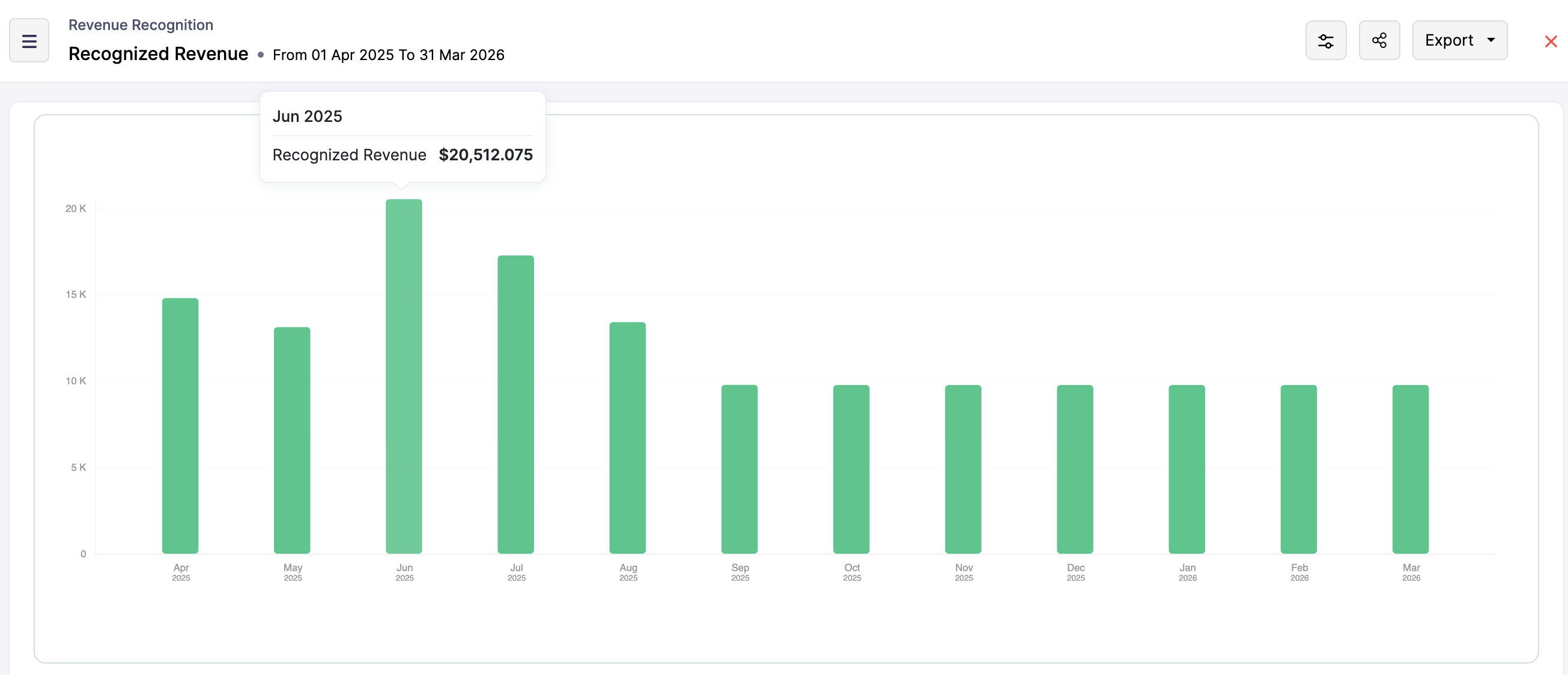
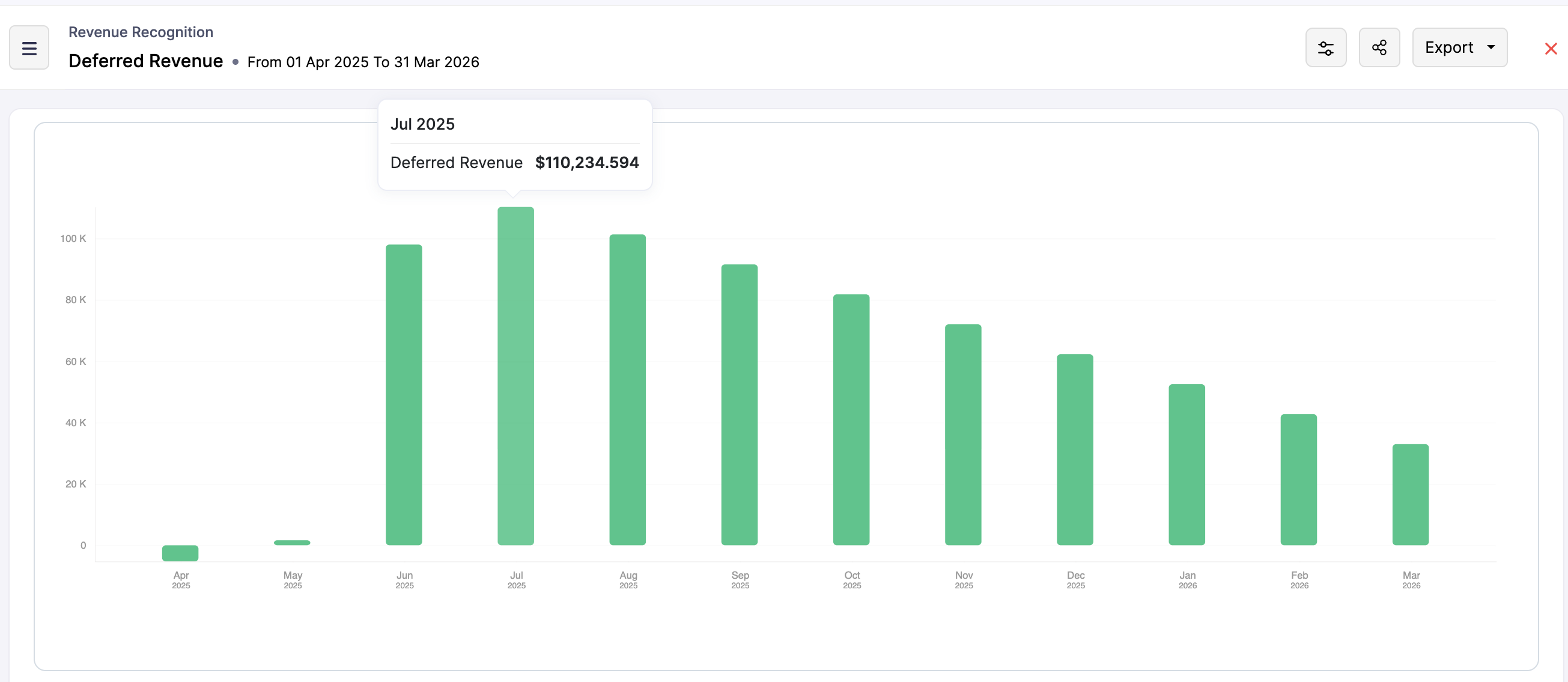
Zoho Billing automatically allocates the revenue between Recognized Revenue and Deferred Revenue. Over the contract term, the deferred revenue decreases as recognized revenue increases. The system will auto-generate:
Recognized Revenue Report: This report reflects income from completed performance obligations, providing insights into current financial performance. We have narrowed it down to give recognized revenue by customers as well as items.
Zoho Billing simplifies revenue recognition by transferring complex accounting standards into practical, automated processes. With configurable rules, flexible methods, and in-depth reporting, businesses can ensure that their recognized and deferred revenue is tracked accurately and transparently. This automated process removes guesswork for a subscription-based model and helps the finance team stay on top of their revenue reporting.

In the next post, we will understand the logic behind the Manual Revenue Recognition that Zoho Billing offers.
Topic Participants
Hari Hara Sudhan. S
Sticky Posts
Community Learning Series | Digest #5 — September 2020
Dear customers, We're happy to bring you the September edition of our #CommunityDigest! Keep track of your subscription KPIs right from your smartphone: Last month, we enhanced our Android mobile app to help our customers get daily updates on their business health. We got to know from a lot of customers that this has made their job much more easier because they no longer have to keep a reminder to manually check on the previous day's revenue or activations. If you have not downloaded it yet, here'sCommunity Learning Series | Digest #4 - August 2020
Dear customers, We hope you're staying safe and healthy. I'm happy to bring you the fourth edition of our #CommunityDigest with some brand-new updates from us. 1. Daily Business Updates (for Android users) The Zoho Subscriptions Android app has got a cool new update: You can now get a push notification to your smartphone that lets you know how many activations and cancellations have taken place, and what's the net revenue for the previous day. The best part is, you can tell the app when exactly youCommunity Learning Series | Digest #3 - July 2020
Dear customers, We hope you're staying safe and healthy. We're glad to bring you the July edition of our #CommunityDigest. New community members can view our previous newsletters here. This time, we have two major updates and three interesting topics for you: 1. Zoho Subscriptions Developer Community Since the inception of Zoho Subscriptions, our team believed that the recurring billing platform we provide should be able to offer an extensive API library that empowers businesses to automate mostIntroducing: Community Learning Series | Digest #1 - May 2020
Dear customers, We hope you are staying safe and healthy. Helping businesses manage their customer subscriptions more efficiently has always been, and always will be, our goal at Zoho Subscriptions. We strongly believe this is possible if we grow together as a community and share what we know with each other. To nurture this shared learning experience, here is our brand-new Community Learning Series! Welcome to the first edition of our digest! Each edition of our community digest includes guides
Recent Topics
Fixed assets in Zoho One?
Hi, We use Zoho Books and have the fixed asset option in it. I started a trial for Zoho One and I do not see that as an option. Is the books that is part of zoho one equivalent to Zoho Books Elite subscription or is it a lesser version? Thanks, MattSet Default Status of Assembly to "Assembled" When Entered in UI
I've just discovered the new "confirmed" status of Assemblies within Inventory. While I understand the intent of this (allowing for manufacturing planning and raw material stock allocation), it was initially confusing to me when manually entering someI need to Record Vatable amount and non vatable amount separately in zoho books in a single line
I need to Record Vatable amount and non vatable amount separately in zoho books in a single line give me the customisation option and in invoice copy to customer the total amount should be inclusive 5%vat and no need to show the vatable and non vatableSort Legend & stacked bar chart by value
I'd love to see an option added to sort the legend of graphs by the value that is being represented. This way the items with the largest value in the graph are displayed top down in the legend. For example, let's say I have a large sales team and I createScanned Doc - selecting Item overwrites Rate
I have a Vendor Invoice which was uploaded to Documents. I select Add To > New Bill. The OCR is actually quite good, but it is reading an Item Description instead of an Item Number. I remove the description and select the correct Item Number... and itTimesheet invalid data error
Getting the "Invalid Date" error when trying to add a time sheet to an appointment in a work order. I initially though the work order was corrupt or something so I deleted the work order and recreated it. I added the first time sheet to the AP and savedConvert invoice from zoho to xml with all details
How to convert an Invoice to XML format with all detailsAny update on adding New Customer Payment Providers who support in store terminal devices?
Currently there is only one Customer payment provider listed for terminal devices in USA- Everyware. They charge a monthly fee of almost $149 minimum. Will you add other providers - like Zoho Payments or Stripe or Worldpay that would allow integratedDealing With One-Time Customers on Zoho Books
Hello there! I am trying to figure out a way to handle One-Time customers without having to create multiple accounts for every single one on Zoho Books. I understand that I can create a placeholder account called "Walk-In Customer", for example, but I"Temporary" Field Value?
I have a custom action in Form A report Detail View that passes the Rec ID and updates a Temp Record ID lookup field in the Form B record via openURL (and opens the Form B report in popup) . The updated Temp Record ID field value in Form B is then usedFile Upload field automatically replaces spaces with underscores – support experience
Hi everyone, I want to share my recent experience regarding the File Upload field behavior in Zoho Creator and my interaction with the Zoho support team. When a user uploads a file, the system automatically renames the document by replacing spaces inWe Asked, Zoho Delivered: The New Early Access Program is Here
For years, the Zoho Creator community has requested a more transparent and participatory approach to beta testing and feature previews. Today, I'm thrilled to highlight that Zoho has delivered exactly what we asked for with the launch of the Early AccessQueries on Project-Based Inventory Consumption and Proforma Invoice in Zoho ERP
We would appreciate your clarification on how Zoho ERP plans to handle the following: Project-based inventory consumption without itemized sales orders Accurate project cost tracking along with inventory reduction Proforma Invoice usage We look forwardApplying Excess Payments & Conflict Invoices Due to Cancelled Items
I’m running into several issues that appear to stem from deeper-than-expected overlap between Zoho Finance (Books/Inventory) and Zoho POS. The level of coupling between these systems seems greater than what was originally communicated, and it’s leadingZoho Sprint Backlog View, filter by item status
Hello, In Zoho Sprints, it would be great to be able filter out specific items in the Backlog based on their status. We would like to track items that were Removed from our backlog without seeing them constantly in the Backlog view, as this view shouldWATERFALL CHART IN ZOHO ANALYTICS
Hi Team, I would like to know whether Zoho Analytics currently supports a Waterfall Chart as a built-in visualization type. If yes, could you please share the steps to create one? If not, is there any workaround or recommended method to build a WaterfallExport contacts from Bigin's mobile app to your Android device
Hello everyone! We're happy to announce that you can now export customer contacts from the Bigin mobile app to your device. Scenario A small-scale business owner has two pipelines in Bigin—one for procuring raw materials and the other for selling hisASAP iOS SDK – Xcode Compatibility Update
Hello everyone, We have been delivering the ASAP iOS SDK developed using Xcode 16.1 to provide Help Center support within mobile applications. Thus, ASAP iOS SDK versions upto 4.5.8 are compatible with development environments running in Xcode 16.1 andSub form auto field population based on parent form
I have a parent form called "Sites" with a text field called "Site". I have a subform called "Design Comments" (actual form name "Review Comments") with a lookup field name "Sites1" that looks up from the Sites form. I want the Sites1 lookup field toNot able to import transactions from Razorpay
Hi, tried implementing Razorpay integration with books,also added a webhook, but while this added a razorpay clearing account it does not have any data in it. Neither is it getting updated with new transactions happening on Razorpay. This problem is compoundedA note-taking app right inside your project management space
How do you feel when you check off the last task from your to-do list after a long day at work? Euphoric, blissful, satisfied? Now, imagine completing the same checklist from your PM platform, without juggling tools. Sounds simple and handy? That’s exactlyEmail Forwarding: Maintain business continuity
As an administrator, ensuring uninterrupted email communication is critical when a role-based employee is unavailable due to extended leave or a temporary role change. Emails from customers, partners, and internal teams must continue to be received andTip #61- Collaborate live with Invite Technician- 'Insider Insights'
Hello Zoho Assist Community! From the series of Technician Console, we will be exploring Session. Let's jump right into a brief overview. We’ve all been there: you’re deep into a complex remote session, and you realize you need a second pair of eyes.How to integrate Zoho CRM, Zoho Forms and a WIX Web Site
Attached video demonstrates how to use Zoho Forms included in Zoho One, to design a Contact Us form to be embedded into a WIX web site and integrated into Zoho CRM.Bug Causing Major Sync & SO Access Failures in Zoho POS
We are experiencing critical and recurring issues in Zoho POS that all trace back to role-permission handling defects in the latest POS app version. These issues directly affect syncing, login ability, and Sales Order access for role-restricted usersAdd Custom Reports To Dashboard or Home Tab
Hi there, I think it would be great to be able to add our custom reports to the Home Tab or Dashboards. Thanks! Chad Announcement: The feature is being rolled out across DC's and Edition in phases. To know more refer to the announcement post here.How to block whole domain?
I am getting at least 50-75sometimes over 100 spams emails a day. I see a lot of the spam is coming from .eu domains. I would like to block /reject all email coming for the .eu domain. I do not have any need for email from .EU domains. Why won't the BlackListHiding Pre-defined Views
You can enhance Zoho with custom views - but you cannot hide the pre-defined views. Most users focus on 4 or 5 views. Right now for EVERY user EVERY time they want to move to one of their 4 or 5 views - they have to scroll down past a long list of pre-definedwhy can't agent see accounts & contacts
My new user, with 'Agent' privileges, cannot see records that don't belong to them. How can I give them access? Why isn't this the default configuration in Zoho?Sender Email Configuration Error.
Hello Team, Hope you are all doing well. We are in the process of creating the Zoho FSM environment in the UAE. When we try to add the sender email address “techsupportuae@stryker.com”, we receive the error message: “Error occurred while sending mail【Zoho CRM】フィルター機能のアップデート:ルックアップ項目を使ったデータフィルタリング
ユーザーの皆さま、こんにちは。コミュニティチームの藤澤です。 今回は「Zoho CRM アップデート情報」の中からフィルター機能のアップデートをご紹介します。 ルックアップ項目を使ったデータフィルタリングがより詳細に行えるようになりました。 この機能は詳細フィルターとカスタムビューで利用でき、必要な情報を正確に取得できます。 これにより、タブ間を移動することなく、より深く正確な方法でデータを絞り込むことが可能になります。 ◉できること 詳細フィルターとカスタムビューで、ルックアップ先タブの項目が選択可能This will be long, Please bear with me - Next Gen Layout - Search
In general, I think that Zoho are going in the right direction with the Next Gen UI. The latest update brings some nice improvements and all-in-all from a user's perspective I think the improvements are generally very good. However, there are some areasZoho Books | Product updates | July 2025
Hello users, We’ve rolled out new features and enhancements in Zoho Books. From plan-based trials to the option to mark PDF templates as inactive, explore the updates designed to enhance your bookkeeping experience. Introducing Plan Based Trials in ZohoZoho Books | Product updates | August 2025
Hello users, We’ve rolled out new features and enhancements in Zoho Books. From the right sidebar where you can manage all your widgets, to integrating Zoho Payments feeds in Zoho Books, explore the updates designed to enhance your bookkeeping experience.Weekly Tips: Protect Confidential Information with PGP in Zoho Mail
We deal with confidential information almost every day, whether it is being sent out or received. Though emails sent using Zoho Mail are encrypted both during transit and at rest, attempts to access and steal your sensitive data are always a threat thatQuotes Approval
Hey all, Could you please help in the following: When creating quotes, how to configure it in a way, that its approval would work according to the quoted items description, not according to quote information. In my case, the quote should be sent to approvalImportant Update: Facebook Pages API Deprecation
Dear Zoho Analytics users, As of January 26, 2026, Facebook has officially deprecated Facebook Pages API version 18. This update involves the removal of several metrics that were previously supported by the API. As a result, these changes will affectAdding a Deal to and Existing Contact
I want to easily add a Deal to an existing Contact. If I click on New Deal on the Contact page this currently this is what happens: All of the mandatory field (and other field) information exists within the Contact. Is there a simple way for it to automaticallyCustom SMTP is now available in Zoho Sign
Hi there! Want to send Zoho Sign emails from your organization's or personal email server? Look no further! Zoho Sign has introduced custom Simple Mail Transfer Protocol (SMTP) for Enterprise users across all data centers. By enabling custom SMTP, youDeleting a memorized email address
How can I delete a memorized email address? Even though the address has been deleted from Contacts, Zoho mail still auto suggests the address when typing it into the TO field. Thanks!Next Page