Ring in the New Year with Guided Conversations for Smooth Offline Support
As we step into the new year, it’s time to refocus, re-energize, and gear up for fresh opportunities. But what about your customers as they begin the year with their own set of challenges or queries to resolve?
With Zoho Desk’s Guided Conversations (GC), you can ensure they’re supported seamlessly, even as your team navigates the post-holiday rush.
Zylker Techfix, a mobile gadget firm, has a busy start as its customers flood them with requests: repair appointments, service inquiries, delivery tracking, and questions about new products. By leveraging Guided Conversations, Zylker Techfix provided an efficient, self-service experience that kept customers engaged while their team prioritized high-value tasks.
Here’s why Zylker Techfix setup the Guided Conversations feature within Zoho Desk:
- Customers could effortlessly log repair or service requests.
- Delivery updates and product inquiries were instantly addressed without delays.
- Clear and reassuring messaging kept customers informed that their concerns were logged and would be prioritized.
Guided Conversations acts as a dependable, 24/7 virtual assistant, automating ticket creation while offering a personal touch. Its intuitive, drag-and-drop builder enables you to design workflows that guide customers through their questions, gather essential information, and create tickets—even when your team is unavailable.
For businesses like Zylker Techfix, GC turned the often-hectic start of the year into an opportunity to build stronger customer relationships. By ensuring requests were acknowledged and logged, customers felt valued and confident that their needs were being addressed.
As you plan for the year ahead, Guided Conversations can help you create a customer experience that’s efficient, thoughtful, and future-ready.
Guide to Set up Guided Conversations (GC) in Zoho Desk
Guide to Set up Guided Conversations (GC) in Zoho Desk
Here’s how you can easily set up Guided Conversations to create tickets when agents are unavailable/offline:
1. Go to Setup > Self-Service > Guided Conversations.
2. Select the department before creating the flow because Guided Conversations are department-specific.
Create a New Flow
3. Click on the Create Flow tab in the top-right corner.
4. Select the Web Channel.
5. Enter a Name and Description for your flow, then click Next.
6. The GC design window will appear. Below the Guided Conversation icon, click the + icon to start building your flow.
7. Drag and drop elements from the right-hand panel to create your conversation blocks.
8. Drag the Text Message Block and drop it into the flow. Type a Welcome message.
9. Enter the Name of the block and the Message you want to display to customers. This block is used to share direct information with your customers.
10. Click the + icon below the text message block and add a Question Block.
11. Use the Question blocks to collect inputs from customers based on your questions.
For example, use the following Question Blocks using the + icon to receive the information from your customers:
- Name (Text Block)
- Email (Email Block)
- Contact Number (Number Block)
- Date (Calendar Block for availability)
- Attachments (Attachment Block to receive files or images, such as screenshots).

Add Button Choice Blocks
12. Use the Button Choice Blocks to present predefined options to customers, such as a list of countries, states, or regions. This is useful for collecting specific information like location and understanding the time zone.
13. Drag the Text Question block to receive a description on the Issues submitted.
14. Create the Date and Time question block to get the customer's availability time to reconnect, if required.

To Create a Ticket
15. Now, click on the Zoho Desk blocks, click on the Create ticket.
16. Give the Block Name, choose the Department (the same department where you create this Guided Conversation), choose the layout for the Email template.
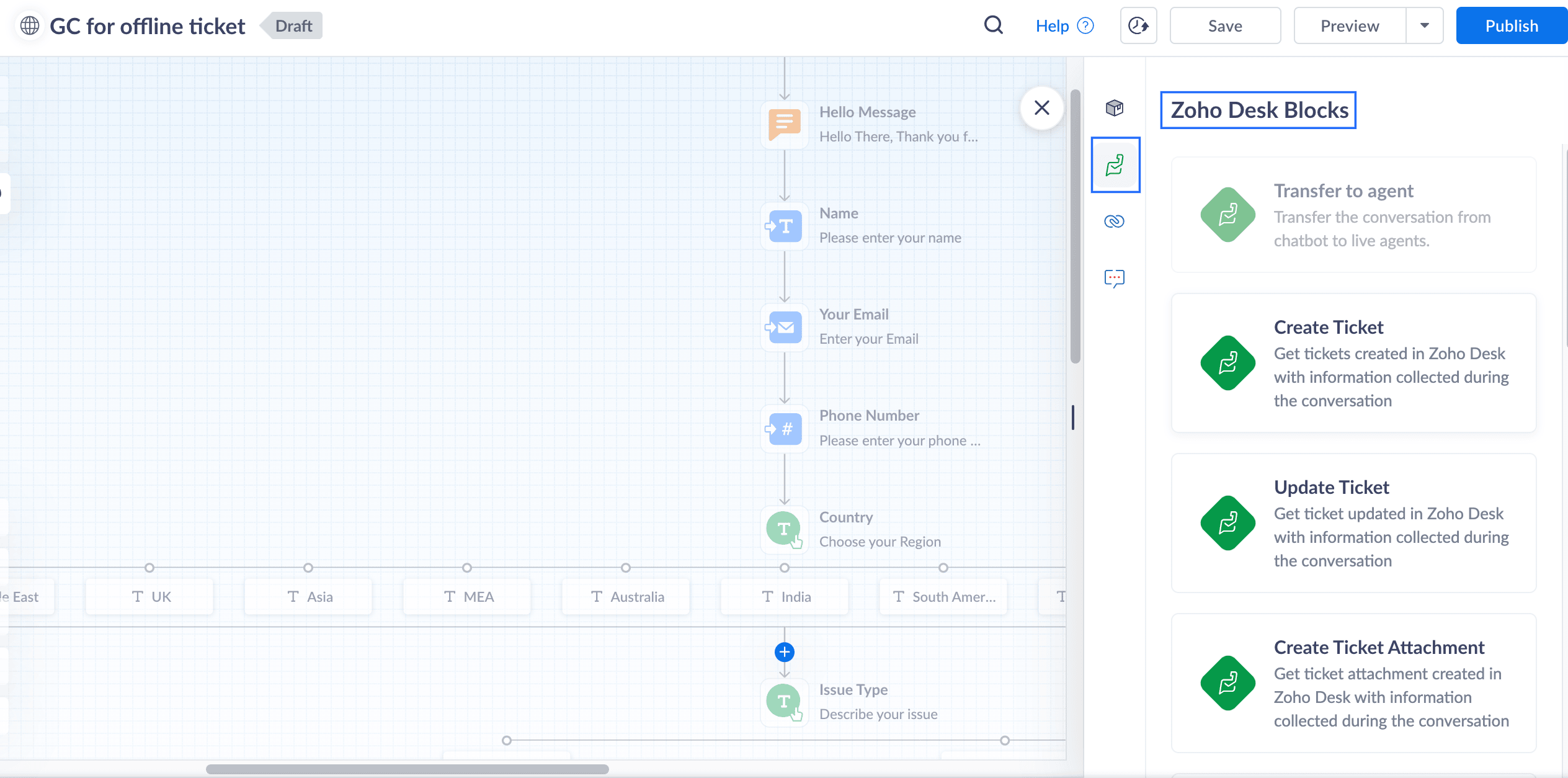
17. In the Input variable mapping, click on the gear icon, map the field variables in the Tickets layout with the Flow variables created within GC.
For example, map the Email field within Tickets to the Email block in GC, map Phone with the Phone field, map Subject with the Issue Type, and map Description with the Describe issue text block
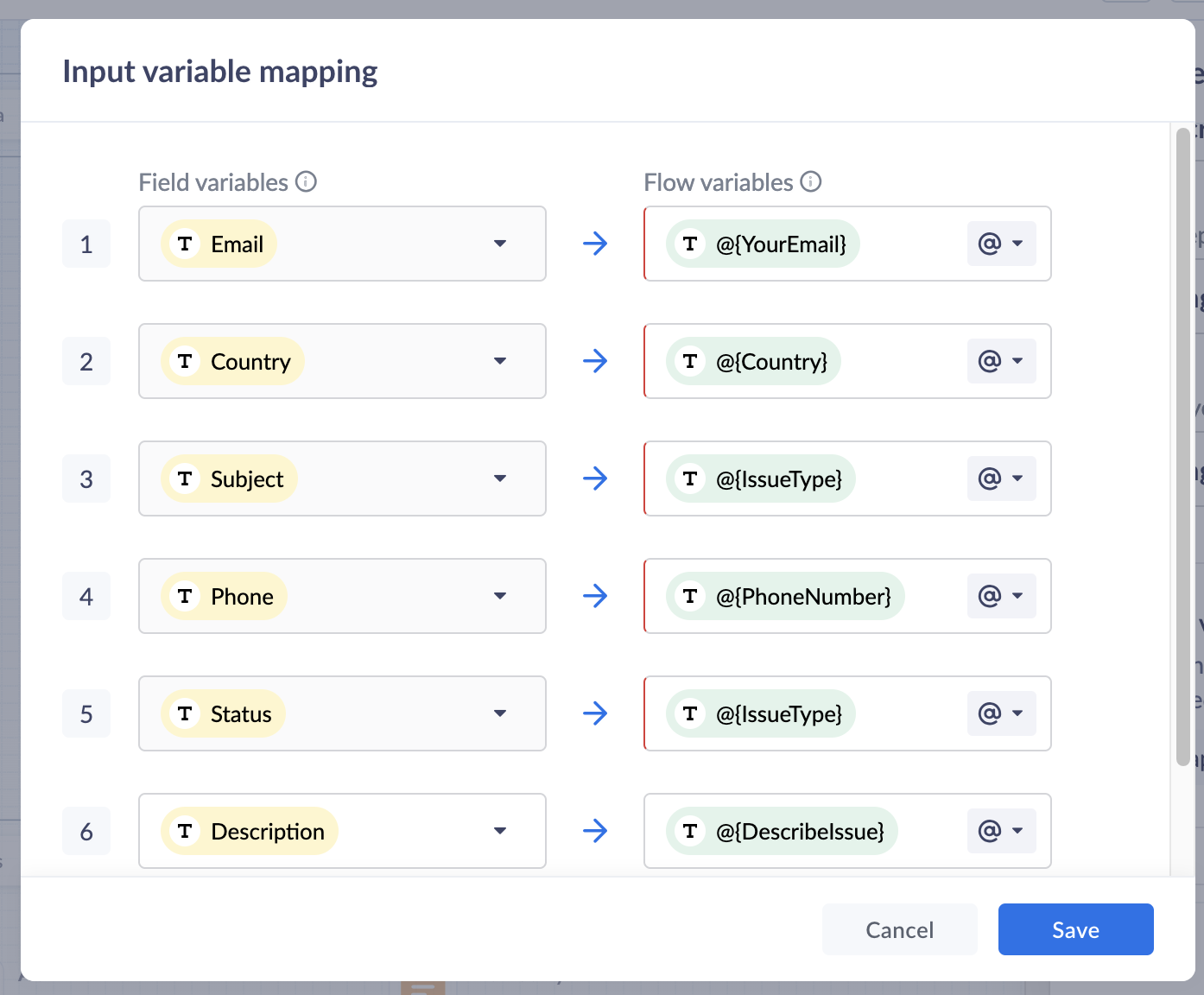
18. Click Save to save the mapping variables
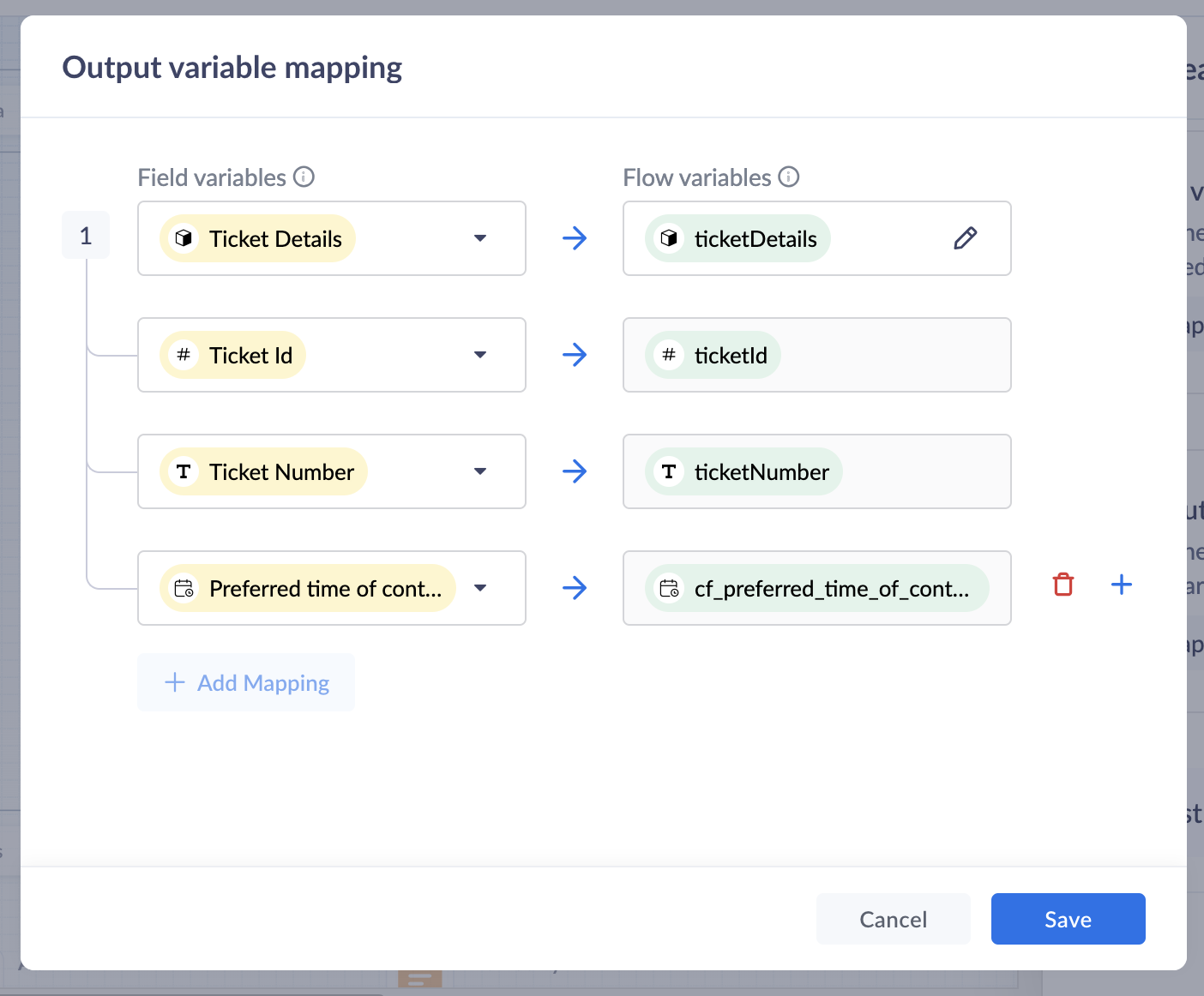
19. In the Output variable mapping, click on the gear icon, map the ticket related information which you would like to share with the customers within the GC.
Preview and Publish
20. Once all blocks are added, click on Preview to view the flow and ensure it works based on your requirements.
21. Save your changes, and click Publish. Your Guided Conversation is ready to use!

Note: Some blocks are being developed for Instant Messaging (IM) channels and will appear faded out if you choose IM channels.
Create A GC Widget
i. Go to Setup(S) >> Self Service >> Guided Conversations >> GC widgets.ii. Click on Create GC widget. Give a Name and Description.iii. Choose the Channels. click on the drop-down arrow under Associate flows >> Add Flow >> select the Published GC.iv. Click Associate. under Access Permissions, select users based on your preferences.v. Enter your preferred welcome message that you would like to appear on your GC widget.vi. Enter End Options based on your preferences.vii. Click Save to save your GC widget.
ASAP Widget
Go to Setup (S) >> Self-Service >> ASAP >> Create New Widget.
a. Enter a Name, enable the widget launcher to show the widget on your website.b. Associate the help widget with required departments.c. Choose the required modules to associate with the widget.d. Once you are done, click on Generate.
Embed GC
You can obtain the embed code to integrate the widget into your website or Help Center, as well as the organization ID for iOS and Android SDKs.
i. Go to Setup (S) >> Self-Service >> ASAP.ii. Hover over the created ASAP widget; click on Embeddable Code.iii. Copy the web embed code for use on your website or Help Center.iv. Use the iOS ID for iOS SDK and the Android ID for Android SDK.
That’s it—your Guided Conversation is now live and ready to assist your customers!
Pro Tip
Guided Conversations can be tailored to suit a variety of scenarios, from managing customer inquiries to streamlining ticketing operations. Enhance the customer experience by customizing, editing, or updating workflows to meet their needs effortlessly.
Explore our Guided Conversation Guide and the automation with GC to ensure your customers always have the support they need.
Here’s to a fantastic start to the New Year! Wishing you success and seamless experiences ahead: Happy New Year from the Zoho Desk Team! 🎉
Topic Participants
Lydia | Zoho Desk
Sticky Posts
Register for Zoho Desk Beta Community
With the start of the year, we have decided to take a small step in making the life of our customers a little easier. We now have easy access to all our upcoming features and a faster way to request for beta access. We open betas for some of our featuresShare your Zoho Desk story with us!
Tell us how you use Zoho Desk for your business and inspire others with your story. Be it a simple workflow rule that helps you navigate complex processes or a macro that saves your team a lot of time; share it here and help the community learn and grow with shared knowledge.Tip #1: Learn to pick the right channels
Mail, live chat, telephony, social media, web forms—there are so many support channels out there. Trying to pick the right channels to offer your customers can get pretty confusing. Emails are most useful when the customer wants to put things on record. However, escalated or complicated issues should not be resolved over email because it's slow and impersonal. When you need immediate responses, live chat is more suitable. It's also quick and convenient, so it's the go-to channel for small issues.Welcome to Zoho Desk Community - Say hello here!
Hello everyone! Though we have been here for a while, it’s time to formally establish the Zoho Desk Community; we’re really happy to have you all here! This can be the place where you take a moment to introduce yourself to the rest of the community. We’d love to hear all about you, what you do, what company or industry you work for, how you use Zoho Desk and anything else that you will like to share! Here’s a little about me. I am Chinmayee. I have been associated with Zoho since 2014. I joined hereWebinar 1: Blueprint for Customer Service
With the launch of a host of new features in Zoho Desk, we thought it’ll be great to have a few webinars to help our customers make the most of them. We’re starting off with our most talked about feature, Blueprint in Zoho Desk. You can register for the Blueprint webinar here: The webinar will be delivered by our in-house product experts. This is a good opportunity to ask questions to our experts and understand how Blueprint can help you automate your service processes. We look forward to seeing
Recent Topics
Introducing the Zoho Projects Learning Space
Every product has its learning curve, and sometimes having a guided path makes the learning experience smoother. With that goal, we introduce a dedicated learning space for Zoho Projects, a platform where you can explore lessons, learn at your own pace,Where to show Customization Field ?
Dear Sir, I have made some New Field in Item Field Customisation. Now I don't require that field in Estimate, Sales Orders etc. I just wants that field in Sales Invoice to Show/Hide... Is that possible ?Zoho Desk 2025 round-up: Key highlights on feature releases
Hello everyone, As we gear up for 2026, here is a detailed round-up of all feature releases in Zoho Desk web throughout the year. For consolidated information on releases check out the What’s New page You can also watch these webinars. Zia in web ZiaPrint Sales Orders, Purchase Orders or Invoices from API
Hello, Is it possible to use the print option that is available in Sales Orders Purchase Orders and Invoices with the API?. I don't see any information in the docs about this. ThanksHow to show a hided report??
in CRM Report , I clicked Hide incidently , how to show the floder again? Nowhere I can find the hided report floder...Converting Customer Invoice to Purchase Bill
Hi, In my service-based business, I sometimes create the customer invoice first, and later I receive the purchase bill from the vendor for the same job. Is there any option in Zoho Books to: Convert a customer invoice into a purchase bill, or Link/associateEmail tracking inquiry
I am trying to track when my emails are opened and clicked like I previously did in HubSpot. HubSpot pretty much did the entire process automatically. After digging through, I finally found in settings --> emails --> BCC Dropbox there is an email I canMass Update of Lookup Fields not possible
Hello List I've created a custom field for Leads and Contacts 'Current Campaign'. This is very Handy as I can filter leads and then related them to a campaign. Everything ready, but then I realized that mass update doesn't work for lookup fields... aCollapsible Sections & Section Navigation Needed
The flexibility of Zoho CRM has expanded greatly in the last few years, to the point that a leads module is now permissible to contain up to 350 fields. We don't use that many, but we are using 168 fields which are broken apart into 18 different sections.Download Attached Files
Hi everyone, Brand new to Zoho Creator. I have a form with a subform. The subform has a field for "File Upload" I have this in a subform to allow multiple files to be uploaded to the parent form. Once the files are uploaded, how can i download or view them? Is this a setting I am just not seeing? If there isn't a way to download them, could i create another form field that dynamically creates the file's URL? That way a user can click the URL to get to the file? Any help with this would be greatlyTicket layout based on field or contact
Hi! I want to support the following use-case: we are delivering custom IT solutions to different accounts we have, thus our ticket layouts, fields and languages (priority, status field values should be Hungarian) will be different. How should I setupNo funcionan correctamente el calculo de las horas laborales para informe de tickets
Hola, estoy intentando sacar estadísticas de tiempo de primera respuesta y resolución en horario laboral de mis tickets, pero el calculo de horas en horario laboral no funciona correctamente cree los horarios con los feriados : Ajusté los acuerdos deZoho Mail Android app update: Set out of office response exclusively for organization members and external users, response interval
Hello everyone! We have now introduced an option to configure out of office messages exclusively for organization members and external users within the Zoho Mail app. Additionally, now you can also customize response intervals for the Out of office messages.Feature Request: Detailed View - Related Block Links!
Desperately need a view record link option on records displaying in the related blocks on a Detail View. For the love of god, please add this feature. Thank you!Sub-Form Padding in CSV Export
Hi, When you use the Sub-Form, and for example you have a Date Field on the Main Page, then Option 1 and Option 2 fields on the Subform, when you export this to CSV the Date column will only have the Date in 1 row, the first row, it would be nice to padDependent / Dynamic DropDown in ZohoSheets
Has anyone figured out a way to create a Dropdown, the values of which is dependent on Values entered in the other cell ?How do I change the order of fields in the new Task screen?
I have gone into the Task module layout, and moving the fields around does not seem to move them in the Create Task screen. Screenshot below. I have a field (Description) that we want to use frequently, but it is inconveniently placed within the MoreZoho → ShipStation Integration – Sales Order–Driven Fulfilment Workflow
Hello All, I’m reaching out to explore the best way to integrate a shipping tool into our inventory which will speed our process up. We are looking to integrate ShipStation into our existing order-to-fulfilment workflow, as we’re keen to standardise onIA ou je peux trouver comment utiliser IA
Je voudrais utiliser IA dans l'interface zoho pour m'aider quand j'ai des questions de rôle partage ou autre configuration d'automatisation, j'utiliser ChatGPT externe mais il ne connait pas toujours l'interface zoho et les réponses sont parfois longueData Processing Basis
Hi, Is there a way to automate the data processing for a candidate every time an application arrives from job boards, without requiring manual intervention? That is, to automatically acquire consent for data processing. I've seen a workflow that allowsZoho vault instal on windows
I am trying to use Zoho Vault Desktop for Windows, but I am unable to complete the sign-in process. Problem description After logging in to my Zoho account and clicking Accept on the authorization page, nothing happens. The application does not proceedZOHO GLITCHES
Ok, you guys have done a great job at building a platform that has the potential to surmount the competition but these glitches are becoming more than frustrating! This is beyond annoying, I'm trying draft lawsuits and type up privacy and refund policiesNotification to customers when I use a Zoho function
Hi all, I tried searching the community but couldn't find anything about it. I noticed that the customer receives the notification of reopening the old ticket but does not receive the notification of opening a new ticket when I use the function: "separateDate Filters in Zoho Desk Dashboard
Hello Team, Currently, in the Zoho Desk dashboard, the date filter is available only for daily, weekly, and monthly views. Could we also add a yearly date filter to allow filtering by an entire year? Additionally, in the custom date filter, it is currentlyMobile app - offline
If I made a couple of forms and my field guys had the mobile app and were somewhere without signal, could they open the app, complete and sumbit a form and have it upload when they are back in signal (we need different info at different jobs and I'm tryingZoho Survey reminder settings are extremely confusing
Hi, I just want to set 3 reminders, one week apart from the first email out. Your form is too confusing and I don't understand. Can you simplify and be more specific regarding the language used on the form ?Zobot drop down list
Hi, I am trying to create a drop down list in Zobot by creating a plug. I think I am close but I just can't get it over the line and was hoping that someone could help me. I had a little bit of help getting the script started (hence the comments) // DelugeHow to compare a subform lookup field that allows multiple entries when edited
I have a form with a subform with multiple fields. One of the fields is a lookup field that allows a multi select. On edit validation, I want a workflow to execute only when the entries in that subform field has changed. The old. function is not workingTranslation of Tooltip Messages
The descriptive help messages should be available to provide translations for.Business Day Logic Update: More Accurate Scheduling for Your Workflows
Hello everyone, We’re improving how business-day calculations work in workflows, especially when triggers happen on weekends. This update ensures that offsets like +0, +1, and +2 business days behave exactly as intended, giving you clearer and more predictableLead Blueprint transition in custom list view
Hi, Is It possible to insert the Blueprint transition label in a custom Canvas list view? I am using Lead module. I see the status, but it would be great if our users could execute the Blueprint right from the list view without having to enter the detailedEmail Notifications not pushing through
Hi, Notifications from CRM are not reaching my users as they trigger. We have several workflow triggers set up that send emails to staff as well as the notifications users get when a task is created for them or a user is tagged in the notes. For the past 6 days these haven't been coming through in real time, instead users are receiving 30-40 notifications in one push several hours later. This is beginning to impact our daily usage of CRM and is having a negative effect on our productivity becauseDebit opening balances of vendors
Dear colleagues: I am looking at the trial balance as on 31st March 2024, and punching opening balances (1st April 2024) in Zoho Books. Vendors have credit balances, by its nature, but some of our vendors have debit balances as well (e.g., we have paidIs there an equivalent to the radius search in RECRUIT available in the CRM
We have a need to find all Leads and/or Contacts within a given radius of a given location (most likely postcode) but also possibly an address. I was wondering whether anyone has found a way to achieve this in the CRM much as the radius search in RECRUITAllow Text within a Formula
Hi, I would like to be able to use this for others things like taking an existing Date Field and copying its value, so by entering getDay(Date)&"-"&getMonth(Date)&"-"&getYear(Date) it results in 01-02-2026. And then when the Date is changed so is thisChange Number Field to Decimal Field
Hi, It would be nice to be able to change the field type without having to delete it and create a new one, messing up the database and history. Thanks DanPipeline.Company Name field shows up as numbers! [Bigin Developer Console > Component > URL]
Hi there, I am setting up to invoke URL to send infromation zoho bigin > zoho forms with company name pre-fill in the form. however when I use : ${Pipelines.Company Name} field it shows up as a string of number instead of words. Help.Add specific field value to URL
Hi Everyone. I have the following code which is set to run from a subform when the user selects a value from a lookup field "Plant_Key" the URL opens a report but i want the report to be filtered on the matching field/value. so in the report there isHow to Move Behavior, Acquisition, Polls & Forms Data from Zoho PageSense to Zoho Analytics?
Hi Zoho Community, I'm looking for a way to transfer data from Zoho PageSense to Zoho Analytics, specifically: Behavioral data (clicks, scrolls, heatmaps, etc.) Acquisition data (traffic sources, campaigns, etc.) Polls and forms data As far as I can tell:Zoho Social - Feature Request - Non-US Date Format
Hi Social Team, I have noticed that there is no option to change the date format from US mm/dd/yyyy to others like dd/mm/yyyy. It would be great to see this added as the platform matures. Thanks for considering this feedback.Next Page