Spreading Love, One Ticket at a Time
At Zylker Techfix, customer service wasn't just about solving issues, it was about creating meaningful human connections. The team believed that every interaction was an opportunity to understand their customers better and offer solutions that truly made a difference.
Understanding the Customer
Customer service is about showing love for customers and loving what you do. Every ticket is an opportunity to connect, solve problems, and make customers feel valued. Zoho Desk became the heart of Zylker Techfix operations to help them do just that.
The Ticket Module: A Treasure Trove of Insights
The Tickets Module records every interaction with the customer. This place helped establish relationships with customers.
The team discovered the Ticket tabs as a wealth of features to understand their customers better:
- Conversation Module held records of the ticket conversations and private comments, helping them keep an eye on interactions with the customer, ensuring no detail was missed.
- Under the Resolution Tab, they mandated recording resolution to track customer actions, ensuring every issue was resolved with care.
- The Parent-Child ticket feature linked related tickets, making it easier to see the bigger picture and provide consistent support.
- Time Entry Module kept them in track with billable hours and time spent on tickets, ensuring efficiency and transparency.
- The History Tab offered insights into past interactions, allowing agents to filter by incoming responses, outgoing replies, comments, and attachments. This was crucial for tracking ticket progress and ensuring timely resolutions.
- The Geo-Location Module is another powerful tool that works well with the Zoho Desk App. This enables to track the location of field service representatives, ensuring real-time updates and better service coordination.
- The Activity Tab helped filter activities based on specific criteria, providing a detailed view of customer interactions.
- Approval Tab facilitated streamlined approval processes, ensuring that responses requiring managerial review were promptly addressed.
- The Attachment Module helped in organizing and accessing customer-related documents easily.
 Note: For early access to the Parent-child ticket feature, request here. This applies to Professional and Enterprise users only.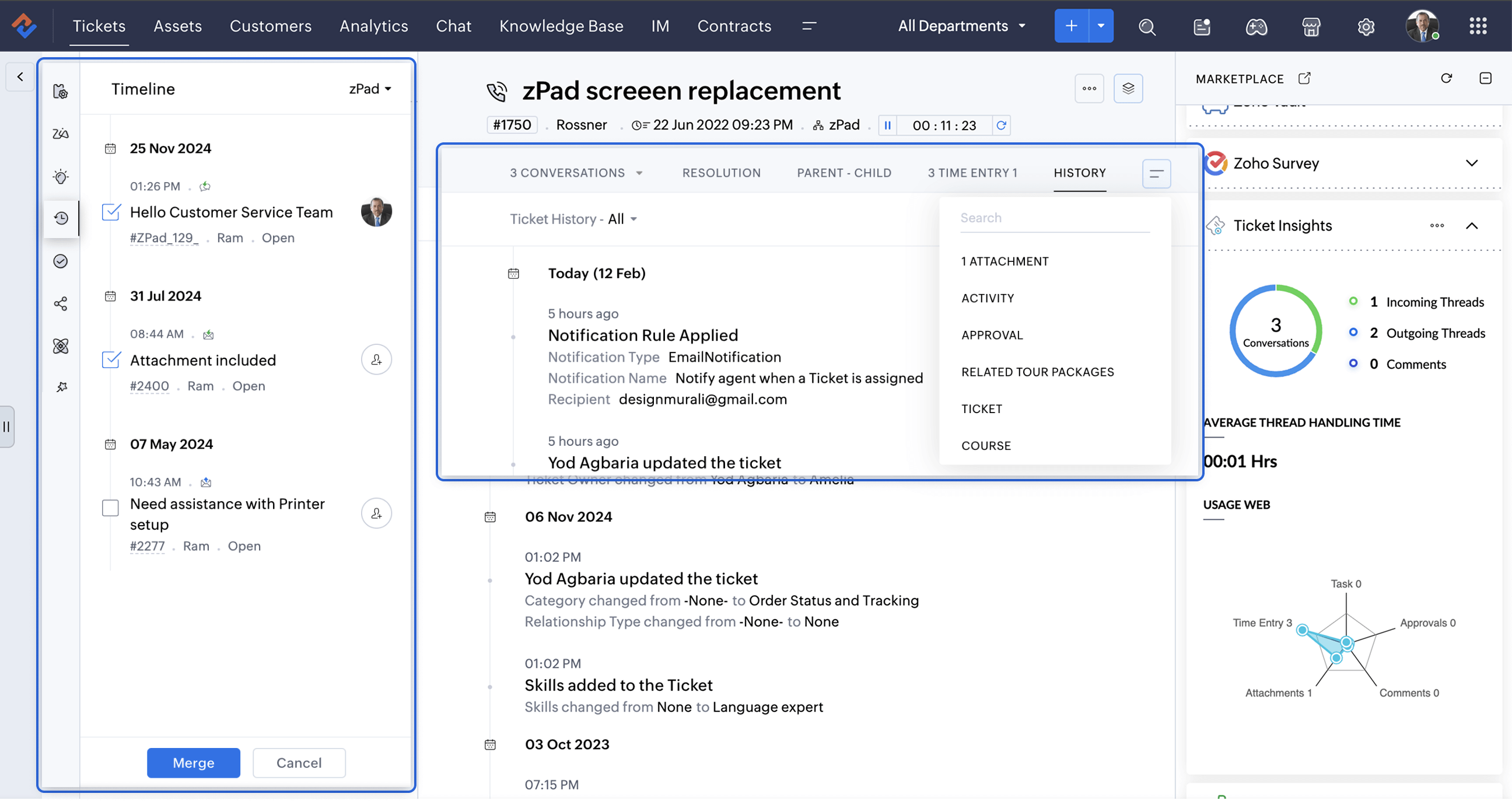
A Smarter Approach to Ticket Management
At times, when Zylker Techfix experienced a surge in tickets, the Ticket Detail banner on the left provided the following details on the ready-to-use extensions:
- Ticket Properties showed the customer and ticket information
- Field Predictions auto-filled customer details, saving time.
- Zoho's AI, Zia leveraged the Answer Bot to provide solutions based on the knowledge base created by the user within Zoho Desk.
- The Ticket Follower option let them keep a track of the tickets handled by them or other agents.
- The Ticket Timeline let them keep an eye on the previous cases handled for the client in the specific Department or All Department. Within a specific department, agents could also merge tickets for efficient handling.
- To ensure visibility across departments, the Share Ticket Option allowed teams to share tickets with different departments while maintaining appropriate access controls such as Full Access, Restricted Access, or Read-Only Access.
Presenting three essential extensions to stay on the go with customer service:
1. Customer Insights for Zoho Desk: Know Your Customers Better
The value of customer service grows as you gain deeper insights into your customers by understanding their experiences, emotions, and the journeys they have taken with your brand.
How well do you know your customers?
How well do you know your customers?
With Customer Insights for Zoho Desk located on the Ticket Detail panel on the left, you can access key interaction details, including response times, resolutions, the number of tickets handled, and happiness ratings. These insights help build stronger relationships and enhance service quality.
In customer service, care is more than just providing solutions.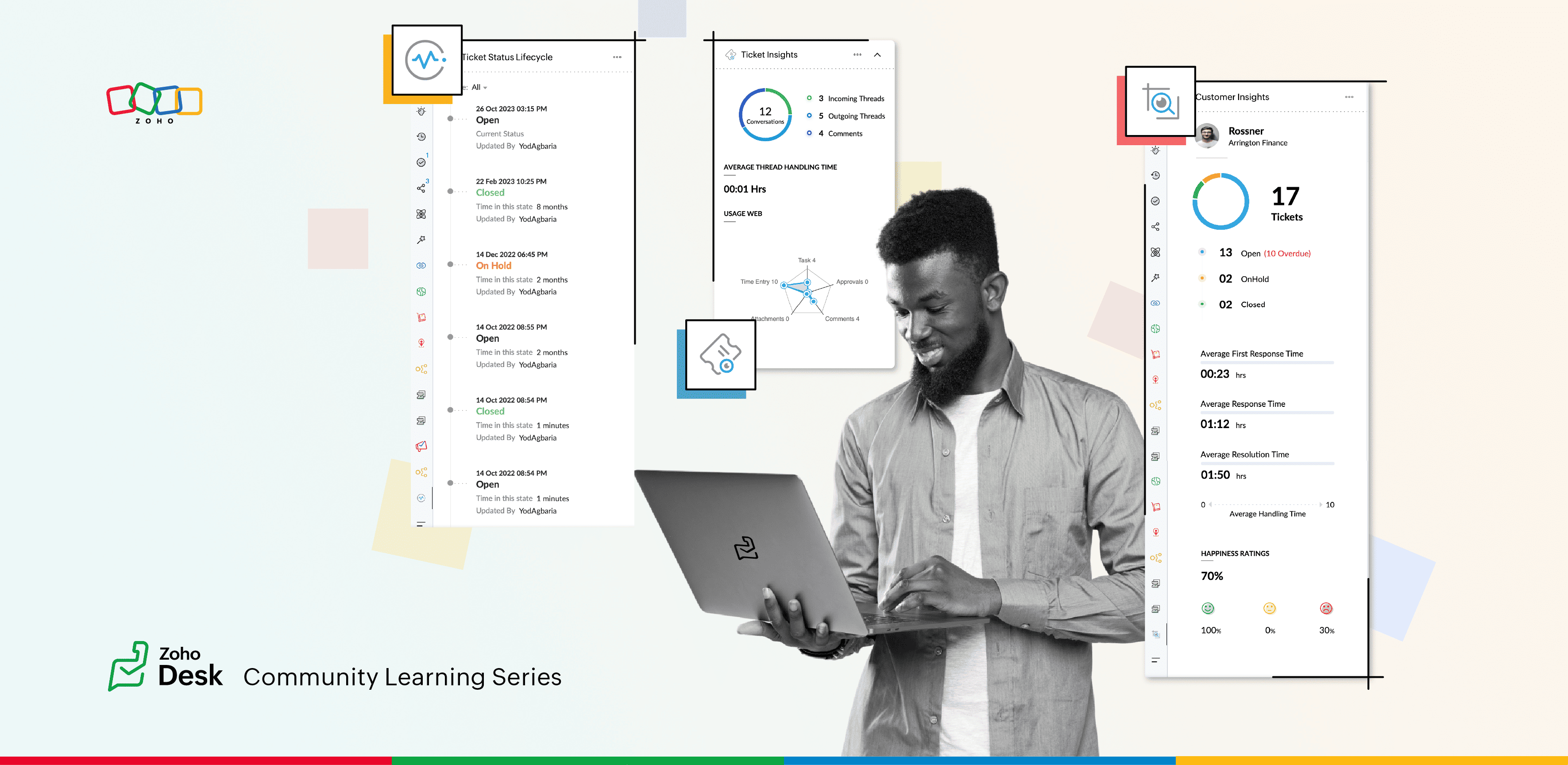
2. Ticket Insights for Zoho Desk: A One-Shot View
Install Ticket Insights for Zoho Desk from the Marketplace Extensions to enhance your ticketing experience.
Where can you view the insights?
- Open a ticket in Zoho Desk.
- Click on the Marketplace
 icon next to the Ticket Subject.
 - Maximize Ticket Insights for a detailed overview.
This tool gave them a one-shot view of:
- Threads: The number of incoming and outgoing threads within a ticket.
- Average Thread Handling Time: How quickly they were resolving issues.
- Ticket Module Usage: A detailed web of how each module was being utilized.
3. Ticket Status Lifecycle for Zoho Desk : At a Glance
Install this extension from Marketplace  icon on the top right. You can view the Ticket Status Lifecycle on the Ticket Detail panel on the left.
icon on the top right. You can view the Ticket Status Lifecycle on the Ticket Detail panel on the left.The Ticket Status Lifecycle provides detailed insights into ticket status changes, including the exact time of each update and the agent responsible for the modification. These insights help identify bottlenecks and assess the efficiency of support processes.
For example, tracking the duration a ticket remaining in a particular status can highlight areas that need improvement. Additionally, the extension allows users to filter the timeline to focus on specific statuses, such as "Open", "On hold", or "Waiting on Customer", or "Pending Approval."
This level of detail ensures that support teams gain a clear and chronological understanding of each ticket’s progression, enabling more informed decision-making and process optimization.
Wrap Up
This helped Zylker Techfix capture critical information in a short time, enabling them to stay on top of their game and offer proactive support.
Zylker Techfix realized that customer service is an act of love. With Zoho Desk and its extensions like Customer Insights, Ticket Insights, and Ticket Status Lifecycle, they understood their customers better, engaged with them meaningfully, and delivered solutions that brought joy.
And so, they continued to spread love, one ticket at a time.
Topic Participants
Lydia | Zoho Desk
Sticky Posts
Register for Zoho Desk Beta Community
With the start of the year, we have decided to take a small step in making the life of our customers a little easier. We now have easy access to all our upcoming features and a faster way to request for beta access. We open betas for some of our featuresShare your Zoho Desk story with us!
Tell us how you use Zoho Desk for your business and inspire others with your story. Be it a simple workflow rule that helps you navigate complex processes or a macro that saves your team a lot of time; share it here and help the community learn and grow with shared knowledge.Tip #1: Learn to pick the right channels
Mail, live chat, telephony, social media, web forms—there are so many support channels out there. Trying to pick the right channels to offer your customers can get pretty confusing. Emails are most useful when the customer wants to put things on record. However, escalated or complicated issues should not be resolved over email because it's slow and impersonal. When you need immediate responses, live chat is more suitable. It's also quick and convenient, so it's the go-to channel for small issues.Welcome to Zoho Desk Community - Say hello here!
Hello everyone! Though we have been here for a while, it’s time to formally establish the Zoho Desk Community; we’re really happy to have you all here! This can be the place where you take a moment to introduce yourself to the rest of the community. We’d love to hear all about you, what you do, what company or industry you work for, how you use Zoho Desk and anything else that you will like to share! Here’s a little about me. I am Chinmayee. I have been associated with Zoho since 2014. I joined hereWebinar 1: Blueprint for Customer Service
With the launch of a host of new features in Zoho Desk, we thought it’ll be great to have a few webinars to help our customers make the most of them. We’re starting off with our most talked about feature, Blueprint in Zoho Desk. You can register for the Blueprint webinar here: The webinar will be delivered by our in-house product experts. This is a good opportunity to ask questions to our experts and understand how Blueprint can help you automate your service processes. We look forward to seeing
Recent Topics
Add multiple users to a task
When I´m assigning a task it is almost always related to more than one person. Practical situation: When a client request some improvement the related department opens the task with the situation and people related to it as the client itself, the salesmanA Roundup of Zoho Sprints 2025
Sorting Custom Date in API isn't working w pagination limit
How can we sort a custom field with DATE using pagination? Starting at page=1 then moving to page=2 with a limit of 10 each, its all messed up and even shows some of the same records as page 1? https://www.zohoapis.com/crm/v2/INVOICE_MODULE/search?criteria=(FM_Contact_ID:equals:1234)&sort_by=Invoice_Date&sort_order=desc&per_page=10&page='SAP Business One(B1) integration is now live in Zoho Flow
We’re excited to share that SAP Business One (B1) is now available in Zoho Flow! This means you can now build workflows that connect SAP B1 with other apps and automate routine processes without relying on custom code. Note: SAP Business One integrationEnhancement in Role and Profile mapping of agents in Sandbox
Hello everyone! We have brought in a modification in the way users are mapped to a particular role and profile in Sandbox. What has changed? When agents are copied from production to Sandbox: If a user's current role and profile is available in Sandbox,The reason I switched away from Zoho Notebook
My main reason for switching to Zoho was driven by three core principles: moving away from US-based products, keeping my data within India as much as possible, and supporting Indian companies. With that intent, I’ve been actively de-Googling my digitalDecimal places settings for exchange rates
Hello, We are facing issues while matching vendor payments with banking feeds. As we often import products/services exchange rate comes into play. Currently, ZOHO allows only six digits for decimal places. We feel that conversions like JPY to INR requireZoho removed ability to see all Scheduled Reports!
If you are not the owner of a scheduled report, Zoho recently removed the capability to see each scheduled report. As an admin who relies on seeing all scheduled reports being sent, this is a terrible update. Now I cannot see ANY scheduled reports...even the ones I am being sent!! This should be a setting for admins to control. This is a bad update.Automate Backups
This is a feature request. Consider adding an auto backup feature. Where when you turn it on, it will auto backup on the 15-day schedule. For additional consideration, allow for the export of module data via API calls. Thank you for your consideration.GCLID and Zoho Bookings
Is there anyway to embed a Zoho Bookings signup on a landing page and pass the GCLID information? More specifically, can this be done using auto-tagging and not manual tagging the GCLID? I know Zappier has an integration to do this but is there a betterMerge Items
Is there a work around for merging items? We currently have three names for one item, all have had a transaction associated so there is no deleting (just deactivating, which doesn't really help. It still appears so people are continuing to use it). I also can't assign inventory tracking to items used in past transactions, which I don't understand, this is an important feature moving forward.. It would be nice to merge into one item and be able to track inventory. Let me know if this is possible.Create PO from an invoice
We are a hardware and software sales company which receives orders over the internet. We drop ship most of our products from a warehouse outside of our company. Our orders get sync'd into Zoho from our store via onesaas as invoices. It would be greatBlueprint or Validation Rules for Invoices in Zoho Books
Can I implement Blueprint or Validation Rules for Invoices in Zoho Books? Example, use case could be, Agent confirms from client that payment is done, but bank only syncs transactions tomorrow. in this case, Agent can update invoice status to done, andResetting auto-number on new year
Hi everyone! We have an auto-number with prefix "D{YYYY}-", it generates numbers like D2025-1, D2025-2, etc... How can we have it auto-reset at the beginning of the next year, so that it goes to D2026-1? Thanks!The Social Wall: December 2025
Hello everyone! As we wrap up the final edition of the Social Wall for 2025, it’s the perfect time to look at what went live during December. QR code generator From paying for coffee to scanning metro tickets, QR codes are everywhere and have made everydayCustom AI solutions with QuickML for Zoho CRM
Hello everyone, Earlier, we introduced Custom AI Solutions in CRM that let you access QuickML for your custom AI needs. Building on that foundation, we’ve now enabled a deeper integration: QuickML models can be seamlessly integrated into CRM, and surfaceHelper Functions and DRY principle
Hello everyone, I believe Deluge should be able to use 'Helper functions' inside the main function. I know I can create different standalones, but this is not helpful and confusing. I don't want 10000 different standalones, and I dont want to have toIntroducing workflow automation for the Products module
Greetings, I hope all of you are doing well. We're happy to announce a few recent enhancements we've made to Bigin's Products module. The Products module in Bigin now supports Workflows, enabling you to automate routine actions. Along with this update,Zia Formula Expression Generator for Formula fields
Hello everyone! Formula fields are super useful when you want your CRM to calculate things for you but writing the expression is where most people slow down. You know what you want, but you’re not fully sure which function to use, how the syntax shouldIssue with Zoho Creator Form Full-Screen View in CRM Related List Integration
Hi Team, We have created a custom application in Zoho Creator and integrated it into Zoho CRM as a related list under the Vendor module, which we have renamed as Consignors. Within the Creator application, there is a form named “Pickup Request.” InsideWrapping up 2025 on a high note: CRM Release Highlights of the year
Dear Customers, 2025 was an eventful year for us at Zoho CRM. We’ve had releases of all sizes and impact, and we are excited to look back, break it down, and rediscover them with you! Before we rewind—we’d like to take a minute and sincerely thank youRestrict Users access to login into CRM?
I’m wanting my employees to be able to utilize the Zoho CRM Lookup field within Zoho Forms. For them to use lookup field in Zoho Forms it is my understanding that they need to be licensed for Forms and the CRM. However, I don’t want them to be able toUnknown table or alias 'A1'
I would like to create a subquery but i am getting the following error: Unknown table or alias 'A1' used in select query. This is the sql statement: SELECT A1.active_paying_customers, A1.active_trial_customers, A1.new_paying_signup, date(A1.date_active_customers),in the Zoho creator i have address field based the customer lookup im selecting the addresss , some times the customer address getting as null i want to show as blank
in the Zoho creator i have address field based the customer lookup im selecting the addresss , some times the customer address getting as null ,i want to show as blank instead of showing null. input.Billing_Address.address_line_1 = ifNUll(input.Customers_Name.Address.address_line_1,"");Question about upgrade and storage space Zoho Notebook
After upgarding my Zoho Notebook plan, I am running into the following issue. I just upgraded from a free Zoho Notebook subscription to Pro Lite after I got a notification in my Window Zoho Notebook desktop app saying that I had run out of space. However,Printing to a brother label maker
I see allot of really old unanswered posts asking how to print to a label maker from a zoho creator app. Has their been any progress on providing the capability to create a customized height & width page or print template or whatever to print labels?Sync desktop folders instantly with WorkDrive TrueSync (Beta)
Keeping your important files backed up and accessible has never been easier! With WorkDrive desktop app (TrueSync), you can now automatically sync specific desktop folders to WorkDrive Web, ensuring seamless, real-time updates across devices. Important:Track online, in-office, and client location meetings separately with the new meeting venue option
Hello everyone! We’re excited to announce meeting enhancements in Zoho CRM that bring more clarity and structure to how meetings are categorized. You can now specify the meeting venue to clearly indicate whether a meeting is being held online, at theAnnouncing new features in Trident for Mac (1.32.0)
Hello everyone! We’re excited to introduce the latest updates to Trident, which are designed to reinforce email security and protect your inbox from evolving threats. Let’s take a quick look at what’s new. Deliver quarantined emails. Organization adminsMarketing Tip #5: Improve store speed with optimized images
Slow-loading websites can turn visitors away. One of the biggest culprits? Large, uncompressed images. By optimizing your images, your store loads faster and creates a smoother shopping experience leading to higher sales. It also indirectly improves SEO.SMS to customers from within Bigin
Hi All, Is there anyone else crying out for Bigin SMS capability to send an SMS to customers directly from the Bigin interface? We have inbuilt telephony already with call recordings which works well. What's lacking is the ability to send and receiveAdmins cannot see each others' Scheduled Reports?!
Very frustrating that as an admin I cannot see what my reports my fellow admins have created and scheduled. After asking about this on the help chat, I was told the issue is trust and security. By giving someone Admin status, it means we trust them with those responsibilities. Please change this, it is not a good process to have to bother other users to change a report or change users within a report.Writer update results in BitDefender blocking it as malware
After updating Writer to latest update, Bitdefender blocked the app and writer no longer runs.Missing Import Options
Hello, do I miss something or is there no space import option inside of this application? In ClickUp, you can import from every common application. We don't want to go through every page and export them one by one. That wastes time. We want to centralizeZoho CRM Portal Field Level Permission Issue
Hi Support Team, I am using the Zoho CRM Portal and configuring field-level editing permissions. However, we are unable to restrict portal users from editing certain fields. We have created a portal and provided View and Edit (Shared Only) access forCollaboration with customers made easy with Zoom Meeting and Zoho Desk integration
Hello everyone! We are happy to announce that you can now integrate your Zoho Desk account with Zoom Meeting. The integration bridges the gap between digital communication and human connection, empowering teams to deliver timely support when it mattersCRM Canvas - Upload Attachments
I am in the process of changing my screens to Canvas. On one screen, I have tabs with related lists, one of which is attachments. There doesn't appear to be a way to upload documents though. Am I missing something really obvious? Does anyone haveTrueSync regularly filling up my local disk
Seems that WorkDrive's TrueSync randomly starts filling up my local hard drive space. None of the folders have been set as "Make Offline" but still it seems to randomly start making file offline. The settings of the app is so minimal and is of no realKaizen #194 : Trigger Client Script via Custom buttons
Hello everyone! Welcome back to another interesting and useful Kaizen post. We know that Client Scripts can be triggered with Canvas buttons and we discussed this with a use case in Kaizen#180. Today, let us discuss how to trigger Client Script when aPicklist field shows "none" as default
Hello, Is there an option to avoid showing "none" as the default value in a picklist field? I also don't want to see any option displayed. My expectation is to have a blank bar, and then when I display the drop-down list, I can choose whichever I waNext Page