Supercharge your operator productivity by leveraging the power of OpenAI in Zoho SalesIQ
Heads-up: The OpenAI integration is currently available only for users in (US, IN EU, AU and JP region). We will be rolling it out to other regions soon.
From complex neuroscience to simple note-taking, AI has seeped through every part of human lives, and we can only assume it is to stay with us and become a part of our lives moving forward. AI has revolutionized how businesses operate; many companies have already implemented AI in their core operations, saving hundreds of hours and tens of thousands of dollars due to its effectiveness and efficiency.
When we implemented AI features in Zoho SalesIQ, we had to prioritize functionality and reliability over features that are merely trendy. So, for this first phase, our focus was customer support.
Here are the features that have been enhanced by AI:
Become a better scriber with AI
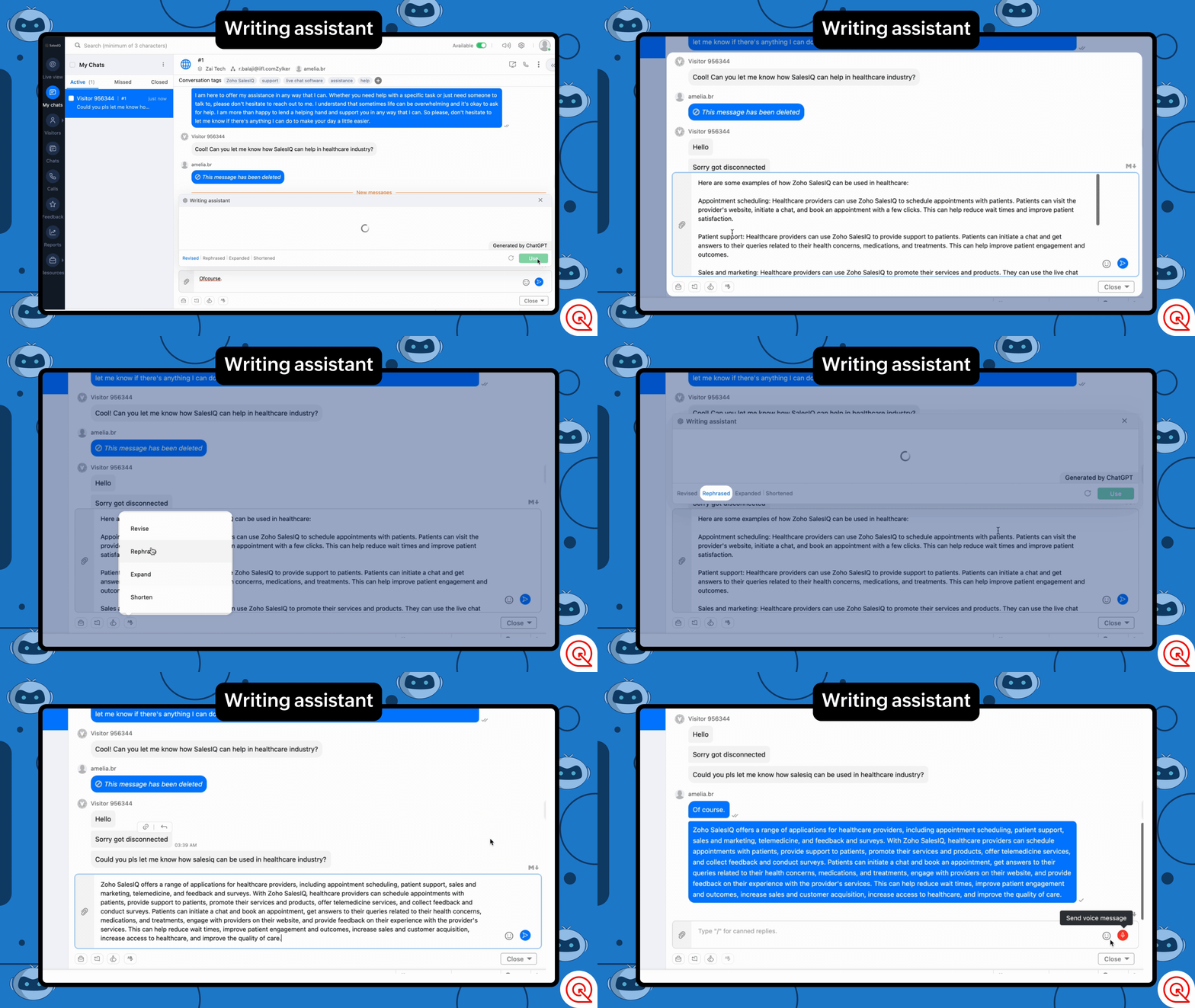
We have introduced a new module in the operator chat window called Writing Assistant powered by OpenAI. Using this, your operators can send better responses to customers. Proofreading is one of the most tiresome jobs, but with the Writing Assistant, you can quickly proofread for spelling, grammar, and tone.
What can it do?
- Rephrase - Paraphrase to enrich the message.
- Shorten - Shorten the message to make the content crisp.
- Expand - Make the message longer to offer a more comprehensive explanation.
- Revise - Checks of grammar and spelling errors in the message.
Conversation summary for quick understanding and recap
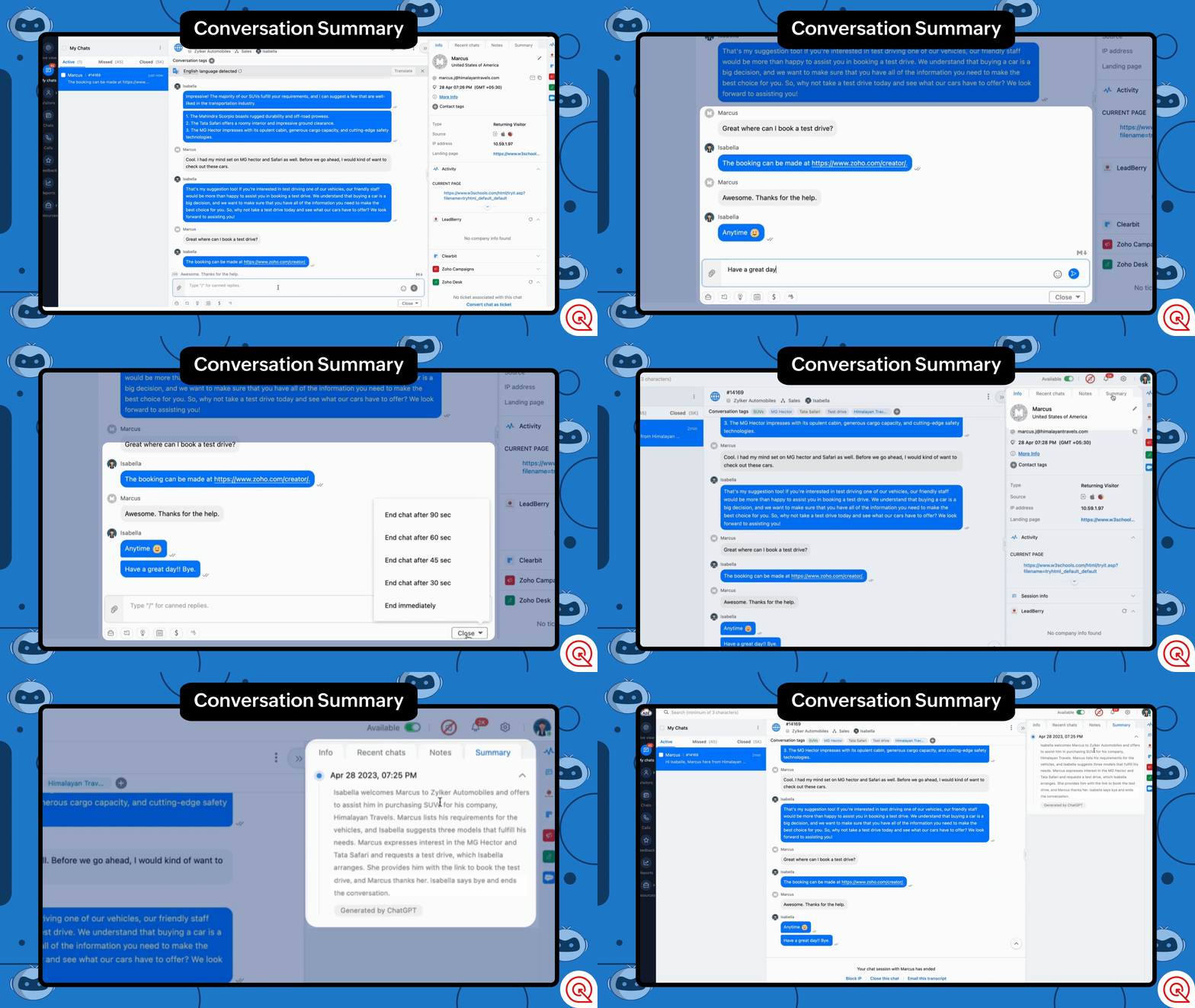
Our new feature Summarize powered by OpenAI, will help you get a condensed overview of the entire conversation in actionable points.
How can this help?
- Get a quick overview or recap of the conversation. Operators can skim through previous conversations to contextual assistance.
- Admins and analysts can now skim through customer chats 10 times faster.
- It can mitigate the need for operators to make conversation overview notes for admins, allowing them to focus on noting down critical drivers.
Quick Tag Suggestions for Better Classification
Tagging can be one of the most compelling features of Zoho SalesIQ when categorizing your conversations. Using Tags, analysts and admins can get in-depth insights into the conversation; it can also be used to understand customer behaviors and trends at a glance.
But manually tagging all the conversations can be tiresome, even more so if you have many untagged chats and want to add tags.
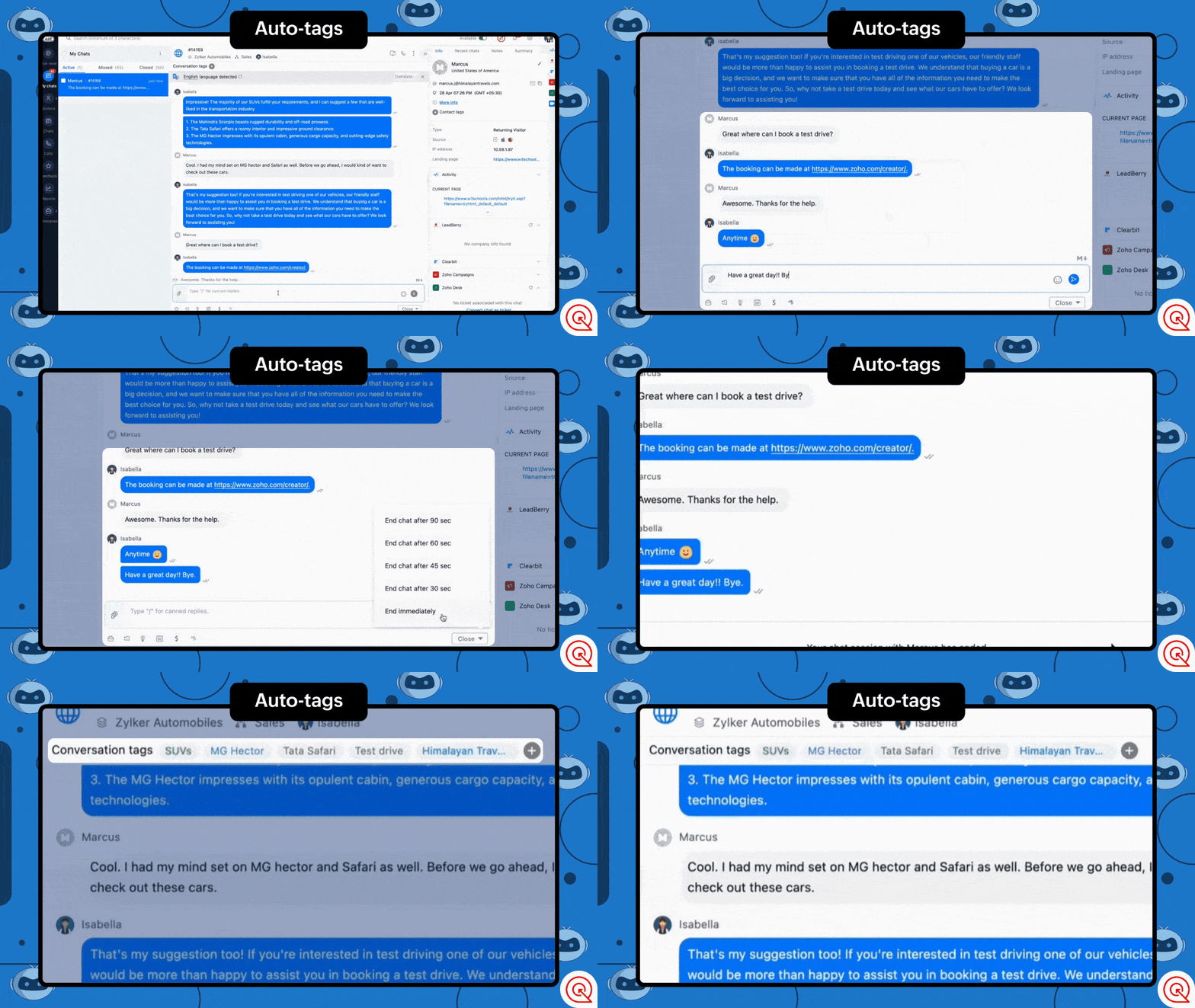
With the tags generation feature, OpenAI can analyze conversations and assign tags to them. You can choose one or both of these options for tag generation.
- Generate and suggest tags - This option allows you to generate new tags or assign existing based on the conversation and assign them with the help of OpenAI.
- Auto-assign tags - This option automatically assigns tags based on the conversation once ended.
Power Up Your Chatbots with ChatGPT
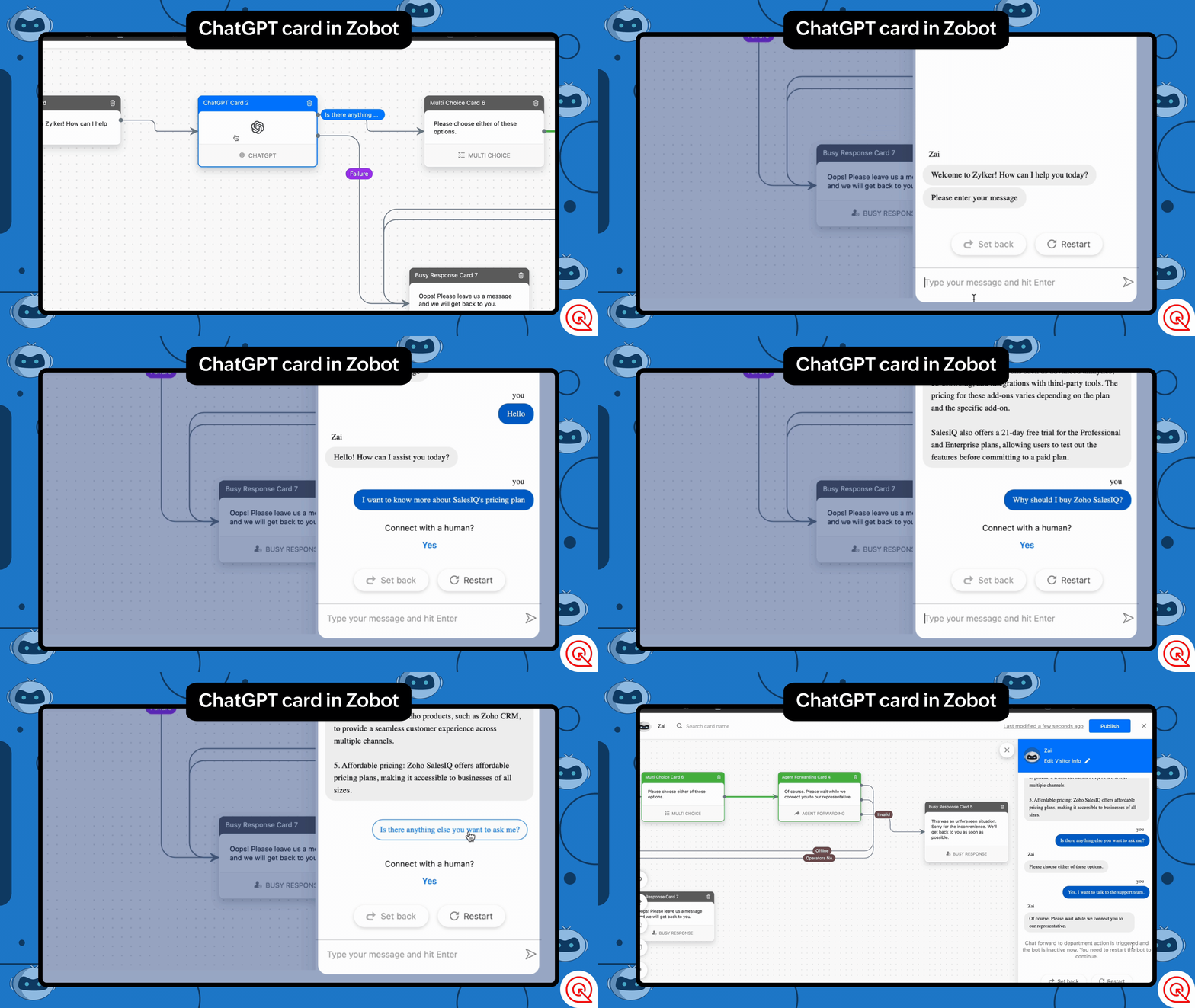
Take your chatbots to the next level and give them a boost by connecting them directly with ChatGPT, allowing your users to communicate directly with the AI. This feature can enrich your automated conversations by allowing users to ask general questions about your business domain or questions that are outside your area of expertise. With AI in the picture, your chatbots can become smart assistants that keep your visitors engaged.
Here is an example on how you can use the block in your chatbot:
Assuming you run a car retail business, you can set up the this block to help visitors with general questions about cars or how they work. ChatGPT can intuitively assist your visitors with these questions.
With features like the Writing Assistant, Summarize, and Tag generation, businesses can improve efficiency, accuracy, and personalization. As AI technology improves and becomes more reliable, we will be looking forward to further automating features of Zoho SalesIQ.
We hope that these features would add great value to operators and admins and to provide optimal support for your users. We are not stopping with this, as AI evolves and becomes more reliable we will be adding more AI based features or core functions of Zoho SalesIQ. Until then, please use this integration and let us know your suggestions. We are happy to hear back from you.
Get Started Now
Caution: Please be aware of the privacy concerns of using OpenAI. We prioritize protecting user data and encourage users to read more about OpenAI privacy policies. Read More.
Regards,
Naveen
Topic Participants
Naveen Chandar
Sushil Bhattachan
director
Adam LV
BeeTravel
Sticky Posts
Right Moment, Right Message, Right Operator: Never Miss a High-Intent Lead
Ever been on a website or app, thinking “Should I buy this or not?” and suddenly a friendly message “Hi! How can I help you?” pops up at the perfect moment? That’s not luck. That’s timing done right. Engaging right visitors at the right moment, with theSpeak Your Customers' Language: SalesIQ's chatbots now support 30 languages 🤖
We're unveiling some major upgrades to our chatbot that are set to revolutionize your experience! Now SalesIQ support 30 languages for both Zobot and Answer bot. By speaking your customers' language, you can enhance engagement, improve customer satisfaction,Attention Deluge Developers: Important Update Regarding "Send Email Deluge Task"
Hi Deluge Users, We hope this message finds you well. We would like to inform you about a recent update on the Send emails deluge task. If you are using this deluge task (SalesIQ Scripts) for your Zobot, widgets, or form controllers to send emails, pleasePlug Samples #12: Verify Customer Mobile Numbers with OTP to Avoid Spam Entries
Hi Everyone! Verifying customer information is critical in business to filter out junk data and spammers. Whether it’s lead generation, appointment booking, or any other operation, ensuring quality data is essential for driving meaningful outcomes. ABig Things Just Dropped in the SalesIQ Universe: Top Upgrades You’ll Love in Nova’25
Nova'25 has landed, and it’s packed with meaningful upgrades to help you engage smarter, work faster, and scale with ease. Whether you're into proactive messaging, smarter automation, or better admin control, there's something here for everyone. Here's
Recent Topics
Markdown for Desk?
Hi, my company wants to use markdown for formatting text in Desk (in all modules there, especially Tickets and Helpcenter). Zoho already offers use of markdown in several products (see https://help.zoho.com/portal/en/kb/backstage/microsite-guide/formatting-with-markdown/articles/formatting-with-markdo)Change Currency symbol
I would like to change the way our currency displays when printed on quotes, invoices and purchase orders. Currently, we have Australian Dollars AUD as our Home Currency. The only two symbol choices available for this currency are "AU $" or "AUD". I wouldCalendar not working
Are we the only ones. On any browser we cannot click on any of our calendar appointments and get them to open. They just make the browser loop. WE have reached out and have been told they are working on it. The office staff are really stuck. The pointWhatsApp Message Template Quick Reply Buttons
Hello, I created my first Message Template to overcome the 24-hr messaging window and it was approved by WhatsApp/Meta. When I go to Meta, I also see that template brought from Zoho Desk, and used it via Zoho Desk IM. However, I notice that when in Meta'sAccount in Quick View Filter
I have a report that I often run against a specific Account. Every time, I have to go into the edit menu and change the Advanced Filter. I would prefer to use the Quick View Filter, but it does not allow me to use the one and only field that makes anySet Display for Numbers/Currency/etc with Client Script/Customization in Canvas List Page
Is it possible to set a display mask for a number/currency field using Client Script or customization? I have custom fields that I would like to keep the decimal places for calculation purposes, but do not need them displayed to the user. So 101.3568136.143.188.51 blocked by spamcop
Zoho mailserver seems to be blocked by spamcop. Cant send mail to my customer. Not sure what to do.🚀 WorkDrive 5.0: Evolving from a file sharing app to an intelligent content management platform: Phase 2
Hello everyone, WorkDrive's primary focus has always been to provide an intelligent and secure content management platform, simplify collaboration, and be the central repository of files for all Zoho apps. In our previous announcement, we unveiled thei keep see there is a connetion issue connecting 3rd party api on zoho when using zia
hi there , i have set up open ai api to zoho zia (copied and pasted to zoho zia) but I keep getting notificaiton "there is a connetion issue connecting 3rd party api on zoho" when using zia on top when click zia and try to type in word thereDeleting Fields in CRM Deletes Views in Analytics
Hey friends! I'm having some issues when we modify some fields within ZohoCRM. There are times where we need to sunset a field and eventually completely remove it. In these instances, it seems like a lot of views are removed in Analytics. This rangesZoho Desk Android and iOS app update: Access multilingual templates on the IM module
Hello everyone! We have introduced multilingual templates on the IM module of the Zoho Desk mobile app allowing you to send IM template messages in translated versions. iOS: Android: Please update the app to the latest version directly from the App Store/Does Zoho offer a full WhatsApp Marketing Platform (like WATI / GallaBox)?
lm exploring WhatsApp marketing and I’d like to understand what options are available within the Zoho ecosystem. Currently, I see: Zoho SalesIQ has a broadcast option, but it seems very limited — for example, it doesn’t support uploading contacts viaCustom buttons
Getting Error "You can only create 10 custom buttons per module" ! I already have more than 10 for 1 module before trying to create another. Is this a new restriction brought about by the all knowing what's best for businesses Zoho guru ? It would beThe Social Wall: October 2025
Hello everyone, As we head toward the end of the year, we’re bringing you a few updates to help give your social media efforts a strong finish. This month, we’re rolling out new enhancements across both the web and mobile app. Post Preview Have you everClient Script | Update - Support for List Page (Canvas) and Notes
Hello everyone! We are glad to announce two exciting updates in Client Script. Client Script support for List Page (Canvas) Client Script support for Notes These open the door to more dynamic and interactive customizations! 1. Client Script support forPincode Based Pricing
We want to give extra discount to customers within city limits because our shipping and packing costs are less. My proposal is assign list of pincodes to price list and assign the price list to customers whenever they sign up with pincodes. Also showfeature question: lookup field in Projects task layout
Hello, Below we have interface to configure a custom task layout, however, we need a lookup field to let pickup data from other apps, such as Zoho CRM Products module, is that possible or already in your roadmap? or a workaround to achieve it? Thanks in advance.What's New in Zoho Analytics - October 2025
Hello Users! We're are back with a fresh set of updates and enhancements to make data analysis faster and more insightful. Take a quick look at what’s new and see how these updates can power up your reports and dashboards. Explore What's New! ExtremeZoho Analytics & SQL Server - Live connect
Below are the steps I did Created a fresh database and table in my own virtual server Created a new data source connection with live connect I was able to select the tables and created the data source successfully I am getting the error when I try toExplore the Redesigned Quotes Module in Zoho Billing
Dear users, We’re excited to introduce a refreshed look for the Quotes details page in Zoho Billing! This update brings you a more efficient user interface experience without changing your existing workflow. We've enhanced layouts with organized tabs,Latest updates in Zoho Meeting | Create departments, Share PDF files
Hello all, You can now create departments to group team members within your organization. This will make it easier for you to organize department-level meetings and invite members. In webinars, use the Share material feature to share PDF files directlyUnify All Zoho Video Meeting Experiences into One Standardized Platform
Hi Zoho Team, We would like to share an important user experience concern regarding the current state of video meeting functionality across the Zoho ecosystem. The Problem Within Zoho, there are multiple ways to initiate or schedule a video meeting: ZohoImport VAT Kenya
Hi. I am quite lost on how to account for VAT when importing. We are an import and distribution company and when importing we get a customs entry with VAT which we pay and claim for this VAT as we do our monthly sales. My question is how to record this[Free Webinar] Product Updates: Quick Catch-Up Session - Part I - Creator Tech Connect
Hello Everyone! We welcome you all to the upcoming free webinar on the Creator Tech Connect Series. The Creator Tech Connect series is a free monthly webinar featuring deep-dive technical sessions designed for developers, administrators, and app builders.Project expenses in Zoho Books
Just the way timesheet is used to calculate labour cost for a particular project, how do i record other expenses against a project such as materials and consumables used for the project? So that under report, I can view the total amount expended on eachBlueprint status change
I want to change the Blueprint status of a workflow. The status is completed automatically when I added the record through API call. But I want to make it active, I don't see any options for this. Even if I draw transition from any stage , it is not visibleWhat is going on with GMail extension.
Suddenly, it is popping up and saying "Please wait while we work our magic... 10%" and it sits there. Yesterday I waited for an entire hour call and it never got further. Today, it's not resolved. Is there a fix I can do? I've tried all the typicalMarketing Tip #6: Cross-sell with related products
Don’t let customers stop at just one product. Suggesting related or complementary items improves the shopping experience and increases order value. Try this today: Use the Item Recommendations feature in Zoho Commerce and add two to three suggested itemsi cannot use <b></b> to bold the message in Creator C6!!!!???What?
Dear experts and friends, Now Creator 6 blocking us from using <b></b> Anyone facing this issue? I faced it on Creator C6 Previously, it used to work. Now failed to work. Faint~ Seek guidance from everyone on how to bold the message. The super simpleZoho Writer - Option to Export as .zdoc format
I've noticed that it's not possible to export a Zoho Writer Document in the .zdoc format. Isn't zdoc, Zoho Writer's own format? My use case is that I sometimes need to create quite complex documents with floating elements, which sometimes need to become[Announcement] Enhanced Merge APIs of Zoho Writer for automating document generation using Zoho Apps data
Hi users, With the record_id parameter in Zoho Writer's Merge APIs, fields related to the given record id is automatically fetched from the Zoho app. You don't have to spend time manually mapping the records and fields in the Deluge code. Here is a samplePin multiple columns and adjust column widths in CRM subforms
Hello all, Subforms act as secondary forms or tables in which you can associate multiple line items to a primary record and thereby ensure more structured and comprehensive data organization. We've made some recent enhancements to subforms. Here's what's[Webinar] Automate sales and presales workflows with Writer
Sales involves sharing a wide range of documents with customers across the presales, sales, and post-sales stages: NDAs, quotes, invoices, sales orders, and delivery paperwork. Generating and managing these documents manually slows down the overall salesAutomate insurance document workflows with Zoho Writer
Insurance companies have to deal with creating and managing complex documents and forms, such as policy applications, explanation of benefits documents, brochures, renewals, and claim forms. Handling all of this manually is hugely time and effort intensive,Latest updates in Zoho Meeting | New End of session notification to remind everyone about the session end time
Hello everyone, We’re excited to share a new feature for Zoho Meeting ; End of session notification. With this new setting, you can choose to remind all participants or only the host about the scheduled end time of a meeting. You can also choose when[Webinar] Zoho Writer for SCM and logistics
Creating, sharing, and distributing complex documents are constant challenges in the SCM and logistics industry. That's why our next webinar is focused on how to simplify these document workflows. Join us on Jul 10, 2025 for a Zoho Writer webinar designed[Webinar] Zoho Writer for the manufacturing industry
Creating, sharing, and distributing complex documents are constant challenges in the manufacturing services industry. That's why our next webinar is focused on how to simplify these document workflows. Join us on May 8, 2025, for a Zoho Writer webinarAdd Comprehensive Accessibility Features to Zoho Writer
Hello Zoho Writer Team, We hope you are doing well. We would like to submit a feature request to enhance Zoho Writer with a full set of accessibility tools, similar to the accessibility options already available in the Zoho Desk agent interface. 🚧 Current[Webinar] Simplifying document workflows in financial services with Zoho Writer
Creating, sharing, and distributing complex documents are constant challenges in the financial services industry. That's why our next webinar is focused on how to simplify these document workflows. Join us on April 10, 2025, for a Zoho Writer webinar[Zoho Writer Webinar] Learn how to simplify your HR operations: Part 2
Hi Zoho Writer users, We're excited to announce the Zoho Writer webinar for July 2024: Learn how Zoho Writer can simplify your HR operations: Part 2. This webinar will focus on how Zoho Writer can help HR teams streamline and automate their entire hiringNext Page