Zoho Creator | Introducing Augmented Reality
We're delighted to announce augmented reality (AR) in Zoho Creator! Now, you can set up your own immersive 3D experiences—combining a glimpse of the real world with computer-generated graphics. AR technology augments what you see, by superimposing digital data (3D models) on real-life objects, captured by your device camera. This real-time digital interaction provides better data visualization and enhances end-user experiences, providing you with exciting new business opportunities.
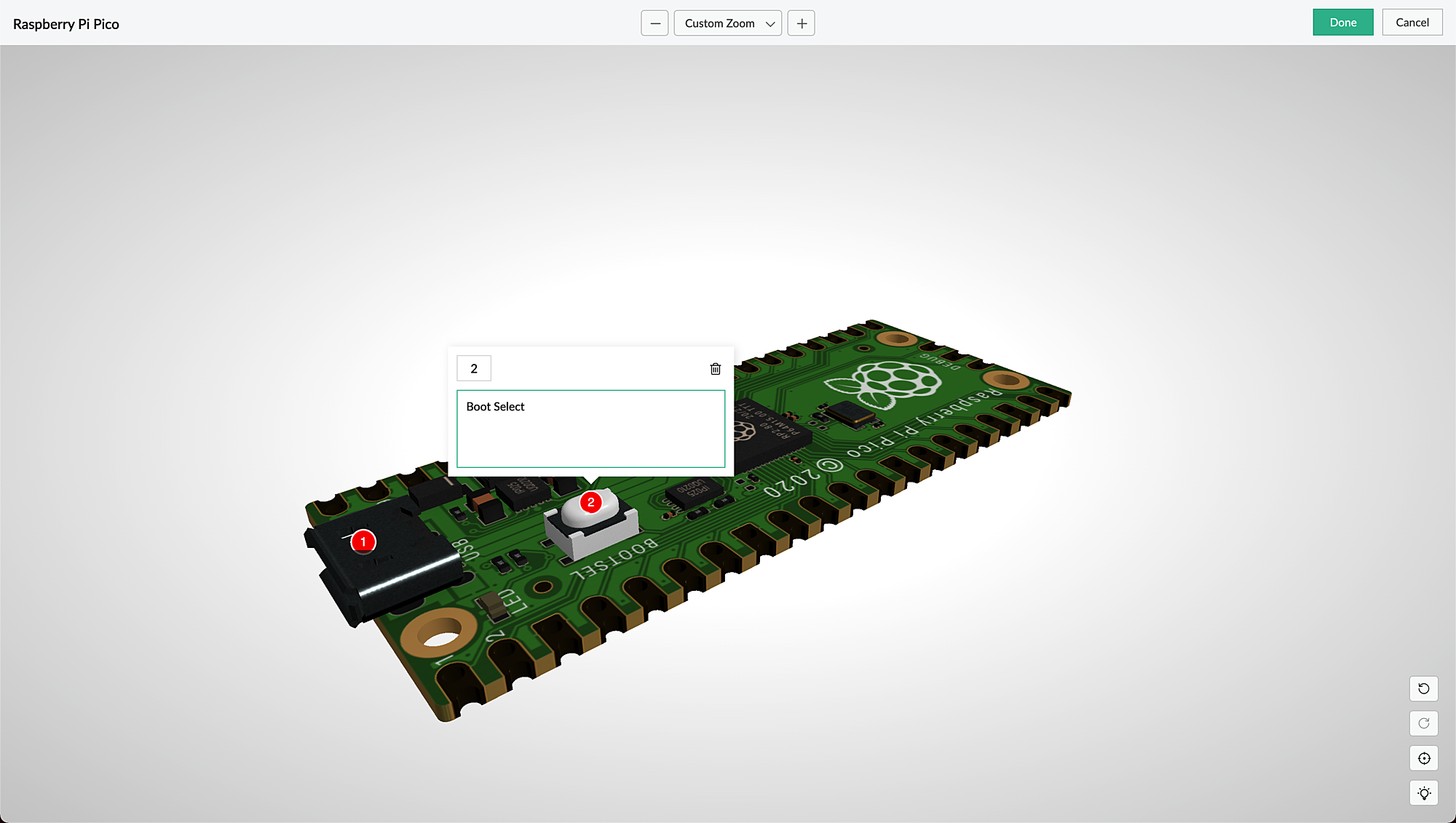
AR is seamlessly accessible via web browsers, smartphones, and tablets, which facilitates the growing interest in multi-experience development platforms (MXDPs). Using AR, your businesses can provide unique approaches to key business challenges in real-world applications.
AR can enhance user experience in many ways:
Organizations can use AR to promote their products or services and launch innovative marketing campaigns.
A rich feedback loop can be created using AR in product customization and quality, where users can select the defective products and also annotate the 3D models by describing the defects.
Users can try out different products virtually, check if a product fits well in their rooms (in the case of furniture products) by either partial or full replacement of the original view of a product with an augmented view of the same product, and make informed choices, all within the comfort of their homes.
AR types in Creator
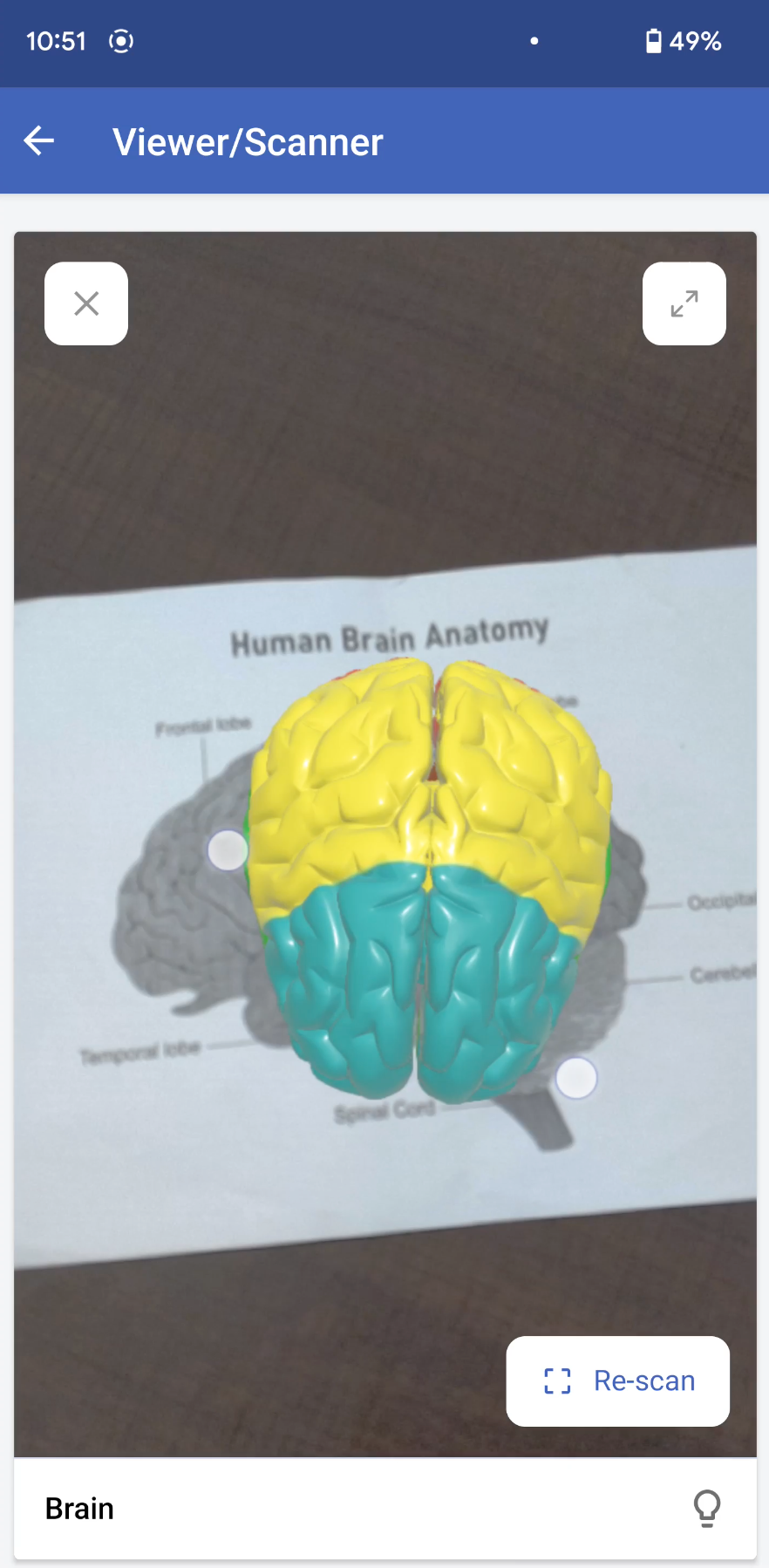
Marker-based AR: This AR-type relies on the recognition of images (referred to as markers). Markers are unique, visual patterns that your device cameras can easily recognize and process. For example, you can point your devices at markers such as scan codes or logos to seamlessly activate the AR experience. Marker-based AR works by scanning a marker, which triggers the content to be overlaid on the camera upon visuals matching the marker image For example, students can scan a diagram in their textbook and view its 3D model (projected on the diagram) through their digital devices.
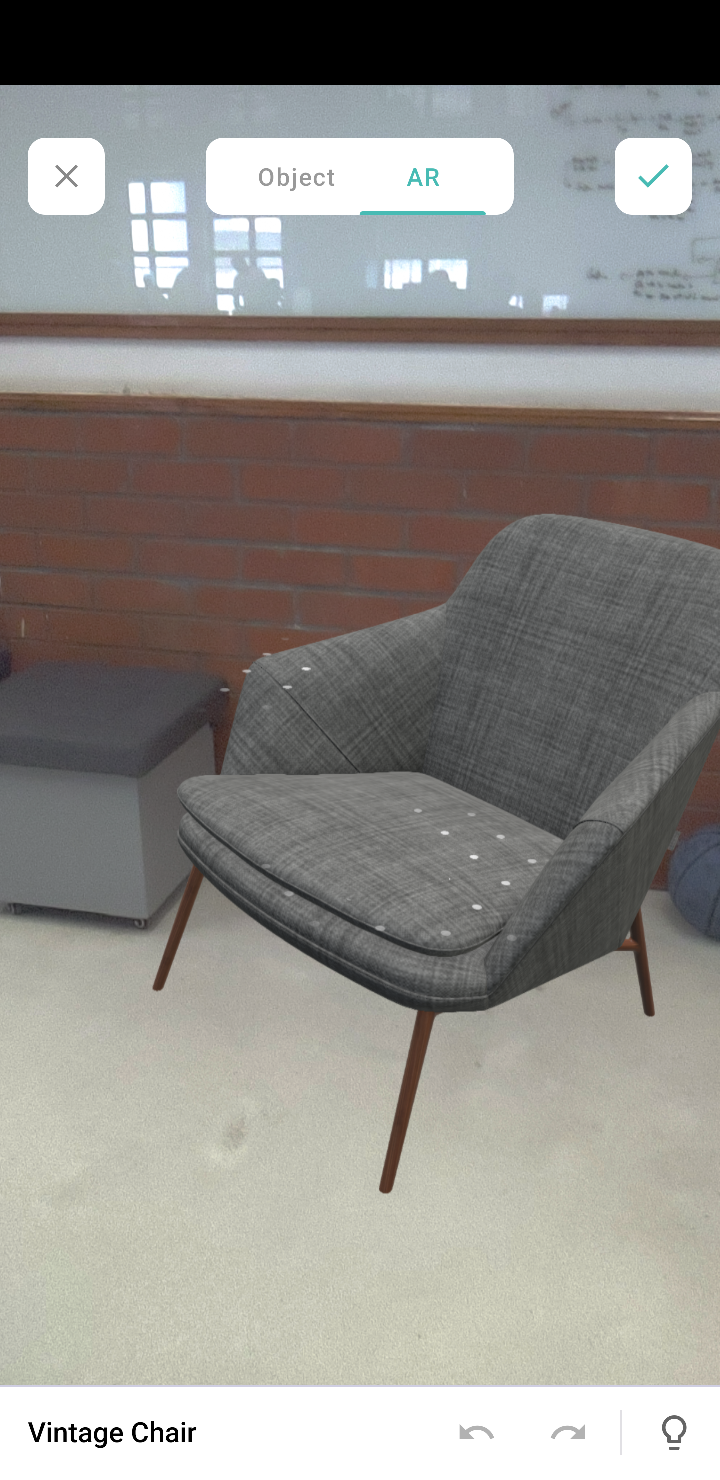
Markerless AR: This AR type does not use a marker. Instead, it allows you to scan the real environment and place digital elements on the recognized (flat) surface. This offers more control to users, as it allows them to choose where they would like to place the virtual object (including real-life placement of virtual augmented objects). For example, furniture companies can enable customers to virtually place their furniture in their homes to check if it would fit well.
In the markerless AR type, users can preview the models in the following two modes:
AR mode: This mode displays the 3D model as superimposed on its environment. Users can rotate/move their devices to view the plotted model.
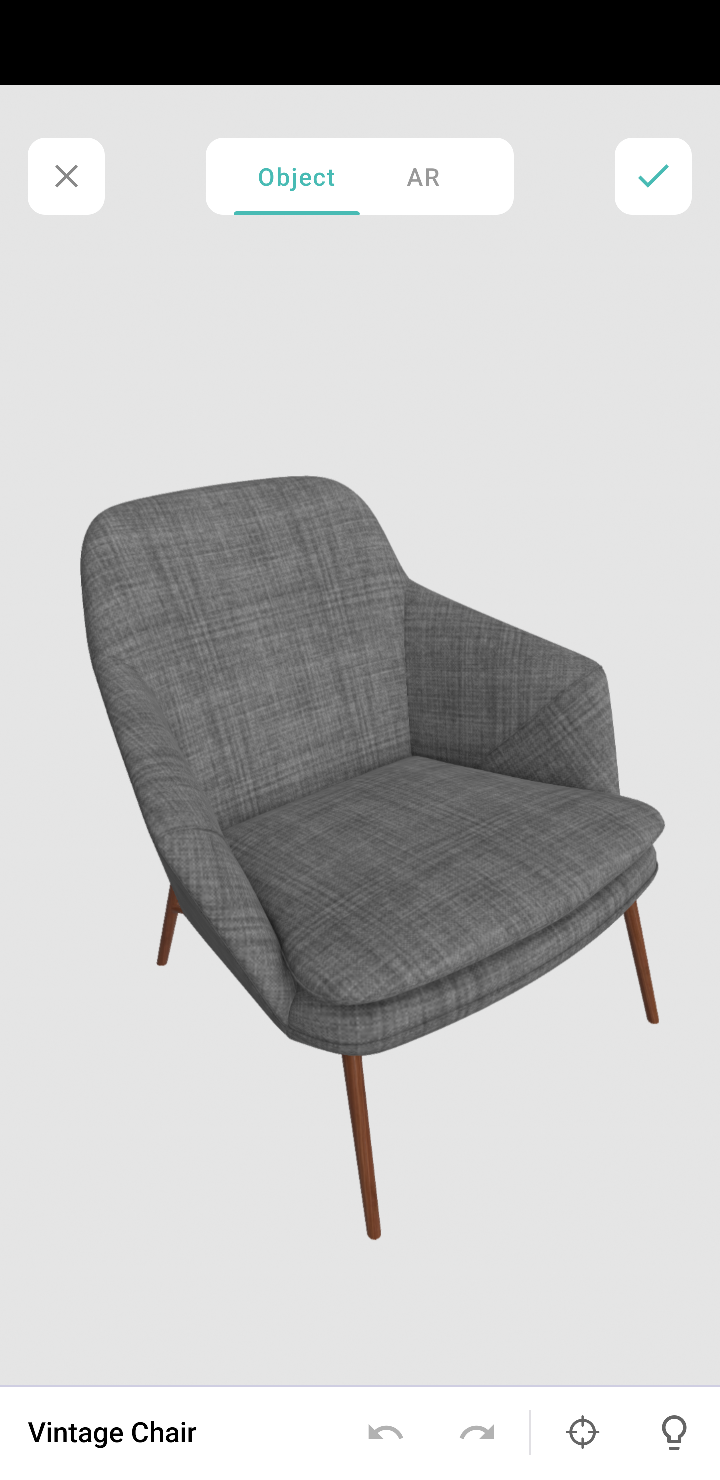
Object mode: This mode displays only the 3D model. It allows you to view the selected/scanned model in a 360˚ rotation. You can also zoom in and zoom out the model, as per your convenience.
Note: These modes are available in the AR field and AR viewer (only for markerless inputs).
AR in Creator
In Creator, AR has been introduced across three modules:
Microservices - AR Library
Form fields - AR field
Pages - AR Viewer
AR Library
AR library stores AR sets of all the apps in your Creator account. You can add and manage AR sets from here. An AR set consists of AR elements such as 3D models and their markers.
AR field
The AR field in a form displays the AR sets (3D models) from the AR library as a dropdown. You can add the AR sets in the AR Inputs field property. When you access your app in live, you can choose a model from either marker-based or markerless AR sets, and you can annotate it.
AR Viewer
The AR Viewer acts as an interface for your device's camera. This interface is used to invoke the camera (only in mobile) to scan a marker for your marker-based AR sets. In your app's page, you can configure the AR Viewer's input in two ways:
Marker-based AR Sets: To scan the marker and plot the respective 3D model.
Passing the 3D model's name through page parameters to load a 3D model directly.
Illustration
1. Imagine you've created an app named Zylker Jewelry. The following flowchart shows how AR is used across this app.
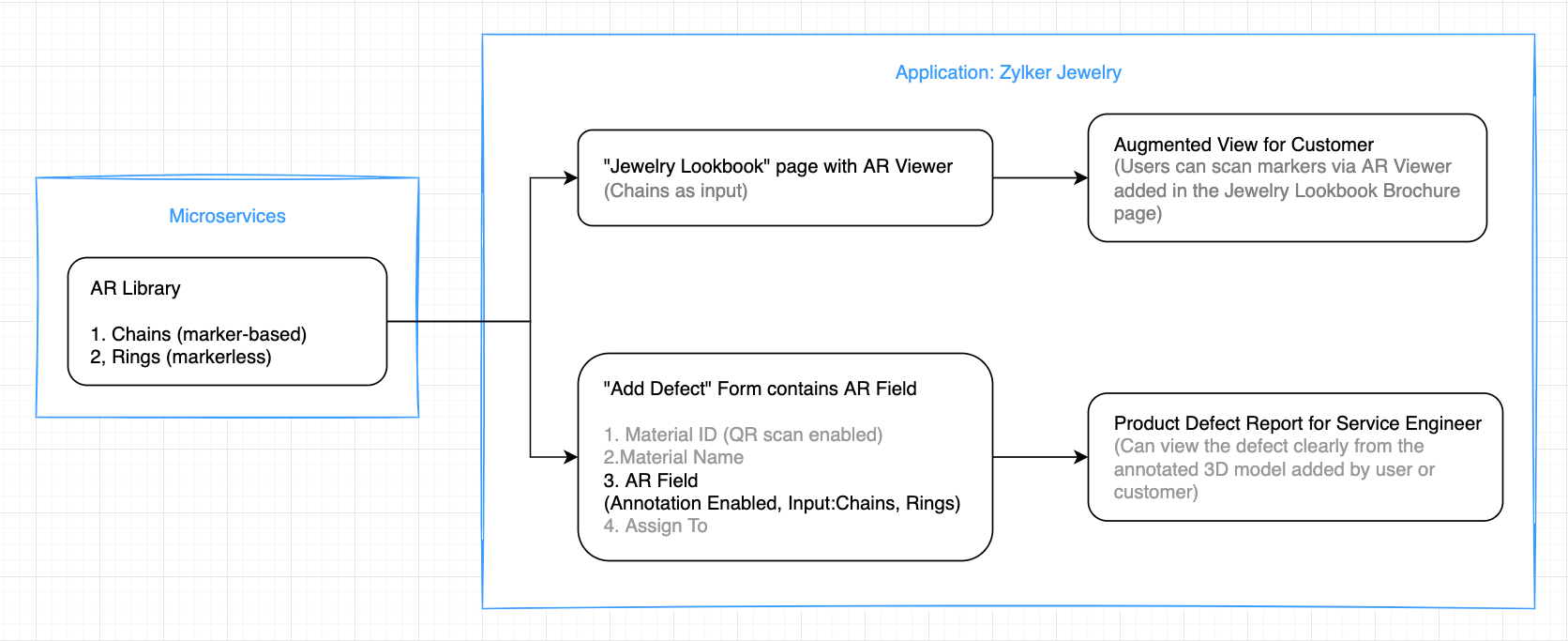
This app enables you to perform the following actions:
(i) Users can use the scanner (AR viewer) on the app's Jewelry Lookbook page to scan the various designs available on your brochure and view them as popup models. They can rotate, zoom in and zoom out, and view the models in full-screen as well.
(ii) Quality assurance engineers can select 3D models of the defective jewels and also annotate them by describing the defects.
Let's take a look at how the above actions can be configured in the Zylker Jewelry app.
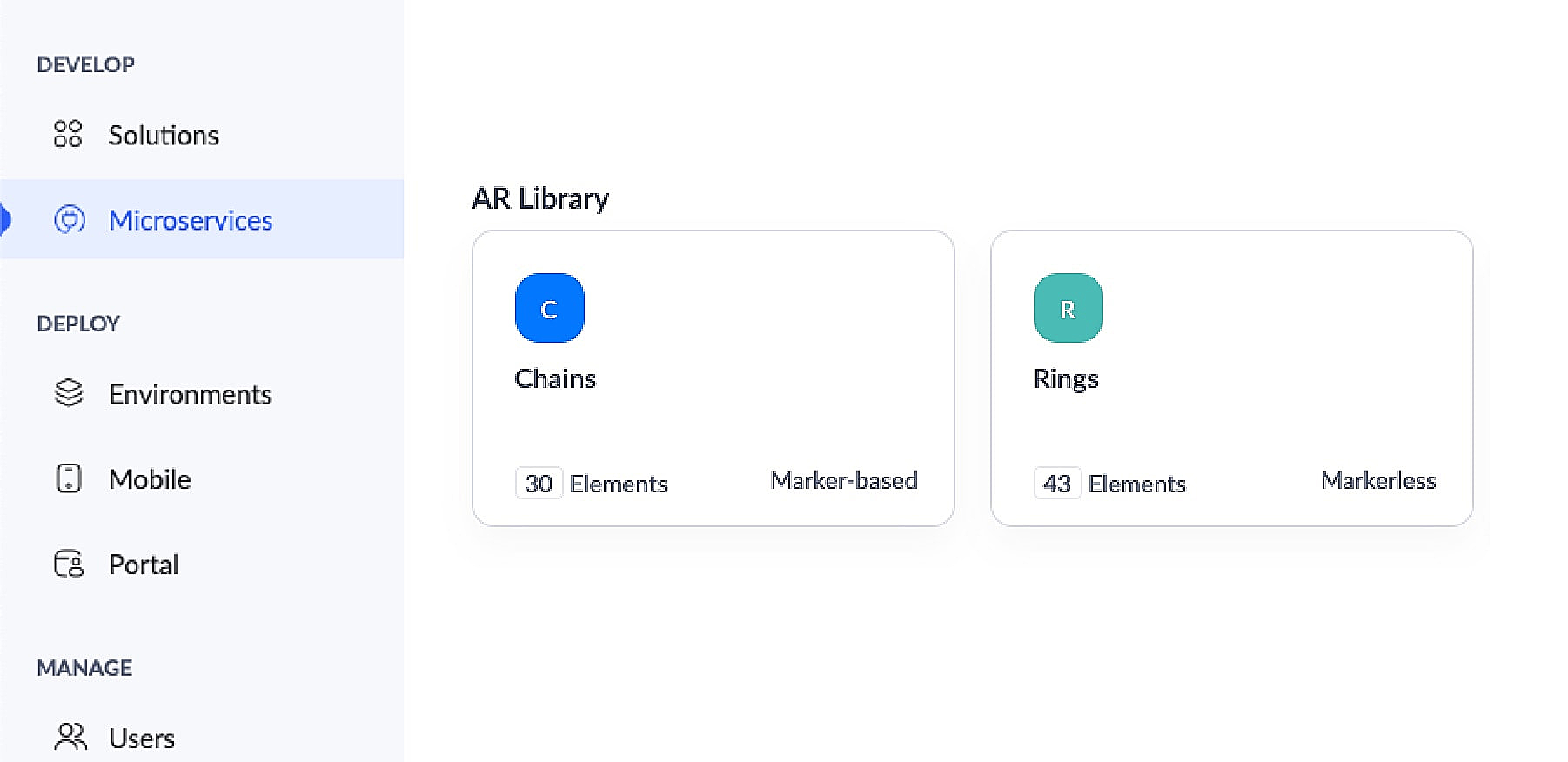
This app has an AR library that contains 3D models of chains (marker-based) and rings (markerless).
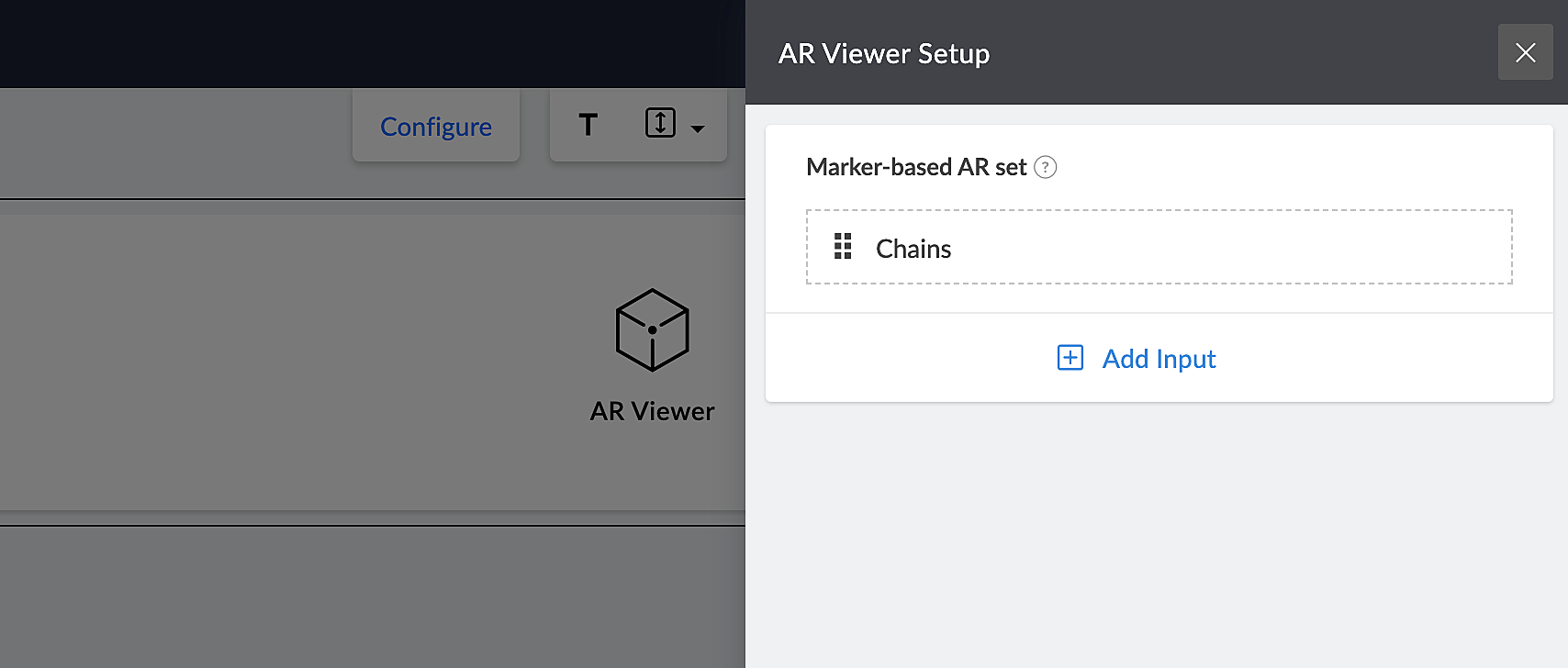
The app's Jewelry Lookbook page has an AR Viewer element with the 3D models of chains as its input. When users access this page, they'll be able to scan the brochure and view the available chain designs on their devices.
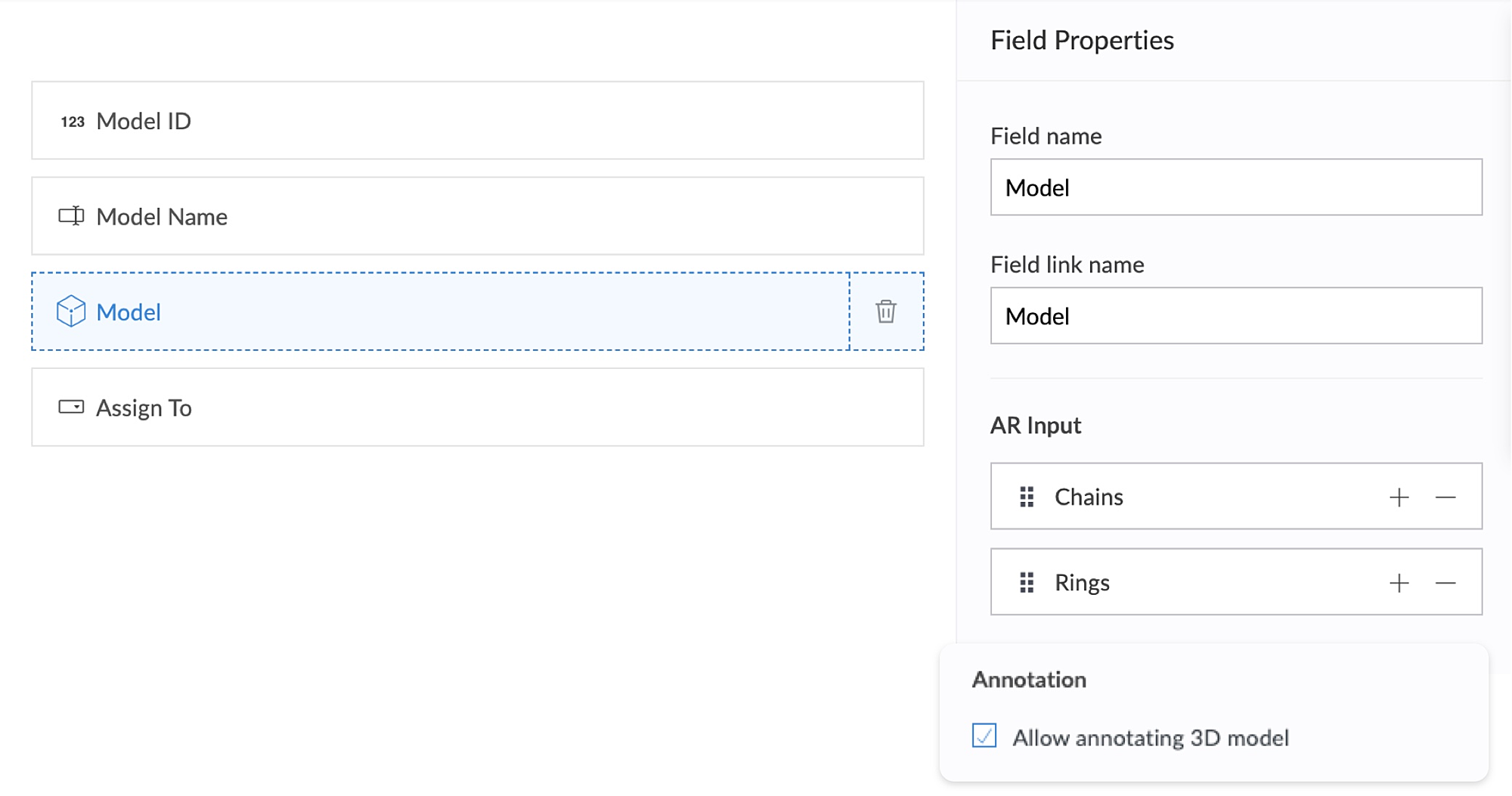
The app's Add Defect form has an AR field containing the 3D models of chains and rings as its AR input. Quality assurance engineers can select the 3D models of defective jewelry from the dropdown and annotate the models by describing the defects. This form also has an Assign To field, that assigns the defect to the designated Service engineer, who can view and take appropriate action.
2. Using AR, classroom education can become all the more intuitive and interactive, as it enables teaching staff to demonstrate virtual examples of textbook concepts. This, in turn, will enable students to engage more actively, learn faster, and memorize information more easily.
Let's take a look at Zylker Schools of Learning, a learning app created for teachers and students. This app facilitates interactive learning through AR technology used across the following components. Apart from these, AR functionality can also be accessed via your mobile applications.
AR Viewer
AR field
AR Viewer:
This app has an AR library that contains textbook diagrams as markers, along with their 3D models. The app's Virtual Book page has an AR Viewer element with the 3D models as its input.
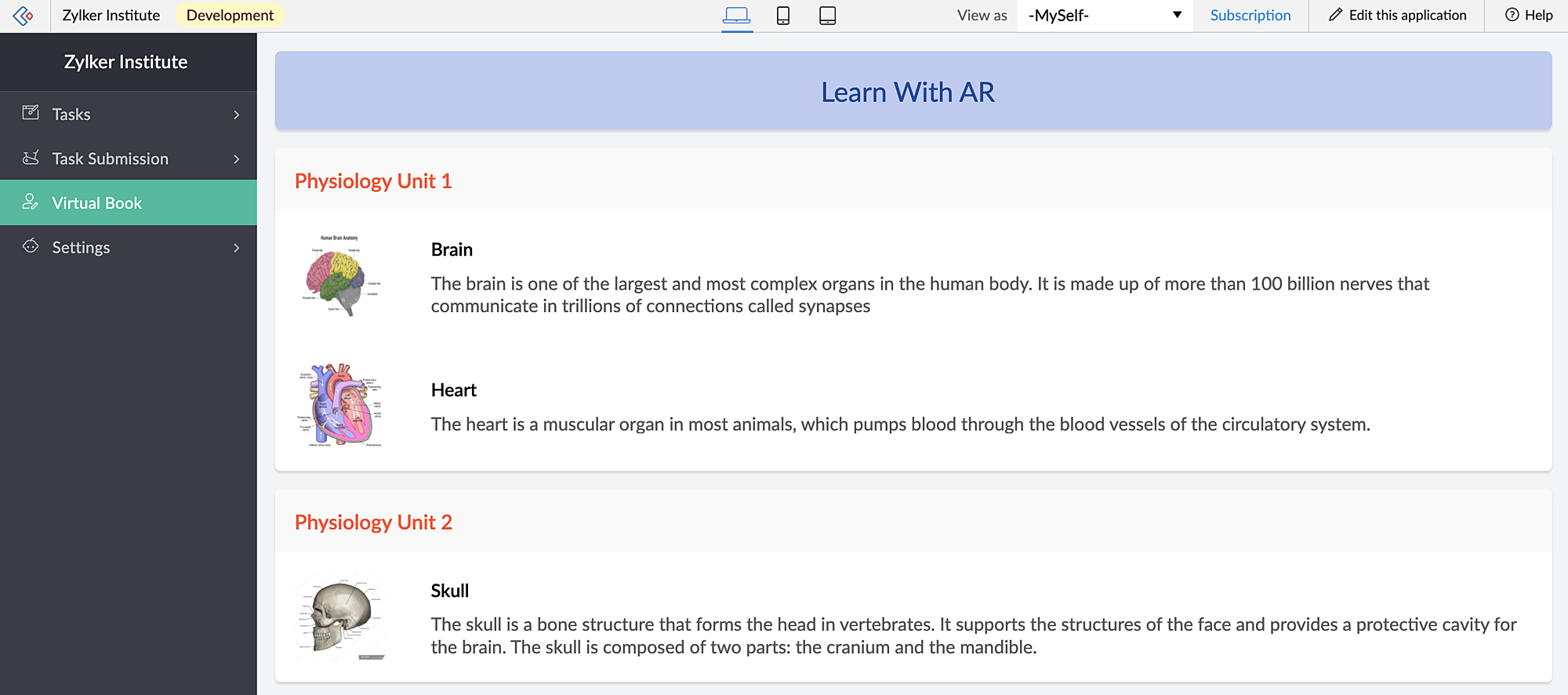
When students access this page, they can click the diagrams and view them in both AR mode and Object mode — rotate, zoom in and zoom out and view in full-screen as well.
When you access the app via mobile, apart from viewing the diagrams in AR Viewer (similar to web), students can also open their device scanner, scan their textbook diagrams and view them as plotted (popup) models on top of their textbook.
AR field:
This app has a New Task form that contains an AR field. This field has 3D diagrams as its input. You can assign tasks to your students, asking them to annotate the 3D models and also view the submitted tasks.
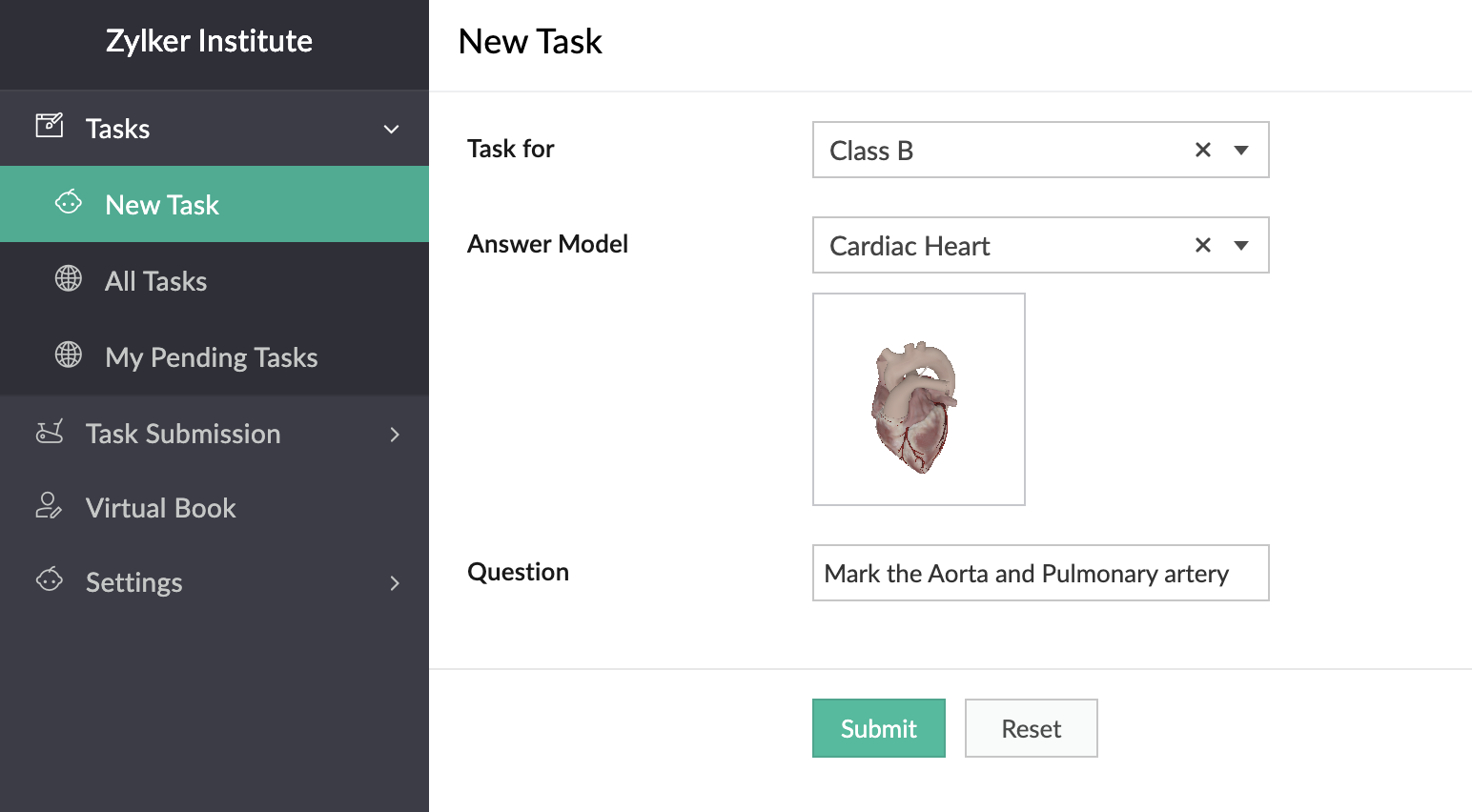
In the below GIF, the demo user Demo 3 is the Teacher profile and Demo 1 is the student profile.
You can also place stickers of the textbook diagrams on your classroom walls, which can be scanned by your students through the provided devices. Upon scanning the sticker, they can view, rotate, and annotate the 3D model of the scanned image which is mapped in the AR Library.
Thus, AR helps in explaining otherwise plain textbook concepts in a visually-appealing manner.
Feature release plan
AR in Creator will be available in C6 for Paid plan users only.
If you have any questions related to AR, please feel free to contact us at support@zohocreator.com.
Regards,
The Zoho Creator Team
Topic Participants
Meghaa Pradyumnan
Catherine
Damien Cregan
PARTHIBAN VALLAVAN
Sriram U
Sticky Posts
Introducing Zoho Creator's 2025 Release Projection 2
Hello Creators! I'm Prakash, from the Creator product management team, and today I'm delighted to unveil our next set of features as part of Release Projection 2 for 2025. With thoughtful analysis and planning, we've curated powerful new capabilitiesZoho Creator - 2023 Release Projection 1
Hello everyone! A very Happy New Year to you and your family. Hope you're all good and having a great time using Zoho Creator to make your lives easier and your businesses prosper. 2022 was an action-packed year for us at Creator, and we hope to continueZoho Creator User Group meetups in a city near you! - Oct - Nov, 2023
Greetings from the Zoho Creator team! We're hosting a series of Zoho Creator meetups in various cities across the globe, and we'd love to meet you there! Our meetups are a great opportunity to network with industry peers, exchange ideas and best practices,Zoho Creator - 2023 Release Projection 2
Hello everyone! Time truly flies when you're having an incredible journey, and today we mark the completion of an eventful and action-packed six months. It feels like just yesterday when we embarked on this adventure together with the launch of our newUpcoming Updates - August 2022
Hi all, Greetings from the Zoho Creator team! Today we've got news for you on some exciting updates. And rest assured— there’s more to come! In this post, we'll be going over the upcoming features and improvements for this month as mentioned below. A
Recent Topics
Schedule Zoho CRM reports only on Business Days
Hello, Is it possible to schedule reports only on business days ? We currently get daily sales reports on weekend which has no value since the sales team doesn't work on weekends. ThanksAny update on much requested feature, to delete attachments without deleting the e-mail body?
People have been requesting the ability to delete e-mail attachments without deleting the e-mail for more than ten years now. The latest I see is marked "Working On It" and a year ago it was supposedly being added, see here: https://help.zoho.com/portal/en/community/topic/is-there-a-way-to-delete-mail-attachments-without-deleting-the-textHow to delete attachments form Zoho mail accounts
I can't find a way to delete attachments from Zoho mail messages, either individually or in bulk. Searches here are providing conflicting results and often talk about workspace, whereas I am only interested in how to delete attachments that are seen withUnable to fetch ticket by custom field value
I'm trying to set up a Flow to fetch a ticket based on a custom field value. This seems like it should be pretty straightforward, but it's not working for me. I keep getting an error saying Zoho Desk says "Extra query parameter 'cf_creator_record_id'Issues with Zoho Sheet in Mac
I have downloaded the Zoho App from App Store but It is failing to Save As, Open & Download Operations. App StoreRecent post analytics not very useful
Hi, I'm enjoying some aspects of the Zoho Social. like being able to schedule posts to multiple channels. However, the recent posts analytics is disappointing. For example, I put up a reel on Instagram and Facebook yesterday. Instagram insights showsZoho Inventory - Composite Items - Assembly - Single Line Item Quantity of One
Hi Zoho Inventory Team, Please consider relaxing the system rules which prevent an assembly items from consisting of a single line item and outputting a quantity of 1. A client I'm currently working with sells cosmetics and offers testers of their productsWhat's New in Zoho Inventory | Q2 2025
Hello Customers, The second quarter have been exciting months for Zoho Inventory! We’ve introduced impactful new features and enhancements to help you manage inventory operations with even greater precision and control. While we have many more excitingZoho POS App Hanging Issue – Sales Becoming Difficult
The Zoho POS app frequently hangs and becomes unresponsive during billing, making it very difficult to complete sales smoothly. This commonly happens while adding items, during checkout, or at payment time, especially during peak hours. These issues causeMake Camera Overlay & Recording Controls Visible in All Screen-Sharing Options
Hi Zoho WorkDrive Team, Hope you are doing well. We would like to request an improvement to the screen-recording experience in Zoho WorkDrive. Current Limitation: At the moment the recording controls are visible only inside the Zoho WorkDrive tab. WhenAllow Attaching Quartz Recordings to Existing Zoho Support Tickets
Hi Zoho Team, We would like to request an enhancement to how Zoho Quartz recordings integrate with Zoho Support tickets. Current Behavior: At the moment, each Quartz recording automatically creates a new support ticket. However, in many real-world scenarios:Add Israel & Jewish Holidays to Zoho People Holidays Gallery
Greetings, We hope you are doing well. We are writing to request an enhancement to the Holidays Gallery in Zoho People. Currently, there are several holidays available, but none for Israel and none for Jewish holidays (which are not necessarily the sameSync Issue
My Current plan only allows me with 10,000 rows and it is getting sync failure how to control it without upgrading my plan"Spreadsheet Mode" for Fast Bulk Edits
One of the challenges with using Zoho Inventory is when bulk edits need to be done via the UI, and each value that needs to be changed is different. A very common use case here is price changes. Often, a price increase will need to be implemented, andSyncing Bills in Zoho Books to Zoho CRM
Is there any way to sync the Bills in Zoho Books in Zoho CRMSAML in Zoho One vs Zoho Accounts
What is the difference between setting up SAML in Zoho Accounts: https://help.zoho.com/portal/en/kb/accounts/manage-your-organization/saml/articles/configure-saml-in-zoho-accounts ... vs SAML in Zoho One?: https://help.zoho.com/portal/en/kb/one/admin-guide/custom-authentication/setting-up-custom-authentication-with-popular-idps/articles/zohoone-customauthentication-azureZoho Inventory. Preventing Negative Stock in Sales Orders – Best Practices?
Dear Zoho Inventory Community, We’re a small business using Zoho Inventory with a team of sales managers. Unfortunately, some employees occasionally overlook stock levels during order processing, leading to negative inventory issues. Is there a way toDeactivated Zoho One account can sign in
I am concerned by the fact that deactivated users in Zoho One have the ability to sign in even after their account has been deactivated (not deleted). these inactive identities have no access to individual Zoho apps or data. based on my experience theyHow can I reset the password for a user in Zoho Projects
We need to reset the password for a user in Zoho Projects. I am the admin portal owner and there was nothing to be found to do this. very confusing.How can I add a comment to an existing ticket via API?
I need to add comments/notes to the history of an existing ticket using the API without overwriting the original ticket description. Thanks!Marketer's Space: Proven tips to improve open rates – Part III
Hello Marketers! Welcome back to another post in Marketer's Space! This is the final post in the "open rate series". In the first and second parts, we discussed topics ranging from sender domains to pre-headers—but we're not done yet. A few more importantMCP no longer works with Claude
Anyone else notice Zoho MCP no longer works with Claude? I'm unable to turn this on in the claude chat. When I try to toggle it on, it just does nothing at all. I've tried in incognito, new browsers, etc. - nothing seems to work.Zoho Social - Feature Request - Reviewer Role
Hi Social Team, I've come across this with a couple of clients, where they need a role which can review and comment on posts but who has no access to create content. This is a kind of reviewer role. They just need to be able to see what content is scheduledZoho Books/Inventory - Update Marketplace Sales Order via API
Hi everyone, Does anyone know if there is a way to update Sales Orders created from a marketplace intigration (Shopify in this case) via API? I'm trying to cover a scenario where an order is changed on the Shopify end and the changes must be reflectedZoho Inventory / Finance Suite - Add feature to prevent duplicate values in Item Unit field
I've noticed that a client has 2 values the same in the Unit field on edit/create Items. This surprised me as why would you have 2 units with the same name. Please consider adding a feature which prevents this as it seems to serve no purpose.Kaizen #224 - Quote-driven Deal Reconciliation Using Zoho CRM Functions and Automation
Hello everyone! Welcome back to another instalment in the Kaizen series. This post covers quote-driven deal reconciliation, emphasizing Functions and Automation to address practical sales challenges. Business Challenge Sales organizations often mark dealsBARCODE PICKLIST
Hello! Does anyone know how the Picklist module works? I tried scanning the barcode using the UPC and EAN codes I added to the item, but it doesn’t work. Which barcode format does this module use for scanning?Zoho Inventory - Allow Update of Marketplace Generated Sales Orders via API
Hi Inventory Team, I was recently asked by a client to create an automation which updated a Zoho Inventory Sales Order if a Shopify Order was updated. I have created the script but I found that the request is blocked as the Sales Order was generated byHow do I create an update to the Cost Price from landed costs?
Hi fellow Zoho Inventory battlers, I am new to Zoho inventory and was completely baffled to find that the cost price of products does not update when a new purchase order is received. The cost price is just made up numbers I start with when the productZoho OAuth Connector Deprecation and Its Impact on Zoho Desk
Hello everyone, Zoho believes in continuously refining its integrations to uphold the highest standards of security, reliability, and compliance. As part of this ongoing improvement, the Zoho OAuth default connector will be deprecated for all Zoho servicesVoC in Zoho CRM is now data savvy: Explore response drilldown, summary components and participation in CRM criteria
VoC has all the goods when it comes to customer intelligence—which is why we're constantly enhancing it. We recently added the following: A customer drilldown component that shows you the list of prospects and customers behind a chart's attribute ExpandedHow do I bulk archive my projects in ZOHO projects
Hi, I want to archive 50 Projects in one go. Can you please help me out , How can I do this? Thanks kapilPassing the CRM
Hi, I am hoping someone can help. I have a zoho form that has a CRM lookup field. I was hoping to send this to my publicly to clients via a text message and the form then attaches the signed form back to the custom module. This work absolutely fine whenCan I add Conditional merge tags on my Templates?
Hi I was wondering if I can use Conditional Mail Merge tags inside my Email templates/Quotes etc within the CRM? In spanish and in our business we use gender and academic degree salutations , ie: Dr., Dra., Sr., Srta., so the beginning of an email / letterZoho Browser??
hai guys, this sounds awkward but can v get a ZOHO BROWSER same as zoho writer, etc. where i can browse websites @ home and continue browsing the same websites @ my office, as v have the option in Firefox, once i save and close the browser and again when i open it i will be getting the same sites. If u people r not clear with my explanation, plz let me know. Thanks, SandeepLet’s Talk Recruit: LinkedIn Cheatsheet
Welcome to the first edition of Let’s Talk Recruit for 2026. We are kicking off the year by revisiting one of the most asked about topics in Zoho Recruit. How our LinkedIn integrations actually work and how recruiters can get the most value from them.Zoho Forms API
Is there any way to get all form entry list using API? Looking forward to hear from youCreating a Chart from a Report
In Zoho Analytics, is it possible to create a chart from a Pivot View report? We are looking to use Zoho Analytics to replace Excel for Sales reports and would like to be able to show both the table and the chart together.Ability to Set Client Name During Portal Invitation
Hi Zoho Team, We would like to suggest an important enhancement to the Zoho Creator Client Portal functionality. Zoho Creator recently introduced the option to set a client’s display name in the Client Portal settings, which is very helpful for creatingMove email between inboxes?
Is it possible to move emails from one team inbox to another? We would like to be able to have a single "catch-all" inbox for incoming requests, and then move the email to the appropriate department inbox. I was hoping we would be able to accomplish thisNext Page