Zoho Creator Upcoming Updates - November 2023

Zoho Creator Upcoming Updates - November 2023

Hello all!
 
Improvement is a constant pursuit at Zoho Creator, and we're excited to bring you the latest developments and progress in our journey. Let's look at the features you can expect this month:
  • Schedules settings in environments
  • Image compression
  • Set values while adding new entries to lookup fields
  • Deprecation of non-standard URIs 
- - - - - - - - - -
Now, let's dive in and explore each of the updates in more detail:

Schedules settings in environments

Schedules empower you to create timed actions that run periodically, either based on date and time values in your form or fixed date and time settings.

While testing in development and stage environments, currently there isn't an option to suspend the configured schedules for specific environments for each application. To resolve this, we're introducing the option to manage the execution of schedules for environment-enabled applications.
 
How will it work?
Navigate to the Environment Settings of the Development or Stage environment. Then switch to the Workflow Schedules tab.
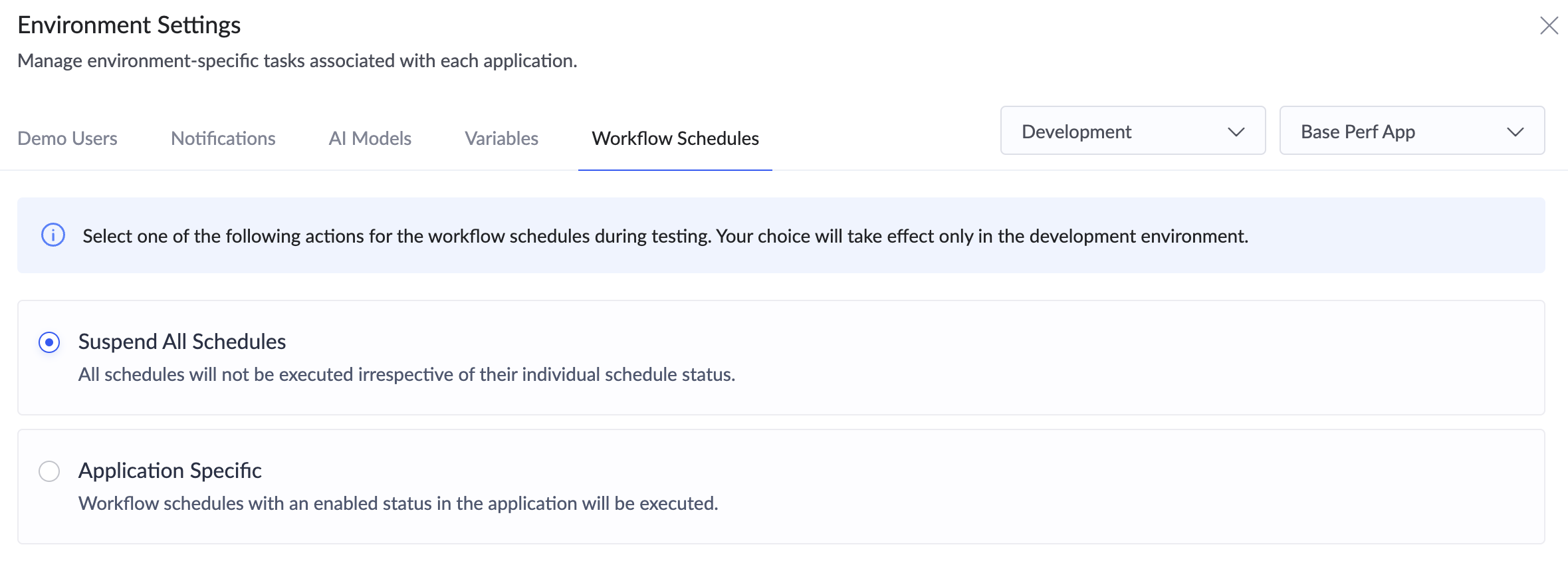
Suspend All Schedules - Choosing this option will suspend the execution of all schedules for each application.
Application Specific - Only schedules that have an enabled status on the Workflows page will be executed. 
 
How does it benefit you?
This nifty feature is particularly useful during testing—where you may want to suspend all schedules in the environment—and also in effectively managing the schedule limits for that environment.
 
Applicable for: C6
Availability: All DCs
Released on: 18-Dec-23
Reference: Manage development environment and Manage stage environment
 
- - - - - - - - - -

Image compression

As cameras get more powerful, we've witnessed an unintended consequence: increasingly large image files. Unfortunately, these large images have been causing performance hiccups (like larger mail merge template attachments and larger image file uploads) during the loading of reports and pages, and this issue has been a source of frustration for many Creator users. We hear you, and we've come up with a dedicated solution to address this challenge.

How do we plan on implementing it?
We'll be introducing a Compression option under the Field Properties of the Image field.
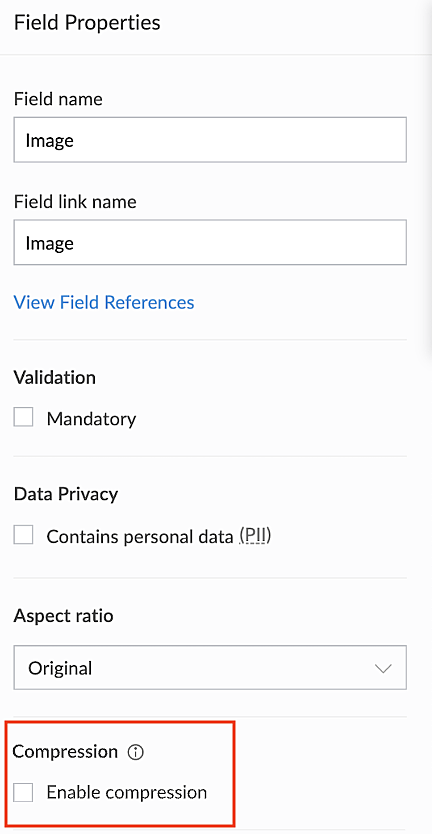
When disabled - The original size of the image will be used.
When enabled - The image will be compressed to a smaller resolution (2560 pixels).

Note that only the compressed images will be retained if the Image Compression property is enabled, and the original images will not be retained.
 
Which images will be compressed, and what is the output size?
If an uploaded image exceeds 2560 pixels, it will be compressed to fit within that size limit, resulting in a final file size approximately between 500 KB and 1.5 MB.
 
Where will the compressed image be used?
  • Image preview thumbnails in reports
  • Print templates
  • Mail merge templates (Zoho Writer)
  • Mail attachments
  • Export data
  • PDF generation
How does it benefit you?
This allows you to compress images without compromising their quality and without depending on external tools. This means faster loading times and an enhanced user experience.

Applicable for: C5, C6, Android, and iOS
Availability: All DCs
Released on: 13-Dec-23
Reference: Image Properties
 
- - - - - - - - - -

Set value while adding new entries to lookup fields

With this new capability, you can pass parameters from a parent form to a lookup form with ease. Going forward, you can easily set values in the pop-up that's displayed when you click the Add new button in lookup fields. With this update, we aim to resolve the scenario where passing values from a main form to a pop-up form would result in repeated pain points.
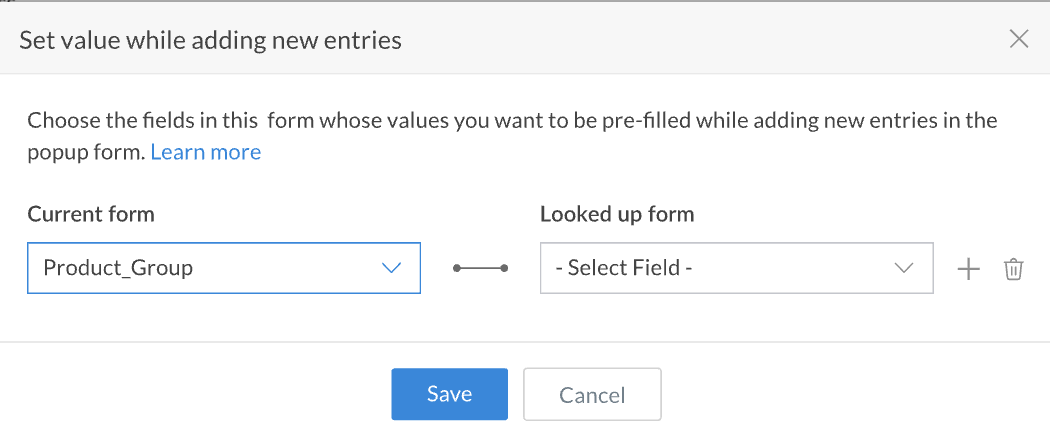

 
Use case
Consider a form that contains fields named "Department manager" and "Department name", which is a lookup field with the Allow New Entries property enabled. Now, in the Department name field, when you click the Add New option, the name of the department manager can be passed to the pop-up from the parent using this functionality. Similarly, you can configure any required field's value to be passed to the pop-up form.

How does it benefit you?
The ability to set values for fields when adding new parent records will ensure more dynamic data handling within your applications.

Applicable for: C5, C6
Availability: All DCs
Released on: 20-Dec-23
Reference: Allow New Entries and Set Value While Adding New Entries
 
- - - - - - - - - -

Deprecation of non-standard URIs 

Over the past few months, we've made concerted efforts to remind you about the impending deprecation of non-standard URIs by sending multiple emails. Starting 01-Jan-2024, we will no longer be supporting non-standard URLs. This means that, after the deadline, any attempt to access the non-standard URL will not return a webpage and instead an error will be displayed.

What's the existing behavior?
Until now, using a forward slash "/" to place the parameters and their values in the query string portion of the URL was allowed.

Non-standard URIs
Standard URIs
Change
https://creatorapp.zoho.com/scope_name/
app_name/component_name/field_name=value
https://creatorapp.zoho.com/scope_name/
app_name/component_name?field_name=value
A query string parameter should start with a '?' symbol.
https://creatorapp.zoho.com/scope_name/
app_name/view-embed//component_name
https://creatorapp.zoho.com/scope_name/
app_name/view-embed/component_name
Use only a single slash "/" as a separator in the URL path.

We request that you update all the instances of incorrect URLs used in your applications as soon as possible. If you're having any difficulty in figuring out where you're using them, just reach out to us at support@zohocreator.com and we'll gladly provide you with a list of the instances where non-standard URLs are present in your applications.

Note: This change applies for both Zoho Creator and Zoho One users.
 
Applicable for: C5, C6
Availability: All DCs
 
- - - - - - - - - -
 
That wraps up this month's updates. Your continued support is our driving force and we hope to be back with more updates soon!
 
Regards,
The Zoho Creator Team

    • Sticky Posts

    • Introducing Zoho Creator's 2025 Release Projection 2

      Hello Creators! I'm Prakash, from the Creator product management team, and today I'm delighted to unveil our next set of features as part of Release Projection 2 for 2025. With thoughtful analysis and planning, we've curated powerful new capabilities
    • Zoho Creator - 2023 Release Projection 1

      Hello everyone! A very Happy New Year to you and your family. Hope you're all good and having a great time using Zoho Creator to make your lives easier and your businesses prosper. 2022 was an action-packed year for us at Creator, and we hope to continue
    • Zoho Creator User Group meetups in a city near you! - Oct - Nov, 2023

      Greetings from the Zoho Creator team! We're hosting a series of Zoho Creator meetups in various cities across the globe, and we'd love to meet you there! Our meetups are a great opportunity to network with industry peers, exchange ideas and best practices,
    • Zoho Creator - 2023 Release Projection 2

      Hello everyone! Time truly flies when you're having an incredible journey, and today we mark the completion of an eventful and action-packed six months. It feels like just yesterday when we embarked on this adventure together with the launch of our new
    • Upcoming Updates - August 2022

      Hi all, Greetings from the Zoho Creator team! Today we've got news for you on some exciting updates. And rest assured— there’s more to come! In this post, we'll be going over the upcoming features and improvements for this month as mentioned below. A
    • Recent Topics

    • Unify Overlapping Functionalities Across Zoho Products

      Hi Zoho One Team, We would like to raise a concern about the current overlap of core functionalities across various Zoho applications. While Zoho offers a rich suite of tools, many applications include similar or identical features—such as shift management,
    • Bulk update Profile Permissions

      Dears, What should we do if we add new forms or reports and need to update more than 20 permissions? Updating them one by one feels pretty harsh, doesn’t it?
    • Filter in fields from Jira extension

      We have installed the Jira extension so we can maken Jira issues from Zoho desk. In Zoho desk I can also see the Jira issue status for example but I can not filter on this field. I would like to setup an filter showing me the closed Jira issues. How can
    • text length in list report mobile/tablet

      Is there a way to make the full text of a text field appear in the list report on mobile and tablet? With custom layouts, the text is always truncated after a certain number of characters.
    • Zoho Creator customer portal limitation | Zoho One

      I'm asking you all for any feedback as to the logic or reasoning behind drastically limiting portal users when Zoho already meters based on number of records. I'm a single-seat, Zoho One Enterprise license holder. If my portal users are going to add records, wouldn't that increase revenue for Zoho as that is how Creator is monetized? Why limit my customer portal to only THREE external users when more users would equate to more records being entered into the database?!? (See help ticket reply below.)
    • Link Contacts to Billed Accounts

      Hello, I want to do a survey on all my customers of 2025. For that I want to select all contacts linked to accounts who where billed in 2025. How to I create this link to I can then use Zoho Survey with this database of contacts?
    • Export all of our manuals from Zoho Learn in one go

      Hi, I know there's a way to export manuals in Zoho Learn, but I want to export everything in one go so it won't take so long. I can't see a way to do this, can I get some assistance or is this a feature in the pipeline? Thanks, Hannah
    • Bring Zoho Shifts Capabilities into Zoho People Shift Module

      Hello Zoho People Product Team, After a deep review of the Zoho People Shift module and a direct comparison with Zoho Shifts, we would like to raise a feature request and serious concern regarding the current state of shift management in Zoho People.
    • Historical Sales Info - Blend with Finance Invoice Line Items, Access in CRM and Desk

      My company has been using Zoho One since 2021, with sales data going back through 2020. However, we have been in business much longer, and we have historical sales information that we want to have at our fingertips when talking with customers (usually
    • Is there API Doc for Zoho Survey?

      Hi everyone, Is there API doc for Zoho Survey? Currently evaluating a solution - use case to automate survey administration especially for internal use. But after a brief search, I couldn't find API doc for this. So I thought I should ask here. Than
    • Pre-Zoho Sales Info - Best Way to Add to Desk / CRM

      My company has been using Zoho One since 2021, with sales data going back through 2020. However, we have been in business much longer, and we have historical sales information that we want to have at our fingertips when talking with customers (usually
    • Shift-Centric View for Assigning and Managing Shifts in Zoho People

      Hello Zoho People Product Team, Greetings and hope you are doing well. This feature request is related to Zoho People - please don't move it to zoho one! We would like to submit a feature request regarding the shift assignment and management view in Zoho
    • CRM function REST API response format

      Is there a way to control the JSON response returned by the CRM function REST API? If I call a function using either OAuth or an API key it returns a 200 OK response with a string in the format shown below. I am using a particular feature of an external
    • Add Employee Availability Functionality to Zoho People Shift Module

      Hello Zoho People Product Team, Greetings and hope you are doing well. We would like to submit a feature request to enhance the Zoho People Shift module by adding employee availability management, similar to the functionality available in Zoho Shifts.
    • Using MPN across multiple SKUs and inventory tracking

      I have several different SKU's that share a common MPN and would like to track inventory by MPN. SKU1 has MPN1 assigned SKU2 has MPN1 assigned Here is an example If I start with 5 of MPN 1 in stock I want each SKU1 and SKU2 to show as 5 in stock, If I
    • Unable to Access Application:

      Whenever I try to access my application from the desktop, say I am editing it and want to test something in the desktop environment I get: An error has occurred. An internal error has occurred. Please check the URL , or try refreshing the page I can edit
    • PDF Annotation is here - Mark Up PDFs Your Way!

      Reviewing PDFs just got a whole lot easier. You can now annotate PDFs directly in Zoho Notebook. Highlight important sections, add text, insert images, apply watermarks, and mark up documents in detail without leaving your notes. No app switching. No
    • CRM gets location smart with the all new Map View: visualize records, locate records within any radius, and more

      Hello all, We've introduced a new way to work with location data in Zoho CRM: the Map View. Instead of scrolling through endless lists, your records now appear as pins on a map. Built on top of the all-new address field and powered by Mappls (MapMyIndia),
    • Cannot see Application from Lookup field

      Hi all, I am trying to access data for an application on our account via a lookup field; however, the application doesn't appear in the dropdown at all. Can anyone shed any light on this, please? I have asked Zoho support; however, they're just as confused,
    • Cannot see correct DNS config for mail after moving domain to another provider

      I have moved my domain from one provider to another and after that zoho mail stopped working (expected). Problem is, zoho mail admin panel still shows (10 hours after move) that all records are correct while I haven't changed anything in my domain DNS
    • Zoho CRM Meetings Module Issues

      We have a use-case that is very common in today's world, but won't work in Zoho CRM. We have an SDR (Sales Development Rep) who makes many calls per day to Leads and Contacts, and schedules meetings for our primary Sales Reps. He does this by logging
    • Zoho Books integration sync from Zoho CRM does not work

      Hi Zoho Community & Zoho Support We just tried to get a sync some products into Zoho Books from CRM using the native sync and we're getting an error: "It looks like some mandatory fields you're trying to map are empty. Please provide valid field names
    • P & L Sub-categorized accounts

      How can I show sub-categorized Income and Expense accounts on the P & L report?
    • Report showing Bill Details with Project and Sales Invoice Number

      Hi There, I am hoping that someone can help, I am looking for report that can show the bill and expense details along with project its as assigned to and the invoice number that the sales has been raised in. The goal is I can filter a customer/project
    • Advanced Payment for Inventory Items with serial numbers

      Hello, We sell equipment that we track the unique serial numbers on using Sales Orders. We can charge the customers an advanced payment, then the balance on delivery. We cannot figure out a way to do this in Books/Inventory: - Cannot part invoice a SO
    • Is it possible to restrict ZCRM user to see only custom views created by administrator

      I have segmented data in my CRM and I want to allow different users to be able to see only parts of it based on some criteria. I've tried to create and share a custom view, but then there is always an option for user to see all open lead for example.
    • Issues Logging into ZOHO

      Hello, one of my coworkers is having issues logging into ZOHO, she has requested a code when entering and the email is correct but she has not received the code. can you help us with this?
    • Google Fonts Integration in Pagesense Popup Editor

      Hello Zoho Pagesense Team, We hope you're doing well. We’d like to submit a feature request to enhance Zoho Pagesense’s popup editor with Google Fonts support. Current Limitation: Currently, Pagesense offers a limited set of default fonts. Google Fonts
    • Add Popup Rejection Metrics to Reports

      Hello Zoho PageSense Team, We would like to request improved reporting for popup interactions. Current Limitation: PageSense currently provides conversion data, but there is no clear visibility into: Popup rejections Popup closes (✕ button clicks) Dismissals
    • Ability to Reset / Reinitialize Popup Cookies

      Hello Zoho PageSense Team, We would like to request the ability to manually reset popup cookies. Current Limitation: At the moment, it is not possible to initiate a new popup cookie from the our side. Visitors who rejected or closed a popup will not see
    • Control Popup Cookie Expiration Duration

      Hello Zoho PageSense Team, We would like to request an enhancement related to popup cookie management. Current Limitation: Currently, PageSense popup cookies remain active for 365 days, and this duration cannot be modified by us. If a visitor closes or
    • Clone / Export Popup Design Across PageSense Projects

      Hello Zoho PageSense Team, We hope you’re doing well. We would like to request an enhancement that allows popup designs to be reused across different PageSense projects. Problem Statement: Currently, Zoho PageSense allows popups to be duplicated only
    • Are there settings for hyperlinks?

      Clicking a hyperlinked cell in Sheet creates this little pop-up with the actual hyperlink inside. Is it possible to have a 1-click link where if you click the cell it opens the link directly with no pop-up?
    • Automatically include all ticket attachments in the ticket resolution email

      Hello Zoho Community, We are implementing Zoho Desk in a real customer-facing production environment and have run into a limitation that is becoming a blocking requirement for our clients. The problem When a ticket is closed or resolved, Zoho Desk sends
    • adding several team members to an Opportunity

      How can we add several team members to one opportunity for collaboration? I have researched and only found something called Deal Team which I cannot find in my CRM to configure.
    • Finding text within a ticket: Expand All or Search this Ticket

      The auto-collapse feature within a ticket is nice for screen scrolling, however it makes it difficult to find text within the ticket if the email is collapsed. In fact you cannot find text if it is collapsed. I would like to propose a feature that allows
    • Books & Desk. Client mapping

      Hi, I’ve been using Zoho Books for several years and am now looking to improve my customer service. I'm experimenting with Zoho Desk and want to sync and map my client data from Zoho Books. However, it seems that mapping requires both contacts to have
    • String handling

      If I cut a currency string from a quote and try and paste it into the Deal "Amount", it will fail unless I manually delete any commas. Dollar signs are no problem, but comma's seem to fail. Please correct this Input Validation error.
    • email address somehow still not verified (?!)

      L.S. After creating a new email template in CRM I was about to send a group email to my clients, then Zoho CRM announced that they would change the sender address to some kind of Zoho-e-ddress because my email address "has not been verified". Not only
    • What's new in Zoho Sheet: Simplify data entry and collaboration

      Hello, Zoho Sheet community! Last year, our team was focused on research and development so we could deliver updates that enhance your spreadsheet experience. This year, we’re excited to deliver those enhancements—but we'll be rolling them out incrementally
    • Next Page