Introducing Data Bars: Graphically represent changes in data within the cells
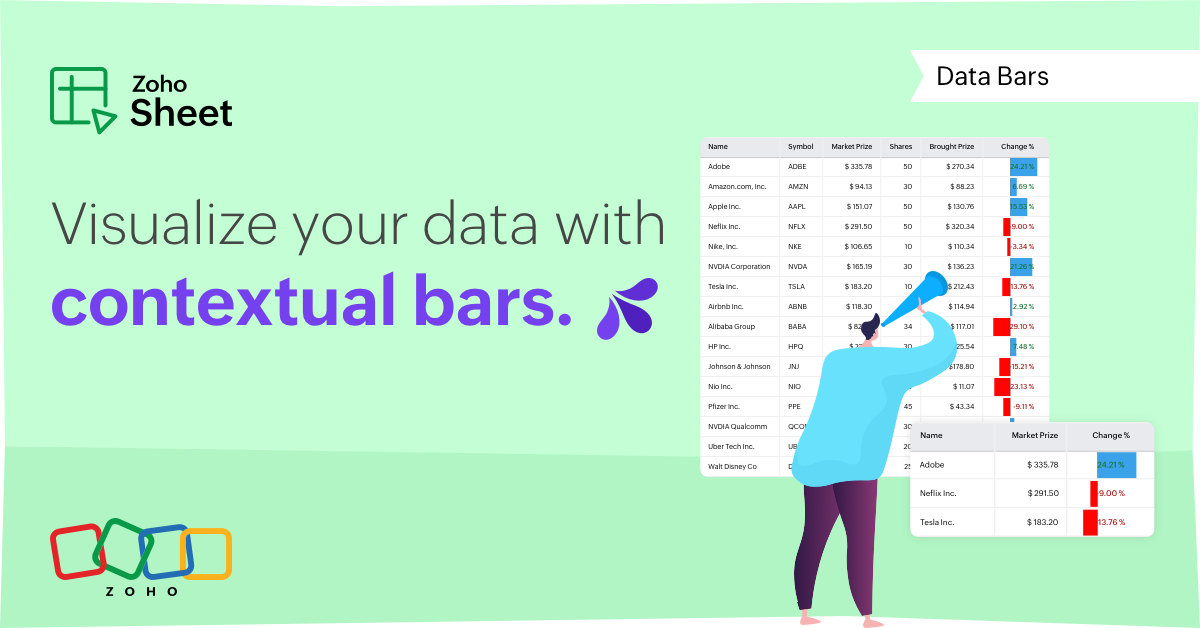
Conditional formatting has helped millions of spreadsheet users analyze and highlight their data more efficiently. In addition to the classic rules, color scales, and icon sets available in Zoho Sheet, you can now apply Data Bars, a convenient method of visually analyzing the values in a cell range.
What are Data Bars?
Data Bars are cell-level bars that can be used to visually represent the position of a value in a given range, with longer bars representing higher values. This helps users summarize data sets at a glance. Let's say you have a monthly sales report and wish to see which months have the highest and lowest sales figures. Find these results in an instant using Data Bars!
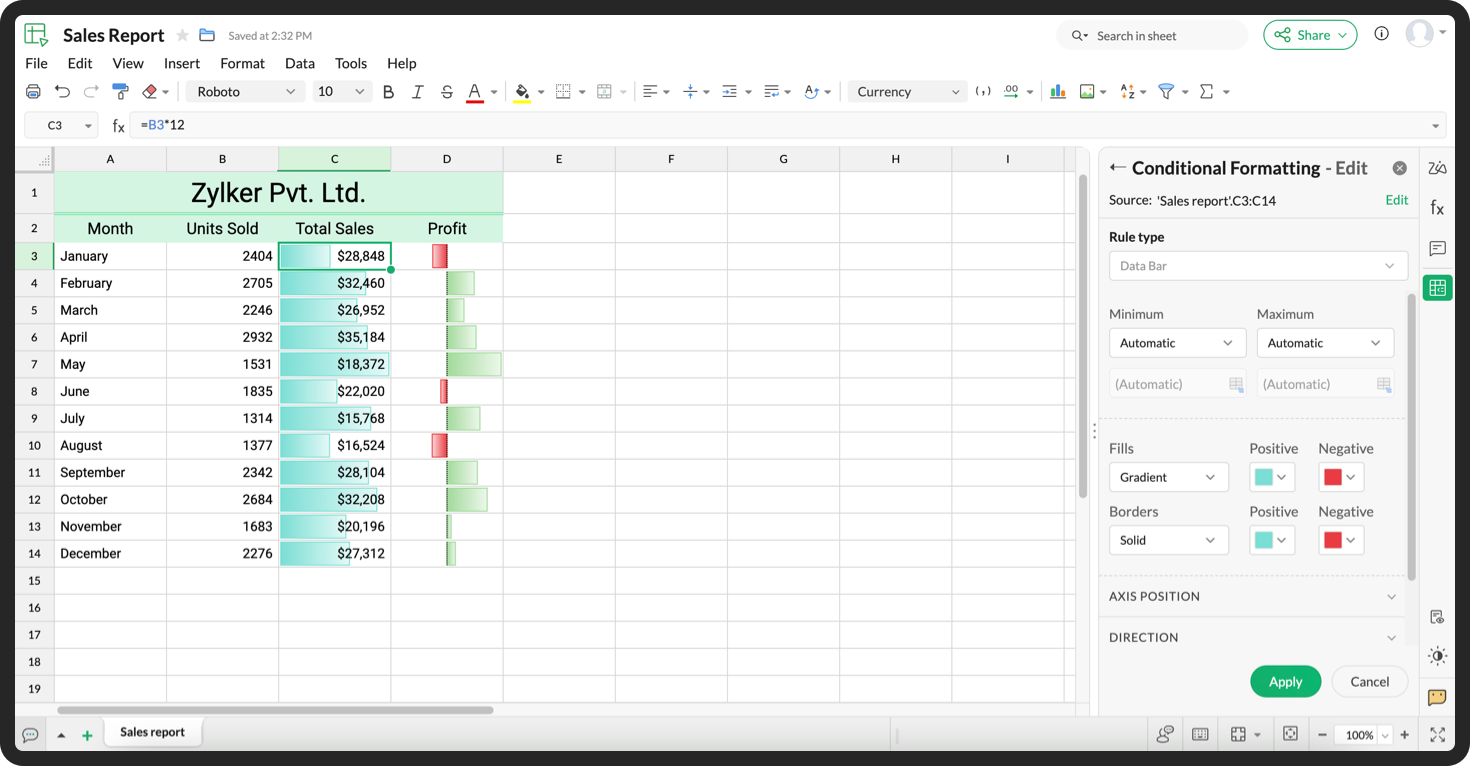
Customizations
Customize your data bars, by adjusting the border, color, and gradient of your bars. You can also choose the direction of the bars and the axis position in the cell, and hide cell content so that only your bars are displayed.
You can also use Data Bars in combination with other conditional formats, like color scales, to analyze your data. Not sure how to get started? Zia now offers suggestions on conditional formatting too!
Read more
Topic Participants
Jaya Shankari S
Aashok Kumar Sharma
Murugalakshmi S
Sticky Posts
What's new in Zoho Sheet: Simplify data entry and collaboration
Hello, Zoho Sheet community! Last year, our team was focused on research and development so we could deliver updates that enhance your spreadsheet experience. This year, we’re excited to deliver those enhancements—but we'll be rolling them out incrementallyNew Features: Repeat Last Action, Insert Cut/Copied Rows/Columns and Hyperlink
You might have noticed the constant updates to Zoho Sheet of late. Here are 3 more features that have been added to Zoho Sheet recently: F4 - Repeat Last Action Insert Cut/Copied Rows and Columns Insert Hyperlink Here is a screen cast demonstrating each of these features. Read further below to learn more about these new features. F4 - Repeat Last Action: You can now repeat the last action you made on your spreadsheet by using the keyboard shortcut, F4. It is quite handy and helps you get your workIntroducing Forms in Zoho Sheet
We hereby bring you the power of forms in Zoho Sheet. Now, build and create your own customized forms using Zoho Sheet. Be it compiling a questionnaire or rolling out a survey, Zoho Sheet can do it all for you. Forms is an excellent feature that helps you collect information in the simplest of ways and having it in Zoho Sheet takes it a notch higher. Build Simple yet Powerful forms Building forms using Zoho Sheet is fairly simple. The exclusive 'Form' tab lets you create one quickly. Whether youSlicers are now available in Zoho Sheet—filter your data interactively
At Zoho Sheet, we diligently track user requests and feedback. In line with this, based on extensive user requests, we've integrated Slicers to pivot tables and are delighted to announce its release. Slicers are interactive visual filters that have add,Introducing Data Bars: Graphically represent changes in data within the cells
Conditional formatting has helped millions of spreadsheet users analyze and highlight their data more efficiently. In addition to the classic rules, color scales, and icon sets available in Zoho Sheet, you can now apply Data Bars, a convenient method
Recent Topics
Date triggering Workflow rule
I have a function triggered by a workflow rule. The function takes a date and creates a task for that date and fills in a field with the name of the day for that date. It also updates the status field of the record. The workflow rule is set to run wheneverRestricting contact creation
Hi all! I am looking to use Zoho Desk in a part of the business that takes end user enquiries. These are generally single interactions, and not linked to an account name. As Desk is Account centric, has anyone designed a way to manage these incoming emailsImport Holiday Calendars
HI Zoho Is there anyway of importing an online calendar like https://www.calendarlabs.com into the business hours calendars, to speed up setup of holiday calendars. Also could we also request a feature where you can specify a Holiday as hours, i.e it could be that the company is on a 1/2 day due to a holiday or when it is Eid in the UAE and they are only allowed to work restricted hours so we need the calendar to be flexible to allow for this. Regards JamieFiltering Tickets based on Email headers
We're starting to get a lot more junk coming into our Zoho Desk, which is then triggering unnecessary email alerts to agents. Once thing we could do to cut this junk in half, is to filter tickets based on email headers. Any email containing the `List-Unsubscribe`Error 550 5.4.1
I’ve tried sending an email to someone but keep receiving this back. Any help would be greatly appreciatedBilling Management: #2 Fair way of Billing- Prorated Billing
Hello, From speaking about the traditional ways of billing in the previous post, we are moving into the deep sea of billing. We are now in a zone to break out the most complex yet, I would call it the fairest way of billing, the Prorated Billing. ProratedAdding image in HTML report page
Hi, I want to know two things: 1. Can anyone advise how to add an image in HTML report. The tagged used is <img> but what path do I mention for the image to be added in the HTML report. 2. Also, I want to know if I am creating an application for the marketHow to change view of HTML report based on device but always print in A4
Hello everyone, I am aware that HTML report view can be configured to adjust according to the screen size like Laptop, Tablet and mobile using media queries. But my concern is no matter on which device the reports is opened when printed should alwaysAge Calculation
I've attempted to calculate the age of someone based on their birthday input by using the formula field. It works but I don't want all those decimals on there. I then tried to use "set variable" after birthday input but I get a field type mismatch, long vs. floating. Any ideas would be wonderful.Search on Custom Field
We're working on an integration with the Zoho FSM API and are trying to retrieve companies based on a custom field we added to the Companies module. However, we can't find a way to filter or query records using custom fields through the API. We have aSendmail function / custom action?
I've setup a function hoping to email various business departments the details of a record once all work in that record is complete so gone about setting up a custom action in such way that each record line on the report has a button to click. Question is how do I actually include data from that record in the email that is sent when the button is clicked? I had thought that since this were being sent per record the email would include the data which had been enteredAPI to post drafts for social media
I we want to post draft posts to our zoho social account and then approve and schedule them within Zoho social. is this possible with for example: https://apis.zoho.com/social/v2/post TIA JonWhat impactful sales coaching techniques have you used to boost your team's performance?
I'm curious about the real-world impact of sales coaching on team performance. What specific techniques or strategies have you found most effective in driving consistent improvement and growth in your sales team? Any success stories or lessons learnedPossible to bold or indent text in the description field?
As part of one item, I often have a detailed description that would be much easier to read if there was the ability to have a bulleted list or bold text and the like. Is this possible? My last invoicing software allowed markup in the field so, for example, an asterisk meant a bullet. I haven't been able to find any documentation related to this. Any information would be appreciated. Thank you.Formatting of Balance Sheet and Profit & Loss Reports
The default format of the Balance Sheet and P&L Reports are based on the Account Types and then the individual accounts within the Chart of Accounts. These are then ordered alphabetically under these sub-headings and one is unable to re-order these orUK MTD reports concerning turnover and cerash accounting
Hi I am a sole trader, and I have just started with Zoho Books in order to comply with the new HMRC requirements. I use 'cash basis' - which I understand to mean that income is when the cash comes in (not the invoice date) and expenses are when they areRetainer Invoice.
Why ZOHO not have facilities to deduct partially advance payment from an invoice.Share saved filters between others
Hi, I am in charge to setup all zoho system in our company. I am preparing saved filters for everybody, but the only one can see its me. How can others see it? ThanksNo practical examples of how survey data is analyzed
There are no examples of analysis with analytics of zoho survey data. Only survey meta data is analyzed, such as number of completes, not actual analysis of responses, such as the % in each gender, cross-tabulations of survey responses. One strange characteristicZoho Creator as LMS and Membership Solution
My client is interested in using Zoho One apps to deploy their membership academy offer. Zoho Creator was an option that came up in my research: Here are the components of the program/offer: 1. Membership portal - individual login credentials for eachAdding Chargebee as a Data Connector
Is it possible to get Chargebee added as a Zoho Analytics data connector?Dropbox to Workdrive
Namaste, Trust you all are doing well. Wanted to check how this can be done with Zoho flow. I typically receive dropbox links from my clients. Is there a way where I can provide the link to Zoho flow and it downloads the files from dropbox link to a workDeals by Stages Funnel not showing in correct order
Using the Stage-Probability Mapping for the Deals module we have created a steps our deals will pass through, RFQ, Closed/Lost, Declined/No-Go, Pricing, Submitted, Negotiations, Won. However when I view the Deal By Stages Funnel it does not show in theConfirmation prompt before a custom button action is triggered
Have you ever created a custom button and just hoped that you/your users are prompted first to confirm the action? Well, Zoho knows this concept. For example, in blueprint, whenever we want to advance to the next state by clicking the transition, it isHow to create auto populate field based on custom module in Zoho CRM?
Hello, i'm still new to Zoho CRM and work as administrator in my company. Currently, I'm configuring layout for Quotes Module. So, the idea is, I've created a read-only field in Quotes called "Spec". I want this field automatically filled with SpecificationOffice 365 and CRM mail integration: permission required
Has anyone run into this weird problem? My email server is Office 365. When I try to configure Zoho CRM to use this server, a Microsoft popup window opens requesting user and password. After entering that, I get a message in the Microsoft window sayingDeluge - Can't get phone number SalesIQ
Hey folks, I’m building a custom plug for SalesIQ that’s supposed to register leads into Zoho CRM. The SalesIQ chat is being implemented on WhatsApp, and in my plug I’m using this line: mobile_clean = session.get("phone").get("value"); From what I understand,Zoho Desk - Community
As a regular user of Zoho Cares Community I would really love to see the publish date of articles. For example, when I look at Announcements, it would be very beneficial to see which ones were posted recently, over those which have just and a recent comment.access to quartz for my customers
Hi how can I have access to the application quartz you use for us to send you screen rocording, this feature would be immensely useful for our customers support https://quartz.zoho.com/Issue with Inline Images in Email Reply via Zoho Desk API
Hi, I am attempting to send inline images in an email reply using the Zoho Desk API, but the images are not being displayed inline for the recipient. I have followed this documentation: https://desk.zoho.com/DeskAPIDocument#Uploads https://desk.zoho.com/DeskAPIDocument#Threads#Threads_SendEmailReplyHow to search a value stored in a subform?
Hello, We store serial numbers in subforms but now we would like to be able to search the values to be able to easily find the record with the serial number. I saw that it's not possible to search such values through global search but is it possible to do it an other way? Thank you,Field Dependency Not Working on Detail Page in Zoho Desk
Hi Support Team, I’ve created field dependencies between two fields in Zoho Desk, and they are working correctly on the Create and Edit layouts. However, on the Detail page, the fields are not displaying according to the dependencies I’ve set — they appearHow do the keyword critera work?
Hi, I'm working on automated assignment of tickets based on keywords. How does this feature work? Where does this criteria look for keywords - email address, subject, email body? Can you please clarify this as I want to avoid overlapping with criteriaError: Unsupported content type: text/html;charset=UTF-8 after tryeing to get the token for n8n automation
I am working on ZOHO Desk automation and need to get the ZOHO auth token for n8n I have created the app in ZOHO Desk API, got client id and client secret. Added all data required to get a token in n8n. After I sign in with my ZOHO credentials in ZOHOImproving Collaboration Features in Zoho Portal
Hello Zoho Community, I’ve recently started exploring Zoho services and I’m really impressed with the wide range of features. However, I feel there is still room for improvement in the collaboration area. For example, it would be really helpful if weAutomated Shopify Emails Not Being Delivered
I have an ecommerce store with Shopify. I recently set up my email to be served through Zoho. Since doing this, customers are not receiving some of our automated emails from Shopify itself. Our initial email that confirms their purchase goes through but our Shipping Notification that is automatically sent out upon fulfillment is not going through. Sometimes we get a notice that it's been classified as spam, sometimes nothing. I can send/receive email via Outlook on my desktop and I can send/receiveSend a campaign to one recipient.
Very often I speak to a customer and they say they didn't see my email (maybe it went in Junk, maybe they deleted it). Anyway, I just want to go into the Campaign and send it to one person. You already have a feature very close to this - when sending a Test. While developing a campaign, I can send tests to anyone. Why can't we have this AFTER the campaign has been sent? I know, there's a caveat, and that's in the use of merge tags. Most of the time I only use FNAME, but maybe you could check ifTry FSM again for our business
We already have our customers individual equipment in CRM with serial numbers, install dates, warranty length and importantly next service which is generally 2 years. a month before the service date is due we get get a report and send out service reminders.Get Cliq Meetings in my O365 calendar
Hi, we are currently evaluating to replace the Teams Messaging and Meetings with Cliq. We currently still have all our email and calendars in O365. What i want to achieve is, to create a (ZOHO) meeting from Cliq and have this meeting added to my Outlook/O365Issue with Zoho Help Portal – Tickets Missing or Not Answered
Hi, How are you? I think there may be an issue with the Zoho Help Portal. I opened a few tickets directly in the help portal a some time ago but never received any response I also opened ticket 148356451 by email. I did receive a reply to it, but theNext Page