The all new Marketing Automation 2.0 is now part of Marketing Plus
Hey everyone,
We're excited to introduce the latest version of Marketing Automation to Zoho Marketing Plus for all users. The new version comes with a lot of features to help simplify and streamline your marketing activities
Revamped user interface
The Marketing Automation module has a whole new user interface that's carefully designed to make it easy to navigate and manage your marketing activities, including creating campaigns, personalizing journeys, generating leads via signup forms, building landing pages, and much more. 
Simplified contact management
Managing your contact list in Marketing Automation is a lot easier with the all-new Contacts module, which was previously known as the Leads module. Firstly, a new dashboard offers a holistic picture of your contacts by offering insightful metrics such as your total number of contacts, contacts that are ready for marketing or sales, contacts by stage, source, and location, and much more.
The detailed contacts view has a new look as well. You can view important details like stages, associated lists, segments, journeys, subscription details, engagements, and a timeline of all activities in chronological order.

You can also view a complete list of contacts filtered by stage with the help of a Kanban view, and you can easily drag and drop contacts across various stages.
Lists have also been simplified. Each list has a detailed dashboard related to contacts, such as contact growth, associated entities, status, and so on. You can also view associated journeys and campaigns for a particular contact list, segment your contacts based on various criteria, and manage them from Marketing Automation.
More ways to generate leads
Websites are one of the best and most effective marketing channels, as they help visitors understand more about your brand and what you offer. Hence, it's essential for businesses to optimize their websites in order to capture and convert these visitors as leads.

Keep tabs on your website
Once your website is live, it's important to measure the performance to increase conversions. Marketing Automation module comes with a detailed dashboard and in-depth analytics on the behavior and acquisition of your website visitors. The behavior report gives you the complete picture of how visitors are interacting with your website, the top performing page, time spent on pages, the page through which visitors first land on your website, and the last page visited before they exit, and lot more.
Marketing campaigns simplified
Marketing Automation now offers a whole new streamlined experience in creating and managing your campaigns across channels. You can create your email campaigns and promote your surveys, webinars, SMS campaigns, and promotions via WhatsApp.
Personalize touchpoints with Journeys
The journey builder comes with a lot of updates. With Journey X-Ray, you can dissect and understand the path your contacts take, the most- and least-engaged actions, the number of entrances and exits, and a lot more. This is designed to give you a better understanding of your customer journey across various touchpoints to help optimize them further.
Triggers | Actions |
Missed goal Date field trigger (revised) Email action trigger (revised) Video click Attachment download | Send survey mail Reminder loop A/B test Three-way condition Update deal Mile stone End of process components |
If you've created journeys with these deprecated components, you'll need to replace them manually before migrating them to the new version.
Revamped roles and permissions
Roles and privileges in Marketing Plus enable you to define and control access to data and various features in Marketing Plus. There are four different roles available by default: Brand Admin, Brand Marketer, Brand Member, and Event Member.

Now, we've introduced more control over how users can access data and features. You can define appropriate permissions for contacts and lists, lead generation functions, marketing channels, websites, and assets.

Accessing the new version
The all-new Marketing Automation will be available for all Marketing Plus users starting on June 4, 2024. All topics, integrations, SMS gateways, and smart URLs will have to be migrated to start accessing the new version.
Migrating topics
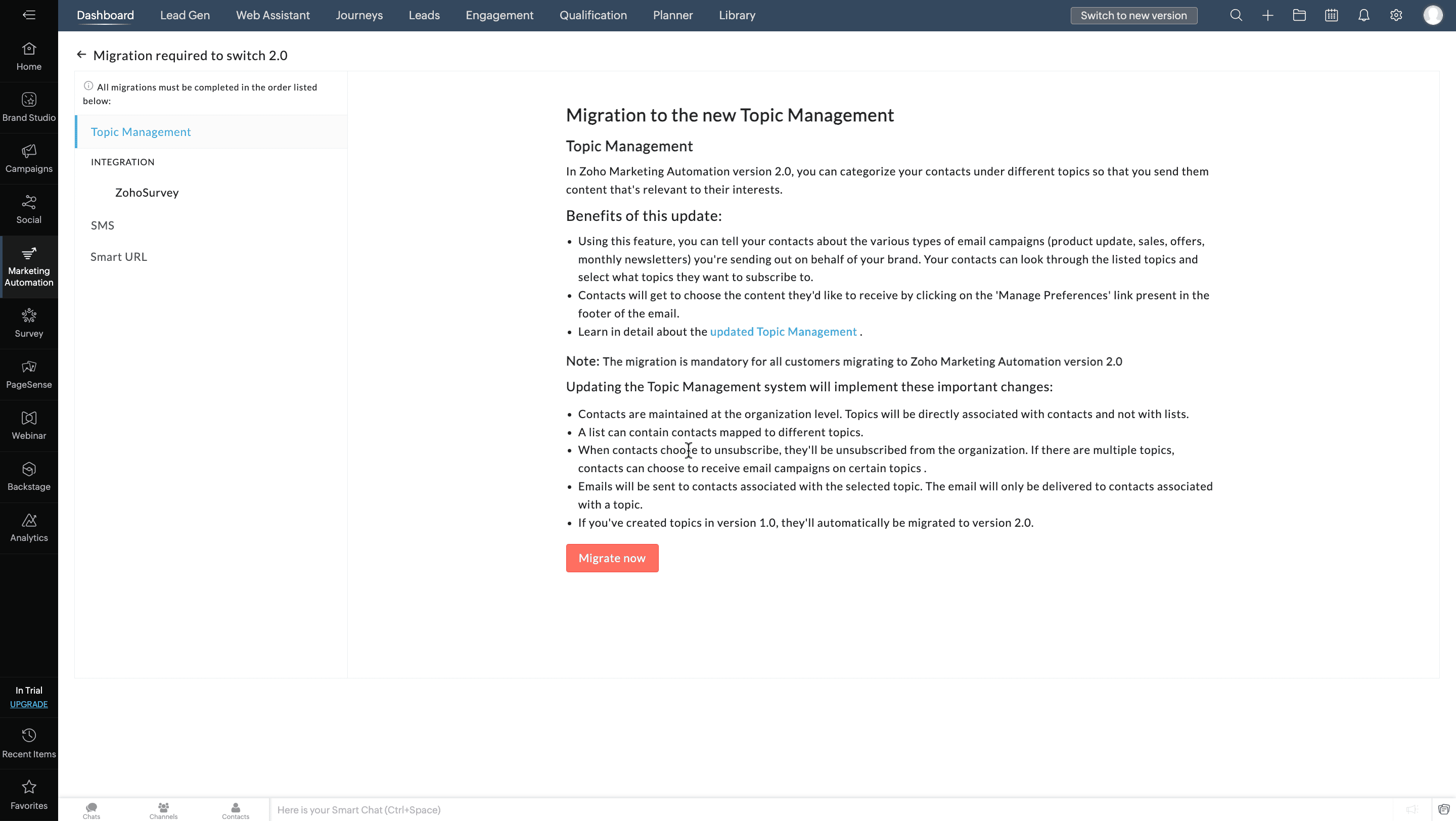
Previously, topics in Marketing Automation were usually associated with lists. Now, you can associate them with contacts directly, as well as associate multiple topics to a contact. They can unsubscribe from these topics per their preferences.
Migrating integrations
Previously, Marketing Automation users could integrate and create syncs with Zoho or other third-party services, which was sometimes hard to track and led to data duplication.
To streamline integrations between solutions, now only the administrator of both applications can integrate and create syncs in Marketing Automation—and only one integration and sync.
For example, if you want to integrate Marketing Automation in Marketing Plus and Zoho CRM, you need to be the Brand Admin in Marketing Plus and an Administrator in Zoho CRM. Once an account is integrated, other users in your organization can't configure another integration.
If multiple integrations are configured in Marketing Automation, you can see the complete list of all the accounts while migrating to the new version. Make sure to select the account you want to retain in the new version.
Migrating SMS providers
To increase accuracy, SMS campaigns will only be sent to the mobile numbers specified in each contact's Mobile field. If you've used any other field to store the contact information in the older version, the data will need to be moved to the Mobile field to start sending SMS campaigns in this new version.
Migrating Smart URLs
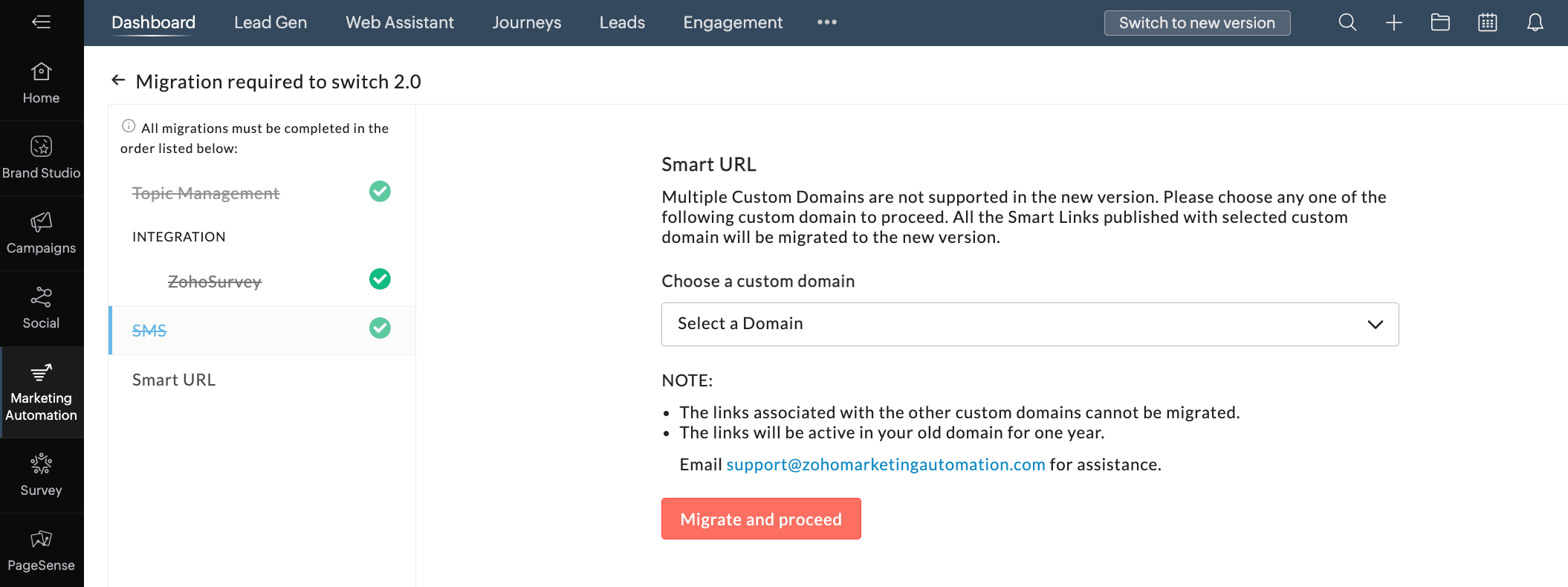
Previously, Smart URLs in Marketing Automation can be created for two custom domains. Now, in the new version, you can create smart URLs using the default or your custom domain. Only one custom domain can be connected. So, while migrating to the new version, you can choose the domain that you want to migrate to the new version.
To access the new version
- Go to the Marketing Automation module in Marketing Plus and click Switch to new version.

- Click Proceed in the pop-up.
- In the Topic Management tab, click Migrate now.
- Select an integration from the Integration tab and click Migrate and Proceed.
Do the same if more integrations are listed in the Integration tab. - In the SMS tab, select your preference.
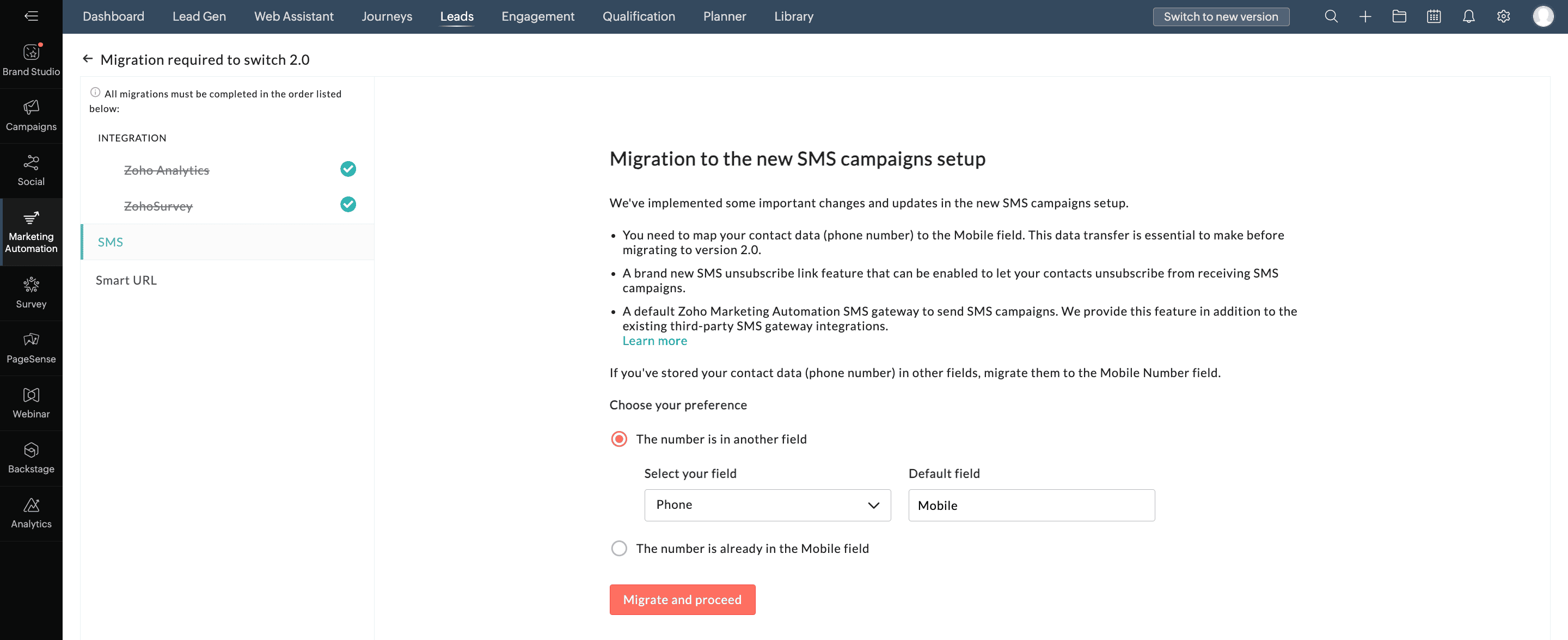
- Click Migrate and Proceed.
- In the Smart URL tab, select the appropriate domain from the drop down list.
- Click Migrate and Proceed.
- Click Switch Now in the pop-up.
We hope you find this information useful. Please give it a try and feel free to share your valuable feedback with us.
Regards,
The Marketing Plus TeamTopic Participants
Arun Kumar V
John Legg
Abishek Mazumdar
Sticky Posts
Introducing Budget Board in Zoho Marketing Plus
Hey everyone, Marketing Plus enables marketers to collaborate more effectively and manage their marketing efforts, from campaign planning to execution to performance measurement—all on one platform. One of the most challenging yet critical tasks for marketingPlan, visualize, and execute your marketing projects with a unified marketing calendar
Hey everyone, We're excited to introduce the unified marketing calendar in Marketing Plus, which we're confident will make it easier for you to plan and manage your various marketing activities. Here's the gist of what it is and how you can use it. What'sThe deprecation of Facebook Groups in Social for Zoho Marketing Plus
Hey everyone, With the introduction of v19.0, Facebook recently announced the deprecation of the Facebook Groups API. For this reason, Zoho Social in Zoho Marketing Plus will no longer support publishing posts in your Facebook Groups starting on AprilRefer Zoho Marketing Plus to your friends and earn rewards!
Hey everyone, We would like to thank you from the bottom of our heart for subscribing to Zoho Marketing Plus. Now you have the opportunity to refer Zoho Marketing Plus to your friends or family members who are looking for a suitable solution to empowerSocial in Marketing Plus now supports TikTok, Instagram Stories and Reels, and YouTube Shorts
Hey everyone, We are excited to inform you that Social now allows you to publish on TikTok! We've also updated it to let you create Instagram Stories and Reels, as well as YouTube Shorts. Here's a brief about the updates. Publishing on TikTok Connect
Recent Topics
Multiple currencies - doesn’t seem to work for site visitors / customers
I am trying to understand how the multiple currency feature works from the perspective of the website visitor who is shopping on my Zoho Commerce site. My site’s base currency is US Dollars (USD) but my store is for customers in Costa Rica and I wouldArchiving Contacts
How do I archive a list of contacts, or individual contacts?How do people handle using Outlook and Zoho Project calendar at the same time?
We have an ongoing problem in our organisation where we use Zoho Projects to plan all of our projects tasks and that also allows us to look forward using the workload report to see which of our consultants are overstretched etc and which are available.10GB Email Storage Limits in Zoho CRM
We’ve had Zoho One for almost 5 years and have always synced our emails from Gmail via IMAP… As of late, we’ve run into issues with our emails not syncing, due to being over the 10GB storage cap… What’s very odd is that we haven’t changed a thing? I knowPerformance is degrading
We have used Mail and Cliq for about three years now. I used to use both on the browser. Both have, over the past 6 months, had a severe degradation in performance. I switched to desktop email, which appeared to improve things somewhat, although initialHow to set page defaults in zoho writer?
hi, everytime i open the zoho writer i have to change the default page settings to - A4 from letter, margins to narrow and header and footer to 0. I cannot set this as default as that option is grayed out! so I am unable to click it. I saved the documentAdd Israel & Jewish Holidays to Zoho People Holidays Gallery
Greetings, We hope you are doing well. We are writing to request an enhancement to the Holidays Gallery in Zoho People. Currently, there are several holidays available, but none for Israel and none for Jewish holidays (which are not necessarily the sameUnable to Send Different Email Templates for Different Documents in Zoho Sign
Hello Zoho Community, I am facing a limitation with Zoho Sign regarding email notifications sent to customers when a document is sent for signing. Currently, whenever I send any template/document for signing, the email notification that goes to the customerEnable History Tracking for Picklist Values Not Available
When I create a custom picklist field in Deals, the "Enable History Tracking for Picklist Values" option is not available in the Edit Properties area of the picklist. When I create a picklist in any other Module, that option is available. Is there a specific reason why this isn't available for fields in the Deals Module?ZO25: The refreshed, more unified, and intelligent OS for business
Hello all, Greetings from Zoho One! 2025 has been a remarkable year, packed with new features that will take your Zoho One experience to the next level! From sleek, customizable dashboards to an all-new action panel for instant task management, we’veVault crashes on Android Devices
Vault is continuously closing after entering the master password on my Android device. After several attempts I get a system message that says there is a bug in the app. I've uninstalled and reinstalled the app, and cleared the app cache, but nothing¿Cómo puedo configurar las contraseñas creadas bajo una directiva para que nunca caduquen y no aparezcan como caducadas en los informes?
¿Cómo puedo configurar las contraseñas creadas bajo una directiva para que nunca caduquen y no aparezcan como caducadas en los informes? La razón por la cual contraseña estas no deben caducar es porque su actualización depende de mi cliente y no de mí.Camera access
My picture doesn't appear in a group discussion. (The audio is fine.) The guide says "Click the lock icon on address bar," but I can't find it. Advise, pleaseAre static links available
I'm still using Zoho Meeting in trial mode. My previous webinar software provided a static link, and I made the mistaken assumption that I could send out my link and start a meeting later. Mass confusion, but my fault. With a paid version do you get aPower up your Kiosk Studio with Real-Time Data Capture, Client Scripts & More!
Hello Everyone, We’re thrilled to announce a powerful set of enhancements to Kiosk Studio in Zoho CRM. These new updates give you more flexibility, faster record handling, and real-time data capture, making your Kiosk flows smarter and more efficientWhy is Zoho Meeting quality so poor?
I've just moved from Office 365 to Zoho Workplace and have been generally really positive about the new platform -- nicely integrated, nice GUI, good and easy-to-understand control and customisation, and at a reasonable price. However, what is going onHow to print a label from zoho creator app?
Hello, I would like to print a label from zoho creator app record similar to attached one. Size 74mm x 102mm. I tried record template. It leaves plenty of space around the content and also I couldn't set the height of the page. So it is not printing properly. Could someone please direct me to right direction for this requirement?Integration between "Zoho Sprints Stories" and "Zoho Projects Tasks/Subtasks"
We have two separate teams in our organization using Zoho for project management: The Development team uses Zoho Sprints and follows Agile/Scrum methodology. The Infrastructure team uses Zoho Projects for traditional task-based project management. InWhere can we specify custom CSS in Zoho Forms custom theme ?
I'm using a form with a dark theme. The OTP popup window is unreadable, because for some reason, the OTP popup background fixes color to white, but still takes the font color specified in the custom theme. This ends up as white on white for me, renderingTeam Gamification
Would love to motivate, engage and encourage our team with our social media posts. Would like to include Gamification features of Social Media in Zoho Social or Marketing Automation. And also bring in Social Advocacy tools/tracking/management to these,Sync Data from MA to CRM
Currently, it's a one-way sync of data from the CRM to MA. I believe we should have the ability to select fields to sync from MA to the CRM. The lead score is a perfect example of this. In an ideal world we would be able to impact the lead score of aUpdate CRM record action
Currently, MA only offers a "Push Data" action to push data to a CRM module. This action is built to cover the need to both create a new record and update an existing record. Because it has been implemented this way all required fields on the CRM modulePro Lite Upgrade - Quick Access Tray
Hello, I was going to upgrade to Pro Lite but the Quick Access Tray feature isn't available for Windows. Of the four features not available for Windows, the QAT is what I'm most interested in. Are there plans to add this feature for Windows anytime soon?Boost your CRM communication with new font types, sizes, and default reply-to options while composing emails
Hello Everyone, We’re excited to introduce a series of impactful enhancements to the email composer settings in Zoho CRM. These updates enable you to personalize and optimize your customer interactions with greater efficiency. So what's new? Add custom3 year sick leave cycle
How do you set up a sick leave cycle for South Africa? In SA the sick works like this for the first 6 months you get 0.83 paid sick days a month, then after 6 months you sick leave balance is reset to 30 days that can be used over a 36 month cycle. ThisWorkDrive and CRM not in sync
1/ There is a CRM file upload field with WorkDrive file set as the source: 2/ Then the file is renamed in WorkDrive (outside CRM): 3/ The File in CRM is not synced after the change in WorkDrive; the file name (reference) in CRM record is not updated (hereIs Zoho Communityspaces now part of Zoho One?
Is Zoho Communityspaces now part of Zoho One?How to update "Lead Status" to more than 100 records
Hello Zoho CRM, How do I update "Lead Status" to more than 100 records at once? To give you a background, these leads were uploaded or Imported at once but the lead status record was incorrectly chosen. So since there was a way to quickly add records in the system no matter how many they are, we are also wondering if there is a quicker way to update these records to the correct "Lead Status". I hope our concern makes sense and that there will be a fix for it. All the best, JonathanBigin’s 2025 Evolution: Highlights from 2025 and What’s Ahead in 2026
Dear Biginners, Wishing you a very happy New Year! As we stand at the cusp of endless possibilities in 2026, we would like to take a moment to reflect on what we achieved together in 2025. Your continued support, thoughtful feedback, and kind words ofSend Supervisor Rule Emails Within Ticket Context in Zoho Desk
Dear Zoho Desk Team, I hope this message finds you well. Currently, emails sent via Supervisor Rules in Zoho Desk are sent outside of the ticket context. As a result, if a client replies to such emails, their response creates a new ticket instead of appendingZoho Desk - Change Time Zone for all users and set default for new user
Hi, Is there a way to set a default time zone so that when user creates an account via the Zoho Desk invitation, they don't need to select the time zone via the hundreds of choice? And, for already created users, can we edit the incorrect time zone selected by the user at the account creation ? Thanks ! FredIntroducing WhatsApp integration in Bigin
Greetings! In today's business landscape, messaging apps play a significant role in customer operations. Customers can engage with businesses, seek support, ask questions, receive personalized recommendations, read reviews, and even make purchases—allAllow Manual Popup Canvas Size Control
Hello Zoho PageSense Team, We hope you're doing well. We would like to request an enhancement to the PageSense popup editor regarding popup sizing. Current Limitation: Currently, the size (width and height) of a popup is strictly controlled by the selectedWhy does Zoho’s diff viewer highlight parts of unchanged lines?
Hi everyone, I’ve noticed something odd in the Zoho editor’s diff view. When I delete a single line, the diff doesn’t just mark that line as removed. Instead, it highlights parts of the next line as if they changed, even though they are identical. Example:CRM x WorkDrive: File storage for new CRM signups is now powered by WorkDrive
Availability Editions: All DCs: All Release plan: Released for new signups in all DCs. It will be enabled for existing users in a phased manner in the upcoming months. Help documentation: Documents in Zoho CRM Manage folders in Documents tab Manage filesPassing the CRM
Hi, I am hoping someone can help. I have a zoho form that has a CRM lookup field. I was hoping to send this to my publicly to clients via a text message and the form then attaches the signed form back to the custom module. This work absolutely fine whenAutomating Employee Birthday Notifications in Zoho Cliq
Have you ever missed a birthday and felt like the office Grinch? Fear not, the Cliq Developer Platform has got your back! With Zoho Cliq's Schedulers, you can be the office party-cipant who never forgets a single cake, balloon, or awkward rendition ofZoho Survey reminder settings are extremely confusing
Hi, I just want to set 3 reminders, one week apart from the first email out. Your form is too confusing and I don't understand. Can you simplify and be more specific regarding the language used on the form ?Add deluge function to shorten URLs
Zoho Social contains a nice feature to shorten URLs using zurl.co. It would be really helpful to have similar functionality in a Deluge call please, either as an inbuilt function or a standard integration. My Creator app sends an email with a personalisedform data load issue when saving as duplicate record is made
Hello. I have a form with a lookup when a value is selected the data from the corresponding record is filled into all of the fields in the form. But the form is loaded in such a state that if any value is changed it will take all of the values pre loadedNext Page