Announcing Bigin's integration with Zoho Directory
As a Bigin admin, you play an important role in managing your organization's user accounts and ensuring secure access to important data. To streamline and enhance your user management operations, Zoho Directory can be a powerful tool. Zoho Directory offers a range of advanced features, including IP restriction, password policies, multi-factor authentication, and Active Directory sync. In this post, we'll discuss how you can leverage Zoho Directory to perform these operations effectively and secure your Bigin account.
1. IP restriction
With Zoho Directory, you can enforce IP restrictions to allow access to Bigin only from specific IP addresses or ranges. This helps protect your organization's data by ensuring that users can only access Bigin from approved locations. You can easily configure IP restrictions within Zoho Directory's user management settings, providing an additional layer of security.
2. Password policies
Implementing strong password policies is vital for maintaining the security of your Bigin accounts. Zoho Directory enables you to define and enforce password complexity rules, such as minimum length and character requirements. By configuring these policies, you can enhance the overall security posture of your organization and reduce the risk of unauthorized access.
3. Multi-factor authentication (MFA)
To add an extra layer of security to user logins, Zoho Directory supports multi-factor authentication. You can enable MFA for Bigin users, requiring them to verify their identities through a secondary method, such as the following options:
- Authenticating with our industry-standard authentication app, Zoho OneAuth
- Enabling hardware-based MFA with YubiKey
- Using authenticator apps like Google Authenticator or Authy
This significantly reduces the chances of unauthorized access, even if the user's password gets compromised.
4. Active Directory sync
You can synchronize user accounts, groups, and attributes between your existing LDAP and Zoho Directory, enabling centralized management across platforms. This integration ensures that changes made, such as user additions or modifications, are automatically reflected in Bigin, saving time and reducing administrative overhead.
5. Single sign-on
Zoho Directory supports single sign-on (SSO) integration, enabling seamless authentication and session management across multiple applications, including Bigin. By configuring SSO, users can log in once using their credentials and subsequently access Bigin and other integrated applications without needing to provide their login information again.
6. Web session management
Zoho Directory provides comprehensive session monitoring capabilities, such as the following:
- Session lifetime - Users will automatically be signed out of their accounts after the defined period.
- Session timeout - Users will signed out of their accounts if they stay inactive for longer than the defined period.
- Concurrent sessions - Users will be allowed only the chosen number of active sessions at a time.
7. User session history
Zoho Directory keeps a record of user session history, allowing you to track and review past sessions. This feature enables you to monitor user behavior, investigate any suspicious activities, and perform audit trails if required. By having visibility into past sessions, you can maintain accountability and identify any security incidents or policy violations.
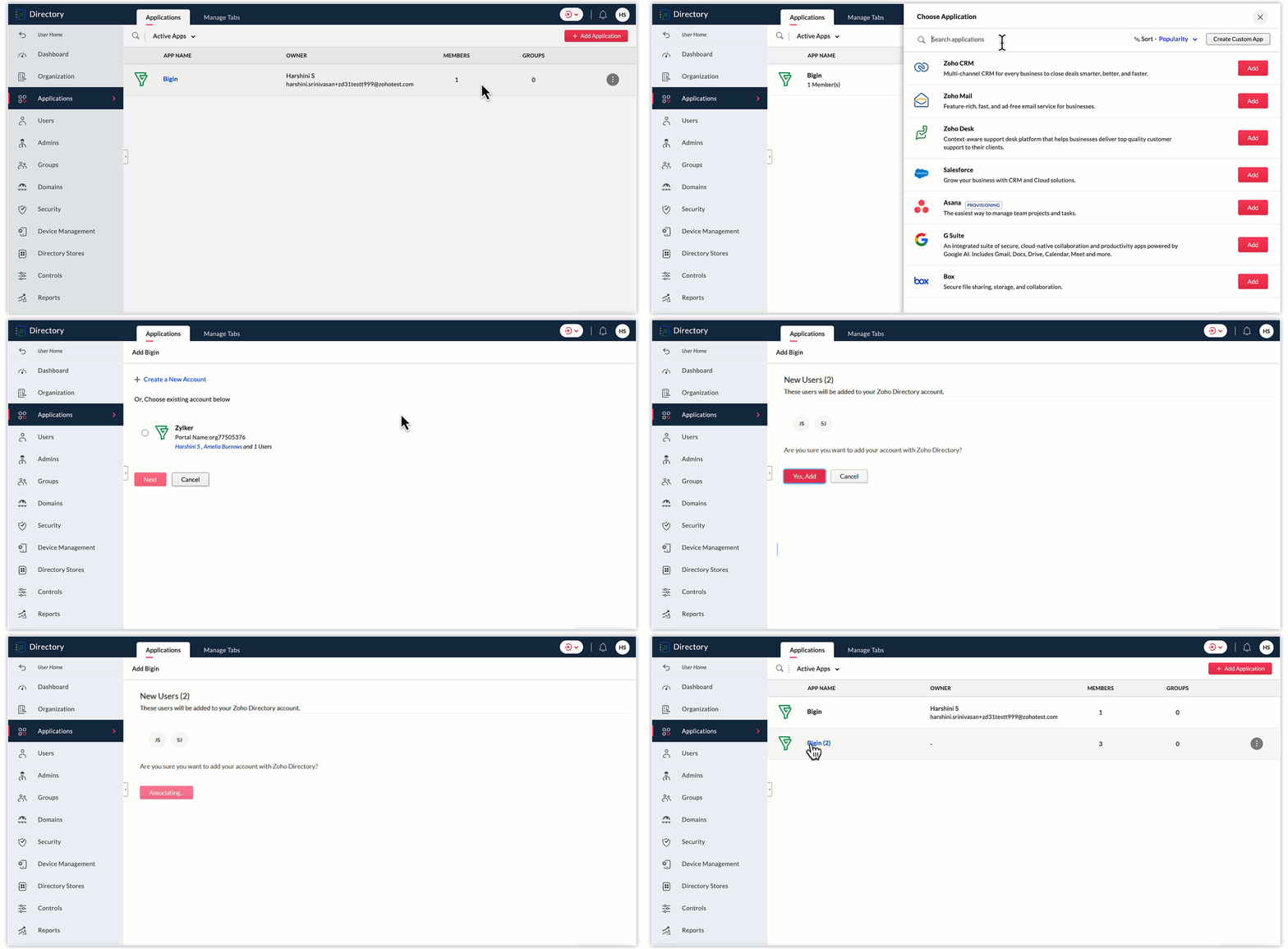
To add Bigin to Zoho Directory, follow these steps:
- Log in to your Zoho Directory account. Once logged in, navigate to the Zoho Directory Admin Panel.
- In the Admin Panel, look for the Applications section.
- Within the Applications section, search for "Bigin" and click on the Add button to initiate the process of adding Bigin to your Zoho Directory.
- Follow the on-screen instructions to configure the settings for the Bigin integration. Choose any of your Bigin accounts displayed, or create a new one. Click Next.
- In the next screen, select the Bigin users you wish to add to Zoho Directory, and click Yes, add.
- Once you've completed the configuration, Bigin will be added to your Zoho Directory.
- You can now manage user access and permissions for Bigin through the Zoho Directory Admin Panel. You can assign users to Bigin, control their roles and privileges, and ensure secure access to the application.
As a Bigin administrator, you can significantly improve the security and access management of your company's data by utilizing Zoho Directory's advanced user management features. From implementing IP restrictions and enforcing password policies to enabling multi-factor authentication and syncing with Active Directory, Zoho Directory provides comprehensive tools for effective user management. You can protect your organization's data, streamline user management, and ensure a positive user experience in Bigin.
Thank you,
Sai Shree | User Education
Sai Shree | User Education
Topic Participants
Saishree T K
Sticky Posts
Schedule mass emails, view mass emails status and more!
Hello everyone, Mass emails help you communicate with multiple customers in a couple of clicks. We have introduced a Mass Emails dashboard in Bigin so that users can see the status of the mass emails like how many emails were opened, clicked and bounced.Introducing Bigin 360: Our new pricing edition with increased feature limits and pre-installed toppings
Dear Biginners Club, Today, we're pleased to launch a brand-new pricing edition called Bigin 360, our highest pricing edition that will sit on top of Express and Premier editions. It's been over four years since our launch, and we're receiving some great[New] Create invoices and contracts in minutes with Zoho Writer's Merge Templates for Bigin!
Do you often find yourself manually entering customer information in your business documents like invoices and contracts? This can be a time-consuming process that can take up valuable time from your business operations. With Zoho Writer's Merge TemplatesAnnouncing #BiginnersClub meetups in US, Middle East, India & UK (Free Event)
Exciting news, Bigin enthusiasts! #BiginnersClub meetups are back, and we're hitting some major cities this time, starting from October. Here's what you can expect: Meet our experts face-to-face Deep dive into Bigin and its advanced features PersonalisedIntroducing Forms: Streamline data collection with Bigin's new form builder.
Hello everyone, Bigin's web forms just got a makeover! We are excited to introduce Forms: an online form builder designed to meet all your data collection need. This revamp was inspired by your feedback, resulting in an upgraded and versatile version
Recent Topics
Hiding / removing Currency field from Layout
Hello, I'm working on the LEAD standard layout of Zoho CRM. I like to have it as minimal as possible for our team. I could remove most of the field, but Currency is not possible. As lead, I don't quite understansd the necessity to have Currency as mandatory.Updating Sales orders on hold
Surely updating irrelevant fields such as shipping date should be allowed when sales orders are awaiting back orders? Maybe the PO is going to be late arriving so we have to change the shipment date of the Sales order ! Not even allowed through the api - {"code":36014,"message":"Sales orders that have been shipped or on hold cannot be updated."}Can we have Backorder Management ?
Can we have Backorder Management ?Accept credit card payment for multiple invoices
We have a problem with Zoho Books. While we can charge a customer's credit card for an individual customer invoice, we cannot charge a customer's credit card for more than one invoice. In our business, it is common for a client to phone up and say, "HereAnyone in Australia using Zoho Books AND has their account with NAB?
Hi I have an account with both NAB and Suncorp. Suncorp transaction come in the next day however NAB transactions take 4-5 business days to appear. eg: A deposit made today in my Suncorp will be imported into Zoho tomorrow. A deposit made today to the NAB account will be imported maybe Saturday (Friday overnight). I have contacted both Zoho and NAB but noone seems to know why. I was just wondering if anyone else in Australia uses NAB and has this issue (or doesn't) maybe we could compare notes andNewby Questions - Vendors, Customers, and Income vs. Other Income Clarifications
Q1. For Deposits, there does not seem to be an option for "Income". "Other Income" is an option however. What is the process to add the option to assign a deposit to type "Income"? Q2. In many cases Vendors and Customer are the same. Vendors may purchaseISO 3166-2 Compliant Country and Regions
Zoho should consider implementing ISO 3166-2 standards for countries and regions in address dropdowns. It adds a lot of noise in the data when items added programmatically conform to ISO 3166-2 (e.g., TX for Texas, CA for Canada, etc.), but the few itemsTax on Imported goods charged by Shipping Company
Hi Folks, I imported goods from outside Canada, for better understanding I will give an example data. imported goods value: 2000$ The shipping company sent me an invoice containing the following information: Custom duty on imported goods: 400$ AdministrationInvoice Import Error: "Either Tax or Tax Exemption Reason is required" - Recurring Across All Attempts
Issue Description: I'm experiencing a critical issue with invoice imports in Zoho Books. Every import attempt fails with the same error message, regardless of the tax data provided: Either Tax or Tax Exemption Reason is required. This error is blockingZia Agents in Zoho CRM: a better way to set up digital employees
Hello everyone, If you've been using Zia Agents in Zoho CRM, so far using Connections was the only deployment method you're familiar with. You create an agent in Zia Agents (define its objective, write instructions, use tools, add knowledge base) andAmazon FBA integration - Handle invoice reconciliation under different GSTINs,
Dear Zoho Community, Thank you for the clarification regarding the Amazon FBA integration, default warehouse, and GSTIN mapping in Zoho Inventory. I understand that Zoho currently supports only one warehouse for Amazon FBA, and that all FBA orders areZoho CRM Copilot Connector
Hello, Are there plans to release a connector for Zoho CRM and Copilot? I'm in the early research stages of potentially switching our CRM solution to Microsoft Dynamics because of its out of the box integration with Copilot. The advantage being that weZoho Sheet for Desktop
Does Zoho plans to develop a Desktop version of Sheet that installs on the computer like was done with Writer?Automation Series: Notify Admin When User Accepts an Invitation
In Zoho Projects, a portal is an organisational-level workspace where user can manage multiple projects. To join a portal, a user will have to accept the portal invitation. However, it is important for admins to be in the loop when a user accepts theLimitation in Using Images or Icons within Dropdown Options in Zoho Survey
Zoho Survey does not support the inclusion of images or icons within dropdown (select box) options. Dropdown question types are limited to text-only choices, which restricts the ability to present visually rich options such as product images or icons.Zoho Bookings - Feature Request - Services Which Include A Resource and Consultant
Hi Bookings Team, My feature request is to have the ability to add Consultants and Resources to Services. Use case: Your business provides first aid training and there are certain equpment you require to provide the half day training. There are only specificWhat's New in Zoho Invoice | January – March 2026
Hello everyone! We're back with the latest updates and enhancements we've rolled out in Zoho Invoice from January to March 2026. Here's what's new this quarter: Compact Bilingual Template [GCC Editions] Tax Calculation on MRP for Tobacco Products [IndiaWhat is a realistic turnaround time for account review for ZeptoMail?
On signing up it said 2-3 business days. I am on business-day 6 and have had zero contact of any kind. No follow-up questions, no approval or decline. Attempts to "leave a message" or use the "Contact Us" form have just vanished without a trace. It stillcan change deal colors in bigin?
can be super useful if we can change colors deals process any way to do it?Facturation électronique 2026 - obligation dès le 1er septembre 2026
Bonjour, Je me permets de réagir à divers posts publiés ici et là concernant le projet de E-Invoicing, dans le cadre de la facturation électronique prévue très prochainement. Dans le cadre du passage à la facturation électronique pour les entreprises,Subform edits don't appear in parent record timeline?
Is it possible to have subform edits (like add row/delete row) appear in the Timeline for parent records? A user can edit a record, only edit the subform, and it doesn't appear in the timeline. Is there a workaround or way that we can show when a userZoho One - White Label
Releasing a white-label feature for Zoho One, or any software or service, can offer several advantages and benefits for both the company providing the software (Zoho in this case) and its users. Here are some key reasons for releasing a white-label featureGoogle Fonts Integration in Pagesense Popup Editor
Hello Zoho Pagesense Team, We hope you're doing well. We’d like to submit a feature request to enhance Zoho Pagesense’s popup editor with Google Fonts support. Current Limitation: Currently, Pagesense offers a limited set of default fonts. Google FontsClient Script | Update - Client Script Support For Custom Buttons
Hello everyone! We are excited to announce one of the most requested features - Client Script support for Custom Buttons. This enhancement lets you run custom logic on button actions, giving you greater flexibility and control over your user interactions.Analytics : Highlighting a single bar in a bar chart
I have a bar chart showing values across a year by week. I have a user filter to change the selected week, however the year graph will remain as showing the full year. Is there anyway to conditionally format or construct the year graph to highlight the selected week ?Zoho CRM with Built-In MCP Support
Zoho CRM now provides built-in support for Model Context Protocol (MCP), enabling AI tools to connect and perform CRM actions using natural language. Zoho CRM MCP servers act as a bridge between AI agents and Zoho CRM, exposing CRM capabilities as callableChoose Component for User Filter
This filter in the Choose Component for User Filter would be better if had an Order or Group by function. Also, the Specify the default filter values: is very confusing and limiting.Inviting client to setup brand and more
Hello, There are two most critical functions which must be added in Zoho Social for Agency. Invite user/client to setup brand and link social media. As a agency we tell our clients, we don't want your social media credentials to manage your account. ThenDisable - order online at zoho store
I'm running cafe with Zoho POS. Doing good, however this enablement (Disable online order only on zakyastore.in) would enhance the business. Support asked to close -> "We can close the store from more options in the Mobile store > Overview > Store detailsSchedule from AI with Zoho Bookings MCP Server
Greetings from the Zoho Bookings team! We’re excited to introduce the Zoho Bookings MCP (Model Context Protocol) Server integration, a powerful new way to bring AI-driven automation into your scheduling workflows. With MCP, you can connect Zoho BookingsCreate your own Zoho CRM homepage using Canvas - Home View!
Hello everyone We are excited to share a new enhancement to Canvas in Zoho CRM that gives users more control over how their homepage looks and works. Introducing Canvas Home View! What is Canvas Home View? You can now create and design a custom homepageHow to make separate ledgers for GST (different types). Based in India
Hello Everyone, I am trying to configure GST for a small business and I am not able to create separate ledgers for the different types of GST. In the reports all of it is mentioned under one heading which is not allowed. How do I make sure that the differentZoho mail admin panel not opening
Canadian Banks ?
Can you advise which Canadian Banks can be used to fully sync credit cards and bank accounts? ThanksCombined Tasks and Issues View (Jira-Style Unified Workload)
Hello Zoho Projects Team, We hope you are doing well. We would like to submit a feature request regarding task and issue visibility in Zoho Projects. Current Behavior: At the moment, Zoho Projects separates Tasks and Issues into different modules, eachScale up your support with Zia actions
Hi there, Have you explored how Zia can help automate repetitive tasks? In customer support, every detail matters when delivering the right solutions to customers, and Zia is here to support you. This edition highlights how Zia can simplify and streamlineDisable Zoho Contacts
We don't want to use this app... How can we disable it?My Zoho mail stopped receiving or sending emails about 3 hours ago
Its a pop 3 account. The emails get into the actual mailbox on the server and I can send emails directly from the server, but they are no longer in Zoho, in neither of my Zoho accounts. All green ticks under Mail Accounts under SettingsPOP mailbox limits
If I am accessing a remote POP mail server using Zoho Mail is there a mailbox quota for the account or is it all related to my mail account storage limits?SPF: HELO does not publish an SPF Record
I am using Zoho mail. Completed all of the required prerequisites from the dashboard to avoid any issues with mail delivery. But when checking on mail-tester.com getting the following error. Can anyone help me solve this?Next Page