Discussions from Ask The Experts 19: Inside Zoho Desk Spring Release 2025 : Zia in Focus
Hello everyone,
We had insightful discussions in both the sessions of Ask the Experts(ATE) 19, diving deep into engaging conversations around Zia and the spring release. Your enthusiastic participation and thought-provoking questions brought the sessions to life!
In this post, we’re spotlighting the Q&A highlights focused exclusively on Zia.
We had insightful discussions in both the sessions of Ask the Experts(ATE) 19, diving deep into engaging conversations around Zia and the spring release. Your enthusiastic participation and thought-provoking questions brought the sessions to life!
In this post, we’re spotlighting the Q&A highlights focused exclusively on Zia.
1. Why are Zia Answer bots not performing as intended after integrating them with the internal Knowledge Base (KB)? Why is the bot unable to provide relevant answers when questions are asked in natural language?
Zia's Answer bot's response is based on how closely the user's query matches the content of your Knowledge Base(KB) articles. Zia operates using Retrieval-Augmented Generation (RAG) technology, which combines AI search and AI-generated responses. For AI search, we use AI training models specifically implemented for your knowledge base, while ChatGPT/Zia is used for generating the responses based on the service you select. Refer Setting up Generative AI Services: Zia or ChatGPT.
A. To improve this, we recommend following our best practices for training Zia Answer Bots. These include:
i. Use simple and commonly-used phrases rather than jargons/isolated keywords in your help documents.
ii. Include clear headings or sub-titles within your help documents to improve searchability and matching accuracy.
B. If you still do not receive relevant answers, we offer an improved Zia search powered by a new training model. If you would like to use it, please drop your request to support@zohodesk.com.
i. Use simple and commonly-used phrases rather than jargons/isolated keywords in your help documents.
ii. Include clear headings or sub-titles within your help documents to improve searchability and matching accuracy.
B. If you still do not receive relevant answers, we offer an improved Zia search powered by a new training model. If you would like to use it, please drop your request to support@zohodesk.com.
Additionally, we have introduced Generative AI powered by Zia, that is powered by open-source and run in Zoho's environment. To enable this, go to Setup(S) >> Zia >> Generative AI >> Services >> select Zia, under Choose service. This is hosted entirely within Zoho's environment and is included at no additional cost and works with the Enterprise edition or Zoho bundles supporting Enterprise features.
2. How to optimize and incorporate the Zia bot within the Professional Edition?
Zia offers its complete range of functionalities exclusively within Zoho Desk Enterprise Edition and Zoho's bundle services.
However, there are specific Zia features available on the Professional Edition:
a. Zia powered by ChatGPT: This integration is accessible within Zoho Desk, enabling responses based on open-domain data. In the Professional edition, Zia will respond using information from the public domain, and the "Reply with Knowledge Base" feature is not available.
Zia offers its complete range of functionalities exclusively within Zoho Desk Enterprise Edition and Zoho's bundle services.
However, there are specific Zia features available on the Professional Edition:
a. Zia powered by ChatGPT: This integration is accessible within Zoho Desk, enabling responses based on open-domain data. In the Professional edition, Zia will respond using information from the public domain, and the "Reply with Knowledge Base" feature is not available.
Additionally, Zia supports enhanced ticket handling through features like Ticket Summary, Zia Insights, Writing Assistance, and AI-generated content.
b. Content Analysis: Launched in the recent spring update, this feature improves upon the existing spell-check capability and is accessible across all paid editions..
b. Content Analysis: Launched in the recent spring update, this feature improves upon the existing spell-check capability and is accessible across all paid editions..
Currently, Zia can only be trained using your Knowledge Base and not from tickets or their resolutions.
Tickets often contain sensitive customer data and personally identifiable information (PII), which should not be accessible to all agents or customers. Due to this privacy constraint, we currently do not train Zia using ticket data.
However, there's an option to add information from the Resolution under the Ticket tabs. While creating a resolution, the agent can select "Save And Add Article" to add the resolution to the Knowledge Base thereby giving Zia an option to train on the article.
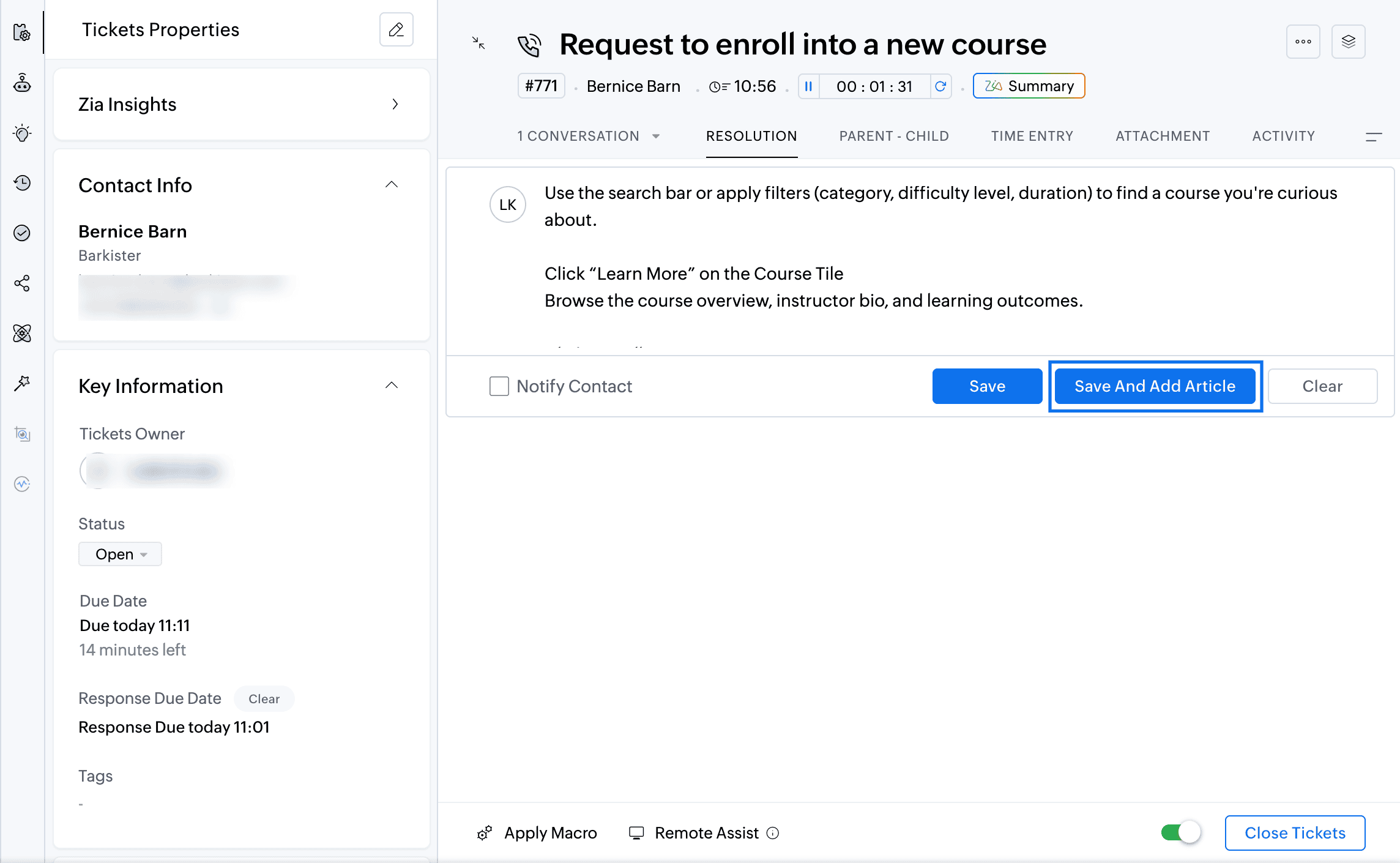
We plan to introduce a feature allowing agents to generate replies based on similar tickets. In this approach, Zia will reference similar tickets and their corresponding responses to suggest an answer. Instead of directly training Zia on potentially sensitive ticket data, this reply assistance feature will help agents by leveraging responses from comparable tickets.
4. Will Zoho offer additional AI models beyond Zia and OpenAI?
Yes, we plan to introduce more AI models, primarily those hosted and managed by Zoho, considering the B2B nature of our services and ensuring data security and privacy.
5. How is data currently handled with OpenAI and Zia?
Currently, when using OpenAI, fields marked as PII are masked on the User Query or KB articles before sending them to Open AI for response generation alone and not for training. Similarly, Zia, powered by open-source models like Lama 3.1, uses data strictly for generation purposes. We've fine-tuned Lama 3.1 specifically for Zoho Desk requirements.
6. Which additional open-source models does Zoho plan to support in the future?
Besides Llama, we plan to soon support additional models such as Qwen, and Mistral.
7. Will Zoho Desk allow users to integrate their own AI models?
Yes, we are working towards creating a platform within Zoho Desk that allows users to bring their own open-source models or custom LLMs for various features.
8. How do we use the Zia GenAI-powered chat? Do we need to set it up with predefined answers?
To create an Answer bot, navigate to Setup > Zia > Answer Bot.The Answer Bot operates by learning from your existing knowledge base data. The Answer Bot leverages generative AI, which can either be powered by Zia using open-source technology or through OpenAI's ChatGPT integration, for which you would need an API key. In our recent spring release, we extended the availability of the Answer Bot across instant messaging (IM) channels. You can now deploy the generative AI-powered Answer Bot, trained specifically on your knowledge base, across IM channels such as WhatsApp, Telegram, Line, WeChat, Facebook Messenger, and your own website. You can also deploy the Answer Bot through ASAP within your Mobile App (SDK). The AI-powered Self-Service with Answer Bot can be powered with Zia(Llama) or ChatGPT.
9. I'm using Zia to predict the"Issue Theme" field automatically, and it shows as successful. However, when I open a ticket, it doesn't suggest any value for me to confirm. Why is this happening?
Regarding Zia's field predictions, there are two available options:
i. Auto-update predicted value.
ii. Allow agents to confirm the predicted values manually ("Let me confirm predicted value manually" option).
To enable Field predictions, navigate to Setup (S) >> Zia >> Field Predictions >> Create A Field Prediction. In the Field Update mode field, you can choose to predict the field automatically or confirm the predicted value manually.
If you're using the "Let me confirm" option, you need to manually confirm the predicted values. To do this, navigate to the Field Prediction section within the Ticket Detail View. You'll find a wand (star) icon in the sidebar (ibar). Click this icon to view the predicted values from Zia. Here, you can either confirm or reject the suggested value, and your choice will help improve Zia's training data.
We're actively working on integrating this feature directly into the ticket properties, so that Zia's recommended values will appear directly within the field itself.
To create an Answer bot, navigate to Setup > Zia > Answer Bot.The Answer Bot operates by learning from your existing knowledge base data. The Answer Bot leverages generative AI, which can either be powered by Zia using open-source technology or through OpenAI's ChatGPT integration, for which you would need an API key. In our recent spring release, we extended the availability of the Answer Bot across instant messaging (IM) channels. You can now deploy the generative AI-powered Answer Bot, trained specifically on your knowledge base, across IM channels such as WhatsApp, Telegram, Line, WeChat, Facebook Messenger, and your own website. You can also deploy the Answer Bot through ASAP within your Mobile App (SDK). The AI-powered Self-Service with Answer Bot can be powered with Zia(Llama) or ChatGPT.
9. I'm using Zia to predict the"Issue Theme" field automatically, and it shows as successful. However, when I open a ticket, it doesn't suggest any value for me to confirm. Why is this happening?
Regarding Zia's field predictions, there are two available options:
i. Auto-update predicted value.
ii. Allow agents to confirm the predicted values manually ("Let me confirm predicted value manually" option).
To enable Field predictions, navigate to Setup (S) >> Zia >> Field Predictions >> Create A Field Prediction. In the Field Update mode field, you can choose to predict the field automatically or confirm the predicted value manually.
If you're using the "Let me confirm" option, you need to manually confirm the predicted values. To do this, navigate to the Field Prediction section within the Ticket Detail View. You'll find a wand (star) icon in the sidebar (ibar). Click this icon to view the predicted values from Zia. Here, you can either confirm or reject the suggested value, and your choice will help improve Zia's training data.
We're actively working on integrating this feature directly into the ticket properties, so that Zia's recommended values will appear directly within the field itself.
10. Does Zia learn from our responses to tickets as well?
Currently, Zia does not learn from the responses you send. It does not have the capability to learn from the messages you type and send. We are working on expanding the capability for Zia to respond in the business tone based on the custom instructions added by agents for each feature.
11. Do I need to upgrade all licenses to Enterprise to use the new Zia LLM if I'm currently on Zoho One?
Yes, you have to upgrade Zoho Desk to the Enterprise edition to use Zia powered by open-source models. Zia is available by default in the Enterprise plan and all Zoho bundles supporting the Enterprise edition of Zoho Desk.
Currently, Zia does not learn from the responses you send. It does not have the capability to learn from the messages you type and send. We are working on expanding the capability for Zia to respond in the business tone based on the custom instructions added by agents for each feature.
11. Do I need to upgrade all licenses to Enterprise to use the new Zia LLM if I'm currently on Zoho One?
Yes, you have to upgrade Zoho Desk to the Enterprise edition to use Zia powered by open-source models. Zia is available by default in the Enterprise plan and all Zoho bundles supporting the Enterprise edition of Zoho Desk.
12. How does Zia determine that an agent needs to intervene in a ticket? Does it instruct the user to contact support, or can it notify agents to own the ticket?
Currently, Zia cannot request an agent to intervene in a ticket.
However, we have a feature called Field Predictions, which uses your historical ticket data to predict and assign ticket ownership. When a customer replies, Zia analyzes the customer's message and, based on its training data, assigns the ticket to an appropriate agent who has previously handled similar conversations. Currently, we do not have a feature that proactively prompts an agent to intervene.
Currently, Zia cannot request an agent to intervene in a ticket.
However, we have a feature called Field Predictions, which uses your historical ticket data to predict and assign ticket ownership. When a customer replies, Zia analyzes the customer's message and, based on its training data, assigns the ticket to an appropriate agent who has previously handled similar conversations. Currently, we do not have a feature that proactively prompts an agent to intervene.
13. While managing multiple departments, can we enable Zia Reply Assistance for just one department?
Currently, the Zia Reply Assistance is configured at the organization level, meaning it applies to all the departments. However, we are actively working on making it department-specific.
14. As I understand, does Zia use ChatGPT for translation purposes?
No, Zoho uses its own translation model. In our recent spring release, we introduced a feature called Writing Assistance. This feature allows you to draft replies in your preferred language (for example, English) and translate them into other languages like Spanish or Italian using Zia. In this scenario, Zia does not utilize ChatGPT. However, for summarizing content or providing reply assistance, we rely primarily on ChatGPT to generate responses directly in languages such as Spanish or Italian.
Additionally, Zia uses open-source models without any associated charges.
Currently, the Zia Reply Assistance is configured at the organization level, meaning it applies to all the departments. However, we are actively working on making it department-specific.
14. As I understand, does Zia use ChatGPT for translation purposes?
No, Zoho uses its own translation model. In our recent spring release, we introduced a feature called Writing Assistance. This feature allows you to draft replies in your preferred language (for example, English) and translate them into other languages like Spanish or Italian using Zia. In this scenario, Zia does not utilize ChatGPT. However, for summarizing content or providing reply assistance, we rely primarily on ChatGPT to generate responses directly in languages such as Spanish or Italian.
Additionally, Zia uses open-source models without any associated charges.
15. How can we utilize AI to analyze data and generate reports?
Currently, Zia is not available for the Reports module. We do have Zia dashboards to monitor Zia's performance, however, we are developing a feature that will allow you to interact with Zia conversationally to create reports on the go.
If you have a subscription to Zoho Analytics, you can already leverage AI to generate reports. Zoho Analytics integrates with Zoho Desk, allowing you to ask questions in natural language and receive AI-generated reports.
Currently, Zia is not available for the Reports module. We do have Zia dashboards to monitor Zia's performance, however, we are developing a feature that will allow you to interact with Zia conversationally to create reports on the go.
If you have a subscription to Zoho Analytics, you can already leverage AI to generate reports. Zoho Analytics integrates with Zoho Desk, allowing you to ask questions in natural language and receive AI-generated reports.
16. Can we obtain customer tone reports from Zia Insights?
Currently, Zia Insights, powered by open-source models, is in its initial phase and does not yet support sending insights directly to reports.
Another way to obtain customer tone reports from Zia insights is using Zia API. Identify the tone and record it on a custom field. Generate reports based on the custom field to get insights on customer tones. We are working on this capability to send Zia Insights results from individual tickets to reports and dashboards.
17. Could you please clarify how Zoho ensures the protection of personally identifiable information (PII) in relation to data retention and Zia’s learning processes?
Regarding data retention, Zoho does not retain your data for training the generative AI models. Zia and ChatGPT utilize your data temporarily for generating responses. For other features, such as field predictions, all data remains within our Zoho ecosystem and does not share data externally for training purposes. Zoho complies with GDPR and HIPAA and sends data to Open AI only after masking Personally Identifiable information.
18. What permissions can be configured when creating knowledge base articles for use with the Answer Bot?
The Answer Bot operates on two channels: one for agents and the other for customers, and uses permission-based generation. When creating knowledge base articles, you can set permissions such as "All Users," "Agents Only," or "Registered Users." Agents accessing the Answer Bot through the Ticket Detail view will have access to all articles, while end-users accessing via ASAP will only see articles marked for "All Users." Currently, the "Registered Users" permission is supported only for agents. Based on these permissions, the Answer Bot determines which articles it can use to generate responses.
We also have a private beta available for a new AI training model: New Retrieval System. If you're interested, please email us your details, and we can enable this feature to further enhance your Answer Bot's accuracy.
19. I currently have Generative AI enabled. What is the difference between ChatGPT and Zia? Should I switch to Zia under Generative AI?
ChatGPT is an integration with OpenAI, where you need your own API key and add credits to your wallet. With ChatGPT, your Zoho Desk data is sent outside Zoho servers to OpenAI for generating responses. On the other hand, Zia is powered by open-source language models, such as Llama, and your data remains within Zoho's servers.
If you switch to Zia under Generative AI, it will be included in your existing Enterprise plan without any additional cost. Zia also offers greater contextual intelligence regarding your data. For example, ChatGPT supports summarizing only up to five conversations per ticket, whereas Zia can summarize up to 30 conversations. Refer here for details.
ChatGPT is an integration with OpenAI, where you need your own API key and add credits to your wallet. With ChatGPT, your Zoho Desk data is sent outside Zoho servers to OpenAI for generating responses. On the other hand, Zia is powered by open-source language models, such as Llama, and your data remains within Zoho's servers.
If you switch to Zia under Generative AI, it will be included in your existing Enterprise plan without any additional cost. Zia also offers greater contextual intelligence regarding your data. For example, ChatGPT supports summarizing only up to five conversations per ticket, whereas Zia can summarize up to 30 conversations. Refer here for details.
Here are the recordings from our Ask the Experts 19 sessions:
Stay tuned on the Ask the Experts Community for more updates as we gear up for the upcoming sessions focussed exclusively on Zia and AI in Zoho Desk.
Regards,
Lydia | Zoho Desk
Stay tuned on the Ask the Experts Community for more updates as we gear up for the upcoming sessions focussed exclusively on Zia and AI in Zoho Desk.
Regards,
Lydia | Zoho Desk