Discussions from Ask The Experts 19: Inside Zoho Desk Spring Release 2025 : Zia in Focus
Hello everyone,
We had insightful discussions in both the sessions of Ask the Experts(ATE) 19, diving deep into engaging conversations around Zia and the spring release. Your enthusiastic participation and thought-provoking questions brought the sessions to life!
In this post, we’re spotlighting the Q&A highlights focused exclusively on Zia.
We had insightful discussions in both the sessions of Ask the Experts(ATE) 19, diving deep into engaging conversations around Zia and the spring release. Your enthusiastic participation and thought-provoking questions brought the sessions to life!
In this post, we’re spotlighting the Q&A highlights focused exclusively on Zia.
1. Why are Zia Answer bots not performing as intended after integrating them with the internal Knowledge Base (KB)? Why is the bot unable to provide relevant answers when questions are asked in natural language?
Zia's Answer bot's response is based on how closely the user's query matches the content of your Knowledge Base(KB) articles. Zia operates using Retrieval-Augmented Generation (RAG) technology, which combines AI search and AI-generated responses. For AI search, we use AI training models specifically implemented for your knowledge base, while ChatGPT/Zia is used for generating the responses based on the service you select. Refer Setting up Generative AI Services: Zia or ChatGPT.
A. To improve this, we recommend following our best practices for training Zia Answer Bots. These include:
i. Use simple and commonly-used phrases rather than jargons/isolated keywords in your help documents.
ii. Include clear headings or sub-titles within your help documents to improve searchability and matching accuracy.
B. If you still do not receive relevant answers, we offer an improved Zia search powered by a new training model. If you would like to use it, please drop your request to support@zohodesk.com.
i. Use simple and commonly-used phrases rather than jargons/isolated keywords in your help documents.
ii. Include clear headings or sub-titles within your help documents to improve searchability and matching accuracy.
B. If you still do not receive relevant answers, we offer an improved Zia search powered by a new training model. If you would like to use it, please drop your request to support@zohodesk.com.
Additionally, we have introduced Generative AI powered by Zia, that is powered by open-source and run in Zoho's environment. To enable this, go to Setup(S) >> Zia >> Generative AI >> Services >> select Zia, under Choose service. This is hosted entirely within Zoho's environment and is included at no additional cost and works with the Enterprise edition or Zoho bundles supporting Enterprise features.
2. How to optimize and incorporate the Zia bot within the Professional Edition?
Zia offers its complete range of functionalities exclusively within Zoho Desk Enterprise Edition and Zoho's bundle services.
However, there are specific Zia features available on the Professional Edition:
a. Zia powered by ChatGPT: This integration is accessible within Zoho Desk, enabling responses based on open-domain data. In the Professional edition, Zia will respond using information from the public domain, and the "Reply with Knowledge Base" feature is not available.
Zia offers its complete range of functionalities exclusively within Zoho Desk Enterprise Edition and Zoho's bundle services.
However, there are specific Zia features available on the Professional Edition:
a. Zia powered by ChatGPT: This integration is accessible within Zoho Desk, enabling responses based on open-domain data. In the Professional edition, Zia will respond using information from the public domain, and the "Reply with Knowledge Base" feature is not available.
Additionally, Zia supports enhanced ticket handling through features like Ticket Summary, Zia Insights, Writing Assistance, and AI-generated content.
b. Content Analysis: Launched in the recent spring update, this feature improves upon the existing spell-check capability and is accessible across all paid editions..
b. Content Analysis: Launched in the recent spring update, this feature improves upon the existing spell-check capability and is accessible across all paid editions..
Currently, Zia can only be trained using your Knowledge Base and not from tickets or their resolutions.
Tickets often contain sensitive customer data and personally identifiable information (PII), which should not be accessible to all agents or customers. Due to this privacy constraint, we currently do not train Zia using ticket data.
However, there's an option to add information from the Resolution under the Ticket tabs. While creating a resolution, the agent can select "Save And Add Article" to add the resolution to the Knowledge Base thereby giving Zia an option to train on the article.
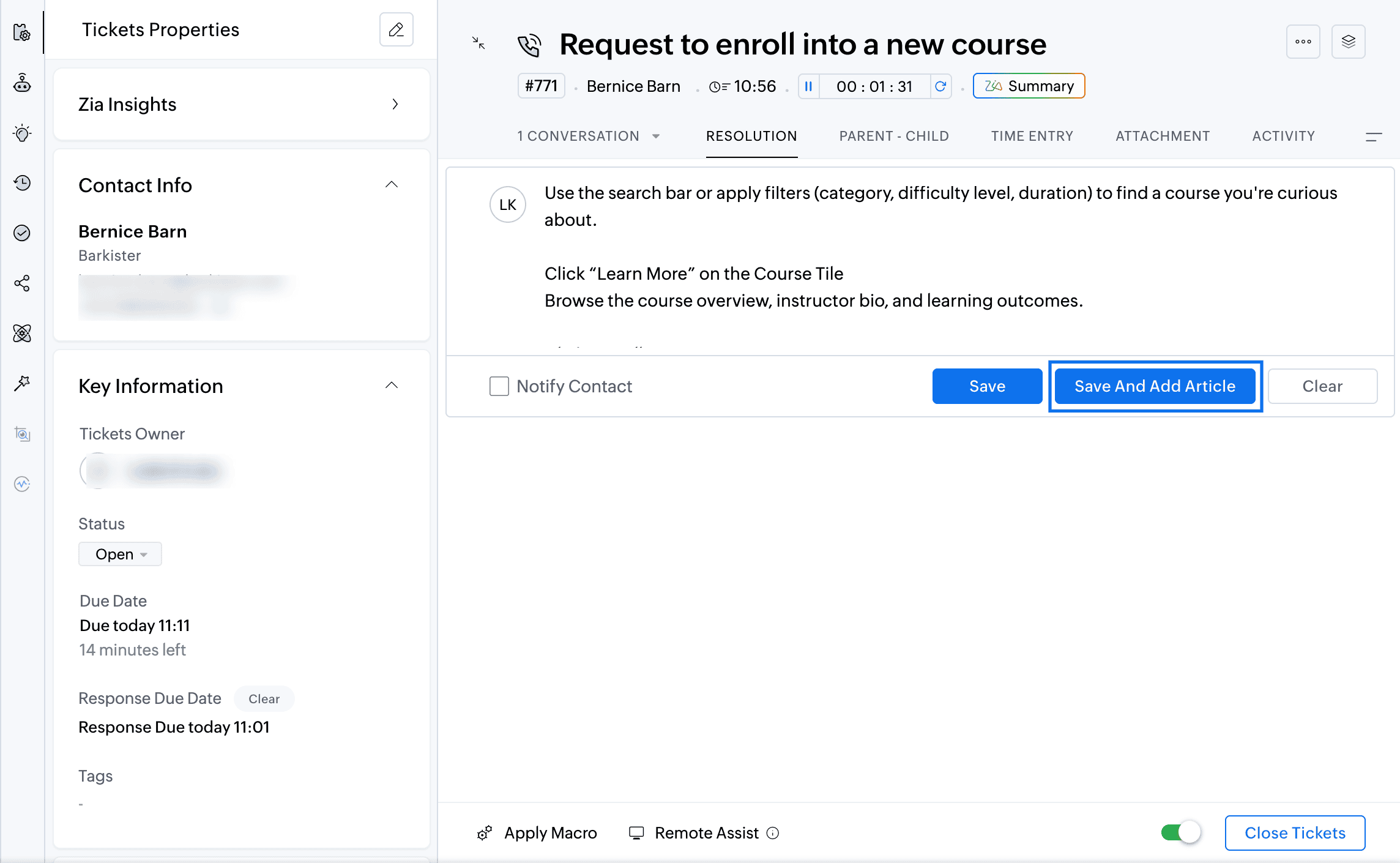
We plan to introduce a feature allowing agents to generate replies based on similar tickets. In this approach, Zia will reference similar tickets and their corresponding responses to suggest an answer. Instead of directly training Zia on potentially sensitive ticket data, this reply assistance feature will help agents by leveraging responses from comparable tickets.
4. Will Zoho offer additional AI models beyond Zia and OpenAI?
Yes, we plan to introduce more AI models, primarily those hosted and managed by Zoho, considering the B2B nature of our services and ensuring data security and privacy.
5. How is data currently handled with OpenAI and Zia?
Currently, when using OpenAI, fields marked as PII are masked on the User Query or KB articles before sending them to Open AI for response generation alone and not for training. Similarly, Zia, powered by open-source models like Lama 3.1, uses data strictly for generation purposes. We've fine-tuned Lama 3.1 specifically for Zoho Desk requirements.
6. Which additional open-source models does Zoho plan to support in the future?
Besides Llama, we plan to soon support additional models such as Qwen, and Mistral.
7. Will Zoho Desk allow users to integrate their own AI models?
Yes, we are working towards creating a platform within Zoho Desk that allows users to bring their own open-source models or custom LLMs for various features.
8. How do we use the Zia GenAI-powered chat? Do we need to set it up with predefined answers?
To create an Answer bot, navigate to Setup > Zia > Answer Bot.The Answer Bot operates by learning from your existing knowledge base data. The Answer Bot leverages generative AI, which can either be powered by Zia using open-source technology or through OpenAI's ChatGPT integration, for which you would need an API key. In our recent spring release, we extended the availability of the Answer Bot across instant messaging (IM) channels. You can now deploy the generative AI-powered Answer Bot, trained specifically on your knowledge base, across IM channels such as WhatsApp, Telegram, Line, WeChat, Facebook Messenger, and your own website. You can also deploy the Answer Bot through ASAP within your Mobile App (SDK). The AI-powered Self-Service with Answer Bot can be powered with Zia(Llama) or ChatGPT.
9. I'm using Zia to predict the"Issue Theme" field automatically, and it shows as successful. However, when I open a ticket, it doesn't suggest any value for me to confirm. Why is this happening?
Regarding Zia's field predictions, there are two available options:
i. Auto-update predicted value.
ii. Allow agents to confirm the predicted values manually ("Let me confirm predicted value manually" option).
To enable Field predictions, navigate to Setup (S) >> Zia >> Field Predictions >> Create A Field Prediction. In the Field Update mode field, you can choose to predict the field automatically or confirm the predicted value manually.
If you're using the "Let me confirm" option, you need to manually confirm the predicted values. To do this, navigate to the Field Prediction section within the Ticket Detail View. You'll find a wand (star) icon in the sidebar (ibar). Click this icon to view the predicted values from Zia. Here, you can either confirm or reject the suggested value, and your choice will help improve Zia's training data.
We're actively working on integrating this feature directly into the ticket properties, so that Zia's recommended values will appear directly within the field itself.
To create an Answer bot, navigate to Setup > Zia > Answer Bot.The Answer Bot operates by learning from your existing knowledge base data. The Answer Bot leverages generative AI, which can either be powered by Zia using open-source technology or through OpenAI's ChatGPT integration, for which you would need an API key. In our recent spring release, we extended the availability of the Answer Bot across instant messaging (IM) channels. You can now deploy the generative AI-powered Answer Bot, trained specifically on your knowledge base, across IM channels such as WhatsApp, Telegram, Line, WeChat, Facebook Messenger, and your own website. You can also deploy the Answer Bot through ASAP within your Mobile App (SDK). The AI-powered Self-Service with Answer Bot can be powered with Zia(Llama) or ChatGPT.
9. I'm using Zia to predict the"Issue Theme" field automatically, and it shows as successful. However, when I open a ticket, it doesn't suggest any value for me to confirm. Why is this happening?
Regarding Zia's field predictions, there are two available options:
i. Auto-update predicted value.
ii. Allow agents to confirm the predicted values manually ("Let me confirm predicted value manually" option).
To enable Field predictions, navigate to Setup (S) >> Zia >> Field Predictions >> Create A Field Prediction. In the Field Update mode field, you can choose to predict the field automatically or confirm the predicted value manually.
If you're using the "Let me confirm" option, you need to manually confirm the predicted values. To do this, navigate to the Field Prediction section within the Ticket Detail View. You'll find a wand (star) icon in the sidebar (ibar). Click this icon to view the predicted values from Zia. Here, you can either confirm or reject the suggested value, and your choice will help improve Zia's training data.
We're actively working on integrating this feature directly into the ticket properties, so that Zia's recommended values will appear directly within the field itself.
10. Does Zia learn from our responses to tickets as well?
Currently, Zia does not learn from the responses you send. It does not have the capability to learn from the messages you type and send. We are working on expanding the capability for Zia to respond in the business tone based on the custom instructions added by agents for each feature.
11. Do I need to upgrade all licenses to Enterprise to use the new Zia LLM if I'm currently on Zoho One?
Yes, you have to upgrade Zoho Desk to the Enterprise edition to use Zia powered by open-source models. Zia is available by default in the Enterprise plan and all Zoho bundles supporting the Enterprise edition of Zoho Desk.
Currently, Zia does not learn from the responses you send. It does not have the capability to learn from the messages you type and send. We are working on expanding the capability for Zia to respond in the business tone based on the custom instructions added by agents for each feature.
11. Do I need to upgrade all licenses to Enterprise to use the new Zia LLM if I'm currently on Zoho One?
Yes, you have to upgrade Zoho Desk to the Enterprise edition to use Zia powered by open-source models. Zia is available by default in the Enterprise plan and all Zoho bundles supporting the Enterprise edition of Zoho Desk.
12. How does Zia determine that an agent needs to intervene in a ticket? Does it instruct the user to contact support, or can it notify agents to own the ticket?
Currently, Zia cannot request an agent to intervene in a ticket.
However, we have a feature called Field Predictions, which uses your historical ticket data to predict and assign ticket ownership. When a customer replies, Zia analyzes the customer's message and, based on its training data, assigns the ticket to an appropriate agent who has previously handled similar conversations. Currently, we do not have a feature that proactively prompts an agent to intervene.
Currently, Zia cannot request an agent to intervene in a ticket.
However, we have a feature called Field Predictions, which uses your historical ticket data to predict and assign ticket ownership. When a customer replies, Zia analyzes the customer's message and, based on its training data, assigns the ticket to an appropriate agent who has previously handled similar conversations. Currently, we do not have a feature that proactively prompts an agent to intervene.
13. While managing multiple departments, can we enable Zia Reply Assistance for just one department?
Currently, the Zia Reply Assistance is configured at the organization level, meaning it applies to all the departments. However, we are actively working on making it department-specific.
14. As I understand, does Zia use ChatGPT for translation purposes?
No, Zoho uses its own translation model. In our recent spring release, we introduced a feature called Writing Assistance. This feature allows you to draft replies in your preferred language (for example, English) and translate them into other languages like Spanish or Italian using Zia. In this scenario, Zia does not utilize ChatGPT. However, for summarizing content or providing reply assistance, we rely primarily on ChatGPT to generate responses directly in languages such as Spanish or Italian.
Additionally, Zia uses open-source models without any associated charges.
Currently, the Zia Reply Assistance is configured at the organization level, meaning it applies to all the departments. However, we are actively working on making it department-specific.
14. As I understand, does Zia use ChatGPT for translation purposes?
No, Zoho uses its own translation model. In our recent spring release, we introduced a feature called Writing Assistance. This feature allows you to draft replies in your preferred language (for example, English) and translate them into other languages like Spanish or Italian using Zia. In this scenario, Zia does not utilize ChatGPT. However, for summarizing content or providing reply assistance, we rely primarily on ChatGPT to generate responses directly in languages such as Spanish or Italian.
Additionally, Zia uses open-source models without any associated charges.
15. How can we utilize AI to analyze data and generate reports?
Currently, Zia is not available for the Reports module. We do have Zia dashboards to monitor Zia's performance, however, we are developing a feature that will allow you to interact with Zia conversationally to create reports on the go.
If you have a subscription to Zoho Analytics, you can already leverage AI to generate reports. Zoho Analytics integrates with Zoho Desk, allowing you to ask questions in natural language and receive AI-generated reports.
Currently, Zia is not available for the Reports module. We do have Zia dashboards to monitor Zia's performance, however, we are developing a feature that will allow you to interact with Zia conversationally to create reports on the go.
If you have a subscription to Zoho Analytics, you can already leverage AI to generate reports. Zoho Analytics integrates with Zoho Desk, allowing you to ask questions in natural language and receive AI-generated reports.
16. Can we obtain customer tone reports from Zia Insights?
Currently, Zia Insights, powered by open-source models, is in its initial phase and does not yet support sending insights directly to reports.
Another way to obtain customer tone reports from Zia insights is using Zia API. Identify the tone and record it on a custom field. Generate reports based on the custom field to get insights on customer tones. We are working on this capability to send Zia Insights results from individual tickets to reports and dashboards.
17. Could you please clarify how Zoho ensures the protection of personally identifiable information (PII) in relation to data retention and Zia’s learning processes?
Regarding data retention, Zoho does not retain your data for training the generative AI models. Zia and ChatGPT utilize your data temporarily for generating responses. For other features, such as field predictions, all data remains within our Zoho ecosystem and does not share data externally for training purposes. Zoho complies with GDPR and HIPAA and sends data to Open AI only after masking Personally Identifiable information.
18. What permissions can be configured when creating knowledge base articles for use with the Answer Bot?
The Answer Bot operates on two channels: one for agents and the other for customers, and uses permission-based generation. When creating knowledge base articles, you can set permissions such as "All Users," "Agents Only," or "Registered Users." Agents accessing the Answer Bot through the Ticket Detail view will have access to all articles, while end-users accessing via ASAP will only see articles marked for "All Users." Currently, the "Registered Users" permission is supported only for agents. Based on these permissions, the Answer Bot determines which articles it can use to generate responses.
We also have a private beta available for a new AI training model: New Retrieval System. If you're interested, please email us your details, and we can enable this feature to further enhance your Answer Bot's accuracy.
19. I currently have Generative AI enabled. What is the difference between ChatGPT and Zia? Should I switch to Zia under Generative AI?
ChatGPT is an integration with OpenAI, where you need your own API key and add credits to your wallet. With ChatGPT, your Zoho Desk data is sent outside Zoho servers to OpenAI for generating responses. On the other hand, Zia is powered by open-source language models, such as Llama, and your data remains within Zoho's servers.
If you switch to Zia under Generative AI, it will be included in your existing Enterprise plan without any additional cost. Zia also offers greater contextual intelligence regarding your data. For example, ChatGPT supports summarizing only up to five conversations per ticket, whereas Zia can summarize up to 30 conversations. Refer here for details.
ChatGPT is an integration with OpenAI, where you need your own API key and add credits to your wallet. With ChatGPT, your Zoho Desk data is sent outside Zoho servers to OpenAI for generating responses. On the other hand, Zia is powered by open-source language models, such as Llama, and your data remains within Zoho's servers.
If you switch to Zia under Generative AI, it will be included in your existing Enterprise plan without any additional cost. Zia also offers greater contextual intelligence regarding your data. For example, ChatGPT supports summarizing only up to five conversations per ticket, whereas Zia can summarize up to 30 conversations. Refer here for details.
Here are the recordings from our Ask the Experts 19 sessions:
Stay tuned on the Ask the Experts Community for more updates as we gear up for the upcoming sessions focussed exclusively on Zia and AI in Zoho Desk.
Regards,
Lydia | Zoho Desk
Stay tuned on the Ask the Experts Community for more updates as we gear up for the upcoming sessions focussed exclusively on Zia and AI in Zoho Desk.
Regards,
Lydia | Zoho Desk
Topic Participants
Lydia | Zoho Desk
Sticky Posts
Ask the Experts 10: A 5-hour online Q&A on Zoho Desk Best Practices
Welcome to Zoho Desk's Ask the Experts session! This is a monthly discussion on our forums; wherein a panel of experts will take on questions specific to topics related to Zoho Desk. The panel will be available for a 5-hour period and will answer anyAsk the Experts 7: A 5-hour online Q&A on Telephony and Call Module
Welcome to Ask the Experts session! This is a monthly discussion in forums; each session, a panel of experts will take questions on specific topics related to Zoho Desk. The panel will be available for a 5-hour period and answer any questions posted here.Ask the Experts 5: Online Q&A on Zoho Desk Extensibility
Welcome to Ask the Experts session! This is a monthly discussion in forums; each session, a panel of experts will take questions on specific topics related to Zoho Desk. The panel will be available for a 5-hour period and answer any questions posted here.Ask the Experts 4: A 5 hour online Q&A on agent productivity
Welcome to Ask the expert session! This is a monthly discussion in forums; each session, a panel of experts will take questions on specific topics related to Zoho Desk. The panel will be available for a 5-hour period and answer any questions posted here.Ask the Experts 3: A 5 hour online Q&A on reports and dashboards
Welcome to Ask the expert session! This is a monthly discussion in forums; each session, a panel of experts will take questions on specific topics related to Zoho Desk. The panel will be available for a 5-hour period and answer any questions posted here.
Recent Topics
Email Sending Failed - SMTP Error: data not accepted. - WHMCS Not sending emails due to this error
I have been trying to figure out a fix for about a week now and I haven't found one on my own so I am going to ask for help on here. After checking all the settings and even resetting my password for the email used for WHMCS it still says: Email Sending Failed - SMTP Error: data not accepted. I have no clue how to fix it at this point. Any insight would be lovely.Zoho Flow - Update record in Trackvia
Hello, I have a Flow that executes correctly but I only want it to execute once when a particular field on a record is updated in TrackVia. I have the trigger filters setup correctly and I want to add an "update record" action at the end of the flow toAdd Comprehensive Accessibility Features to Zoho Desk Help Center for End Users
Hello Zoho Desk Team, We hope you're doing well. We’d like to submit a feature request to enhance the client-facing Help Center in Zoho Desk with comprehensive accessibility features, similar to those already available on the agent interface. 🎯 CurrentZoho CRM mobile: Support for rich text in multi-line fields, Image upload field, and more
Hello everyone, We've made a few enhancements to the Zoho CRM mobile app to improve your experience. Here's what's new: Rich text support for multi-line fields (iOS) Image upload field support (iOS and Android) Tool tip markdown (iOS) Rich text supportin zoho creator Sales Returns form has sub form Line Items return quantity when i upate the or enter any values in the sub form that want to reflect in the Sales Order form item deail sub form field Q
in zoho creator Sales Returns form has sub form Line Items return quantity when i upate the or enter any values in the sub form that want to reflect in the Sales Order form item deail sub form field Quantity Returned\ pls check the recording fetch_salesorderEstimates with options and sub-totals
Hi It seems it would be great to be able to show multiple options in an estimate. For instance I have a core product to which I can add options, and maybe sub-options... It would be great to have subtotals and isolate the core from the not compulsory items. ThanksOptional Items Estimate
How do you handle optional items within an estimate? In our case we have only options to choose with. (Like your software pricing, ...standard, professional, enterprise) How can we disable the total price? Working with Qty = 0 is unprofessional....Important Update : Zendesk Sell announced End of Life
Hello Zendesk users, Zendesk has officially announced that Zendesk Sell will reach its End of Life (EOL) on August 31, 2027 (Learn more). In line with this deprecation, Zoho Analytics will retire its native Zendesk Sell connector effective October 1,Zoho Sheets
Hi, I am trying to transition into Zoho sheets, I have attached the issues encountered. Server issues, file trying to upload for more than 30 mins, even once uploaded my data aren't loaded. Simple calculations are not working I have attached the sample.Zoho CRM + Zoho FSM : alignez vos équipes commerciales et techniques
La vente est finalisée, mais le parcours client ne fait que commencer ! Dans les entreprises orientées service, conclure une vente représente seulement la première étape. Ce qui suit — installation, réparation ou maintenance régulière — influence grandementTop Bar Shifting issue still not fixed yet
I mentioned in a previous ticket that on Android, the top bar shifts up when you view collections or when you're in the settings. That issue still hasn't been fixed yet. I don't wanna have to reinstall the app as I've noticed for some reason, reinstallingPower of Automation:: Automate the process of updating project status based on a specific task status.
Hello Everyone, Today, I am pleased to showcase the capabilities of a custom function that is available in our Gallery. To explore the custom functions within the Gallery, please follow the steps below. Click Setup in the top right corner > DeveloperBilling Management: #3 Billing Unbilled Charges Periodically
We had a smooth sail into Prorated Billing, a practice that ensures fairness when customers join, upgrade, or downgrade a service at any point during the billing cycle. But what happens when a customer requests additional limits or features during theNo bank feeds from First National Bank South Africa since 12 September
I do not know how Zoho Books expects its customers to run a business like this. I have contacted Zoho books numerous times about this and the say it is solved - on email NO ONE ANSWERS THE SOUTH AFRICAN HELP LINE Come on Zoho Books, you cannot expectCitation Problem
I had an previous ticket (#116148702) on this subject. The basic problem is this; the "Fetch Details" feature works fine on the first attempt but fails on every subsequent attempt, Back in July after having submitted information electronically and wasFailing to generate Access and Refresh Token
Hello. I have two problems: First one when generating Access and Refresh Token I get this response: As per the guide here : https://www.zoho.com/books/api/v3/#oauth (using server based application) I'm following all the steps. I have managed to getAuto-Forward All Incoming Mail
I have setup the Zoho Business Mail to host my own domain's mail. Is it possible to have all incoming email auto-forwarded to another email account? What I would like to do is have all incoming emails forwarded to my Yahoo or Hotmail accounts until I can complete the migration to Zoho. I can't seem to locate this setting anywhere. I don't care whether the mail is kept on the Zoho server or not at this time.Zeptomail 136.143.188.150 blocked by SpamCop
Hi - it looks like this IP is being blocked, resulting in hard bounces unfortunately :( "Reason: uncategorized-bounceMessage: 5.7.1 Service unavailable; Client host [136.143.188.150] blocked using bl.spamcop.net; Blocked - see https://www.spamcop.net/bl.shtml?136.143.188.150Apply transaction rules to multiple banks
Is there any way to make transaction rules for one bank apply to other banks? It seems cumbersome to have to re-enter the same date for every account.How to bulk update records with Data Enrichment by Zia
Hi, I want to bulk update my records with Data Enrichment by Zia. How can I do this?How do I split a large CSV file into smaller parts for import into Zoho?
Hi everyone, I’m trying to upload a CSV file into Zoho, but the file is very large (millions of rows), and Zoho keeps giving me errors or takes forever to process. I think the file size is too big for a single import. Manually breaking the CSV into smallerClient Script Payload Size Bug
var createParams = { "data": [{ "Name": "PS for PR 4050082000024714556", "Price_Request": { "id": "4050082000024714556" }, "Account": { "id": "4050082000021345001" }, "Deal": { "id": "4050082000023972001" }, "Owner": { "id": "4050082000007223004" }, "Approval_Status":lead convert between modules
Hello, The workflow we set up to automatically transfer leads registered via Zapier into the Patients module to the Leads module started to malfunction unexpectedly on September 25, 2025, at 11:00 AM. Under normal circumstances, all fields filled in theFlow Task Limits - How to Monitor, Understand Consumption?
So, I got an email last night saying that I've exhausted 70% of my tasks for this month, and encouraging me to buy more tasks. I started to dig into this, and I cannot for the life of me figure out where to find any useful information for understanding,Cross References Do Not Update Correctly
I am using cross references to reference Figures and current am just using the label and number, i.e. Figure #. As seen here: When I need to update the field, I use the update field button. But it will change the cross reference to no longer only includingManage control over Microsoft Office 365 integrations with profile-based sync permissions
Greetings all, Previously, all users in Zoho CRM had access to enable Microsoft integrations (Calendar, Contacts, and Tasks) in their accounts, regardless of their profile type. Users with administrator profiles can now manage profile-based permissionsHow to Track and Manage Schedule Changes in Zoho Projects
Keeping projects on track requires meticulous planning. However, unforeseen circumstances can cause changes to schedules, leading to delays. It becomes important to capture the reason for such changes to avoid them in the future. Zoho Projects acknowledgesIs there a notification API when a new note is addeding
Trying to push to Cliq, or email notification when there's a new note added in module. How to implement this?Collaborate Feature doesn't work
Hello Team. It seems that the collaborate section is broken? I can post something but it all appears in "Discussions". In there is no way how I would mark something as Draft, Approval, post or any of the other filter categories? Also if I draft a postEdit Permission during and after approval?
When a record is sent for approval Can a user request for edit permission from the approver? We don't want to give edit permissions for all the records under approval Only on a case-by-case basis How can we achieve this?Zoho web and mobile application not workingn
Both zoho forms web and mobile application aren't working. I have checked my network connections and they are fine.Bulk Moving Images into Folders in the Library
I can't seem to select multiple images to move into a folder in order to clean up my image library and organize it. Instead, I have to move each individual image into the folder and sometimes it takes MULTIPLE tries to get it to go in there. Am I missingLatest updates in Zoho Meeting | Breakout rooms and End to end encryption
Hello everyone, We’re excited to share a few updates for Zoho Meeting. Here's what we've been working on lately: Introducing Breakout Rooms for enhanced collaboration in your online meetings and End-to-end encryption to ensure that the data is encryptedSystematic SPF alignment issues with Zoho subdomains
Analysis Period: August 19 - September 1, 2025 PROBLEM SUMMARY Multiple Zoho services are causing systematic SPF authentication failures in DMARC reports from major email providers (Google, Microsoft, Zoho). While emails are successfully delivered dueAccidentally deleted a meeting recording -- can it be recovered?
Hi, I accidentally deleted the recording for a meeting I had today. Is there a way I can recover it?How to access email templates using Desk API?
Trying to send an email to the customer associated to the ticket for an after hours notification and can't find the API endpoint to grab the email template. Found an example stating it should be: "https://desk.zoho.com/api/v1/emailtemplates/" + templateID;Update Portal User Name using Deluge?
Hey everyone. I have a basic intake form that gathers some general information. Our team then has a consultation with the person. If the person wants to move forward, the team pushes a CRM button that adds the user to a creator portal. That process isUnable to retrieve Contact_Name field contents using Web API in javascript function
Hello, I've added a field in the Purchase Order form to select and associate a Sales Order (Orden_de_venta, lookup field). I've also created a client script to complete some fields from the Sales Order (and the Quote), when the user specifies the relatedUpdating Woocommerce Variation Products Prices Via Zoho CRM
I can update product prices with this flow: But I can't update variant products. I got a code from Zoho for this, but I couldn't get it to work. It needs to find the product in the CRM from the SKU field and update the variation with the price there.Emails Disappearing From Inbox
I am experiencing the unnerving problem of having some of the messages in my inbox just disappear. It seems to happen to messages that have been in there for longer than a certain amount of time (not sure how long exactly). They are usually messages that I have flagged and know I need to act on, but have not gotten around to doing so yet. I leave them in my inbox so I will see them and be reminded that I still need to do something about them, but at least twice now I have opened my inbox and foundNext Page