Easily perform calculations using dates with the new DATEDIF function

Easily perform calculations using dates with the new DATEDIF function

Hey Zoho Writer users!
 
We've enhanced Zoho Writer's formula capabilities with the new DATEDIF function. This allows you to calculate the difference between dates in days, months, and years.
 
Function syntax:
 
=DATEDIF(start_date, end_date, unit)

Inputs:
start_date
The date from which the calculation begins
end_date
The date till which the calculation is needed
unit
The format (day, month, year) in which the difference should be calculated.
 
You can also have the start_date and end_date as a merge field or an auto-date field.

List of supported units:

Unit
Description
Y
Calculates the difference in years
M
Calculates the difference in months
D
Calculates the difference in days
MD
Calculates the difference in days, excluding months and years
YM
Calculates the difference in months, excluding years
YD
Calculates the difference in days excluding years
 
D(Days) will be used as the default unit if no unit is specified.
DATEDIF returns the difference as an integer.


How to insert a DATEDIF function in Zoho Writer:
 
  1. Click the hamburger menu located on the top left side of the editor and click Fields.
  2. Click Formula located under the Dynamic Fields category.
  3. In the popup, click Choose Function and choose DATEDIF from the list of functions.


Here are some examples of the DATEDIF function:
 
Example
Syntax
Output
Calculate the difference between Dec. 28, 2023 and Feb. 28, 2024 in months
=DATEDIF([28/12/2023], [28/02/2024],"M")
2
Calculate the difference between Jan. 15, 2024 and March 16, 2024 in days, excluding months and years
=DATEDIF([15/01/2024], [16/03/2024],"MD")
1 (Because the difference is 1 day and 2 months, this formula returns 1 day)
Calculate the difference between Feb. 20, 2023 and April 20, 2024 in months excluding years
=DATEDIF([20/02/2023], [22/04/2024],"YM")
2 (Because the difference is 1 year and 2 months, this formula returns 2 months)

Please ensure the end_date is greater than the start_date.
To use the DATEDIF function in Writer's merge templates please make sure the field type is date and configured in a date format supported in Zoho Writer.
 
A real-world example:
 
Let's say you're sending reminder emails to your event attendees mentioning the number of days until the event. The DATEDIF function allows you to easily insert this number without doing the calculations manually.
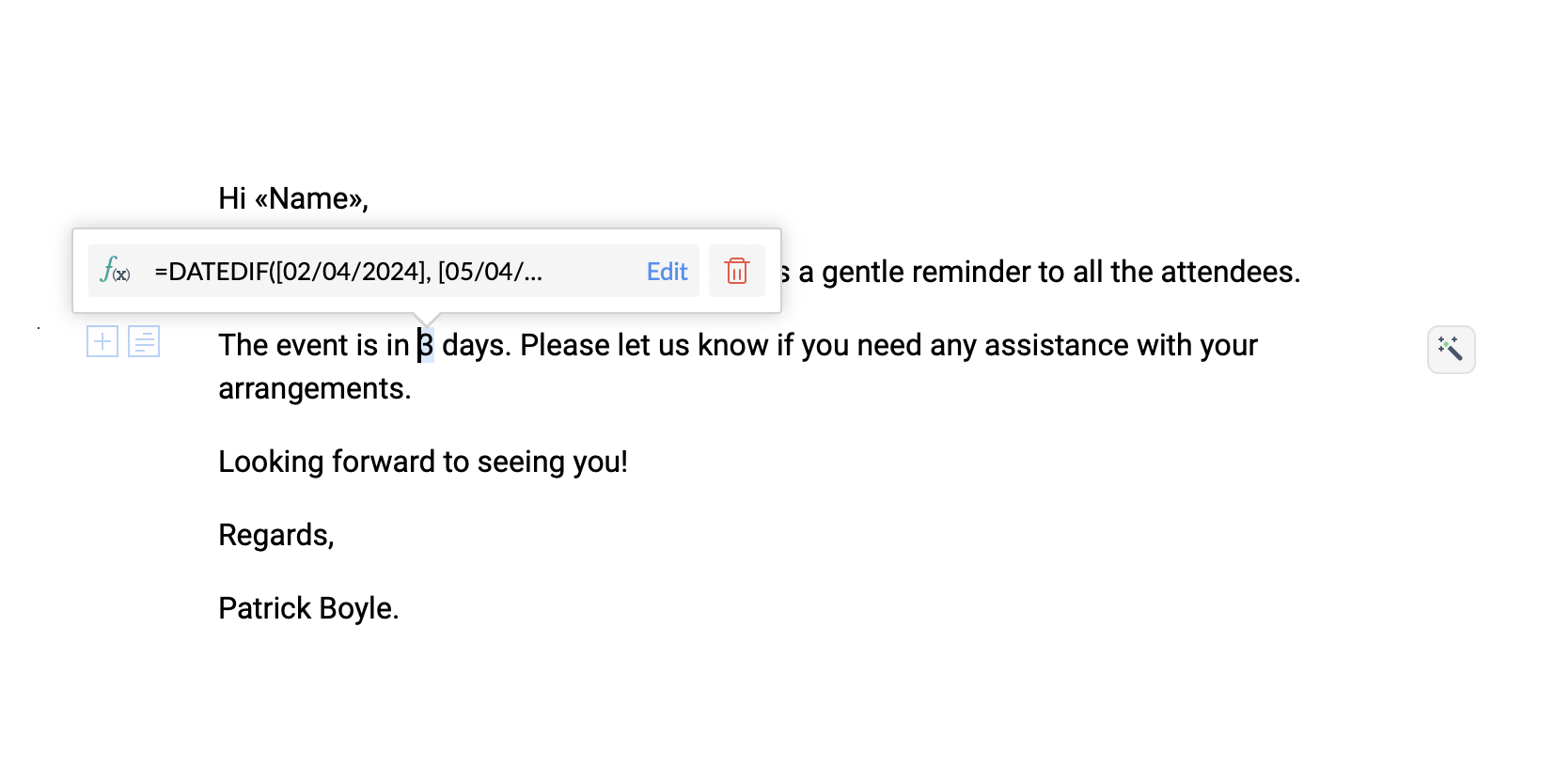


Try the new DATEDIF function in Zoho Writer and let us know your suggestions and feedback in the comments section below or email us at support@zohowriter.com or support@eu.zohowriter.com.
 
If you have any function that you want us to add in Zoho Writer, please let us know in the comments.
 
Regards,
Team Writer


    • Sticky Posts

    • Zoho Writer's WordPress extensions

      Hey Zoho Writer users! Say goodbye to all your WordPress content publishing woes with Zoho Writer's WordPress extensions. Publish content with all your formatting and images, republish content when you update a document, and more—from a single window
    • Easily perform calculations using dates with the new DATEDIF function

      Hey Zoho Writer users! We've enhanced Zoho Writer's formula capabilities with the new DATEDIF function. This allows you to calculate the difference between dates in days, months, and years. Function syntax: =DATEDIF(start_date, end_date, unit) Inputs:
    • Date-based conditions and filters

      Configure conditions with date  Hi everyone! We are excited to announce that you can now compare and filter data with date-based conditions. This update lets you compare date fields in a document to a reference date and display a text or value if the
    • Introducing group by, aggregation, and repeating regions in mail merge templates

      Display data exactly the way you want and highlight key insights with Zoho Writer's enhanced merge templates. We've supercharged Zoho Writer's merge templates with the capability to dynamically group, aggregate, and repeat data as blocks. You can now
    • Say hello to an improved way to merge documents!

      Automating all your documents from start to finish is now easier than ever with Writer's new merge tools.   If you haven't seen it yet, you can read the main announcement here. Here is the full list of the features we've rolled out: 1. Dynamic Table Headers
    • Recent Topics

    • Trying to show the actual Terms & Conditions on PDF

      Hi, On Zoho forms I am trying to have the actual terms and conditions that the user needs to accept also show on the pdf that they receive after. Right now it only says "Agreed". Please help.
    • Installing EMAIL Setup in New Domain

      Respected Support team, I'm facing an issue with cloudflare in Pakistan, I want to setup Zoho Mail Setup but I Don't know how to enable Zoho mail setup without cloudflare. My Website https://stumbleguyzzapk.com/, https://fakservices.com/ is using CF,
    • Enhancements to Zoho Meeting Annotator

      Hello Zoho Meeting Team, Hope you are doing well. We would like to share a few improvement suggestions regarding the Zoho Meeting Annotator used during screen sharing. While the current version provides helpful annotation tools, there are several limitations
    • Cliq iOS can't see shared screen

      Hello, I had this morning a video call with a colleague. She is using Cliq Desktop MacOS and wanted to share her screen with me. I'm on iPad. I noticed, while she shared her screen, I could only see her video, but not the shared screen... Does Cliq iOS is able to display shared screen, or is it somewhere else to be found ? Regards
    • Triggering rules on lead conversion

      There is no field on the Rule list for rule conversion to trigger an alert on liead conversion to a potential. I assigned a rule to file on any creation or update of a lead. The lead was changed a lead to a potential but no rule was fired. Rajesh Bhadra
    • Can I create a custom function for chart of accounts?

      I'm trying to add a custom function that should run whenever a record in the Chart of Accounts module is edited, but on the form for creating a new function, the module dropdown does not include the chart of accounts as an option.
    • Can I filter a Lookup field to only show related records from another Lookup in Zoho CRM?

      In our Leads module, we have two Lookup fields: Recruitment Agency – the agency that the lead came from Recruiter – the individual contact from that agency who sent us the lead Both fields link correctly to their respective records in CRM. However, our
    • How to calculate separate totals for Product Line Items filtered by category in Quotes?

      Hello! I'm working with Quotes in Zoho CRM and need help calculating conditional totals for line items. Current setup: I have two tables in my Quote template (Zoho Writer), both displaying Quoted Line Items Table 1 (top): Shows all products where Product
    • Add "Fetch Composite Item" Action for Inventory

      I want to make a Flow that uses information returned in the GET call for Composite Items, and it's not currently available in Zoho Flow. Please consider adding this functionality.
    • Zoho Social/Marketing Plus - Addition to "Monitor" function

      It would be very helpful if the Monitor function would allow us to add a column to monitor hashtags in addition to pages and mentions. This is a common and very valuable function in other social listening tools.
    • Almacenamiento

      Hola, Quisiera saber como podría hacer para bajar el almacenamiento de 5gb a mis usuarios, en otras palabras los quiero ir limitando de la cuota real, y luego ir agregando poco a poco la cantidad hasta llegar a los 5gb que me dan en el plan free. 
    • Develop Zoho Meeting as a Full Native Application (Not a Browser Wrapper)

      Hello Zoho Meeting Team, Hope you are doing well. We would like to suggest an important improvement regarding the Zoho Meeting desktop application. At the moment, the Zoho Meeting app feels more like a mini browser window or an iframe that loads the web
    • Zoho Invoice Now Supports VeriFactu for Businesses in Spain

      Starting from January 1, 2026, Spain requires real-time invoice reporting for all B2B transactions. From July 2026, this requirement will extend to B2C transactions as well. All reporting must be carried out through the VeriFactu to AEAT (Agencia Estatal
    • Will I Get a Refund If I Downgrade Zoho Mail?

      Hello, We upgraded an email account for our new employee. However, the employee left after one month, and now I've reduced the number of Zoho Mail users from 7 to 6. Can we get a refund for the remaining portion of our annual payment?
    • Zoho Billing Now Supports VeriFactu for Businesses in Spain

      Starting from January 1, 2026, Spain requires real-time invoice reporting for all B2B transactions. From July 2026, this requirement will extend to B2C transactions as well. All reporting must be carried out through the VeriFactu to AEAT (Agencia Estatal
    • Introducing the revamped What's New page

      Hello everyone! We're happy to announce that Zoho Campaigns' What's New page has undergone a complete revamp. We've bid the old page adieu after a long time and have introduced a new, sleeker-looking page. Without further ado, let's dive into the main
    • Zoho Books - France

      L’équipe de Zoho France reçoit régulièrement des questions sur la conformité de ses applications de finances (Zoho Books/ Zoho Invoice) pour le marché français. Voici quelques points pour clarifier la question : Zoho Books est un logiciel de comptabilité
    • Name autocomplete

      Hi, During searching emails the web tool does not always propose the auto-completion of the saved emails. As a result I either have to go to contacts and look up the exact email, or the exact full name including the middle name and any dots, which is very annoying. For example I have a contact that I emailed in the past that has "First M. Last" <email@email.com> type of contact. When I start typing 'First' the email may or may not pop up in the autocomplete menu. Then if I start typing "first last"
    • Can we handle a support like (incident management) project in Zoho Projects?

      Hi, I have a new profile of a project whereby we provide "ticket" base support to a client. They have a request and ideally we would handle comms via a email exchange logged in Zoho. Today we use Zoho Projects for all out projects, which means that we
    • Using a CRM Client Script Button to create a Books Invoice

      Hello, I need help handling error messages returned to my client script from a function. The scenario I have setup a client script button which is available from each Deal. This CS executes a crm function, which in turn creates an invoice based on the
    • Why Format section gets disabled when we create Merge Template over PDF

      I need some assistance I have a Client who is going to give certificates to users who passes his exam. So, I am using mail merge but in ZOHO writer after I upload the PDF and create merge Template over PDF the format Section gets disabled. My problem
    • Possible to connect Zoho CRM's Sandbox with Zoho Creator's Sandbox?

      We are making some big changes on our CRM so we are testing it out in CRM's Sandbox. We also have a Zoho Creator app that we need to test. Is it possible to connect Zoho CRM's Sandbox to Zoho Creator's Sandbox so that I can perform those tests?
    • How do i follow up my email campaign in-thread

      Is there a way to follow up the email campaign so that it is in-thread using zoho campaigns? eg customer gets original email with subject line "hello" then 5 days later follow up would be with subject line "RE: hello".
    • How to unlink a SAML user from the existing Zoho Desk user (domain change case)

      Hi everyone, I’m trying to understand how to handle a situation where a customer changes their company domain. In our setup, users authenticate via SAML, so when the domain changes, the SAML system treats them as a new user. However, in Zoho Desk, I’d
    • Announcing new features in Trident for Mac (1.29.0)

      Hello everyone! Trident for macOS (v1.29.0) is here with new features and enhancements to enhance your business communication. Let's take a quick look at them. Access shared mailboxes. You can now view and access shared mailboxes in Trident, which are
    • Books is extremely slow again today !

      Everything is running slowly even with 500mb connection speed
    • Cyclic dependencies in many-to-many relationships...

      I have an application which includes a form for companies, and a form for contacts. Each company can be assigned 1 technical and 1 administrative contact. I have this working okay so far, but I want to copy the scripts used so far to a new empty application. When I import the scripts it fails with a message that says: Problem encountered while creating the application Error in resolving form dependency:Cyclic dependency among the forms:[Company, Contact] What can I do to resolve this? After all,
    • Zoho Workdrive for Office, "vsto runtime not found"

      Hi all, I have been trying to get ZohoWorkdrive_MS-addin_1.4.exe installed, but I keep getting the error "VSTO Runtime Not Found!" - even though I have installed it ... Anyone else hear had problems with the MS addin?  FYI, I am using O365 on A Dell laptop running Win 10 Home - fully patched and up-to-date.  I have tried compatibility modes and running explicitly as Administrator - the usual steps. Any advice would be appreciated.
    • Zoho API to create ticket

      I'm developing an integration to create tickets via API, but, locally it works (send and recieve requests). In production it also works sending requests, but, my file don't recieve any response data. My URL is available in Zoho API Console and I have
    • Automate Timesheet Approvals with Multi-level Approval Rules

      Introducing Approval Rules for Timesheets in Zoho Projects. With this automation, teams can manage how timesheets are reviewed and approved by setting up rules with criteria and assigning approvers to handle submissions. Timesheet, when associated to
    • Zia’s AI Assist now helps you write clearer notes — in seconds

      After helping recruiters craft job descriptions, emails, and assessments, Zia’s AI Assist is now stepping in to make note-taking effortless too. Whether you’re recording feedback after an interview or sharing quick updates with your team, you can now
    • Building toppings #1 - Serving your needs with Bigin toppings

      Hey Biginners! We're excited to kick off our Developer Community series on building toppings for Bigin, and our goal is to provide an accessible, beginner-friendly, and relevant path for every developer. Imagine creating tiny pieces of software that unlock
    • Can we create Sprint with tasks from Multiple projects?

      Hi Team, We were using Zoho Sprints for quite sometime. Currently we have started the process of Sprint method. We couldnt create the active sprint board with the tasks from multiple projects. I would like to know whether this is possible or Any timeline
    • Tip of the Week #74– Create automated workflows in MS Power Automate

      Zoho TeamInbox now connects directly with Microsoft Power Automate, letting you streamline everyday routines tasks such as from sending emails to managing threads, with automated workflows. About the integration Zoho TeamInbox integrates with Microsoft
    • Account validation

      Hello everyone, I registered my account on ZeptoMail to use the system, but the problem is that the verification period on Zepto's end has already passed and I have limited functionality.
    • Paste issues in ZOHO crm notes

      Hi, since a week or so I have issues with the paste function in ZOHO CRM. I use "notes" to copy paste texts from Outlook emails and since a week or so, the pasting doesnt function as it should: some text just disappears and it gives a lot of empty lines/enters.....
    • Is it possible to add a gradient color to a newsletter im designing?

      From where i sit it looks like you can only choose a single color but not combine 2 colors?
    • New Feature: Audit Log in Zoho Bookings

      Greetings from the Zoho Bookings team! We’re excited to introduce Audit Log, a new feature designed to help you track all key actions related to your appointments. With Audit Log, you can maintain transparency, strengthen security, and ensure accountability.
    • Custom validation in CRM schema

      Validation rules in CRM layouts work nicely, good docs by @Kiran Karthik P https://help.zoho.com/portal/en/kb/crm/customize-crm-account/validation-rules/articles/create-validation-rules I'd prefer validating data input 'closer to the schema'
    • Customised Funnel

      We are running the standard plan for our ZOHO CRM. I have been asked if there is a way to combine data from the Calls module, Deals module and Contact Module into 1 funnel, similar to the view you can get when viewing Deals By Stages, you can see the
    • Next Page