Kaizen #199: FAQs on Multi-Select Lookup (MxN) Field in Zoho CRM
Nearing 200th Kaizen Post – We want to hear from you!
Do you have any questions, suggestions, or topics you would like us to cover in future posts? Your insights and suggestions help us shape future content and make this series better for everyone.
Hey everybody!!!
Welcome back to another post in the Kaizen series!
In this post, we will address some of the most frequently asked questions about the Multi-Select Lookup(MxN) field from the Zoho CRM developer community forum.
1. What is a Multi-select lookup field?
A multi-select lookup field in Zoho CRM lets you create a many-to-many relationship between two modules. This means a record in one module can be linked to multiple records in another module and vice versa.
For example, using an multi-select lookup field, you can associate multiple skills with an employee.
2. How does the Mutli-Select Lookup relationship work?
When you create a Multi-Select Lookup between two modules, for example, Employees and Skills, Zoho CRM automatically creates a hidden linking module, which is also known as an MxN module. This module stores the associations between records in the two modules, enabling you to track and manage many-to-many relationships.
For instance, if you link Employees and Skills, a linking module named EmpXSkills will be created.
This linking module is accessible only via API.
Backend Flow of multi-select lookup Relationship
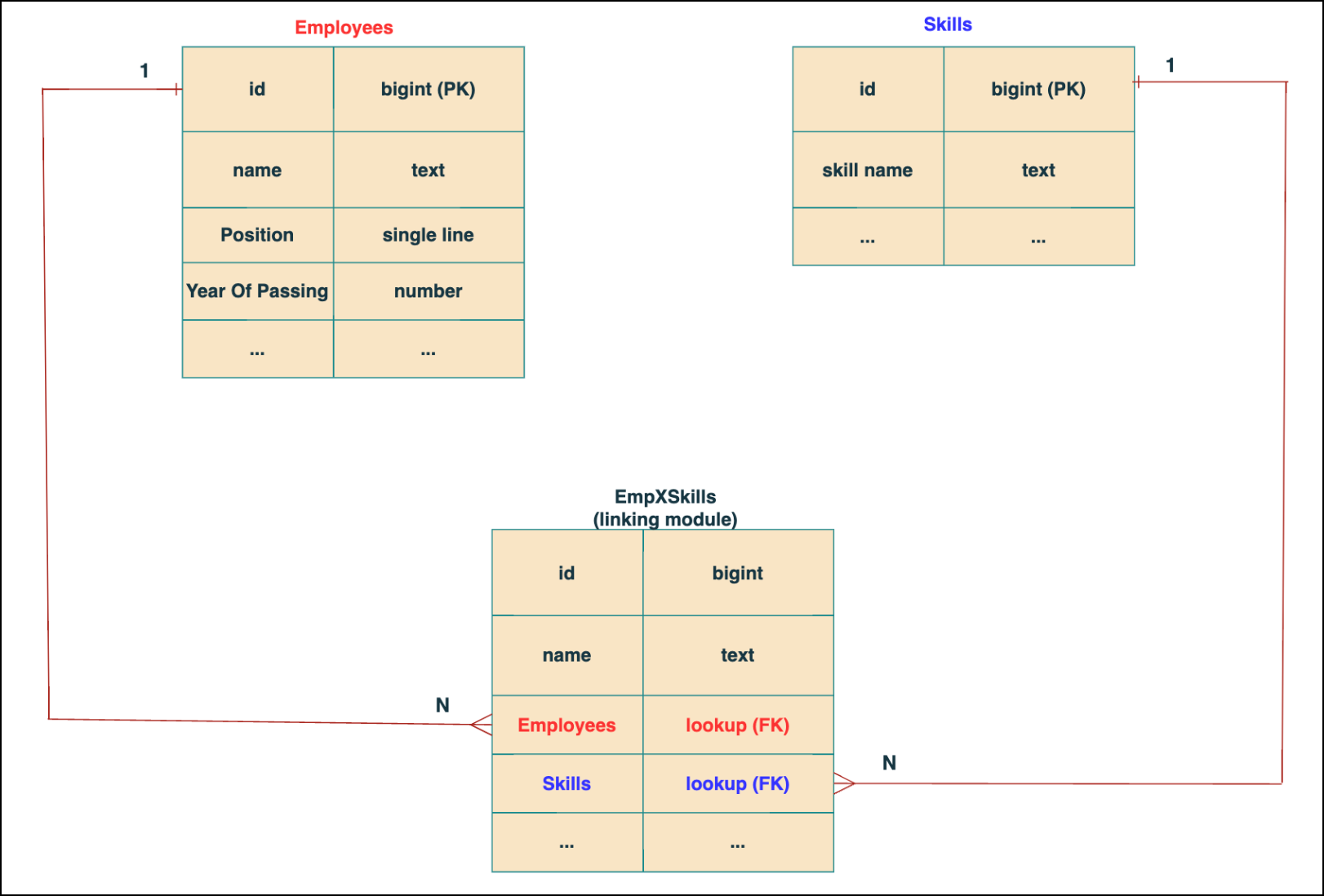
In the linking module, two lookup fields (lookup fields with api names - Employees and Skills) will be created. The lookup fields, one pointing to Employees and the other pointing to Skills from the linking module, establish a connection between the linking module and its associated module.
Why you cannot use a lookup field for this use case?
In Zoho CRM, a lookup field creates a one-to-many relationship between two modules i.e. one record in the source module can be linked to only one record in the target module.
Example :
If you create a lookup field for Skills in the Employees module, each employee can be linked to only one skill. So, use a multi-select lookup field instead of a lookup field when you need to represent complex relationships like one employee - many skills and one skill - many employees.
3. How to create a multi-select Lookup field using Zoho CRM APIs?
To create a Multi-Select lookup field between two modules using Zoho CRM APIs, follow these steps:
Step 1: Identify the Module API Name
Before creating the field, you should know the API names of the Employees and Skills modules. For that, use the Get Module Metadata API.
Request URL : {{api-domain}}/crm/v8/settings/modules
Request method : GET
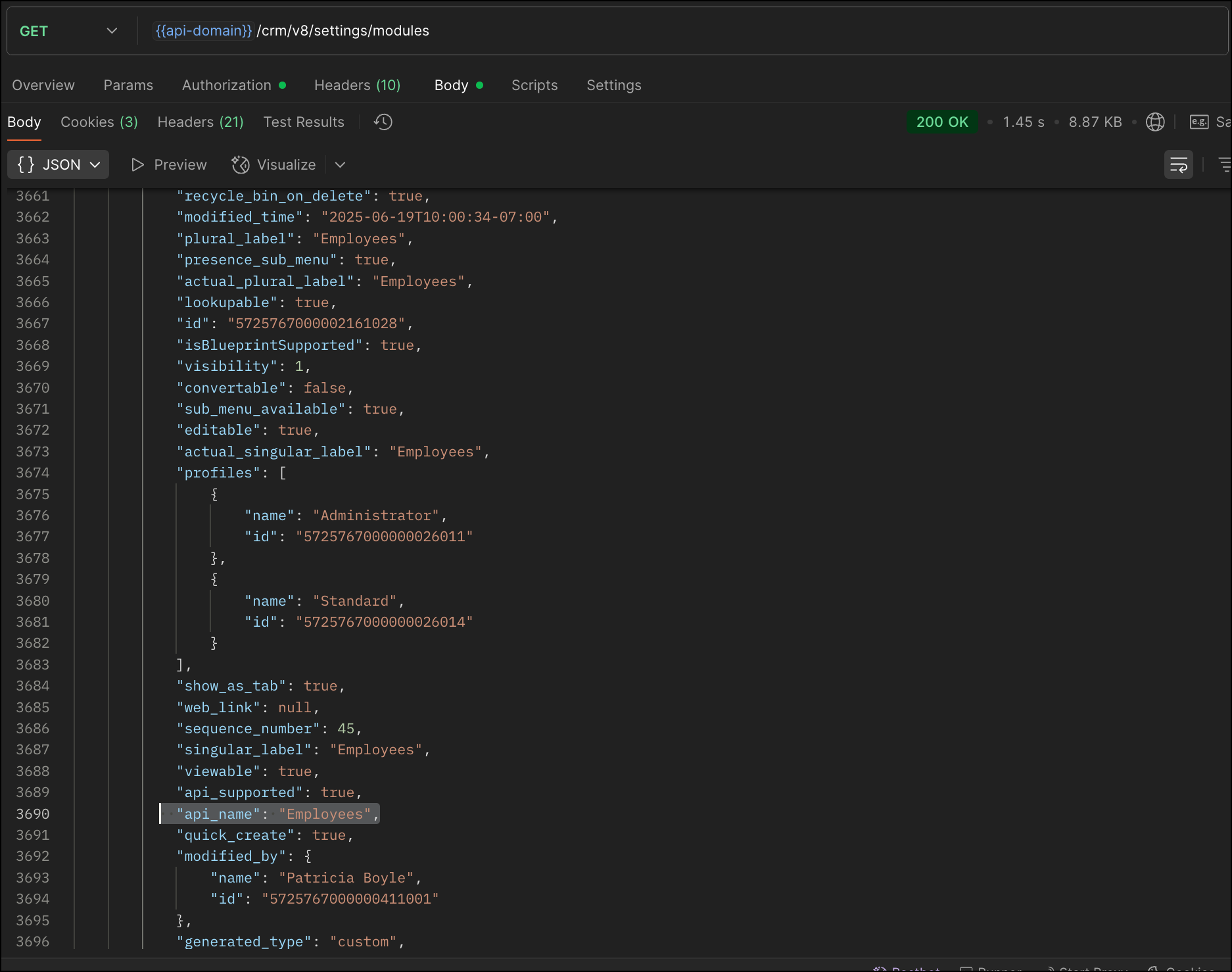
Now, search for the Employees module in the response and note its API name.
Step 2: Use the Create Custom Fields API
To establish a many-to-many relationship between two modules, in our case, Employees and Skills, you need to create a custom field of type multi-select lookup in the Employees module (parent module). Here, we will associate multiple skills to an employee.
This custom field requires:
- The related module you want to link to - Skills.
- A display field from the related module
- The linking module (EmpXSkills), which stores the actual associations.
Use the Create Custom Fields API to create custom fields.
Request URL : {{api_domain}}/crm/v8/settings/fields?module=Employees
Request method : POST
Sample input :
|
{
"fields": [
{
"field_label": "Skills", //Name of the field in your module
"data_type": "multiselectlookup", //Type of the field
"multiselectlookup": { //This JSON object contains the multi-select lookup relationship details
"connected_details": { //Details about the module and field you want to link
"module": {
"api_name": "Skills" //API name of the related module
},
"field": {
"field_label": "Skills" //The field in the related module to display
}
},
"linking_details": { //Details about the junction or linking module that manages the many-to-many relationship
"module": {
"plural_label": "EmpXSkills" //Plural label of the junction module
}
}
}
}
]
}
|
4. How Do You Find the Linking Module and Field API Names?
To know the API name of the linking module:
Use the Get Modules API and search for "generated_type" : "linking" in the response to identify MxN modules. In our case, EmpXSkills.
Request URL : {{api_domain}}/crm/v8/settings/modules
Request method : GET
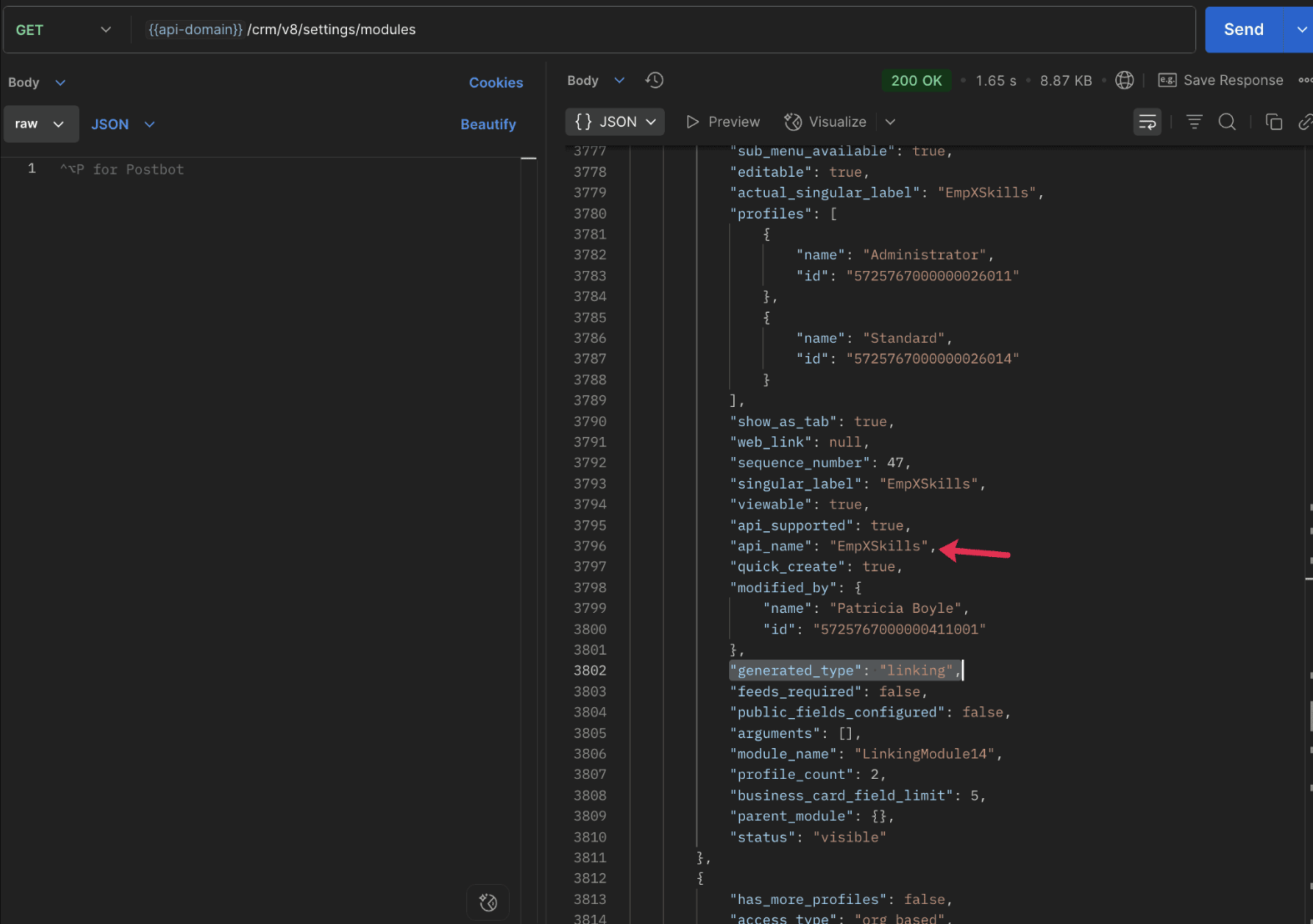
To know the field API names in the linking module:
Use the Get Fields Metadata API to retrieve the API names of lookup fields within the linking module.
Request URL : {{api_domain}}/crm/v8/settings/fields?module=EmpXSkills
Request method : GET
5. How do I associate records via a multi-select lookup field using the Insert Records API in Zoho CRM?
To associate records using a multi-select lookup field, you must provide the record IDs from the related module. The association is made through the linking module.
Example :
Associating multiple skills with an employee using the multi-select lookup field.
Request URL : {{api-domain}}/crm/v8/Employees
Request method : POST
Sample input :
|
{
"data": [
{
"Name": "Patricia",
"Email": "patricia@mail.com",
"Position": "Marketing Specialist",
"Year_of_Experience": 5,
"Skills": [ // API name of the multi-select lookup field in the Employees module
{
"Skills": { // API name of the lookup field in the linking module pointing to the Skills module
"name": "Marketing",
"id": "5725767000002149427" //ID from the Skills module are mandatory to establish the link
}
},
{
"Skills": {
"name": "Social Media Marketing",
"id": "5725767000002149476"
}
}
]
}
]
}
|
6. How do I associate an Employee's skills using the linking module in Zoho CRM?
To establish a relationship between the Employees and Skills modules through the linking module, use the Insert Records API to create a record in the linking module, EmpXSkills.
To do this,
- Use the appropriate lookup field API names to reference the parent module.
- You must need the record IDs from both the Employees and Skills modules to create the associations.
Request URL : {{api-domain}}/crm/v8/EmpXSkills
Request method : POST
Sample input :
|
{
"data": [
{
"Name": "Patricia",
"Employees": {
"id": "5725767000002161001" // Record ID from the Employees module
},
"Skills": {
"id": "5725767000002149476" // Record ID from the Skills module
}
}
]
}
|
7. When should I use create/update operations in the Employees module vs the EmpXSkills module?
|
Employees Module |
EmpXSkills (linking) Module |
|
Use when you want to create or update an Employee and associate Skills using the Multi-select Lookup field. |
Use when you want to create or remove associations between existing Employee and Skill records without modifying the actual Employee or Skill data. |
|
Creating a new employee and assigning their skills at once. |
Managing relationships between existing records i.e., linking and unlinking skills to employees. |
8. How to update a record in the linking module?
To update a record in the linking module, use the Update Records API.
Request URL : {{api-domain}}/crm/v8/EmpXSkills/5725767000006269044
Request method : PUT
Sample input :
|
{
"data": [
{
"Skills": {
"name": "Marketing",
"id": "5725767000002170035" //Associating another skill with the employee
}
}
]
} |
In the above sample, we have replaced an existing skill associated with an employee with another Skill in the linking module.This is done by updating the Skills lookup field in the EmpXSkills record.
Please note that in the linking module, Skills is a lookup field, so you can associate only one skill per linking record. But in the Employees module, Skills is a multi-select lookup field, so an employee can be associated with multiple skills.
9. How to unlink records from the parent module as well as the linking module?
Unlink the associated records from the parent module:
Using the Update records API, you can remove an associated skill from an employee, use the "_delete": null key within the multi-select lookup field in the Employee record update.
Request URL : {{api-domain}}/crm/v8/Employees/5725767000006269044
Request method : PUT
Sample input :
|
{
"data": [
{
"Skills": [
{
"Skills": {
"name": "Marketing",
"id": "5725767000002170035" // The Skill record you want to unlink
},
"id": "5725767000007228047", //record ID - The record created in the linking module for the employee with the Marketing skill
"_delete" : null
}
]
}
]
}
|
Replace an associated record from the linking module:
Use the Update Records API to replace an existing association in the linking module.
Request URL : {{api-domain}}/crm/v8/EmpXSkills/5725767000007228035
Request method : PUT
Sample input :
|
{
"data": [
{
"Skills": {
"name": "Java",
"id": "5725767000005259075" //replacing a new skill
}
}
]
}
|
In the above sample, we have replaced the existing skill with Java.
10. Why am I seeing the error "DUPLICATE_LINKING_DATA" in the Update Records API?
This error occurs when you try to associate records with the parent record that are already linked with the Multi-select lookup field. To resolve this, check the records you are trying to link and make sure your association is only with records that are not already linked.
Know your existing linked records:
Before the Update Records API, use the Get Related Records Data API and search for the multi-select lookup field. In our case, Skills is the multi-select lookup field created in the Employees module. This will return all records already associated.
Example :
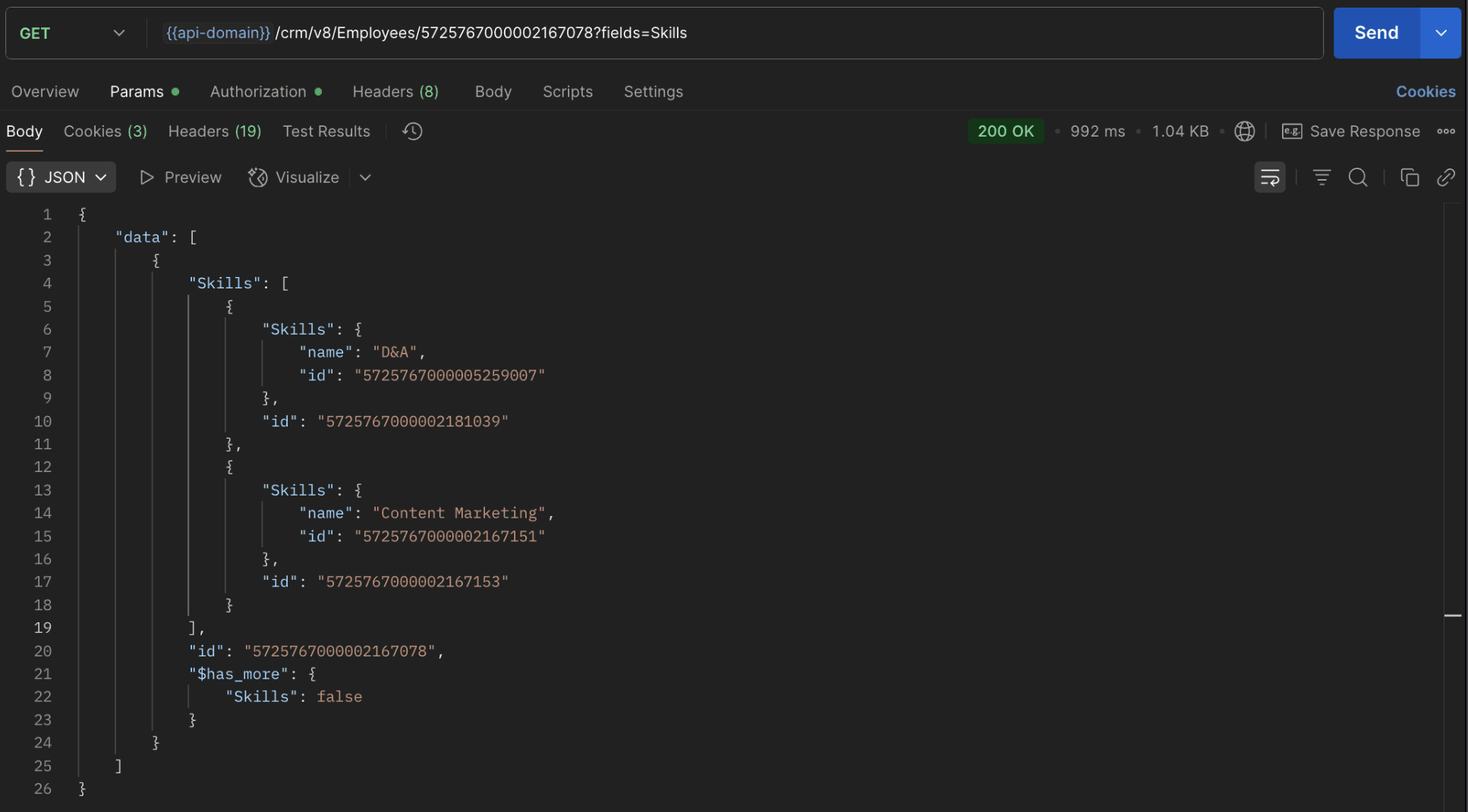
The response returns all Skills already linked with that Employee.
Using this way, compare the IDs from the API response with the new records you are about to link, and only proceed with non-duplicate IDs. This avoids duplicate entries and prevents the "DUPLICATE_LINKING_DATA" error.
11. What happens if I delete a record in the linking module?
When you delete a record in the linking module, it only removes the association between the related records in the Employees and Skills modules.
Note :
- Deleting a linking module record removes only the relationship between two records from the Employees and Skills modules.
- Deleting an Employee or Skill record deletes all corresponding entries in the linking module as well.
12. How do I query linked records?
Use the COQL API to query multi-select lookup data by specifying the corresponding linking module's API name directly in your query. The linking module is treated as a separate module in Zoho CRM, so you can retrieve associated records by querying it like any other module.
Sample query :
|
{
"select_query": "select Skills.Name as skill, Employees.Name as employee from EmpXSkills where Skills.Name like '%Marketing%'"
}
|
Use the Get Module Metadata API to know the linking module's API name.
13. How do I export multi-select lookup records using the Bulk Read API?
To export multi-select lookup data, linking module records efficiently, use the Bulk Read API with the linking module’s API name.
Request URL : https://www.zohoapis.com/crm/bulk/v8/read
Request method : POST
Sample Request :
|
{
"callback": {
"method": "post"
},
"query": {
"module": {
"api_name": "EmpXSkills" //API name of the linking module
},
"fields": [
"Employees.Name",
"Employees.Year_of_Experience",
"Skills.Name"
],
"criteria": {
"group": [
{
"field": {
"api_name": "Employees.Year_of_Experience"
},
"comparator": "greater_than",
"value": "4"
},
{
"field": {
"api_name": "Skills.Name"
},
"comparator": "contains",
"value": "Social"
}
],
"group_operator": "AND"
}
}
}
|
14. Can I import my linking module's data using the Bulk Write API?
Yes. Like the Leads and Contacts modules, you can also import linking module's data into Zoho CRM using the Bulk Write API by directly specifying the linking module’s API name.
If you are importing data that involves both a parent module, Employees and its associated MxN linking module, follow these steps:
1. Create separate CSV files:
- One for the parent module - Employees
- One for the linking module - EmpXSkills
2. Zip the files into a single ZIP file.
3. Upload the ZIP in a single Bulk Write API request.
4. Ensure accurate field mappings are provided in the API request body.
Refer to Kaizen #131 - Bulk Write for parent-child records using Scala SDK for more details on handling parent-child records.
15. Can I receive notifications if a multi-select lookup field in a module is modified or updated?
Yes, you can receive notifications when a MxN field is updated using the Notification API. To enable instant notifications for actions performed in a module, use the respective API names of the linking module in the input body.
Request URL : https://www.zohoapis.com/crm/bulk/v8/actions/watch
Request method : POST
Sample input :
|
{
"watch": [
{
"channel_id": "10000",
"events": [
"EmpXSkills.all" //EmpXSkills represents the API name of the linking module
],
"notify_url": "https://webhook.site/9f5ba227-ce5a-4709-814d-b044c003d605",
"return_affected_field_values": true
}
]
}
|
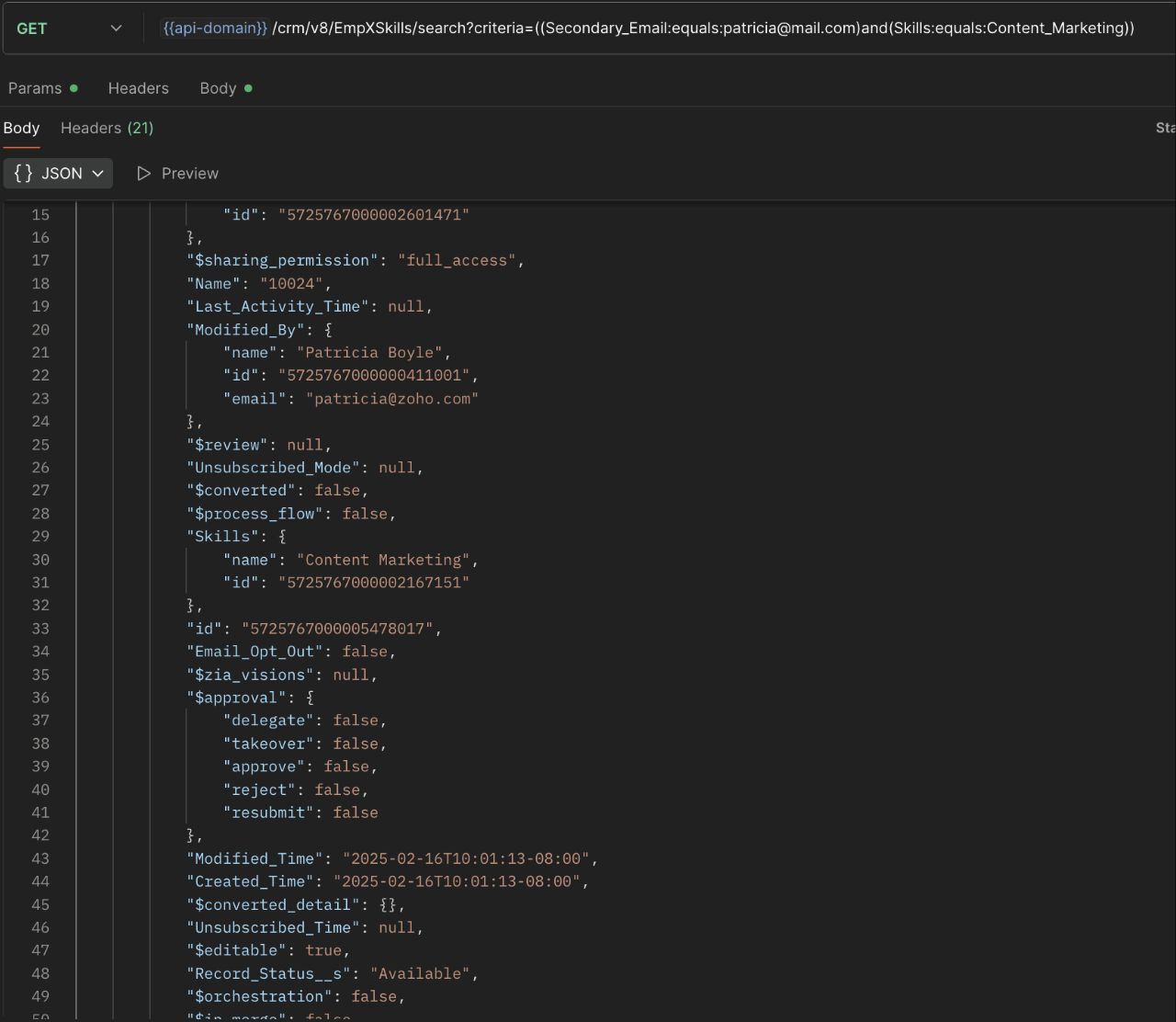
16. Can I use criteria-based filtering when accessing multi-select lookup data using the Search API?
Yes, you can filter multi-select lookup data using the criteria parameter in the Search API's URL.
Here is an example that fetches records from the EmpXSkills linking module.
Request URL : {{api-name}}/crm/v8/EmpXSkills/search?criteria=((Secondary_Email:equals:patricia@mail.com)and(Skills:equals:Content_Marketing))
Request method : GET
Sample response :
x-----------------------------x
We trust that this post meets your needs and is helpful. Let us know your thoughts in the comment section or reach out to us at support@zohocrm.com
Stay tuned for more insights in our upcoming Kaizen posts!

Previous Kaizen Post : Kaizen #198: Using Client Script for Custom Validation in Blueprint | Kaizen Directory
Other FAQs in the Kaizen series :
- Kaizen#75 - Frequently Asked Questions on Client Script
- Kaizen #147 - Frequently Asked Questions on Zoho CRM Widgets
- Kaizen #155 - Frequently Asked Questions on Subforms
- Kaizen #170 - Frequently Asked Questions on Notification APIs
- Kaizen #195: Frequently Asked Questions on Bulk Read API and Bulk Write API
Topic Participants
Subramanian K
Sticky Posts
Kaizen #198: Using Client Script for Custom Validation in Blueprint
Nearing 200th Kaizen Post – 1 More to the Big Two-Oh-Oh! Do you have any questions, suggestions, or topics you would like us to cover in future posts? Your insights and suggestions help us shape future content and make this series better for everyone.Kaizen #226: Using ZRC in Client Script
Hello everyone! Welcome to another week of Kaizen. In today's post, lets see what is ZRC (Zoho Request Client) and how we can use ZRC methods in Client Script to get inputs from a Salesperson and update the Lead status with a single button click. In thisKaizen #222 - Client Script Support for Notes Related List
Hello everyone! Welcome to another week of Kaizen. The final Kaizen post of the year 2025 is here! With the new Client Script support for the Notes Related List, you can validate, enrich, and manage notes across modules. In this post, we’ll explore howKaizen #217 - Actions APIs : Tasks
Welcome to another week of Kaizen! In last week's post we discussed Email Notifications APIs which act as the link between your Workflow automations and you. We have discussed how Zylker Cloud Services uses Email Notifications API in their custom dashboard.Kaizen #216 - Actions APIs : Email Notifications
Welcome to another week of Kaizen! For the last three weeks, we have been discussing Zylker's workflows. We successfully updated a dormant workflow, built a new one from the ground up and more. But our work is not finished—these automated processes are
Recent Topics
Auto populate email field in zoho form
Hi, Is there a way the email field in zoho forms can be auto populated based on the name selected from a drop down list?Option to accept and pay for estimate from Public Estimate link?
Is there any way that our customers can get the Estimate in their email, click on "View Estimate" and from the public link, click Accept and Pay? When they click that, in the background Zoho would create the invoice record in the so that the payment wouldKaizen #125 Manipulating Multi-Select Lookup fields (MxN) using Zoho CRM APIs
Hello everyone! Welcome back to another week of Kaizen. In last week's post in the Kaizen series, we discussed how subforms work in Zoho CRM and how to manipulate subform data using Zoho CRM APIs. In this post, we will discuss how to manipulate a multi-selectEasily track referrals with Zoho Forms
Referral tracking can be a powerful way for businesses to understand where their leads are coming from. With Zoho Forms, tracking the referral sources of your leads is an easy and straightforward process. Here are some tips to help you make the most ofAdd an email to an existing ticket is not working
I noticed that in Zoho Desk the funcionality to add an email to an existing ticket is not working using the syntax [##12345##], has the method changed? In red is the syntax we use to add email to an existing ticket As you can see, he did not add the emailNew CRM to Campaigns Sync Doesn't Continue Making Updates
Changes made in CRM are not appearing in mapped fields in matching Campaign records after migrating to the new sync process. The only way we've found to get records to update is to call into Support and point out the problem. After convincing SupportZoho Integration with UPS
I have 2 questions: Firstly, is there a way to notify UPS that we have a package to collect once we have done the shipping label? Secondly, how do I get the tracking number and shipment method onto the Invoice and Package Slip for the customer? ThanCannot log in to IMAP account as of last night
Hey I've been using MFA with an authenticator for a while and have had to use application passwords for Outlook and Edison Mail on my Android devices. Last night the app passwords started to be rejected on my Android devices so I created new ones forLow Stock View
We use the Low Stock view frequently as a guide to inform us when to reorder items, but the view is misleading because it does not take into account Purchase Orders that have already been raised. Unless you are aware and check item by item, this can leadImprove History Feature in Zoho Inventory
At present there is a "history" tab on Zoho Inventory Items, however this only shows a date and time stamp along with the users name. It doesn't say what was changed. What is the value of this if you can't see what was changed? My Ideal is to includeShow backordered items on packing slip
We send out a lot of large orders, and often there are one or two things backordered. How can I fix the packing slips to show quantity ordered & quantity packed There should also be the ability to "ship" 0 of an item so the receiver knows that thingsDocument | Files
The vendor "Partial matches" still not fixed here after years of putting up with having to select most vendors manually ! ( again, the banking "Transaction rules" would solve a lot of these issues ) Some unwanted, irrelevant pdf's also arrive. It wouldbooks+POS+ tap to pay+ stripe
So in the UK we now have tap to pay with stripe. So we can use the stripe app as a POS terminal. Brilliant news. Can we hope that the Books App might add this feature ASAP. It would be great to have one system rather than using the not very good SquareCanvas Form View - Client Script Page on load - Url params not working
We have a custom module with a canvas page for form view. We have a button in Customers module to open this canvas page using invokeurl function. We send few parameters as in the URL as query parameters. https://crm.zoho.in/crm/orgxxxxxxxx/tab/CustomModule12/create/canvas/64333200000261xxxx?layoutId=643332000002605001&c=${Customers.CustomerSending Recruit SMS's to Zoho Cliq - Or tracking in the Messages module in Recruit?
Is there any way to send SMS Gateway messages in Recruit to ZOho Cliq? We use 2-way SMS massages a lot in Zoho Recruit to speed up communication with Candidates. However the only way to keep track of received SMS's is by keeping a look out for the EmailIs it possible to set a customer context variable in Zobot
Hi, I want to use a context variable to route users down different paths in my Zobot chat flow. I know I can do this when the user enters data. But I want to know if I can use a variable that is 'hard coded' on the card, that the user is unaware of. UseCannot change Blog Title
There is nowhere to change the blog title. You can change the blog URL but that is making no difference to the text "Enter Your Post Title" am I missing something?Kaizen #203 - Answering Your Questions | Handling API Limits and Error Responses
Hi Everyone, Welcome back to yet another post in the Kaizen Series! We appreciate your keen participation in the 200th milestone celebration of the Kaizen series. We will continue to answer the queries we received through the feedback. When working withHow to verify website ownership with google search console
Hi, I am having a free .in domain provided by Zoho I have created a website on it now I want to verify my ownership to google webmaster. Can you please help me how to do that."SPF record exceed the allowed limit of 10"
Hi, I was wondering if there were a "universal Zoho SPF record" that would allow all my configured Zoho services that email things to meet this limitation ? or do I have to have an entry for mail, com, billing, etc?Animated GIF Images in Chat
I know this seems to be a small feature request but in a recent Cliq update Zoho disabled autoplay for animated GIFs posted in Cliq conversations. We think this was not a good change. In our organization, animated GIFs in a chat play a role in expressingI can't seem to login in to Mail Apps of MacOS /IOS
Hi, i'm having trouble in signing in to mail apps from IOS. It's always come back to wrong passwords. But i already changed my password like 3 times. But still it says wrong credentialsProfile Image Showing Incorrectly in Zoho Mail
Hi everyone, I’m facing a serious issue with Zoho Mail. The profile image showing for my email address is incorrect — it’s not my image. When I send an email to my Gmail account, it displays someone else’s image. This looks very suspicious and can makeI need access to my old email
I need access to my old email bromzeman@zoho.com to verify it for forwarding. I can’t access the inbox to get the confirmation code. Please assist with recovery or forwarding. as you might already know, they made alot of the email addresses to have thatSet Defaults for Email Groups
Is there a way to set defaults for all of the groups that I establish as a moderator? For example, I want every group I establish to have the following settings: 1. Moderator is <user> 2. User is <user>, <user> 3. Notifications for new group turnedLOGS FOR RECEIVED MAIL ( READ DATE & TIME)
In Zoho mail we can extract the read logs of received mails so that we can see when we have read the mail and at what time & we have read it.Domain verification probem
Hello, i use a domain from Namecheap with hosting from Cinfu when i try to verify my domain on zoho i get "TXT Verification failure" i even tried the HTML verification and the code appears but also giving me the verification failure error.Switching to Cloudflare email routing from Zoho Mail
Hello, I'm currently working on migrating from Zoho Mail to Cloudflare's email routing solution. This requires changing MX and TXT records for our custom domain - when we do this, will our users still be able to log into their accounts and access an archivedUn Subscription Button
How can i Add the Un Subscription Button in Zoho mailDocuments unable view and need to downlad
I can't view .doc files in Zoho mail unless I download them, but I can view PDF files without downloading.we encountered a problem while sending your email. please try again later.
Adding and removing people from groups
We're having problems adding people to a group. Apparently Zoho has one email address and will not recognize a different email address.MAIL SEARCH IS NOT WORKING
THIS ISSUE HAS BEEN BUGGING ME SINCE MORNING, PLEASE RESOLVE THIS AT THE EARLIESTURL Parameter on Help Center SIgn in link
Is it possible to add a url parameter to the sign in link on the Help Center?migrating from HelpScout
I am attempting to import a conversation file from helpscout into desk and am receiving size errors. What is the current file size restriction. Does anyone have any tips for a successful migration?Layout Rules Don't Apply To Blueprints
Hi Zoho the conditional layout rules for fields and making fields required don't work well with with Blueprints if those same fields are called DURING a Blueprint. Example. I have field A that is used in layout rule. If value of field A is "1" it is supposed to show and make required field B. If the value to field A is "2" it is supposed to show and make required field C. Now I have a Blueprint that says when last stage moves to "Closed," during the transition, the agent must fill out field A. NowArticle Name Sorting in Zoho Desk Knowledge Base (agent / admin side)
Dear Zoho Desk Support, We are writing to request an enhancement to the Knowledge Base management feature within Zoho Desk. Currently, there is no option to sort articles by their name, which significantly hinders efficient article management, especiallyHow to parse JSON data with SQL in Zoho Analytics?
Hi all, I have a column with JSON data. I want to show this column in a chart, but it is very messy, and no JSON parsing function is supported on Zoho Analytics. data example: {"id": 5, "status": "false", "date": "15/10/22"} what I want to do in SQL isAdd an Equation Field (Or update the Formula Field)
Hi, I would like to be able to have one field as a Text Field with QR Code, and then have multiple Equation/Formula Fields that then take parts of that fields data with LEFT, MID, RIGHT, REGEX, etc. Thanks DanHow to parse column having JSON data using SQL?
We have a daily sync from a PostgreSQL database that brings data into Zoho Analytics. Some of the columns store raw JSON data. We need to build SQL queries on top to parse data from JSON and store them in discrete columns. There is no option for "DataNext Page