Kaizen #199: FAQs on Multi-Select Lookup (MxN) Field in Zoho CRM
Nearing 200th Kaizen Post – We want to hear from you!
Do you have any questions, suggestions, or topics you would like us to cover in future posts? Your insights and suggestions help us shape future content and make this series better for everyone.
Hey everybody!!!
Welcome back to another post in the Kaizen series!
In this post, we will address some of the most frequently asked questions about the Multi-Select Lookup(MxN) field from the Zoho CRM developer community forum.
1. What is a Multi-select lookup field?
A multi-select lookup field in Zoho CRM lets you create a many-to-many relationship between two modules. This means a record in one module can be linked to multiple records in another module and vice versa.
For example, using an multi-select lookup field, you can associate multiple skills with an employee.
2. How does the Mutli-Select Lookup relationship work?
When you create a Multi-Select Lookup between two modules, for example, Employees and Skills, Zoho CRM automatically creates a hidden linking module, which is also known as an MxN module. This module stores the associations between records in the two modules, enabling you to track and manage many-to-many relationships.
For instance, if you link Employees and Skills, a linking module named EmpXSkills will be created.
This linking module is accessible only via API.
Backend Flow of multi-select lookup Relationship
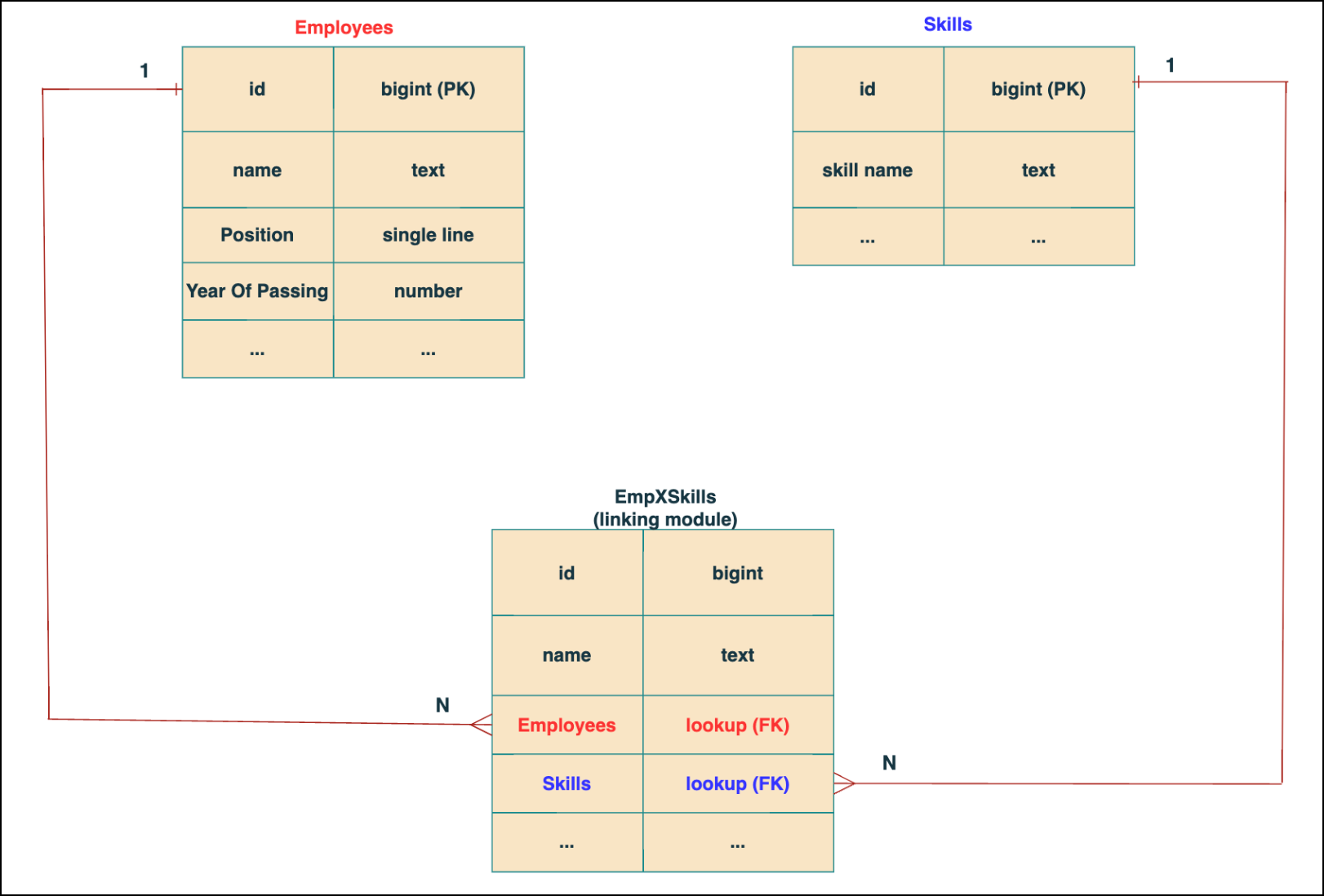
In the linking module, two lookup fields (lookup fields with api names - Employees and Skills) will be created. The lookup fields, one pointing to Employees and the other pointing to Skills from the linking module, establish a connection between the linking module and its associated module.
Why you cannot use a lookup field for this use case?
In Zoho CRM, a lookup field creates a one-to-many relationship between two modules i.e. one record in the source module can be linked to only one record in the target module.
Example :
If you create a lookup field for Skills in the Employees module, each employee can be linked to only one skill. So, use a multi-select lookup field instead of a lookup field when you need to represent complex relationships like one employee - many skills and one skill - many employees.
3. How to create a multi-select Lookup field using Zoho CRM APIs?
To create a Multi-Select lookup field between two modules using Zoho CRM APIs, follow these steps:
Step 1: Identify the Module API Name
Before creating the field, you should know the API names of the Employees and Skills modules. For that, use the Get Module Metadata API.
Request URL : {{api-domain}}/crm/v8/settings/modules
Request method : GET
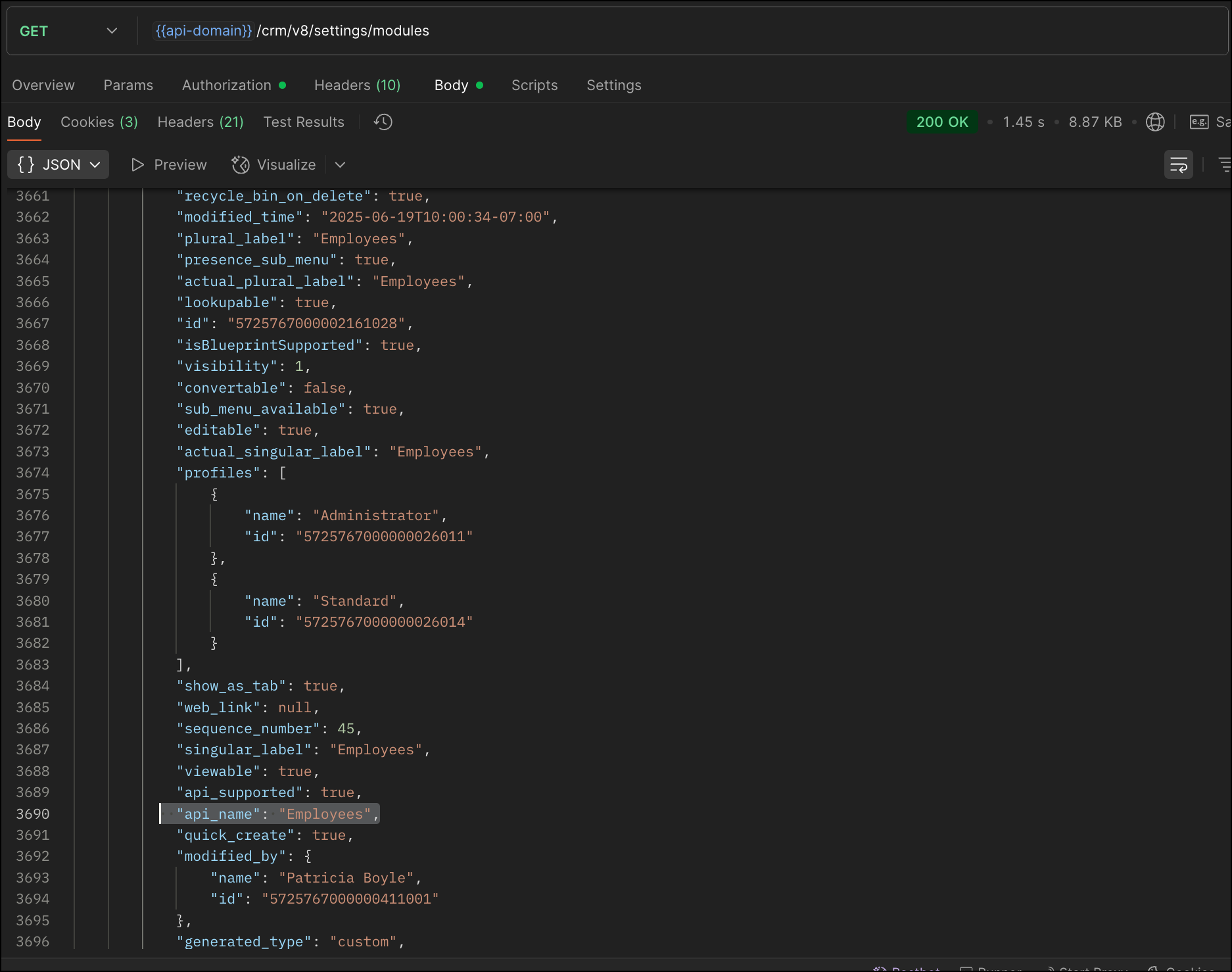
Now, search for the Employees module in the response and note its API name.
Step 2: Use the Create Custom Fields API
To establish a many-to-many relationship between two modules, in our case, Employees and Skills, you need to create a custom field of type multi-select lookup in the Employees module (parent module). Here, we will associate multiple skills to an employee.
This custom field requires:
- The related module you want to link to - Skills.
- A display field from the related module
- The linking module (EmpXSkills), which stores the actual associations.
Use the Create Custom Fields API to create custom fields.
Request URL : {{api_domain}}/crm/v8/settings/fields?module=Employees
Request method : POST
Sample input :
|
{
"fields": [
{
"field_label": "Skills", //Name of the field in your module
"data_type": "multiselectlookup", //Type of the field
"multiselectlookup": { //This JSON object contains the multi-select lookup relationship details
"connected_details": { //Details about the module and field you want to link
"module": {
"api_name": "Skills" //API name of the related module
},
"field": {
"field_label": "Skills" //The field in the related module to display
}
},
"linking_details": { //Details about the junction or linking module that manages the many-to-many relationship
"module": {
"plural_label": "EmpXSkills" //Plural label of the junction module
}
}
}
}
]
}
|
4. How Do You Find the Linking Module and Field API Names?
To know the API name of the linking module:
Use the Get Modules API and search for "generated_type" : "linking" in the response to identify MxN modules. In our case, EmpXSkills.
Request URL : {{api_domain}}/crm/v8/settings/modules
Request method : GET
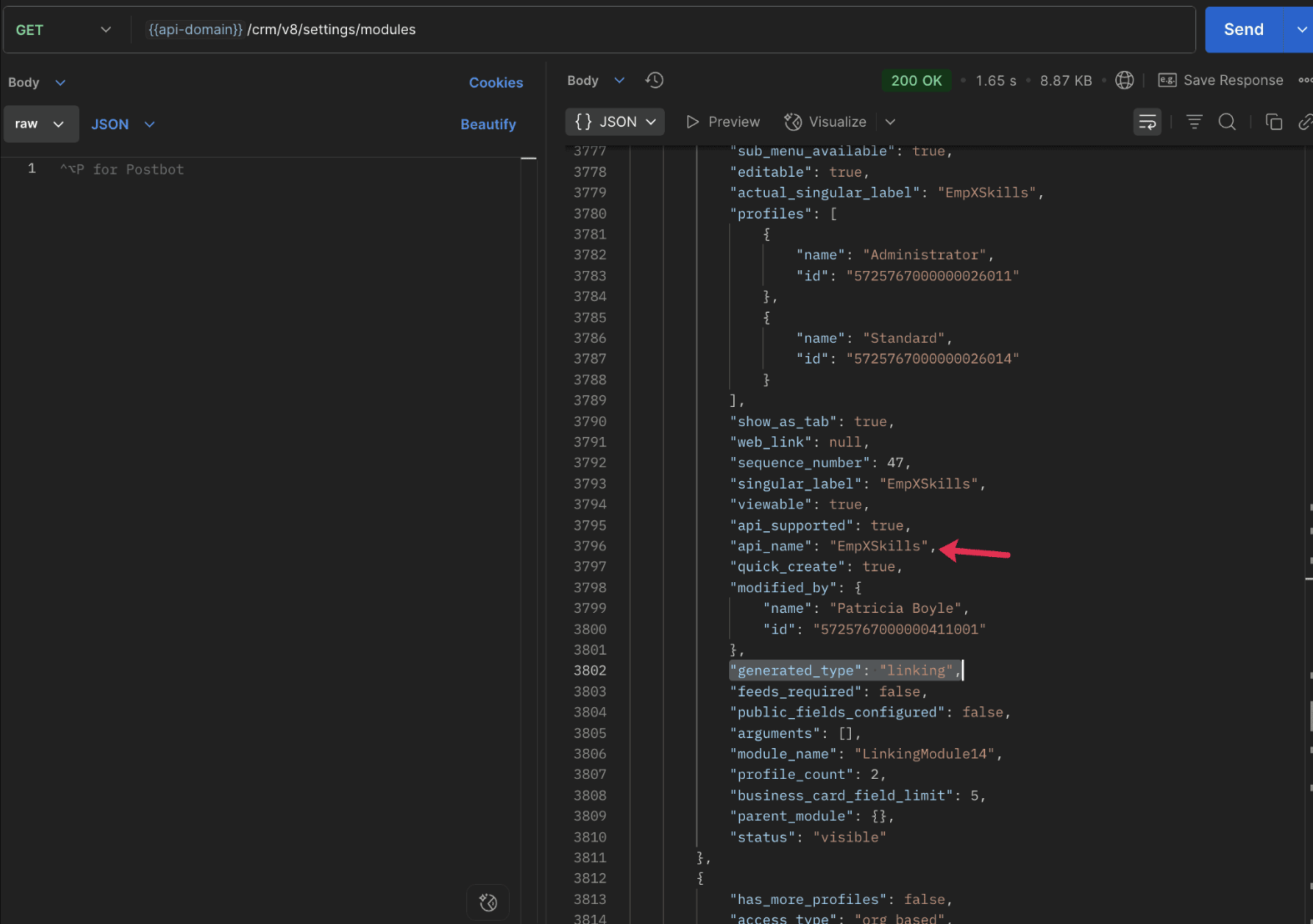
To know the field API names in the linking module:
Use the Get Fields Metadata API to retrieve the API names of lookup fields within the linking module.
Request URL : {{api_domain}}/crm/v8/settings/fields?module=EmpXSkills
Request method : GET
5. How do I associate records via a multi-select lookup field using the Insert Records API in Zoho CRM?
To associate records using a multi-select lookup field, you must provide the record IDs from the related module. The association is made through the linking module.
Example :
Associating multiple skills with an employee using the multi-select lookup field.
Request URL : {{api-domain}}/crm/v8/Employees
Request method : POST
Sample input :
|
{
"data": [
{
"Name": "Patricia",
"Email": "patricia@mail.com",
"Position": "Marketing Specialist",
"Year_of_Experience": 5,
"Skills": [ // API name of the multi-select lookup field in the Employees module
{
"Skills": { // API name of the lookup field in the linking module pointing to the Skills module
"name": "Marketing",
"id": "5725767000002149427" //ID from the Skills module are mandatory to establish the link
}
},
{
"Skills": {
"name": "Social Media Marketing",
"id": "5725767000002149476"
}
}
]
}
]
}
|
6. How do I associate an Employee's skills using the linking module in Zoho CRM?
To establish a relationship between the Employees and Skills modules through the linking module, use the Insert Records API to create a record in the linking module, EmpXSkills.
To do this,
- Use the appropriate lookup field API names to reference the parent module.
- You must need the record IDs from both the Employees and Skills modules to create the associations.
Request URL : {{api-domain}}/crm/v8/EmpXSkills
Request method : POST
Sample input :
|
{
"data": [
{
"Name": "Patricia",
"Employees": {
"id": "5725767000002161001" // Record ID from the Employees module
},
"Skills": {
"id": "5725767000002149476" // Record ID from the Skills module
}
}
]
}
|
7. When should I use create/update operations in the Employees module vs the EmpXSkills module?
|
Employees Module |
EmpXSkills (linking) Module |
|
Use when you want to create or update an Employee and associate Skills using the Multi-select Lookup field. |
Use when you want to create or remove associations between existing Employee and Skill records without modifying the actual Employee or Skill data. |
|
Creating a new employee and assigning their skills at once. |
Managing relationships between existing records i.e., linking and unlinking skills to employees. |
8. How to update a record in the linking module?
To update a record in the linking module, use the Update Records API.
Request URL : {{api-domain}}/crm/v8/EmpXSkills/5725767000006269044
Request method : PUT
Sample input :
|
{
"data": [
{
"Skills": {
"name": "Marketing",
"id": "5725767000002170035" //Associating another skill with the employee
}
}
]
} |
In the above sample, we have replaced an existing skill associated with an employee with another Skill in the linking module.This is done by updating the Skills lookup field in the EmpXSkills record.
Please note that in the linking module, Skills is a lookup field, so you can associate only one skill per linking record. But in the Employees module, Skills is a multi-select lookup field, so an employee can be associated with multiple skills.
9. How to unlink records from the parent module as well as the linking module?
Unlink the associated records from the parent module:
Using the Update records API, you can remove an associated skill from an employee, use the "_delete": null key within the multi-select lookup field in the Employee record update.
Request URL : {{api-domain}}/crm/v8/Employees/5725767000006269044
Request method : PUT
Sample input :
|
{
"data": [
{
"Skills": [
{
"Skills": {
"name": "Marketing",
"id": "5725767000002170035" // The Skill record you want to unlink
},
"id": "5725767000007228047", //record ID - The record created in the linking module for the employee with the Marketing skill
"_delete" : null
}
]
}
]
}
|
Replace an associated record from the linking module:
Use the Update Records API to replace an existing association in the linking module.
Request URL : {{api-domain}}/crm/v8/EmpXSkills/5725767000007228035
Request method : PUT
Sample input :
|
{
"data": [
{
"Skills": {
"name": "Java",
"id": "5725767000005259075" //replacing a new skill
}
}
]
}
|
In the above sample, we have replaced the existing skill with Java.
10. Why am I seeing the error "DUPLICATE_LINKING_DATA" in the Update Records API?
This error occurs when you try to associate records with the parent record that are already linked with the Multi-select lookup field. To resolve this, check the records you are trying to link and make sure your association is only with records that are not already linked.
Know your existing linked records:
Before the Update Records API, use the Get Related Records Data API and search for the multi-select lookup field. In our case, Skills is the multi-select lookup field created in the Employees module. This will return all records already associated.
Example :
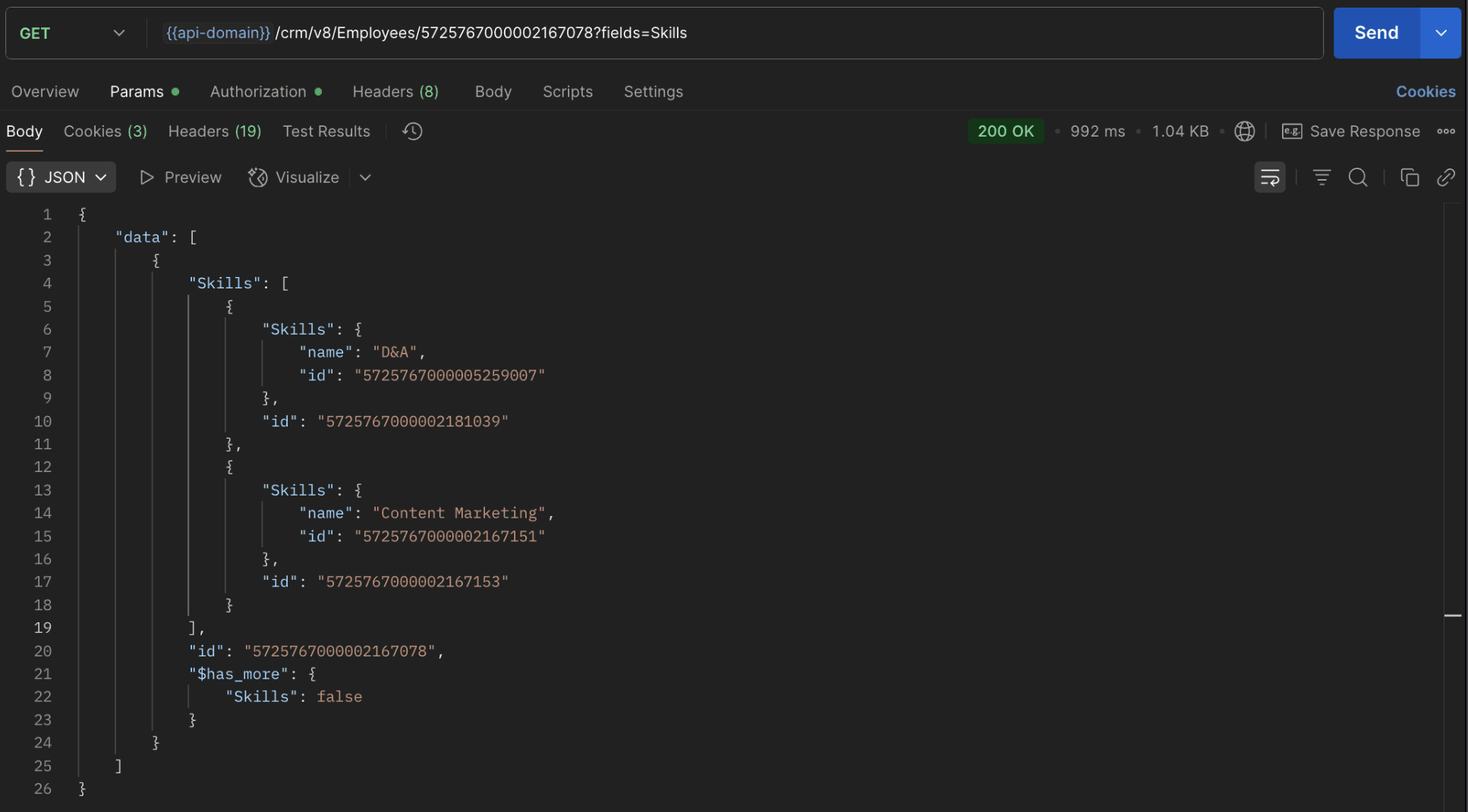
The response returns all Skills already linked with that Employee.
Using this way, compare the IDs from the API response with the new records you are about to link, and only proceed with non-duplicate IDs. This avoids duplicate entries and prevents the "DUPLICATE_LINKING_DATA" error.
11. What happens if I delete a record in the linking module?
When you delete a record in the linking module, it only removes the association between the related records in the Employees and Skills modules.
Note :
- Deleting a linking module record removes only the relationship between two records from the Employees and Skills modules.
- Deleting an Employee or Skill record deletes all corresponding entries in the linking module as well.
12. How do I query linked records?
Use the COQL API to query multi-select lookup data by specifying the corresponding linking module's API name directly in your query. The linking module is treated as a separate module in Zoho CRM, so you can retrieve associated records by querying it like any other module.
Sample query :
|
{
"select_query": "select Skills.Name as skill, Employees.Name as employee from EmpXSkills where Skills.Name like '%Marketing%'"
}
|
Use the Get Module Metadata API to know the linking module's API name.
13. How do I export multi-select lookup records using the Bulk Read API?
To export multi-select lookup data, linking module records efficiently, use the Bulk Read API with the linking module’s API name.
Request URL : https://www.zohoapis.com/crm/bulk/v8/read
Request method : POST
Sample Request :
|
{
"callback": {
"method": "post"
},
"query": {
"module": {
"api_name": "EmpXSkills" //API name of the linking module
},
"fields": [
"Employees.Name",
"Employees.Year_of_Experience",
"Skills.Name"
],
"criteria": {
"group": [
{
"field": {
"api_name": "Employees.Year_of_Experience"
},
"comparator": "greater_than",
"value": "4"
},
{
"field": {
"api_name": "Skills.Name"
},
"comparator": "contains",
"value": "Social"
}
],
"group_operator": "AND"
}
}
}
|
14. Can I import my linking module's data using the Bulk Write API?
Yes. Like the Leads and Contacts modules, you can also import linking module's data into Zoho CRM using the Bulk Write API by directly specifying the linking module’s API name.
If you are importing data that involves both a parent module, Employees and its associated MxN linking module, follow these steps:
1. Create separate CSV files:
- One for the parent module - Employees
- One for the linking module - EmpXSkills
2. Zip the files into a single ZIP file.
3. Upload the ZIP in a single Bulk Write API request.
4. Ensure accurate field mappings are provided in the API request body.
Refer to Kaizen #131 - Bulk Write for parent-child records using Scala SDK for more details on handling parent-child records.
15. Can I receive notifications if a multi-select lookup field in a module is modified or updated?
Yes, you can receive notifications when a MxN field is updated using the Notification API. To enable instant notifications for actions performed in a module, use the respective API names of the linking module in the input body.
Request URL : https://www.zohoapis.com/crm/bulk/v8/actions/watch
Request method : POST
Sample input :
|
{
"watch": [
{
"channel_id": "10000",
"events": [
"EmpXSkills.all" //EmpXSkills represents the API name of the linking module
],
"notify_url": "https://webhook.site/9f5ba227-ce5a-4709-814d-b044c003d605",
"return_affected_field_values": true
}
]
}
|
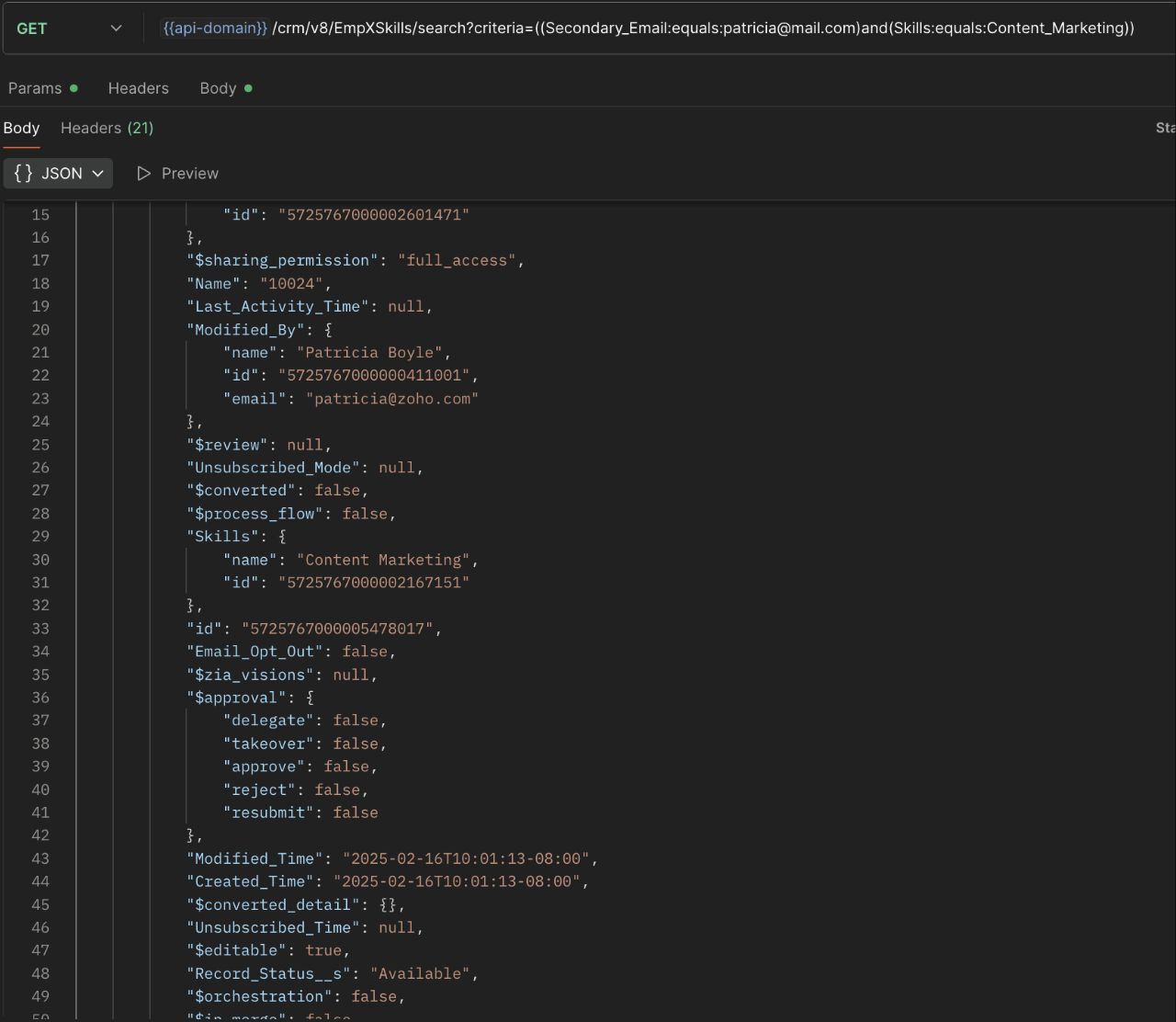
16. Can I use criteria-based filtering when accessing multi-select lookup data using the Search API?
Yes, you can filter multi-select lookup data using the criteria parameter in the Search API's URL.
Here is an example that fetches records from the EmpXSkills linking module.
Request URL : {{api-name}}/crm/v8/EmpXSkills/search?criteria=((Secondary_Email:equals:patricia@mail.com)and(Skills:equals:Content_Marketing))
Request method : GET
Sample response :
x-----------------------------x
We trust that this post meets your needs and is helpful. Let us know your thoughts in the comment section or reach out to us at support@zohocrm.com
Stay tuned for more insights in our upcoming Kaizen posts!

Previous Kaizen Post : Kaizen #198: Using Client Script for Custom Validation in Blueprint | Kaizen Directory
Other FAQs in the Kaizen series :
- Kaizen#75 - Frequently Asked Questions on Client Script
- Kaizen #147 - Frequently Asked Questions on Zoho CRM Widgets
- Kaizen #155 - Frequently Asked Questions on Subforms
- Kaizen #170 - Frequently Asked Questions on Notification APIs
- Kaizen #195: Frequently Asked Questions on Bulk Read API and Bulk Write API
Topic Participants
Subramanian K
Sticky Posts
Kaizen #198: Using Client Script for Custom Validation in Blueprint
Nearing 200th Kaizen Post – 1 More to the Big Two-Oh-Oh! Do you have any questions, suggestions, or topics you would like us to cover in future posts? Your insights and suggestions help us shape future content and make this series better for everyone.Kaizen #226: Using ZRC in Client Script
Hello everyone! Welcome to another week of Kaizen. In today's post, lets see what is ZRC (Zoho Request Client) and how we can use ZRC methods in Client Script to get inputs from a Salesperson and update the Lead status with a single button click. In thisKaizen #222 - Client Script Support for Notes Related List
Hello everyone! Welcome to another week of Kaizen. The final Kaizen post of the year 2025 is here! With the new Client Script support for the Notes Related List, you can validate, enrich, and manage notes across modules. In this post, we’ll explore howKaizen #217 - Actions APIs : Tasks
Welcome to another week of Kaizen! In last week's post we discussed Email Notifications APIs which act as the link between your Workflow automations and you. We have discussed how Zylker Cloud Services uses Email Notifications API in their custom dashboard.Kaizen #216 - Actions APIs : Email Notifications
Welcome to another week of Kaizen! For the last three weeks, we have been discussing Zylker's workflows. We successfully updated a dormant workflow, built a new one from the ground up and more. But our work is not finished—these automated processes are
Recent Topics
"Disbursing product components in phases, monitoring them, and displaying only the final product."
i have a product composed of multiple components, and these components will be delivered to the customer in batches. However, the final invoice should only show the finished product. How can I issue (or release) the components and track their deliveFollowed Subtasks doesn't show up in the Subtasks Section
I have a task assigned to me now in the same task, there's a subtask and I am added as the follower on that task Even though I am a follower I still don't see that in the subtasks section The view permission for the profile is Related It's supposed toTip #39- Strengthen account security with Multi-factor Authentication (MFA) – ‘Insider Insights’
Securing your organization's data begins with verifying that only the correct individuals have access to it. One of the simplest yet most effective ways to accomplish this is to enable Multi-factor Authentication (MFA) within Zoho Assist. MFA introducesAutomate timeout chat tracking with Workflows in SalesIQ
With our feature-packed Nova release, Workflows has become one of the most powerful tools in Zoho SalesIQ. They let you automate follow-up actions when key events occur, such as when a chat ends, a visitor leaves a bad/good rating, or a lead is updated.Mass edit / Mass update products
Hi, Is there any way to mass update or bulk edit product fields in Zoho Inventory?Automatic Verification of IMAP Integration Status
Our sales staff have their O365 email integrated with CRM, over time this integration requires re-authentication via the UI. I can manually check the integration status by accessing Settings -> Channels -> Email -> Email Sharing -> "Configuration Type"Tip of the Week #68– Share and access files faster with Zoho WorkDrive extension.
Have you ever wasted time searching for the right file to attach to your emails—or worried whether the right people could access it? Without proper sharing settings, files might end up inaccessible to teammates or, worse, visible to people who shouldn’tCV-Library: The Newest Source Booster in Zoho Recruit!
We’ve expanded your sourcing toolkit — CV-Library, one of the UK’s largest and most trusted online job boards, is now available as a Source Booster in Zoho Recruit. This gives recruiters instant access to millions of UK-based candidate profiles, all withoutIs there the possibility to book less than 250 customer portal users?
If you use the Creator, which is included in Zoho ONe, you can create a customer portal and give access to a maximum of 3 external people / customers, right? On the Creator website I saw that you can add 250 users for 100€/month. However, we don't needDisplay Parts custom fields in the Work Order
Hello, I see that is it possible to add custom fields in the Parts module. Would it be possible to also add those custom fields in the Work Order Module under Parts? This would be very useful for customer who want to showcase more information about parts.Unable to edit Saved Estimates
We are facing issue with editing the price or discount for a saved estimate for nearly 1 week.Translation Blueprint & Picklists with Custom Values
Hello everyone, I downloaded the translation file and I'm not finding the blueprint transitions. Does this means that the transitions cannot be translated? Also, the picklist values to be translated in the document are not the same that are actually used the in module. For exemple, for my lead module, the picklist values for Lead Status are : Not-contacted, contacted, junk and lost lead. In the translation document (English to French), this is what I see: PicklistValues.Leads.Lead_Status.ContactHow to create a custom sales signal?
I want to create a custom sales signal for a custom module. is it possible to create one? If anyone know please let me knowOnly show products in offers based on lead source
We work with several lead sources, each with their own products and different pricing. For example, one product might have two or three different prices. Sometimes, when creating a quote, the wrong product is accidentally selected. Is there a way to onlyNarrative 7 - The importance of data sharing
Behind the scenes of a successful ticketing system - BTS Series Narrative 7 - The importance of data sharing Definition Data sharing requires a commitment to preserving the integrity and dependability of shared data throughout its entire lifecycle. ThisCheck out in Meetings
Why there is no check out in Meetings of Zoho CRM, very difficult to trackIssue with Zoho Projet
Zoho Project on all the cellphones of my customer is crashing. He has mixed brands (Samsung and Pixel). Everything is fine on website and mobile website. Could not reproduce the issue in workshop using Samsung/Pixel/iPhone Uninstallation of Zoho ProjectSecurePass email English language issue -- please hire someone to correct the English language issues sprinkled throughout your interface
I wrote previously about some incorrect English in your SecurePass offering. After about six months it was corrected. I have never revoked permission before today and just discovered another language mistake that was not corrected. When you revoke a SecurePassPublished Components
@zoho team, Checking if we can add a password for the public links as we have non-licensed usersPlease Enable Snippets for Agents Adding Comments
Snippets and templates are currently enabled for agents when they use the reply functionality. There is currently no way to add a template or snippets when an agent comments. This is really weird. Our agents don't use the reply functionality, only theTip of the Week - Extracting Data from JSON Columns
Let's say you are importing a CSV or Excel file into Zoho Analytics. What if the file contains a few columns in JSON format? This is where Zoho DataPrep, embedded right within Zoho Analytics, comes in handy. This week's tip explains how to extract dataDeluge UI Updates
Are there any updates planned for the Deluge UI in Zoho Desk? It feels quite dated and lack-lustre after you've spent some time in the CRM Deluge UI.Zia Agents - Follow Ups
It would be nice to have Zia Agents do follow ups. A lot of times agents are trying to schedule things with users and they say "can we set your printer up tomorrow?" and the user never says anything. A way to have a personalized reminder to the user automaticallyHide Agents name in Ticket Responses in "My Area"
We were able to hide the agents name in the emails, however, the customer is able to see which agent has responded to a ticket in the thread of emails by going into their Help Center thread. Is there any way we can hide that information?Option to Automatically Update Extensions
Hello Zoho Desk Team, We recently received an email notifying us about an extension update that must be done manually. We’d like to request a feature that allows extensions to be updated automatically without requiring manual intervention. This wouldEmbed Report with Auto Height
Hello Developers, When we embed report within Page, we are getting one awesome feature to adjust the report height. "Auto" and "Custom' height. This "Auto" option works well when we have no records. But I want to embed report based on some conditionsZoho Payroll: Product Updates - August 2025
This month’s updates to Zoho Payroll bring enhanced efficiency and smarter features, simplifying payroll management for users in India, UAE, KSA, and US. Read on to explore how these updates can streamline your workflow. Filter Pay Runs by Type (India,Numerical Rating for Interviewer Assessments
Introducing Numerical Rating, a powerful new addition to interviewer assessments that brings precision and flexibility to candidate evaluations. ✅ What is Numerical Rating? Numerical Rating lets interviewers assign a score for each question in the assessment,User Tips: Adding Multiple Products (Package) to a Quote v2.0 (with Client Script)
This solution is an improvement on the original idea which used deluge. My solution was posted in the comments are: https://help.zoho.com/portal/en/community/topic/adding-multiple-products-package-to-a-quote The updated version uses client script insteadAre downloadable product available in Zoho Commerce
Hi all. We're considering switching to Zoho Commerce for our shop, but we sell software and remote services. Is there a features for downloadable products? I can't find any information about this. Thank you very much AliceCustom image for each contact using merge tag
Hi, I'm wondering if it's possible to set up an email campaign to display a different image for each contact using a custom field for the image url. I tried inserting custom html: <img src='$[UD:APP_IMAGE_URL||]$'/> but the editor seemed to reject this and did not actually add anything to the email template. Has anyone got any ideas? cheers, JeremyComment Reactions like a Thumbs Up
Can we please have the ability to emoji react on comments or at the very least, thumbs a comment up? Literally every other project management system out there can support this and it is very much needed to just acknowledge a comment instead of completelyZoho Mail Search Engine Sucks
Hello There! I really like all the features of Zoho Mail and I believe is way better than Gmail except for the Search Function. I believe Zoho Mail has a very poor search function, if you misspelled a word in the search box, Zoho Mail won't display anyAllow Subtasks and Task Lists to have their own Layout
I'd like to have the ability for subtasks and task lists to have their own layout. A subtask for us doesn't require all the fields that a parent task has. The subtask seems cluttered with all the extra fields. Within a project Task List had different purposes. I'd like the task layout to be different for some task lists.How to update Customers in Zoho Books through Zoho Flow?
Updating customers in Zoho Flow using a "update customer" action is deleting contact persons in Zoho Books.How to transfer credit between customers?
Hi All, We have a slightly odd situation. It happens that we have two separate customers that are related to each other personally. One customer has an amount of credit, and would like to use that credit to pay the *other* customers invoice. How wouldZoho Books Reports: Basic report with total items sold and Cost of goods sold
How can books show a report with Item Name || Qty Sold || Total Revenue || Total Cost of Goods Sold || Margin I need to factor in also invoices that have been credited where customers returned good. This seems like such a basic report, I'm sure I'm missingThe amount entered is more than the balance due for the selected bills."
Hi Team i am trying to record payments for vendors using API and getting this error in response as { "code": 28011, "message": "The amount entered is more than the balance due for the selected bills." } JSON is prepared according to Documentation andVBA handling named ranges
In VBA I'm able to work with a single cell named range. E.g. Set Jr = Range ("Year").Value. Also other options are working fine, like Range("Year").Address shows $L$3. However a named range refering to multiple cells is not working for me. Eg. tbl_TestKaizen #176 - Optimizing the Use of Record ID Variables in Zoho CRM Queries
Hello everyone! Welcome to another week of Kaizen! Since the release of Queries, we have covered Handling Query Variables in Zoho CRM, Serialization and Schema Management, and Leveraging the 'crmAPIResponse' object in Queries in previous posts. Today,Next Page