Kaizen #199: FAQs on Multi-Select Lookup (MxN) Field in Zoho CRM
Nearing 200th Kaizen Post – We want to hear from you!
Do you have any questions, suggestions, or topics you would like us to cover in future posts? Your insights and suggestions help us shape future content and make this series better for everyone.
Hey everybody!!!
Welcome back to another post in the Kaizen series!
In this post, we will address some of the most frequently asked questions about the Multi-Select Lookup(MxN) field from the Zoho CRM developer community forum.
1. What is a Multi-select lookup field?
A multi-select lookup field in Zoho CRM lets you create a many-to-many relationship between two modules. This means a record in one module can be linked to multiple records in another module and vice versa.
For example, using an multi-select lookup field, you can associate multiple skills with an employee.
2. How does the Mutli-Select Lookup relationship work?
When you create a Multi-Select Lookup between two modules, for example, Employees and Skills, Zoho CRM automatically creates a hidden linking module, which is also known as an MxN module. This module stores the associations between records in the two modules, enabling you to track and manage many-to-many relationships.
For instance, if you link Employees and Skills, a linking module named EmpXSkills will be created.
This linking module is accessible only via API.
Backend Flow of multi-select lookup Relationship
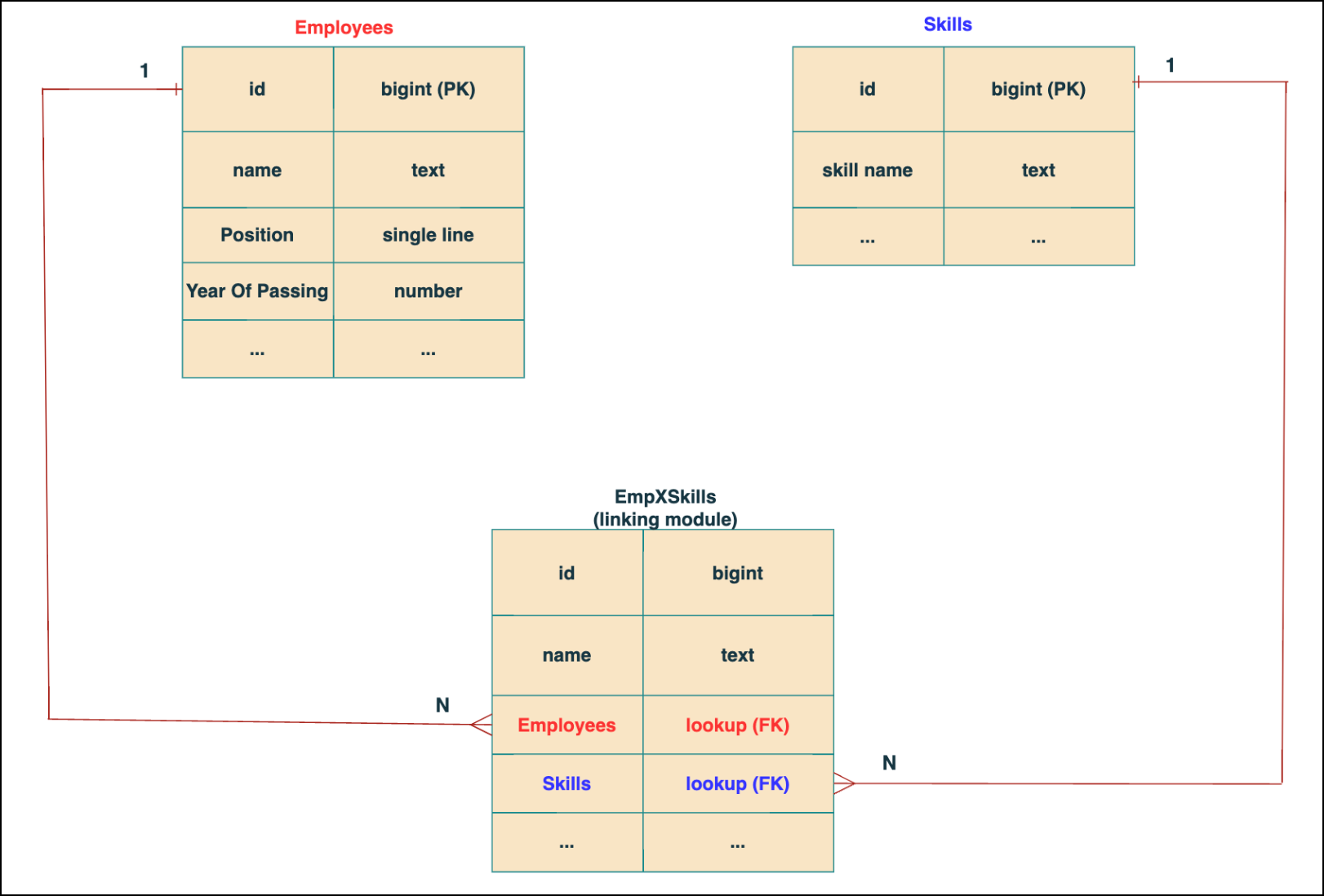
In the linking module, two lookup fields (lookup fields with api names - Employees and Skills) will be created. The lookup fields, one pointing to Employees and the other pointing to Skills from the linking module, establish a connection between the linking module and its associated module.
Why you cannot use a lookup field for this use case?
In Zoho CRM, a lookup field creates a one-to-many relationship between two modules i.e. one record in the source module can be linked to only one record in the target module.
Example :
If you create a lookup field for Skills in the Employees module, each employee can be linked to only one skill. So, use a multi-select lookup field instead of a lookup field when you need to represent complex relationships like one employee - many skills and one skill - many employees.
3. How to create a multi-select Lookup field using Zoho CRM APIs?
To create a Multi-Select lookup field between two modules using Zoho CRM APIs, follow these steps:
Step 1: Identify the Module API Name
Before creating the field, you should know the API names of the Employees and Skills modules. For that, use the Get Module Metadata API.
Request URL : {{api-domain}}/crm/v8/settings/modules
Request method : GET
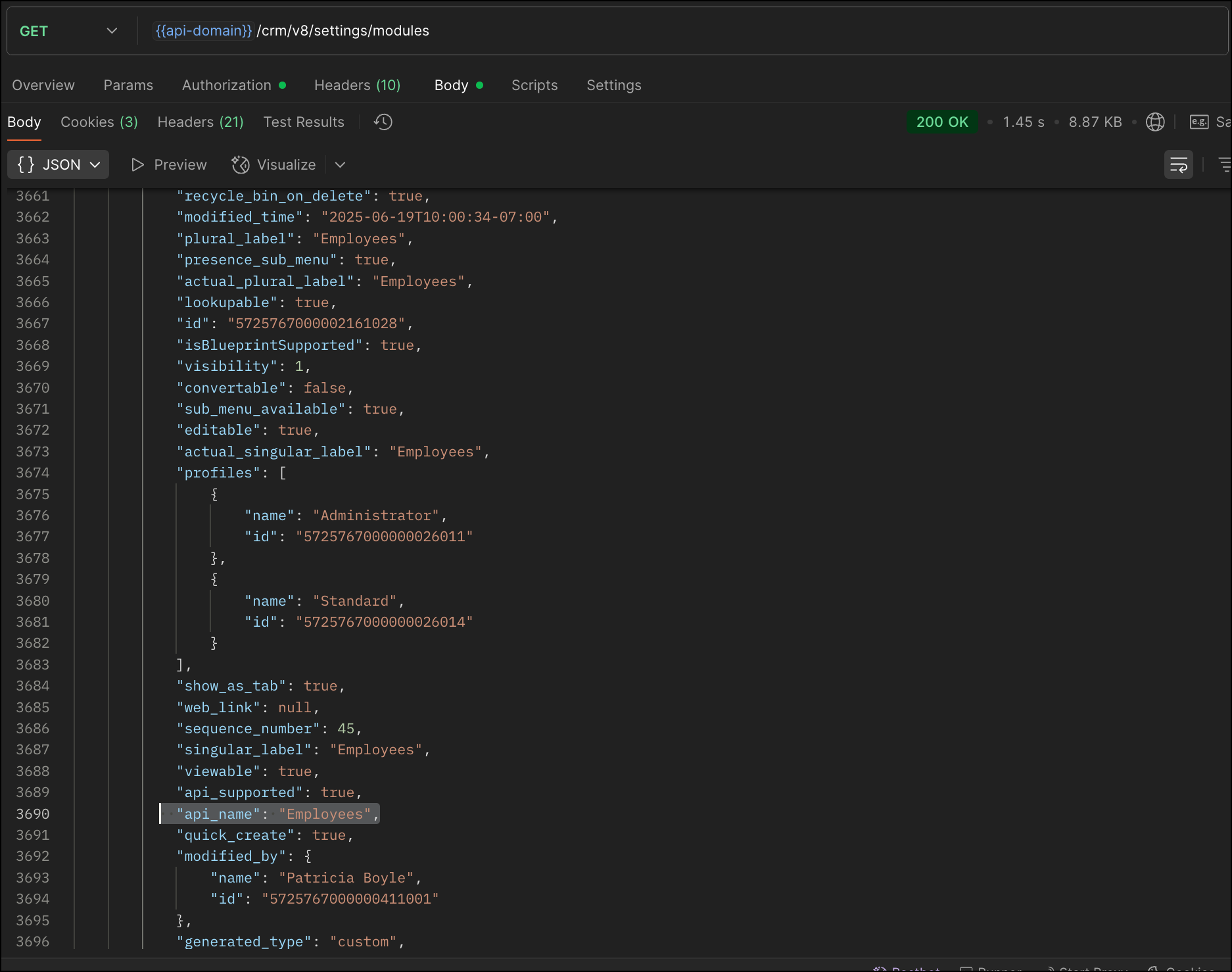
Now, search for the Employees module in the response and note its API name.
Step 2: Use the Create Custom Fields API
To establish a many-to-many relationship between two modules, in our case, Employees and Skills, you need to create a custom field of type multi-select lookup in the Employees module (parent module). Here, we will associate multiple skills to an employee.
This custom field requires:
- The related module you want to link to - Skills.
- A display field from the related module
- The linking module (EmpXSkills), which stores the actual associations.
Use the Create Custom Fields API to create custom fields.
Request URL : {{api_domain}}/crm/v8/settings/fields?module=Employees
Request method : POST
Sample input :
|
{
"fields": [
{
"field_label": "Skills", //Name of the field in your module
"data_type": "multiselectlookup", //Type of the field
"multiselectlookup": { //This JSON object contains the multi-select lookup relationship details
"connected_details": { //Details about the module and field you want to link
"module": {
"api_name": "Skills" //API name of the related module
},
"field": {
"field_label": "Skills" //The field in the related module to display
}
},
"linking_details": { //Details about the junction or linking module that manages the many-to-many relationship
"module": {
"plural_label": "EmpXSkills" //Plural label of the junction module
}
}
}
}
]
}
|
4. How Do You Find the Linking Module and Field API Names?
To know the API name of the linking module:
Use the Get Modules API and search for "generated_type" : "linking" in the response to identify MxN modules. In our case, EmpXSkills.
Request URL : {{api_domain}}/crm/v8/settings/modules
Request method : GET
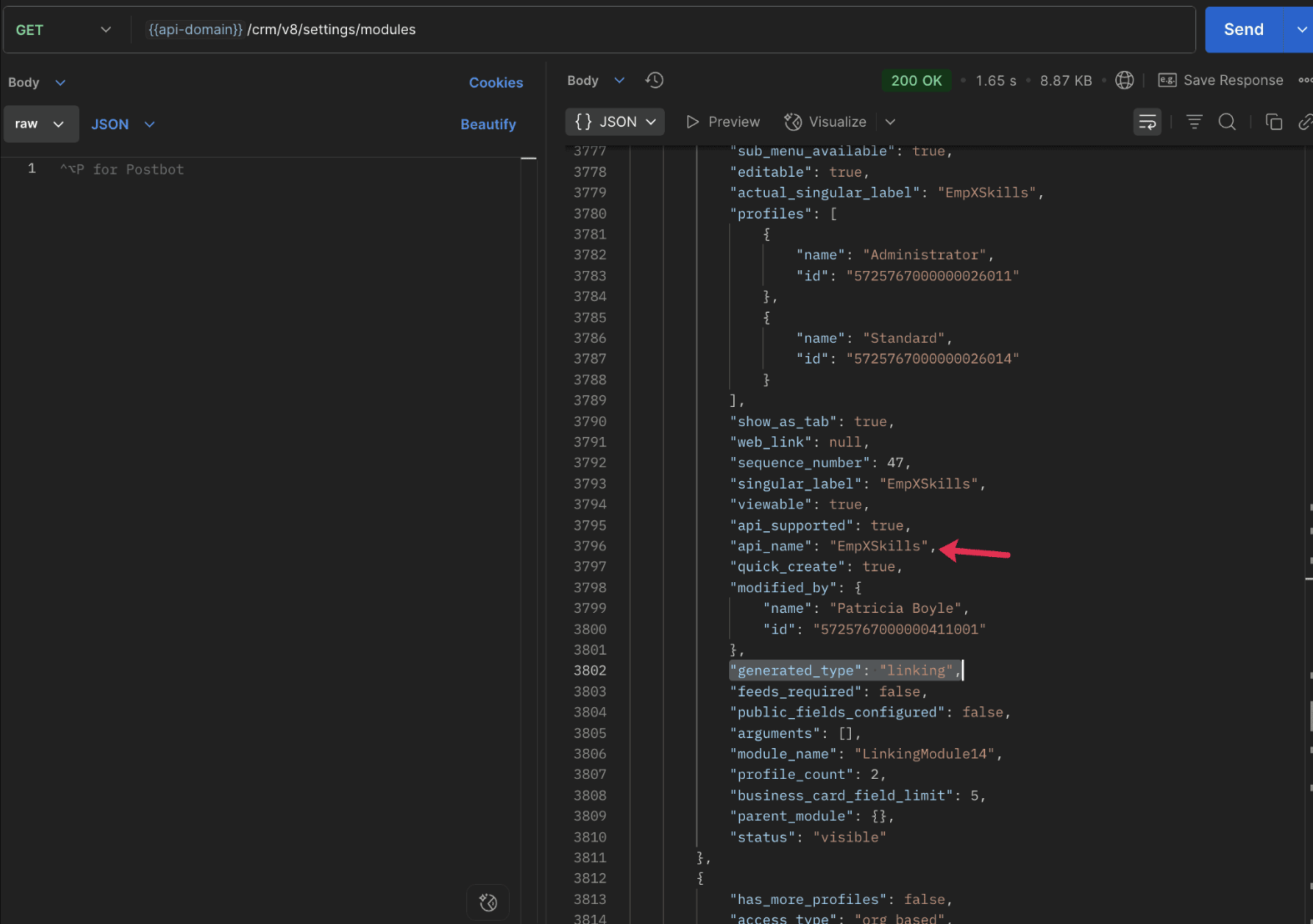
To know the field API names in the linking module:
Use the Get Fields Metadata API to retrieve the API names of lookup fields within the linking module.
Request URL : {{api_domain}}/crm/v8/settings/fields?module=EmpXSkills
Request method : GET
5. How do I associate records via a multi-select lookup field using the Insert Records API in Zoho CRM?
To associate records using a multi-select lookup field, you must provide the record IDs from the related module. The association is made through the linking module.
Example :
Associating multiple skills with an employee using the multi-select lookup field.
Request URL : {{api-domain}}/crm/v8/Employees
Request method : POST
Sample input :
|
{
"data": [
{
"Name": "Patricia",
"Email": "patricia@mail.com",
"Position": "Marketing Specialist",
"Year_of_Experience": 5,
"Skills": [ // API name of the multi-select lookup field in the Employees module
{
"Skills": { // API name of the lookup field in the linking module pointing to the Skills module
"name": "Marketing",
"id": "5725767000002149427" //ID from the Skills module are mandatory to establish the link
}
},
{
"Skills": {
"name": "Social Media Marketing",
"id": "5725767000002149476"
}
}
]
}
]
}
|
6. How do I associate an Employee's skills using the linking module in Zoho CRM?
To establish a relationship between the Employees and Skills modules through the linking module, use the Insert Records API to create a record in the linking module, EmpXSkills.
To do this,
- Use the appropriate lookup field API names to reference the parent module.
- You must need the record IDs from both the Employees and Skills modules to create the associations.
Request URL : {{api-domain}}/crm/v8/EmpXSkills
Request method : POST
Sample input :
|
{
"data": [
{
"Name": "Patricia",
"Employees": {
"id": "5725767000002161001" // Record ID from the Employees module
},
"Skills": {
"id": "5725767000002149476" // Record ID from the Skills module
}
}
]
}
|
7. When should I use create/update operations in the Employees module vs the EmpXSkills module?
|
Employees Module |
EmpXSkills (linking) Module |
|
Use when you want to create or update an Employee and associate Skills using the Multi-select Lookup field. |
Use when you want to create or remove associations between existing Employee and Skill records without modifying the actual Employee or Skill data. |
|
Creating a new employee and assigning their skills at once. |
Managing relationships between existing records i.e., linking and unlinking skills to employees. |
8. How to update a record in the linking module?
To update a record in the linking module, use the Update Records API.
Request URL : {{api-domain}}/crm/v8/EmpXSkills/5725767000006269044
Request method : PUT
Sample input :
|
{
"data": [
{
"Skills": {
"name": "Marketing",
"id": "5725767000002170035" //Associating another skill with the employee
}
}
]
} |
In the above sample, we have replaced an existing skill associated with an employee with another Skill in the linking module.This is done by updating the Skills lookup field in the EmpXSkills record.
Please note that in the linking module, Skills is a lookup field, so you can associate only one skill per linking record. But in the Employees module, Skills is a multi-select lookup field, so an employee can be associated with multiple skills.
9. How to unlink records from the parent module as well as the linking module?
Unlink the associated records from the parent module:
Using the Update records API, you can remove an associated skill from an employee, use the "_delete": null key within the multi-select lookup field in the Employee record update.
Request URL : {{api-domain}}/crm/v8/Employees/5725767000006269044
Request method : PUT
Sample input :
|
{
"data": [
{
"Skills": [
{
"Skills": {
"name": "Marketing",
"id": "5725767000002170035" // The Skill record you want to unlink
},
"id": "5725767000007228047", //record ID - The record created in the linking module for the employee with the Marketing skill
"_delete" : null
}
]
}
]
}
|
Replace an associated record from the linking module:
Use the Update Records API to replace an existing association in the linking module.
Request URL : {{api-domain}}/crm/v8/EmpXSkills/5725767000007228035
Request method : PUT
Sample input :
|
{
"data": [
{
"Skills": {
"name": "Java",
"id": "5725767000005259075" //replacing a new skill
}
}
]
}
|
In the above sample, we have replaced the existing skill with Java.
10. Why am I seeing the error "DUPLICATE_LINKING_DATA" in the Update Records API?
This error occurs when you try to associate records with the parent record that are already linked with the Multi-select lookup field. To resolve this, check the records you are trying to link and make sure your association is only with records that are not already linked.
Know your existing linked records:
Before the Update Records API, use the Get Related Records Data API and search for the multi-select lookup field. In our case, Skills is the multi-select lookup field created in the Employees module. This will return all records already associated.
Example :
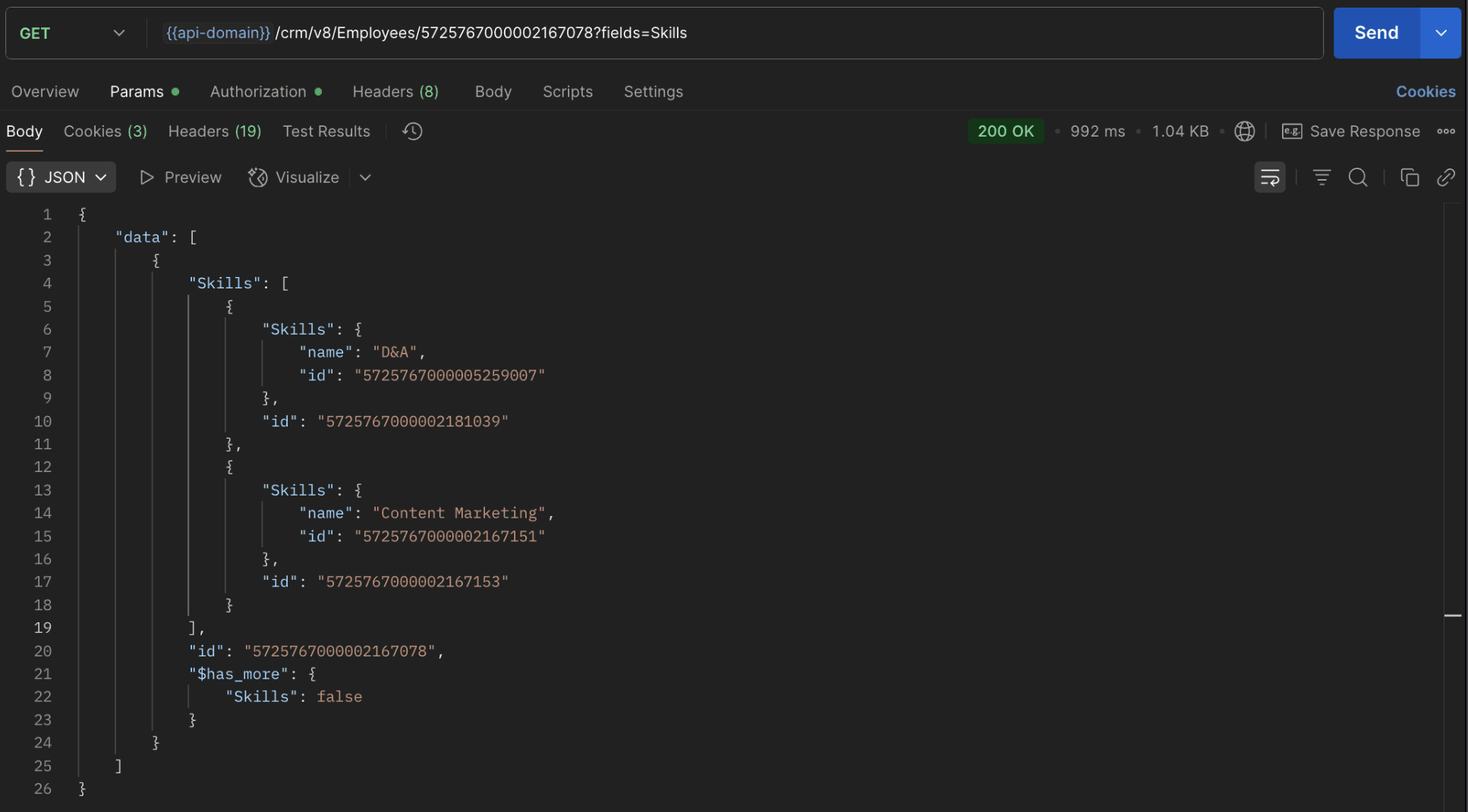
The response returns all Skills already linked with that Employee.
Using this way, compare the IDs from the API response with the new records you are about to link, and only proceed with non-duplicate IDs. This avoids duplicate entries and prevents the "DUPLICATE_LINKING_DATA" error.
11. What happens if I delete a record in the linking module?
When you delete a record in the linking module, it only removes the association between the related records in the Employees and Skills modules.
Note :
- Deleting a linking module record removes only the relationship between two records from the Employees and Skills modules.
- Deleting an Employee or Skill record deletes all corresponding entries in the linking module as well.
12. How do I query linked records?
Use the COQL API to query multi-select lookup data by specifying the corresponding linking module's API name directly in your query. The linking module is treated as a separate module in Zoho CRM, so you can retrieve associated records by querying it like any other module.
Sample query :
|
{
"select_query": "select Skills.Name as skill, Employees.Name as employee from EmpXSkills where Skills.Name like '%Marketing%'"
}
|
Use the Get Module Metadata API to know the linking module's API name.
13. How do I export multi-select lookup records using the Bulk Read API?
To export multi-select lookup data, linking module records efficiently, use the Bulk Read API with the linking module’s API name.
Request URL : https://www.zohoapis.com/crm/bulk/v8/read
Request method : POST
Sample Request :
|
{
"callback": {
"method": "post"
},
"query": {
"module": {
"api_name": "EmpXSkills" //API name of the linking module
},
"fields": [
"Employees.Name",
"Employees.Year_of_Experience",
"Skills.Name"
],
"criteria": {
"group": [
{
"field": {
"api_name": "Employees.Year_of_Experience"
},
"comparator": "greater_than",
"value": "4"
},
{
"field": {
"api_name": "Skills.Name"
},
"comparator": "contains",
"value": "Social"
}
],
"group_operator": "AND"
}
}
}
|
14. Can I import my linking module's data using the Bulk Write API?
Yes. Like the Leads and Contacts modules, you can also import linking module's data into Zoho CRM using the Bulk Write API by directly specifying the linking module’s API name.
If you are importing data that involves both a parent module, Employees and its associated MxN linking module, follow these steps:
1. Create separate CSV files:
- One for the parent module - Employees
- One for the linking module - EmpXSkills
2. Zip the files into a single ZIP file.
3. Upload the ZIP in a single Bulk Write API request.
4. Ensure accurate field mappings are provided in the API request body.
Refer to Kaizen #131 - Bulk Write for parent-child records using Scala SDK for more details on handling parent-child records.
15. Can I receive notifications if a multi-select lookup field in a module is modified or updated?
Yes, you can receive notifications when a MxN field is updated using the Notification API. To enable instant notifications for actions performed in a module, use the respective API names of the linking module in the input body.
Request URL : https://www.zohoapis.com/crm/bulk/v8/actions/watch
Request method : POST
Sample input :
|
{
"watch": [
{
"channel_id": "10000",
"events": [
"EmpXSkills.all" //EmpXSkills represents the API name of the linking module
],
"notify_url": "https://webhook.site/9f5ba227-ce5a-4709-814d-b044c003d605",
"return_affected_field_values": true
}
]
}
|
16. Can I use criteria-based filtering when accessing multi-select lookup data using the Search API?
Yes, you can filter multi-select lookup data using the criteria parameter in the Search API's URL.
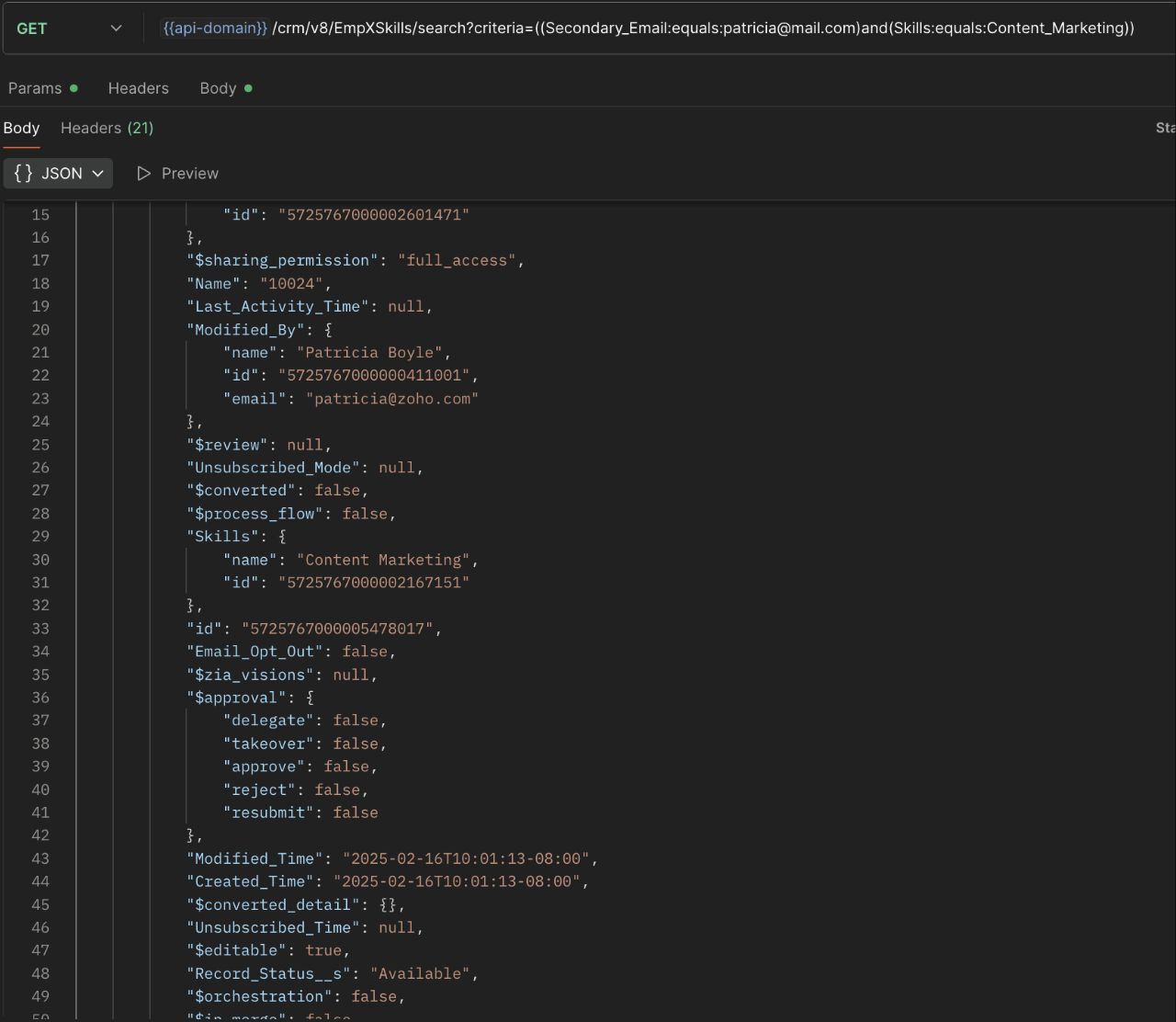
Here is an example that fetches records from the EmpXSkills linking module.
Request URL : {{api-name}}/crm/v8/EmpXSkills/search?criteria=((Secondary_Email:equals:patricia@mail.com)and(Skills:equals:Content_Marketing))
Request method : GET
Sample response :
x-----------------------------x
We trust that this post meets your needs and is helpful. Let us know your thoughts in the comment section or reach out to us at support@zohocrm.com
Stay tuned for more insights in our upcoming Kaizen posts!

Previous Kaizen Post : Kaizen #198: Using Client Script for Custom Validation in Blueprint | Kaizen Directory
Other FAQs in the Kaizen series :
- Kaizen#75 - Frequently Asked Questions on Client Script
- Kaizen #147 - Frequently Asked Questions on Zoho CRM Widgets
- Kaizen #155 - Frequently Asked Questions on Subforms
- Kaizen #170 - Frequently Asked Questions on Notification APIs
- Kaizen #195: Frequently Asked Questions on Bulk Read API and Bulk Write API
Topic Participants
Subramanian K
Sticky Posts
Kaizen #198: Using Client Script for Custom Validation in Blueprint
Nearing 200th Kaizen Post – 1 More to the Big Two-Oh-Oh! Do you have any questions, suggestions, or topics you would like us to cover in future posts? Your insights and suggestions help us shape future content and make this series better for everyone.Kaizen #226: Using ZRC in Client Script
Hello everyone! Welcome to another week of Kaizen. In today's post, lets see what is ZRC (Zoho Request Client) and how we can use ZRC methods in Client Script to get inputs from a Salesperson and update the Lead status with a single button click. In thisKaizen #222 - Client Script Support for Notes Related List
Hello everyone! Welcome to another week of Kaizen. The final Kaizen post of the year 2025 is here! With the new Client Script support for the Notes Related List, you can validate, enrich, and manage notes across modules. In this post, we’ll explore howKaizen #217 - Actions APIs : Tasks
Welcome to another week of Kaizen! In last week's post we discussed Email Notifications APIs which act as the link between your Workflow automations and you. We have discussed how Zylker Cloud Services uses Email Notifications API in their custom dashboard.Kaizen #216 - Actions APIs : Email Notifications
Welcome to another week of Kaizen! For the last three weeks, we have been discussing Zylker's workflows. We successfully updated a dormant workflow, built a new one from the ground up and more. But our work is not finished—these automated processes are
Recent Topics
Still client need to download .exe?
Hello, the client for use zoho assist need everytime download .exe file and launch it?Splitting a ticket's entire thread
Hi, When you split a ticket it only splits the individual reply that you clicked "Split as new ticket" on. Is it not possible to split the entire ticket thread from that point into the new ticket (every reply from the split point forward)? Or is thereEditing the text on the Help Center home page
Is it possible to edit the "Welcome to Help Center" message anywhere? This one: We'd like to be able to tailor it a little more ourselves.WHMCS for Zoho Flow
Can we use WHMCS for Zoho flow?Online meetings through Calendar Booking form with options
This is great to see and particularly for those users who don't have Zoho BOOKINGS. The shame of it all though is that it could have been better. Why do we have to set up separate booking forms for each type of meeting and for each online conferencingAgents permission per department
Hi Team, can I setup permission for each agent what they can do in each department, for example I want account department agents to only have view access to support department tickets and not allowed to assign or reply to clients. I am sure this wouldCRM notes
I want to be able to add notes to a task that do not necessarily get rolled up into an account or contact. For example, I tasks to work on a Court Order for John Doe divorce account. There might be lots of updates (in the form of notes) that employeesAlternative / optional Position
How do you create an alternative position or an optional position (article) in offers?جمود في الصفحة عند حفظ عمل
عندما اقوم باضافة ايقونة الى صفحة النموذج تجمد الصفحة ولا تعمل وتصبح مثل المظلة احدث الصفحة لا تعمل انتظر قليلا لا تعمل اقوم بنسخ رابط الصفحة والصقه في الرابط فيعملZOHO Books Canadian payroll Integration
Hello, I know ZOHO books doesn't have Canadian payroll and I dont believe its coming anytime soon. My question is there a Canadian payroll software that could be integrated with Zoho Books? Thank you HDZoho Desk Time Tracking and the Salary Privacy Issue
Hello colleagues, Just wondering if anyone did hit the same wall? In the Desk, when the agent-specific hourly rates are enabled (Zoho Desk → Setup → Time Tracking → Billing Preferences), these Time Entries are being displayed in the Ticket History tab.How to Delete, Disable, or Remove Streams from the Mail App?
Is there a way to remove Streams from the mail app sidebar? I get too many notifications, it doesn't add any value to Zoho's functionality (especially since you can just make comments inside an email), and is distracting. I do not want notifications/alertsDelay in MX updates
Hi, I set MX Records 12 hours ago, and I am receiving email normally, but I still get notification MX record is not pointing correctly. Error: The MX records of your domain is not yet pointed to Zoho Mail. Why there is a delay in detecting MX records,make.com integration
Just wondering if anyone on Zoho One account connecting apps to Make.com We're on Canadian server (.com) and when connecting to Make.com, it keeps having error of Invalid Client ID. I have contacted both Zoho and Make and both sides said it's not an errorArticle Numbers for KB articles
Hello, I was wondering if it's possible to turn on article numbers/ part numbering for KB articles. If this is not already a feature, we'd like to request it. Frequently a solution will require multiple articles so tracking which articles are referencedRefund Request ,Zoho Mail Subscription (zoho suport is not replying)
Hi Zoho Team, I recently subscribed to the Zoho Mail yearly plan, but after evaluating it, I found that the interface does not suit my workflow. I’ve already canceled the subscription from my end. As I’m well within your 30-day refund window, I’m requestingFile Encryption - Zoho Desk iOS app update
Hello, Everyone! We have now introduced the 'File Encryption' option within the Zoho Desk app as part of the HIPAA Compliance. This option allows the user to encrypt the attachments within the Desk mobile app, which acts as an additional layer of security.Data encryption - Zoho Desk iOS
Hello, Everyone! In the recent iOS version(v2.8.23) of the Zoho Desk app, we have supported data encryption. As a part of HIPAA Compliance, the Zoho Desk mobile app now allow users to encrypt the Desk mobile database as an additional layer of security.Notify Admin when a user forgets to check-in or check-out at the designated time.
Hello, I would like notify the Admin via email when a user forgets to check-in or check-out at the designated time. What is the best way to setup this email notification?Assistance Needed with Prospect Conversion Issue
Hi, I attempted to convert a prospect to an account, but received a pop-up notification indicating that the contact information matches an existing contact. I selected the option to add it to the existing contact, but it appears the prospect was not successfullyMail Merge - unable to send more than 50 email
Hi, I've subscribed to the pay email service because of the Mail Merge feature. However, I've found that this feature only allow to send up to 50 emails. I've to attach a screenshot for your reference. This limitation is not mentioned anywhere in service.Zoholics Europe 2025: Your Ultimate Data Analysis (Zoho Analytics) Workshop Experience
Why should you attend? This year, Zoholics Europe 2025 is putting data analysis centre stage. With a dedicated workshop designed to answer all your data-related questions, you’ll gain practical skills, real-time solutions, and expert insights that youUK payroll entries
Hey guys, Nett payroll payments are imported direct into the bank, using an external payroll system (will be glad for Zoho to have a UK payroll app) At present I have monthly recurring bills for HMRC which are auto entered & paid when due. This seemsReverse Charge Services (Non-EU) Showing Correctly in 84/85 and 67, But Missing in Box 46 - Germany
Hi, I'm located in Germany and I’ve set up my expenses for non-EU services (e.g., OpenAI, DeepSeek) under the reverse charge mechanism (§ 13b UStG) in Zoho Books, and I noticed some discrepancies in the VAT Summary Report. What’s Correct: Reverse ChargeZoho Live Chat/Support
What is going on with Zoho support lately? I've tried to use the live chat feature 4 different times and it refuses to connect to any (despite waiting over 30 minutes one of the tries). I finally gave up and emailed my question nearly a week ago and stillCan we have a module to records Certificate No and TDS rates for Lower TDS Certificates by the vendors ?
Can we have a module to records Certificate No and TDS rates for Lower TDS Certificates by the vendors ?Tip #38- Track Organizational Changes: A Guide to Using Action Log Viewer- 'Insider Insights'
Hello Zoho Assist Community! Ever needed to trace who did what and when within your remote support operations? Let’s say your support team is growing, and you want to monitor key activities like settings updates, user invites, module changes, or permissionAnswer Bot - Issues with language recognization
When a user enters the phrase "gift vouchers" into the chatbot as their first message, the bot responds in French, even though: The default bot language is set to English The user's browser language settings are set to English All translate settings inTip of the Week #67– Avoid confusion – Mark duplicate threads.
When customers send the same message to multiple email addresses, such as support@ and sales@, your team may end up seeing the same message in different inboxes. This creates confusion, risks double replies, and clutters your workspace. Use the Mark asFinal Reminder: Discontinuation of Older ASAP Widgets and Mobile SDK Support
We launched the new ASAP Help Widget last year, introducing a unified and enhanced experience. Since then, older configurations have been placed in read-only mode, with all major updates and improvements built exclusively on the new version. As part ofZoho Subscriptions -- Zoho Commerce integration
Is there integration between Zoho Subscriptions and Zoho Commerce? I would like to create subscription plans in Zoho Subscritpions and list them for on my Zoho Commerce store.Website show Blank white screen
Customer called me to tell me my website is currently down upon review it shows a white screen however I can access everything via editor. JITCADCAM.comHow manufacturing analytics can transform your enterprise with Zoho Projects Plus
Did you know that every single car is made up of 30,000 to 40,000 individual parts? All of these are manufactured meticulously in various facilities before being assembled into one. The global manufacturing industry spans a wide range from deliveringCustomize your SalesIQ live chat with Custom CSS and blend it with your website design
Hi everyone. Hope you all are having a great day! SalesIQ offers various inbuilt customization choices for your chat widget and window like changes in colour, theme, font etc. Although these choices are many, sometimes they may not match with the designFrom Email Address When Replaying to Missed Chats
One of the most common things we do is follow up on every missed chat. Missed chats are like money in the bank, people just waiting for your response and to start a relationship with our companies. However, SalesIQ only lets you respond from 1 email address from your entire account?! We have happily paid for 4 subscriptions, but our users cannot reply from their own email address? How are we supposed to build customer relationships? The fix to this issue is so simple, just load in the logged inNarrative 6 - The impact of rebranding
Behind the scenes of a successful ticketing system - BTS Series Narrative 6 - The impact of rebranding Every organization has invested in branding to set itself apart, and that should be reflected in the help desk. Zoho Desk enables organizations to applycustom color palette for picklist in Sheet
Migrating over from Google Sheets and missing the ability to customize the individual item colors of my picklist/dropdown menus. Is this something that is possible? A search showed me creating a custom color palette in Analytics is possible but I am notWhat's New - July 2025 | Zoho Backstage
Start smart, end strong. From knowing who’s coming to celebrating who showed up, July’s updates help you run events that feel organized from the first invite to the final thank you. Planning an event used to be like writing a choose-your-own-adventureImage Upload Field API get encrypted ID and sequence number
Hello is there a way to extract the encrypted id and sequence number from image upload fields through the Zoho CRM API? I created a custom script with javascript within Zoho CRM, but I want to extract the encrypted id and sequence number for all my imagesAttention: Changes to 10DLC TCR pricing and new authentication requirements
Hi everyone, Starting August 1, 2025, The Campaign Registry (TCR) is introducing new pricing changes and a mandatory brand verification process called Authentication+ 2.0, which will affect how you register and manage your 10DLC messaging services. TheseNext Page