Keeping project teams in the know with Zoho Cliq
Project management is all about processes, data flow, and maintaining order. But communicating appropriate information at crucial times to stakeholders is as important as the moving parts of a project. Zoho Cliq can facilitate effective communication among project members. Not just that. It can allow creating and updating tasks, issues inside Zoho Projects right from the very conversations that drive execution. If you are struggling to balance between streamlined communication and driving execution, then this post is for you.
Right signal to the right channel
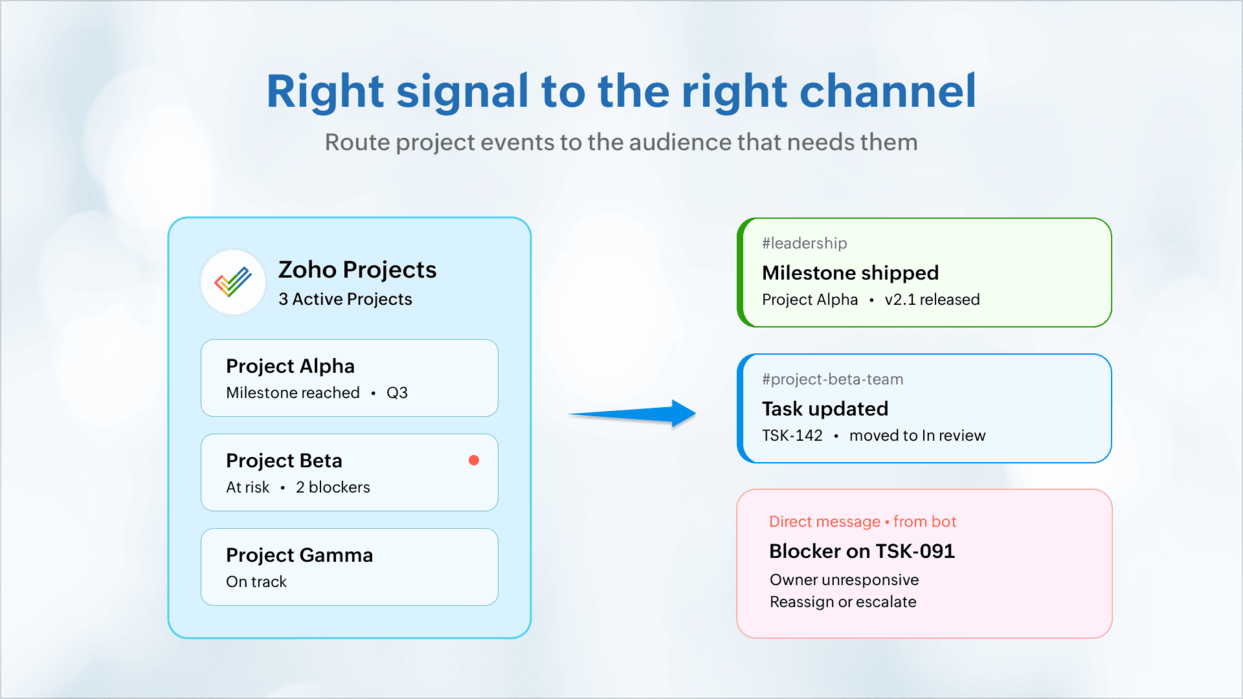
Project activity is logged inside modules. But the real work happens inside everyday exchanges and in keeping relevant stakeholders informed. Post periodic digests or milestone completions to leadership on channels, and blockers on individual DMs. Group chats can handle tasks, issues, or related discussions separately. Bots can send DMs for critical bugs, milestone slips, and blocked tasks. This way, everyone is kept in the know.
Meeting-free teams
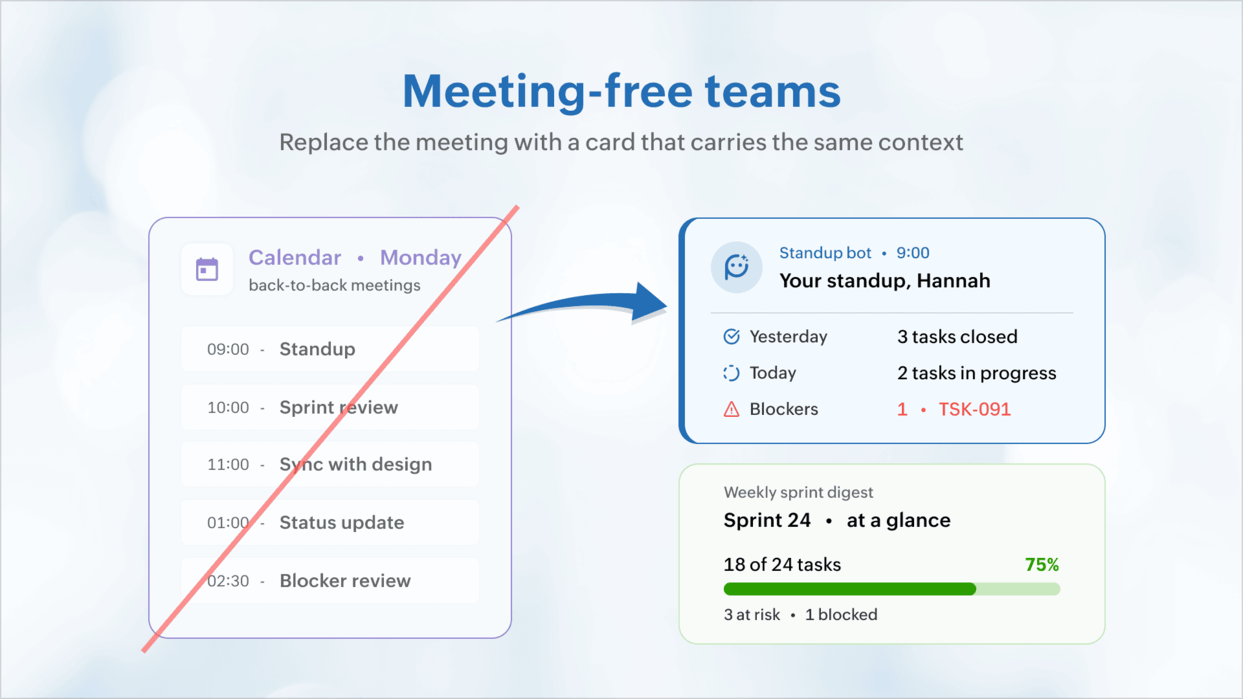
Save your teams hours of precious time lost in meetings. Use a personalized stand-up card and schedule it to know what's on your plate rather than get on meetings that stretch forever. A carefully designed message card summing up the week's tasks or sprint schedule can provide more context than an hour of a team stand-up.
No promises made in the air
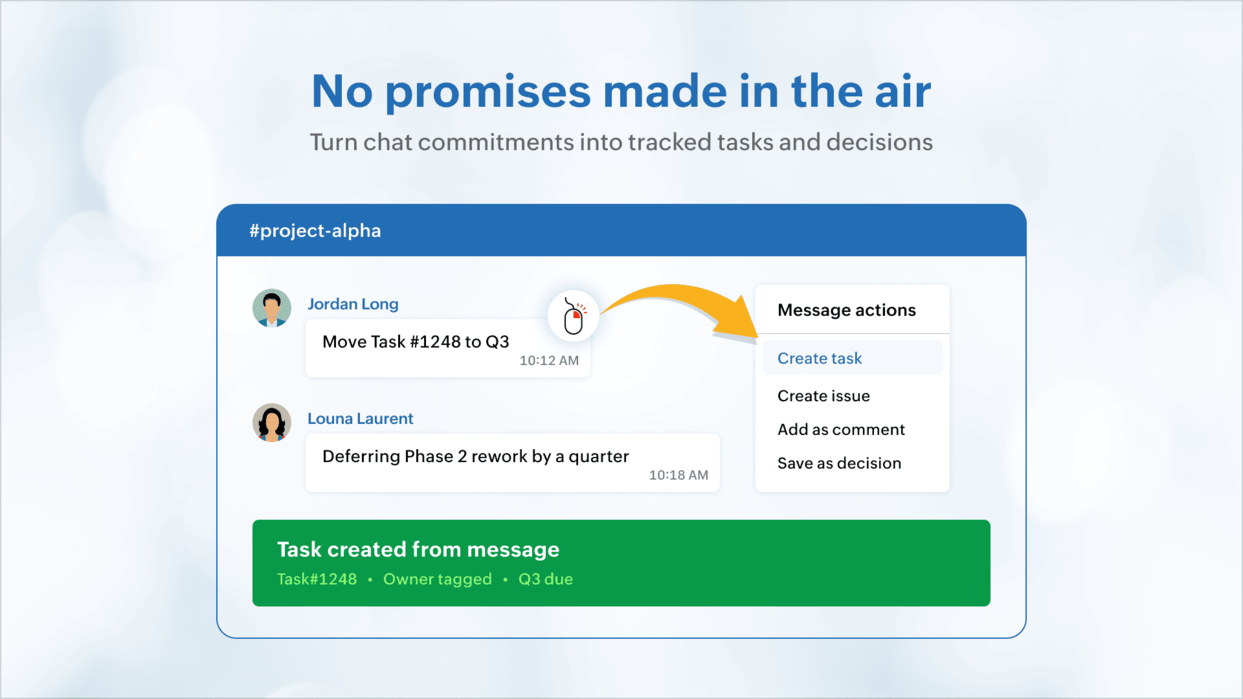
Most ideas, commitments, suggestions, updates are shared loosely over chat and are handled based on verbal affirmations. With Zoho Cliq, users can convert chats into work items, share design feedback, add bug triage as issues, and record the discussions around them too. Tasks now have complete context and managers do not need intensive follow-ups.
Activate reviews and approvals
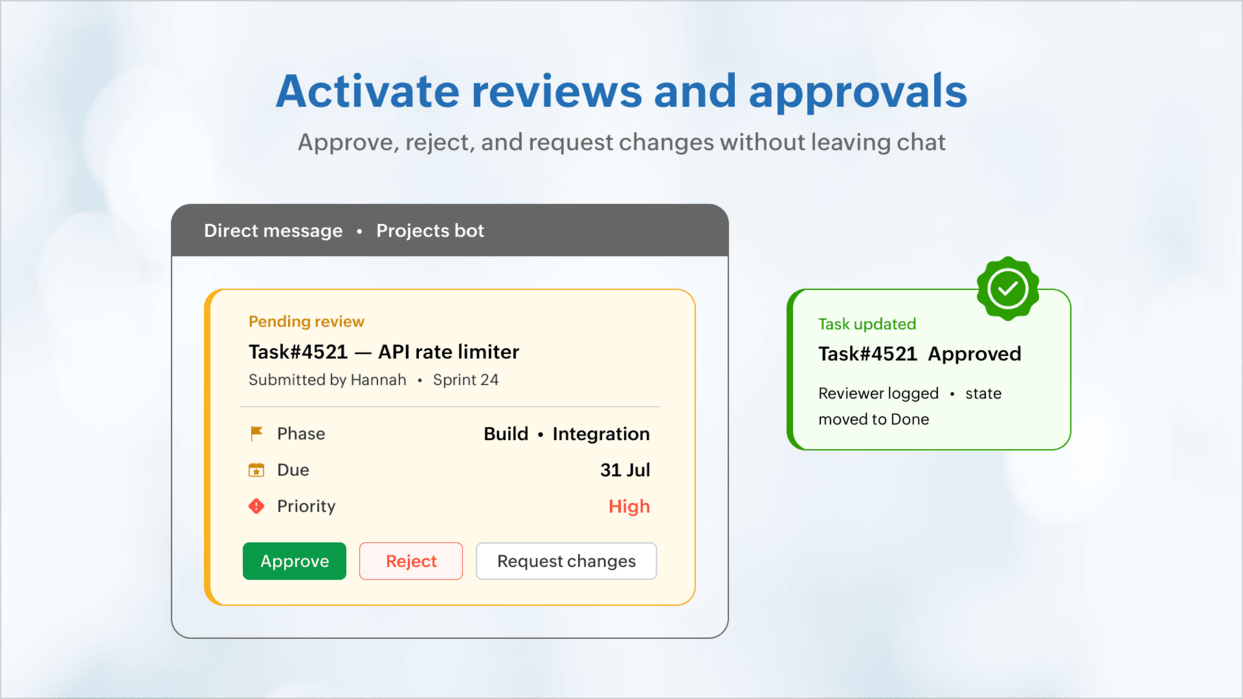
While project managers grapple with ensuring reviews and approvals happen on time, they miss the time lost silently during waiting.
The reviewer is unaware of the submission until they open their task lists. And the author does not know when their review is complete. Message cards with the item details like status, the sprint or phase it is part of, the due date, and other relevant details can be sent over DMs to approvers.
The message cards can feature buttons inline to approve or reject or request changes. You can facilitate task updates, approve time-logs, and much more with a single click–all inside Zoho Cliq.
Cross-project dependencies
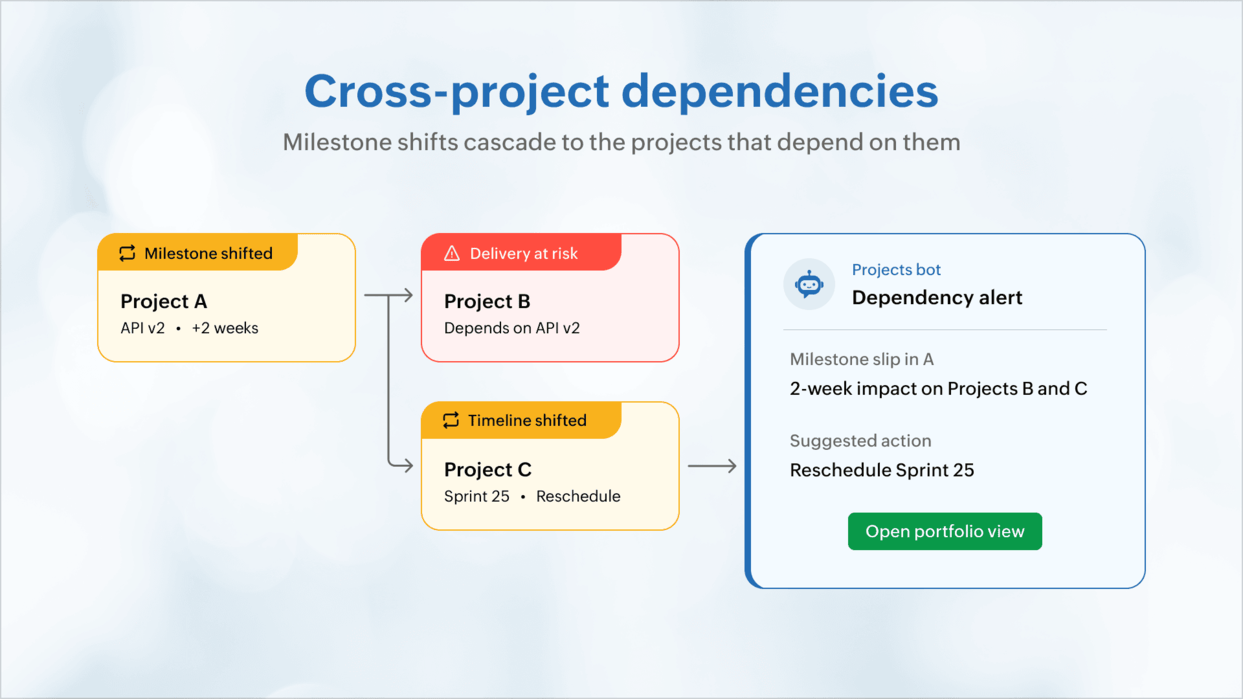
Milestone slips in one project can cascade on to others. Teams working on their items might find out about the extension from a customer or a status meeting after it happens. A Cliq bot can pre-emptively listen across projects, and inform dependent teams about prospective delays the moment things shift. This can make project portfolio delivery proactive instead of reactive.
All you have to do is ask
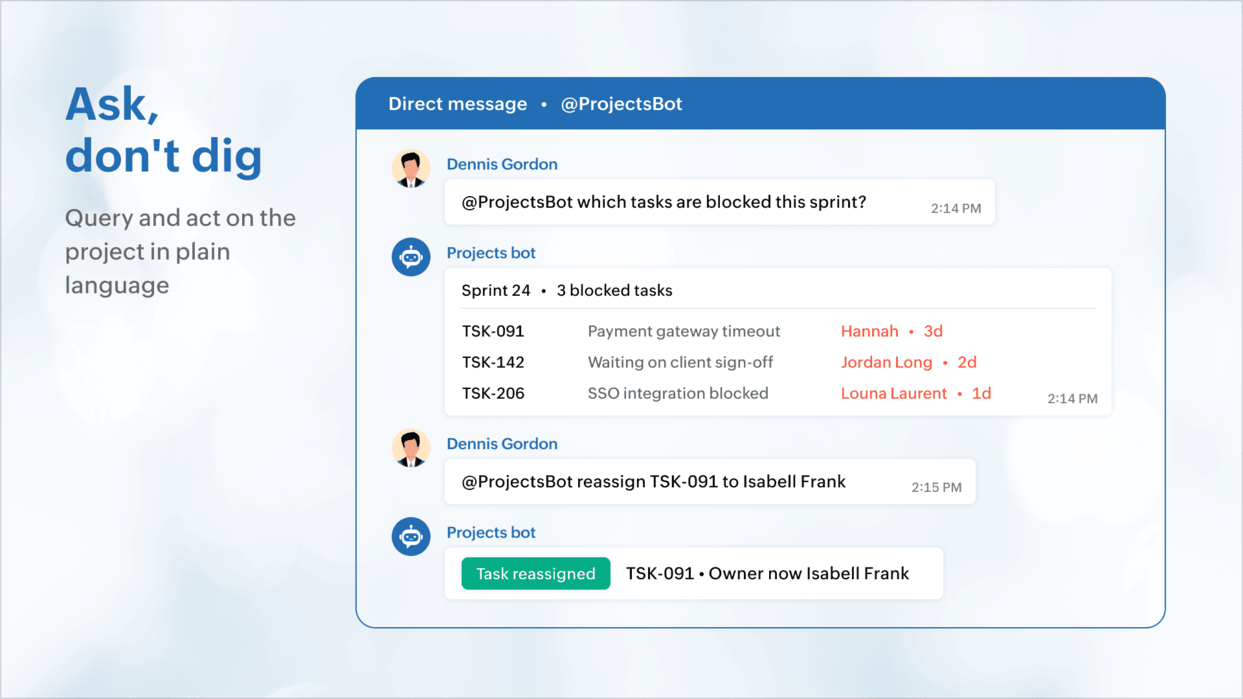
Zoho Cliq has a chat interface that can facilitate project-related exchanges. All you have to do is wire your favourite LLM or Zoho Projects MCP and simply ask in natural language like "What tasks are blocked for this sprint?" or "What's the capacity for the next week?" — and get a response inline. The chat window we're so used to seeing display alerts also queries the project on your bidding.
 Pro tip: Zoho Cliq has bots that can orchestrate notifications and streamline decision-making for IT services, or software delivery teams running concurrent projects. /slash commands can highlight project blockers, show timesheets pending approval, tasks or reviews that need approval, and also effect changes with the click of a button. Zoho Cliq can help you achieve all these through voice commands or natural language processing capabilities.
The Zoho Projects-Zoho Cliq integration
The Zoho Projects integration for Zoho Cliq lets you map channels to projects, create tasks and issues from any message, receive notifications for the events that matter, and use the Projects Bot to stay ahead of deadlines. Beyond the defaults, the Cliq platform offers slash commands, bots, message cards, schedulers, webhooks, etc. to model the exact flow your delivery team runs on.
Let us know if you're interested in knowing more. If you'd like to work with one of our partners, write to us at support@zohoprojects.com and we'll take it forward for you.
Check out our previous editions:
#4 Bridging the gap between support and project delivery
#3 Powering up Zoho CRM and project intelligence
#2 Build an approval management system with custom modules
#1 Effective project and task customization with CodeX
Let us know if you're interested in knowing more. If you'd like to work with one of our partners, write to us at support@zohoprojects.com and we'll take it forward for you.
Check out our previous editions:
#4 Bridging the gap between support and project delivery
#3 Powering up Zoho CRM and project intelligence
#2 Build an approval management system with custom modules
#1 Effective project and task customization with CodeX
Best,
Zoho Projects Team
Zoho Projects Team