Making the most of email notifications in Zoho Bookings
Email notifications are one of the most versatile tools in Zoho Bookings.
We've beautified and translated them. Now, let's see what other steps we can take to further stretch their use.
In this guide, we'll use email notifications to:
- Create product awareness
- Market other services
- Show social proof
- Thank customers
- Collect feedback
- Win repeat business and more
Check out the table below to see how you can pack more value into your outgoing emails.
Email Notifications
Booked | Rescheduled | Canceled | Completed | No-show | Reminders | |
| Agenda and meeting prerequisites | ✓ | ✓ | ✓ | |||
Case studies | ✓ | ✓ | ✓ | |||
Customer testimonials | ✓ | ✓ | ✓ | |||
Staff credentials | ✓ | ✓ | ✓ | |||
Post-appointment instructions | ✓ | |||||
Data gathering | ✓ | ✓ | ✓ | |||
"Book another appointment" button | ✓ | ✓ | ✓ | |||
Service promotions | ✓ | ✓ |
Yes, customer testimonials, case studies, and other value additions can be shared through social media. But think about this: Brands spend billions of dollars for customer attention, whereas on the other end, customers are overloaded with information. It's difficult to reach your customers amidst this chaos.
Even if you pack valuable content into your social posts, your customers are likely distracted and their attention fragmented.

But when you leverage email notifications in Zoho Bookings, you get more targeted customer attention with very little effort from your side. Above all, it is FREE.How?
Because even when faced with hundreds of emails, customers will open Zoho Bookings messages to view valuable information like appointment times and meeting links.

Plus, as customers often forget these details, they're likely to open your email notifications more than once. This means you get a customer's undivided attention on a recurring basis.
So why not leverage this?
You can double-down on the value you deliver to your customers during this attention window and let customers know more about what you have to offer.
This reinforces brand recall, strengthens customer trust, and increases repeat bookings, eventually leading to a boost in revenue.
Sending value packed emails
Let's explore different ways to deliver value to your customers.1. Agenda and prerequisites
An agenda helps you set clear expectations by giving a preview of the session. This way, customers can prepare for what's to come.
Prerequisites are beneficial for both you and the customer. Say, for example, you teach students programming languages online. Your prerequisites might be a laptop, a GitHub account, and an integrated development environment such as Visual Studio.
This helps your students prepare and makes your class time more effective. It's a win-win situation.
Two ways to send an agenda and prerequisites to your customers include visuals and text.
Visuals
For more detailed agendas, you can create a private page on your website with stunning designs and include the page's hyperlink in your email. This is easily done by creating a share link through Zoho WorkDrive or Google Drive.
Here's what a hyperlinked agenda will look like:
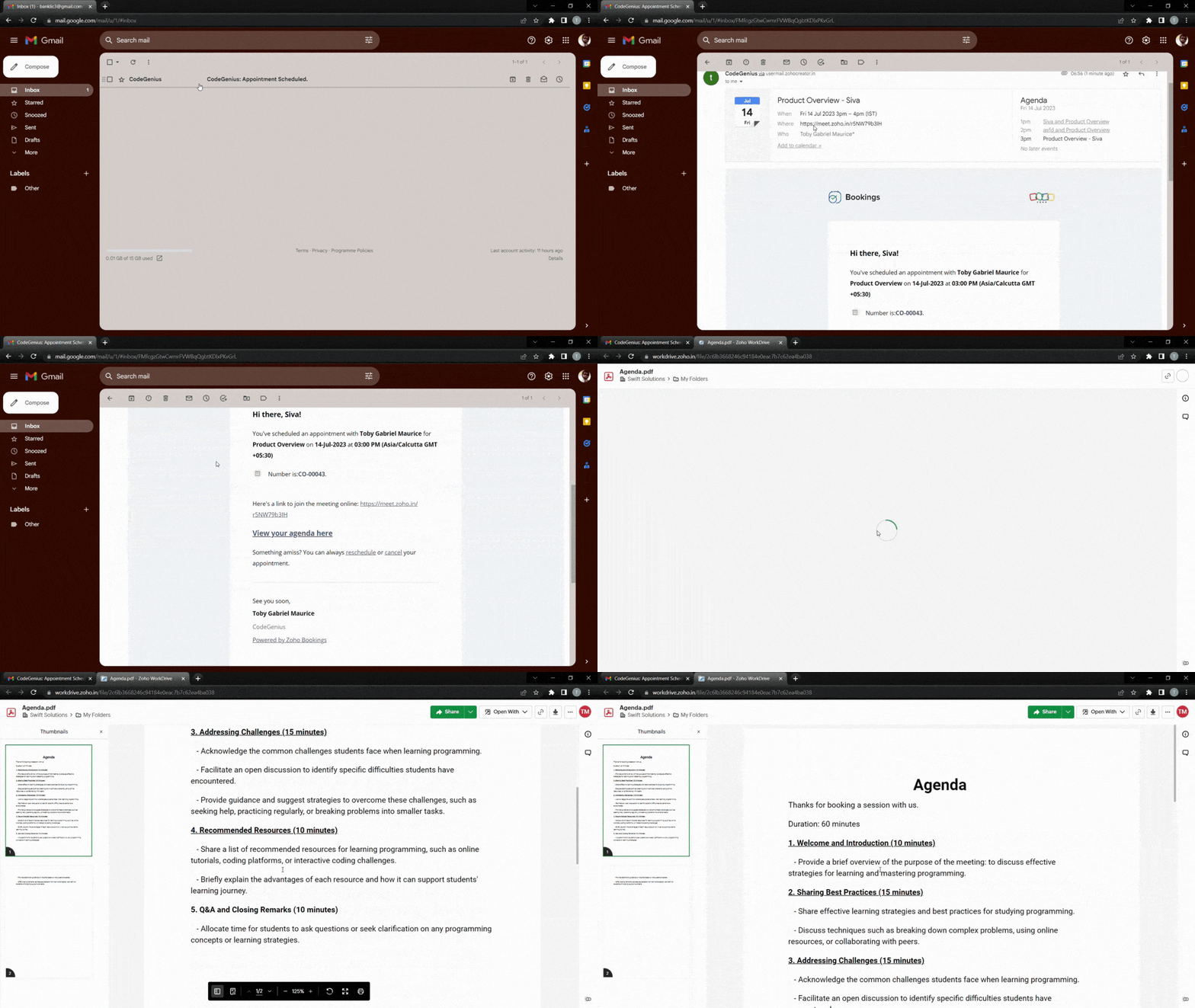
To make things even easier for customers, you can hyperlink a downloadable agenda. The following video demonstrates how to add a downloadable file to your outgoing emails.
Text
If your agenda is short, you can write it out using bullet points directly within your emails. We recommend having no more than six points to keep the message as concise as possible.
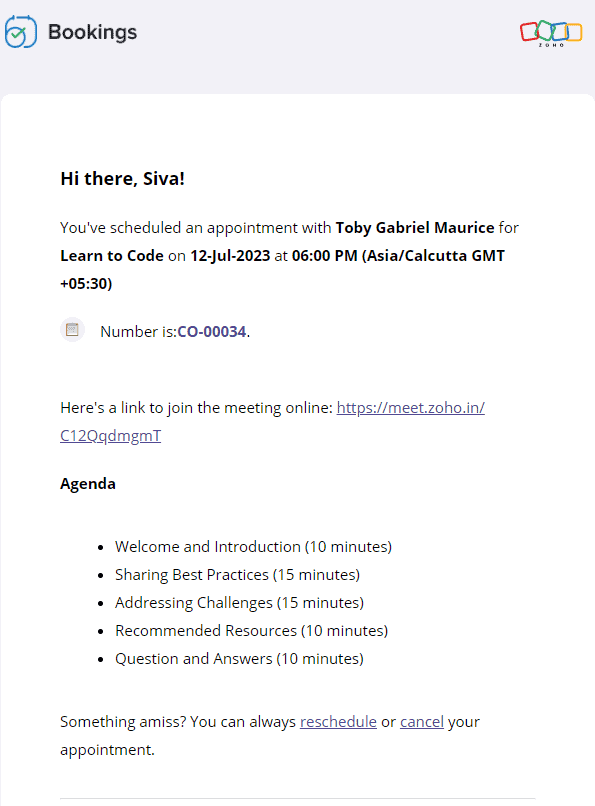
Text-based agenda

Text-based prerequisites
The following video shows how to add text-based agendas and pre-requisites to your emails.
2. Customer testimonials, case studies, and more
Customer testimonials and case studies help you showcase your credibility and gain trust. When your potential customers see highly rated testimonials and successful case studies, they'll put their faith in you.
It's also important to note that customers might have second thoughts about their appointment if it is far in advance. Sending these testimonials eliminates any such thought and reduces the possibility of a no-show.
Let's dive into some of the ways that you can send positive customer feedback along with your emails.
Landing pages and blog posts
Sometimes, the real estate in an email isn't sufficient enough. In those cases, you can hyperlink your testimonials or include buttons that lead to customer feedback forms.
Here's what the output will look like.
And here's how to add a button that links to any content of your choice.
Copy and paste the following code from the below snippet to add a button to your emails. In place of the blue "Button Text Here," you can add the text that you wish to see on your buttons.
- <button style="padding: 16px 32px; text-align: center; display: inline-block; font-size: 16px; margin: 4px 2px; background-color: rgb(80, 73, 127)">
- <a href="https://www.zoho.com/bookings/customers/loanstreet.html" style="color: white; text-decoration: none">
- <!-- Button Text Here -->
- </a>
- </button>
Videos
You can also embed your YouTube thumbnails as images in your emails and hyperlink them to the corresponding videos. We embed thumbnails rather than videos because most email clients cannot read video embeds.
We can use online image editors like Canva to create engaging thumbnails. This method intrigues your clients, increases click through rates, and enhances brand recall.
The following GIF shows how the output will look like:

Using the same technique, you can record videos of your staff speaking on camera about:
- The agenda, to give a preview of the session
- Any prerequisites, to prepare your customers for an engaging session
- Their own experience in the industry, to assure customers that they're under the guidance of an expert
Check out the following video to embed YouTube thumbnails in your outgoing emails.
- <a href="https://www.zoho.com/bookings/">
- <img src="https://i.imgur.com/JieK.png" alt="HTML tutorial" style="width:400px;height:250px;">
- </a>
4. Adding value after an appointment
It's best to go the extra mile and send thank you emails to your customers post-appointment. You can also send resources that may be helpful to them.
For example, a marketing team that does product demos could send out a PDF that contains help documents, support contacts, and other useful details. A solopreneur who teaches programming languages online might send a study plan and some words of encouragement.

All these steps show that you care about your customer's progress. This leads to increased trust, recurring bookings, and growth in revenue.
Depending upon the size of these instructions, you can choose to include them in the body of the email itself, or within a downloadable PDF, videos, hyperlink, or a button.
5. Collecting feedback
Both satisfied and dissatisfied customers add value to a business, and forms work well when you wish to gather their feedback. This comes in handy for cancellation and no-show emails as well because it allows us to find out why our customers have cancelled. You can also send forms along with your completed emails to find out what went well.
Here's what a hyperlinked form will look like:

Notes
1. Zoho Bookings offers five types of email notifications and three types of reminders. Not all content works with every email, and our table at the beginning of the article can help you decide on which to use. Depending upon your businesses, you can choose to stick with one or more value additions.
2. Be sure that your reminders are spaced out well. For example, if you have an appointment scheduled two weeks from now, you can send three reminders. However, if the appointment were just two days away, you would likely just want to send one reminder. This will also vary depending upon the industry you're in, so we recommend you use your best judgment.
Suggested flow ideas
So far, we've seen the content that works for different types of emails. But what should your ideal flow be?
Don't worry, we've got your back.
Here are some sample flows that you could emulate.
- Marketing team that offers product demo calls
- Booked email + agenda
- Reminder 1 + staff experience
- Reminder 2 + customer testimonial
- Completed email + post-appointment instructions
- Solopreneur who teaches programming languages
- Booked email + pre-requisites
- Reminder 1 + staff experience
- Reminder 2 + agenda
- Reminder 3 + case study
- Completed email + post-appointment instructions
In this article, we've pushed the boundaries of email templates in Zoho Bookings. We've also discussed different ways that we can group together email notifications and create flows that maximize value for your audience.
If you have any questions, drop them in the comments or email us at hello@zohobookings.com. We'll be happy to help you out.
Topic Participants
Siva
Sticky Posts
Zoho Bookings know-how: A hands-on workshop series
Hello! We’re conducting a hands-on workshop series to help simplify appointment scheduling for your business with Zoho Bookings. We’ll be covering various functionalities and showing how you can leverage them for your business across five different sessions.Announcing: custom color palette + free workshop
Hello everyone, We're excited to share new feature in Zoho Bookings—a color palette within booking page themes. You'll find this option under Manage Bookings > Workspaces > Booking Page Themes. You can customize the color of every element in your booking page and even alter the transparency of your background image. Please note that this is a paid feature included in the Basic and Premium plans. At the moment, it's available only under the Modern Web theme. This means you can create billions (7,Complete walk-through of Zoho Bookings (video)
Save time for both you and your customers. Use Zoho Bookings, the appointment scheduling app from Zoho, to free yourself from email and paper-based scheduling. Zoho Bookings can give you a common calendar by syncing multiple calendars, including yours and your staff's. Your customers can book a time convenient for them, and pay for services, through your website or the customizable webpage features available in Zoho Bookings. They'll also get emails reminding them about their appointments and anyNew Features: Service Availability and staff booking page themes!
Dear All, Want a dedicated schedule for your one-on-one services? How would it feel to have one-on-one services open for consultations only during certain times? You need a superpower to make that happen and we give it to you - Service Availability isZoho Bookings has a new pricing - Pay per user
Dear customers, Businesses around the world use Zoho Bookings. Customers have booked 1.5 million appointments and over 200K online meetings using Bookings. We are only set to cross more milestones, thanks to your support. We are excited to introduce to
Recent Topics
Adding Multiple Files to a Zoho Vault Entry
There is a old blog post talking about adding multiple file attachments to one Zoho Vault Secret: https://www.zoho.com/blog/vault/introducing-new-features-in-zoho-vault-powerful-password-sharing-wider-storing.html Is that still possible, I can see howFNB South Africa Bank Feed
I should've thought this wouldn't work. As suspect, Zoho claims to be able to pull bank feeds from First National Bank (South Africa), but fails everytime. I suppose Xero (or even Sage One) is the way to go? If they (miraculously) get it to work again,Dropshipping Address - Does Not Show on Invoice Correctly
When a dropshipping address is used for a customer, the correct ship-to address does not seem to show on the Invoice. It shows correctly on the Sales Order, Shipment Order, and Package, just not the Invoice. This is a problem, because the company beingAdd Attachment Support to Zoho Flow Mailhook / Email Trigger Module
Dear Zoho Support Team, We hope you are well. We would like to kindly request a feature enhancement for the Mailhook module in Zoho Flow. Currently, the email trigger in Zoho Flow provides access to the message body, subject, from address, and to address,Zoho Invoice Customer Login Portal
Are there any plans for a customer portal to Zoho Invoice, ala Freshbooks? I would like customers that I invoice to be able to login to review invoices and invoice history. I have not switched from Freshbooks for this very reason.the custom domain forwards by default to the old career site / how to switch it off??
dear friends, how to switch off the old version of the career site?? The set up custom domain forwards directly to the old site, so that I cant publish it... Any ideas? Thank you! KR, VictoriaPreserve Ticket Issue Mapping When Migrating from Jira to Zoho Projects
Hello Zoho Projects Team, We hope you are doing well. We are currently exploring a full migration from Jira to Zoho Projects, and we identified a critical limitation during the migration process involving Zoho Desk integration. Current Situation: We useZoho Books blocks invoicing without VeriFactu even though it is not mandatory until 2027
I would like to highlight a very serious issue in Zoho Books for Spain. 1. The Spanish government has postponed the mandatory start of VeriFactu to January 1st, 2027. This means that during all of 2026 businesses are NOT required to transmit invoicesHotmail is STILL blocking the zoho mail IP
Greetings, as I already mentioned in my last message, my Zoho IP has been blocked by Hotmail for more than 15 days. Although someone said that the issue was "solved," it still isn't, and this amount of time seems neither normal for a "serious" company,Recording Shopify/Amazon fees in Zoho Books - Zoho Inventory
We are currently flushing out the connections between Shopify/Amazon and Zoho Inventory. For other users of Zoho Books - Zoho Inventory, where and at what point do you record the merchant fees associated with theses channels? I have gotten mixed responseshow to undoreconciled transaction
how to undo reconciled transactionPre-fill webforms in Recruit
I don't want to use the career site portal (as I have my own already), but I would like to direct users to the application forms for each role, from my website job pages. Is there a way to pre-fill fields in Recruit application forms, so that I only haveThis user is not allowed to add in Zoho. Please contact support-as@zohocorp.com for further details
Hello, Just signed up to ZOHO on a friend's recommendation. Got the TXT part (verified my domain), but whenever I try to add ANY user, I get the error: This user is not allowed to add in Zoho. Please contact support-as@zohocorp.com for further details I have emailed as well and writing here as well because when I searched, I saw many people faced the same issue and instead of email, they got a faster response here. My domain is: raisingreaderspk . com Hope this can be resolved. Thank youClient Portal ZOHO ONE
Dear Zoho one is fantastic option for companies but it seems to me that it is still an aggregation of aps let me explain I have zoho books with client portal so client access their invoice then I have zoho project with client portal so they can access their project but not their invoice without another URL another LOGIN Are you planning in creating a beautiful UI portal for client so we can control access to client in one location to multiple aps at least unify project and invoice aps that wouldFunction #8: Add additional charges to invoices
Here goes one of the highly sought-after custom functions in Zoho Books. If you find yourself needing to apply additional charges to customers on their invoices (say credit card surcharges, or fuel charges applicable to customers from a certain region,Taxes Payable Adjustment
I am from Canada and I need to make an adjustment to my Taxes Payable (HST) account. Basically I need to take a portion of the amount within Taxes Payable and expense that portion to another account. The adjusting entry would like like the following:ASAP Widget Not showing "My Tickets"ed
Hello Team, I have created a ZOHO ASAP Widget and embedded to my portal app.clearvuiq.com , widget renders ok and I can open tickets from widget. However I want my opened tickets to be visible in the widget. How can I achieve that?Bug Causing Major Sync & SO Access Failures in Zoho POS
We are experiencing critical and recurring issues in Zoho POS that all trace back to role-permission handling defects in the latest POS app version. These issues directly affect syncing, login ability, and Sales Order access for role-restricted usersAdd Zoho Forms to Zoho CRM Plus bundle
Great Zoho apps like CRM and Desk have very limited form builders when it comes to form and field rules, design, integration and deployment options. Many of my clients who use Zoho CRM Plus often hit limitations with the built in forms in CRM or Desk and are then disappointed to hear that they have to additionally pay for Zoho Forms to get all these great forms functionalities. Please consider adding Zoho Forms in the Zoho CRM Plus bundle. Best regards, Mladen Svraka Zoho Certified Consultant andHow to view CRM Sales Orders in Desk
What's the usual way to view all CRM sales orders linked to a contact, when viewing a ticket in Desk? I don't want to have to open a new tab to see the order in CRM. And the Desk CRM sidebar doesn't seem to be configurable. Would I have to use an extensionKaizen #219: Actions API - Webhooks APIs - Part 1
Hello all!! Welcome back to a fresh Kaizen week. In the previous weeks, we covered Workflow Rules APIs, Actions APIs - Email Notification APIs, Tasks Update API, and Field Update API. This week, we will continue with another Actions API - Webhooks APIZoho Books Extension: What Happens If Custom Fields Already Exist?
When developing Zoho Books extensions, what happens if the target Zoho Books organization already has a custom field with the same API name as one defined in the extension? I’m asking because we originally created an on-Books version of this functionality,Zoho Books Extension: What Happens If Custom Fields Already Exist?
When developing Zoho Books extensions, what happens if the target Zoho Books organization already has a custom field with the same API name as one defined in the extension? I’m asking because we originally created an on-Books version of this functionality,Pricing Strategies: #3 Services never Stop with just Plans
"Hey, while you're here, could you also take a look at the vegetable patch?" Aaron hears that line almost every week. He runs a small gardening service, the kind where customers subscribe to a simple monthly plan that includes basic maintenance, mowing,Cropping Photos for Zoho Sites
Hi, I'm wondering if there is a built in crop tool for zoho sites for my photos so I can crop them and see what the crop looks like on the site?Deluge scripts
Why is there not a search function to make it easier to find the script of interest when modifications are required.bulk edit records and run internal logic
hi there is few logics in manner "it this than that" logics work well when i edit entry openning it one by one (via workflow "on add/edit - on success" , for custom field "on update/on user input") but when i try bulk edit records - logic does not work. how can i turn on logic to work as programmed - for mass editing records via bulk edit?WebDAV / FTP / SFTP protocols for syncing
I believe the Zoho for Desktop app is built using a proprietary protocol. For the growing number of people using services such as odrive to sync multiple accounts from various providers (Google, Dropbox, Box, OneDrive, etc.) it would be really helpfulPossible for first Signer of Sign Form to specify the next signer in the sequence
We have many use cases where multiple signers need sign the same document. We'd love to be able to use sign forms, where the a signer who uses the Sign Form link can specify the name and email address for the next person in the sequence.BUG: Can't copy-paste data outside Sheet
Currently I can't paste data copied from inside any of my Zoho Sheet files to any other app. Copy-paste works inside the sheet It does NOT work between two different sheets These sheets are built from automation templates Everything works fine if I createZoho CRM Community Digest - November 2025 | Part 1
Hello Everyone! Here’s what came through in the first half of November: new updates and a few helpful community discussions with real, notable solutions. Product Updates: Android App Update: Inctroducing Swipe Actions You can now swipe left or right onUpload own Background Image and set Camera to 16:9
Hi, in all known online meeting tools, I can set up a background image reflecting our corporate design. This doesn't work in Cliq. Additionally, Cliq detects our cameras as 4:3, showing black bars on the right and left sides during the meeting. WhereThe Social Wall: November 2025
We’re nearing the end of the year, and the holiday season is officially kicking in! It’s that time when sales peak and your social media game needs to be stronger than ever. We’re back with exciting new updates across AI, analytics, and the mobile appTruesync for Linux
Is Truesync available on linux ?Hidding/excluding specific picklist options from filter
Hi. Is it possible to hide/exclude specific picklist options from this filter? I don't want them to be shown when someone tries to filter in the leads moduleSubforms to Capture Multi-Row Data in Job Sheets
Subforms transform your job sheets from simple checklists to powerful, data-rich forms. In field service work — whether maintenance, inspection, installation, or repair — a single job can involve multiple repeatable entries: readings, parts used, activities年内最後のユーザー向けイベント:5名限定! 課題解決型ワークショップイベント Zoho ワークアウト開催のお知らせ (12/18)
ユーザーの皆さま、こんにちは。コミュニティチームの中野です。 12月開催のZoho ワークアウトについてお知らせします。 今回はZoomにて、オンライン開催します。 参加登録はこちら(無料) https://us02web.zoom.us/meeting/register/QHn6kJAcRs-znJ1l5jk0ww ━━━━━━━━━━━━━━━━━━━━━━━━ Zoho ワークアウトとは? Zoho ユーザー同士で交流しながら、サービスに関する疑問や不明点の解消を目的とした「Zoho ワークアウト」を開催します。Add "Fetch Composite Item" Action for Inventory
I want to make a Flow that uses information returned in the GET call for Composite Items, and it's not currently available in Zoho Flow. Please consider adding this functionality.Adress Labels for sending of the oder und barcode
We want to print with my address labels to stick on the order of the ware can. there are these options?printing individual labels - Dymo LabelWriter
I am trying to print individual labels to my Dymo LabelWriter - has anyone done this? Latest Update (December 2025): The Canvas Print View is now available! We encourage you all to try it out and share your feedback with us. Learn more here: Zoho CRMNext Page