Nouveau forfait Bigin Premier : Multi-devises, flux de travail avancés et plus encore !
Bonjour à tous,
Nous sommes ravis d'annoncer une toute nouvelle édition de Bigin qui contient plusieurs nouvelles fonctionnalités comme la multidevise, des flux de travail avancés, des champs de recherche personnalisés et plus encore : l'édition Premier. Voici une vidéo de présentation (en anglais) .
À l'avenir, Bigin sera disponible en trois éditions : Gratuit, Express et Premier.
Qu'est-ce que l'édition Premier ?
L'édition Premier est dotée de fonctionnalités supplémentaires comparé à l'édition Express. Elle s'adresse aux entreprises qui ont besoin de fonctionnalités avancées. Voici les nouvelles fonctions :
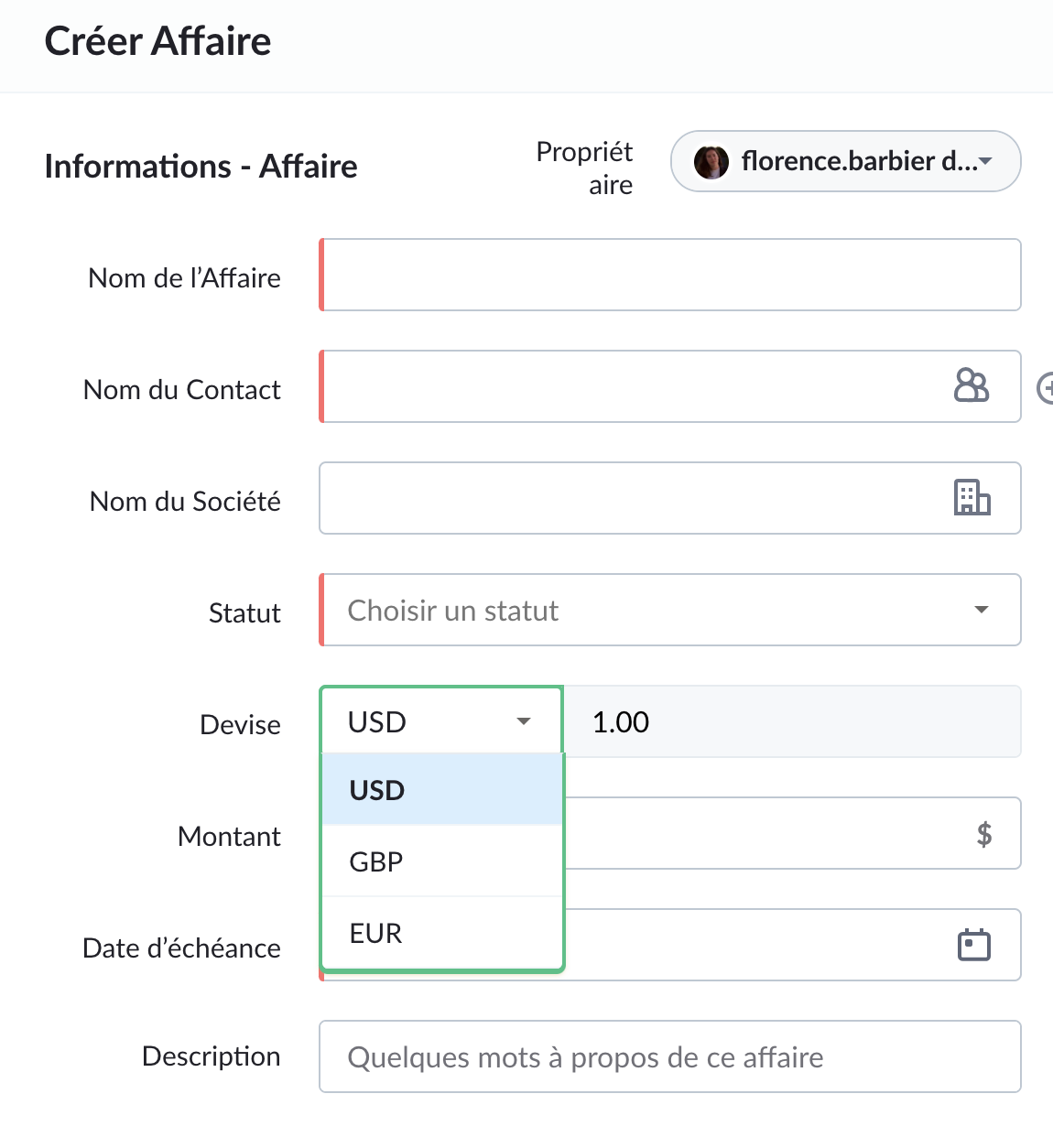
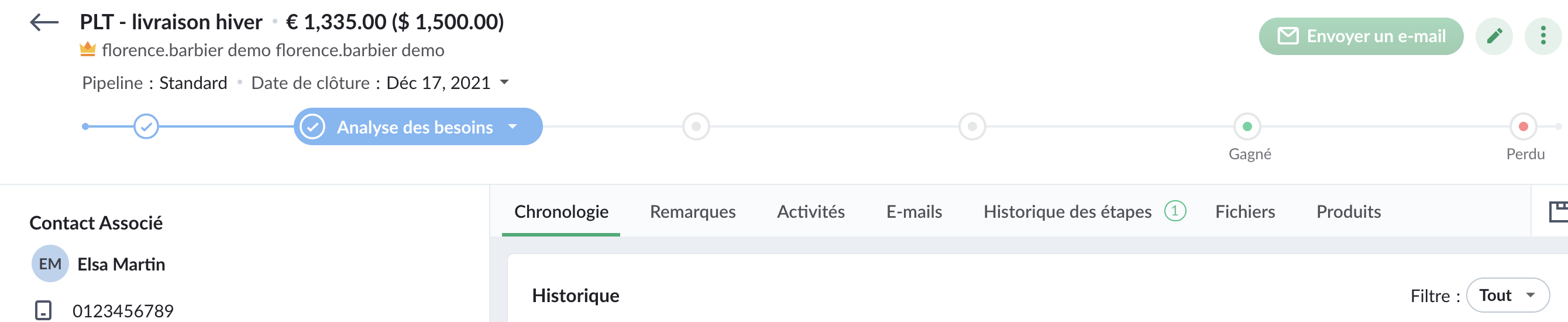
Multi-devises
Toute organisation qui traite avec des clients de différents pays doit effectuer des transactions dans la devise locale. Mais convertir manuellement la devise est un processus fastidieux et complexe. C'est là que Multi-devises de Bigin vous fait gagner du temps et vous permet d'effectuer ces conversions facilement. Avec Multi-devises, vous pouvez définir différentes devises pour différents enregistrements de transactions et Bigin se chargera des conversions de taux de change.
Pour en savoir plus, cliquez ici.
Pour en savoir plus, cliquez ici.
Champs de recherche personnalisés
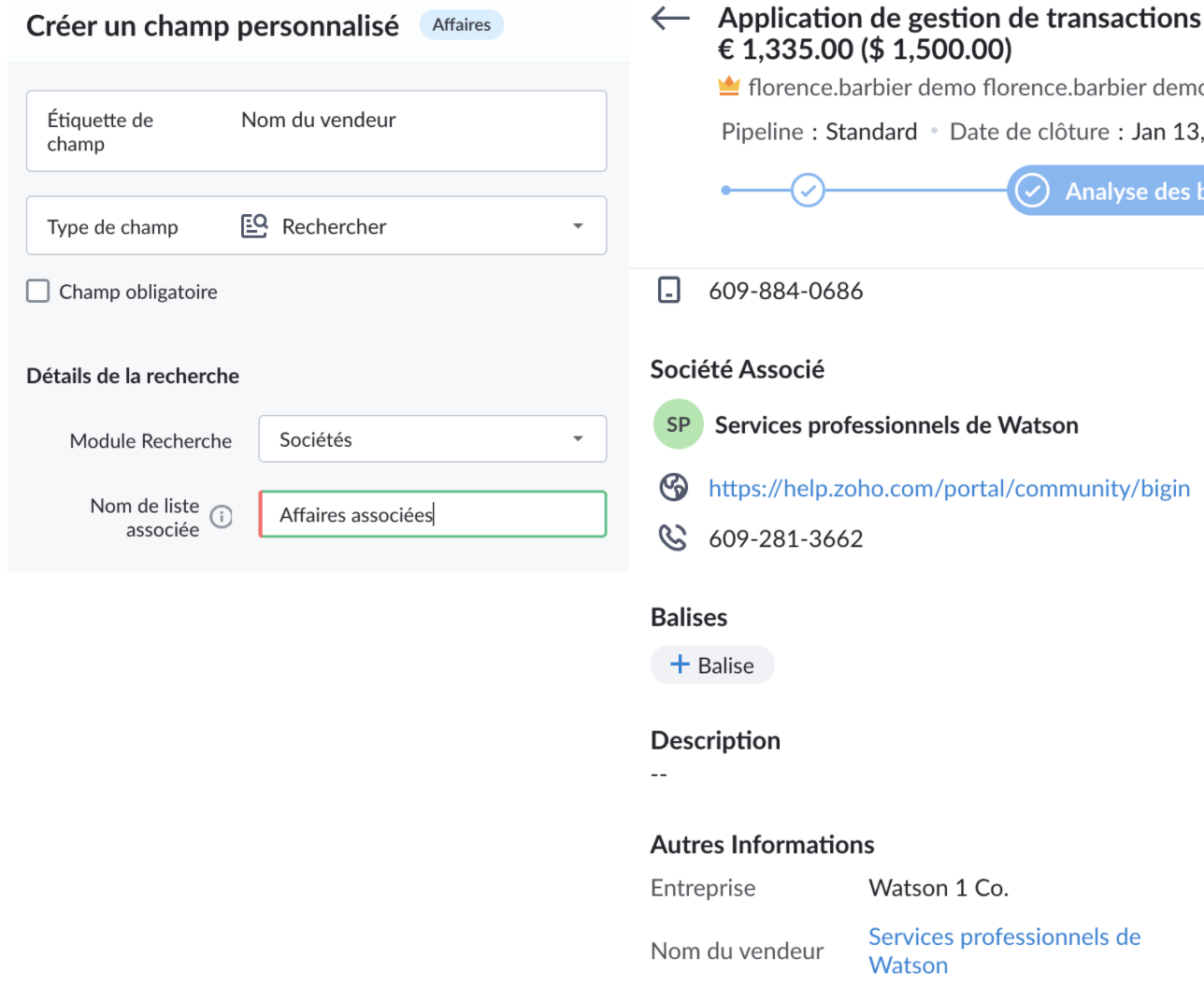
Un champ de recherche permet de relier deux enregistrements dans des modules différents. Supposons que vous souhaitiez associer la société de votre fournisseur et la société du client à une transaction. Ici, vous pouvez créer un champ de recherche personnalisé pour associer le module Sociétés au module Affaires.
Pour en savoir plus, cliquez ici.
Règles de flux de travail avancées
Vous pouvez maintenant configurer des déclencheurs basés sur la date et l'heure dans les règles de flux de travail. Par exemple, vous pouvez configurer une règle pour créer une tâche pour un utilisateur afin de suivre une affaire si elle est inactive pendant plus de 15 jours.
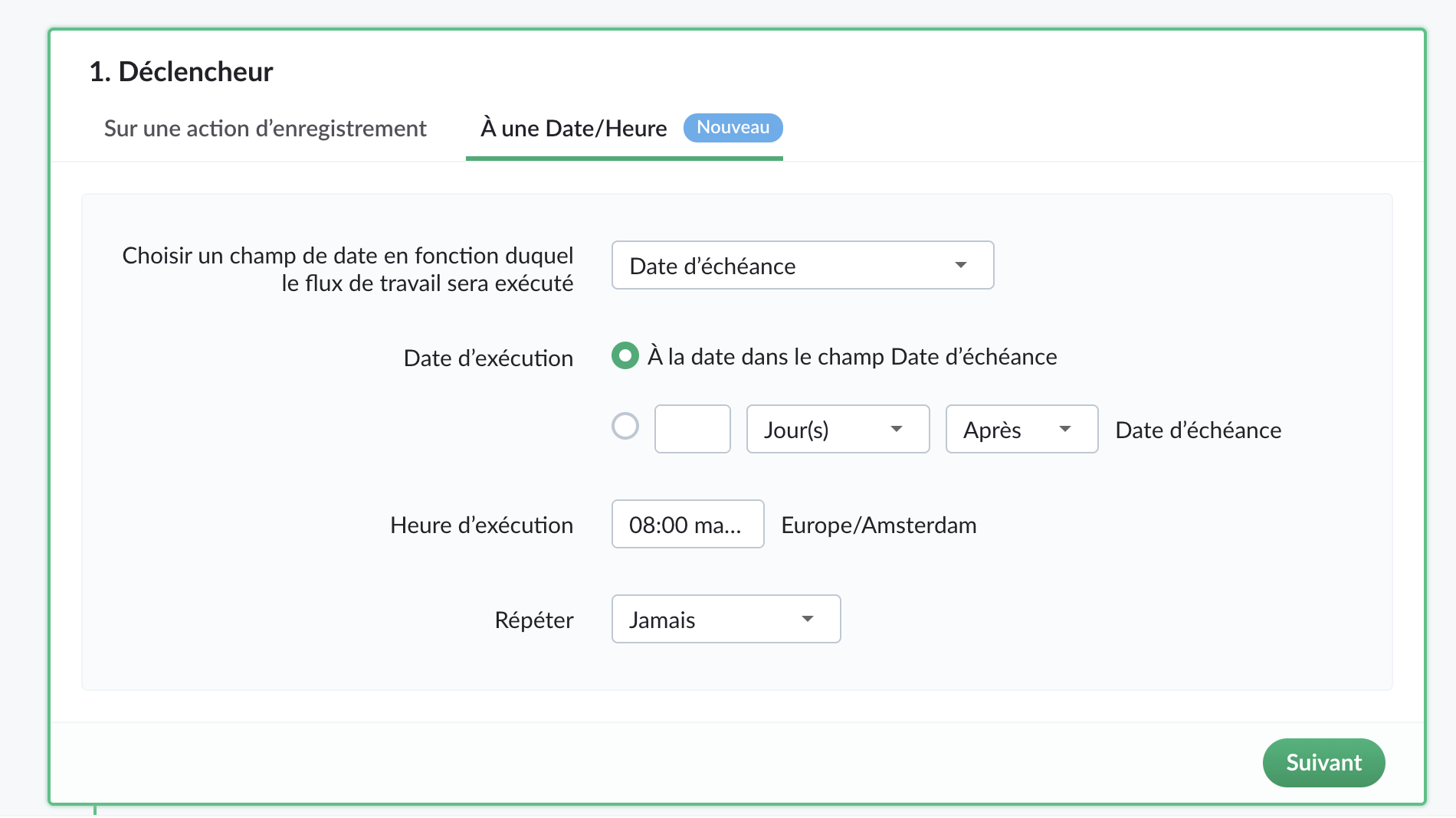
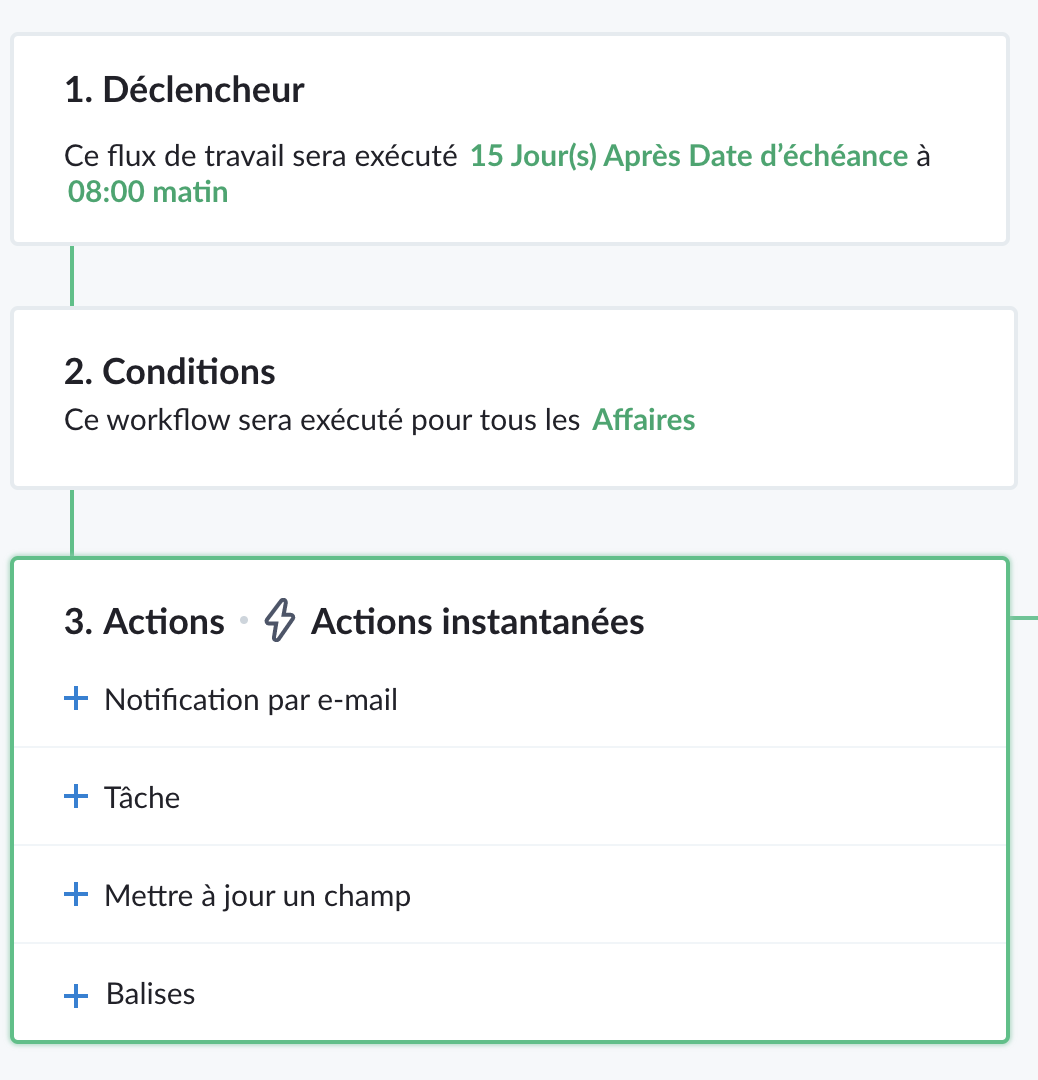
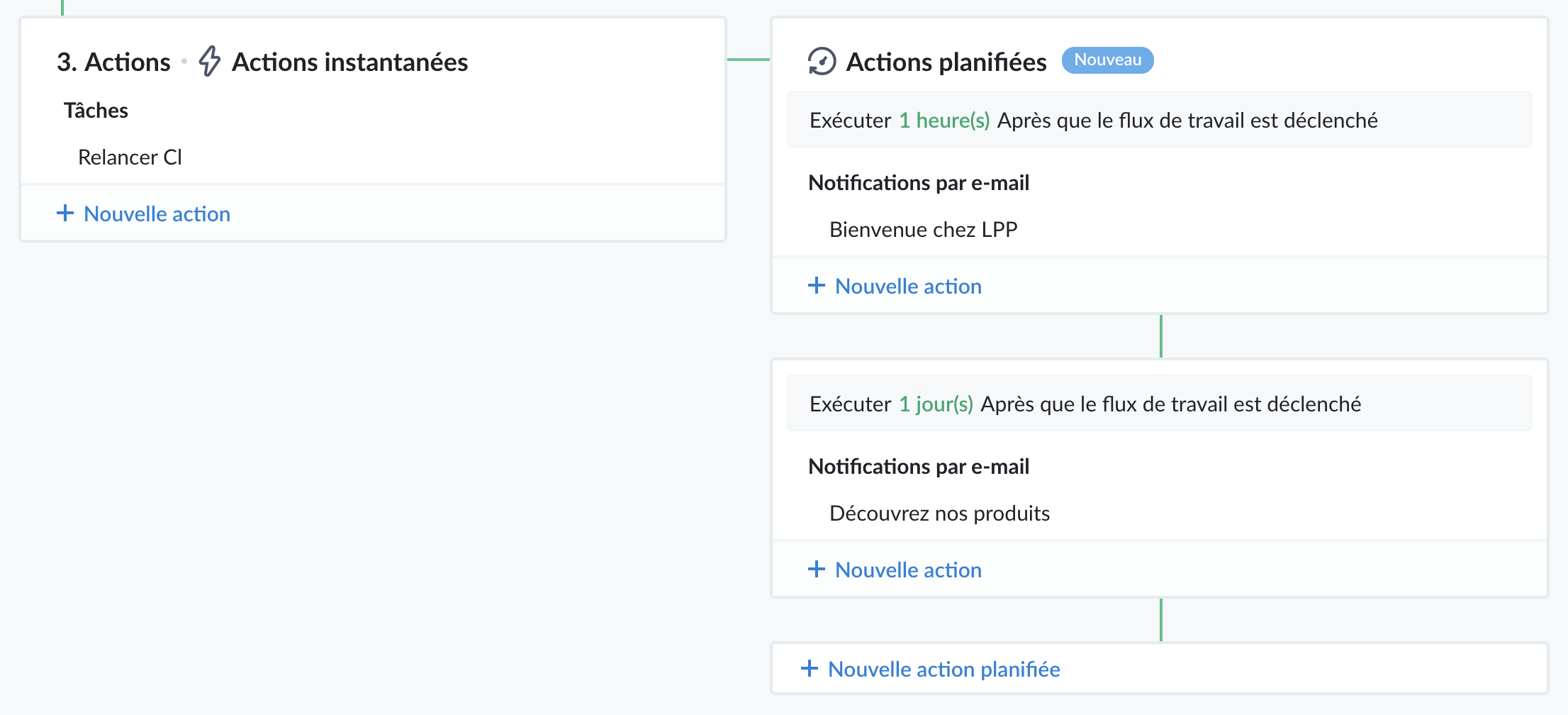
Vous pouvez planifier des actions telles que des notifications par e-mail, la création de tâches, la mise à jour de champs à exécuter à une date/heure spécifiée après le déclenchement d'un workflow.
Pour en savoir plus, cliquez ici.
Règles de transition d'étape
Certaines des données capturées dans le pipeline sont des informations importantes qui aident à conclure l'affaire. Elles doivent être saisies par les représentants mais il n'est pas idéal de rendre ces champs obligatoires car les représentants peuvent ne pas disposer de ces informations lors de la création de l'affaire. Les règles de transition d'étape vous permettent de spécifier les champs qui doivent être remplis par les utilisateurs lorsqu'ils déplacent une affaire d'une étape à une autre.
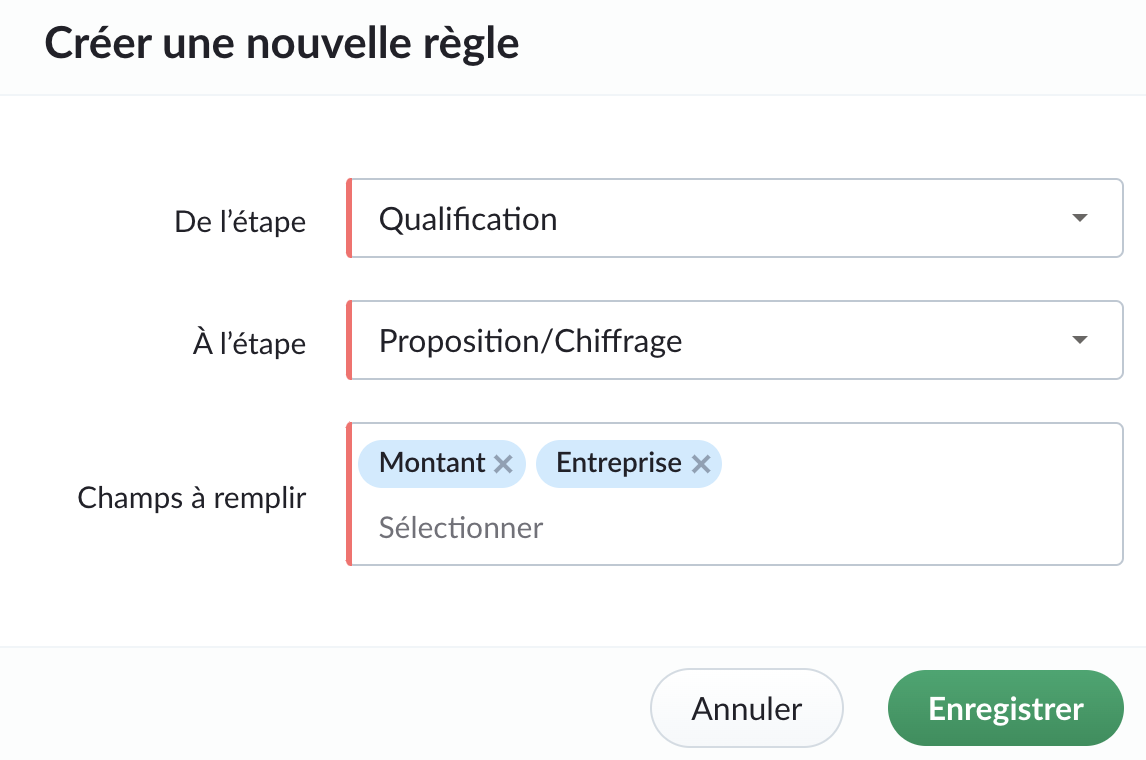
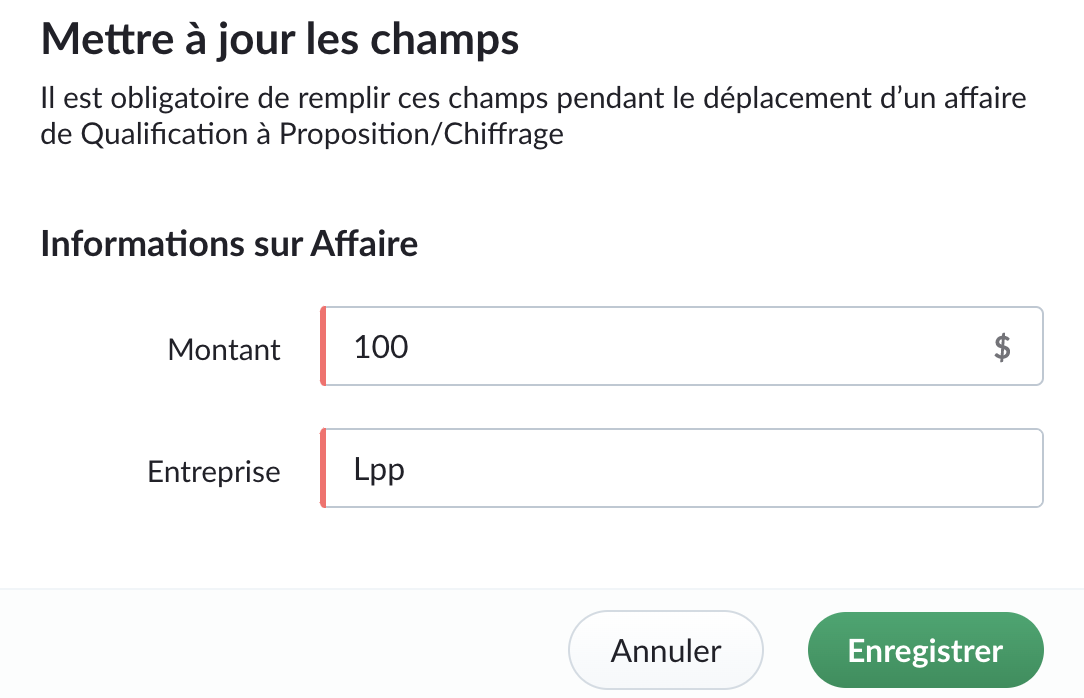
Vous pouvez également créer des restrictions spécifiques au pipeline qui empêchent la clôture directe d'une transaction à partir d'étapes spécifiques. Cela évite qu'une transaction soit fermée prématurément et lui permet de traverser les étapes nécessaires. Par exemple, vous pouvez empêcher la clôture directe d'une affaire à partir des étapes "Non contacté", "Qualifié", "Analyse des besoins".
Prix
Le prix de Bigin Premier sera de :
- 12 € / utilisateur/mois, facturé annuellement
- 15 € / utilisateur/mois, facturé mensuellement
Y a-t-il des changements dans l'édition Bigin Express ?
Oui, Bigin Express offre :
1. Pipelines multiples : 3 pipelines au lieu de 5.
2. Balises : 10 balises par module, au lieu de 20.
3. Champs personnalisés : 10 champs personnalisés par module, au lieu de 20.
4. Règles de flux de travail : 10 règles de workflow par organisation, au lieu de 20.
5. Webforms : 3 webforms, au lieu de 5.
Note : Ces changements n'affecteront pas les clients existants de Bigin Express. Les changements ci-dessus ne s'appliqueront qu'aux nouveaux clients d'Express qui s'inscrivent à partir du 19 novembre 2021.
Quels sont les changements dans Zoho One ?
Jusqu'à présent, nous avons offert l'édition Express de Bigin aux utilisateurs de Zoho One. À partir de la semaine prochaine, nous offrirons l'édition Premier de Bigin aux utilisateurs de Zoho One.
N'hésitez pas à nous contacter à l'adresse support@bigin.com si vous avez des questions.
Merci à tous,
L'équipe Zoho France
Merci à tous,
L'équipe Zoho France
Topic Participants
Florence Barbier
Sticky Posts
Bigin - Astuce #5 : Comment transférer le statut Super Admin ?
Bonjour Community France, Découvrons comment transférer le statut de Super Administrateur. Sachez que le statut de super administrateur ne peut être transféré à un autre utilisateur administrateur que par le super administrateur lui même. Pour transférerNouveau forfait Bigin Premier : Multi-devises, flux de travail avancés et plus encore !
Bonjour à tous, Nous sommes ravis d'annoncer une toute nouvelle édition de Bigin qui contient plusieurs nouvelles fonctionnalités comme la multidevise, des flux de travail avancés, des champs de recherche personnalisés et plus encore : l'édition Premier.Nouveauté Bigin : associez plusieurs contacts à une même affaire!
Bonjour à tous, Une transaction implique souvent plusieurs décideurs. Prenons l'exemple de l'entreprise Zylker qui utilise Bigin pour gérer ses pipelines de vente. Ils souhaitent acheter des meubles. Pour valider la vente, différents employés, de différentsPack débutant : vos premiers pas sur Zoho Bigin
Dans cet article nous verrons comment paramétrer votre CRM Bigin en 4 étapes : renseigner vos informations, gérer vos utilisateurs ainsi que leurs rôles et profils. Renseigner les informations de votre organisation Vous venez de vous inscrire à Zoho Bigin,Anniversaire Bigin : le CRM pour les petites entreprises évolue
Bonjour à tous ! Nous sommes de retour avec quelques annonces passionnantes. Mais d'abord, joyeux anniversaire à nous ! Bigin a eu un an récemment et nous avons un nouvel ensemble de fonctionnalités que nous sommes impatients de partager avec vous. Nous
Recent Topics
Proactive Alert for Existing Open Tickets per Contact / Account
Hello Zoho Desk Team, Greetings, and hope you’re doing well. We would like to submit a feature request aimed at improving agent awareness and efficiency when handling tickets in Zoho Desk. Use case When an agent opens a ticket (new or existing), it isShift-Centric View for Assigning and Managing Shifts in Zoho People
Hello Zoho People Product Team, Greetings and hope you are doing well. This feature request is related to Zoho People - please don't move it to zoho one! We would like to submit a feature request regarding the shift assignment and management view in ZohoBring Zoho Shifts Capabilities into Zoho People Shift Module
Hello Zoho People Product Team, After a deep review of the Zoho People Shift module and a direct comparison with Zoho Shifts, we would like to raise a feature request and serious concern regarding the current state of shift management in Zoho People.Add the ability to Hide Pages in Page Rules
Hi, We have Field Rules to show and hide fields and we have page Rules, but we can't hide a page in Page Rules so it isn't completed before the previous page (And then have the Deny Rules to prevent submitting without both pages completed), we can onlyTicket resolution field - can you add links, video, and images?
Seems like the ticket resolution fields is just a text field. Any plans to add the ability to add links, images...the same functionality in the problem description box? I would like to send the customer a link to a KB article, a link to our Wiki, embedTicket Resolution - Add rich formatting, screenshots and attachments
The resolution field only allows plain text at the moment. Many of our resolutions involve posting screenshots as evidence, it would be great for us to be able to have rich text formatting, be able to paste screenshots and add attachments in the solutionRemove the “One Migration Per User” Limitation in Zoho WorkDrive
Hi Zoho WorkDrive Team, Hope you are doing well. We would like to raise a critical feature request regarding the Google Drive → Zoho WorkDrive migration process. Current Limitation: Zoho WorkDrive currently enforces a hard limitation: A Zoho WorkDriveSetting certian items to be pickup only
How do we have some items that are pickup only? I have several items in my item's list that I do not ship. But they need to be on the website to be sold, and picked up in store. Need to be able to do this as one of these products is a major seller forDeprecation Notice: OpenAI Assistants API will be shut down on August 26, 2026
I recieved this email from openAI what does it means for us that are using the integration and what should we do? Earlier this year, we shared our plan to deprecate the Assistants API once the Responses API reached feature parity. With the launch of Conversations,CRUD actions for Resources via API
Hello, is it possible to perform CRUD actions through the API for Resources? We want to create a sync from Zoho CRM Car record to Bookings resources to create availabilities for Car bookings. For Test drives, not only the sales person needs to be available,Feature Request - The Ability to Link A Customer with a Vendor
Hi Finance Suite Team, Many businesses buy and sell products from the same companies or individuals. For example, a car sales business may buy a car from a member of the public, and that member of the public may also buy a new car from us. This makesKaizen #140 - Integrating Blog feed scraping service into Zoho CRM Dashboard
Howdy Tech Wizards! Welcome to a fresh week of kaizen. This week, we will look at how to create a dashboard widget that displays the most recent blog post of your preferred products/services, updated daily at a specific time. We will leverage the potentialDeluge Learning Series – Client functions in Deluge | January 2026
We’re excited to kick-start the first session of the 2026 Deluge Learning Series (DLS) with Client functions in Deluge. For those who are new to DLS, here’s a quick overview of what the series is all about: The Deluge Learning Series takes place on theConvert Lead Automation Trigger
Currently, there is only a convert lead action available in workflow rules and blueprints. Also, there is a Convert Lead button available but it doesn't trigger any automations. Once the lead is converted to a Contact/Account the dataset that can be fetchedText snippet
There is a nice feature in Zoho Desk called Text Snippet. It allows you to insert a bit of text anywhere in a reply that you are typing. That would be nice to have that option in Zoho CRM as well when we compose an email. Moderation Update: We agree thatI'm getting this error when I try to link an email to a deal inside the Zohomail Zoho CRM extension.
When I click "Yes, associate," the system displays an "Oops!! Something went wrong" error message. I have attached a screenshot of the issue for reference.CRM gets location smart with the all new Map View: visualize records, locate records within any radius, and more
Hello all, We've introduced a new way to work with location data in Zoho CRM: the Map View. Instead of scrolling through endless lists, your records now appear as pins on a map. Built on top of the all-new address field and powered by Mappls (MapMyIndia),Zoho Sheet - Desktop App or Offline
Since Zoho Docs is now available as a desktop app and offline, when is a realistic ETA for Sheet to have the same functionality?I am surprised this was not laucned at the same time as Docs.ZOHO add-in issue
I cannot connect ZOHO from my Outlook. I am getting this error.Which WhatsApp API works seamlessly with Zoho CRM?
I’m exploring WhatsApp API solutions that integrate seamlessly with Zoho CRM for customer communication, lead nurturing, and automation. I would love to hear insights from those who have successfully implemented WhatsApp within Zoho CRM. My Requirements:Marketing Automation
L.S. Marketing Automation is and has always been part of the Zoho One bundle - according to the information provided on the Zoho Website. Why when I open Marketing Automation do I get the following message?: "Your trial has expired. We hope you enjoyedWhat's New in Zoho Analytics - January 2026
Hello Users! We are starting the year with a strong lineup of updates, marking the beginning of many improvements planned to enhance your analytics experience. Explore the latest improvements built to boost performance, simplify analysis, and help youCan I convert multiple OLM files to Thunderbird at once?
Yes, you can convert multiple OLM files to Thunderbird at once using the Aryson OLM file Converter. The tool supports bulk OLM file conversion, allowing users to select multiple OLM files in a single process. It preserves the original folder structure,Translation from Chinese (Simplified) to Chinese (Traditional) is not working. It randomly translated. Google Translate accurately but zoho translate is not working at all
Hi friends, The newly added language for translation. https://www.zoho.com/deluge/help/ai-tasks/translate.html "zh" - Chinese "zh-CN" - Chinese (Simplified) "zh-TW" - Chinese (Traditional) my original text: 郑这钻 (and it is zh-CN) translated traditionalThe Social Playbook - January edition: Getting started with content creation
Social media isn’t just about posting some random content. It’s about why certain content works, how brands stand out, and what makes people pause mid-scroll. The Social Playbook is a monthly community series where we break all of that down. Through realSupport for Custom Fonts in Zoho Recruit Career Site and Candidate Portal
Dear Zoho Recruit Team, I hope you're doing well. We would like to request the ability to use custom fonts in the Zoho Recruit Career Site and Candidate Portal. Currently only the default fonts (Roboto, Lato, and Montserrat) are available. While theseAdding bank details to the contact through API
How to add bank-related information to the contact while creating it using API? The account number needs to be encrypted before sending it through API but not sure how to encrypt and get those values. Please guide me in this.Font breakage in Zoho Mail Desktop Lite application for Mac
Dear Zoho Mail and Workplace Community, With the latest update of macOS Sequoia and macOS Tahoe, there has been font breakages in the email preview of Zoho Mail Desktop Lite application for Mac. This breakage is due to the corruption of the System fontsFeature request - image resizing on sales orders
I need to be able to show the items on the sales orders, currently the item image shows really small and no way to resize it, need the ability to make the image larger to showcase the product on the pdfsWhat's new in Zoho Sheet: Simplify data entry and collaboration
Hello, Zoho Sheet community! Last year, our team was focused on research and development so we could deliver updates that enhance your spreadsheet experience. This year, we’re excited to deliver those enhancements—but we'll be rolling them out incrementallyNueva edición de "Ask The Expert" en Español Zoho Community
¡Hola Comunidad! ¿Te gustaría obtener respuestas en directo sobre Zoho CRM, Zoho Desk u otra solución dentro de nuestro paquete de CX (Experiencia del Cliente? Uno de nuestros expertos estará disponible para responder a todas tus preguntas durante nuestraAutomation Series: Auto-Notify External Users on Issue Closure
Hello Folks! In Zoho Projects, you can notify external issue reporters via email when an issue is marked as Closed. This helps the users avoid manual follow-ups and keeps the reporter updated. In this post, we’ll walk through a simple setup using a WebTurn chat conversations into real action with Integration Blocks in Guided Conversations
When a Guided Conversation fails, it's usually not because the logic is wrong. They fail because the conversation stops moving. A customer starts a chat with a clear goal: report an issue, check a status, or confirm something. At first, the flow doesBasic Mass Update deluge schedule not working
I'm trying to create a schedule that will 'reset' a single field to 0 every morning - so that another schedule can repopulate with the day's calculation. I thought this would be fairly simple but I can't work out why this is failing : 1) I'm based inclick to call feature
I've Zoho CRM and in that i want click to call feature.We Asked, Zoho Delivered: The New Early Access Program is Here
For years, the Zoho Creator community has requested a more transparent and participatory approach to beta testing and feature previews. Today, I'm thrilled to highlight that Zoho has delivered exactly what we asked for with the launch of the Early AccessFrom Zoho CRM to Paper : Design & Print Data Directly using Canvas Print View
Hello Everyone, We are excited to announce a new addition to your Canvas in Zoho CRM - Print View. Canvas print view helps you transform your custom CRM layouts into print-ready documents, so you can bring your digital data to the physical world withCan the Product Image on the Quote Template be enlarged
Hello, I am editing the Quote Template and added ${Products.Product Image} to the line item and the image comes up but it is very tiny. Is there anyway that you can resize this to be larger? Any help would be great! ThanksCreating Parent Child relationship in Accounts
We have customers with multiple locations, I setup the HQ as an account, then I setup the different sites marking the HQ as the parent to that location. If I then do a Deal for one of the locations, is there a way to show by looking at the parent accountLearner transcript Challenges.
Currently i am working on a Learner Transcript app for my employer using Zoho Creator. The app is expected to accept assessment inputs from tutors, go through an approval process and upon call up, displays all assessments associated with a learner inNext Page