Team Modules in Zoho CRM: Empower Every Team, Break Silos and Boost Collaboration
Hello Everyone,
The ultimate goal of every business is to achieve customer delight—and achieving customer delight cannot happen with the effort of a single person or team. At Zoho CRM, we believe that it’s a shared mission that spans across your entire organization. From Sales and Pre-sale to Marketing, Onboarding, and beyond, every team plays a role in shaping the customer's experience.
While sales teams are the champions that lead customer conversions and make the tough negotiations with prospects, the ultimate clinching of a business deal is the result of cumulative efforts of multiple minds. So instead of limiting Zoho CRM's capabilities to just one team, we introduced Teamspaces to onboard multiple customer-facing teams onto the CRM platform.
However, how do these teams work in the CRM system?
Presenting Team Modules, a powerful new way to empower all customer-facing teams with the tools they need to manage relationships and contribute to business success.
With Team Modules, each department within a team can build and manage their own processes directly within Zoho CRM; there will be no need to rely solely on central admins. This enables cross-functional teams to work in sync toward a common goal: delighting your customers, every single day.
In this post, we’ll walk you through how Team Modules fit into Zoho CRM, the availability of automation within them, manage team users, and enable seamless coordination through requests.
How do Team modules fit into Zoho CRM?
In traditional CRM setups, the authority to configure processes across all teams typically rests with central admins — a necessary measure to ensure data privacy and consistency. However, this often creates bottlenecks, delaying essential internal processes.

With Zoho CRM for Everyone, we’ve changed that. Now, multiple customer-facing teams can operate from within their dedicated Teamspaces and each teamspace can have its own Teamspace Admin, who oversees the activities and workflows specific to that team. Learn more.
Within every Teamspace, processes can be configured and executed through Team Modules. Team modules are customizable modules that enable teams to set up their own workflows and manage data independently. Learn more.
Let's take the example of the Sales team. They may handle multiple processes such as Customer Conversions, Sales Administration, Renewals, and more. Each of these processes is typically managed by different departments. These departments with their own processes and responsibilities can be captured via Team Modules.
To ensure data security and integrity, Team Modules come with module-level access controls that let you manage permissions with precision. Team Modules include different types of users or roles:
- Team module admins,
- Managers,
- Members,
- Participants, and
- Requesters.
From our example above, the department heads for each sales process in the sale team can be assigned as team module admin. Team members from the department can be assigned with other types of users or personas depending on their roles and responsibilities.
Each role or type of user in the team module have specific permissions, ensuring that they perform their tasks without compromising data access or privacy. Learn more.

In conclusion, while a central admin will certainly continue to operate at the highest level to take care of company-wide priorities and governance, team module admins now have the flexibility to configure and run their own modules — leading to faster, more efficient operations.
The image below depicts a CRM system built for an ecommerce industry where there are multiple teams within their teamspaces, having multiple processes captured in a team module and each process will be managed by a team module admin.

Automation in Team Modules
Empowering teams to build their own processes means giving them the tools to automate those processes too. Team module admins or users with Create Team Module permissions enabled can set up automations for their team.
Team Module Admins or users with the appropriate permissions can:
- Create workflow rules, blueprints, approval processes, and assignment rules
- Design canvas pages, webforms, layout rules, validation rules, and wizards
This lets them handle a huge set of use cases when it comes to common tasks like assignment, approval, process compliance, notifications, etc. Learn more.
Let's look at an example of automation configured in a case study team module of the Marketing Team:
- An assignment rule to assign enterprise case studies to marketing managers automatically
- A workflow rule to send notifications to customers to keep them in the loop.
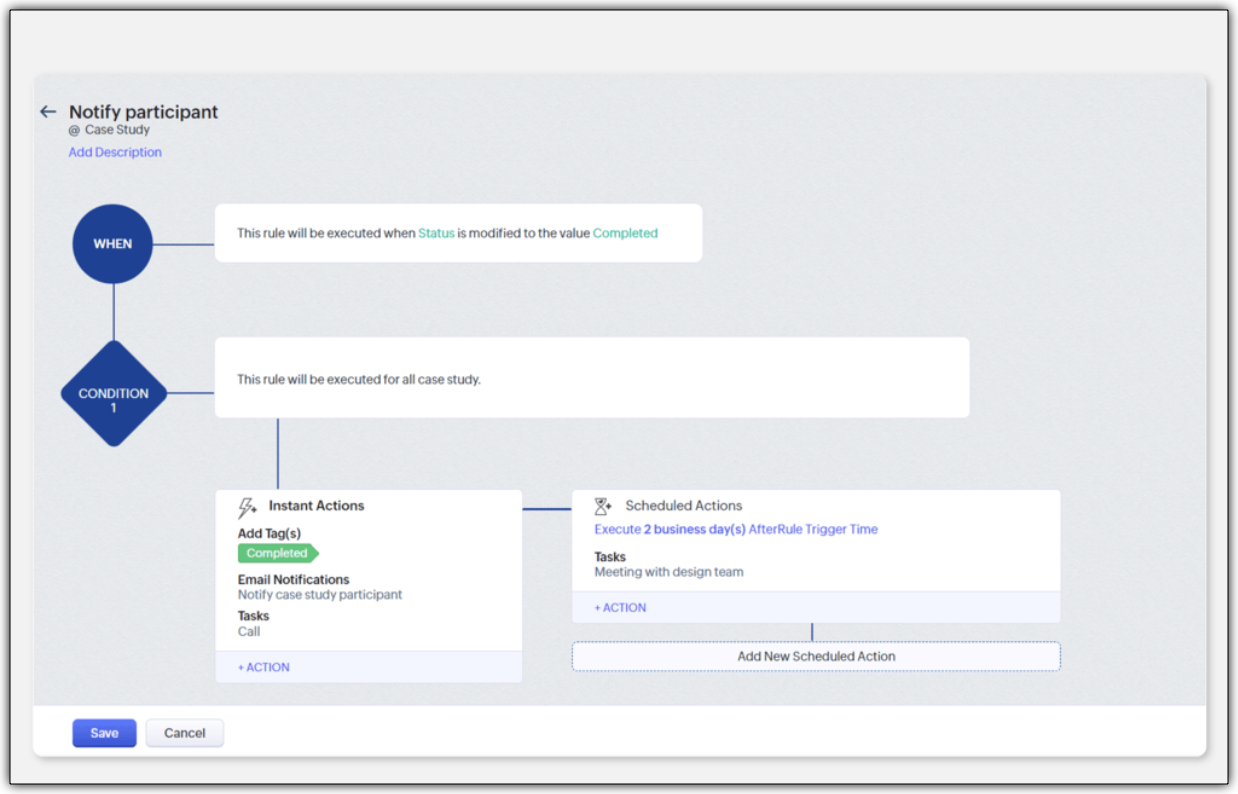
- A blueprint to streamline the case study publishing process
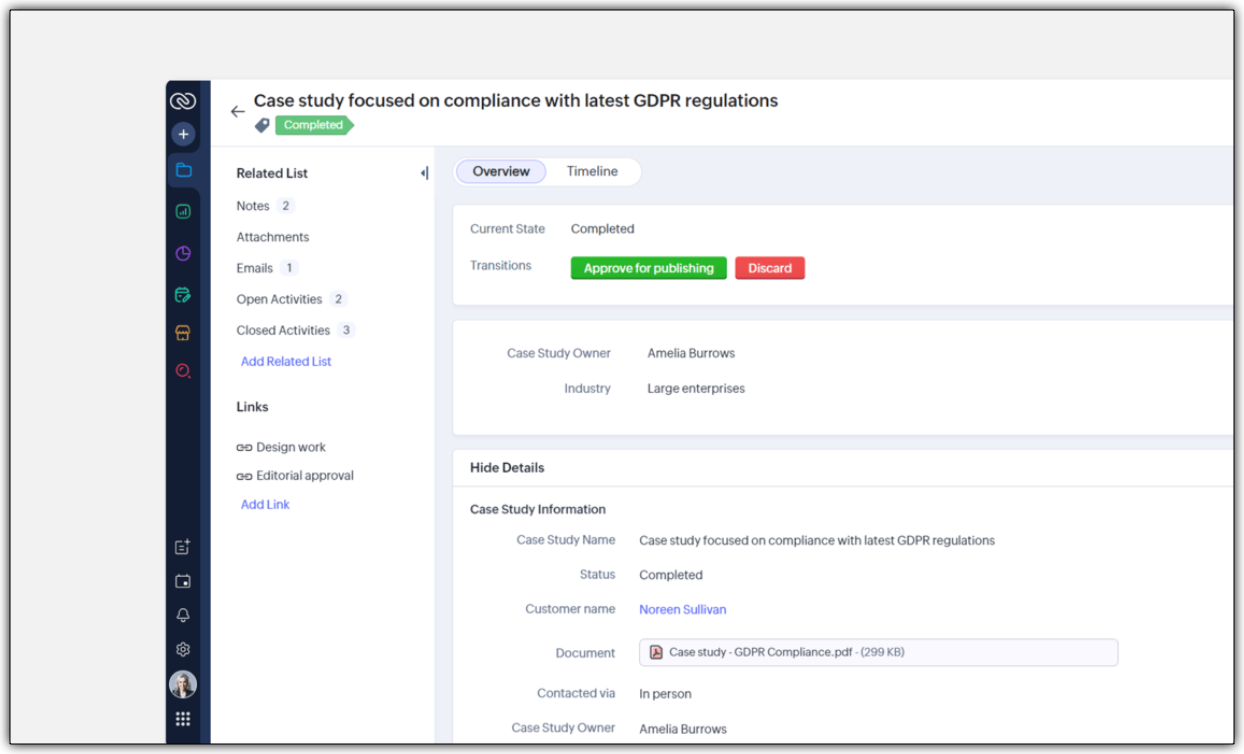
- An approval process to ensure that case studies are signed off by a team module manager
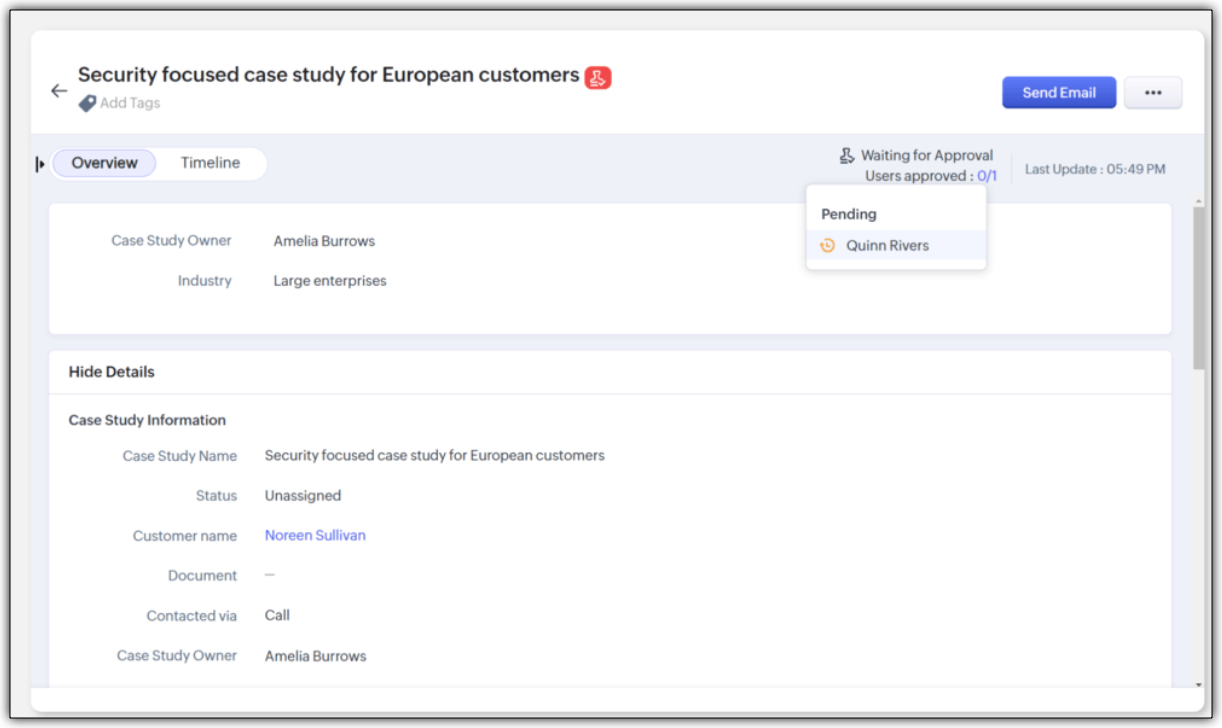
Improving Team Coordination
Winning a customer is often like running a relay race where one team hands off to the next until the goal is achieved. With multiple customer-facing teams onboard, how can they coordinate to achieve their goal - in case of any industry, it would be to close a deal successfully.
For example, in a typical SAAS industry, there would be multiple customer-facing teams : Sales team, Marketing team, Pre-sales team, Onboarding team and a Training team. Once all the teams are onboarded onto the CRM platform, teams would require information from each other during a sales process. Example,
- While the sales team is negotiating their next big deal, they may have to request supporting material like case studies from the marketing team.
- If a marketer wants to write a better case study, in turn, they may like to raise a request for customer implementation from the solutions experts team and so on.
In our current-day CRM system, these requests or the need for information between teams happen outside the CRM ; via chats, emails, or spreadsheets, thus leading to disconnects and inefficiencies.

CRM for Everyone addresses this challenge by making team coordination a seamless part of the user interface by introducing Requesters.
Each team could register a need for a deliverable from another team in order to move ahead in the process by raising what we call a "request". In the above case, the sales team is the "Requester" for Marketing, Presales, and Legal teams requesting different materials and action items in order to close a sale. Learn more

They can keep a track of their requests without being privy to their other teams' internal operations directly from the "My Requests" tab. The Requesters can also be kept informed once their requests have been met. In our example, when ultimately the case study does arrive, the sales team that "requested it" can follow it up, not via chat or email, but in the CRM itself.

How can users be assigned as Requesters?
Team Module Admins can assign Requesters in three ways:
- Individually : Add specific users when setting up a Team Module.
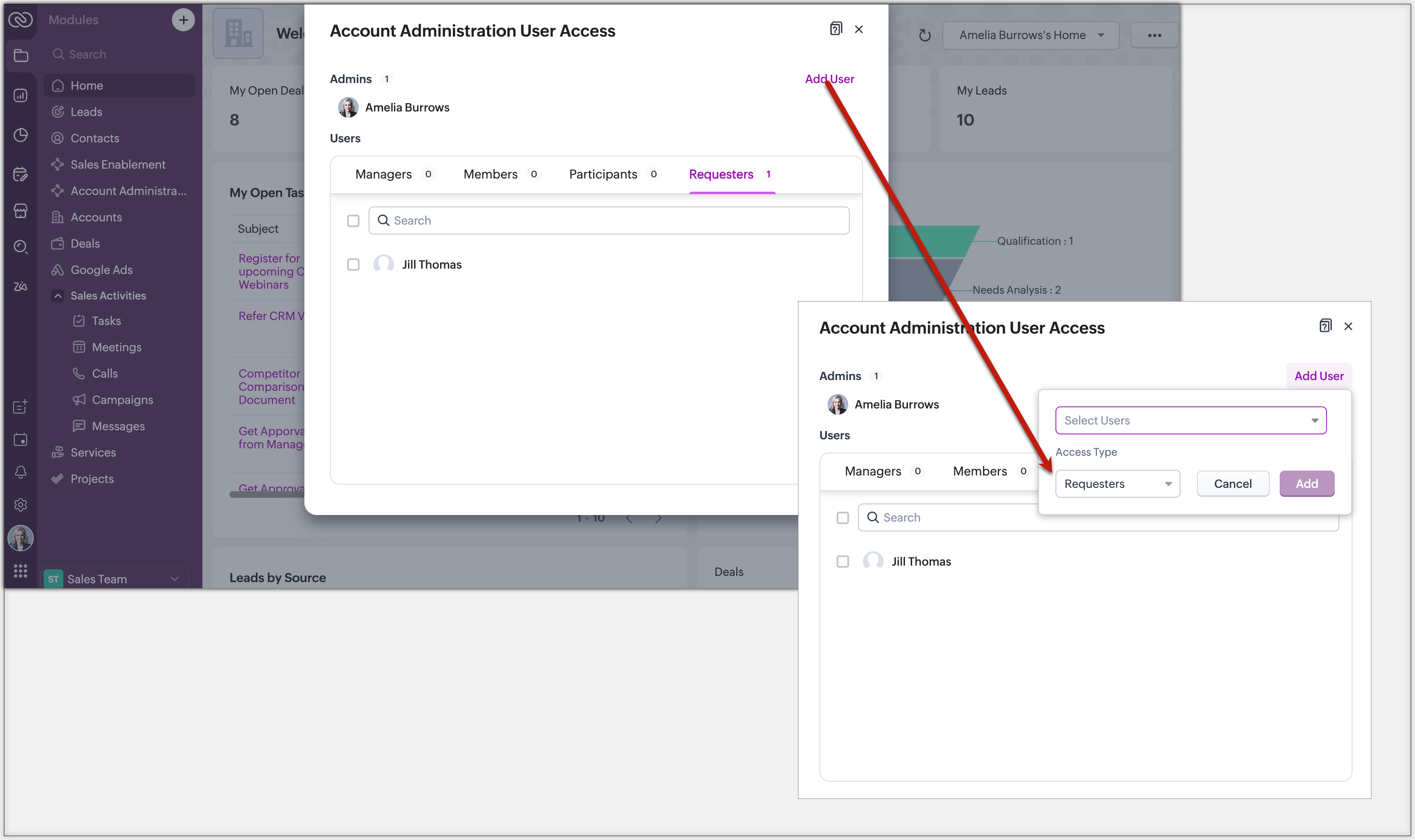
- QR Code or Link : Generate a link or code from requester settings. Anyone with access can instantly join and submit requests, no manual effort needed.
Example: Marketing can embed a QR code in an internal newsletter to allow regional sales reps to submit campaign briefs easily.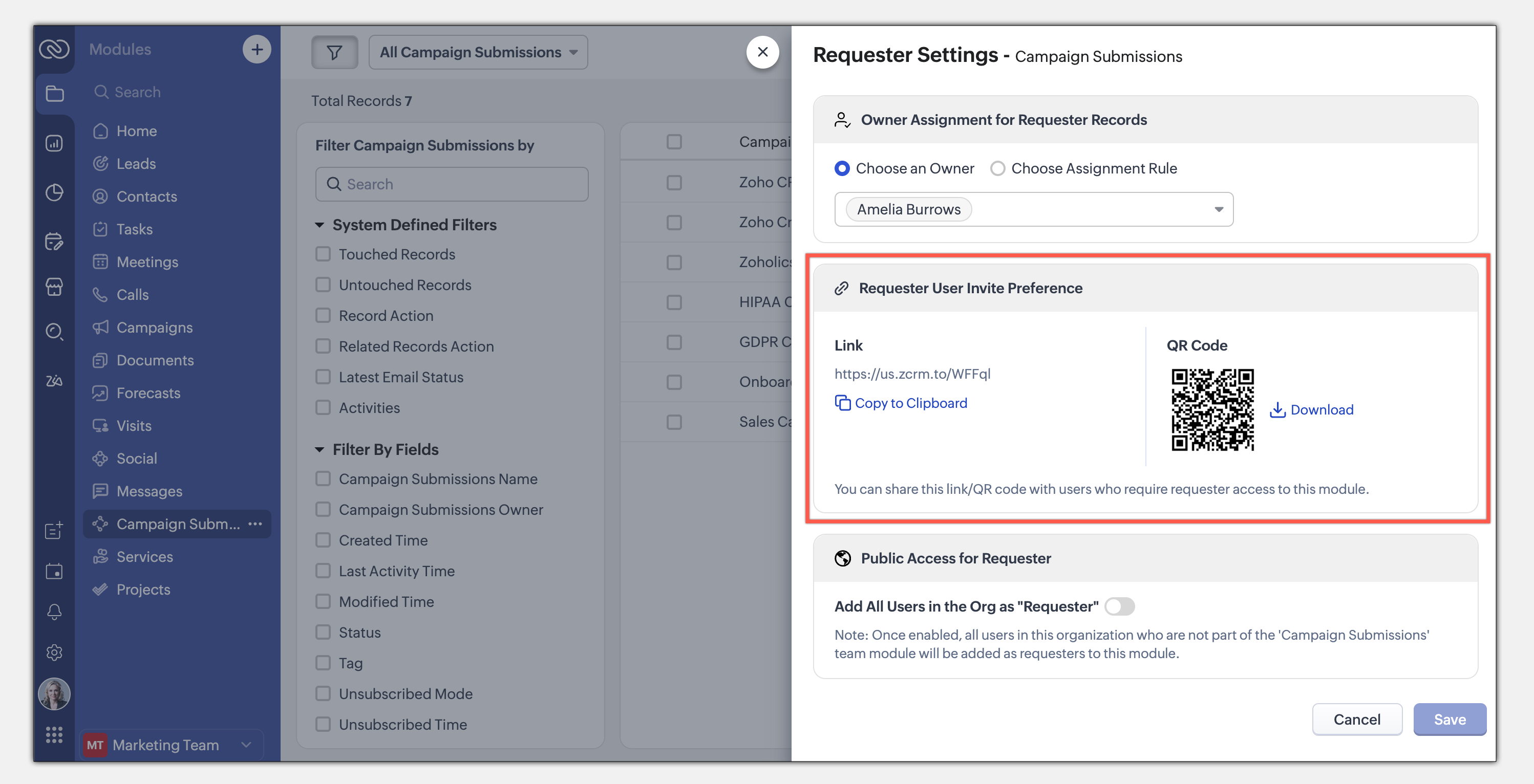
- Enable All Users : Allow all users in the organization to become requesters in a given module.
Example: A Sales Enablement module can be accessed by Product, Marketing, or Training teams to submit requests for sales insights.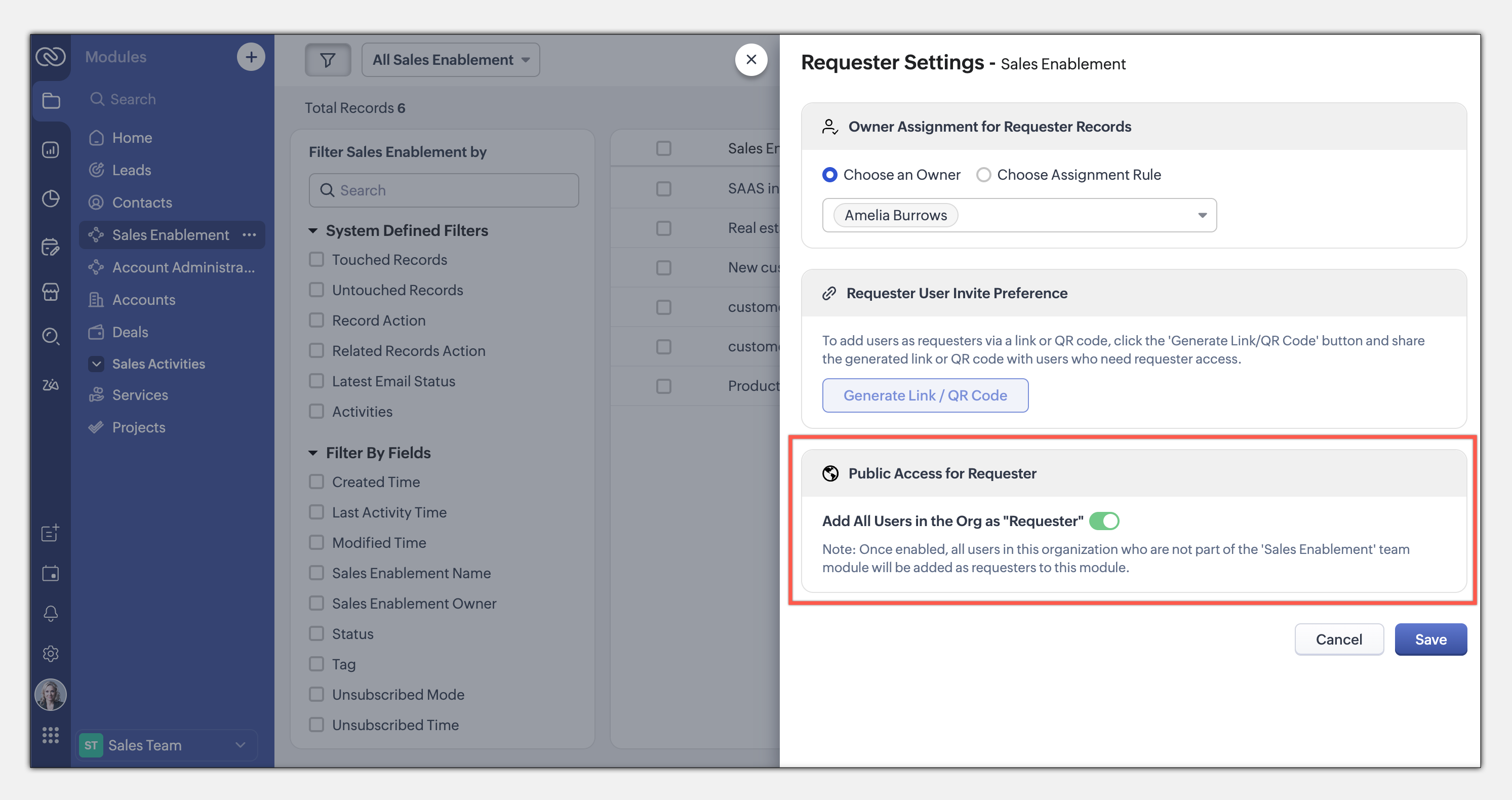
This seamless, integrated request system ensures teams can collaborate efficiently while maintaining privacy and process control. Learn more
This entire loop of requests and coordination between teams to meet a common goal is woven into the CRM interface as an integral part of the system, thus eliminating communication silos. This also puts us a good step closer to improving the adoption of CRM by several teams across the organization.
The details and nitty-gritty of who can manage what, who can view which data sets, etc., have to be carefully decided and managed. So CRM for Everyone also packs in an easy interface for each team to organize and manage their team modules.
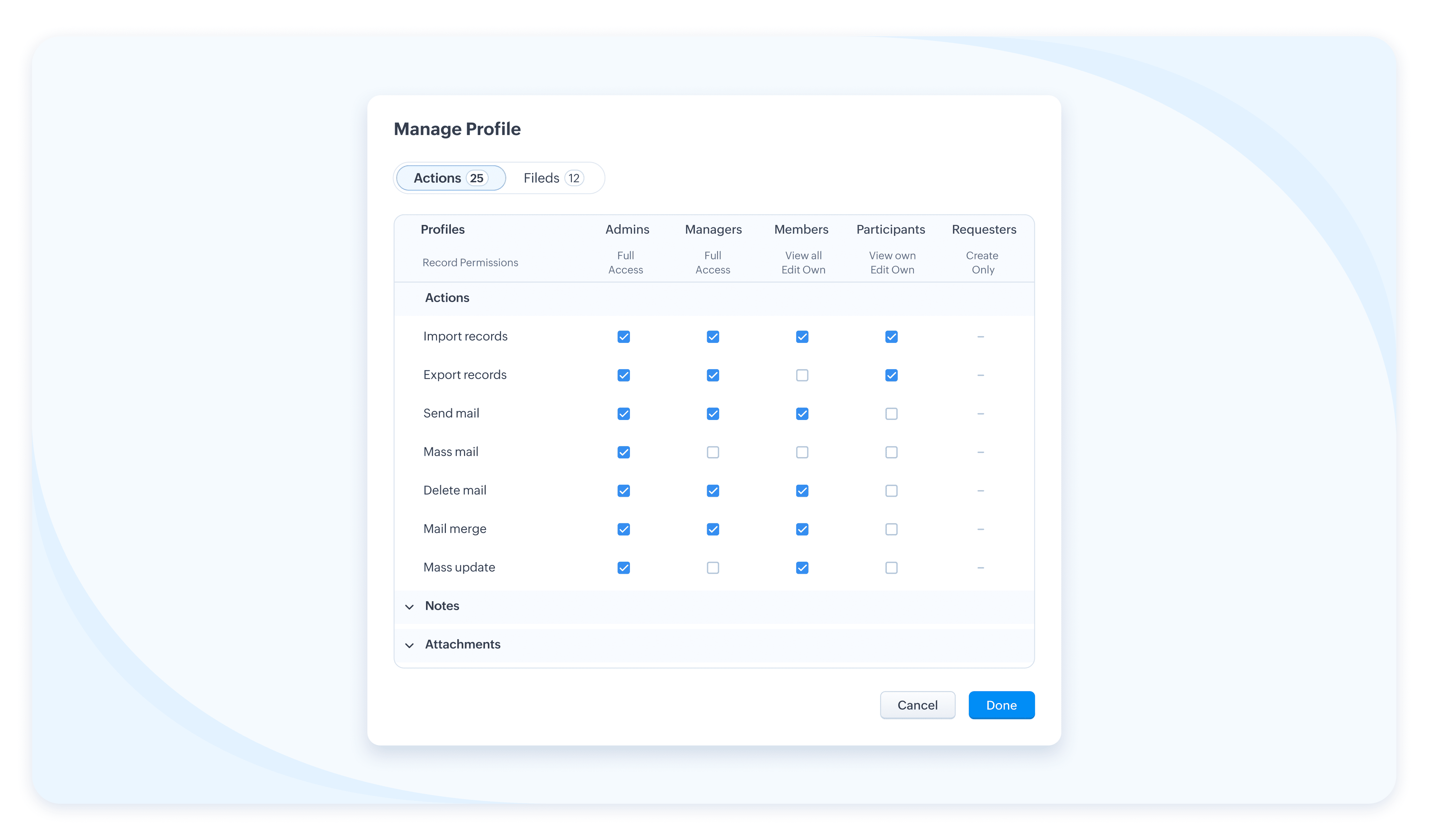
The details and nitty-gritty of who can manage what, who can view which data sets, etc., have to be carefully decided and managed. So CRM for Everyone also packs in an easy interface for each team to organize and manage their team modules.
Team Users For Team Modules
When we aspire to democratize the system and empower various non-sales teams, we hear you thinking, how do we take it from being an aspiration to ground level implementation? What motivates an organization to bring, most likely a large number of non-sales users, on to Zoho CRM? What’s their incentive?
Well, so far, the non-sales teams have probably not had the opportunity at all, to be a part of the same CRM system where all the customer data and processes are housed. The fact that Team Module will now give them that opportunity to be a part of this crucial system and simplify their work management is an incentive in itself, so to speak.
Of course, there is also a cost-related incentive. Since the non-sales team members will typically not need access to all of CRM, we have created a new type of user license to encourage their access to CRM— called the Team User license, which is priced lower than a regular CRM user license, and by design will allow only limited access to CRM.
With the introduction of Team User licenses, we will now have two types of CRM users:
➤ Organization User
➤ Team User
Well, so far, the non-sales teams have probably not had the opportunity at all, to be a part of the same CRM system where all the customer data and processes are housed. The fact that Team Module will now give them that opportunity to be a part of this crucial system and simplify their work management is an incentive in itself, so to speak.
Of course, there is also a cost-related incentive. Since the non-sales team members will typically not need access to all of CRM, we have created a new type of user license to encourage their access to CRM— called the Team User license, which is priced lower than a regular CRM user license, and by design will allow only limited access to CRM.
With the introduction of Team User licenses, we will now have two types of CRM users:
➤ Organization User
➤ Team User
- The Organization User is your regular power CRM user who will need access to all CRM data and most functionalities. Typically, a sales team member.
- A Team User is typically a non-sales team member, whose work could be managed in CRM alongside sales, as they have a part to play in the entire customer-oriented process. For example: A presales executive who needs to step in to give a product demo to a customer right after a salesperson's pitch. Alternatively, a Legal team member might have to process contract signatures while closing a deal. Additionally, a Training team member who will take up a training request for a customer on-demand.
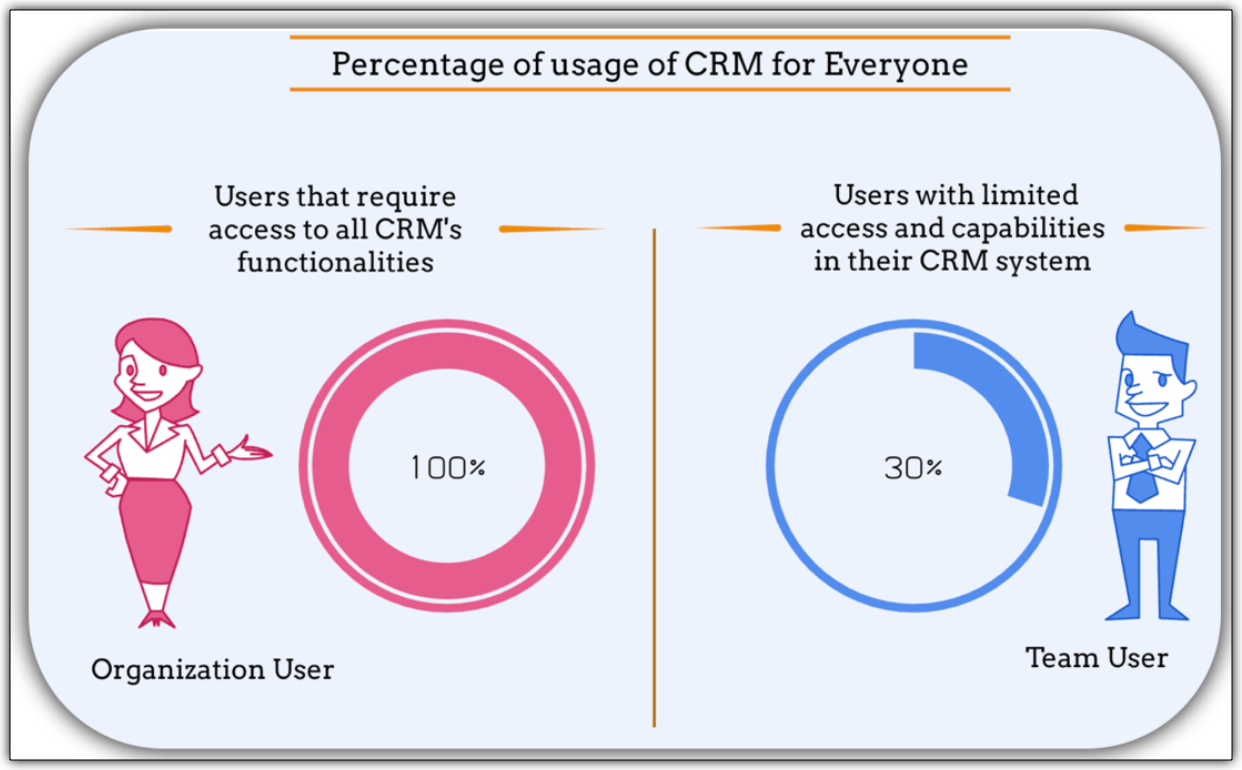
The legal team members, trainers, or pre-sales executives can make contributions only in their respective Team Modules. They don't require the entire range of features in the CRM system. In fact, they won't even need access to some key organization modules. They log into the system to fulfil their responsibilities, complete their deliverables, and then log out.
Such users are your ideal candidates for Team User Licenses.
Such users are your ideal candidates for Team User Licenses.
What is the cost of a Team User license?
Team User licenses are priced significantly lower than a regular CRM license and enable you to have cost savings, depending on how you want to distribute the Org Vs Team licenses among your users.
A Team User License costs:
➤ $9/ team license/ month (if paid annually)
➤ $11/ team license / month (if paid monthly)
For instance, Zylker Corp has onboarded 50 members of their sales team to the Zoho CRM Enterprise edition. They now wish to add an additional 30 non-sales customer operations members as Team Users. The distribution of licenses for these 80 users (on the Enterprise edition) will be as follows:
Organization Users - 50 users * 40 $ = 2000 $
Team Users [Annual ] - 30 users * 9 $ = 270 $
-----------------------------------------------------------------
Total Cost - 80 users = 2270 $
Let's see how much they would have to pay without this license in case they have to onboard all users using the regular CRM Org License :
All users as Organization users, therefore, 80 users * 40 $ = 3200
Thus, Zylker Corp's total savings with the Team User License is 930 $ which is significantly lower than regular CRM licenses.
A Team User License costs:
➤ $9/ team license/ month (if paid annually)
➤ $11/ team license / month (if paid monthly)
For instance, Zylker Corp has onboarded 50 members of their sales team to the Zoho CRM Enterprise edition. They now wish to add an additional 30 non-sales customer operations members as Team Users. The distribution of licenses for these 80 users (on the Enterprise edition) will be as follows:
Organization Users - 50 users * 40 $ = 2000 $
Team Users [Annual ] - 30 users * 9 $ = 270 $
-----------------------------------------------------------------
Total Cost - 80 users = 2270 $
Let's see how much they would have to pay without this license in case they have to onboard all users using the regular CRM Org License :
All users as Organization users, therefore, 80 users * 40 $ = 3200
Thus, Zylker Corp's total savings with the Team User License is 930 $ which is significantly lower than regular CRM licenses.
Team Modules in Zoho CRM make it easier for all your customer-facing teams to manage their own work, collaborate smoothly, and stay aligned. With CRM for Everyone, you can break down silos, speed up processes, and deliver better customer experiences—together.
It’s a smarter, more connected way to use CRM across your organization.
Start using Team Modules today and bring every team closer to your customers.
Regards,
Serena Woolridge
Resources
Topic Participants
Serena Woolridge
Sticky Posts
Good news! Calendar in Zoho CRM gets a face lift
Dear Customers, We are delighted to unveil the revamped calendar UI in Zoho CRM. With a complete visual overhaul aligned with CRM for Everyone, the calendar now offers a more intuitive and flexible scheduling experience. What’s new? Distinguish activitiesVoC in Zoho CRM is now data savvy: Explore response drilldown, summary components and participation in CRM criteria
VoC has all the goods when it comes to customer intelligence—which is why we're constantly enhancing it. We recently added the following: A customer drilldown component that shows you the list of prospects and customers behind a chart's attribute ExpandedWrapping up 2025 on a high note: CRM Release Highlights of the year
Dear Customers, 2025 was an eventful year for us at Zoho CRM. We’ve had releases of all sizes and impact, and we are excited to look back, break it down, and rediscover them with you! Before we rewind—we’d like to take a minute and sincerely thank youPresenting ABM for Zoho CRM: Expand and retain your customers with precision
Picture this scenario: You're a growing SaaS company ready to launch a powerful business suite, and are looking to gain traction and momentum. But as a business with a tight budget, you know acquiring new customers is slow, expensive, and often deliversCreate and populate a record in an instant: Introducing zero-shot field prompting to Zia's ICR
A couple of months ago, we upgraded our in-house AI image detection and validation tool, Zia Vision, with intelligent character recognition (ICR). By training Zia with sample images, you could create and enrich CRM records with data extracted from standard
Recent Topics
Can I write a check in Zoho Books with no associated bill?
This currently does not seem possible, and I have a client that desperately needs this function if I am able to convert them with Quickbooks. Thank you in advance for your reply.OpenAPI Specs are just plain wrong
The provided yml files for generating the OpenAPI specs are absolutely riddled with errors and inconsistencies. From missing fields on the objects, to just incorrectly named resource objects. I'm having to go through and manually changing the spec toAbout Meetings (Events module)
I was working on an automation to cancel appointments in zoho flow , and in our case, we're using the Meetings module (which is called Events in API terms). But while working with it, I'm wondering what information I can display in the image where theCustom Footer – Zoho Writer Document
Hello everyone, I’m having an issue adding a custom footer in a Zoho Writer document. I would like to insert my company information (including a logo + address) in the footer. The problem is that when I add these elements, the main content of my pagesReport grouping
I have added a grouping in a report but it is not working how i had expected. I wanted to group a summary on a field named Size but when i add the grouping the report is still showing me each record and making a summary at the bottom of the report. WhatSocial Media Simplified with Zoho Social: Preview your Instagram grid before posting
For a platform like Instagram that relies on visual appeal, it's important that you plan your image and video content in a way that holds your audience's attention. Planning your grid ahead of time gives you the benefit of understanding how your postsSpreadsheet View click & focus issue in Arabic (RTL) localization
Hello Zoho Support Team, I am facing an issue in Zoho Creator Spreadsheet View when using Arabic localization (RTL). Scenario: My app supports English (LTR) and Arabic (RTL). I created a Spreadsheet View for a form. In English, everything works correctly.VAT rates - exempt and out of scope
Good Evening, UK based company here. I am a bit confused in respect of setting up VAT rates for exempt goods and services; at present I am simply leaving the VAT rate blank in the transactions in order to prevent any VAT appearing in the VAT return. WhenHow to loop through Multiple Upload and Display Actual File Name
I have been reading the help on the File Upload Control and reviewed the Deluge help on files and I can not figure out how to loop through the uploaded files and do anything but get the automatically created file names. The code below will run but eachabou arattai
I want to use the Arattai app for business purposes, so please convert my account to a business account.I have my own invoice app, and I want to link it with the Arattai app for direct messaging.Overlapping Reports in Dashboards
It's rare, but occasionally it would be a good feature if I were able to overlap reports, either fully or partially in the Dashboards. Also, then having the ability to move objects to the front or rear, or make them transparent/translucent would be goodLooking back at Zoho Calendar in 2025
Hello Zoho Calendar Community, As we step into a brand-new year, we’d like to take a moment to thank you for being an active and valued part of the Zoho Calendar community. Your trust, feedback, and continued engagement motivate us to keep evolving andThere was an error while connecting to GSTN
I am trying to file GSTR1. Everything flows smoothly until I reach the final step of filing the return. After I enter the PAN and OTP for filing it raises the error "There was an error while connecting to GSTN"Zoho Books Extension: What Happens If Custom Fields Already Exist?
When developing Zoho Books extensions, what happens if the target Zoho Books organization already has a custom field with the same API name as one defined in the extension? I’m asking because we originally created an on-Books version of this functionality,Internal Server Error (500) When Attempting to View Banking Transactions
I am experiencing an Internal Server Error (500) when attempting to view transactions across all of my banking accounts. Despite multiple attempts to resolve this, I have received little more than runaround from support, and the issue remains unresolved.How do I add a blank line to the Organisation Address Format?
I'd like to have my VAT number, for example, shown prominently by having a clear gap between it and the address block above, but any blank lines in the address format get ignored in PDF outputs.Automatic Invoice Number generation for createRecord
Hello, while testing some custom Buttons in my Zoho Books application, I noticed that I get an error that previously did not occur. After some further digging I found that the automatic transaction numbering of invoices no longer work in my organization.Adding number of days to an estimate.
I need both QTY of item and "number of days hire" in my estimates at the line item level. Any clues as to how this is done would be greatly appreciated. It needs to calculate. Thanks JBooks Api: listing expenses created after certain dates
Is there any parameter I can add to the List Expenses endpoint that will let me look up expenses by when they were created?Why can't we change the Account type from an Expense to an Asset?
Like the question. Why in QuickBooks for example if I mistakenly created an account as an expenses and I already captured information in those accounts, I can just change the account type from expense to assetIs it possible to do validation for the Actions added to Reports?
We have an all-around On Validate function that checks all the possibilities before the Created/Edited form submissions. We want to have a button in the report view, so we can change records without entering. We are able to add this button, and it doesAbility to Edit Ticket Subject when Splitting a Ticket
Often someone will make an additional or new request within an existing ticket that requires we split the ticket. The annoying part is that the new ticket maintains the subject of the original ticket after the split so when the new ticket email notification[Free Webinar] Environments in Zoho Creator - Creator Tech Connect
Hello Everyone, We’re delighted to kick off the 2026 edition of the Zoho Creator Tech Connect Series and are excited to continue this learning journey with you. The Creator Tech Connect series is a free monthly webinar featuring deep-dive technical sessionsZoho Voice API SMS
I made a post request in Zapier to try to send an SMS. Authentication appears to be configured correctly. I followed the documentation and I'm getting a 400 Error "Internal Server Error". Not helpful at all. Anyways, I could not find any information onHow do I change (error) display messages
Hi! I would like to edit display messages like "invalid entries" and "enter a value for Nome" and so on into Italian language messages. How can I do that? Already tried on Validate on form submit. Where I am failing? Thanks in advance.Record Overseas Transactions Along with CC charges
Hi All, We receive payments via stripe in multiple currencies and stripe takes around 2.5% fees. The amount is settled in INR into our local bank. What should be the currency of the income account used for Stripe payments? Here is a sample flow that weEasier onboarding for new users with stage descriptions
Greetings, I hope all of you are doing well. We're happy to announce a recent enhancement we've made to Bigin. You can now add descriptions to the stages in your pipeline. Previously, when creating a pipeline, you could only add stages. With this update,Pieds de page personnalisé - Document Zoho Writer
Bonjour à tous, Je rencontre un souci avec l’ajout d’un pied de page personnalisé dans un document Zoho Writer. Je souhaite insérer les informations de mon entreprise (notamment un logo + adresse) dans le pied de page. Le problème, c’est que lorsque j’ajoutePermissions on Views
Having the option of any agent creating custom views is firing back and got a situation where there are a hundred different views across the team and tickets are not being dealt in the most efficient of ways. Tickets seems to be missed by some agents,Credit card transactions are backwards after importing statements
I am new to Zoho Books so I'm importing my firm's bank and credit card statements in. My credit card statements have a single column with negative numbers so that is the option I chose. But when I went to categorize the credit card transactions, I canimport data from Apollo.ai into zoho crm via zoho flow
I might be asking this question in the wrong forum. We use Apollo.ai to find potential new leads for our business, there are around 10000 leads that we have initially found. We have an Apollo.ai account but just to do searches, we dont use it as a crm.Knowledgebase SEO
We have a custom-domain mapped help center that is not restricted via login. I have some questions: a) will a robots.txt file still allow us to control indexing? b) do we have the ability to edit the sitemap? c) do category URLs get indexed by searchVIsual maindmaps in Zoho notebook Ai
Can I create and export VIsual maindmaps in Zoho notebook Ai1stDibs Integration to Zoho Inventory
Hello is it possible to integrate my Zoho inventory and 1stDibs?Community Question: Renewal vs Invoicing
This is a question for the community. Does anyone else consider there to be a difference between a subscription renewal event and sending out a recurring invoice for a subscription? For example, let's say customer XYZ purchases a 1-year subscription tocloud console support for music websites
Hi Friends, I am not from a very technical background.. So need support from the Zoho family. I want to build a e-commerce website which is in Musical Niche. It will help people learn music & play instruments of all types. There are a few players in the market like Chordify , Guitaa, Guitar Dashboard, ChordU & few others. But I all these websites allow only a few instruments to play. So I want to build a better website than the one I mentioned. So wnated to know what UI & AI should I use so thatScheduled Reports - Do not send empty report
Hello, We are intensively using reports in the CRM, especially for sales managers. When data is empty, they still receive an email. Can you add an option to avoid sending the report when data is empty?Is Zoho One Desktop more secure than Zoho One Web SaaS?
Is Zoho One Desktop more secure than using Zoho One in browser? Inherently, it seems desktop would be unless you don't do things like share your pw or leave pc on. I am concerned about data being on the cloud or someone else's server and database.Reminder Settings - Time Tracker
On the time tracker in Reminder Settings I created a reminder according to the Zoho manual. But a manager asked me to change the message that goes in the email. Is it possible to change the message? I didn't find that in the Zoho manual. Another question: I configured to receive the reminder everyone who logged in less than 40 hours. Does Zoho consider less than 40 hours of the current week or the whole month? Another situation, I put it so that I and another specific user would receive the notification,Create Item group from a composite Item
I have applied my mind for hours but cannot figure this out. Can you have a composite item in an item group?. E.g. We bundle different color and size SKU's together as composite items. Also Using composite items as Bill of Materials. We want to createNext Page