Automate your inbox during vacation in Zoho TeamInbox

When you're on vacation or away from your desk, the last thing you want is for important emails to be missed or left unanswered. The good news is, you can easily set up rules in Zoho TeamInbox to assign incoming messages automatically to a teammate who's available during your absence, ensuring seamless communication without missing any conversation.
Every rule comprises three parts:
- Trigger - defines what should initiate the rule.
- Condition - defines the criteria that should be met for the rule to take actions.
- Action - defines the actions that are to be performed when the condition is met.
Create rules for auto assigning messages:
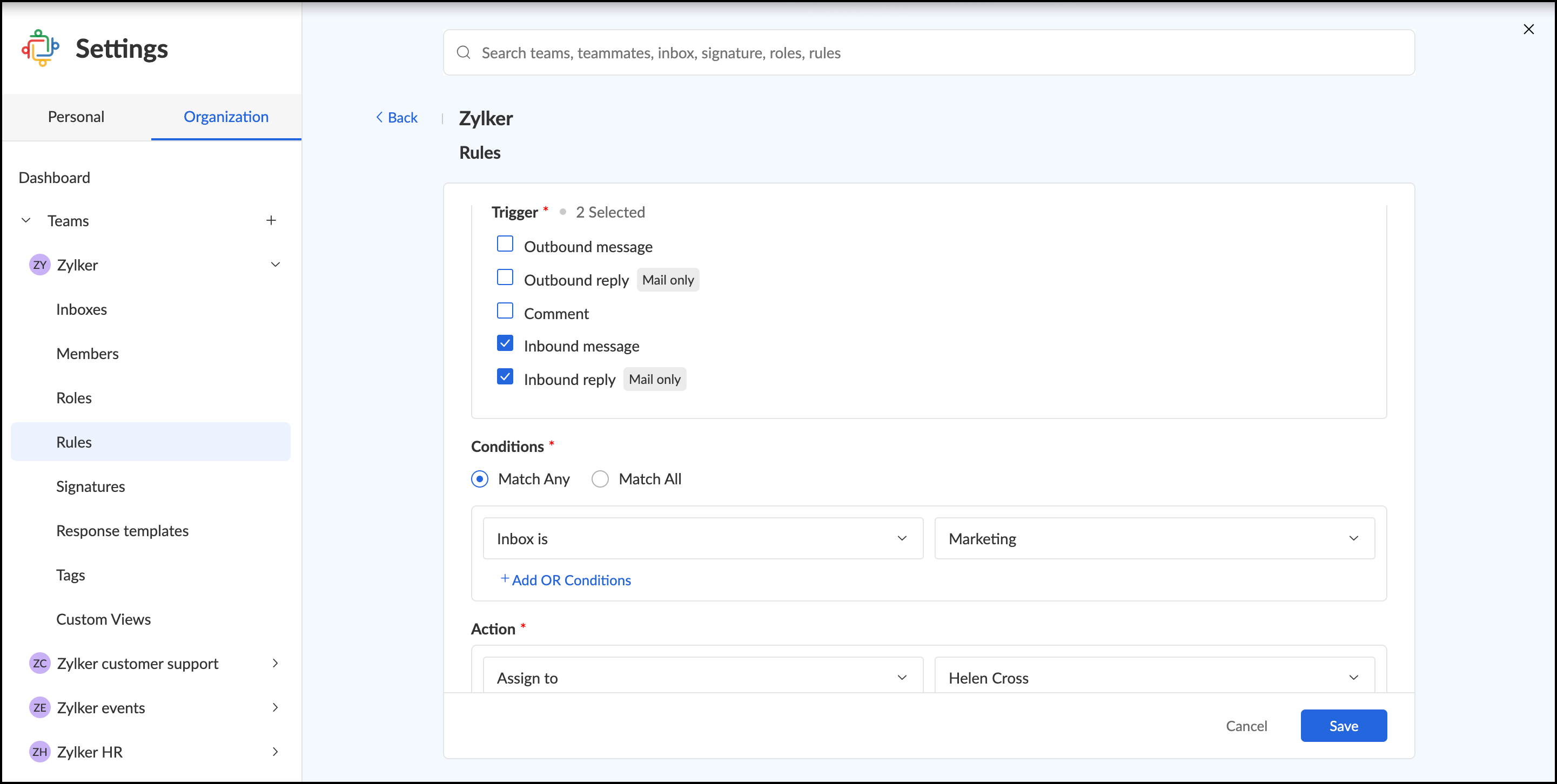
Here you want to assign all the incoming emails to your team member in a specific inbox.In this instance, your rule should be as follows:
Trigger - Inbound messages/reply
The rule will trigger every time a new message is received in the team's inboxes. This message can be a reply in an existing thread or a completely new message.
Condition - Inbox is
The rule will now check if the message received is within the specified inbox. You can add any number of conditions and choose if you want all the conditions to be met or just any one condition to be met.
Action - Assign to <team member's name>
When the above condition is met, the message will be assigned to your team member.
Steps to create rules:
- Login to Zoho TeamInbox.
- From the left pane, select the team, for which you want to set up rules.click the More icon and click Manage team.
- Select the Rules tab and click Add Rules.
- Enter a Name for your rule.
- Define the Trigger as Inbound messages and Inbound reply.
- Define the Condition that is to be met for the rule to perform actions.
- Select the actions to be performed as "Assign to". When the above mentioned conditions are met the thread will be assigned to the teammate you select.
- Click Create.
Once you save your rule, it is active and will start processing. You can stop the rule anytime by clicking Disable next to it, which can be enabled when needed.
Implementing these simple rules will help you enjoy your vacation worry-free, knowing your inbox is still in good hands! Got ideas for topics youn want us to explore next? Share them with us in the comments!
If you haven’t tried Zoho TeamInbox yet, sign up today and start your free trial.

Topic Participants
Neha Kumari
Recent Topics
Include Audio in Zoho Assist Session Recordings
Hello Zoho Assist Team, We hope you're doing well. We’d like to formally submit a feature request regarding session recordings in Zoho Assist. 🎯 Current Limitation When conducting a Zoho Assist session that includes voice and/or video chatting, the recordingUnable to update Created Date/Time even via upsert
hi all --- running a demo version and "recreating" some data from hubspot. I had tried the method to automatically move data over but it missed A TON of fields and some stuff wouldn't even map correctly so i am simply creating new Deal records to testBlockchain Feature?
Since I'm not an expert in this technology, is there any reason why you would not want to add this option to your Zoho SIgn documents? Is there a downside?Kaizen #196 - Zoho CRM Queries - Best Practices
Nearing 200th Kaizen Post – We want to hear from you! Do you have any questions, suggestions, or topics you would like us to cover in future posts? Your insights and suggestions help us shape future content and make this series better for everyone. GotBest way to account for shipping charges to customer
I have been allocating all our shipping expenses to the "postage" account, but I realise that is probably incorrect, as for the most part, we pass on shipping charges to our customers. So I should probably add the shipping charges into the "shipping charges"Zoho Flow s’enrichit avec les subflows et les actions Webhook
Nous sommes ravis d’annoncer deux ajouts importantsà Zoho Flow : les subflows et les webhooks sortants. Ces nouvelles fonctionnalités ont été conçues pour vous aider à créer des workflows plus facilement et à automatiser davantage de tâches répétitives.How to assign canvas view for portal user
Hi , as a portal user, I can switch to another canvas view, however, I cannot find any field to configure a default canvas view for portal user. May I ask how to set it up in CRM? And if I can view list by sheet view as a portal user?Restrict Leave Application Based on Attendance Cycle (24th to 23rd)
Hi Zoho Team, Our organization follows a custom attendance cycle from 24th of the current month to 23rd of the next month. I would like to configure the system so that: Employees should not be able to apply backdated leave for any date after the attendanceHow do I assign a parent to an existing campaign?
I created a campaign but now I'd like to make that existing campaign a child of another. How can I do this?Categorize Tickets Through The App
I used to be able to categorize and assign tickets through the app without any issues. However, for the past year, whenever I try to edit a ticket, select a category, and click save, it doesn’t actually save the changes. As a result, I haven’t been ableCan't add picture to email template. Says I'm over the character limit.
I tried creating an email template with a picture and it says I'm over the character limit. The picture is pretty small. What can I do?Allow breakdown of per diem for meals provided
Would it be possible to break the per diem down into what you get for each meal. The reason for this is we want to offer per diem but if a meal is provided by a customer or sales we need to remove this from the per diem bucket for that day. We break downAutomatically moving Leads into their corresponding buckets
Hi, I have developed a lead pipeline and created different cadences for various lead segments. After enrolling leads into their respective cadences, each lead goes through a series of follow-ups (in my case, three emails). If a lead does not respond afterTracking Email Template usage
I'd like to be able to track how many times agents/users send an email from Templates. This is so we can track their activity in relation to Campaigns in CRM. ThanksGet employee id of authenticated user via API
Hi, For adding timetracking records an employee id is required. Is there an API Route available to get the employee ID of the current authenticated user? or something like /users/me Currently using https://people.zoho.com/people/api/forms/employee/getRecordsCollect in-app feedback with richer context and granular insights
Hello, Apptics community! From GenAI chatbots to one-tap checkouts, user experience standards keep rising—yet 96% of unhappy users never explain what went wrong; they simply leave. Introducing in-app feedback 2.0 banner In-app feedback 2.0 is here toTemporary restiction
My account says You have been temporarily restricted from publishing jobs from Zoho Recruit.Click here to request a one-time approval to publish your jobs and when I go to click it shows error. Kindly assist.Help with Quote template for peer review
We are wanting to do peer review of quotes/proposals, however the quote templates dont have product cost, profit margins, etc. It is difficult for a manager to approve a quote without ensuring nothing is going out at improper margins, etc. I have notHow many AR fields We can add in a form?
I want to add at least 10-15 AR fields in a form. I just want to know is there any limit on the AR fields or do I need to pay extra money for using 10-15 AR fields. Thanks in advance.Agent working hours
Hi, I know it is possible to set company business hours but is it possible so that agents can have different ones? I.e. some agents cover later hours on specific weeks - can these be set so those agents that are "working" get notified about tickets etc.Disallow CLOSE if tags field is empty
I want to introduce a mandatory condition that NEW tickets (not prior closed tickets) cannot enter the CLOSED state without first having an entry in the tags field. Is there a way I can do this?Central de Ajuda - Restringir visualização de tickets
Estou tentando configurar o Zoho Desk para que determinados usuários dentro de uma mesma conta consigam visualizar apenas os tickets criados por usuários específicos dessa conta — e não todos os tickets ou apenas os seus próprios. Até onde sei, existeBusiness Hours with lunch break
Our business hours are: mon - fri 08:30 - 13:00, 15:00 - 18:30. How can I handle the lunch break? If I use 8:30 - 18:30 it obviously breaks SLA. ThanksAsk the Experts 21: Power up your support game with Zoho Desk Automation
" In every business, there are tasks to automate, Zoho Desk helps with features that integrate Assignments to manage tickets and teams to align,Macros for quick actions and workflows to streamline Contracts and schedules to hold things tight, Plans runIf leads are assigned to a person before 4:00 PM and the stage is "Fresh Lead", then an email should be triggered at 4:00 PM to all assigned users. If leads are assigned after 4:00 PM and the stage is
If leads are assigned to a person before 4:00 PM and the stage is "Fresh Lead", then an email should be triggered at 4:00 PM to all assigned users. If leads are assigned after 4:00 PM and the stage is "Fresh Lead", then the email should be triggered theMultiselect lookup in subform
It would be SO SO useful if subforms could support a multiselect look up field! Is this in the works??Tasks as calendar events? What about a way to verify a meeting actually happened?
I'm not sure how to best ask this, but i'm looking to add some guard-rails into zoho for the end-user. However for guardrails to be effective they can't really add extra steps for the end-user. i.e. every step that's added for the user, is another placeAttachments should sync between Zoho Finance in CRM and Zoho Books
It would EXTREMELY helpful and practical if the attachments added to an invoice via Zoho Finance in CRM synced with the invoice updates in Zoho Books. Currently, attachments to an invoice updated in CRM DO NOT appear as attachments when viewing the sameIntroducing a new home page view and UI enhancements for Dashboards
Hello everyone, In CRM, the home pages provide a quick view of the various happenings in a business with the help of dashboards. The home pages also help to organize one's and the team's day's work. There are three views in the home tab: Classic User'sCall result pop up on call when call ends
I’d like to be able to create a pop up that appears after a call has finished that allows me to select the Call Result. I'm using RingCentral. I have seen from a previous, now locked, thread on Zoho Cares that this capability has been implemented, butData Template Amending
Hi, is it possible to remove data templates once you have applied them in Workdrive? Also, once I have added a new field to a data template can I mass update multiple files who have already been allocated that template and amend just that one addedZoho Flow y subformularios de Zoho CRM
Buenas tardes, En mi empresa vamos a empezar a usar los subformularios de zoho crm pero estos los voy a tener que rellenar con zoho flow ya que va a ser el encargado de rellenar dichos campos del subformulario. El problema es que a la hora de intentarRecurring Invoices
We are looking at moving our invoices to ZOHO Billing, I have started the trial period and like that I can et up for four different companies. The one feature we need which is mentioned in the documentation is Recurring Invoices so we can send our RentImplement Meeting Polls in Zoho Bookings
Dear Zoho Bookings Support Team, We'd like to propose a feature enhancement related to appointment scheduling within Zoho Bookings. Current Functionality: Zoho Bookings excels at streamlining individual appointment scheduling. Users can set availabilityZoho Projects App update: Arabic and Hebrew language support
Hello everyone! In the latest version(v3.10) of the Zoho Projects iOS app update, we have brought in support to access the app in RTL(Right to Left) languages (Arabic and Hebrew). Note: RTL is yet to be supported on the Calendar and Gantt charts modulesI want to cancel @mention group in the notes in Zoho CRM
Hi Everybody, I want to prevent people from mentioning a specific group in notes in Zoho CRM. We have one group called Team Sales, and although we've asked users not to mention groups, they still mention the group name. My workaround is to change theKaizen #193: Creating different fields in Zoho CRM through API
🎊 Nearing 200th Kaizen Post – We want to hear from you! Do you have any questions, suggestions, or topics you would like us to cover in future posts? Your insights and suggestions help us shape future content and make this series better for everyone.How to install node packages in Zoho Creator cloud functions
I wanted to create some functions which requires node packages like axios, fetch, multer etc., How and where can i install the node packages in Zoho creator to use it in Zoho creator Nodejs function.Session "Ask Me Anything" Zoho France - Le 26 Juin 2025 14h à 17h (en Français
Chers Utilisateurs, Vous cherchez à mieux comprendre Zoho CRM ou Zoho Desk ? Nos experts seront disponibles pour répondre à toutes vos questions lors de notre session Ask Me Anything. Rejoignez-nous ici pour en discuter en ligne. Pendant trois heures,Option to Crop Existing Agent Image in Zoho One Directory
Hello Zoho Team, We hope you're all doing well. We would like to request a small but useful enhancement to the Zoho One Directory. 🎯 Current Limitation At present, the system allows cropping an agent image only during the initial upload of an agent'sNext Page