Discussions from Ask The Experts 19: Inside Zoho Desk Spring Release 2025 : Zia in Focus

Discussions from Ask The Experts 19: Inside Zoho Desk Spring Release 2025 : Zia in Focus

Hello everyone,  
We had insightful discussions in both the sessions of Ask the Experts(ATE) 19, diving deep into engaging conversations around Zia and the spring release. Your enthusiastic participation and thought-provoking questions brought the sessions to life!  
In this post, we’re spotlighting the Q&A highlights focused exclusively on Zia.

1. Why are Zia Answer bots not performing as intended after integrating them with the internal Knowledge Base (KB)? Why is the bot unable to provide relevant answers when questions are asked in natural language?

Zia's Answer bot's response is based on how closely the user's query matches the content of your Knowledge Base(KB) articles. Zia operates using Retrieval-Augmented Generation (RAG) technology, which combines AI search and AI-generated responses. For AI search, we use AI training models specifically implemented for your knowledge base, while ChatGPT/Zia is used for generating the responses based on the service you select. Refer Setting up Generative AI Services: Zia or ChatGPT.
A. To improve this, we recommend following our best practices for training Zia Answer Bots. These include:
      i. Use simple and commonly-used phrases rather than jargons/isolated keywords in your help documents.
      ii. Include clear headings or sub-titles within your help documents to improve searchability and matching accuracy.
B. If you still do not receive relevant answers, we offer an improved Zia search powered by a new training model. If you would like to use it, please drop your request to support@zohodesk.com.
Additionally, we have introduced Generative AI powered by Zia, that is powered by open-source and run in Zoho's environment. To enable this, go to Setup(S) >> Zia >> Generative AI >> Services >> select Zia, under Choose service.  This is hosted entirely within Zoho's environment and is included at no additional cost and works with the Enterprise edition or Zoho bundles supporting Enterprise features.
 
2. How to optimize and incorporate the Zia bot within the Professional Edition?
Zia offers its complete range of functionalities exclusively within Zoho Desk Enterprise Edition and Zoho's bundle services.
However, there are specific Zia features available on the Professional Edition:
  a. Zia powered by ChatGPT: This integration is accessible within Zoho Desk, enabling responses based on open-domain data. In the Professional edition, Zia will  respond using information from the public domain, and the "Reply with Knowledge Base" feature is not available.
Additionally, Zia supports enhanced ticket handling through features like Ticket Summary, Zia Insights, Writing Assistance, and AI-generated content.
  b. Content Analysis: Launched in the recent spring update, this feature improves upon the existing spell-check capability and is accessible across all paid editions..
 
3. Is it possible to train Zia to provide answers based on resolutions from closed tickets rather than solely relying on the Knowledge Base?
Currently, Zia can only be trained using your Knowledge Base and not from tickets or their resolutions.
Tickets often contain sensitive customer data and personally identifiable information (PII), which should not be accessible to all agents or customers. Due to this privacy constraint, we currently do not train Zia using ticket data.
However, there's an option to add information from the Resolution under the Ticket tabs. While creating a resolution, the agent can select "Save And Add Article" to add the resolution to the Knowledge Base thereby giving Zia an option to train on the article. 
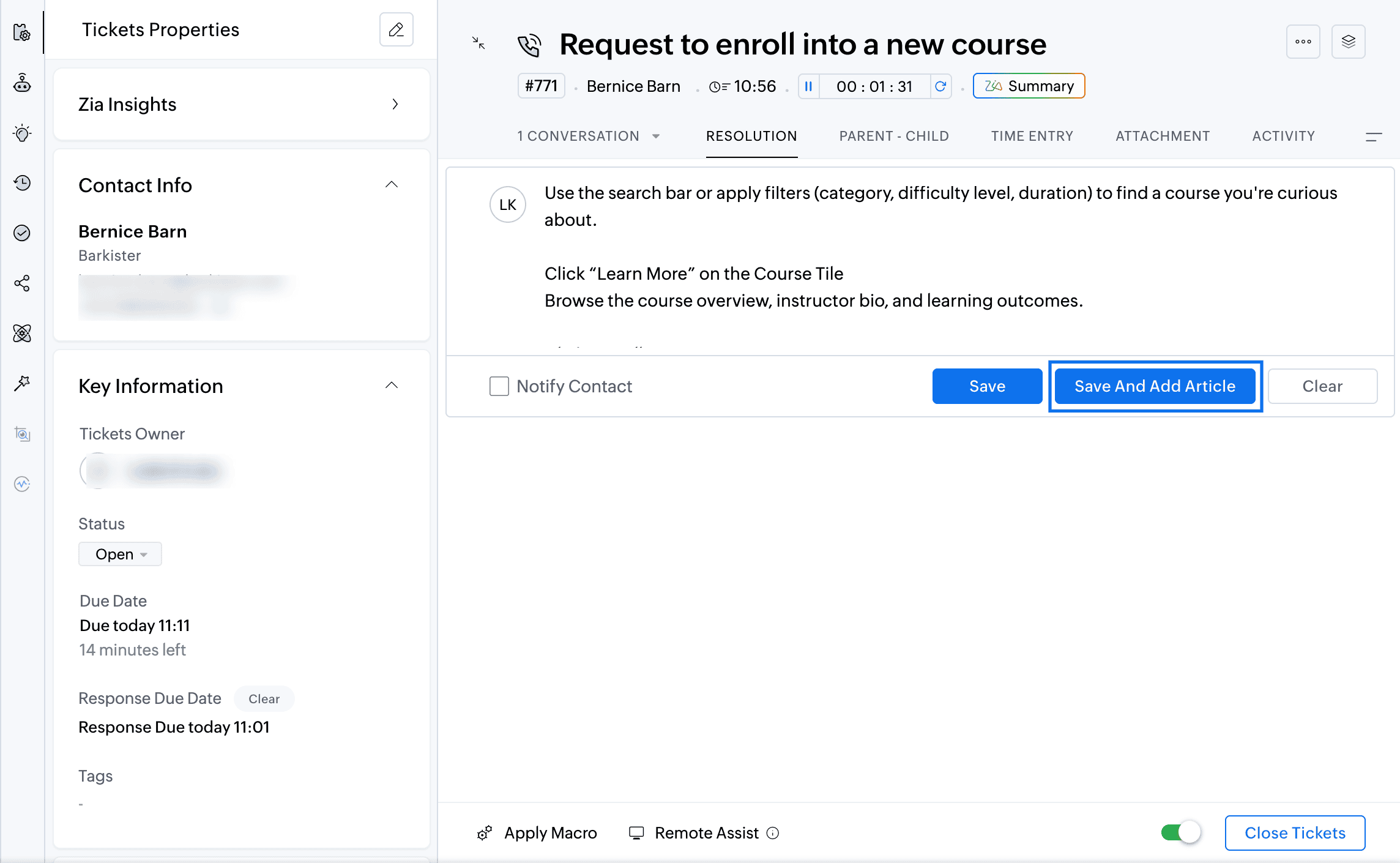


We plan to introduce a feature allowing agents to generate replies based on similar tickets. In this approach, Zia will reference similar tickets and their corresponding responses to suggest an answer. Instead of directly training Zia on potentially sensitive ticket data, this reply assistance feature will help agents by leveraging responses from comparable tickets.

4. Will Zoho offer additional AI models beyond Zia and OpenAI?  
Yes, we plan to introduce more AI models, primarily those hosted and managed by Zoho, considering the B2B nature of our services and ensuring data security and privacy.

5. How is data currently handled with OpenAI and Zia?  

Currently, when using OpenAI, fields marked as PII  are masked on the User Query or KB articles before sending them to Open AI for response generation alone and not for training. Similarly, Zia, powered by open-source models like Lama 3.1, uses data strictly for generation purposes. We've fine-tuned Lama 3.1 specifically for Zoho Desk requirements.

6. Which additional open-source models does Zoho plan to support in the future?  

Besides Llama, we plan to soon support additional models such as Qwen, and Mistral.

7. Will Zoho Desk allow users to integrate their own AI models?  

Yes, we are working towards creating a platform within Zoho Desk that allows users to bring their own open-source models or custom LLMs for various features.
 
8. How do we use the Zia GenAI-powered chat? Do we need to set it up with predefined answers?
To create an Answer bot, navigate to Setup > Zia > Answer Bot.The Answer Bot operates by learning from your existing knowledge base data. The Answer Bot leverages generative AI, which can either be powered by Zia using open-source technology or through OpenAI's ChatGPT integration, for which you would need an API key. In our recent spring release, we extended the availability of the Answer Bot across instant messaging (IM) channels. You can now deploy the generative AI-powered Answer Bot, trained specifically on your knowledge base, across IM channels such as WhatsApp, Telegram, Line, WeChat, Facebook Messenger, and your own website. You can also deploy the Answer Bot through ASAP within your Mobile App (SDK). The AI-powered Self-Service with Answer Bot can be powered with Zia(Llama) or ChatGPT.

9. I'm using Zia to predict the"Issue Theme" field automatically, and it shows as successful. However, when I open a ticket, it doesn't suggest any value for me to confirm. Why is this happening?
Regarding Zia's field predictions, there are two available options:
     i. Auto-update predicted value.
     ii. Allow agents to confirm the predicted values manually ("Let me confirm predicted value manually" option).
        To enable Field predictions, navigate to Setup (S) >> Zia >> Field Predictions >> Create A Field Prediction. In the Field Update mode field, you can choose to  predict the field automatically or confirm the predicted value manually.
If you're using the "Let me confirm" option, you need to manually confirm the predicted values. To do this, navigate to the Field Prediction section within the Ticket Detail View. You'll find a wand (star) icon in the sidebar (ibar). Click this icon to view the predicted values from Zia. Here, you can either confirm or reject the suggested value, and your choice will help improve Zia's training data.
We're actively working on integrating this feature directly into the ticket properties, so that Zia's recommended values will appear directly within the field itself.
 
10. Does Zia learn from our responses to tickets as well?
Currently, Zia does not learn from the responses you send. It does not have the capability to learn from the messages you type and send. We are working on expanding the capability for Zia to respond in the business tone based on the custom instructions added by agents for each feature.

11. Do I need to upgrade all licenses to Enterprise to use the new Zia LLM if I'm currently on Zoho One?
Yes, you have to upgrade Zoho Desk to the Enterprise edition to use Zia powered by open-source models. Zia is available by default in the Enterprise plan and all Zoho bundles supporting the Enterprise edition of Zoho Desk.
 

12. How does Zia determine that an agent needs to intervene in a ticket? Does it instruct the user to contact support, or can it notify agents to own the ticket?
Currently, Zia cannot request an agent to intervene in a ticket.
However, we have a feature called Field Predictions, which uses your historical ticket data to predict and assign ticket ownership. When a customer replies, Zia analyzes the customer's message and, based on its training data, assigns the ticket to an appropriate agent who has previously handled similar conversations. Currently, we do not have a feature that proactively prompts an agent to intervene.

13. While managing multiple departments, can we enable Zia Reply Assistance for just one department?
Currently, the Zia Reply Assistance is configured at the organization level, meaning it applies to all the departments. However, we are actively working on making it department-specific.

14. As I understand, does Zia use ChatGPT for translation purposes?
No, Zoho uses its own translation model. In our recent spring release, we introduced a feature called Writing Assistance. This feature allows you to draft replies in your preferred language (for example, English) and translate them into other languages like Spanish or Italian using Zia. In this scenario, Zia does not utilize ChatGPT. However, for summarizing content or providing reply assistance, we rely primarily on ChatGPT to generate responses directly in languages such as Spanish or Italian.
Additionally, Zia uses open-source models without any associated charges.
 
15. How can we utilize AI to analyze data and generate reports?
Currently, Zia is not available for the Reports module. We do have Zia dashboards to monitor Zia's performance, however, we are developing a feature that will allow you to interact with Zia conversationally to create reports on the go.
If you have a subscription to Zoho Analytics, you can already leverage AI to generate reports. Zoho Analytics integrates with Zoho Desk, allowing you to ask questions in natural language and receive AI-generated reports.

16. Can we obtain customer tone reports from Zia Insights?
Currently, Zia Insights, powered by open-source models, is in its initial phase and does not yet support sending insights directly to reports.
Another way to obtain customer tone reports from Zia insights is using Zia API. Identify the tone and record it on a custom field. Generate reports based on the custom field to get insights on customer tones. We are working on this capability to send Zia Insights results from individual tickets to reports and dashboards. 

17. Could you please clarify how Zoho ensures the protection of personally identifiable information (PII) in relation to data retention and Zia’s learning processes?
Regarding data retention, Zoho does not retain your data for training the generative AI models. Zia and ChatGPT utilize your data temporarily for generating responses. For other features, such as field predictions, all data remains within our Zoho ecosystem and does not share data externally for training purposes. Zoho complies with GDPR and HIPAA and sends data to Open AI only after masking Personally Identifiable information.

18. What permissions can be configured when creating knowledge base articles for use with the Answer Bot?  

The Answer Bot operates on two channels: one for agents and the other for customers, and uses permission-based generation. When creating knowledge base articles, you can set permissions such as "All Users," "Agents Only," or "Registered Users." Agents accessing the Answer Bot through the Ticket Detail view will have access to all articles, while end-users accessing via ASAP will only see articles marked for "All Users." Currently, the "Registered Users" permission is supported only for agents. Based on these permissions, the Answer Bot determines which articles it can use to generate responses.
We also have a private beta available for a new AI training model: New Retrieval System. If you're interested, please email us your details, and we can enable this feature to further enhance your Answer Bot's accuracy.
 
19. I currently have Generative AI enabled. What is the difference between ChatGPT and Zia? Should I switch to Zia under Generative AI?
ChatGPT is an integration with OpenAI, where you need your own API key and add credits to your wallet. With ChatGPT, your Zoho Desk data is sent outside Zoho servers to OpenAI for generating responses. On the other hand, Zia is powered by open-source language models, such as Llama, and your data remains within Zoho's servers.
If you switch to Zia under Generative AI, it will be included in your existing Enterprise plan without any additional cost. Zia also offers greater contextual intelligence regarding your data. For example, ChatGPT supports summarizing only up to five conversations per ticket, whereas Zia can summarize up to 30 conversations. Refer here for details. 

Here are the recordings from our Ask the Experts 19 sessions: 
Stay tuned on the Ask the Experts Community for more updates as we gear up for the upcoming sessions focussed exclusively on Zia and AI in Zoho Desk. 
Regards, 
Lydia | Zoho Desk

    Access your files securely from anywhere


                            Zoho Developer Community


                                                  • Desk Community Learning Series


                                                  • Digest


                                                  • Functions


                                                  • Meetups


                                                  • Kbase


                                                  • Resources


                                                  • Glossary


                                                  • Desk Marketplace


                                                  • MVP Corner


                                                  • Word of the Day


                                                  • Ask the Experts


                                                            • Sticky Posts

                                                            • Ask the Experts 10: A 5-hour online Q&A on Zoho Desk Best Practices

                                                              Welcome to Zoho Desk's Ask the Experts session! This is a monthly discussion on our forums; wherein a panel of experts will take on questions specific to topics related to Zoho Desk. The panel will be available for a 5-hour period and will answer any
                                                            • Ask the Experts 7: A 5-hour online Q&A on Telephony and Call Module

                                                              Welcome to Ask the Experts session! This is a monthly discussion in forums; each session, a panel of experts will take questions on specific topics related to Zoho Desk. The panel will be available for a 5-hour period and answer any questions posted here.
                                                            • Ask the Experts 5: Online Q&A on Zoho Desk Extensibility

                                                              Welcome to Ask the Experts session! This is a monthly discussion in forums; each session, a panel of experts will take questions on specific topics related to Zoho Desk. The panel will be available for a 5-hour period and answer any questions posted here.
                                                            • Ask the Experts 4: A 5 hour online Q&A on agent productivity

                                                              Welcome to Ask the expert session! This is a monthly discussion in forums; each session, a panel of experts will take questions on specific topics related to Zoho Desk. The panel will be available for a 5-hour period and answer any questions posted here.
                                                            • Ask the Experts 3: A 5 hour online Q&A on reports and dashboards

                                                              Welcome to Ask the expert session! This is a monthly discussion in forums; each session, a panel of experts will take questions on specific topics related to Zoho Desk. The panel will be available for a 5-hour period and answer any questions posted here.


                                                            Manage your brands on social media


                                                                  Zoho TeamInbox Resources


                                                                      Zoho CRM Plus Resources

                                                                        Zoho Books Resources


                                                                          Zoho Subscriptions Resources

                                                                            Zoho Projects Resources


                                                                              Zoho Sprints Resources


                                                                                Qntrl Resources


                                                                                  Zoho Creator Resources


                                                                                      Zoho CRM Resources

                                                                                      • CRM Community Learning Series

                                                                                        CRM Community Learning Series


                                                                                      • Kaizen

                                                                                        Kaizen

                                                                                      • Functions

                                                                                        Functions

                                                                                      • Meetups

                                                                                        Meetups

                                                                                      • Kbase

                                                                                        Kbase

                                                                                      • Resources

                                                                                        Resources

                                                                                      • Digest

                                                                                        Digest

                                                                                      • CRM Marketplace

                                                                                        CRM Marketplace

                                                                                      • MVP Corner

                                                                                        MVP Corner


                                                                                          Design. Discuss. Deliver.

                                                                                          Create visually engaging stories with Zoho Show.

                                                                                          Get Started Now


                                                                                            Zoho Show Resources

                                                                                              Zoho Writer

                                                                                              Get Started. Write Away!

                                                                                              Writer is a powerful online word processor, designed for collaborative work.

                                                                                                Zoho CRM コンテンツ


                                                                                                  Nederlandse Hulpbronnen


                                                                                                      ご検討中の方


                                                                                                              • Recent Topics

                                                                                                              • Is it possible to sync data every 5–10 minutes in Zoho Analytics (CRM or Excel imports)?

                                                                                                                Hello Team, I want to know if Zoho Analytics supports near real-time syncing of data from different sources. My requirements: I am importing data from Zoho CRM → Zoho Analytics I also have some datasets maintained in Excel/CSV I want both data sources
                                                                                                              • Zoho CRM Participants Automatic - Invite Using Deluge

                                                                                                                Hi Zoho! Is there a way to make the invitations automatic via API? I'm using this one but it doesn't work or reflect in the CRM: participantUser = Map(); participantUser.put("type","email"); participantUser.put("participant",email); participantUser.put("invited",
                                                                                                              • Is there any way to send an Excel received by email to Dataprep?

                                                                                                                Every day I receive an email alert with an Excel file that I want to process through a Dataprep pipeline. To do this, I need to: -Save the file to disk -Open the pipeline -Run the pipeline -Update the source -Several clicks to select and open the saved
                                                                                                              • Whatsapp Connection Status still "Pending" after migration

                                                                                                                Hello, I migrated my WhatsApp API to Zoho from another provider a day ago. So far the connection status is still “Pending”. There is a problem? How long does it usually take?
                                                                                                              • Work Order Assignment for Engineers Handling Their Own Requests

                                                                                                                I’m setting up FSM for a business where there are multiple engineers, but each engineer handles their own process end-to-end receiving the service request, creating the work order, and completing the field service job. I noticed that I must create an
                                                                                                              • Experience Zoho Show on Mac now!

                                                                                                                Work today isn’t tied to a single place, time, or routine. It happens in cafes between meetings, on flights, or late at night when ideas strike. And when ins, your tools need to be ready, wherever you are. That’s why we built the Zoho Show app for Mac.
                                                                                                              • 【開催報告】東京 ユーザー交流会 Vol.4 | Zoho CRM 自動化のコツ ・Bookings のビジネス活用シーンとおすすめ機能を紹介

                                                                                                                ユーザーの皆さま、こんにちは。コミュニティチームの藤澤です。 11月28日(金)に新橋で「東京 ユーザー交流会 Vol.4」を開催しました。ご参加くださったユーザーの皆さま、ありがとうございました。ユーザー交流会の年内開催は、今回が最後でした。 この投稿では、当日のセッションの様子や使用した資料を紹介しています。残念ながら当日お越しいただけなかった方も、ぜひチェックしてみてください😊 ユーザー活用事例セッション:関数やクライアントスクリプトまで、CRMをもっと便利に Zoho CRM には、ワークフローやブループリントなど、さまざまな自動化に役立つ標準機能が備わっています。さらに、関数(Deluge)のようにスクリプトを記述して高度な自動化を実現することもできます。
                                                                                                              • Kiosk Button Actions

                                                                                                                I need to add an action to a Kiosk Button to loop me back to start the kiosk again and I am not sure what that looks like (function, etc.).
                                                                                                              • [Webinar] Automate generation of wills, trusts, POAs, and other estate planning documents with Zoho Writer

                                                                                                                Managing the lifecycle of the estate planning documents such as wills, trusts, and POAs, from client intake to final storage, can be complex and time-consuming. Join our live webinar to learn how Zoho Writer transforms this process by automating document
                                                                                                              • Dependent drop-downs... how?

                                                                                                                Good day. I have 2 different situations where I need a dependent drop-down field. First is for a subform, where I want to show related fields for a specific customer on the main form. In my case it is a parent whose children make use of our school transport
                                                                                                              • Client Portal ZOHO ONE

                                                                                                                Dear Zoho one is fantastic option for companies but it seems to me that it is still an aggregation of aps let me explain I have zoho books with client portal so client access their invoice then I have zoho project with client portal so they can access their project but not their invoice without another URL another LOGIN Are you planning in creating a beautiful UI portal for client so we can control access to client in one location to multiple aps at least unify project and invoice aps that would
                                                                                                              • Reporting Limitation on Lead–Product Relation in Zoho CRM

                                                                                                                I noticed that Zoho CRM has a default Products related list under Leads. However, when I try to create a report for Lead–Product association, I’m facing some limitations. To fix this, I’m considering adding a multi-lookup field along with a custom related
                                                                                                              • Zoho Logs - Not seeing logs since 30 Nov

                                                                                                                Hi, we have a few functions running, I am testing some new ones and noticed that although I can see executions, I cannot see any logs, even when the first line on the functions is a log. I reviewed some existing functions, one of which is invoked on a
                                                                                                              • Series Label in the Legend

                                                                                                                My legend reads 'Series 1' and 'Series 2'. From everything I read online, Zoho is supposed to change the data names if it's formatted correctly. I have the proper labels on the top of the columns and the right range selected. I assume it's something in
                                                                                                              • Dynamic Signature - Record owner

                                                                                                                Hi everyone, I’m using Zoho Writer merge templates from Zoho CRM and have two questions: Owner signature: How can I automatically insert the CRM record owner’s signature in the merged document? I’m not sure where this signature is stored or how to reference
                                                                                                              • Set Warehouse based on Vendor

                                                                                                                Greetings. I would like to set automaticaly the Warehouse based on the Vendor. Context: I am working on an adaptation of a Purchase Order to be used as a Quotation. I have defined that when a user has to raise a quote the Vendor will be "PROCUREMENT" I would like to set the Warehouse to a predefined value when "PROCUREMENT" is set as Vendor. I have tried to do with the Automation feature using the Field Update option, but Warehouse does not is listed as a field. Can you help? Thanks in advance.
                                                                                                              • search and Smart Bar both missing in Mail

                                                                                                                One of the users on my account does not have the search bar at the top right or the Smart Bar at the bottom left of the desktop Mail app. Any ideas how to get those back?
                                                                                                              • Printing from Zoho Creator hosted on my own server to printers hosted on my clients local network

                                                                                                                Hello. Fairly new to Zoho Creator and looking for best options to be able to print from my application hosted on my own server to any printer hosted on my clients own local network. Any advice is welcome. Thank you.
                                                                                                              • Add System Pre-Defined Lookup Field to Subform?

                                                                                                                Hi there! New to using Zoho, so this may already exist, but I'm having trouble figuring it out. Is there a way to get the system pre-defined Account Lookup field (in our case, renamed to Company Name), as the starting point for a subform? In our company,
                                                                                                              • Numbered / bullet point List in Zho Cliq

                                                                                                                Hi, is there a way to format chat messages in Cliq like this Topic 1 Hey, I finished this project yesterday etc... Topic 2 I am still working on this etc...
                                                                                                              • Cannot Access Subform Display Order in Deluge

                                                                                                                As highlighted in this community post, we still have to deal with the significant limitation of not being able to access the user-sorted order of subform rows through Deluge. This creates a major disconnect between the UI capabilities and backend automation,
                                                                                                              • How many groups in Zoho Mail can I make?

                                                                                                                I'm currently on the free plan, which has a limit of 10 users. Does that limit includes groups too? If not, what is the limit for groups? Thanks!
                                                                                                              • Feature Suggestion for Zoho Social: Auto-reply to Comments or Keywords

                                                                                                                Hi Zoho team, I'd like to suggest a very specific feature that would be extremely helpful for customer engagement: the ability to automatically send a reply to comments on posts — either all comments or those containing specific keywords. For example,
                                                                                                              • My domain did not activate

                                                                                                                Hi, my domain (apsaindustrial.com.ar) did not activate, and the phone verification message never arrived. Please would you solve this problem? Thanks.
                                                                                                              • Already have Zoho account. Not letting me log in

                                                                                                                I already have a Zoho account that is associated with my Google email and my phone number. Even though I'm already logged in to Zoho, when I click on the mail icon to access my email, it takes me to the pricing page. When I click on the free option, it
                                                                                                              • ZOHO Mail App Not working

                                                                                                                There seems to be an issue with Zoho Mail App today. It is not connecting to server, internet is working fine, tried uninstalling app and reinstalling, loading circle keeps spinning round. Is there an update on the way?
                                                                                                              • facing error 550 5.4.6 while sending emails

                                                                                                                Please help me fix this issue
                                                                                                              • Allow Itemization for Recurring Expenses

                                                                                                                For whatever reason, one cannot itemize a Recurring Expense. This capability should be added. The use cases to support this are largely the same as what they were to allow for itemization in Expenses. Anything that would need to be itemized for a regular
                                                                                                              • Zoho reply to not working. just reply to my self

                                                                                                                Hello. i using on my wordpress website a contact form from Wsform. i can set the reply to email there. normally it works. but since i am using your wordpress plugin zoho mail it doesn`t work. its not using the reply to (email from customer). I just can
                                                                                                              • Painfully Slow Zoho mail

                                                                                                                Since yesterday Zoho Mail seems to have starting functioning very slowly and having a few bugs. It's slow to open mails, slow to send, slow to change between email accounts. Sometimes clicking on a particular folder (eg Sent folder) stops working and
                                                                                                              • Can't receive any email from other platform

                                                                                                                Hello,everyone, i'm just join zoho and create two email accounts for my own business. I was using it to get a verified email from stripe, but can't receive it. and I use my private gmail account to send test email twice, first time show below reply, but
                                                                                                              • Weekly Tips: Secure your attachment downloads with Zoho Mail

                                                                                                                Safety is one of our main concerns, whether it’s about device security or online protection. We use tools like fingerprint scanners, facial recognition, and two-factor authentication to keep our devices and email accounts secure. We use methods like OTP
                                                                                                              • Your Incoming has been blocked and the emails will not be fetched in your Zoho account and POP Accounts

                                                                                                                Can some on help me regarding our account . thank you so much
                                                                                                              • Zoho Creator integration with Sage 50

                                                                                                                Hi, Wondering if anyone has had any experience connecting Zoho to Sage 50 and could share any information on this matter. Thank you.
                                                                                                              • Dropshipping Address - Does Not Show on Invoice Correctly

                                                                                                                When a dropshipping address is used for a customer, the correct ship-to address does not seem to show on the Invoice. It shows correctly on the Sales Order, Shipment Order, and Package, just not the Invoice. This is a problem, because the company being
                                                                                                              • Conditional Email Forwarding

                                                                                                                How can I set conditional email forwarding of the users? For example: Mail should be forwarded to a address only if it comes from a particular sender. So, I want such email forwarding, which forwards mails based on particular conditions, like the incoming
                                                                                                              • Incoming emails not appearing in Inbox

                                                                                                                Hello, I have an issue with incoming emails sent from my website (domain: h2ostop.si). Emails are visible in the Sent folder, which means they are successfully sent through Zoho SMTP, but they never appear in my Inbox. Nothing arrives in Inbox, Spam,
                                                                                                              • Automatic Matching from Bank Statements / Feeds

                                                                                                                Is it possible to have transactions from a feed or bank statement automatically match when certain criteria are met? My use case, which is pretty broadly applicable, is e-commerce transactions for merchant services accounts (clearing accounts). In these
                                                                                                              • Email Opt Out Question

                                                                                                                Has the problem where if a customer is emailed opt out prevents you sending standard emails? For me this feature is simply to stop any email marketing and should not block people from receiving emails via Zoho mobile, which makes no sense.
                                                                                                              • Can No Longer Access Zoho Email Accounts from iPhone or iPad Apple Mail Apps ,.

                                                                                                                Keeps asking for password, Says ID or password incorrect. Tried creating a new app specific password. Same result. Is this possibly related to the server maintenance. Have verified all email settings, userid and password. This has worked for years until
                                                                                                              • Next Page