Kaizen #132 - Manipulating Subforms from third-party Application using Functions

Kaizen #132 - Manipulating Subforms from third-party Application using Functions

Hey folks! Welcome to a fresh week of Kaizen. 

In this post, we will see how to work with subforms and external fields in a module through CRM functions. 

Consider a scenario where a High School utilizes Zoho CRM to manage student records, academic performance, and offered courses. Additionally, the school employs an Exam portal for students to take examinations. After the examination, the portal sends the mark information back to Zoho CRM along with it's own course id, student id, marks & other details. 

Problem Statement 

When the exam portal initiates a webhook call to CRM, the high school management wants to capture that data and update the CRM subform records accordingly. This subform should act as a semester progress report for each student.  

Solution Overview 

To address this requirement, a custom function must be implemented. The webhook URL will be the API REST URL of the custom function in Zoho CRM. Upon receiving the notification, the function is triggered, and the details from the notification are used to manipulate the subform.

Let us walk through this process of triggering functions using a webhook to manipulate subforms. 

Prerequisites 

From the Third-Party Application 

  • We assume that a webhook will be triggered from the third-party application when the exam is over and evaluated by the teacher. The webhook will carry the following information:  
Field
Data Type
Description
Exam Name
String
Name of the examination that the student attends.
Student ID
Long String
Unique ID of the student within the Portal App.
Course ID
Long String
Unique ID of the course within the Portal App.
Marks
Integer
Total marks of the student in the particular course.
Total Time
Integer
Time taken by the student to complete the exam.

  • The webhook URL should correspond to the API REST URL of the custom function in Zoho CRM.  

From Zoho CRM 

Here is a data model image of the CRM modules involved in this scenario for your ease of understanding.  
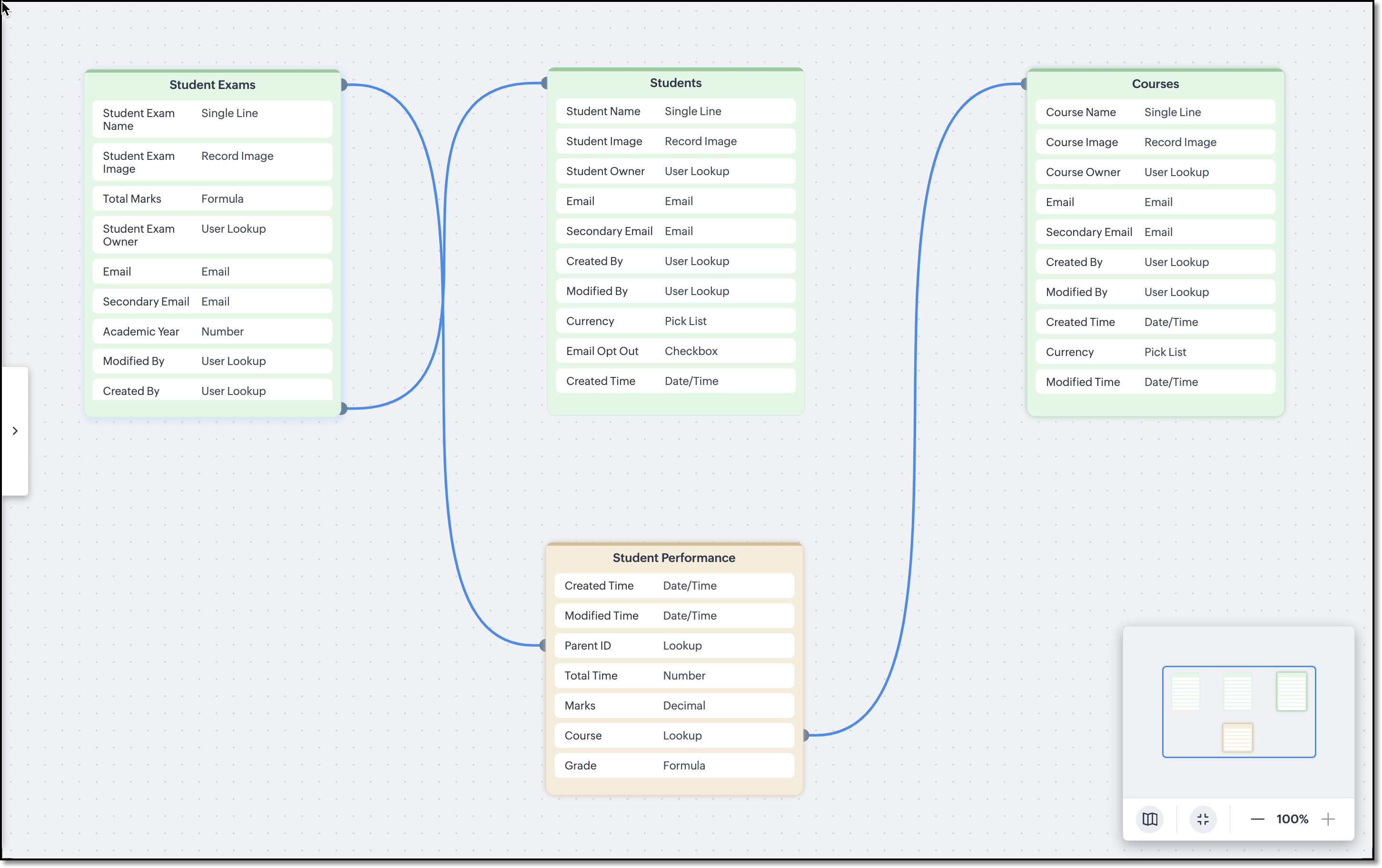


The Courses, Students and Student Exams modules are assumed to be pre-loaded with records. Following are the module wise fields that are expected to be already configured in the school's CRM org.  

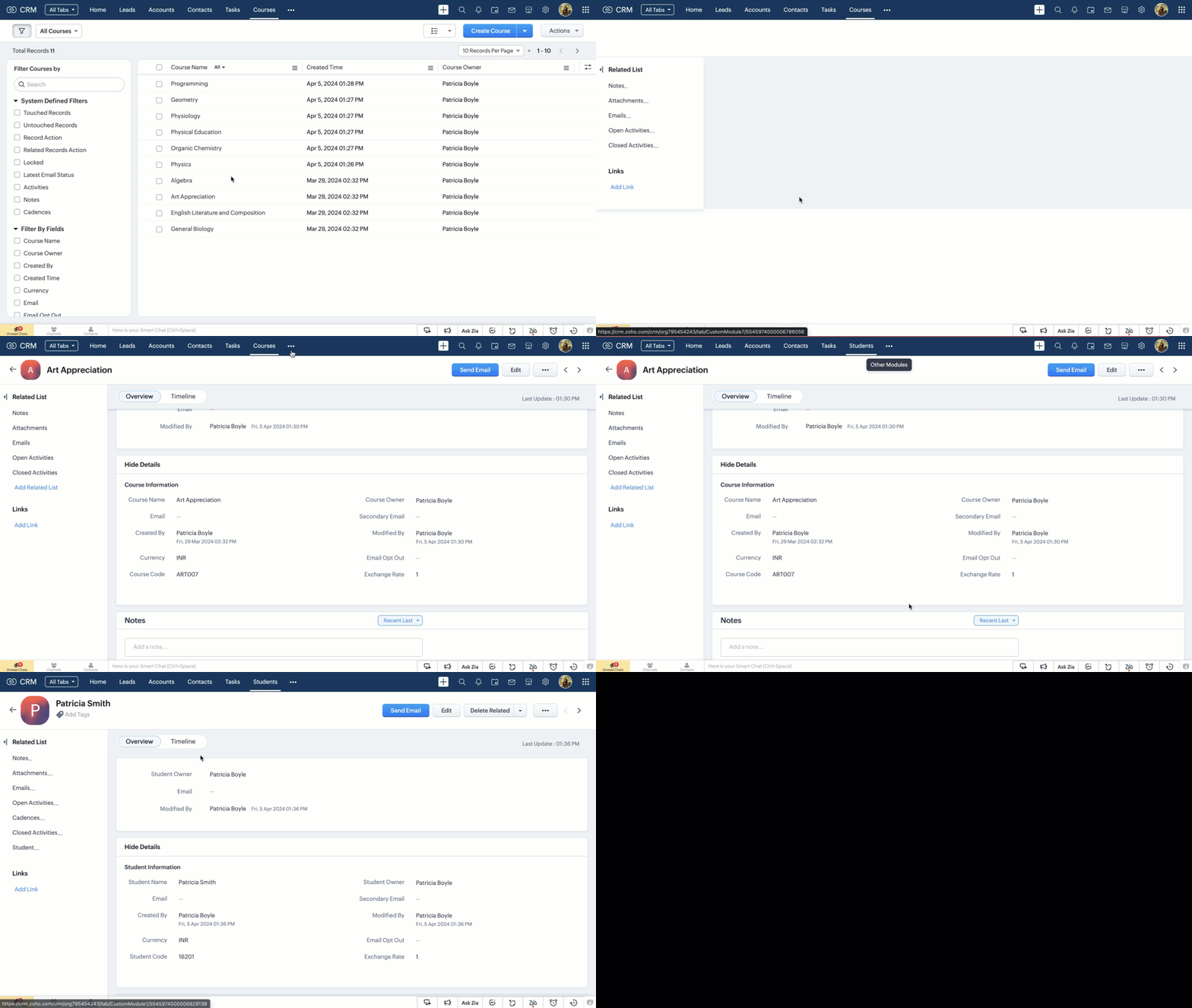
Courses and Students Modules 

External fields named Student Code in the Students module and Course Code in the Courses module are used to match the IDs deployed in the third-party application. 


Note
      External fields can be updated only using the Update Records API.

Student Exams Module 

Following are the custom fields that we assume to be already available in the Student Exams module. 

Field Name
Data Type
Description
Student
Lookup
The field looks up to the Students module.
Total Marks
Integer (Formula)
A subform aggregate field that sums up the values of the Marks field in the Student Performance subform.
GPA
Integer (Formula)
Calculates the GPA of a student in that particular examination.
Exam Name
String (Picklist)
List downs the examinations that are planned to be conducted for the academic year.


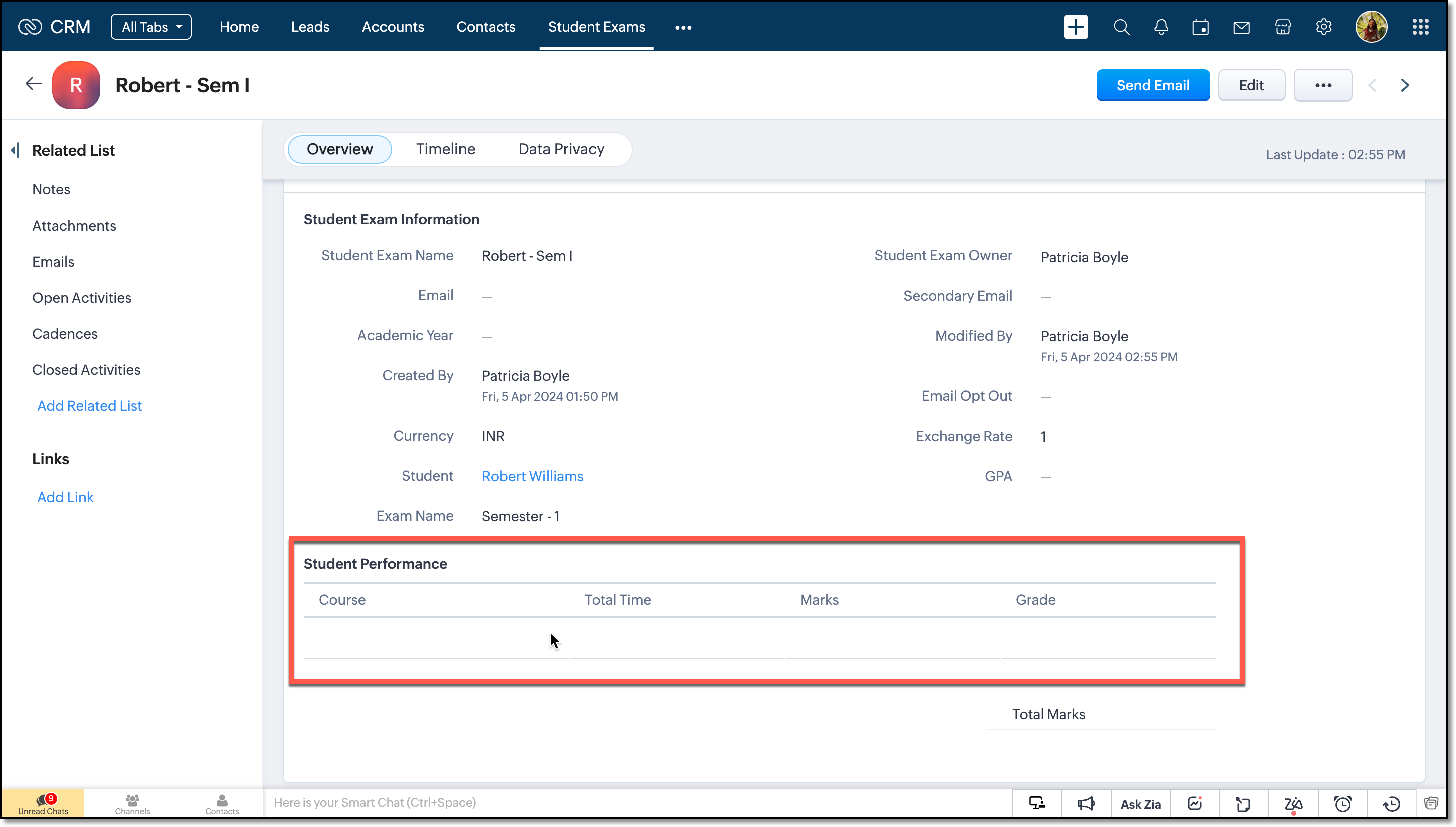
Student Performance Subform 

A subform named Student Performance within the Student Exams module, comprising the following fields.

Field Name
Data Type
Description
Course
Lookup
Represents the course name and it looks up to one of the courses from the Courses module.
Total Time
Integer
Time taken by the student to complete the exam.
Marks
Integer
Marks of the student in the particular course.

Grade
String (Formula)
Grading system is infused as formula and it works depending on the value in the Marks field.


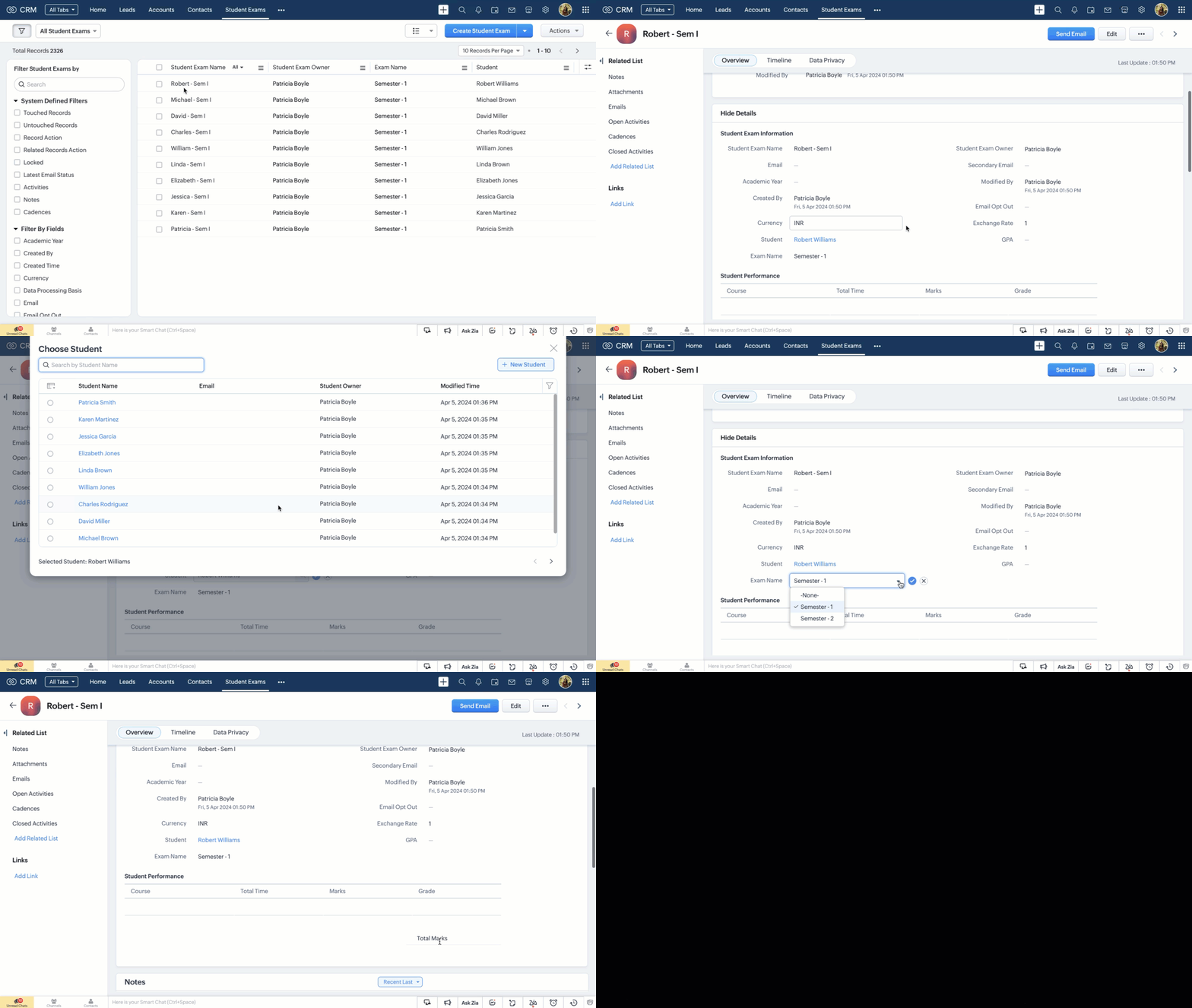
The subform is assumed to be empty and will be updated only on receiving a webhook notification from the Portal App. 

Note 
      Make a Modules Metadata API call to get the API names of the modules and the subform. Next, fire the GET Fields API call to get the API names of the fields. We will need them in crafting the custom function. 

Creating the Custom Function 

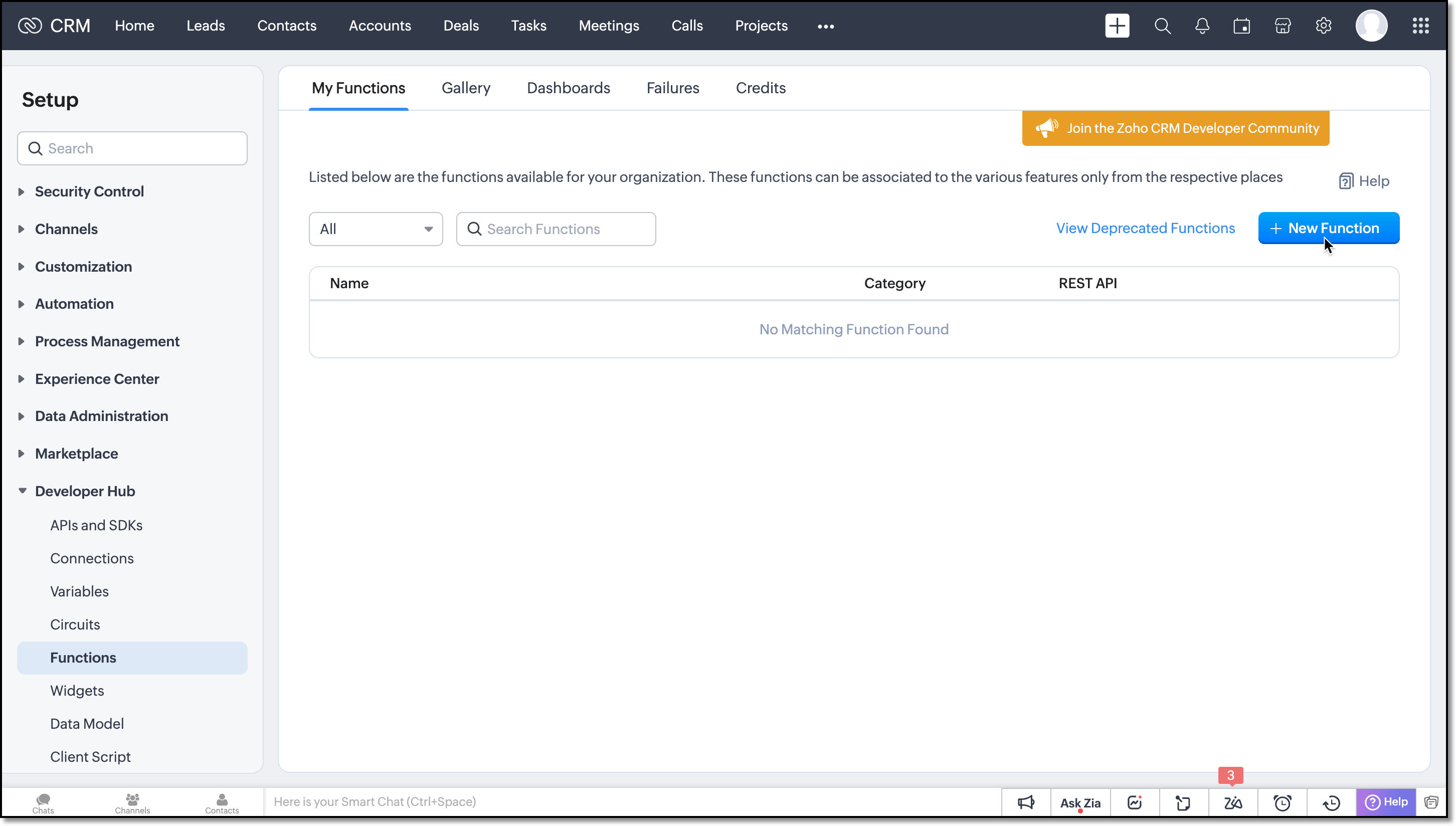
Step 1: Navigate to the Setup > Developer Hub > Functions and click the New Function button. 


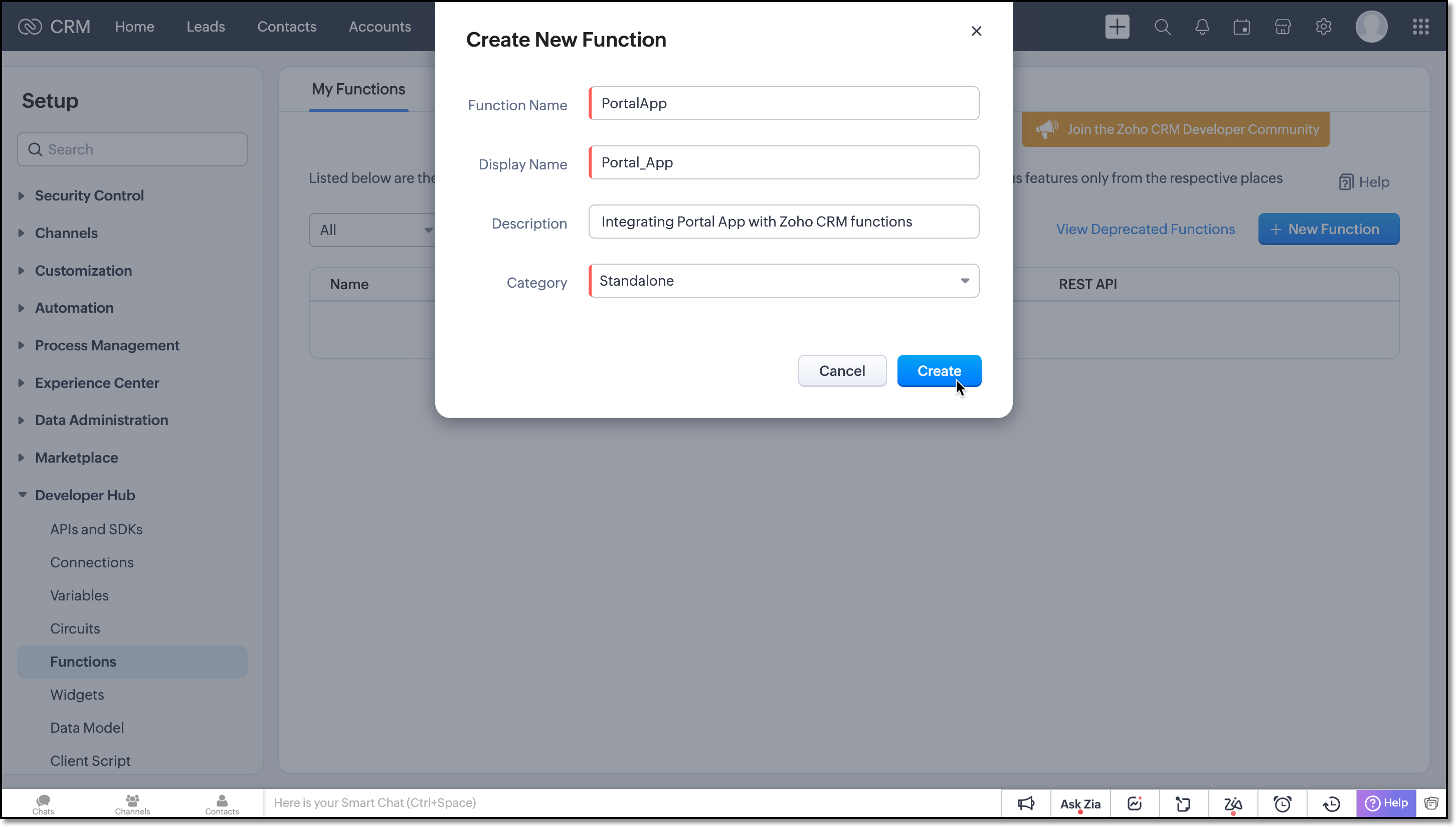
Now, create a Standalone function by filling in the details. 

Flow of the Function 

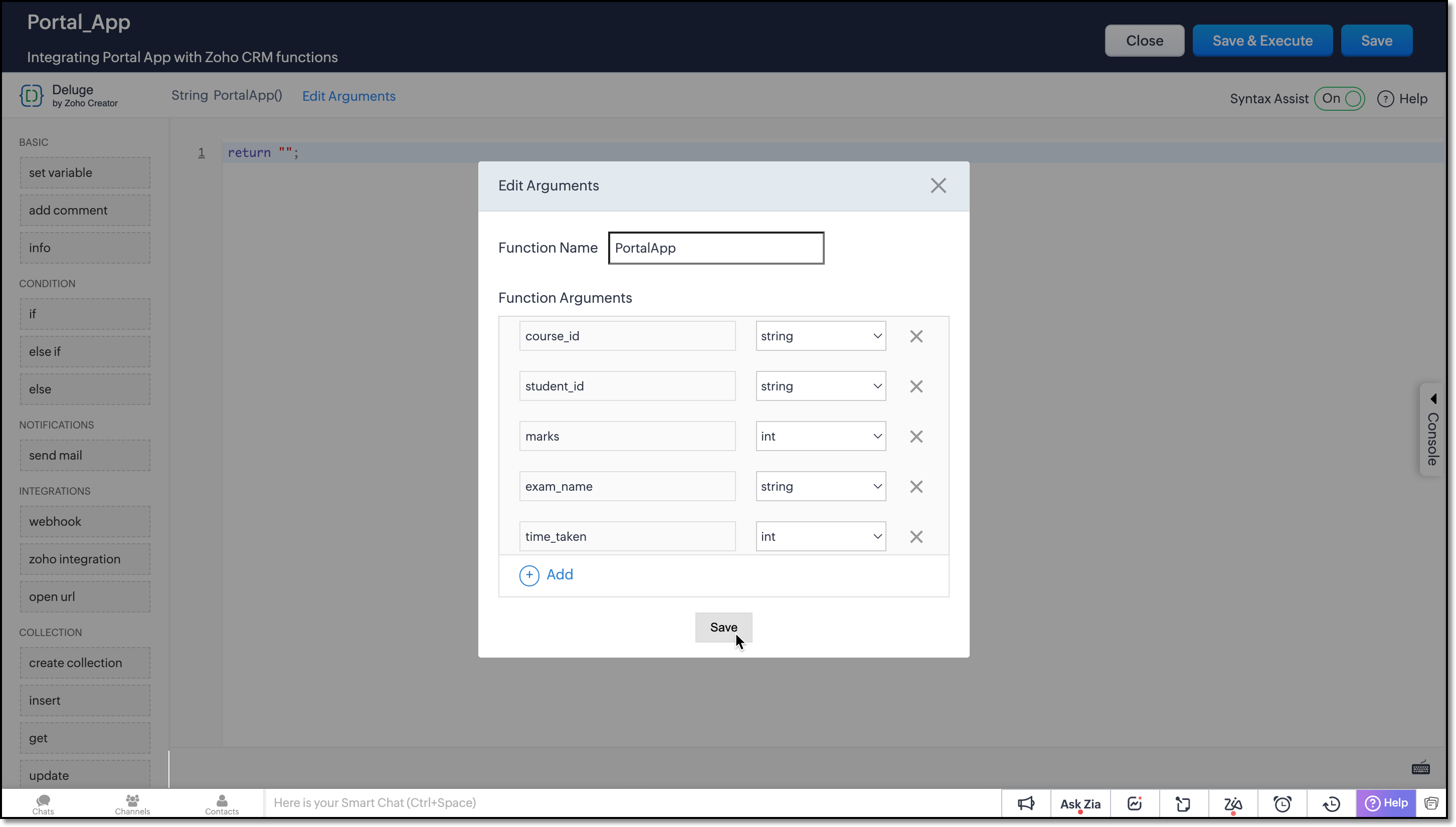
Argument Setup 

Define function arguments to receive details from the function as shown here: 


Data Retrieval 

Invoke the COQL API within the function to retrieve the necessary records from the Student Exams and Courses module. 

student_examMap = Map();
student_examMap.put("select_query","select id from Student_Exams where Student.Student_Code =" + student_id + " and Exam_Name=" + exam_name + " limit 1");
exam_response = invokeurl
[
type :POST
parameters:student_examMap.toString()
connection:"crm_oauth_connection"
];
exam_id = exam_response.getJSON("data").get(0).get("id");

Here, the query is structured to retrieve the ID of the Student Exam record where the Student lookup field corresponds to the record with the Student Code matching the student_id in the notification, and the Exam Name picklist field matches the value of exam_name from the notification. 

Note: You can use only =, !=, in and not in operators for querying External fields in Zoho CRM. 

courseMap = Map();
courseMap.put("select_query","select id from Courses where Course_Code =" + course_id + " limit 1");
course_response = invokeurl
[
type :POST
parameters:courseMap.toString()
connection:"crm_oauth_connection"
];
course_id = course_response.getJSON("data").get(0).get("id");

In this COQL call, the query fetches the ID of the record from the Courses module whose Course Code field matches the course_id received in the notification. 

Subform Update Handling

The custom function should address the following three cases inorder to effectively manipulate the subform data from the third-party application. 
  • Every webhook call from the Exam portal should be added as a new entry to the subform.
  •  If entries already exist in the subform, the function should perform PATCH operation.
  • Before executing the PATCH operation, it is crucial to check whether the webhook call is for a new course or an update to the existing course. In such cases, the function should refrain from adding the course; instead, it should update the corresponding entry. 
To append new entries to the subform, you can use the UPDATE Records API. Refer to this kaizen to learn more about manipulating subforms using Zoho CRM APIs. 

Student Performance is a module created for the subform configured in the Student Exams module. In order to perform the PATCH operation with an Update API, make a COQL API call to the Student Performance module and fetch the existing data, if any.  

subform_examMap = Map();
subform_examMap.put("select_query","select Course, Total_Time, Marks from Student_Performance where Parent_Id.id =" + exam_id);
subform_response = invokeurl
[
type :POST
parameters:subform_examMap.toString()
connection:"crm_oauth_connection"
];

This query retrieves the exam records of the student for that particular exam in Student Exams module, from the Student Performance subform. The subform should correspond to the parent record that matches the notification data. Since we already have the ID of that parent record from one of the previous COQL call, we have directly used the response in this query. 

Now that we have the existing subform data, the function has to verify whether the data from webhook call matches any of the Course in the subform data. If it matches, the new entry replaces the existing one; otherwise, the new entry is added to the existing entries and forms a request payload called examinfo. This payload will be used in the later part of the functions to update the record in Student Exams module. 

Following is how you should achieve this using for-each loop. 

final_subform = List();
flag = true;
if(!isBlank(subform_response))
{
subform_data = subform_response.getJSON("data").toList();
if(subform_data.len() > 0)
{
for each  data in subform_data
{
if(data.get("Course").get("id") == course_id)
{
final_subform.add({"Course":{"id":course_id},"Total_Time":time_taken,"Marks":marks});
flag = false;
}
else
{
final_subform.add(data);
}
}
}
}
if(flag || isBlank(subform_response))
{
final_subform.add({"Course":{"id":course_id},"Total_Time":time_taken,"Marks":marks});
}
examinfo = {"Student_Performance":final_subform};

Next, let us update the Student Performance subform in the Student Exams module using the pre-defined integration task called Update Record in Zoho CRM functions. This task makes an Update Records API call to replace all entries within the subform. It updates the entries with the same course_id provided in the notification, inserts new entries and removes old entries accordingly.   

response = zoho.crm.updateRecord("Student_Exams",exam_id,examinfo);
return "nothing";

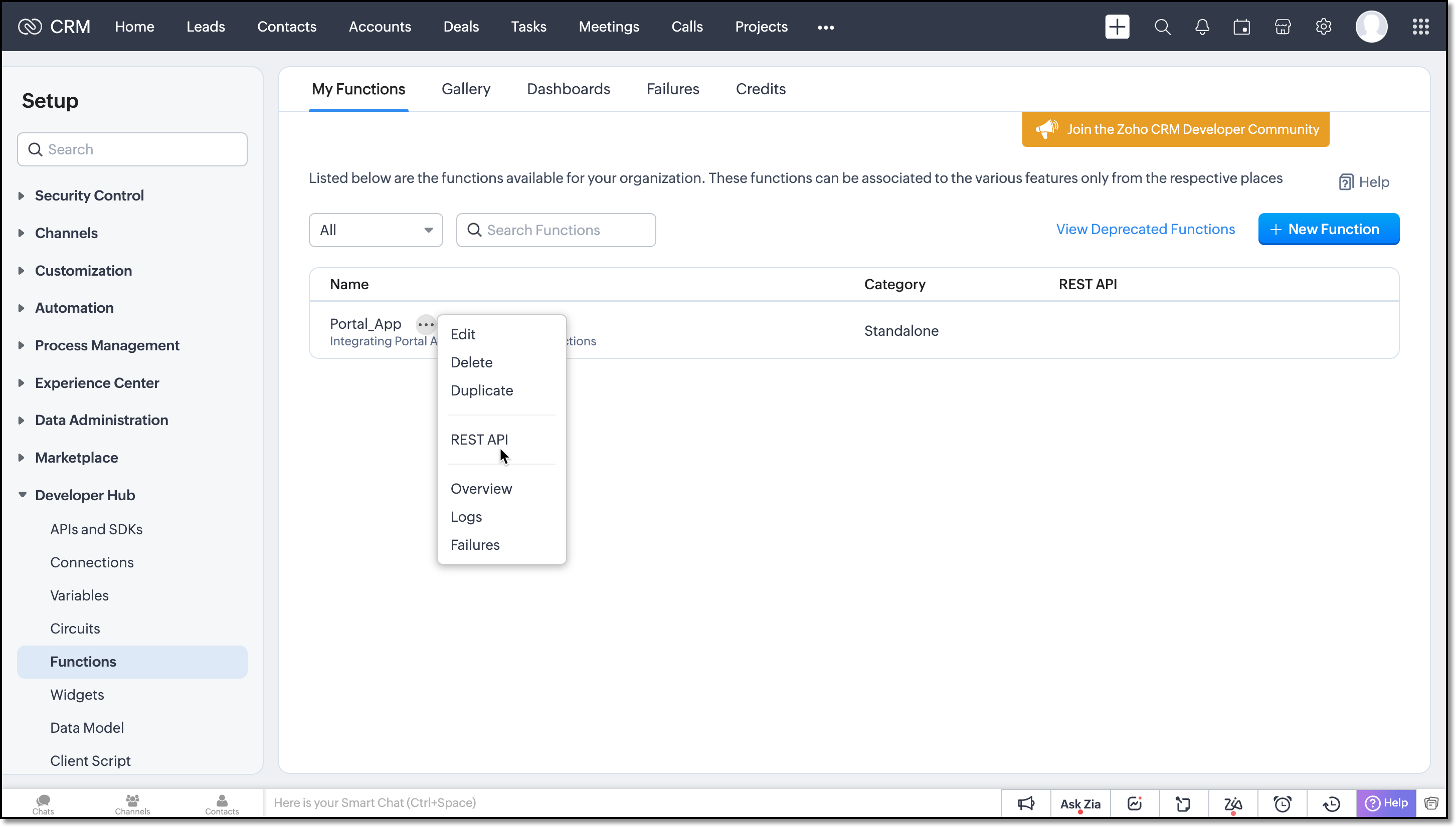
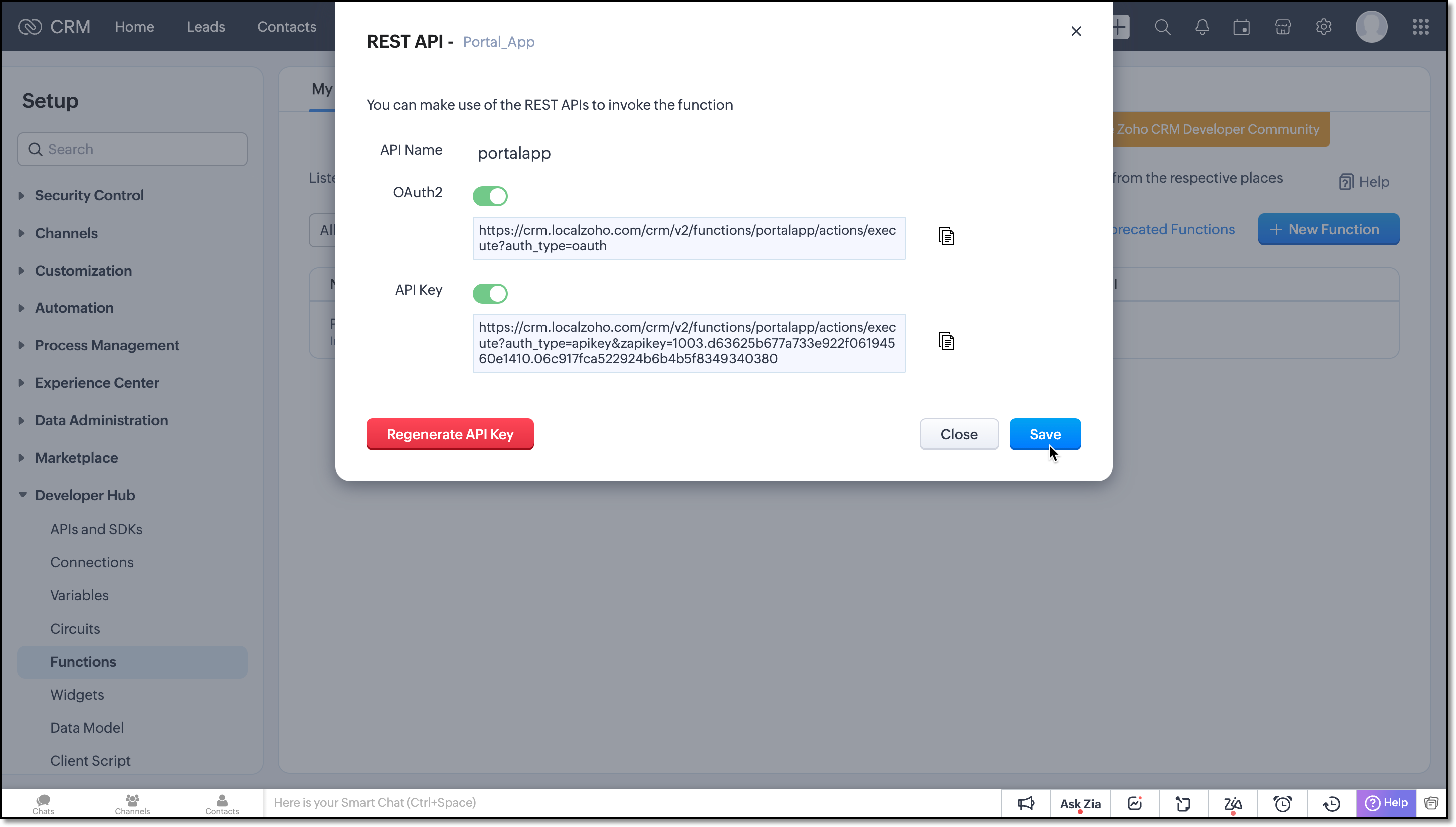
Save the function and click the more icon of the function you have created and choose REST API.  


Enable the OAuth2 and API Key for the function. 

Next copy the API key and provide it in the webhook URL of the Portal App. 


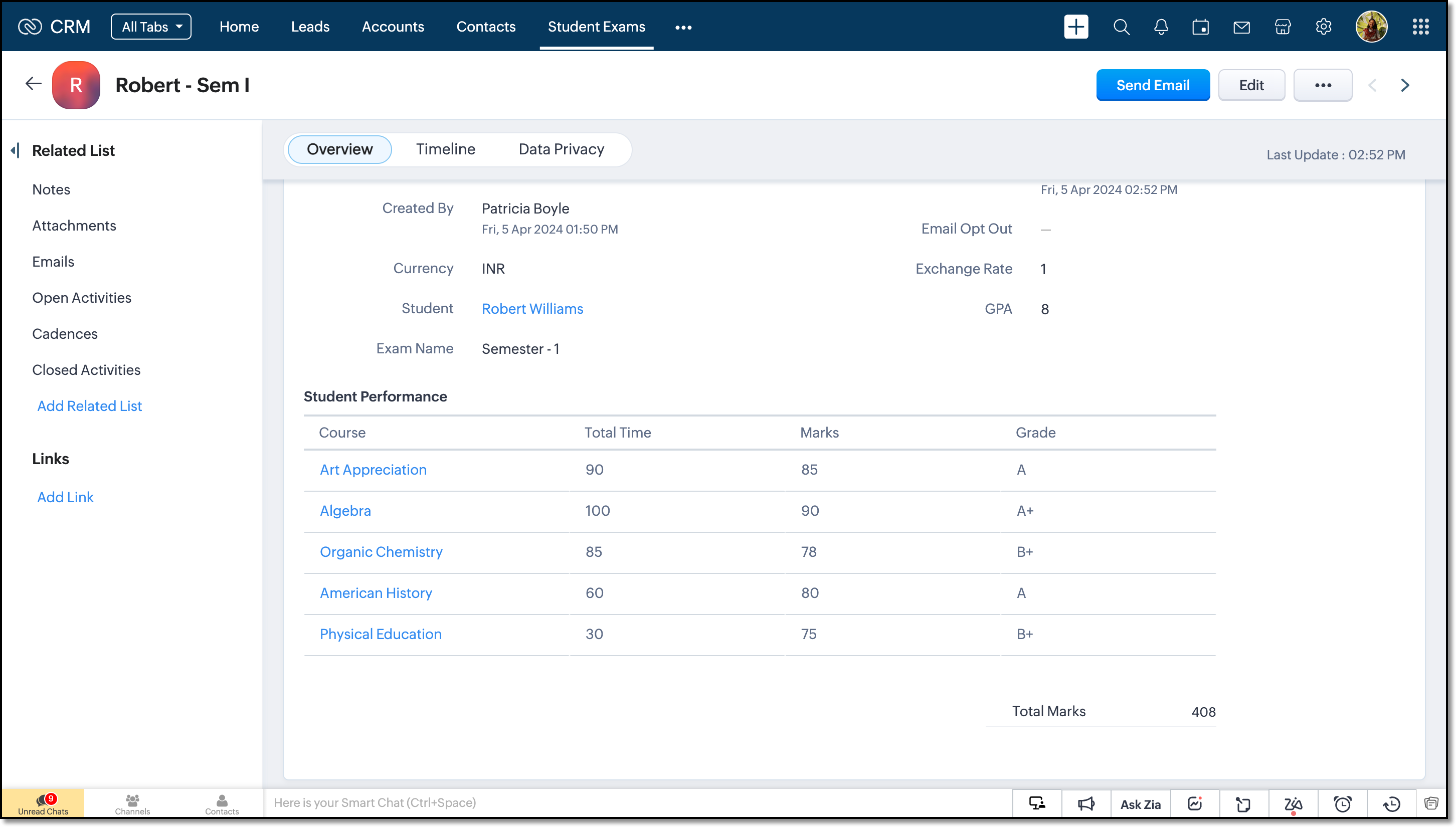
On receiving notifications to this URL the function will be triggered and the records will be updated. 


We believe you found this post both beneficial and informative!

Your thoughts and perspectives matter to us. If there is a topic you would like us to delve into or if you have any questions, please feel free to drop a comment below or send us an email at support@zohocrm.com.

Stay tuned until we circle back to you on next Friday! 

--------------------------------------------------------------------------------------------------------

Recommended Reads

---------------------------------------------------------------------------------------------------------


    Access your files securely from anywhere


                            Zoho Developer Community


                                                  • Desk Community Learning Series


                                                  • Digest


                                                  • Functions


                                                  • Meetups


                                                  • Kbase


                                                  • Resources


                                                  • Glossary


                                                  • Desk Marketplace


                                                  • MVP Corner


                                                  • Word of the Day


                                                  • Ask the Experts


                                                            • Sticky Posts

                                                            • Kaizen #217 - Actions APIs : Tasks

                                                              Welcome to another week of Kaizen! In last week's post we discussed Email Notifications APIs which act as the link between your Workflow automations and you. We have discussed how Zylker Cloud Services uses Email Notifications API in their custom dashboard.
                                                            • Kaizen #216 - Actions APIs : Email Notifications

                                                              Welcome to another week of Kaizen! For the last three weeks, we have been discussing Zylker's workflows. We successfully updated a dormant workflow, built a new one from the ground up and more. But our work is not finished—these automated processes are
                                                            • Kaizen #152 - Client Script Support for the new Canvas Record Forms

                                                              Hello everyone! Have you ever wanted to trigger actions on click of a canvas button, icon, or text mandatory forms in Create/Edit and Clone Pages? Have you ever wanted to control how elements behave on the new Canvas Record Forms? This can be achieved
                                                            • Kaizen #142: How to Navigate to Another Page in Zoho CRM using Client Script

                                                              Hello everyone! Welcome back to another exciting Kaizen post. In this post, let us see how you can you navigate to different Pages using Client Script. In this Kaizen post, Need to Navigate to different Pages Client Script ZDKs related to navigation A.
                                                            • Kaizen #210 - Answering your Questions | Event Management System using ZDK CLI

                                                              Hello Everyone, Welcome back to yet another post in the Kaizen Series! As you already may know, for the Kaizen #200 milestone, we asked for your feedback and many of you suggested topics for us to discuss. We have been writing on these topics over the


                                                            Manage your brands on social media


                                                                  Zoho TeamInbox Resources


                                                                      Zoho CRM Plus Resources

                                                                        Zoho Books Resources


                                                                          Zoho Subscriptions Resources

                                                                            Zoho Projects Resources


                                                                              Zoho Sprints Resources


                                                                                Qntrl Resources


                                                                                  Zoho Creator Resources


                                                                                      Zoho CRM Resources

                                                                                      • CRM Community Learning Series

                                                                                        CRM Community Learning Series


                                                                                      • Kaizen

                                                                                        Kaizen

                                                                                      • Functions

                                                                                        Functions

                                                                                      • Meetups

                                                                                        Meetups

                                                                                      • Kbase

                                                                                        Kbase

                                                                                      • Resources

                                                                                        Resources

                                                                                      • Digest

                                                                                        Digest

                                                                                      • CRM Marketplace

                                                                                        CRM Marketplace

                                                                                      • MVP Corner

                                                                                        MVP Corner


                                                                                          Design. Discuss. Deliver.

                                                                                          Create visually engaging stories with Zoho Show.

                                                                                          Get Started Now


                                                                                            Zoho Show Resources

                                                                                              Zoho Writer

                                                                                              Get Started. Write Away!

                                                                                              Writer is a powerful online word processor, designed for collaborative work.

                                                                                                Zoho CRM コンテンツ


                                                                                                  Nederlandse Hulpbronnen


                                                                                                      ご検討中の方


                                                                                                              • Recent Topics

                                                                                                              • Tip of the Week #78 – Cut response time with multichannel shared inboxes

                                                                                                                If you’ve ever felt your team juggling between multiple email accounts, social pages, and chat apps just to reply to customers, you’re not alone. Managing conversations in multiple channels can quickly turn messy. Important messages across inboxes, replies
                                                                                                              • Need a way to run a client script longet than 10 seconds

                                                                                                                By The Grace of G-D. Hi, Currently, Client Scripts are Timing out at 10 seconds. We have complex logics that needs more time. Can you add a feature request to increase the timeout?
                                                                                                              • Exciting Updates to the Kiosk Studio Feature in Zoho CRM!

                                                                                                                Hello Everyone, We are here again with a series of new enhancements to Kiosk Studio, designed to elevate your experience and bring even greater efficiency to your business processes. These updates build upon our ongoing commitment to making Kiosk a powerful
                                                                                                              • FSM Improvement Idea - Show an Import button when there is no data

                                                                                                                I am setting up FSM for a client and I noticed that there is no option to import data, see screenshot below. Even when you click Create Contact there is only an option to Import from Zoho Invoice. It is only after you add at lease 1 record that the Import
                                                                                                              • Unable to Send Different Email Templates for Different Documents in Zoho Sign

                                                                                                                Hello Zoho Community, I am facing a limitation with Zoho Sign regarding email notifications sent to customers when a document is sent for signing. Currently, whenever I send any template/document for signing, the email notification that goes to the customer
                                                                                                              • Timeline Tracking Support for records updates via module import and bulk write api

                                                                                                                Note: This update is currently available in Early Access and will soon be rolled out across all data centers (DCs) and for all editions of Zoho CRM. The update will be available to all users within your organization, regardless of their profiles or roles.
                                                                                                              • UI Improvement - Ability to Collapse Flow

                                                                                                                The UI for Flow is generally pretty good. However, when multiple decision trees are used, the layout can get pretty convoluted and hard-to-follow (see one of my Flows below): In these cases, even the auto-arrange fails to make this something that a normal
                                                                                                              • Tasks Statuses

                                                                                                                Hi, The task status "Completed" is a final status which closes the task. We need to have a status "Cancelled". However, when the status is set to "Cancelled", the task prompt still has a blue button to Close Task. When the customer clicks that and closes
                                                                                                              • Add Lookup Field in Tasks Module

                                                                                                                Hello, I have a need to add a Lookup field in addition to the ones that are already there in the Tasks module. I've seen this thread and so understand that the reason lookup fields may not be part of it is that there are already links to the tables (
                                                                                                              • Create New Tasks Layout in CRM

                                                                                                                I am able to do this in Leads, Contacts, Meetings, Calls - every other module, but cannot create a new layout in tasks. I have the appropriate access but it's simply not appearing as an option. Only "Standard" option shows. Please help!
                                                                                                              • Whatsapp Connection Status still "Pending" after migration

                                                                                                                Hello, I migrated my WhatsApp API to Zoho from another provider a day ago. So far the connection status is still “Pending”. There is a problem? How long does it usually take?
                                                                                                              • Using IMAP configuration for shared email inboxes

                                                                                                                Our customer service team utilizes shared email boxes to allow multiple people to view and handle incoming customer requests. For example, the customer sends an email to info@xxxx.com and multiple people can view it and handle the request. How can I configure
                                                                                                              • Auto-sync field of lookup value

                                                                                                                This feature has been requested many times in the discussion Field of Lookup Announcement and this post aims to track it separately. At the moment the value of a 'field of lookup' is a snapshot but once the parent lookup field is updated the values diverge.
                                                                                                              • Zoho Recruit Subscription

                                                                                                                Hello Zoho Recruit Team, Good day! I would like to inquire about your recruitment subscription plans and would also like to verify the current subscription our company is enrolled in under Zoho Recruit. Thank you, and I look forward to your response.
                                                                                                              • Keyboard shortcut M key

                                                                                                                I'm trying to customize my keyboard shortcuts and assign the "m" key. But it says the key is already assigned. I've looked through all my shortcuts and can't see any assigned "m". When I select an email and press the M key, nothing happens. What is the
                                                                                                              • Is it possible to create a meeting in Zoho Crm which automatically creates a Google Meet link?

                                                                                                                We are using Google's own "Zoho CRM for Google" integration and also Zoho's "Google Apps Sync" tools, but none of them provide us with the ability to create a meeting in Zoho CRM that then adds a Google Meet link into the meeting. Is this something that
                                                                                                              • Ensure Consistent Service Delivery with Comprehensive Job Sheets

                                                                                                                We are elated to announce that one of the most requested features is now live: Job Sheets. They are customizable, reusable forms that serve as a checklist for the services that technicians need to carry out and as a tool for data collection. While on
                                                                                                              • Bill automation in Zoho Books

                                                                                                                Hi I am looking for 3rd-party options for bill automation in zoho which are economical and preferably have accurate scanning. What options do I have? Zoho's native scanning is a bit pricey
                                                                                                              • Automatic Portal invite

                                                                                                                We have numerous customers we move through a blueprint in deals, when they get to a certain point we need to give them portal access, how can this be done through deluge or a workflow? Latest Update (December 2025): The option to automate portal invitations
                                                                                                              • Marketer's Space: Why mobile optimization deserves a place in your email strategy

                                                                                                                Hello Marketers, Welcome back to Marketer's Space! Today, we'll talk about the importance of creating mobile-friendly email designs. While mobile phones were once used only to make phone calls, today they're used for almost everything, including texting,
                                                                                                              • Enhancements in Canvas

                                                                                                                Dear All, Greetings! Canvas lets you design the record details page to suit your brand or business preferences. We are glad to introduce the following enhancements to uplift your design experience. Reusable Components Style Presets Let's go! Reusable
                                                                                                              • Introducing Dark Mode / Light Mode : A New Look For Your CRM

                                                                                                                Hello Users, We are excited to announce a highly anticipated feature - the launch of Day, Night and Auto Mode implementation in Zoho CRM's NextGen user interface! This feature is designed to provide a visually appealing and comfortable experience for
                                                                                                              • ABN with Legal Entity Name

                                                                                                                Hi, How can I execute this? The ABN number is entered in Accounts Module and ideally, it should display or suggest the correct Legal Entity Name based on the ABN lookup. ex. Account Name: JPG Resources ABN Number: 65 067 761 871 Legal Entity Name: (auto
                                                                                                              • Zoho Cliq not working on airplanes

                                                                                                                Hi, My team and I have been having this constant issue of cliq not working when connected to an airplane's wifi. Is there a reason for this? We have tried on different Airlines and it doesn't work on any of them. We need assistance here since we are constantly
                                                                                                              • Prepopulating Fields

                                                                                                                Hello, I have a form (Assets) with 2 lookup fields: Client (from Clients) Site (from Client Sites) I modified the code (highlighted in red below), so the Site dropdown shows the list of sites related to the Client. must have Client_Site ( type = picklist
                                                                                                              • Unify Overlapping Functionalities Across Zoho Products

                                                                                                                Hi Zoho One Team, We would like to raise a concern about the current overlap of core functionalities across various Zoho applications. While Zoho offers a rich suite of tools, many applications include similar or identical features—such as shift management,
                                                                                                              • Detailed Account Reports - Add Running Balance

                                                                                                                When one clicks into an account from a report (say P/L or Balance Sheet), the default reports have the Debit, Credit, and then the Amount. The Amount column (last one) is duplicate information. It would be far better and fit more peoples' use cases if
                                                                                                              • Start Workflow from Deluge Script

                                                                                                                I have developed a customized process from our CRM that leverages a deluge script to create a statement of work document. Once the document has been created via the merge and store function, I would like the ability to start a workdrive review & approve
                                                                                                              • Issue: Ticket Export Does Not Include Ticket Threads

                                                                                                                Dear Zoho Desk Support Team, I hope you’re doing well. I wanted to bring to your attention that the current ticket export feature in Zoho Desk does not seem to include the ticket threads or conversation history. When exporting tickets, only the summary
                                                                                                              • Pushover Notification Module

                                                                                                                Hello, it would be good if there would be a "Pushover" (https://pushover.net/) module besides the standard SMS module. Pushover is now very well known, especially in IT, and is becoming more and more popular. The biggest advantage are the customizable
                                                                                                              • Forward - no Ticket Number

                                                                                                                Hello, when I send an email to Zoho Desk via Reply or Reply All, the ticket number is in the subject line. But if I use forward then not. Is there an option to change this? We often forward e-mails and a reply to this will of course create a new ticket
                                                                                                              • Checkout: Adding Images

                                                                                                                Hello everyone, I’m trying to add a small GoGreen logo in the shipping section of the checkout to promote our sustainable shipping. While I can insert text without any issues, it seems that adding images is not supported in this area. Is there currently
                                                                                                              • Sortie de Zoho TABLE ??

                                                                                                                Bonjour, Depuis bientôt 2 ans l'application zoho table est sortie en dehors de l'UE ? Depuis un an elle est annoncée en Europe Mais en vrai, c'est pour quand exactement ??
                                                                                                              • [solved] #original_sender trick not working for us

                                                                                                                Hello community ! We really like DESK.. it's working like a charm for us but I have a request. Some users are sending emails personnaly to me (instead of using the support adress).. and I saw there was a possibilty to use : #original_sender {mail@mail.com}
                                                                                                              • SalesIQ Chat Notifications

                                                                                                                I am the admin of our salesIQ implementation. About two weeks ago, I started hearing/seeing notification for ALL chats messages from monitored agents/chat participants. I don't need to see these, we have a manager who deals with this. I can't stop the
                                                                                                              • Correlated subqueries not supported in Zoho Analytics. This creates huge limitations

                                                                                                                Running into a major limitation in Zoho Analytics: correlated subqueries simply don’t work, even in completely standard SQL patterns inside a JOIN. Example: LEFT JOIN "Bills" b ON d."Id" = b."Deal ID" AND EXISTS ( SELECT 1 FROM "Bill
                                                                                                              • Unknown table or alias 'A1'

                                                                                                                I would like to create a subquery but i am getting the following error: Unknown table or alias 'A1' used in select query. This is the sql statement:  SELECT A1.active_paying_customers, A1.active_trial_customers, A1.new_paying_signup, date(A1.date_active_customers), 
                                                                                                              • Batch Emails in CRM Plus without using a template?

                                                                                                                Hi guys. Is it possible to send the same email to multiple people at the same time within CRM Plus without using an email template? At the moment we create a custom view in Contacts to display the people that we need. We then click the boxes on the left, and click 'Send Mail', but always need to select a template. Sometimes its better to write a quick one off message, without needing to set up a template first. Thanks.
                                                                                                              • bank charge

                                                                                                                a charge to my account was made that I did not authorize, of $16.46, for something that looks like "computer maintenance or something to that matter". please refund.
                                                                                                              • [Free Webinar] Product Updates: Quick Catch-Up Session - Part II - Creator Tech Connect

                                                                                                                Hello Everyone! We welcome you all to the upcoming free webinar on the Creator Tech Connect Series. The Creator Tech Connect series is a free monthly webinar featuring deep-dive technical sessions designed for developers, administrators, and app builders.
                                                                                                              • Next Page