Let’s take a look at the new features and enhancements that went live across all Workplace applications for the month of July.
Zoho Mail
Display Reply & Forward Subjects in Your Preferred Language
Choose how email subjects appear when replying to or forwarding emails. Select English or your preferred display language to automatically use localized subject prefixes that match your language preference. Introducing Web Tabs
Web Tabs let you open external applications, tools, and websites directly within Zoho Mail, so you can work without switching between multiple browser tabs.
Filter Emails in Storage Management
Storage Management section now lets you filter and view emails within Clean Up by Sender and Clean Up by Newsletter, making email cleanup faster and more organized.
Remove invitees from Streams
Group moderators can now remove invitees directly from the Add/View Invitees option, making it easier to manage group invitations.
Zoho Mail Mobile Updates - Android
Classification labels are now supported for delegated mailboxes.
To retrieve emails once you have sent them, use Recall option from the sent folder by clicking on the Mail Delivery Status (MDS) icon
Pin important emails so they remain at the top and are easily accessible across different folders.
You can now view, accept and deliver Quarantined emails along with a detailed view.
Zoho Mail Mobile Updates - iOS
Pin important emails so they remain at the top and are easily accessible across different folders.
You can now select Cliq Meeting directly from the Conferencing drop-down while creating a calendar event in Zoho Mail mobile app.
To retrieve emails once you have sent them, use Recall option from the sent folder by clicking on the Mail Delivery Status (MDS) icon.
BIMI(Brand Indicators for Message Identification) has been enabled, allowing organization's to display their verified brand logo alongside authenticated emails. A blue tick is also shown next to the sender's email address for BIMI verified domains.
Preview EML attachments added to emails you receive.
Control migration status notifications for users
You can now control whether users are notified about the success or failure of their migration status through email.Learn more! Export emails from Spam and Trash folders
You can now include emails from Spam, Trash, or both folders when exporting user accounts from Zoho Mail Admin Console.
Enhanced Domains report
The Domains report gives administrators a complete view of all domains added to the organization along with their configuration and verification status. It also allows administrators to view complete information on DNS records, mail traffic, and audit logs for each domain.
Manage and monitor enhanced Shared mailbox activity
The Shared Mailbox Activity report tracks all events within a shared mailbox, including event category, action performed, responsible user, and client IP address. Administrators can filter, search, and click on any activity to view detailed information for each event.
Track external email traffic with External traffic reports
External Traffic Reports provide administrators a complete view of all emails sent to or received from outside the organization, covering details such as domain name, recipient count, and email size.
Share and export displayed data from Admin Reports
Administrators can now export select report data from the Admin Reports section to their device, Cliq, or WorkDrive. You can view the total number of records to be exported before the action is completed.
Zoho Calendar
Find the right MCP tools for your tasks in seconds
Find the right MCP tool faster with the new Tool Finder, your centralized guide to exploring Zoho Calendar MCP capabilities and supported actions.
Meet the All-New Sidebar: Clean, compact, and customizable
Finding your schedules just got easier, Our latest sidebar update introduces smart collapsible accordions to declutter your view instantly, alongside a powerful inline search filter to find any calendar in a flash.
Resource Booking — Now with Approvals!
Admins can now configure approval workflows for resource bookings by reviewing, approving, or rejecting booking requests, ensuring better control over shared resource reservations.
Zoho Cliq
Integrate Jira, Trello, Bookmarks and Translate Phrase to Cliq
Enhanced Jira integration
Summarize Jira issues instantly with ChatGPT, Claude, or Gemini, let bots automatically close discussion threads when issues are completed, and enjoy a redesigned Jira widget with a more intuitive experience.
Trello, revamped
Experience a redesigned Trello integration with a smoother, more intuitive interface, richer previews for Trello links, and the new follow-ups feature to help you track and manage pending actions with ease.
Mail Bookmarks and Notes in Cliq
Access your Zoho Mail Bookmarks and Notes directly within Cliq without switching apps.
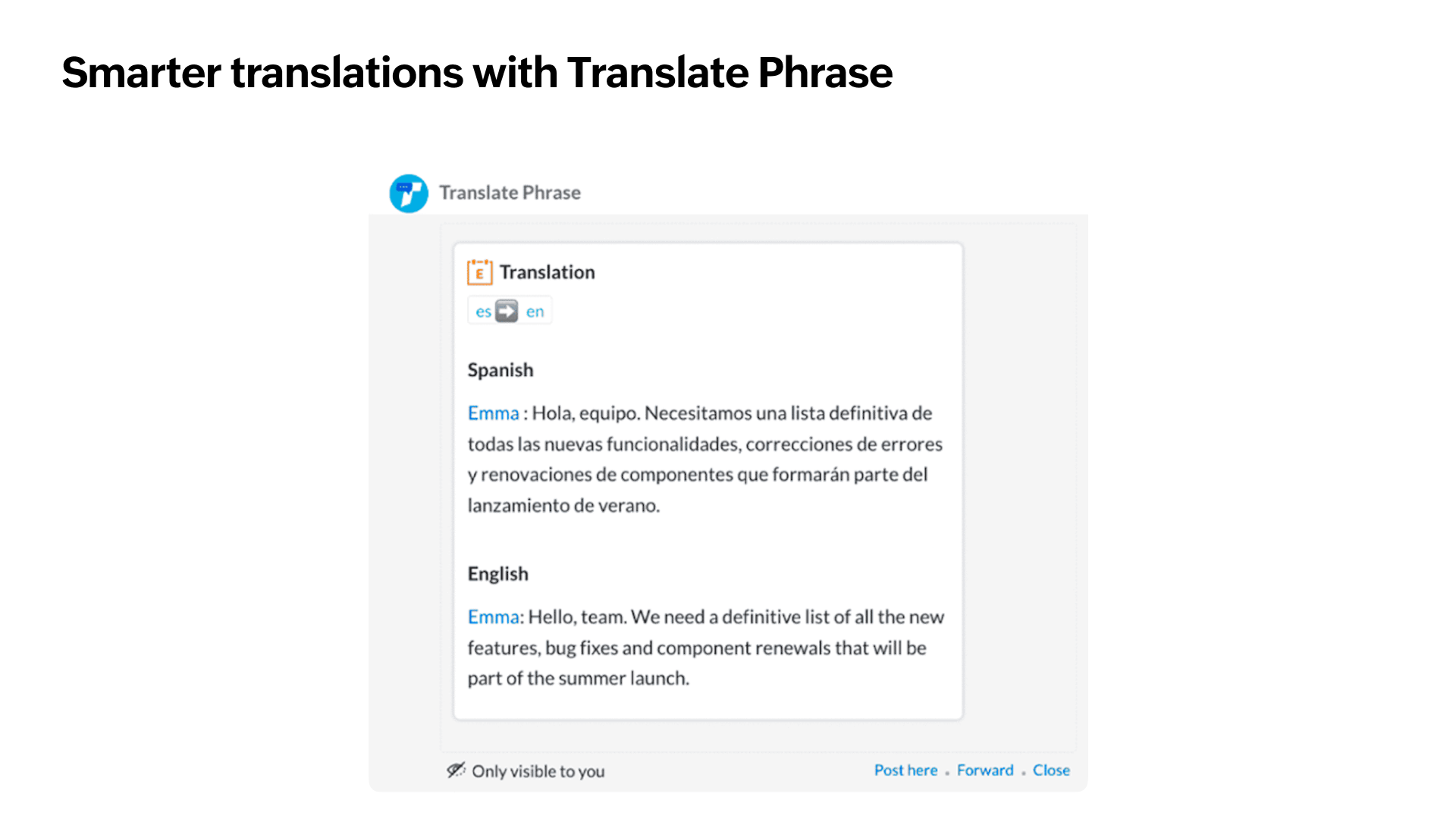
Smarter translations with Translate Phrase
More reliable translations: Translate Phrase now uses a new translation engine for faster, more accurate translations.
Choose source and target languages: Select both the source and target languages, or let Cliq automatically detect the source language.
Translate messages: Translate one or multiple messages directly from the message actions menu without leaving the conversation.
Zoho Show
Introducing MP4 Export in Zoho Show for Android
Convert your presentations into high-quality MP4 videos without leaving the app. No screen recording. No third-party apps. Just a seamless video export.
Offline editing is now available in Show for iOS and macOS
Continue editing presentations offline. Changes are automatically synchronised to the cloud when you're back online.
Zoho Connect
A refreshed experience on your Zoho Connect iOS app
Zoho Connect now embraces Apple’s Liquid Glass design language on supported iPhone, iPad, and Mac devices. The updated interface introduces elegant translucent effects, refined animations, and a modern visual experience that feels more responsive while maintaining the familiar navigation and functionality.
A refreshed look for your network dashboard
Enhance the appearance of your Zoho Connect dashboard with an image background of your choice for a clean and immersive experience. We've also introduced a new Greeting widget that lets you welcome users with personalized messages when they land on the dashboard, making their experience more engaging from the moment they sign in.
Zoho Writer
Conditionally show or hide sections in merged documents
Display sections of your document only when your data meets the conditions you define, and generate personalised documents for every recipient from a single merge template.
Enhancements to formulas
Zoho Writer's latest formula enhancements introduce 12 new string formulas, conditional formulas in merge templates, and an AI-powered formula assistant.
Insert Zoho Checkout payment links in your merge documents
Zoho Writer now integrates with Zoho Checkout. Add a payment field to your merge template, and every generated document—like invoices, order forms, and agreements— will carry a personalized "Pay Now" link that lets recipients pay without leaving the document.