Getting started with document merge in Zoho Writer

Getting started with document merge in Zoho Writer

Overview

Zoho Writer’s template-based document generation lets you automatically create personalized documents by merging pre-designed templates with data from spreadsheets, forms, CRMs, or APIs. Merge fields pull in real data to generate contracts, invoices, proposals, and other documents at scale. With support for conditional logic, tables, and image merging, Zoho Writer streamlines accurate and efficient document automation.

When your document automation involves multiple templates or multi-step automation and distribution, Writer lets you build sophisticated Power Automate–style document workflows. Learn more about Writer’s Automation Builder

Steps

Step 1: Create or open a merge template

Design or open the merge template in Zoho Writer to generate personalize documents.
To create a merge template:
  1. Click File > New Automation Template > Merge Template
    1. Design from scratch: If you wish to create a template from scratch.
    2. Design over PDF: If you wish to convert an existing PDF file as a template.

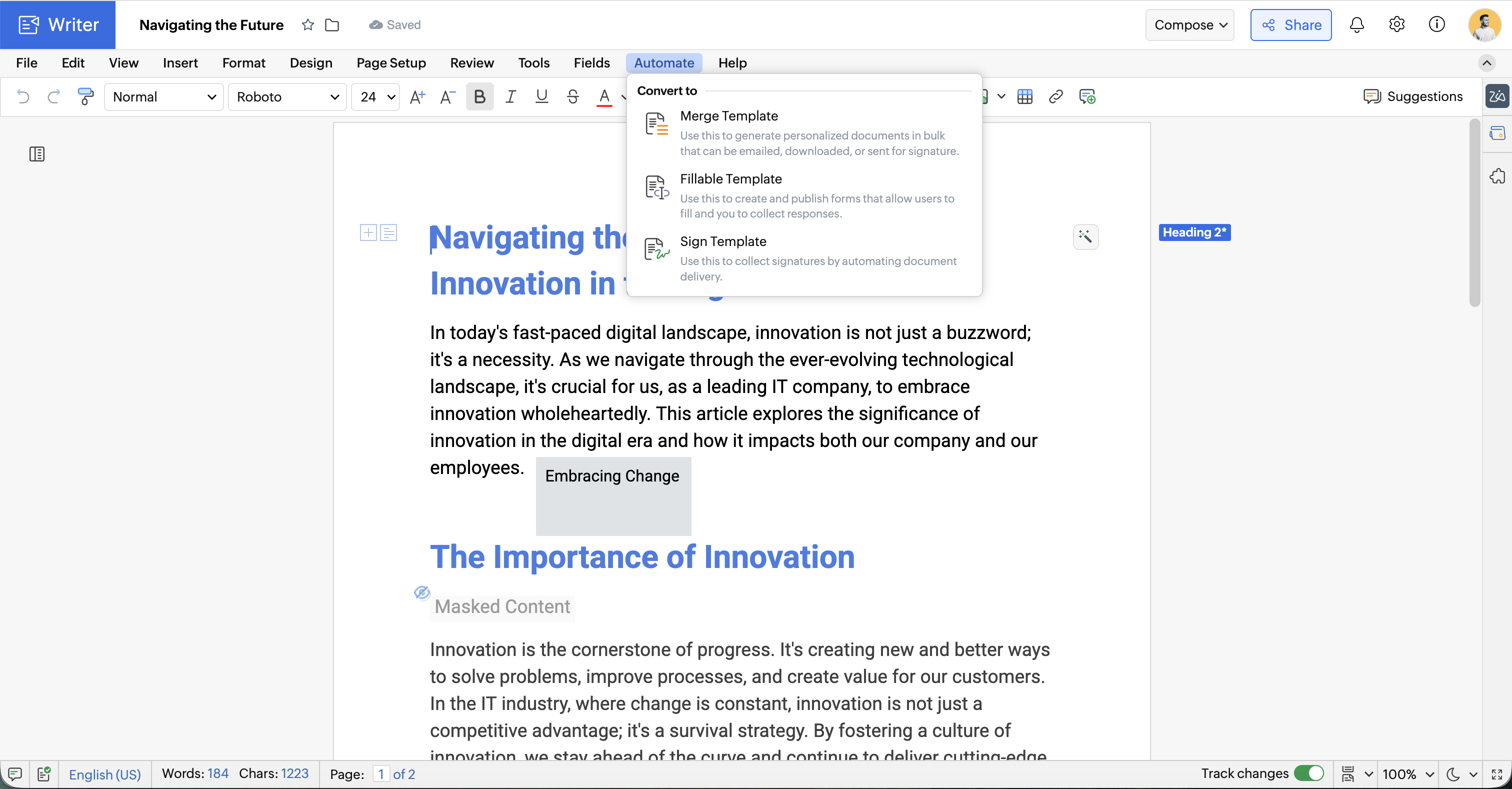
You can also convert an existing document to a merge template by clicking Automate > Convert to merge template.
Step 2: Select your data source

  1. Click Automate > Configure.

  2. Choose your preferred data source.


Step 3: Setup template with fields 

To render merge fields as specific elements (like checkboxes, images, links, etc.) in Zoho Writer, you need to set the merge field types correctly while inserting them.

1. Insert merge fields

Add merge fields to personalize a document with information from the data source. Set the appropriate merge field type to determine how data is displayed or behaves in the final merged document. 

2. Insert advanced merge fields   

Advanced fields in Zoho Writer involves Formula Fields, Conditional Fields, Repeat Fields, Chart Fields, Conditional Blocks, and Nested Merge Fields. These are what make Zoho Writer powerful for dynamic templates like invoices, proposals, contracts, or data-driven reports.

  1. Formula Fields 
    1. Perform calculations directly inside the document (e.g., =SUM(Quantity * Price)).
    2. Useful for invoices, quotes, and order forms.
      Learn how to configure formula fields in templates
  2. Conditional Fields 
    1. Display content based on conditions (IF/ELSE logic).
    2. Example: Show “Paid” if status = Paid, else show “Pending.”
      Learn how to use conditional fields in templates
  3.  Repeat Field
    1. Lets you automatically duplicate a block of content (like a table row or section) for each record in a dataset.
    2. Instead of manually copying and pasting rows, Zoho Writer will expand the block dynamically based on the incoming data.
      Learn how to repeat blocks
  4. Chart Field
    1. Lets you insert dynamic charts (bar, line, pie, etc.) into your document.
    2. The chart is linked to data sources like Sheets or CRM
      Learn how to configure chart fields in templates

3. Insert AutoFields

AutoFields are dynamic fields that automatically populate standard information in your document—like dates, page numbers, document metadata, or user details—without needing to manually enter them.

 4. Insert Main Form Fields

A main form represents the primary record or entity in your data source. Each main form field corresponds to a unique entry (like a single person, invoice, or application). These fields pull in one-to-one data—meaning one record equals one document.


Example:  If you're sending invoices, each customer name and address would come from main form fields.


5. Insert Subform Fields As Repeat Blocks 

A subform is a set of fields linked to the main form, designed to handle repeating data—that is, multiple entries related to a single main record. Subforms help create one-to-many relationships in your document. Subforms automatically belong to a main form and will repeat for each associated entry during the merge.

Repeat blocks usually a table row, paragraph, or group of fields — to repeat once per item in a list or subform from your data source.


Step 4: Configure when to run merge

  1. Manually / On Trigger

Choose this option to run the merge manually by clicking Run Merge or set up triggers in connected apps to automate the merge using a button, Deluge script, or API when specific app events occur.

  1. How to run merge from Zoho CRM
  2. How to run merge from Zoho Creator
  3. How to run merge from Zoho Projects
  4. How to run merge from Zoho Sprints
  5. How to run merge from Zoho Books
  6. How to run merge with Zoho Flow
  1. On Form Submission
Automatically run the merge whenever someone submits a connected Zoho Form. You can email the generated document, let users download it, or send the data to Zoho Sheet. Learn more.
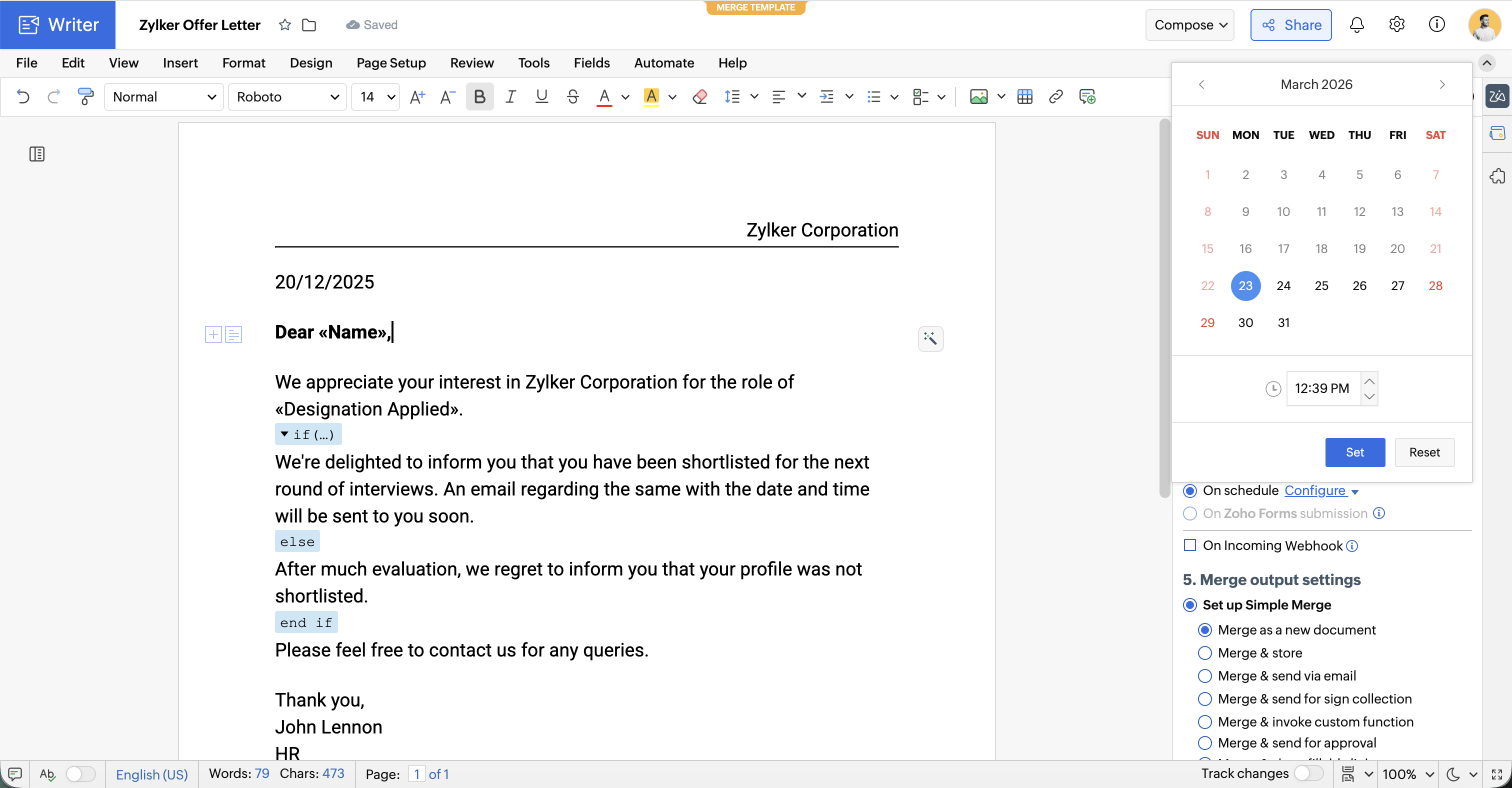
  1. Scheduled / Date & Time  

Set a specific time and date for the merge to run automatically, ideal for schedule tasks like sending reports or letters on specific date or time.
  1. External trigger (via a webhook)

Trigger merges when an event happens in an external app such as a field's value updation or a new entry created using a webhook.

Step 5: Configure merge output options

Select one of the available output options to proceed with the merge. Each option lets you control how the generated document is delivered, stored, or shared based on your workflow requirements.

  1. Set up simple merge

Simple document automation is a set of prebuilt automation flows that allow you to generate documents using one template and then, store, email, send for signing, or send as fillable form. Simple merge output options include:
  1. Setup advanced merge

Advanced Automation Flow Builder lets you to design dynamic document workflows for complex requirements like generating (merge) documents, combining them into one, and then emailing or storing them, conditionally choosing one or multiple templates for document generation, dynamically distributing the generated documents through email, sending for signature collection, or performing post document generation actions like:
  1. Combining multiple generated documents into a single file before being sent for signing.
  2. Creating dynamic folders and storing the generated documents in them, and much more.

Step 6: Preview the merge  

  1. Click Preview Merge to see how the document looks with actual data.
  2. Navigate through records to check formatting and correctness.

Step 7: Run the merge 

  1. Click Run Merge
  2. How to Track Merge Progress and Handle Errors in Zoho Writer

Troubleshooting

Problem : In CRM Email merge template to send to a contact that includes the details of a Deal and I'd like to include the Product that's been added to the deal, but Product doesn't seem to be an option in the list of Merge Fields.
Cause : It is not possible to fetch the fields from products within contacts and you must have a custom lookup field added.
Solution:  Creating a subform in the Deals module and list down the Products. You can also write a custom function to pull the details of the Product to fields within the Contacts/Deals module to include it in the email template.

Merge limits and credits

 Merge field setup

  1. How to shorten field names
  2. How to add dynamic links in merge document 
  3. How to format date fields or or subtract days/months/year from date field  in merge
  4. How to add dynamic barcode or QR code in Merge
  5. How to add dynamic text watermarks in Merge
  6. How to aggregate data in Merge  (GroupBy & Aggregate Functions)
  7. How to merge documents with Uploaded Files on Form Submission
  8. How use Work Drive Image URLs in Merge Fields

 Merge Sub-form data 

 Merge output 

  1. How to sequentially number generated documents from merge
  2. How to protect PDF generated from Merge
  3. How to setup merge for Zoho Form Submissions
  4. How to Merge Labels with CRM Data
  5. How to use CRM Templates in Email body and Merge Document as Attachment

Post merge actions

  1. How to run Custom Workflows Post Merge 
  2. How to Setup CRM Actions Post Merge

Merge customization

Merge status and control

      Create. Review. Publish.

      Write, edit, collaborate on, and publish documents to different content management platforms.

      Get Started Now


        Access your files securely from anywhere

          Zoho CRM Training Programs

          Learn how to use the best tools for sales force automation and better customer engagement from Zoho's implementation specialists.

          Zoho CRM Training
            Redefine the way you work
            with Zoho Workplace

              Zoho DataPrep Personalized Demo

              If you'd like a personalized walk-through of our data preparation tool, please request a demo and we'll be happy to show you how to get the best out of Zoho DataPrep.

              Zoho CRM Training

                Create, share, and deliver

                beautiful slides from anywhere.

                Get Started Now


                  Zoho Sign now offers specialized one-on-one training for both administrators and developers.

                  BOOK A SESSION


                              Quick LinksWorkflow AutomationData Collection
                              Web FormsEnterpriseOnline Data Collection Tool
                              Embeddable FormsBankingBegin Data Collection
                              Interactive FormsWorkplaceData Collection App
                              CRM FormsCustomer ServiceAccessible Forms
                              Digital FormsMarketingForms for Small Business
                              HTML FormsEducationForms for Enterprise
                              Contact FormsE-commerceForms for any business
                              Lead Generation FormsHealthcareForms for Startups
                              Wordpress FormsCustomer onboardingForms for Small Business
                              No Code FormsConstructionRSVP tool for holidays
                              Free FormsTravelFeatures for Order Forms
                              Prefill FormsNon-Profit

                              Intake FormsLegal
                              Mobile App
                              Form DesignerHR
                              Mobile Forms
                              Card FormsFoodOffline Forms
                              Assign FormsPhotographyMobile Forms Features
                              Translate FormsReal EstateKiosk in Mobile Forms
                              Electronic Forms
                              Drag & drop form builder

                              Notification Emails for FormsAlternativesSecurity & Compliance
                              Holiday FormsGoogle Forms alternative GDPR
                              Form to PDFJotform alternativeHIPAA Forms
                              Email FormsFormstack alternativeEncrypted Forms

                              Wufoo alternativeSecure Forms

                              TypeformWCAG

                                All-in-one knowledge management and training platform for your employees and customers.

                                          Create. Review. Publish.

                                          Write, edit, collaborate on, and publish documents to different content management platforms.

                                          Get Started Now


                                                            You are currently viewing the help pages of Qntrl’s earlier version. Click here to view our latest version—Qntrl 3.0's help articles.


                                                                Manage your brands on social media


                                                                  • Desk Community Learning Series


                                                                  • Digest


                                                                  • Functions


                                                                  • Meetups


                                                                  • Kbase


                                                                  • Resources


                                                                  • Glossary


                                                                  • Desk Marketplace


                                                                  • MVP Corner


                                                                  • Word of the Day


                                                                  • Ask the Experts


                                                                    Zoho Sheet Resources


                                                                        Zoho Forms Resources


                                                                          Secure your business
                                                                          communication with Zoho Mail


                                                                          Mail on the move with
                                                                          Zoho Mail mobile application

                                                                            Stay on top of your schedule
                                                                            at all times


                                                                            Carry your calendar with you
                                                                            Anytime, anywhere


                                                                                  Zoho Sign Resources

                                                                                    Sign, Paperless!

                                                                                    Sign and send business documents on the go!

                                                                                    Get Started Now


                                                                                            Zoho TeamInbox Resources


                                                                                                      Zoho DataPrep Demo

                                                                                                      Get a personalized demo or POC

                                                                                                      REGISTER NOW


                                                                                                        Design. Discuss. Deliver.

                                                                                                        Create visually engaging stories with Zoho Show.

                                                                                                        Get Started Now


                                                                                                                            • Related Articles

                                                                                                                            • Configure workflow in Zoho Books with Writer's mail merge

                                                                                                                              Overview Use Zoho Writer with Zoho Books to create branded PDFs and automate document generation from your Books data. You can either use the Zoho Writer Templates extension in Zoho Books for one‑click document generation, or configure ...
                                                                                                                            • How to generate labels with Zoho CRM data using mail merge

                                                                                                                              Navigate to Settings from CRM Home. Under customization, click Templates > Mail Merge > New Template. Select a module. Assign a name to the template and pick a folder for the template to be saved and click Create, and select Blank. Insert a table and ...
                                                                                                                            • What are the limits in document automation in Writer

                                                                                                                              Overview The below table shows the document automation limits in Writer and their respective eligibility for increase or decrease via add-ons. Feature Limit Template and Document Generation Limits Template count Unlimited Template size 5 lakh ...
                                                                                                                            • Configure workflow in Zoho Sprints with Writer's mail merge

                                                                                                                              The integration between Zoho Sprints and Zoho Writer simplifies the process of document generation, making it more efficient for teams managing projects. By utilizing template functions, you can create dynamic document templates that pull in data ...
                                                                                                                            • How mail merge template works in Zoho CRM

                                                                                                                              Overview During CRM integration, when a user selects or opens any record and initiates a merge operation, a temporary document is generated from the chosen template to facilitate the merge operation with the record's data. It's crucial to note that ...
                                                                                                                              Wherever you are is as good as
                                                                                                                              your workplace

                                                                                                                                Resources

                                                                                                                                Videos

                                                                                                                                Watch comprehensive videos on features and other important topics that will help you master Zoho CRM.


                                                                                                                                eBooks

                                                                                                                                Download free eBooks and access a range of topics to get deeper insight on successfully using Zoho CRM.


                                                                                                                                Webinars

                                                                                                                                Sign up for our webinars and learn the Zoho CRM basics, from customization to sales force automation and more.


                                                                                                                                CRM Tips

                                                                                                                                Make the most of Zoho CRM with these useful tips.


                                                                                                                                  Zoho Show Resources