Zoho Bookings Extension for Zoho Cliq

 Zoho Cliq is a team communication platform that helps teams collaborate in real time. With the Zoho Bookings extension for Zoho Cliq, you can receive instant notifications when appointments are booked, rescheduled, or canceled directly through the Zoho Bookings bot, helping you stay updated on your schedule without leaving Zoho Cliq.
1. How the Zoho Bookings extension works in Cliq
The Zoho Bookings extension connects your Zoho Bookings account with Zoho Cliq. After the extension is installed and authorized, the Zoho Bookings bot is automatically added for all users in your organization. The bot keeps you informed about appointment activity, lets you view your schedule, and provides quick actions to manage appointments directly within Zoho Cliq.
Key benefits
- Receive instant notifications when appointments are confirmed, rescheduled, or canceled.
- Get appointment reminders before scheduled meetings.
- View today's appointments – Lists all the appointments scheduled for the current day.
- View upcoming appointments – Displays the next 30 upcoming appointments.
Who can access this feature? | |
Available on | |
Who can install? | Zoho Cliq admin |
Who can use it? | After the extension is installed, all users in the organization are automatically subscribed to the Zoho Bookings bot. |
2. Install the extension
- Search for Zoho Bookings and click Install.
- Click Connect that redirects you to the permissions page.
- A pop-up will be shown to show the permissions. Select the permissions and click Accept.

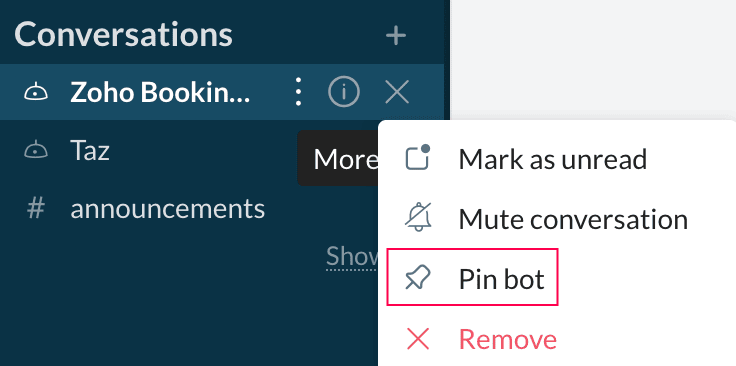
Tip: Once installed, we recommend that you pin the Zoho Bookings Bot extension for easy access. You can do so by clicking the option  icon next to the bot and select Pin bot.
After installation:
- The Zoho Bookings Bot is automatically added for all organization users.
- Users begin receiving appointment notifications immediately.

3. What you can do with this extension
The Zoho Bookings extension helps you stay informed about your appointments and manage them directly from Zoho Cliq. You can:
- Receive appointment notifications.
- View today's appointments.
- View upcoming appointments.
3.1 Receive appointment notifications
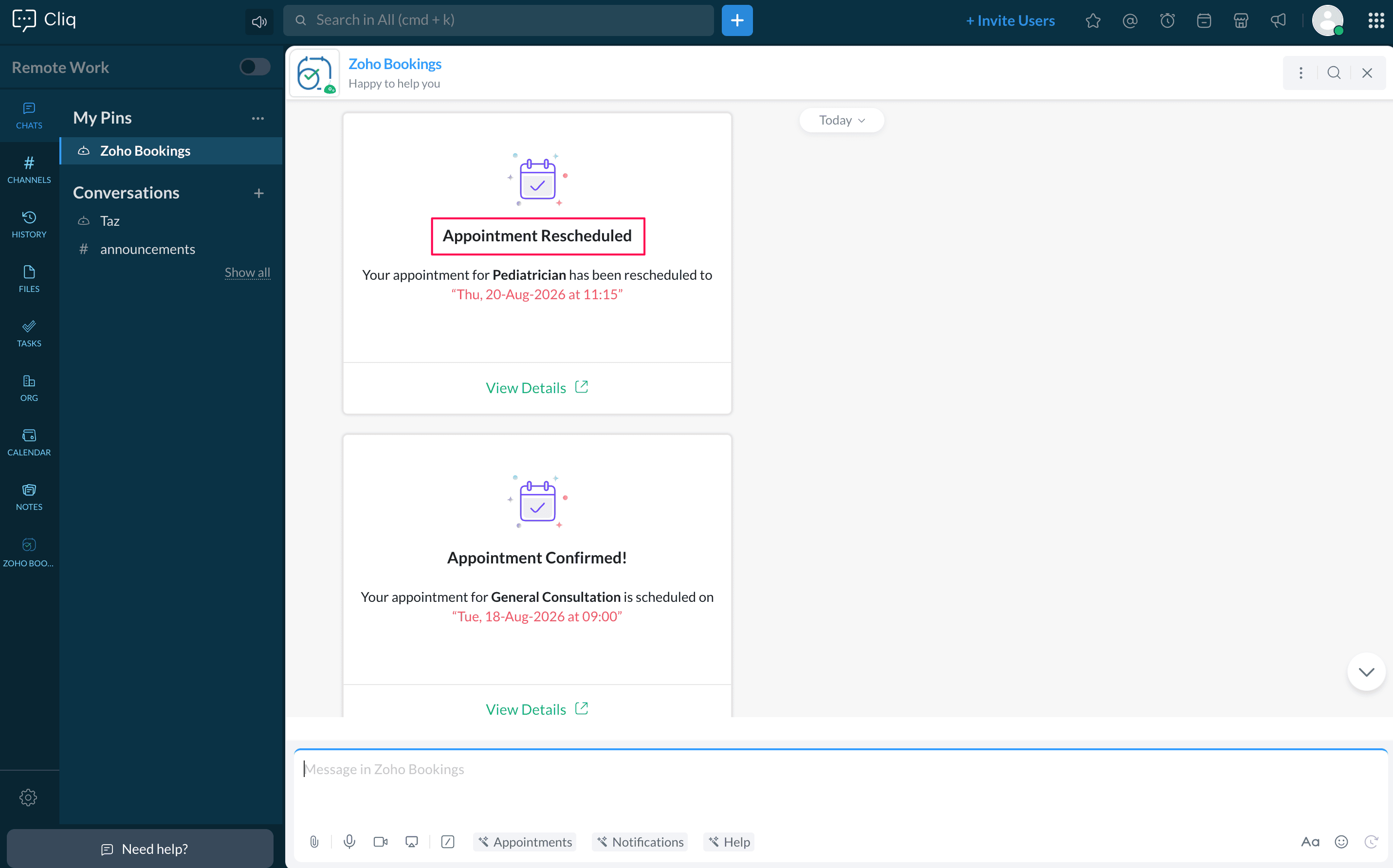
The Zoho Bookings bot automatically sends notifications whenever an appointment is booked, rescheduled, or canceled. Each notification includes the appointment details and lets you quickly view, reschedule, or cancel the appointment within Zoho Cliq.
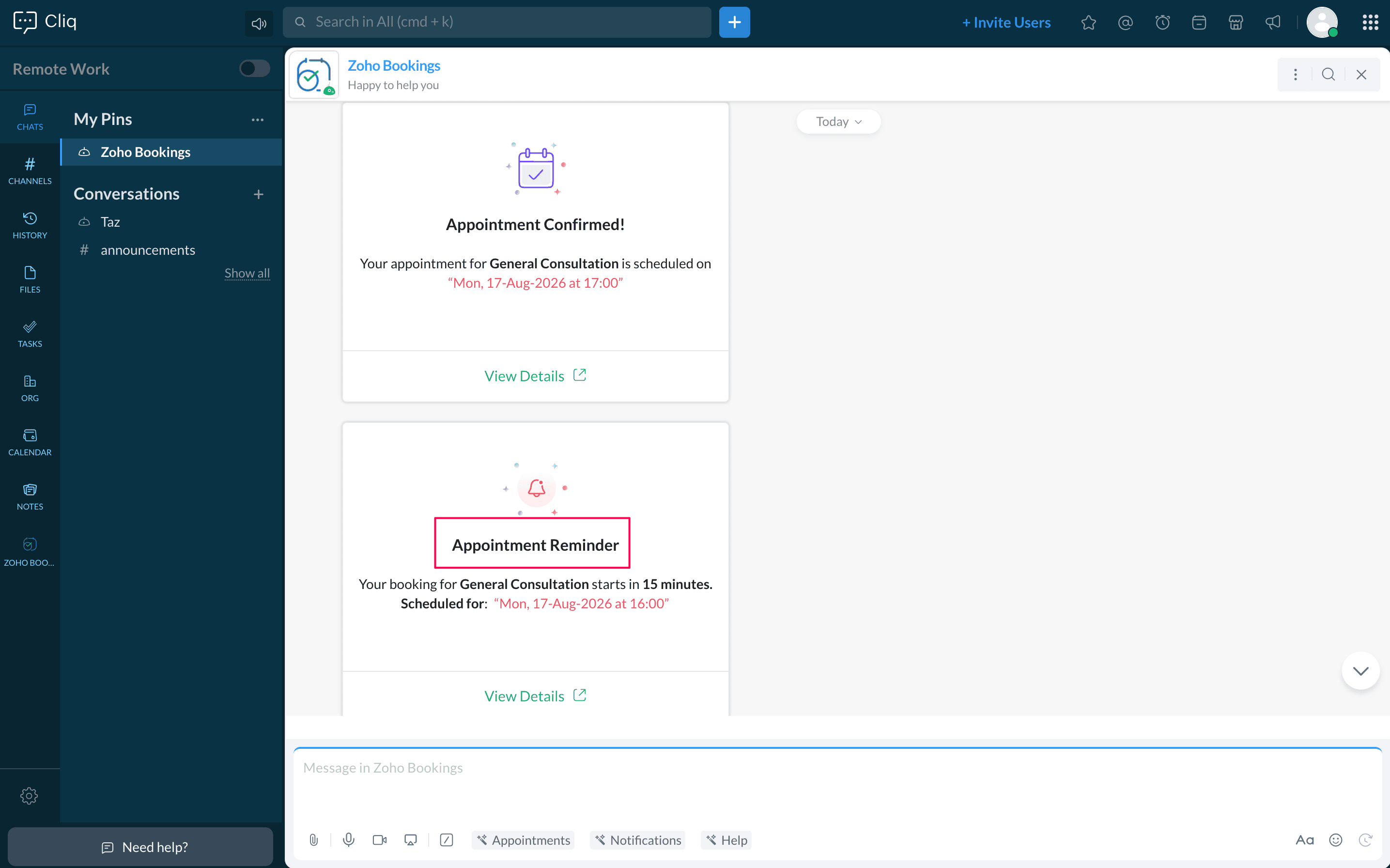
In addition to appointment updates, the bot also sends reminders before your scheduled appointments, helping you stay prepared for upcoming meetings.
3.2 View today's appointments
To view your appointments for the current day, open the Zoho Bookings Bot, click Appointments, and select Today. This displays all appointments scheduled for the current day based on your configured time zone. You can review appointment details, reschedule appointments if necessary, or cancel them directly from Zoho Cliq.
3.3 View upcoming appointments
To view your future appointments, open the Zoho Bookings Bot, click Appointments, and select Upcoming. This displays the first 30 scheduled upcoming appointments in chronological order. You can review appointment information, reschedule appointments, or cancel them without opening Zoho Bookings.
4. Bot preferences
You can manage your Zoho Bookings bot subscription and configure your appointment notification preferences.
4.1 Manage the Zoho Bookings bot
You can subscribe to or unsubscribe from the Zoho Bookings bot depending on whether you want to receive bot messages in Zoho Cliq.
To update your bot subscription:
- Open the Zoho Bookings bot.
- Click the Options
icon.
Select:
- Unsubscribe to stop receiving messages from the bot.
- Subscribe to start receiving messages from the bot.
When you unsubscribe, you'll no longer receive messages from the Zoho Bookings bot until you subscribe again. This change applies only to your Zoho Cliq account and does not affect other users in your org.
4.2 Manage notifications
If you're subscribed to the Zoho Bookings bot, you can choose whether to receive appointment notifications.
To update your notification preference:
- Open the Zoho Bookings bot.
- Navigate to Notifications.
- Select:
- Enable to receive appointment notifications.
- Disable to stop receiving appointment notifications.
When you disable notifications, you'll stop receiving appointment-related notifications. This change applies only to your Zoho Cliq account and does not affect other users in your org.
5. Uninstall the extension
The extension can only be uninstalled by an admin. Once uninstalled, it is removed for all users in the organization.
- Sign in to Zoho Cliq as an admin.
- Open Marketplace and go to Installed Extensions.
- Select Zoho Bookings and select Uninstall Extension.
After the extension is uninstalled, the Zoho Bookings bot will no longer be available in Zoho Cliq for users in your org.
Points to note
- Users only see appointments they have permission to access in Zoho Bookings.
- Each user can individually subscribe to or unsubscribe from the Zoho Bookings bot.
FAQ
Why am I not receiving appointment notifications in Zoho Cliq?
You may not receive appointment notifications if you have unsubscribed from the Zoho Bookings bot or disabled notifications. Make sure that the extension is installed, you are subscribed to the bot, and notifications are enabled.
Can I receive notifications only for my own appointments?
Yes. The Zoho Bookings bot only sends notifications for appointments that you have permission to access in Zoho Bookings. You won't receive notifications for appointments assigned to other users.
Can I disable appointment notifications without affecting other users?
Yes. Notification preferences are managed individually. Disabling notifications stops appointment notifications only for your Zoho Cliq account and does not affect other users in your organization.
What happens if I reschedule or cancel an appointment from Zoho Cliq?
The appointment will be updated directly in the Zoho Bookings. Customers and staff members will receive notifications based on the notification settings configured in your Zoho Bookings account.
What happens if the Zoho Bookings extension is uninstalled?
When the extension is uninstalled by a Zoho Cliq admin, the Zoho Bookings bot stops sending appointment notifications to users.
Can I install the Zoho Bookings extension myself?
No, only a Zoho Cliq admin can install and authorize the extension.
Can I manage appointments from Zoho Cliq without opening Zoho Bookings?
Yes, you can view appointment details, reschedule, and cancel appointments directly from Zoho Cliq.
Will new users automatically receive the Zoho Bookings bot?
Yes, after the extension is installed, users in the organization are automatically subscribed to the bot.
What's the difference between unsubscribing from the Zoho Bookings bot and disabling notifications?
Unsubscribing from the Zoho Bookings bot stops all messages from the bot, including appointment notifications and reminders, until you subscribe again.
Disabling notifications turns off appointment notifications while you remain subscribed to the Zoho Bookings bot. You can enable notifications again at any time.
Related links