Sender Recognition
In short: people open email from senders they recognize. Build that recognition with a consistent from-name and business domain, authenticated mail (SPF, DKIM, DMARC — now required), a steady template and logo, and honest subject lines. With DMARC at enforcement you can also turn on BIMI, which shows your verified logo right next to your name in the inbox.
For your campaigns to succeed, you need to be recognizable. If recipients don’t recognize where an email is coming from, they’re less likely to open it — and more likely to treat it as suspicious. Trust is one of the main currencies by which your brand is valued, so it has to be managed carefully.
Most recipients quickly check whether:
-
Anything seems off about the sender name, email address, or domain.
-
The format of a message they normally receive has changed.
-
The subject line or content looks deceptive or misleading.
-
The footer information is complete.
This guide walks through building trust by creating recognizable messages. The primary factors are your sender name, sender email address, template, subject line, and content — plus the authentication that lets providers vouch for you.
Authentication comes first
Recognition starts below the surface. Before a mailbox provider will trust your name and logo, it checks that your mail is authenticated. Since February 2024, Google and Yahoo require bulk senders to use SPF, DKIM, and DMARC, with the From domain aligned. Authenticated mail is what makes the rest of the signals below credible; unauthenticated mail looks suspicious no matter how polished it is.
Sender name
-
Your name is the first thing recipients notice, so make it instantly recognizable. If your company is Zylker and your name is Tom, something like "Tom | Zylker" works well.
-
Avoid punctuation clutter — both filters and people distrust it. P@_t_r_i_c_i^a looks alarming; "Patricia" looks genuine.
-
Use spell check. Even a small typo can cost you a contact.
-
Use the same sender name in every campaign — consistency is what recognition is built on.
-
Don’t use an email address as your sender name. For a sender named Jim, use "Jim," not jim@zylker.com — the latter is a common spam pattern and tends to land in spam.
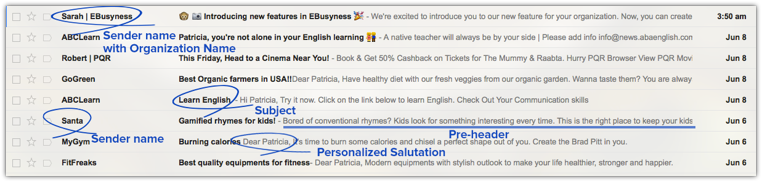
Sender email address
-
Send from your own organization’s domain or subdomain — e.g. patricia@zylker.com or patricia@admin.zylker.com.
-
Never send from a free mailbox domain like gmail.com, yahoo.com, or aol.com. Those providers publish strict DMARC policies that make mail "from" their domains fail authentication outright, so it will be rejected or spam-foldered.
-
Use a repliable address, not no-reply@yourdomain.com. No-reply senders look worse to filters and throw away replies, which are a strong positive engagement signal.
-
On a new domain, build reputation gradually — warm up, use contact segmentation, suppress bounces, and avoid role addresses, complaints, and unsubscribes. Learn more about improving your domain’s reputation.
-
If you use a secondary domain, tell recipients why in the footer, e.g. "You’re receiving this because you subscribed at yourdomain.com."
Show your logo with BIMI
BIMI puts your verified brand logo next to your name in the inbox — the strongest recognition signal available today.
Once your DMARC policy is at enforcement (p=quarantine or p=reject), you can publish a BIMI record so supporting providers — Gmail, Yahoo, and Apple Mail — display your logo beside the sender name before the email is even opened. Gmail requires a certificate tying the logo to you: a Verified Mark Certificate (VMC), which needs a registered trademark and adds a blue checkmark, or the newer Common Mark Certificate (CMC), introduced in 2025, which needs no trademark — just proof your logo has been in public use on your domain for at least a year. Yahoo can display a logo without a certificate. (Microsoft Outlook doesn’t currently support BIMI.) BIMI is both a recognition and an anti-impersonation tool, so it’s worth setting up once your authentication is solid.
Templates
Familiarity with your format is a major recognition factor. Once you settle on a style — subject approach, logo, message layout, imagery, and footer — a pattern forms in your contacts’ minds, and they recognize your email at a glance. Keep it consistent: sudden changes to your look can throw contacts off and depress engagement. Match your email layout to your website so the brand feels continuous.
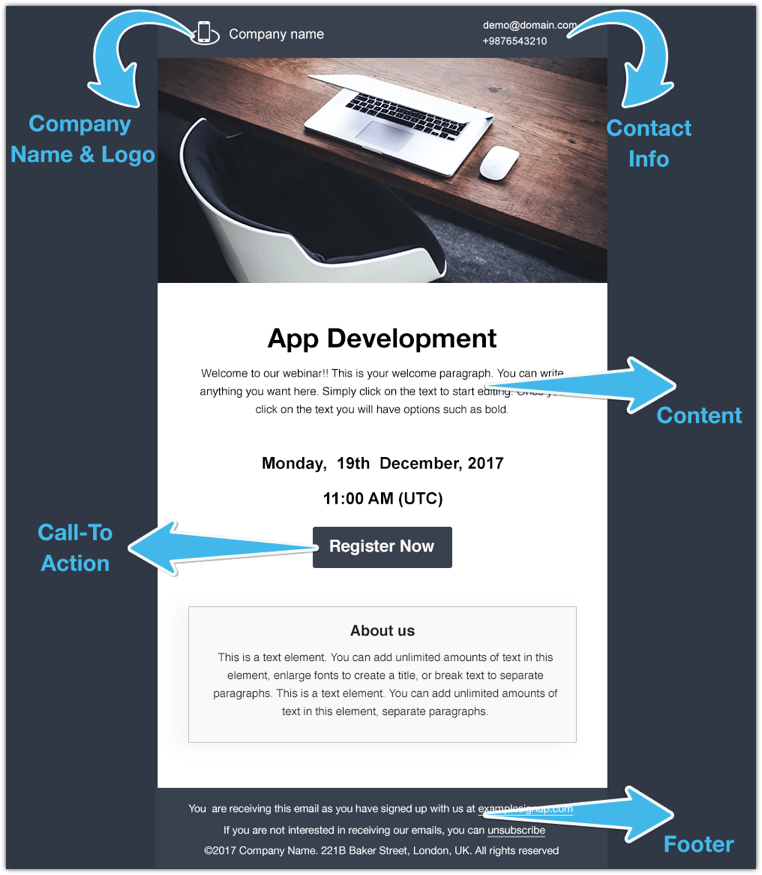
In the next template, the logo and company name are at the bottom just above the footer. Message of the email is at the top.

Note: Make sure that the Image:Text ratio is not greater than 40:60.
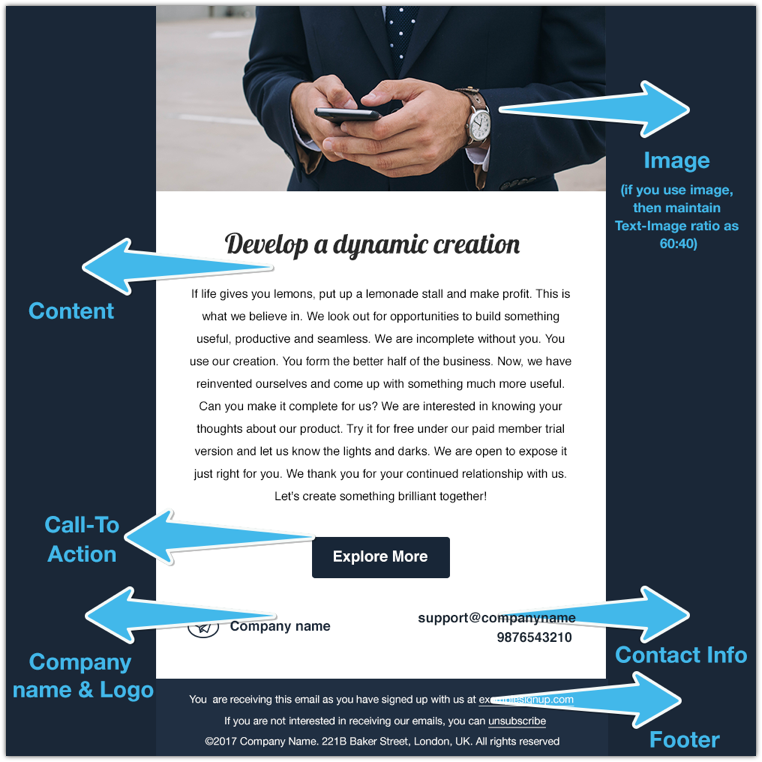
Standardize your template preferences so that your contacts don't face any difficulty recognizing your messages. If you change your preferences suddenly, then your contact may not react well to your email.
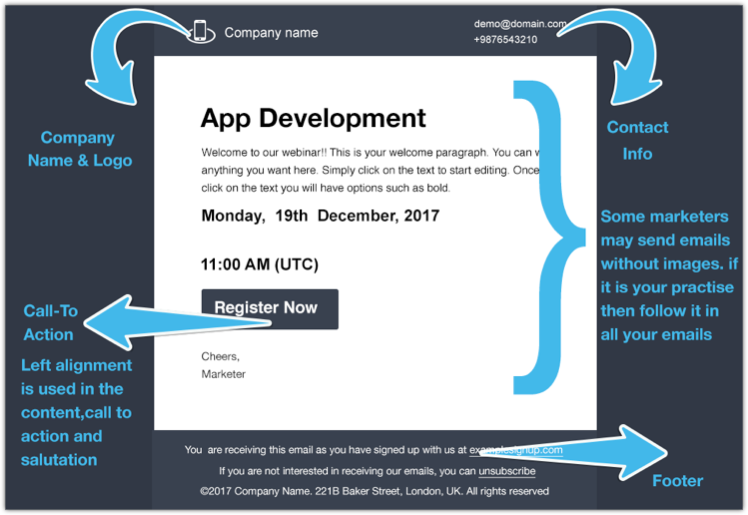
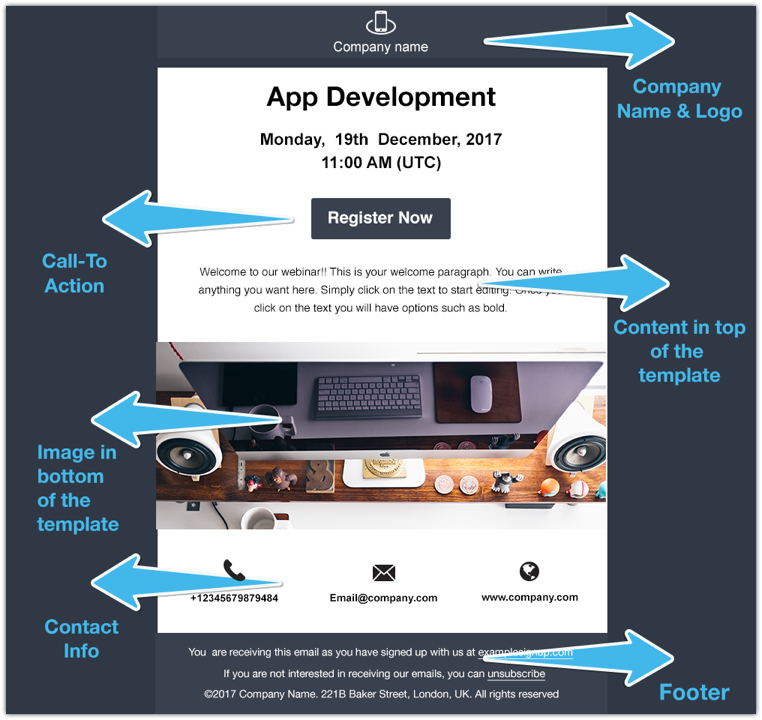
In this template, the text is placed on top and the image is at the bottom, with contact information directly below that. Positioning these elements consistently plays an important role in email recognition.
Email subject
-
Keep subject lines crisp and honest — they must reflect the actual content. Address recipients by name using the $[FNAME]$ and $[LNAME]$ merge tags rather than their email address.
-
Don’t put personal or sensitive information in the subject line.
-
Modern filters weigh sender reputation and engagement far more than individual "spam words," so focus on clarity and honesty rather than memorizing banned-word lists — just avoid ALL CAPS, excessive punctuation, and misleading claims.
Content
Content covers your logo, message body, images, and footer — the core of every email.
Sender logo
Your logo is your most recognizable brand element. Position it consistently, matching your official website, and keep to a standard formatting guide. (With BIMI, that same logo can also appear at the inbox level, before the email is opened.)
Email message
Apply consistent layout standards across campaigns:
✓ alignment
✓ font style
✓ font color
✓ size
✓ text spacing
The simplest approach is to mirror the layout you use on your website. Place a single, clearly visible call-to-action, and double-check that its links point where they should.
Images
-
Keep a healthy balance of text and images — roughly 60% text to 40% images is a good guideline.
-
Never rely on a single image for your whole message. Many clients don’t load images by default, so an image-only email can arrive blank. Always include real text and add descriptive alt text to every image so the message survives when images are blocked.
-
Use appropriate resolution — too low looks poor, too high loads slowly.
Footer
Business email typically must carry legal identification, either in the body or via a link, and it must be easy to find. Requirements vary by country, so include what applies to you — commonly:
-
Sender or company name (and authorized representatives where required)
-
A valid physical postal address (required under CAN-SPAM in the US)
-
Phone number or a contact form
-
Sender email address
-
Where applicable in your region: business registration number, publisher name, and tax ID
-
A visible, working unsubscribe option — and, for bulk senders, a one-click unsubscribe (List-Unsubscribe / RFC 8058) honored within two days.
Keep any disclaimer in a consistent place. Helpful footer lines include:
-
"You’re receiving this because you subscribed at abcdomain.com."
-
"If you’d prefer not to hear from us, unsubscribe."
-
"If this lands in spam, please add us to your contacts so our emails reach you."
What now?
With a recognizable, authenticated, consistent email style, expect better engagement over time. As recipients interact and providers see clean, authenticated mail, your domain reputation improves and more of your email reaches the inbox. Happy campaigning!