Timesheet Methods - Overview

Timesheet Methods - Overview

The Timesheet Methods section allows you to enable or disable timesheet methods according to your organization’s time tracking preferences. Choose the methods that best suit your timesheet requirements.

To enable or disable timesheet methods:
Navigate to Settings > Timesheets > Configuration > Methods.
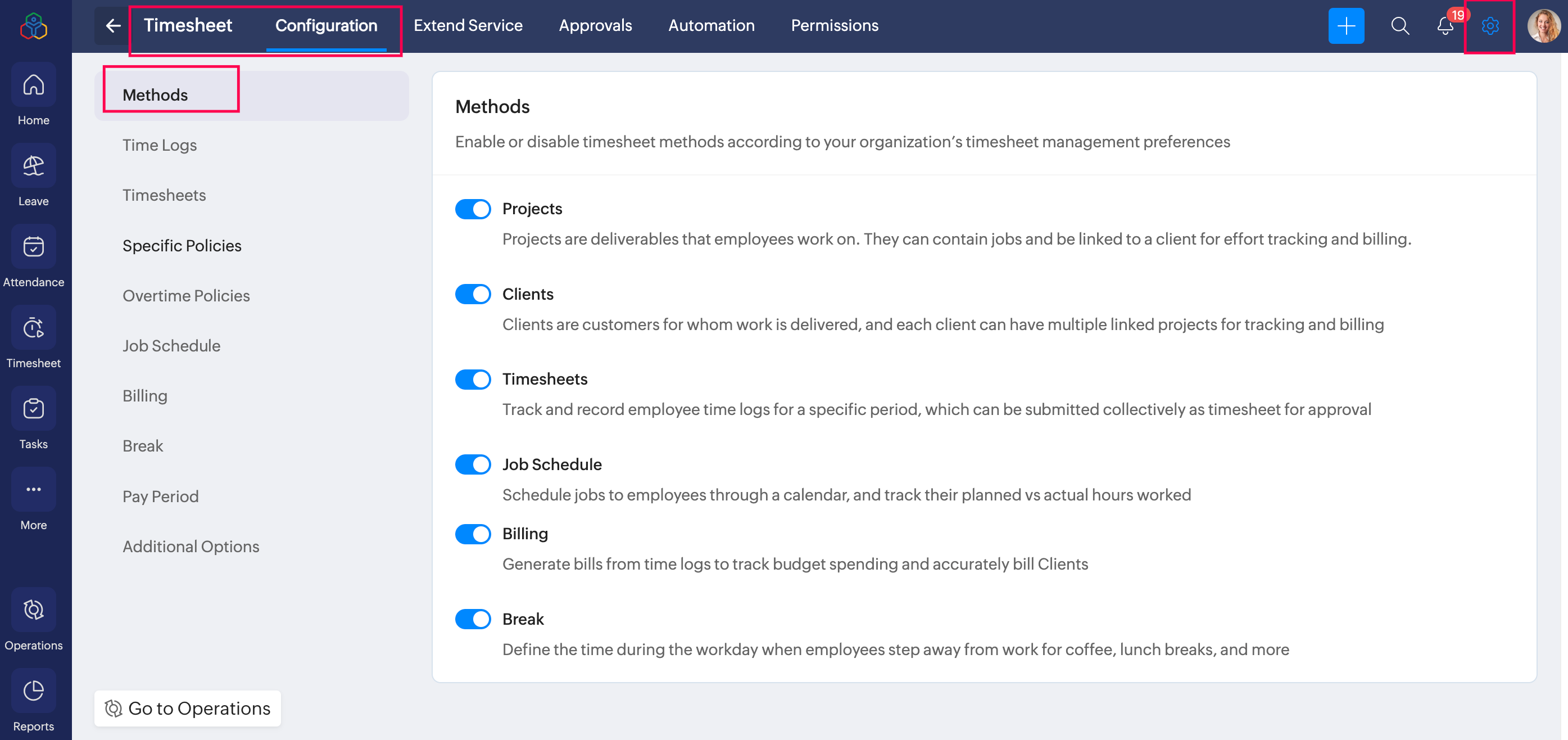


  1. Projects
    Projects are work assignments or deliverables that employees contribute to. Each project can include multiple jobs and can be linked to clients for tracking and billing.
    Use: Organizes work by project for better visibility, tracks hours per project for billing and reporting, assigns jobs to employees 
    Example: A Website Redesign project tracks hours from designers and developers for progress updates and client billing.
  1. Clients
    Clients are the customers for whom work is delivered. Multiple projects can be linked to a single client to track effort and billing accurately.
    Use: Links projects to clients for clear accountability, generates client-specific reports, and supports accurate invoicing based on actual work hours.
    Example: Client XYZ Corp has three active projects. Hours logged by employees on each project are tracked and billed to XYZ Corp.

  2. Timesheets
    Timesheets collect employee time logs over a specific period (daily, weekly, or monthly) and allow submission for approval.
    Use: Consolidates logged hours for review, supports manager approval workflow and, integrates with payroll for accurate salary calculation.
    Example: An employee logs 8 hours per day for a week. The timesheet is submitted at week-end, approved by the manager, and feeds into payroll.

  3. Job Schedule
    Job scheduling helps assign jobs to employees using a job schedule calendar, and tracks planned versus actual hours worked.
    Use: Assign jobs with specific timelines, compare planned hours versus actual logged hours, monitor productivity and resource utilization.
    Example: Implement API for User Authentication | Assigned To: Developer A | Time: 10:00 AM – 1:00 PM, 23rd Dec 2025 Planned Hours: 3 | Actual Hours Logged: 3.5
  1. Billing
    Billing helps track billable and non-billable hours spent on client projects for accurate billing and invoicing.
    Use: Tracks billable hours for client or project and helps generate bills and invoice clients.
    Example: 10 hours of work for Client XYZ Corp are can be converted into a bill at the defined hourly rate.
  1. Breaks
    Breaks help you define and track break periods in the timesheet. Admins can define breaks based on location, and employees can log them in their timesheets. Breaks can also be set to be automatically logged for employees.
    Use: Define break times for employees and helps maintain compliance with labor regulations.
    Example: Employees log a 30-minute lunch break scheduled at 1 PM. Break time can be excluded from billable hours but recorded in timesheets.

    Learn more:
  2. Timesheets Settings
  3. Timesheet - Operations
  4. Job Scheduling
  5. Billing
  6. Managing Projects
  7. Managing Clients
  8. Setting up Pay Period in Zoho People


      Create. Review. Publish.

      Write, edit, collaborate on, and publish documents to different content management platforms.

      Get Started Now


        Access your files securely from anywhere

          Zoho CRM Training Programs

          Learn how to use the best tools for sales force automation and better customer engagement from Zoho's implementation specialists.

          Zoho CRM Training
            Redefine the way you work
            with Zoho Workplace

              Zoho DataPrep Personalized Demo

              If you'd like a personalized walk-through of our data preparation tool, please request a demo and we'll be happy to show you how to get the best out of Zoho DataPrep.

              Zoho CRM Training

                Create, share, and deliver

                beautiful slides from anywhere.

                Get Started Now


                  Zoho Sign now offers specialized one-on-one training for both administrators and developers.

                  BOOK A SESSION


                              Quick LinksWorkflow AutomationData Collection
                              Web FormsEnterpriseOnline Data Collection Tool
                              Embeddable FormsBankingBegin Data Collection
                              Interactive FormsWorkplaceData Collection App
                              CRM FormsCustomer ServiceAccessible Forms
                              Digital FormsMarketingForms for Small Business
                              HTML FormsEducationForms for Enterprise
                              Contact FormsE-commerceForms for any business
                              Lead Generation FormsHealthcareForms for Startups
                              Wordpress FormsCustomer onboardingForms for Small Business
                              No Code FormsConstructionRSVP tool for holidays
                              Free FormsTravelFeatures for Order Forms
                              Prefill FormsNon-Profit

                              Intake FormsLegal
                              Mobile App
                              Form DesignerHR
                              Mobile Forms
                              Card FormsFoodOffline Forms
                              Assign FormsPhotographyMobile Forms Features
                              Translate FormsReal EstateKiosk in Mobile Forms
                              Electronic Forms
                              Drag & drop form builder

                              Notification Emails for FormsAlternativesSecurity & Compliance
                              Holiday FormsGoogle Forms alternative GDPR
                              Form to PDFJotform alternativeHIPAA Forms
                              Email FormsFormstack alternativeEncrypted Forms

                              Wufoo alternativeSecure Forms

                              TypeformWCAG


                                          Create. Review. Publish.

                                          Write, edit, collaborate on, and publish documents to different content management platforms.

                                          Get Started Now


                                                            You are currently viewing the help pages of Qntrl’s earlier version. Click here to view our latest version—Qntrl 3.0's help articles.


                                                                Manage your brands on social media


                                                                  • Desk Community Learning Series


                                                                  • Digest


                                                                  • Functions


                                                                  • Meetups


                                                                  • Kbase


                                                                  • Resources


                                                                  • Glossary


                                                                  • Desk Marketplace


                                                                  • MVP Corner


                                                                  • Word of the Day


                                                                  • Ask the Experts


                                                                    Zoho Sheet Resources


                                                                        Zoho Forms Resources


                                                                          Secure your business
                                                                          communication with Zoho Mail


                                                                          Mail on the move with
                                                                          Zoho Mail mobile application

                                                                            Stay on top of your schedule
                                                                            at all times


                                                                            Carry your calendar with you
                                                                            Anytime, anywhere


                                                                                  Zoho Sign Resources

                                                                                    Sign, Paperless!

                                                                                    Sign and send business documents on the go!

                                                                                    Get Started Now


                                                                                            Zoho TeamInbox Resources


                                                                                                      Zoho DataPrep Demo

                                                                                                      Get a personalized demo or POC

                                                                                                      REGISTER NOW


                                                                                                        Design. Discuss. Deliver.

                                                                                                        Create visually engaging stories with Zoho Show.

                                                                                                        Get Started Now


                                                                                                                            • Related Articles

                                                                                                                            • Timesheet Service Settings - Overview

                                                                                                                              What is Timesheet Service Settings? Timesheet settings allow administrators to configure the various aspects of time logs, this includes methods, restrictions and permissions, and related preferences. Currency, billing, job scheduling, and other ...
                                                                                                                            • Timesheet Service Overview

                                                                                                                              What is Timesheet Service in Zoho People? Timesheet management in Zoho People facilitates recording and tracking of employee work hours. It is a platform for employees to log their time spent on tasks and projects. Employers can easily monitor and ...
                                                                                                                            • Timesheet Reports

                                                                                                                              To access the various timesheet reports, navigate to Reports on the bottom left corner of your screen and go to the Organization Reports tab. Here is a detailed look at all the reports that are part of Timesheet in Zoho People: Time Logs This report ...
                                                                                                                            • Attendance Methods - Overview

                                                                                                                              What do we mean by Attendance Methods? The attendance system does not just include managing employee check-in and check-out; based on the requirements of the organization, there could be a need to enable and track on-duty breaks, remote-in, and also ...
                                                                                                                            • Performance Methods

                                                                                                                              What are Performance Methods? Performance methods are utilized to assess employee performance, the evaluations of which contribute to the determination of how well employees perform. Enable the methods based on your organization's employee evaluation ...
                                                                                                                              Wherever you are is as good as
                                                                                                                              your workplace

                                                                                                                                Resources

                                                                                                                                Videos

                                                                                                                                Watch comprehensive videos on features and other important topics that will help you master Zoho CRM.


                                                                                                                                eBooks

                                                                                                                                Download free eBooks and access a range of topics to get deeper insight on successfully using Zoho CRM.


                                                                                                                                Webinars

                                                                                                                                Sign up for our webinars and learn the Zoho CRM basics, from customization to sales force automation and more.


                                                                                                                                CRM Tips

                                                                                                                                Make the most of Zoho CRM with these useful tips.


                                                                                                                                  Zoho Show Resources