Announcing new features in Trident for macOS (v.1.10.0)

Announcing new features in Trident for macOS (v.1.10.0)

Hello everyone!

Trident for macOS (v.1.10.0) is here with major features and enhancements to elevate your workplace communication and productivity. Let's take a quick look at them.

Create tasks from emails.
In addition to creating tasks from selected text in an email, you can now also convert an entire email into a task. The email subject will automatically become the task title, and the email content will be considered the task description.

Note: The option 'Add to Filters' is now rearranged under the 'Add to' toolbar option.


View events from CRM Calendar.
You can now view all of your CRM tasks, meetings, and calls from the Zoho CRM web app as events in Trident's calendar module. This enables you to schedule client meetings and manage follow-ups to improve customer relationships and efficiency.


View your out-of-office status in Calendar.
You can now view your entire out-of-office duration in the calendar. This allows those who have access to your calendar to see when you'll be unavailable and schedule events and meetings based on your availability.


Import events from ICS files. 
You can now import events from ICS files into your personal or group calendars, with options to include attendees, set reminders, mark events as private, or overwrite existing events with updated details. ICS file attachments can be opened from any module, allowing you to easily import events to your calendar.


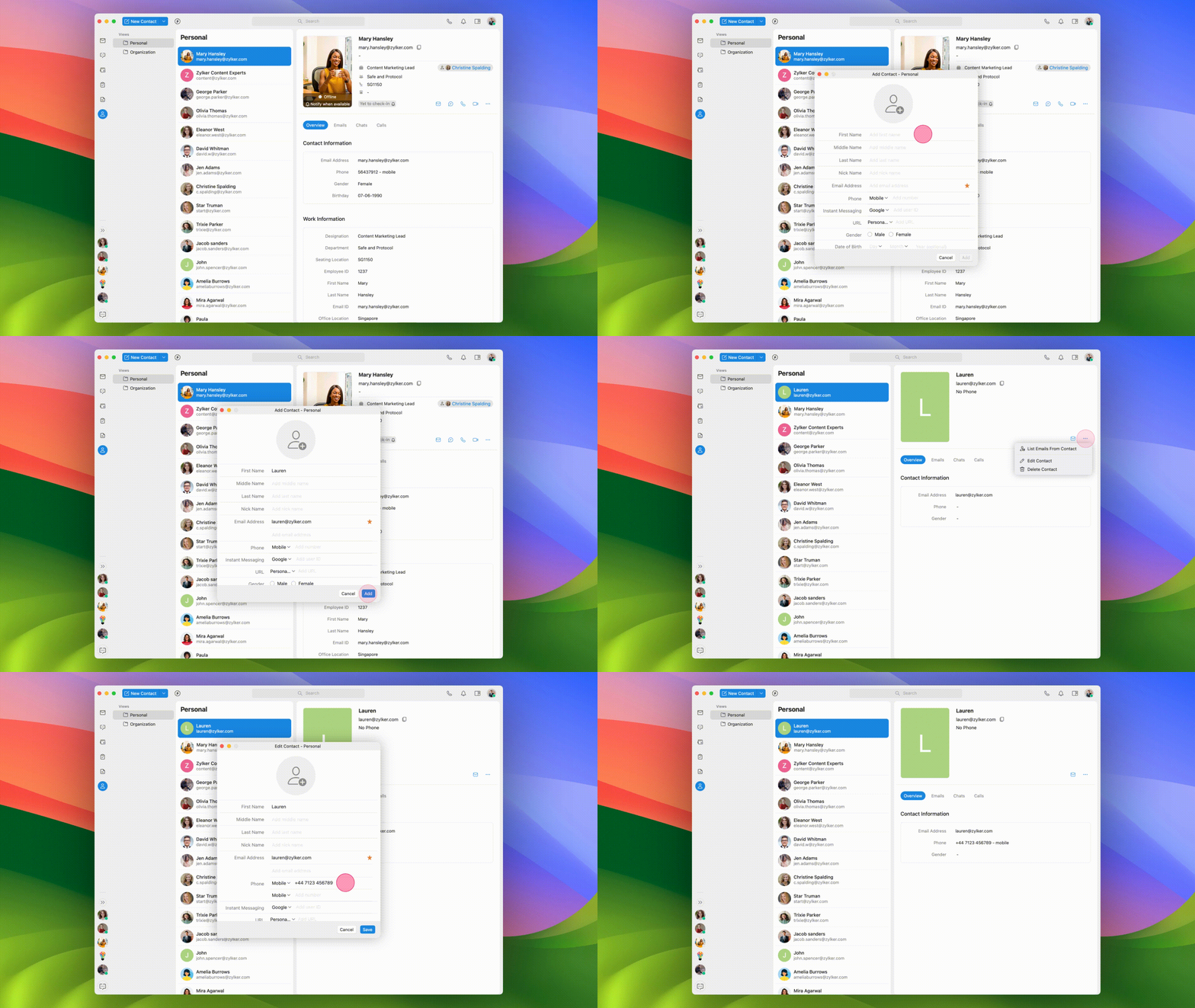
Add and edit contacts.
Previously, you could view all of your personal and organizational contacts in Trident. Now, you can also add new contacts and edit existing contact details directly within the app so you can keep your contacts' information up to date at all times.

Zoom eWidget.  
Another addition to Trident's list of widgets: the Zoom eWidget. With this new widget, you can view all of your upcoming and past Zoom meetings, schedule new ones, and join meetings instantly. This integration helps you keep your meetings organized in one convenient place.


Download email attachments to your Mac with Smart Flow.
You can now drag and drop email attachments to your Mac device to download them easily. This enables you to bypass clicks, navigation, and waiting times, ensuring a smarter way to download files.


Other enhancements.
In this update, we've made some enhancements to other existing features to improve your experience using Trident. Here's a quick overview:
  • Threaded conversations are now highlighted on selection.
  • Task start and due dates can now be updated with time in the Task module as well as in the Smart Assistant. 
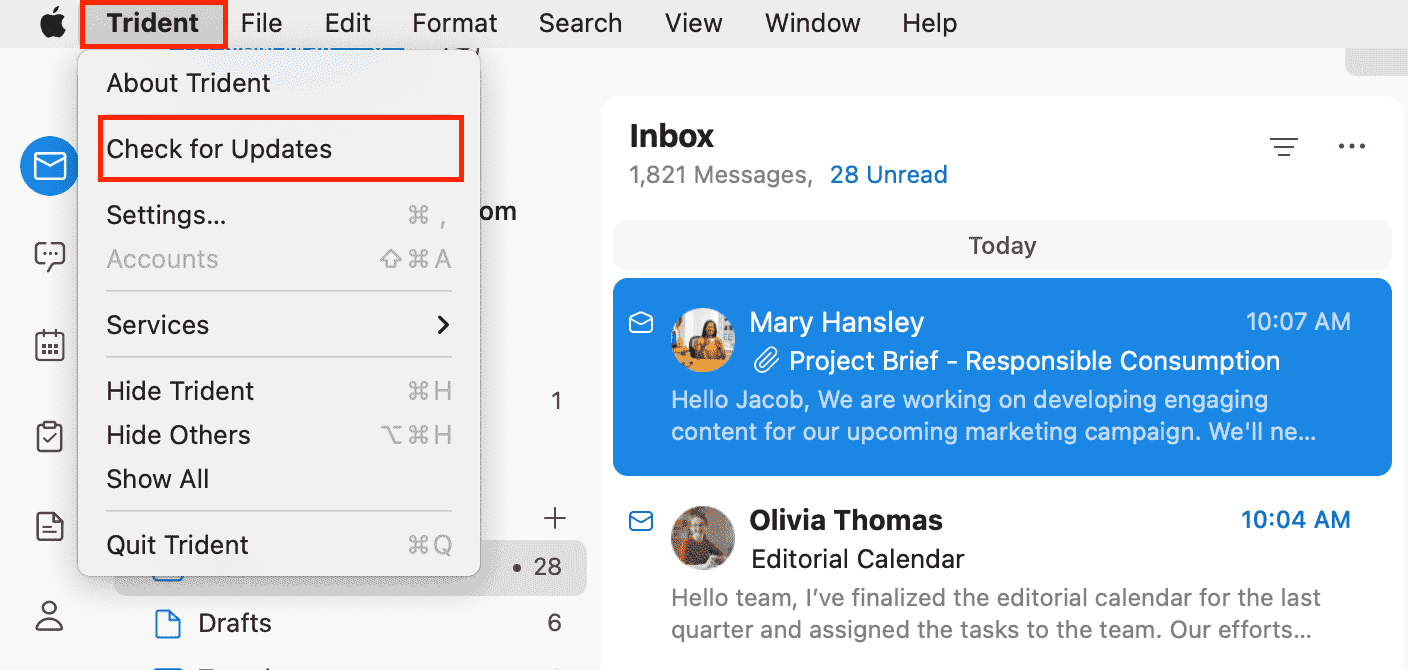
To leverage these new features in Trident, update the app to the latest version by following the steps below:
  1. Open Trident.
  2. In the system menu bar, click Trident.
  3. Select Check for Updates from the menu list.
Don't have the app yet? Download it from the website and experience a smarter way to work.

Give these features a spin, and let us know your feedback and suggestions in the comments section below. You can also reach us at trident@zohosupport.com.

To submit your feedback directly through the app, follow the steps below:
  1. Open Trident.
  2. From the system menu bar, click Help.
  3. Select Send Feedback.
  4. In the feedback window, enter the necessary details under Subject and Feedback Content.
  5. When ready, click Submit.


We look forward to hearing from you!

Until next time,
Sneha

      • Recent Topics

      • How to record GST amount for Value of Service on Inward remittance charged by bank

        Hi please advice I have a situation.    1. I have HDFC bank account 2. I have a customer who has done inward remittance for purcahses from overseas. 3. HDFC is showing Value of Service say $100 and GST @ 18%. 4. Value of Service is not charged. But  CGST
      • Sort by Project Name?

        How the heck do you sort by project name in the task list views??? Seems like this should be a no-brainer?
      • Project Statuses

        Hi All, We have projects that sometimes may not make it through to completion. As such, they were being marked as "Cancelled". I noticed that these projects still show as "Active" though which seems counter intuitive. In fact, the only way I can get them
      • I have a requirement to integrate Zoho Books with Zoho Projects at both project and task levels.

        Currently, when i create transactions in Zoho Books (Expenses, Invoices, Bills), we can only map them at the project level. However, our requirement is to: Map records at both project and task levels Sync these transactions back to Zoho Projects under
      • What’s New in Zoho Inventory — Latest Features, Integrations & Updates | December 2025

        Zoho Inventory has evolved significantly over the past months, bringing you smarter, faster, and more connected tools to streamline your operations. Whether you’re managing multichannel sales, complex fulfillment workflows, or fast-moving stock, our newest
      • Add Multiple Modules in Automation

        Right now I am trying to automate sending customer statements in WhatsApp, if they have overdue invoices, since customer has multiple invoices overdue I don't want to send repetitive message for those. Right now in automation you can only select 1 module,
      • Feature Request in Zoho Books : Tracking Inventory for Service Items

        At the moment, ZOHO Books don't allow to track inventory of Service Items (I just talked with customer care executive for confirmation). MY PROBLEM: I resell services Digital Signatures Certificates ( SAC ‐ 998319) and other similar services, I purchase
      • Create Tasklist with Tasklist Template using API v3

        In the old API, we could mention the parameter 'task_template_id' when creating a tasklist via API to apply a tasklist template: https://www.zoho.com/projects/help/rest-api/tasklists-api.html#create-tasklist In API v3 there does not seem to be a way to
      • Audio Recording Button needs work

        People struggle to understand how to record the audio - the mic button is tiny and barely visible. Please make the recording option more prominent and obvious and the upload file function should be secondary... (not taking up the majority of the space).
      • Enhancing user experience with Audio/Video Upload in Zoho Forms

        Hello form builders! Today, interactive forms are an integral part of websites and applications. While text-based inputs serve a variety of purposes, audio and video uploads can open up a world of possibilities for businesses. Imagine you are a talent
      • Early Preview for an Upcoming Enhancement to Zoho One - App Adoption and Feature Discovery

        Hello, Enterprise Support Community, We're excited to give you an early sneak peak at an upcoming enhancement to the Zoho One platform: new App Adoption & Feature Discovery components, designed to help our customers adopt the right tools to enhance their
      • You cannot send this email campaign as it doesn't have any eligible contacts in the selected mailing list. You can try adding contacts or choose other mailing lists.

        please help
      • Add Days In Stage to Filter Options for Pipeline

        We use the days in stage to see how long a ticket has been in a certain stage. But there is no option to see this via filters. eg if i wanted to see how many tickets over 5 days in a stage, there no way to do this. Currently we have to export a report
      • Integration problem between zoho crm and zoho forms for an update in zcrm, with two mapped custom fields

        Hello everyone, I need to correct an existing integration between Zoho CRM and Zoho Forms: the use case is that a user needs to send an email to a contact, who will click on a button in this email, redirecting to a Zoho Forms. The contact can update or
      • Purchase Order Quantity Validation Not Enforced During Bill Approval

        Hello Team, I would like to report a potential issue in the Purchase Order to Bill workflow. Steps to reproduce: Create a Purchase Order for an item with Quantity = 100. Approve/sign the Purchase Order. Convert the Purchase Order into a Bill. Change the
      • How do I add multiple contacts in a deal

        How do I add multiple contacts in a deal
      • Blueprint Not Triggering When Lead Status Is Updated by Workflow (IndiaMART Integration)

        I have set up a blueprint that triggers when a lead’s status is “New Lead.” Our CRM is integrated with IndiaMART, and when leads are created from IndiaMART, their Lead Status is initially set to None. To handle this, I created a workflow that automatically
      • Add multiple users to a task

        When I´m assigning a task it is almost always related to more than one person. Practical situation: When a client request some improvement the related department opens the task with the situation and people related to it as the client itself, the salesman
      • Journey vs Campaign Confusions

        Hi there! I hope you're all doing great! I'm new to the Zoho MA and I'm confused between Journey and Campaigns. I'm not sure if these two work together or not. I hope you can enlighten me. What I'm trying to do is setting up a Newsletter. 1. We have a
      • The 3.1 biggest problems with Kiosk right now

        I can see a lot of promise in Kiosk, but it currently has limited functionality that makes it a bit of an ugly duckling. It's great at some things, but woeful at others, meaning people must rely on multiple tools within CRM for their business processes.
      • Zoho Webinar not sending calendar entry into Outlook or other calendars

        Dear All, I am using Zoho Webinar for last few months and noted that when a attendee registers at the webinar link he gets an email will intimating his registration and link to webinar. He also get few file ( for Outlook, Google calendar etc) which he
      • Ticket Status

        HI, Any idea on how to create other options for this header??? I want to add an "Ordered" status. Its under "tickets" in Overview, I need a new status created (see second picture)
      • Turning off the recorded welcome in Zoho Webinar

        Is there a way to turn off the recorded voice that comes up at the beginning of every webinar session? It devalues the experience for attendees from feedback, interrupting their connection with our brand and delaying webinar start unnecessarily.
      • Save embed widget personalizations

        Ok, Zoho, Great work on providing PRICING TABLES via the embed widget. Thanks so much. This changed the game for me Only one slight problem....I can't seem to save my widget settings. I'm still building my products and plans but I'm testing how they look
      • Team folder not created when creating project using zoho flow

        When I try to automate project creation using zoho flow, and I have enabled workdrive integration to automatically create team folders to attach to the project, this only works when I create a new project through the UI. But I am trying to automate project
      • Add an option to deactivate Zoho Meeting "Welcome" message

        My request is to provide an option to deactivate the annoying Zoho Meeting "Welcome" voice when participants join meetings... or remove it all together. First impressions count, especially with new clients. This notification reminds me of the AOL "You've
      • Service line items

        Hello Latha, Could you please let me know the maximum number of service line items that can be added to a single work order? Thanks, Chethiya.
      • SalesIQ > My Chat sort by Unread or Follow-up

        Hi Zoho SalesIQ Team, I would like to submit a feature request regarding the My Chat > Sorting in the SalesIQ UnRead Follow-up Conversation tags Thank you for considering. Best regards, CJ
      • Record sharing for Activities modules in CRM

        Hello everyone, We've got a few quick enhancements to what we covered in this previous announcement: record sharing is now available for Activities modules. 1. Sharing Tasks, Meetings, and Calls Until now, activity records could only be shared indirectly
      • SalesIQ : How to disable "Idle chat handling" ?

        Hello SalesIQ Team. SalesIQ, How to disable "Idle chat handling" ? I would like to disable the option “Automatically close chats that have been idle for a specified amount of time.”
      • How do I create an update to the Cost Price from landed costs?

        Hi fellow Zoho Inventory battlers, I am new to Zoho inventory and was completely baffled to find that the cost price of products does not update when a new purchase order is received. The cost price is just made up numbers I start with when the product
      • Facturation électronique 2026 - obligation dès le 1er septembre 2026

        Bonjour, Je me permets de réagir à divers posts publiés ici et là concernant le projet de E-Invoicing, dans le cadre de la facturation électronique prévue très prochainement. Dans le cadre du passage à la facturation électronique pour les entreprises,
      • Function and workflow to create customer payment and send receipt

         I am attempting to set up a workflow/custom function for the automatic creation of a customer payment and sending the email receipt, but am receiving the error "Improper Statement Error might be due to missing ';' at end of the line or incomplete expression" I've been over everything several times and cannot see where the error is (code is copied into the attached document).  I haven't used custom functions before with Deluge, so it's very likely something very simple, or I've completely mucked
      • Smart Alerts: Protect users with configurable email alerts

        Email-based threats are becoming harder to identify and manage. Administrators need proactive ways to protect users from phishing, fraud, and policy violations. Standard filters can block emails, but blocking alone isn't always the most effective response.
      • Power up Zoho CRM with project intelligence

        Dear user, You're probably one of those businesses using your CRM as a single source of truth. It's where sales, project execution, and finance teams go to analyze past decisions and formulate future strategies. But what happens when project data is either
      • Print multiple uploaded images in an HTML snippet in a Page

        I have a Form: Job_Preparation It stores details of each new item that must be built by the fabricators in our workshop. The form has a field: Documents I upload 4 image files to the Documents field. I want to print a sheet for our workshop staff with
      • "Track Inventory for this item" is forced checked by default for goods items (eTims issue?)

        Hello, Since connecting our Zoho books to eTims (Kenya) the "Track Inventory for this item" is forced checked by default (eTims issue?) in the Item creation page for any type of goods. So when purchasing anything that the company does not intend to sale,
      • Zoho Team Inbox - roadmap

        Hi, would be good to understand the Teaminbox roadmap, in particular: 1. API / Zoho Deluge connections. We have a process where the each email needs to be either tagged or assigned daily. It would be great if we could automate a 5pm alert for any exemptions
      • Free webinar! Sign documents across borders: AES, QES, ID verification

        Hello all, Signing paperwork across geographies sounds simple, until critical questions around legality, security, and compliance pop up. Join our upcoming webinar to see how Zoho Sign helps businesses worldwide sign documents with confidence. Agenda:
      • Add field "Expected Availability Date" to Purchase Orders

        Hi there. We drop ship and 'make to order' whereby we backorder sales order items directly with factories for manufacturing. One of the leading questions from Customers is "when is the order ready". Currently there is an 'Expected Delivery Date', which
      • Next Page