Attention: Display Issues on Chromium Browsers with Intel® Core™ Ultra Processors
Dear Customers,
We've recently identified a display-related issue that may affect some of our Zoho Assist users, particularly technicians using devices powered by Intel® Core™ Ultra Processors.
What’s Happening?
If you're running a Chromium-based browser (like Chrome, Edge, or Brave) on a system with an Intel® Core™ Ultra Processor, you might notice screen artifacting or unexpected color flashes during remote support sessions. This issue only affects the technician’s view—not the end user’s experience. Here is a screenshot of how the screen would look like if you are affected by this issue:

Why Is This Happening?
Chromium browsers utilize hardware acceleration to boost performance by offloading graphics-intensive tasks—like video rendering or complex animations—to your system's GPU. While this generally enhances browsing speed and responsiveness, it can sometimes lead to compatibility issues between your browser, GPU, and specific hardware configurations—like the Intel® Core™ Ultra series.
We’ve discovered that when hardware acceleration is enabled, the Zoho Assist session rendering may be disrupted, resulting in graphical glitches for technicians initiating the session.
Who Is Affected?
- Affected: Technicians running remote sessions via Chromium browsers on Intel® Core™ Ultra Processors with hardware acceleration enabled.
- Not affected: End users—even those on the same hardware—or technicians using other CPU models or browsers without hardware acceleration.
Temporary Workaround
To avoid this issue, we recommend disabling hardware acceleration in your Chromium browser. Here's how:
- Open your browser settings.
- Search for “hardware acceleration.”
- Toggle off the option that says “Use hardware acceleration when available.” or " Use graphics acceleration when available."
- Restart your browser.
- Start a new Zoho Assist session and try connecting to your devices.
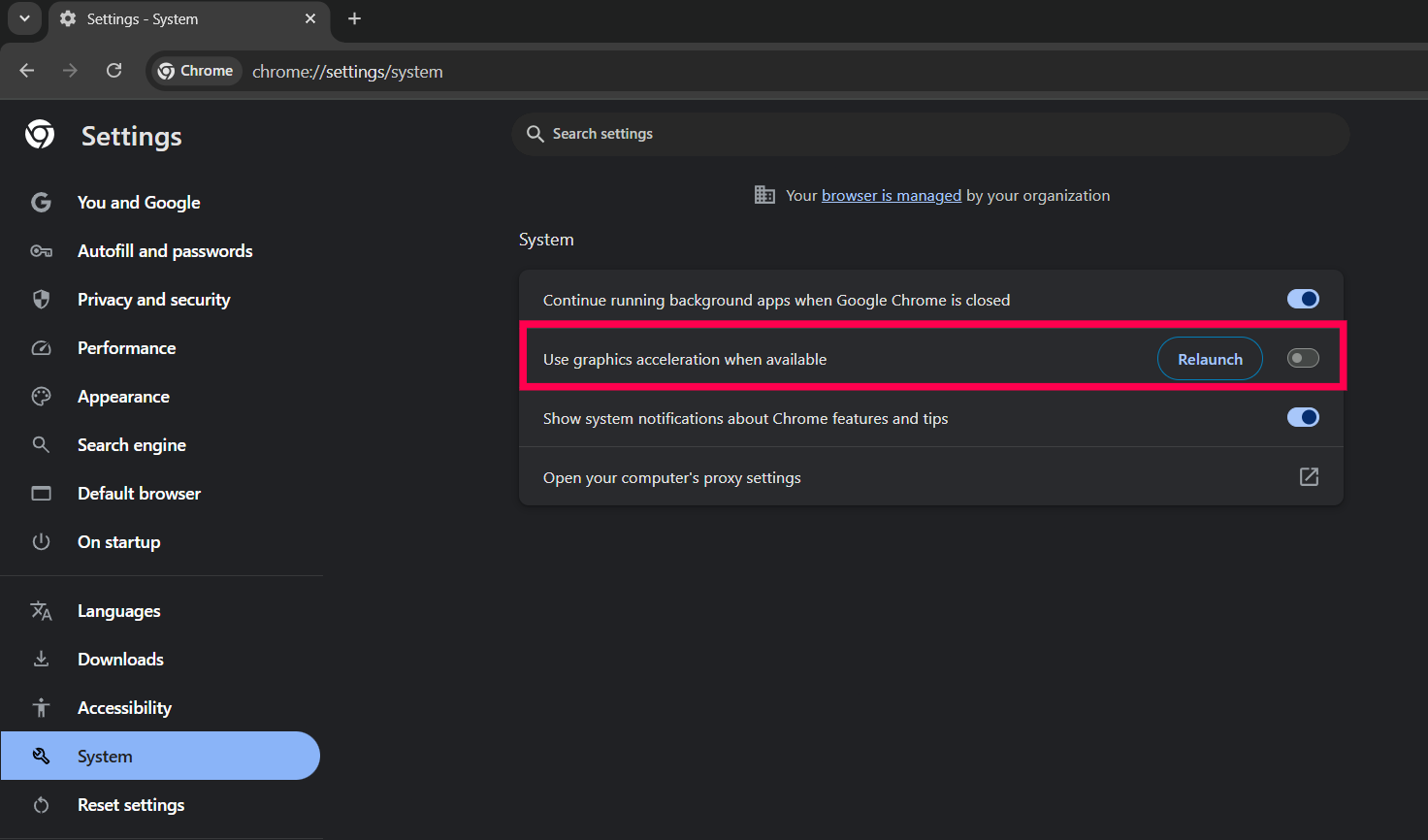
Disabling this feature ensures smoother Zoho Assist session rendering on affected devices.
We appreciate your patience and understanding as we work to provide a long-term solution. If you have any questions or need assistance adjusting your browser settings, feel free to reach out to our support team at support@zohoassist.com
Sincerely,
The Zoho Assist Team
Topic Participants
Ambrish V
Sticky Posts
Attention: Upcoming changes to Zoho Assist support for older windows versions
At Zoho Assist, our goal is to provide you with secure, reliable, and feature-rich remote support experiences. To maintain this standard, we periodically align our platform with the latest technology and security updates from the broader software ecosystem.End of Support announcement for macOS 10.9, 10.10, 10.11, 10.12, and 10.13
Dear Customers, We would like to inform you of an important update regarding our support for legacy macOS operating systems with Zoho Assist. Starting May 1, 2025, we will officially end support for macOS versions 10.9, 10.10, 10.11, 10.12, and 10.13.Zoho Assist: Important Security Upgrade Notice
Dear Customers, We're committed to providing safe and secure remote connections across networks and devices. To uphold this commitment, we're upgrading to an updated security protocol. This change won't affect our support for major operating systems.TLS v1.2 Upgrade and Changes to System Requirements for Zoho Assist
As we tighten our TLS v1.2 security update, admins and users need to be aware that supported versions of operating systems and web browsers will change after October 31st, 2018. After this date, we will retire support for clients using TLS v1.0 and TLS v1.1 protocols. In order to support these changes and meet the updated PCI standards please ensure that computers configured for Unattended Access are updated to TLS v1.2 and use web browsers that support the latest update. What is TLS v1.2, and whyRelease Notes: Version 1.82, February 2015
New Chrome Extension: Start a Session quickly! Recently, we have released a Chrome Extension , which enables you to start a session instantly. You can simply enter your customer email address and start a session right from your browser extension. Make sure you are always logged-in to your Zoho account in your chrome browser so that you can avail the professional edition features if you are a paid customer. Supporting your Mac customers is much easier now! We have deployed a new Customer Console
Recent Topics
Deluge Error Code 1002 - "Resource does not exist."
I am using the following script in a Custom Button on a Sales Return. Basically, the function takes the information in the sales return (plus the arguments that are entered by the user when the button is pushed) and creates a return shipping label viaAdding multiple Attendee email addresses when adding a Zoho Calendar event in Zoho Flow
I am trying to integrate Notion and Zoho Calendar via Zoho Flow. However, the Attendee email address supported by Zoho Calendar - Create event only supports one email address, so I am having difficulty implementing automation to automatically registerGraceful Handling of Exceeded Option Limits
Hi Zoho SalesIQ team. I would like to submit a feature request to deal with a bug in salesIQ Current Behavior (Bug): When a dynamic list passed to the Single Select Option Card contains more than 20 options, the Zobot stops responding (freezes/hangs)System default SLA descriptions can't be modified
The system default SLAs have identical descriptions for all SLA levels, but their settings differ. However, I am facing an issue where I cannot modify these descriptions and save the changes. The content of the description box can be edited but the changesAdding non-Indian billing address for my Zoho subscription
Hey Need help with adding a non-Indian billing address for my Zoho subscription, trying to edit the address to my Singapore registered company. Won't let me change the country. Would appreciate the help. Regards, RishabhHow to create one ZohoCRM organisation out of a multi-organization?
Hi, we have a multi-org including two different Zoho CRM organizations for two companies using respectively EUR and USD as default currency. I was wondering if there is any easy way to merge the two organizations into just one, so that users may accessGray screen while signing documents
We are all getting a "gray" screen when trying to sign documents in Zoho sign. Anyone else having issues?Designing a practical Zoho setup for a small business: lessons from a real implementation
I recently finished setting up a Zoho-based operating system for a small but growing consumer beauty business (GlowAtHomeBeauty), and I wanted to share a practical takeaway for other founders and implementers. The business wasn’t failing because of lackLink Purchase Order to Deal
Zoho Books directly syncs with contacts, vendors and products in Zoho CRM including field mapping. Is there any way to associate vendor purchase orders with deals, so that we can calculate our profit margin for each deal with connected sales invoicesProjects custom colors replaced by default orange
Since yesterday, projects uploaded to Zoho, to which I had assigned a custom color, have lost the customization and reverted to the default color (orange). Has anyone else had the same problem? If so, how did you resolve it?Interview booked through Invite but no Notifications
We have a workflow that was developed through a developer/partner that was tested and worked. Today, we pushed a candidate through the process and invited them to an in-office interview. They were sent the booking link (as usual and as tested before successfully)WebDAV support
I need WebDAV support so that I can upload/download (and modify) documents from my local file system. Is anything planned in his direction?Automatiser la gestion des SLA dans Zoho Desk avec Zoho Contracts
Les équipes du service client s’efforcent d’assurer un support rapide, régulier et fiable pour garantir la satisfaction de chaque client. Les accords de niveau de service (SLA) permettent de clarifier les engagements en définissant les termes et conditionsiOS App doesn't refresh for Document Creation
Hello Zoho team, I have created a workflow to be used on a mobile iOS device which starts in Zoho Creater and ends with a murge and store function that then opens the newly created document within the Zoho Writer app. This process is working great howeverUploading a signed template from Sign to Creator
Good day, Please help me on how to load a signed document back into Creator after the process has been completed in Sign. Below is the code that I am trying, pdfFile = response.toFile("SignedDocument_4901354000000372029.pdf"); info pdfFile; // AttachZoho DataPrep and File Pattern configuration
I'm using Zoho data prep to ingest data from One Drive into Zoho Analytics... The pipeline is super simple but I can't any way to get all the files that I need. Basically I need to bring all the files with a certain pattern and for that I'm using a regexAssistance needed: Activation of a domain
Hello Zoho Support, I purchased the .com domain "primesolva.com" via Zoho 6 days ago. The domain is still pending, and I cannot access the DNS panel to add the TXT verification for domain ownership. Please confirm the registration status and help me activateOperation not permitted
I am trying to add an email address to the list of user but I am getting error Operation not permittedRequest to Permanently Delete Email User (info@mehbobgulf.com ) from Old Organization
Please permanently delete the user email info@mehbobgulf.com It is still associated with my old Zoho organization. I cannot delete it because it shows ‘You cannot delete email. Zoho host’. I need to use this email in a new Zoho account.”Client host [89.36.170.5] blocked using Spamhaus
Hello please make make actions for delist ..... "Client host [89.36.170.5] blocked using Spamhaus"Suggestion: Option to Re-run a migration
As I'm going through a migration process, I like the IMAP migration tool, but it would be better if there were an option to re-run the same migration as configured. There's not even an option to copy/edit one that's already there. Just run if it hasn'tIssue with "Add Your Mobile Number"
Hello, I am trying to sign up for email service for a domain name, and I cannot finish the authentication. When I enter my mobile number, I receive the message "We’re unable to send OTP to this mobile number. Please contact support-as@zohocorp.com". Izoho mail non vérifié
Bonjour, Il y'a un jour que j'ai acheté un domaine et toute les tentatives pour l'associé a mon compte shopify son vaine. j'ai essayé TXT sans suite après, j'ai essayer avec CNAME sans suite. j'aurais besoin de votre assistance pour associé mon mail.Unable to send message;Reason:553 Relaying disallowed. Invalid Domain
i have facing the issue "Unable to send message;Reason:553 Relaying disallowed. Invalid Domain" if i verify domain evertthing i did but still face the same error.ZohoMail is so close to being Perfect BUT
Why don’t you have HILIGHTING???!! I've been trying to find a substitute for Edison Mail but I want & need hilighting (preferably in more than just yellow)! Is this even on your To Do list? I’m so disappointed. 🙄Override Auto Number field?
We are preparing to migrate from Salesforce. In Salesforce, we auto-generate a unique number on our Opportunities (Potentials). If the Opportunity results in a contract, we use that unique number as the Contract number. There are some situations whereUsing a third party service provider want to move directly with Zoho
Hi good day I’m currently using Zoho but I’m using a third party service provider I want to move directly with you guys I’m using Zoho email and invoices and my domain please let me know if it’s possible to move away from the third party provider my emailRequest for Assistance Regarding Email Sending Issue (554 5.1.8 - Email Outgoing Blocked)
Dear Zoho Support Team, I hope this message finds you well. I am writing to request assistance with an issue we are currently facing regarding our Zoho Mail account. Our email account, admin@tuyensinhcanuoc.com, is encountering the following error whenZoho Mail API returns empty inbox (0 messages) but webmail shows 37 unread emails
Hello, I'm experiencing a discrepancy between Zoho Webmail and the Mail API (EU region). **Setup:** - Account: EU datacenter (mail.zoho.eu) - API: Self Client OAuth2 via api-console.zoho.eu - Scopes: ZohoMail.messages.READ, ZohoMail.messages.UPDATE, ZohoMail.folders.READ,Zoho Mail not working
Zoho Mail not workingShipStation and Zoho Inventory
Hello, I am looking to sync zoho inventory with shipstation ZOHO INVENTORY SHIP STATION Sales Order ==> create ORDERS INVOICE <== Shipments What exactly does BETA mean on the Shipstation connector? This is required for me to sign-on in the next month. Thanks in advance for your efforts550 5.4.6 Unusual sending activity detected. Please try after sometime
Hi, I am receiving this error message when trying to send my emails. The only reason I can think why this is happening is my previous two emails were bounced back to me due to a non working mailbox error. I have followed the online links for unblocking but it says there are no blocks on my account. How and when can I get my email working again to send emails? Thanks,E
We are trying to add our Zoho Form embed in our Elementor Page Builder. After adding Zoho Forms widget in elementor page builder it’s displaying in backend page builder but it’s giving 403 error while trying to save, as it’s not reflecting in front end.Formatting Problem | Export to Zoho Sheet View
When I export data to Zoho Sheet View, ID columns are automatically formatted as scientific notation. Reformatting them to text changes the actual ID values. For example, 6557000335603071 becomes 6557000335603070. I have attached screenshots showing thisConnecting Zoho Inventory to ShipStation
we are looking for someone to help connect via API shipStation with Zoho inventory. Any ideas? Thanks. Uricustom module import.
Is there a way to import data into a custom module? Thanks RudyHEIC File Type Viewer
Hi, It would be nice to be able to click on the images in the All Entries/Reports Tables which are HEIC the same as JPG, PNG, etc. so they open in a viewer from Zoho or the Attachment Service, today HEIC requires you to download each image and open itBuilding Toppings #4 - Setting up and using connections in Bigin toppings
When building a topping to extend Bigin's functionality and connect it with third-party applications, creating and handling connections is an important step. Connections provide a secure way for your topping to authenticate and communicate with otherNeed code format to specify default values
Can someone please direct me to the code syntax or the proper translation per the instructions circled below. These instructions don't seem correct.AI Interview Insights: Turn Recorded Interviews into Quick Transcripts & Summaries
Evaluating interviews shouldn’t require replaying long recordings or taking manual notes. With AI Interview Insights, you can now review complete transcripts and AI-generated summaries of your One-way (Recorded) interviews right inside Zoho Recruit. ThisNext Page