Introducing Configure, Price, Quote (CPQ) in Zoho CRM | Public early access 2023
Greetings Customers!
We're excited to announce that the CPQ feature will soon be available in Zoho CRM and accessible to all accounts using the Professional, Enterprise, and Ultimate editions. We've opened this feature to select customers, and it'll be available to all within a week. As we move ahead, you can expect further enhancements and added functionalities.
Please note that while the CPQ feature will be enabled to all customers, one of its components, called Guided Selling, will be available upon request. Guided Selling is a holistic way of filtering the product selection to meet the customer's requirements. It presents a series of product-specific questions and narrows down a list of products based on the user's responses.
-------------EDIT As on 17/10/2023--------
Guided Selling in CPQ, which was available on Request-based Early Access, has now been released to all eligible users across DCs. Guided Selling is as accessible as other features in CPQ. Please learn more about Guided Selling from here: https://help.zoho.com/portal/en/kb/crm/cpq/articles/guided-selling
-------------------------------------------------------
What is Configure, Price, Quote (CPQ)?
CPQ is a sales tool that helps you share customized and accurate quotes with customers in just a few clicks. Pre-configure product combinations and price rules and create bespoke quotes, along with applicable taxes and discounts. This is a transformative tool for businesses with multiple product lines. Please note that currently, the CPQ feature only supports Zoho CRM's native inventory modules.
How to access CPQ in Zoho CRM
Click on the gear icon in the top-right corner of your Zoho CRM account. On the Setup page, you can access your CPQ settings and configure your product and price rules.
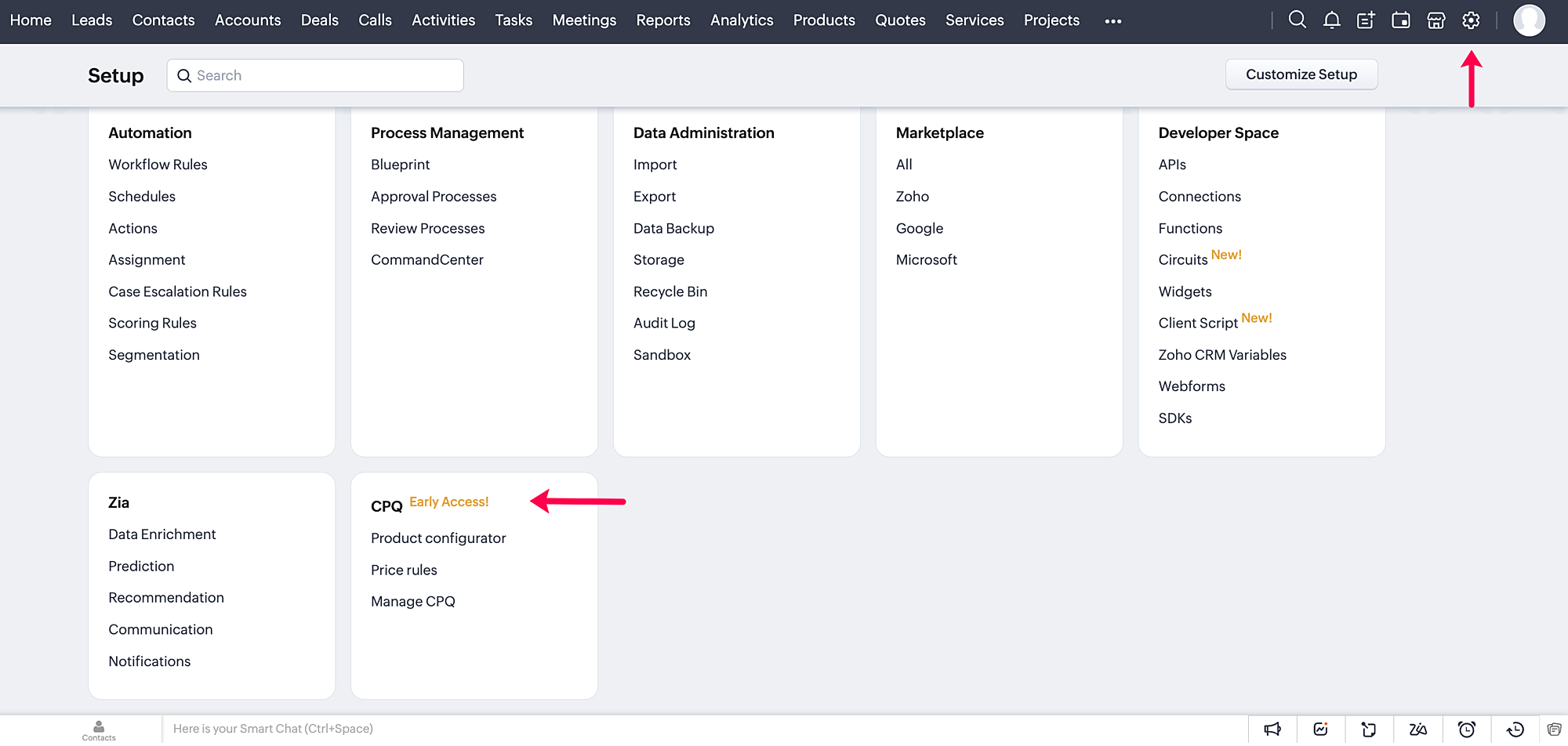
How does CPQ in Zoho CRM work?
CPQ centralizes the pricing and product inclusions in quotes salespeople generate, allowing them to sell more quickly and efficiently. In addition to Zoho CRM's built-in inventory management, CPQ expedites quote creation and enhances the customer's purchase journey. The two building blocks of the CPQ solution are the Product Configurator and Price Rules.
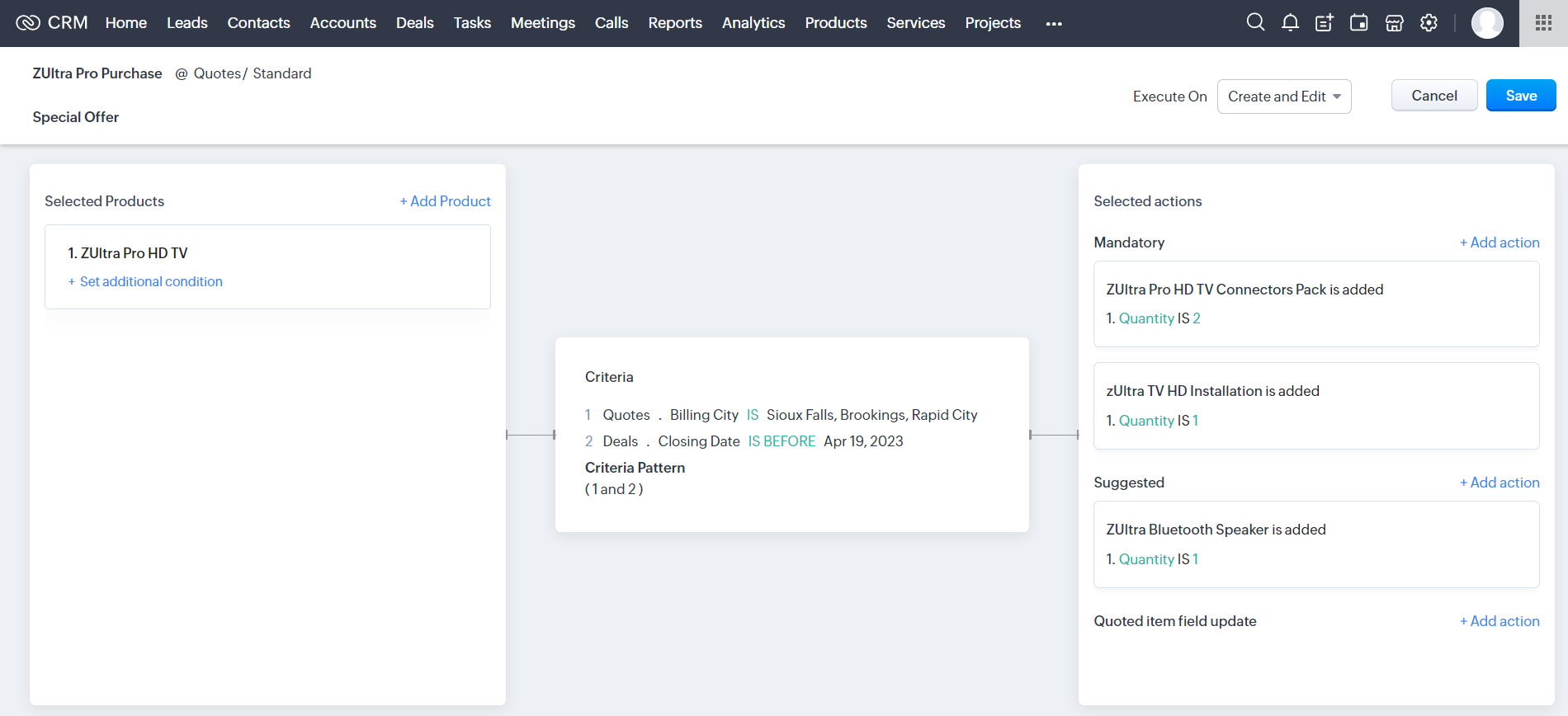
The Product Configurator enables you to pre-define automated actions like product additions, suggestions, and field updates for a single product or a combination of products. You can set multiple criteria to qualify these product rules across various modules in CRM. This cross-module capability enables salespeople to customize quote generation by including different record types, such as deal amount, region, vendors, and so on.
Price Rules help to accommodate conditional pricing; i.e., you can pre-set list prices and discounts for products that meet specific conditions. It can also qualify price rules according to cross-module conditions.
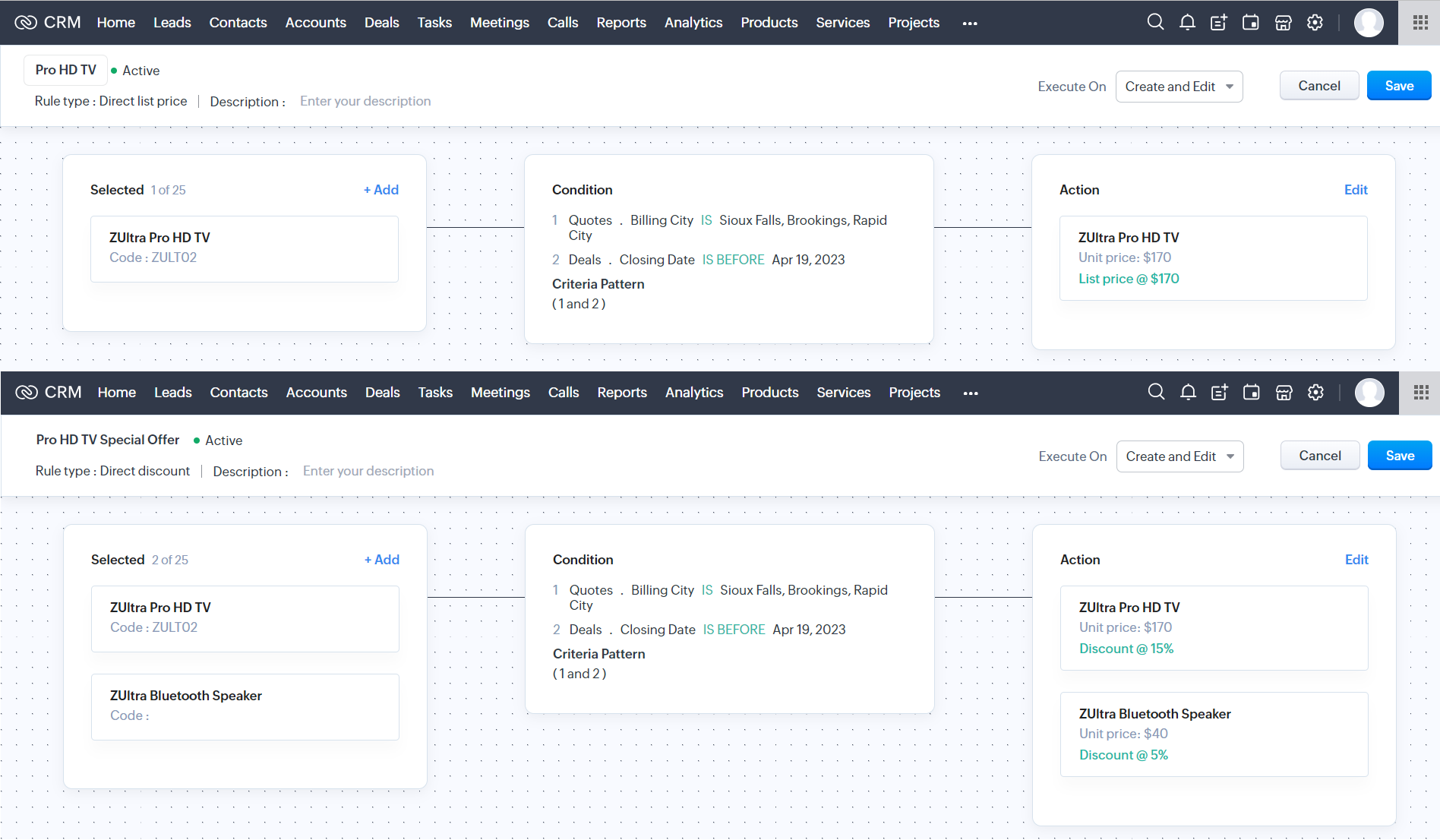
After you configure your rules in CPQ, the pre-defined actions are executed automatically when your salespeople create quotes in Zoho CRM. Watch this video for a quick overview of CPQ:
Guided Selling
Guided selling in CPQ quickly refines the results from the product catalogue based on the customer's requirements. For this, you just have to create a series of sequential questions and map the input answers to appropriate fields across various CRM modules—namely, the Contacts, Accounts, Deals, and Products modules. So during quote creation, salespeople just have to specify the product requirements, and the Guided Selling functionality in CPQ suggests the right product.
How can you benefit from a CPQ solution?
It's essential for businesses today to keep up with prospects' evolving needs and offer solutions quickly before they move on to other alternatives. One aspect of sales conversion is sending a customized quote to your prospect while making necessary modifications when required. And relying on outdated legacy systems and manual effort can only lead to more errors and delays. A CPQ solution ensures your salespeople can generate customized quotes quickly and thereby enhance the purchase experience.
- A CPQ solution, along with Zoho CRM's built-in inventory management functionalities, enables you to build a more comprehensive sales cycle.
- It expedites your quote management process, enabling your salespeople to save time and effort.
- It minimizes the risk of errors due to misinformation or typos during quote calculation.
Watch our recorded webinar to get an overview of Zoho CRM's CPQ feature and how it works.
Resources: Help docs
Topic Participants
Ankitha Nair
Kevin Flynn
sundeep mohana
Ivan Staykov
Chester Hull
Sticky Posts
Announcing Early Access to "Zoho CRM for Everyone" — A new and exciting update to Zoho CRM
Update : Zoho CRM For Everyone's Nextgen Interface gets an upgrade! Hello everyone, We’ve updated the Zoho CRM for Everyone Nextgen interface based on your feedback. The UI is now simpler with a unified sidebar, a more visible global search and features[Early Access] Voice of the Customer (VoC) for Zoho CRM
Happy new year, everyone! We have an exciting addition to our suite of features and would like to introduce you to VoC (Voice of the Customer) for Zoho CRM, powered by Zia. 2023 is definitely the best time to be a customer with rapid innovations and advancementsAdding calls as a channel in Voice of the Customer
Dear All, We hope you're well! It's been almost a year since we opened Zoho CRM's Voice of the Customer solution up for early access. We are grateful for the reception and support you have been showing us with regards to its adoption and feedback. Since
Recent Topics
Dynamic Field Folders in OneDrive
Hi, With the 2 options today we have either a Dynamic Parent Folder and lots of attachments all in that one folder with only the ability to set the file name (Which is also not incremented so if I upload 5 photos to one field they are all named the sameRight Shift key not sending to Zoho Assist environments
I'm unable to use Right Shift key in Zoho environments. Zoho environments are Win10. Computer I access from is Win 11. Issue started when I changed to Win 11. Have tried: - Multiple browsers - web client AND desktop client - 3rd party mapping tools toUnable to Filter Retail Sales Orders & Need Paid/Unpaid Filter – Zoho Books
Hi Zoho Team, Recently you introduced Retail – Standard and Retail – Premium templates for Sales Orders. However, in the Sales Order module we still cannot filter or segregate Retail Sales Orders separately from normal B2B sales orders. Because of this,About Meetings (Events module)
I was working on an automation to cancel appointments in zoho flow , and in our case, we're using the Meetings module (which is called Events in API terms). But while working with it, I'm wondering what information I can display in the image where thePDF Annotation is here - Mark Up PDFs Your Way!
Reviewing PDFs just got a whole lot easier. You can now annotate PDFs directly in Zoho Notebook. Highlight important sections, add text, insert images, apply watermarks, and mark up documents in detail without leaving your notes. No app switching. NoAbility to assign Invoice Ownership through Deluge in FSM
Hi, As part of our process, when a service appointment is completed, we automated the creation of the invoice based on a specific business logic using Deluge. When we do that, the "Owner" of the invoice in Zoho FSM is defaulted to the SuperAdmin. ThisHow do you do ticket add ons in Backstage?
Hi Everyone, If you wanted to have general admin tickets and allow for add ons, like camping, or car or Carbon offset. What would you do? Peace RobinFrom Zoho CRM to Paper : Design & Print Data Directly using Canvas Print View
Hello Everyone, We are excited to announce a new addition to your Canvas in Zoho CRM - Print View. Canvas print view helps you transform your custom CRM layouts into print-ready documents, so you can bring your digital data to the physical world withvalidation rules doesn't work in Blueprint when it is validated using function?
I have tried to create a validation rule in the deal module. it works if I try to create a deal manually or if I try to update the empty field inside a deal. but when I try to update the field via the blueprint mandatory field, it seems the validationPull cells from one sheet onto another
Hello all! I have created an ingredients database where i have pricing and information and i want to pull from that database into a recipe calculator. I want it to pull based on what ingredient I choose. The ingredients database has an idea and i wantHow can Data Enrichment be automatically triggered when a new Lead is created in Zoho CRM?
Hi, I have a pipeline where a Lead is created automatically through the Zoho API and I've been trying to look for a way to automatically apply Data Enrichment on this created lead. 1) I did not find any way to do this through the Zoho API; it seems likeEmails Failing with “Relaying Issues – Mail Sending Blocked” in ZeptoMail
Hello ZeptoMail Support Team, We are facing an email delivery issue in our ZeptoMail account where emails are failing with the status “Process failed” and the reason “Relaying issues – Mail sending blocked.” Issue Details Agent Name: mail_agent_iwwa FromHow does Zoho handle support operations for our EU users?
Dear Zoho users, We have some news and reminders about how we handle support operations for Zoho users in the EU Data Center. This is part of our broader commitment to ensuring GDPR compliance and providing secure data handling for all users. We'd likeSender Email Configuration Error.
Hello Team, Hope you are all doing well. We are in the process of creating the Zoho FSM environment in the UAE. When we try to add the sender email address “techsupportuae@stryker.com”, we receive the error message: “Error occurred while sending mailLayout Adjustment.
Hello Latha, Hope you are doing well. I wanted to check with you about adjusting the layout columns in the Service Report from the backend, as currently there is no capability for us to customize the layout from our end. Below is the output that I amLet us view and export the full price books data from CRM
I quote out of CRM, some of my clients have specialised pricing for specific products - therefore we use Price Books to manage these special prices. I can only see the breakdown of the products listed in the price book and the specialised pricing forAnyone in Australia using Zoho Books AND has their account with NAB?
Hi I have an account with both NAB and Suncorp. Suncorp transaction come in the next day however NAB transactions take 4-5 business days to appear. eg: A deposit made today in my Suncorp will be imported into Zoho tomorrow. A deposit made today to the NAB account will be imported maybe Saturday (Friday overnight). I have contacted both Zoho and NAB but noone seems to know why. I was just wondering if anyone else in Australia uses NAB and has this issue (or doesn't) maybe we could compare notes andZoho Often Lag
Desk Team, We've noticed that Desk, Creator & other apps seems to lag more these days. We often refresh multiple times.Offer already made- but I withdrew it
I made an offer letter, but made a mistake on it. I withdrew the offer but now I can't recreate the correct offer. Zoho keeps saying that "A same offer has already been made". I look in the "offers" and there are NO offers (this is the first time I'veImporting into the 'file upload' field
Can you import attachments into the file upload field. I would expect it to work the same way as attachments do, But can't seem to get it to work. Moderation Update: The option to import into File Upload and Image Upload fields has been supported. ReadLayout Rules Don't Apply To Blueprints
Hi Zoho the conditional layout rules for fields and making fields required don't work well with with Blueprints if those same fields are called DURING a Blueprint. Example. I have field A that is used in layout rule. If value of field A is "1" it is supposed to show and make required field B. If the value to field A is "2" it is supposed to show and make required field C. Now I have a Blueprint that says when last stage moves to "Closed," during the transition, the agent must fill out field A. NowWhy is the ability Customize Calls module so limited?
Why can't I add additional sections? why can't I add other field types than the very limited subset that zoho allows? Why can I only add fields to the outbound/inbound call sections and not to the Call Information section?Zoho Desk blank screen
opened a ticket from my email, zoho desk comes up blank, nothing loads. our receptionist also gets the same thing under her login on her computer. our sales rep also gets same thing on zoho desk at his home on a different computer. I tried clearing cache/history/cookies,Optimum CRM setup for new B2B business
Can some advise the most common way to setup Zoho CRM to handle sales for a B2B company? Specifically in how to handle inbound/outbound emails. I have spent hours researching online and can't seem to find an accepted approach, or even a tutorial. I havefilter on sheets mobile (iOS, iPadOS) does not work
I have this issue on every spreadsheet, whether imported or created natively in Zoho Sheets. I can use on desktop without issue: desktop screenshot on iOS the filter dropdowns are not there and there is no way to add them mobile iPadOS looks the same【Zoho CRM】商談タブへのデータインポート
Zoho使用前にエクセルで管理していた商談情報を、Zoho一括管理のため、商談タブにインポートしたいのですが、お客さまの氏名だけが紐づけられませんでした。 「Zoho CRMにインポートする項目を関連付ける」のところが画像のようになっています。 (弊社では、「姓」を「★個人データ名」という項目名に変更し、フルネームを入れて使用しています。) どのようにしたら氏名をインポートできるかご存じの方がいらっしゃいましたら、ご教示いただきたく、よろしくお願いいたします。 (投稿先が間違っていましたらご指Add Custom Reports To Dashboard or Home Tab
Hi there, I think it would be great to be able to add our custom reports to the Home Tab or Dashboards. Thanks! ChadCanva Integration
Hello! As many marketing departments are streamlining their teams, many have begun utilizing Canva for all design mockups and approvals prior to its integration into Marketing automation software. While Zoho Social has this integration already accomplished,Can't edit Segments
Happening with 2 different Zoho One environments, in different browsers. Please fix.Zoho Sheet for Desktop
Does Zoho plans to develop a Desktop version of Sheet that installs on the computer like was done with Writer?Transfer ownership of files and folders in My Folders
People work together as a team to achieve organizational goals and objectives. In an organization, there may be situations when someone leaves unexpectedly or is no longer available. This can put their team in a difficult position, especially if thereConsumer Financing
Does Zoho currently have a payment gateway (such as Stripe, Square, etc) which offers financing for customers? So, let's say the estimate we give the customer is greater than what they can afford at the time, but we can sell the service now, letting themSubform edits don't appear in parent record timeline?
Is it possible to have subform edits (like add row/delete row) appear in the Timeline for parent records? A user can edit a record, only edit the subform, and it doesn't appear in the timeline. Is there a workaround or way that we can show when a userZoho CRM - Option to create Follow-Up Task
When completing a Zoho CRM Task, it would be very helpful if there was an option to "Complete and Create Follow-Up Task" in the pop-up which appears. It could clone the task you are closing and then show it on the screen in edit mode, all the user wouldZoho CRM for Everyone's NextGen UI Gets an Upgrade
Hello Everyone We've made improvements to Zoho CRM for Everyone's Nextgen UI. These changes are the result of valuable feedback from you where we’ve focused on improving usability, providing wider screen space, and making navigation smoother so everythingFile Upload field automatically replaces spaces with underscores – support experience
Hi everyone, I want to share my recent experience regarding the File Upload field behavior in Zoho Creator and my interaction with the Zoho support team. When a user uploads a file, the system automatically renames the document by replacing spaces inDeluge function to copy parent record file upload field to child record file upload field
I'm stuck trying to write a deluge function that is triggered via automation in child record "Appointments," confirms if a file is in file upload "Report" field of parent "Contacts" record via Contacts lookup field "Contact_Name". If no file is in parentZoho Books Sandbox environment
Hello. Is there a free sandbox environment for the developers using Zoho Books API? I am working on the Zoho Books add-on and currently not ready to buy a premium service - maybe later when my add-on will start to bring money. Right now I just need aMake panel configuration interface wider
Hi there, The same way you changed the custom function editor's interface wider, it would be nice to be able to edit panels in pages using the full width of the screen rather than the currently max-width: 1368px. Is there a reason for having the configuration panel not taking the full width? Its impossible at this width to edit panels that have a lot of elements. Please change it to 100% so we can better edit the layouts. Thanks! B.Image Compression Options
Much better if we have level of options to compress the image [20%, 40%...] We are dealing with service reports daily that has before and after photos (image field)- the file size too large and one thing, the current limit is 10mb or 15mb for reportNext Page