Introducing Zia's integration with OpenAI for Zoho CRM

The integration was earlier available only in the US DC. It has now been extended to the EU, IN, and AU DCs.
Hello all,
We are delighted to announce the release of Zia's integration with OpenAI for Zoho CRM. This integration incorporates the power of OpenAI's generative AI into Zia's AI capabilities. As part of the release, we are introducing the Smart Prompt functionality, to assist users in enhancing their communication with leads and customers. Let us have a look at what it has to offer.
Smart Prompt in Zoho CRM
Smart Prompt recommends prompts to users, and assists them in generating relevant and high-quality content, perform various content-based actions on existing content, and get any additional information as required.
The feature will be available for the following sections in Zoho CRM:
- Email compose window
- Email template creation
- Record details page
Let us take a closer look at how you can use it in your Zoho CRM account.
Email Compose Window
In the email compose window, when the email content is available, you can modify the content. It is also possible to trigger the feature by selecting part of the email content. As of now, this feature is applicable for text content.
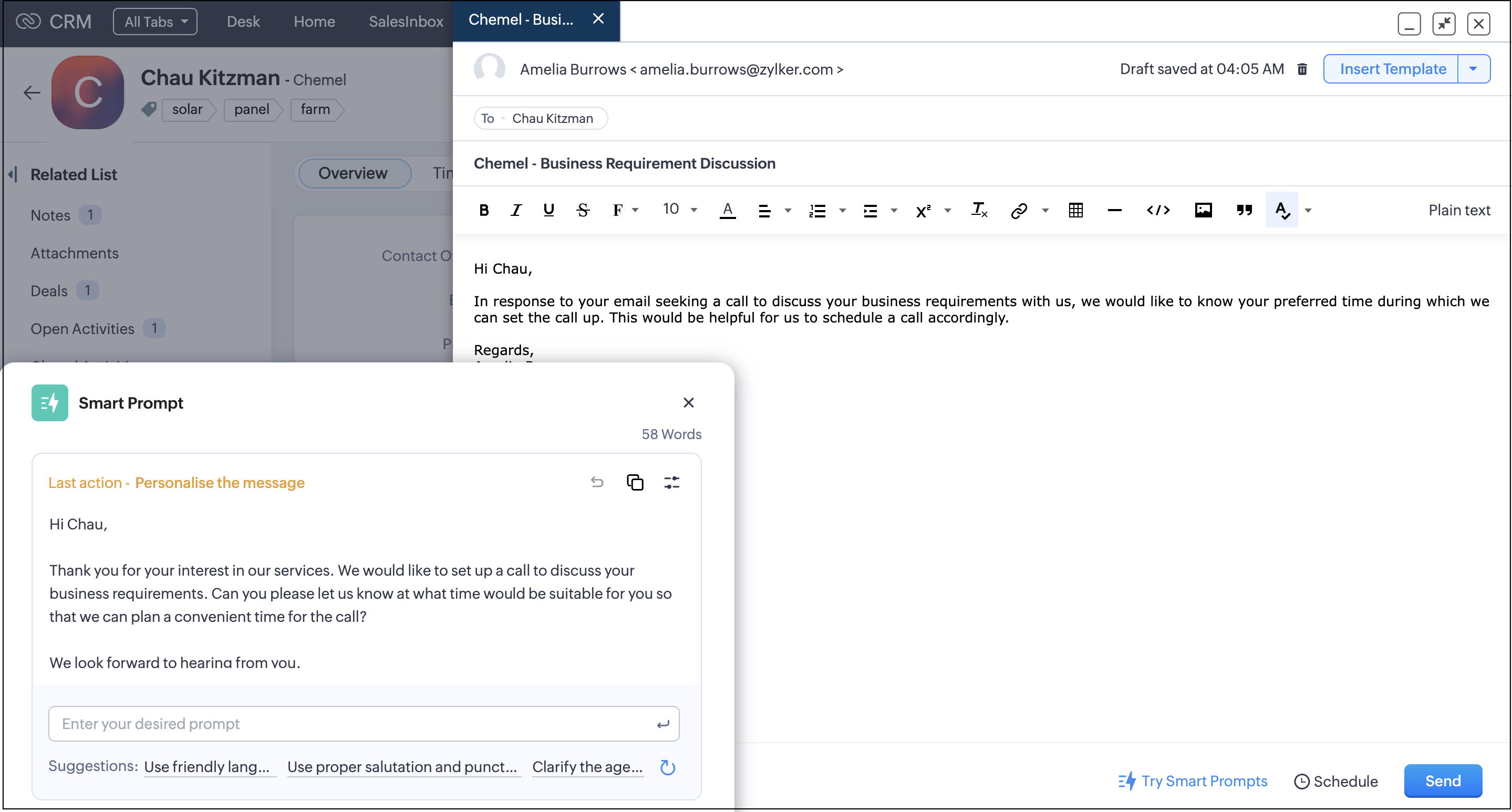
You can also adjust the length and writing style of the generated content.
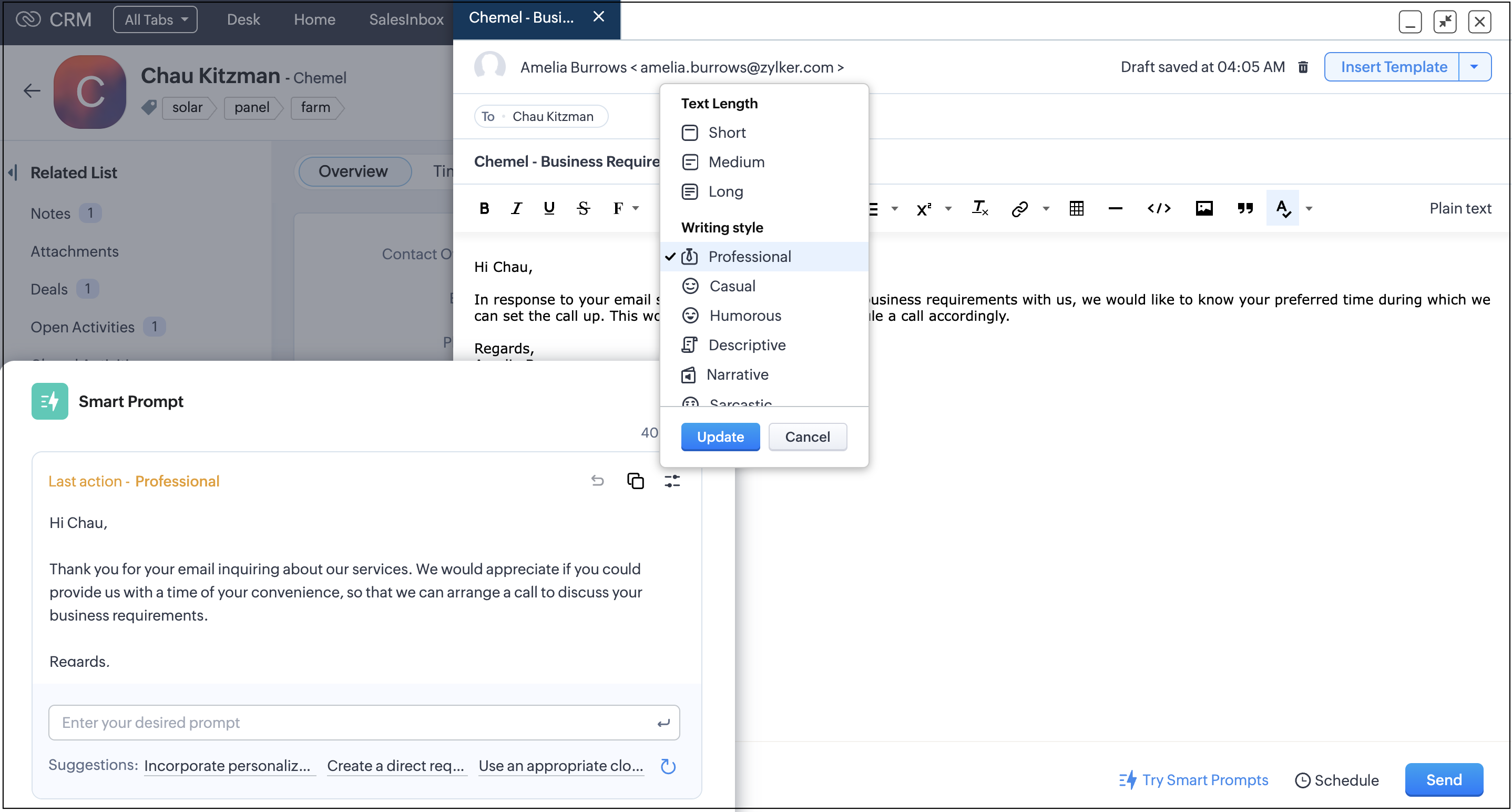
Once you are fine with the changes, you can copy and paste the content in your email compose window. You can directly replace the content in your email compose window using the Replace button, which is available when you compose your email in plain text instead of the rich text format.
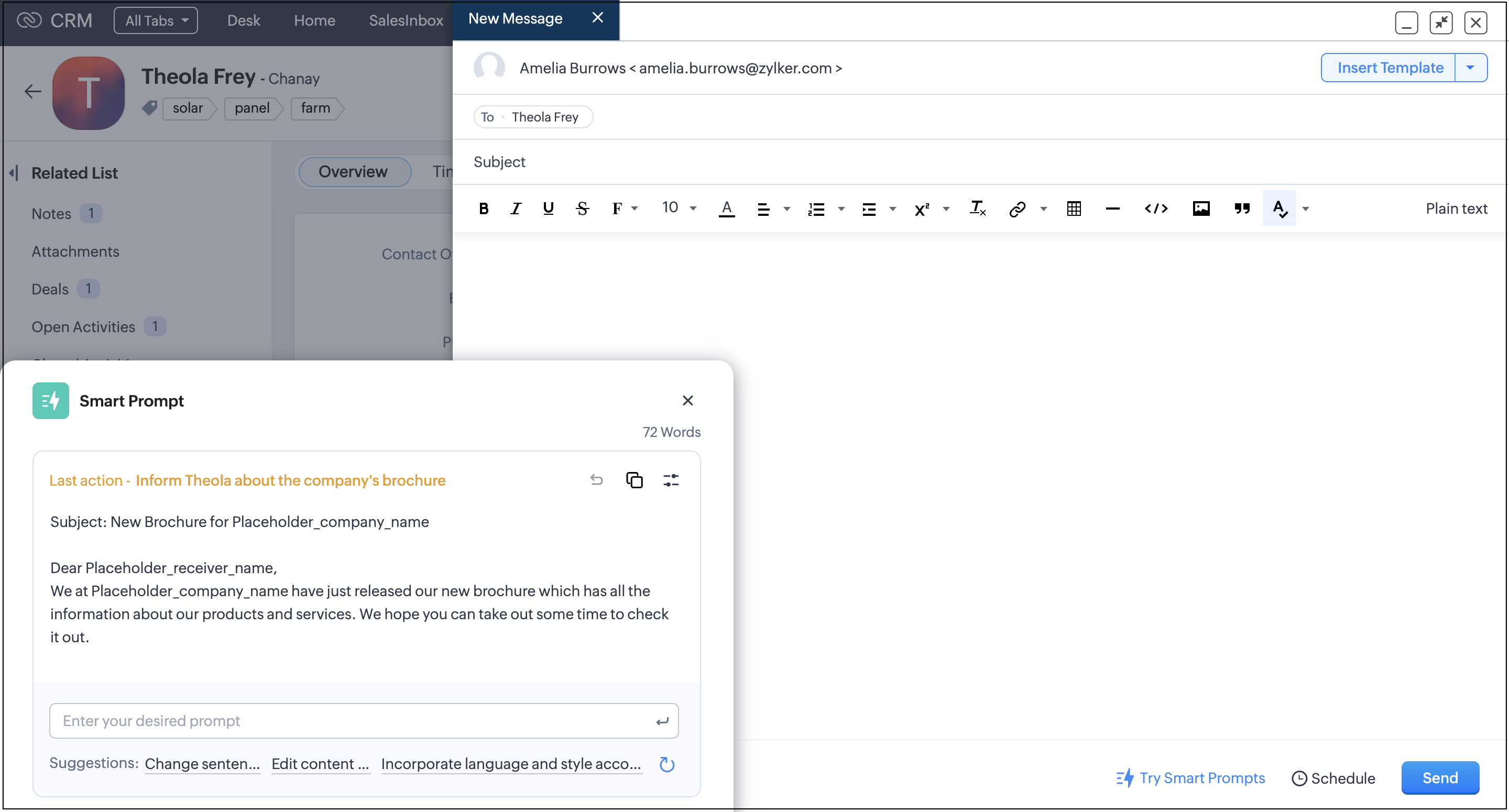
When there is no content input in your email compose window, you can generate content from scratch. Additionally, you can perform custom prompts through the prompt window.
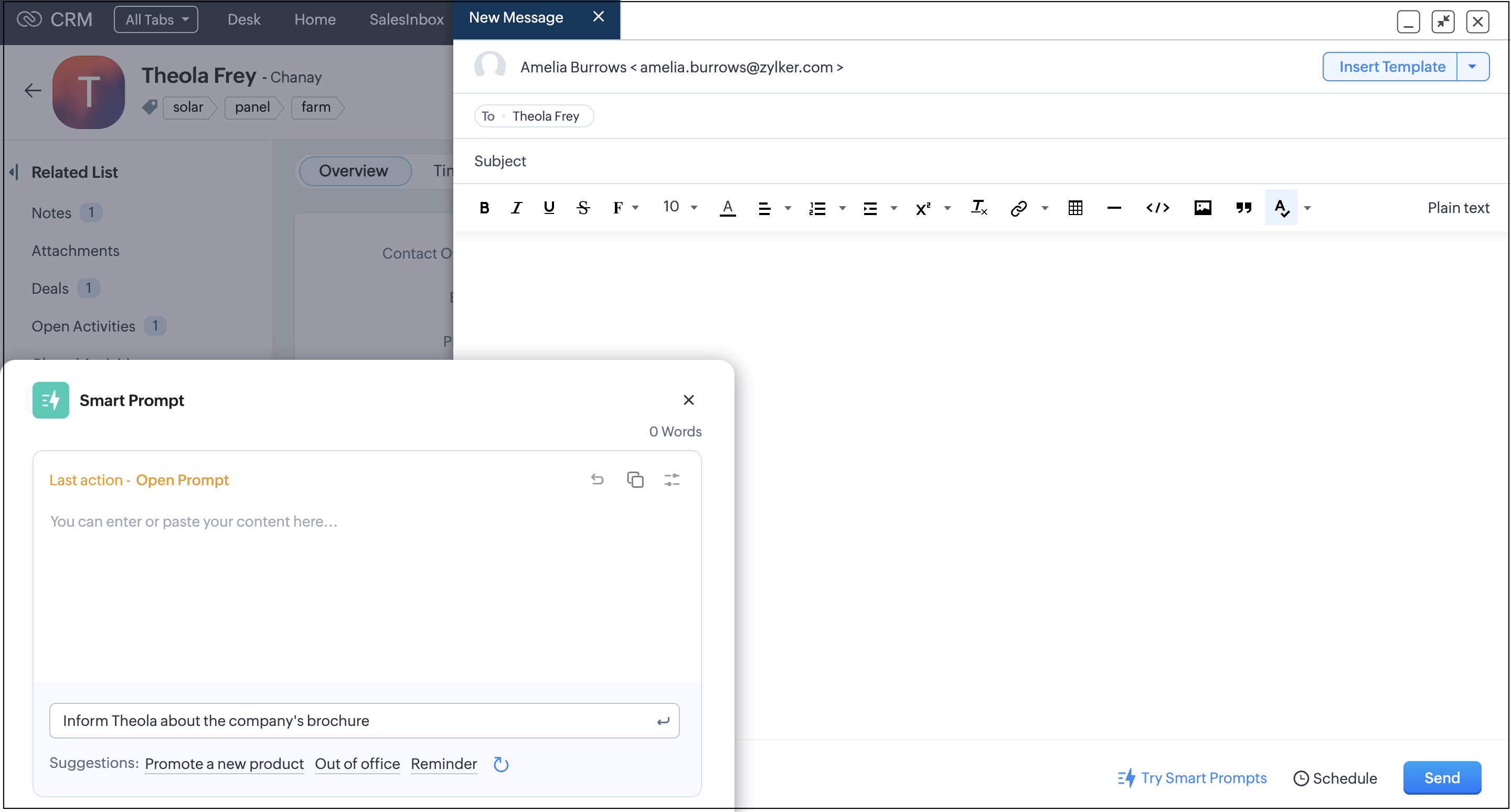
Once you are satisfied, you can copy and paste the content in your email compose window. You can directly insert the content in your email compose window using the Insert button, which is available when you compose your email from scratch in plain text instead of the rich text format.
Email Templates
When creating email templates, you can generate or modify existing content. As of now, this feature is applicable only on the text component.
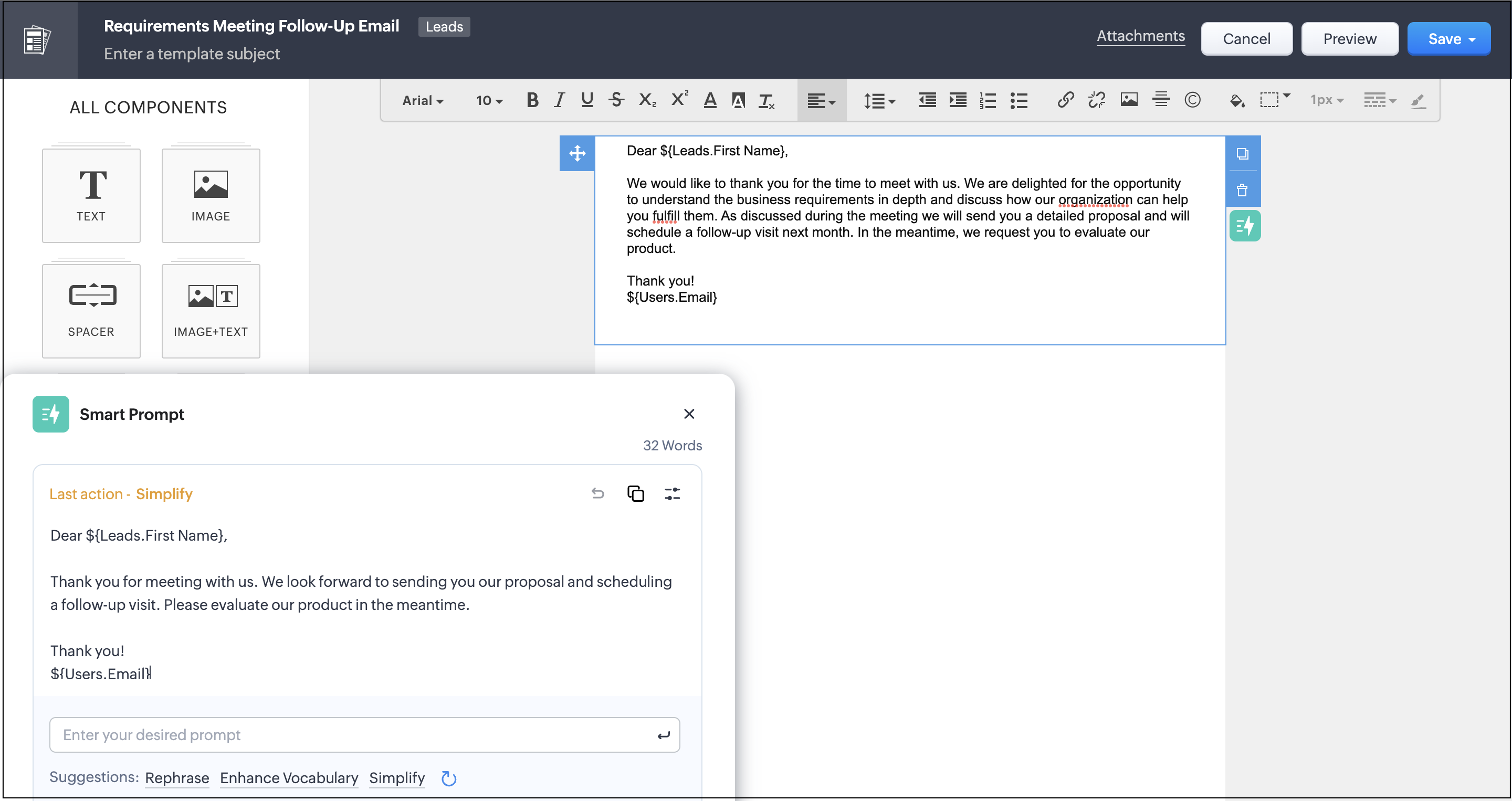
Record Details Page
On the record details page, you can leverage suggestions that you can use to refine individual notes as needed.
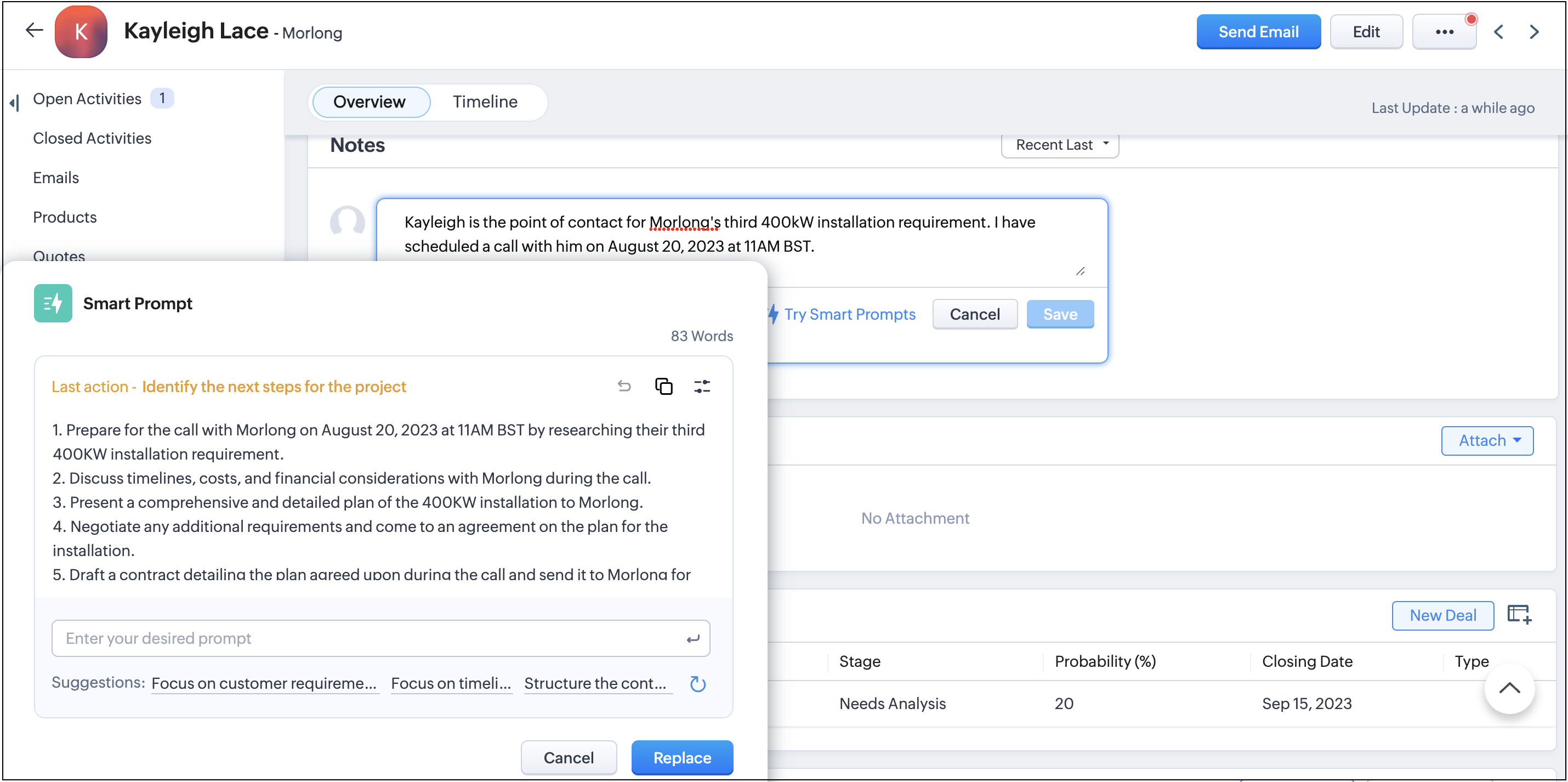
Apart from these, you can extract more information through some of the fields on the record details page.
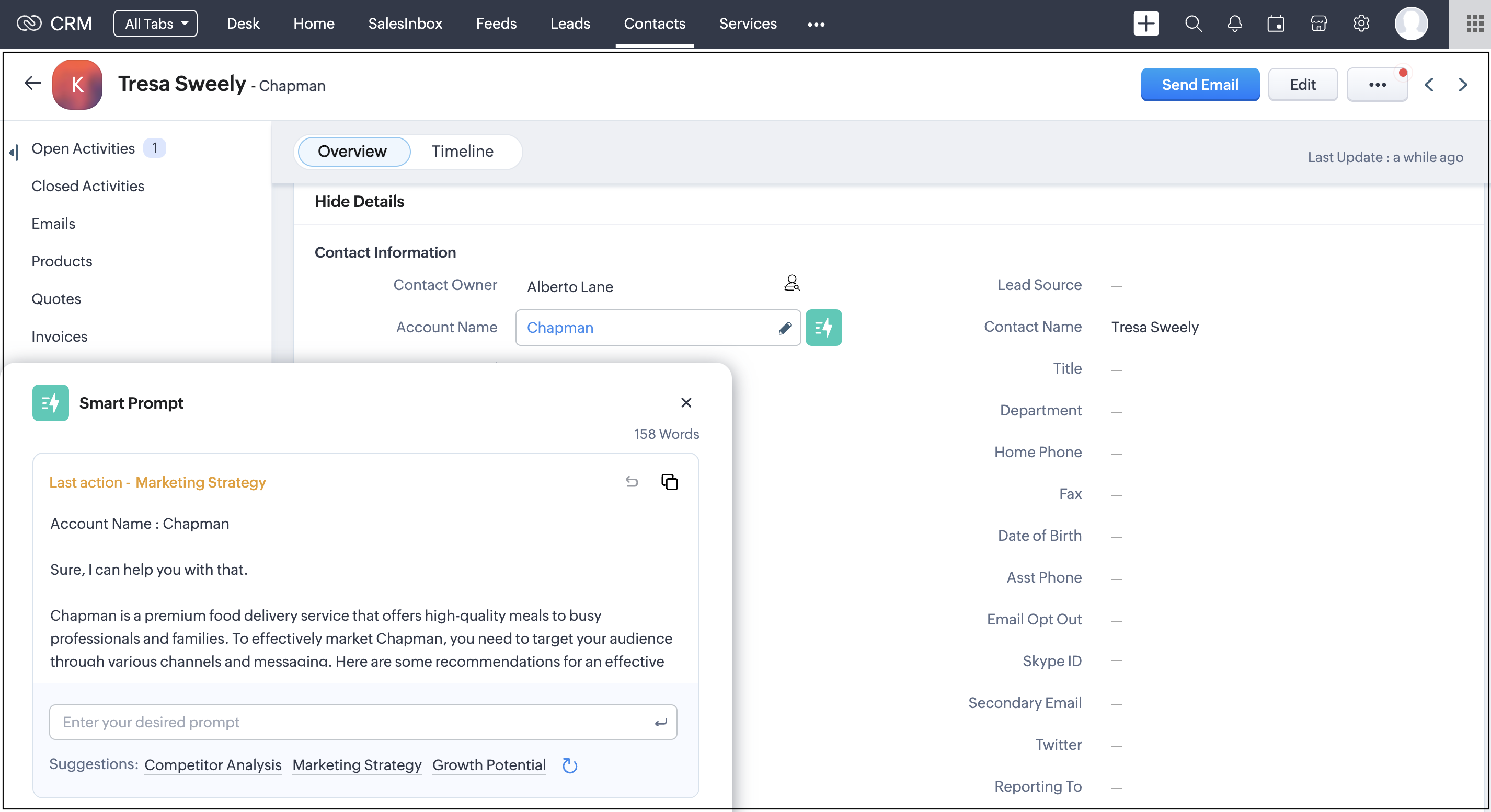
You can extract information using Smart Prompt for the following fields on the records detail page :
Modules | Fields |
Leads | Company, Industry, Website |
Contacts | Account Name, Vendor Name |
Accounts | Account Name, Website, Industry |
Deals | Account Name |
Tasks | Subject |
Calls | Call Agenda, Subject |
Quotes | Subject, Terms and Conditions, Account Name |
Products | Vendor Name |
Sales Orders | Subject, Terms and Conditions, Account Name |
Vendors | Vendor Name, Website |
Cases | Subject, Internal Comment, Account Name, Solution |
Solutions | Questions, Answer |
Appointments | Additional Information |
Notes:
- Only admins can enable/disable the feature.
- Admins can restrict profile permission and disable certain users from accessing this feature.
- Only English language is supported for now.
- Feature is available to accounts with enterprise subscription plan or above.
To learn more about the integration in detail please refer to this help doc. You can also refer to this FAQ section to get some common queries clarified.
Topic Participants
Vinay Karthikk S
George Thiess
Andres
Sunderjan Siddharth
Sticky Posts
Free Webinar - Digital signatures for digital contract management with Zoho CRM
Hi, Did you know you can seamlessly send and collect signatures on important business documents like business proposals, vendor agreements, sales contracts, invoices, and other inventory documents with Zoho Sign’s extension for Zoho CRM? Join our upcomingNew User Interface for your Email integration in Zoho CRM
Hello folks, As most of you may already know, Zoho Mail recently got a new user interface that's a lot better and easier to use. As a result, this change will affect your email integration with your Zoho CRM account**. If you have your email integration in Zoho CRM set up through POP, your Emails UI in CRM will be moved to the new Zoho Mail UI. We hope that you like the new and improved Emails interface inside Zoho CRM. Feel free to share your feedback by commenting below. **Please note that,Fetching leads from Zoho CRM into Zoho Creator, automatically
I'd like to pull new leads from the CRM system, into Creator, on a daily basis. Is this possible? Yes, it is possible. Zoho Creator and Zoho CRM are integrated with each other, enabling you to synchronize data between them. This is done by fetching records from CRM into a Zoho Creator form. In order to achieve this, you'll have to configure a workflow alert in Zoho CRM. For instance, you can maintain the lead details in CRM on a separate form in Zoho Creator by fetching the details automatically
Recent Topics
CRM - Site/Location
Hi Zoho, One massive oversight of the Zoho CRM is the inability to add multiple sites or locations to one account. Many organisations have several (in some cases, hundreds) of sites across the country or even the globe. The workaround to this, of course,An unknown error occurred. Please contact support
Whenever I visit this page I see this. I changed browser and still the same. Can someone from Zoho help me please?How to Streamline Pick & Ship
Is there a way to streamline the built-in pick and ship process? I guess mostly on the ship side. Our current process allows us to choose shipping super fast. It's an EasyPost plugin for WooCommerce. You have to populate the boxes / weights / shippingHow to add, delete or rename the "payment method" drop down?
When we recorded payment in invoice, there's a "payment method" drop down with choices like cash, bank transfer... We want to add and delete or rename some new selection. How to do such adjustment? Please advice.Smarter data gathering with Query component in Wizards
Dear All, Introducing the Query Component in Wizards for CRM! A smart search field that saves you time and effort, and helps you manage and gather data more efficiently than ever before. Long and complex record entries can be overwhelming and prone toIntroducing teamspaces and team modules in Zoho CRM mobile app
Hello everyone, We have an exciting update to share in the Zoho CRM mobile app. As part of CRM For Everyone—a new set of features that reflect our vision to democratize CRM and make it accessible for all—teamspaces and team modules are now available onClient Script - change page and/or section background colours
Hello, Would anyone be willing to help me with a bit of Client Scripting code? I have had a go myself but only been able to alter the form field styles, not the overall page/section/heading styles. I want to set a different page background colour forZoho SalesIQのチャットボット、ブロックのコピー機能
Zoho SalesIQのチャットボットの構築でドラッグアンドドロップで作成を行っているます。 内容は同じブロックのコピーペースト機能がないみたいなのですが、同一のブロック、同一の複数のブロックをいくつも作成する場合は、皆様はどのように行われていますか? 例えば添付の4つのブロックをまとめてコピーして、別のフローの先につなげる場合です。 教えていただけますと幸いです。よろしくお願いいたします。Questions About Zoho Commerce Member Portal
Hello, A couple questions about the Zoho Commerce Member Portal: 1. Can I add only specific pages be added to the Members Portal, and not the entire website? 2. When a customer signs up on my Zoho Commerce site, is there a setting that gives me a chanceOnline Payment Fees
We don't take many online credit card payments so the merchant service provider (PayPal) charges us the 2.9% fee for processing the amount. I would like the ability for the fee to be automatically added to the total amount for "ease of payment". We'dError occured. please try again!!!
I created a new list. Added two new contact's email addresses. I try to EDIT either one of them to add their first name, last name and phone number. Whatever I try to edit and update, I get the error message Error occured. please try again!!! And it doesn't update any of their info. I tried just editing first and last name. Still get the error. No matter what I try to update, I get the error. I tried creating a new list, and adding just one email address and then edit it and also get the error."Send email as" not work
Hi team, I currently use ZOHO MAIL services on the MAKE platform (formerly INTEGROMAT). In MAKE I entered my ZOHO MAIL credentials but the problem is that when the emails are sent from the automation in MAKE, the emails do not come in with the name set*UPDATE: ISSUE RESOLVED, SEE HOW FOR HELP* Issue imbedding Youtube Videos
**UPDATE: RESOLVED** For anyone that is having a similar issue, try this workaround before attempting to have the Zoho techs fix it. I have been in communication with them for weeks about this and they can't seem to fix the issue. Thinking it may have just been my computer or my browser, I tried two different computers on two different networks, each running different versions of Windows, and tried it on Chrome, Firefox and IE; nothing worked. So, needless to say, it's an issue with Zoho somewhere.Backorder For Composite Items
Hello If i released SO for composite item and use backorder feature of zoho inventory then it should backorder child item items of composite and not composite item.This is basic of backordering.I conveyed this to zoho call center but no solution yet.Paid Support
We are in the process of creating tiers for our support offerings. There will be three tiers of support available - 2 paid and 1 free. The paid tiers will be purchased in allotted hours. I need to figure out how to a) work in the out of the box SLA, ContractsAutomatically CC supervisor
Hello, in our organization agents are replying to tickets and they are required to CC their supervisor on all emails to and from customers. is there a way to have an email address automatically populate in the CC field when reply to a ticket? thaZoho One - White Label
Releasing a white-label feature for Zoho One, or any software or service, can offer several advantages and benefits for both the company providing the software (Zoho in this case) and its users. Here are some key reasons for releasing a white-label featureAre this Features included in the Road Map
1. Sync between description/short description in Zoho Books/Inventory and Zoho Commerce: I am unsure how it works now. I belive the description is not pulled. 2. Pick Up: This feature is great. It is added on Zoho Commerce but not on Books/Inventory whichReconciliation - Show Transactions After End Date
I did a quick search, and I've only seen this brought up indirectly. In the reconciliation interface, transactions dated up to a week after the end date should be available for being reconciled. The use case is pretty simple... many times, transactionsAuto populate email field in zoho form
Hi, Is there a way the email field in zoho forms can be auto populated based on the name selected from a drop down list?Option to accept and pay for estimate from Public Estimate link?
Is there any way that our customers can get the Estimate in their email, click on "View Estimate" and from the public link, click Accept and Pay? When they click that, in the background Zoho would create the invoice record in the so that the payment wouldKaizen #125 Manipulating Multi-Select Lookup fields (MxN) using Zoho CRM APIs
Hello everyone! Welcome back to another week of Kaizen. In last week's post in the Kaizen series, we discussed how subforms work in Zoho CRM and how to manipulate subform data using Zoho CRM APIs. In this post, we will discuss how to manipulate a multi-selectEasily track referrals with Zoho Forms
Referral tracking can be a powerful way for businesses to understand where their leads are coming from. With Zoho Forms, tracking the referral sources of your leads is an easy and straightforward process. Here are some tips to help you make the most ofAdd an email to an existing ticket is not working
I noticed that in Zoho Desk the funcionality to add an email to an existing ticket is not working using the syntax [##12345##], has the method changed? In red is the syntax we use to add email to an existing ticket As you can see, he did not add the emailNew CRM to Campaigns Sync Doesn't Continue Making Updates
Changes made in CRM are not appearing in mapped fields in matching Campaign records after migrating to the new sync process. The only way we've found to get records to update is to call into Support and point out the problem. After convincing SupportZoho Integration with UPS
I have 2 questions: Firstly, is there a way to notify UPS that we have a package to collect once we have done the shipping label? Secondly, how do I get the tracking number and shipment method onto the Invoice and Package Slip for the customer? ThanCannot log in to IMAP account as of last night
Hey I've been using MFA with an authenticator for a while and have had to use application passwords for Outlook and Edison Mail on my Android devices. Last night the app passwords started to be rejected on my Android devices so I created new ones forLow Stock View
We use the Low Stock view frequently as a guide to inform us when to reorder items, but the view is misleading because it does not take into account Purchase Orders that have already been raised. Unless you are aware and check item by item, this can leadImprove History Feature in Zoho Inventory
At present there is a "history" tab on Zoho Inventory Items, however this only shows a date and time stamp along with the users name. It doesn't say what was changed. What is the value of this if you can't see what was changed? My Ideal is to includeShow backordered items on packing slip
We send out a lot of large orders, and often there are one or two things backordered. How can I fix the packing slips to show quantity ordered & quantity packed There should also be the ability to "ship" 0 of an item so the receiver knows that thingsDocument | Files
The vendor "Partial matches" still not fixed here after years of putting up with having to select most vendors manually ! ( again, the banking "Transaction rules" would solve a lot of these issues ) Some unwanted, irrelevant pdf's also arrive. It wouldbooks+POS+ tap to pay+ stripe
So in the UK we now have tap to pay with stripe. So we can use the stripe app as a POS terminal. Brilliant news. Can we hope that the Books App might add this feature ASAP. It would be great to have one system rather than using the not very good SquareCanvas Form View - Client Script Page on load - Url params not working
We have a custom module with a canvas page for form view. We have a button in Customers module to open this canvas page using invokeurl function. We send few parameters as in the URL as query parameters. https://crm.zoho.in/crm/orgxxxxxxxx/tab/CustomModule12/create/canvas/64333200000261xxxx?layoutId=643332000002605001&c=${Customers.CustomerSending Recruit SMS's to Zoho Cliq - Or tracking in the Messages module in Recruit?
Is there any way to send SMS Gateway messages in Recruit to ZOho Cliq? We use 2-way SMS massages a lot in Zoho Recruit to speed up communication with Candidates. However the only way to keep track of received SMS's is by keeping a look out for the EmailIs it possible to set a customer context variable in Zobot
Hi, I want to use a context variable to route users down different paths in my Zobot chat flow. I know I can do this when the user enters data. But I want to know if I can use a variable that is 'hard coded' on the card, that the user is unaware of. UseCannot change Blog Title
There is nowhere to change the blog title. You can change the blog URL but that is making no difference to the text "Enter Your Post Title" am I missing something?Kaizen #203 - Answering Your Questions | Handling API Limits and Error Responses
Hi Everyone, Welcome back to yet another post in the Kaizen Series! We appreciate your keen participation in the 200th milestone celebration of the Kaizen series. We will continue to answer the queries we received through the feedback. When working withHow to verify website ownership with google search console
Hi, I am having a free .in domain provided by Zoho I have created a website on it now I want to verify my ownership to google webmaster. Can you please help me how to do that."SPF record exceed the allowed limit of 10"
Hi, I was wondering if there were a "universal Zoho SPF record" that would allow all my configured Zoho services that email things to meet this limitation ? or do I have to have an entry for mail, com, billing, etc?Animated GIF Images in Chat
I know this seems to be a small feature request but in a recent Cliq update Zoho disabled autoplay for animated GIFs posted in Cliq conversations. We think this was not a good change. In our organization, animated GIFs in a chat play a role in expressingNext Page