Kaizen #124 - Manipulating Subform using Zoho CRM APIs
Hello everyone!
Welcome back to another post in our Kaizen series.
In this post, we will discuss how to manipulate the Subform data using Zoho CRM APIs.
Subforms
A Subform is a data section embedded in the primary form to collect details related to the parent record. It helps in maintaining multiple records under a single parent record.
Using subform, you can create a parent-child relationship between modules, where the parent module represents the primary data and the child module contains the related data.
Data Model Representation
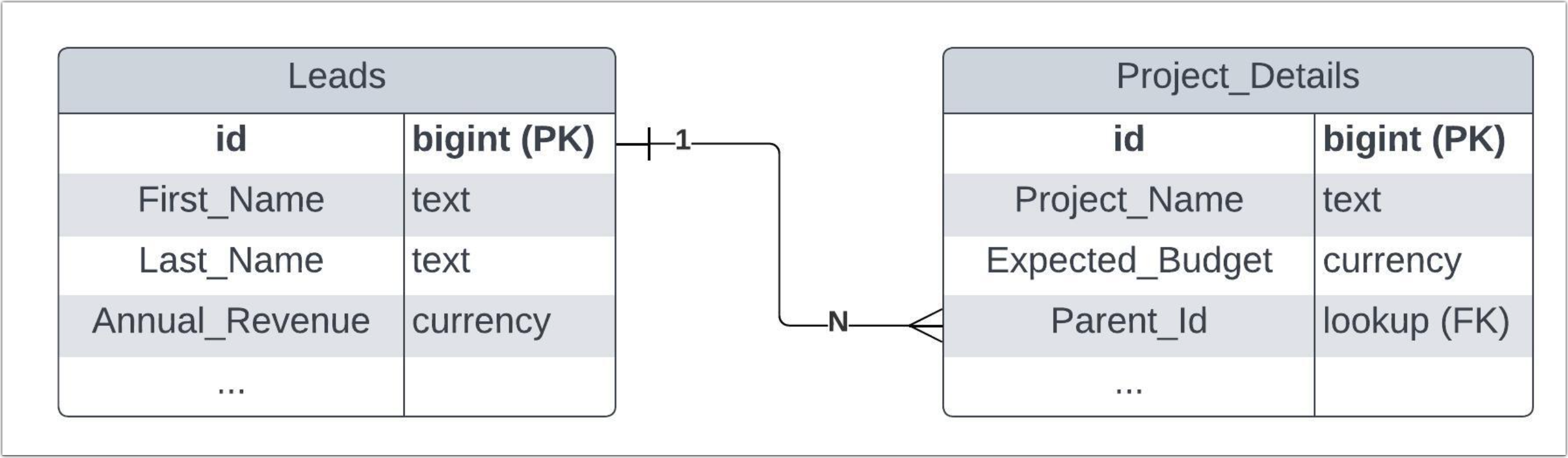 The above diagram shows the data model representation when you create a subform in a module.
 Use Case
Consider Zylker Consulting organization using Zoho CRM to maintain their leads and their projects. Zylker uses the Project Details subform in the Leads module to collect project-specific information collected from their Leads.
The Project Details subform includes fields such as Project Title,Type, Budget, and Status, in addition to the Parent_Id lookup field.
Now, the Zylker's sales team needs to retrieve all the details of the projects from the Leads module for further project analysis, expected budgets, and status. Let's see how to manipulate these data in CRM using Zoho CRM APIs.
The APIs used in this post
API | Methods |
Subforms API | GET, POST, UPDATE |
Records API | POST, UPDATE, DELETE |
Search API | GET |
COQL API | POST |
Bulk Read API | POST, GET |
How to retrieve subform records using the Zoho CRM APIs?
To retrieve subform records from the subform module, specify the subform module's API name to access their records or fields.
Step - 1
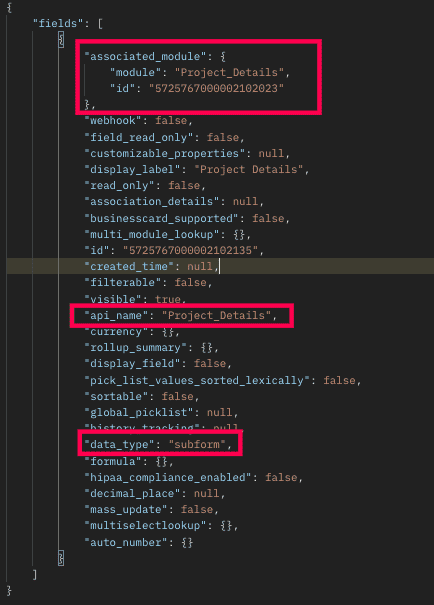
To know the API names of the subform fields in a module, make a GET - Fields Metadata API call. Among all the Leads' fields, subform field can be identified by the json key data_type with the value subform. Corresponding subform module can be found from the json associated_module. Below is the API call & response for such a subform field.
Request URL :
{api-domain}/crm/v6/settings/fields/{subform_field_id}?module=Leads
Request Method: GET
Sample Response:
Step - 2
Using the api_name of the subform module, make a GET Fields metadata API call to get the list of fields (along with their api_name) in the subform. One of the fields of the subform module will be Parent_Id with the data_type as lookup, pointing to the parent module (here it is Leads).
Request URL
Request Method: GET
Sample Response:
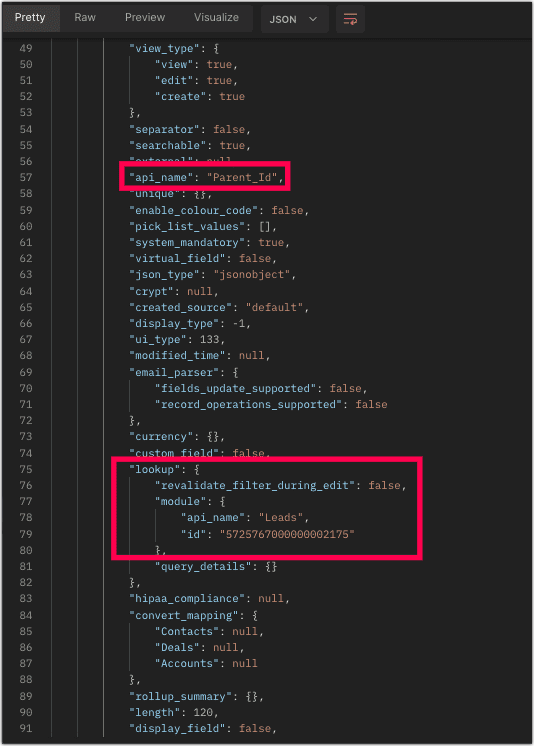
Now you know how to get the API name of the subform and its corresponding fields.
Step - 3
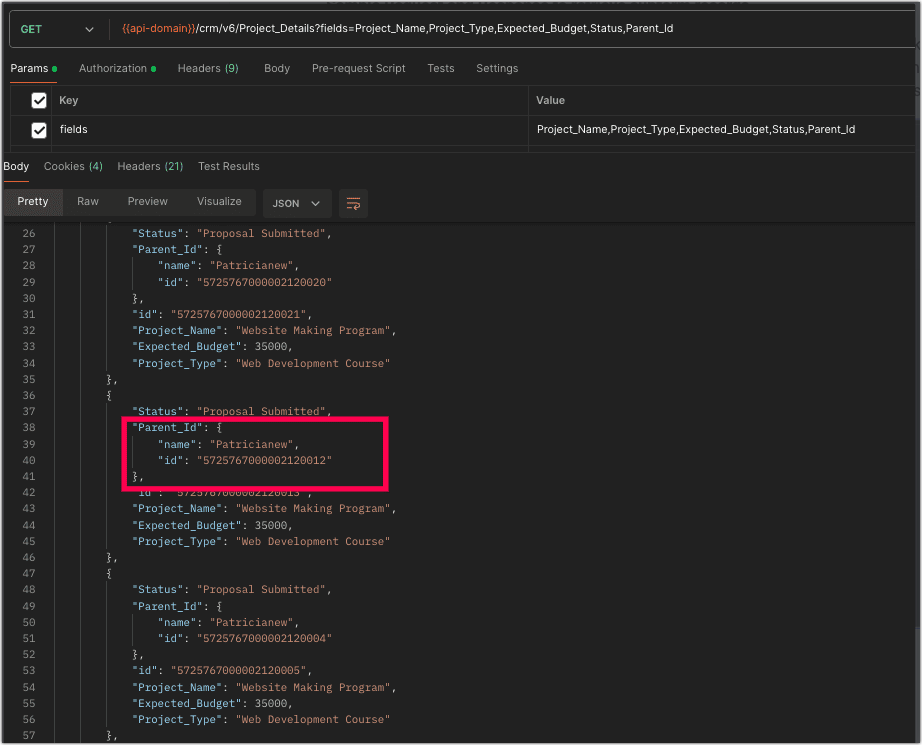
Sample Request and Response to retrieve subform records
The below request will retrieve all the subform records in the Leads module. The linking of subform record to the Lead's module will be available in the Parent_Id field, which is highlighted. The id key inside the Parent_Id json object is the id of the Leads records.
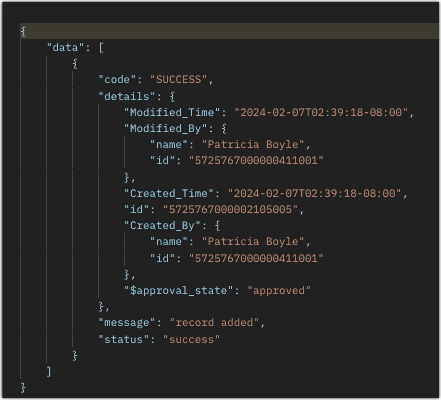
How to add data to the subforms?
To add records to the subform, you need the API name of the subform and its corresponding field API names.
Request URL:
Request Method: POST
Sample Input
Retrieve Subform Data via Search API and COQL API
Search API
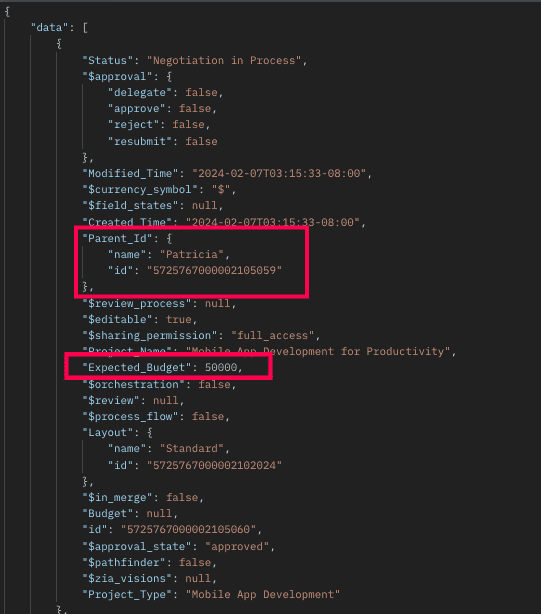 The above response shows all records that meet the specified criteria.
How to retrieve subform records from a particular parent record?
Retrieving Subforms Data via COQL API
Sample Response:
{ "data": [ { "Last_Name": "Patricia", "Company": "Info Technology", "Email" : "patricia@mail.com", "Project_Details": //API name of the subform [ { "Project_Name": "Mobile App Development for Productivity", "Project_Type": "Mobile App Development", "Expected_Budget": 50000, "Status": "Negotiation in Process" }, //API names of the subform fields { "Project_Name": "Big Data Infrastructure Implementation", "Project_Type": "Infrastructure Upgrade", "Expected_Budget": 30000, "Status": "Proposal Submitted" }, { "Project_Name": "Big Data Infrastructure Implementation", "Project_Type": "Infrastructure Upgrade", "Expected_Budget": 30000, "Status": "Proposal Submitted" } ] } ] } |
The above highlighted syntax is used for adding data to the subform records.
Sample Response:
Kaizen #33 - Subforms API explains in detail how to Fetch, Update, and Delete the subform data with sample requests, inputs, and responses.
Retrieve Subform Data via Search API and COQL API
There may be situations where you need to fetch records based upon certain conditions.
Criteria :
The sales team wants to retrieve the subform records whose budget is greater than or equal to $40000. In this case, we will use Zoho CRM's Search API and COQL API. Let's see how to achieve this.
Search API
To retrieve the records that match your search criteria, retrieve subform data using its corresponding module API name. Note that using Search API, you can fetch data quickly from a single module.
Request URL:
Request Method: GET
Sample Response :
The above response shows all records that meet the specified criteria.How to retrieve subform records from a particular parent record?
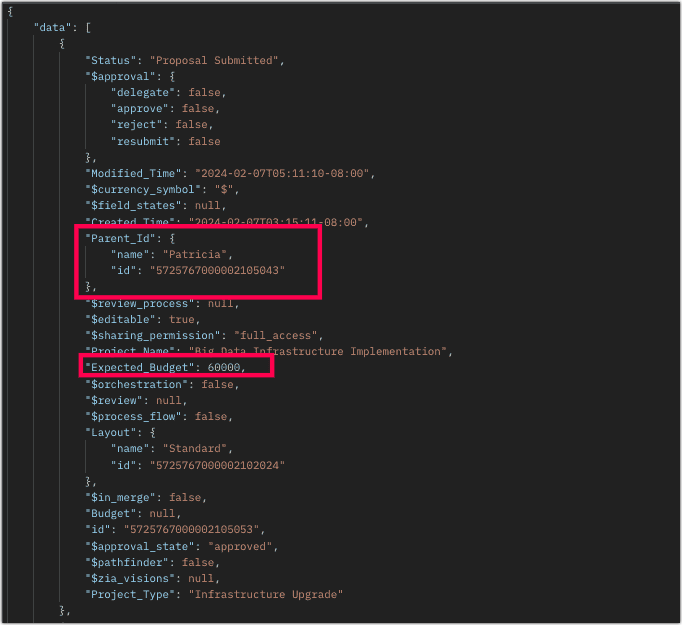
To retrieve subforms records in a particular lead record that meet the above criteria, follow the below sample request.
Sample Request URL:
Sample Response:
Retrieving Subforms Data via COQL API
We know that the subform is maintained in a separate module. So, retrieve subform data by querying the subform module's API name and it's parent module via the Parent_Id lookup field.
Request URL:
Request Method : POST
Sample Input:
{ "select_query" : "select Expected_Budget from Project_Details where ((Expected_Budget >=40000) and (Parent_Id = 5725767000002105043))" } |
Sample Response:
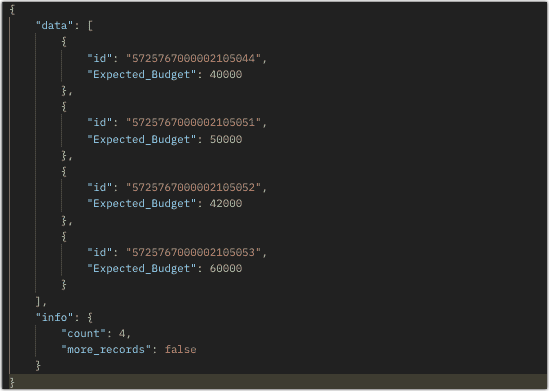
Using a Parent_Id (lookup field pointing to Leads module) in the COQL criteria automatically adds a left join to the child module (Project_Details). With that join, criteria can be applied to the fields of the parent module also. Below example illustrates that we want to fetch the Expected_Budget field of the Project_Details module where the Expected_Budget is greater than or equal to 40000 for the corresponding Leads with Annual Revenue greater than 1000000.
{ "select_query" : "select Expected_Budget from Project_Details where ((Expected_Budget >=40000) and (Parent_Id.Annual_Revenue > 100000 ))" } |
From the SQL perspective, above COQL can be interpreted as
select pd.Expected_Budget from Project_Details as pd left join Leads as l on pd.Parent_Id=l.id where pd.Expected_Budget>=40000 and l.Annual_Revenue > 1000000 |
Bulk Read API
Bulk Read API allows you to fetch a large set of data i.e., you can fetch a maximum of 200,000 records in a single API call.
To export subform records in the Leads module in CSV file format, use the subform's API name.
Request URL:
Request Method: POST
Sample input to export subform records:
{ "callback": { "method": "post" }, "query": { "module": { "api_name": "Project_Details" //API name of the Subform module }, "file_type": "csv" } } |
Export subform records that meet the specified criteria
To export subform records based on the given criteria above (similar to the criteria for Search and COQL APIs).
Sample Input:
{ . . . "query": { "module": { "api_name": "Project_Details" }, "fields": [ "Project_Name", "Project_Type", "Expected_Budget", "Status" ], "criteria": { "field": { "api_name": "Expected_Budget" }, "comparator": "greater_equal", "value": "40000" //Retrieving subform records with an expected budget greater than or equal to $40,000 } } } |
Export subform records that meet the specified criteria for the particular parent record
To export the subform records of a particular parent record in the Leads module. Check the below sample request.
Sample Input:
{ . . . "query": { "module": { "api_name": "Project_Details" }, "fields": [ "Project_Name", "Project_Type", "Expected_Budget", "Status" ], "criteria": { "group": [ { "field": { "api_name": "Expected_Budget" }, "comparator": "greater_than", "value": "39999" }, { "field": { "api_name": "Parent_Id" }, "comparator": "equal", "value": "5725767000002105043" } ], "group_operator": "AND" } } } |
As the API is an asynchronous API, the response will not be available instantly; the bulk read job is scheduled, and the status can be checked. Once the job is completed, it'll be notified in the callback URL. The records are available in a downloadable CSV file or ICS file (for events). You can export subform records in a module using the subform module API name. See Kaizen #12 Bulk Read API to know how to view the status of the scheduled job and download the file, along with more sample requests and responses.
Frequently Asked Questions
Q. Is the API name of the subform case-sensitive? Also, how can I view the API name of a subform field in the web UI?
Yes, the API name of a subform is case-sensitive. To know the API name of a subform module (e.g. Project Details) Please go to Setup -> Developer Hub -> APIs -> CRM API -> API names -> Click on the parent module where the subform was created (e.g. Leads) and scroll down there you can view the subform field's API name.
Q. I changed the order of subform records and made a GET - Records API call. The system listed the records in the same order as displayed in the UI, rather than the order of their creation. Is this the system design?
When you make a GET - Records API call for a module, it lists the subform records ordered in the UI. Note that you can re-order the subform records. So, when you retrieve those records via the API, they will be listed in the same order as they are arranged in the UI.
Q. Can we change a subform field's API name via API?
You can change the API name of the subform field only through the UI. Go to Setup -> Developer Hub -> APIs -> CRM API -> API names -> Click on the parent module where the subform was created (e.g. Leads) and go to the Field Label section. There you can view the subform field name and edit the API by clicking on the Edit option.
We trust that this post meets your needs and is helpful. Let us know your thoughts in the comment section or reach out to us at support@zohocrm.com
Stay tuned for more insights in our upcoming Kaizen posts!
------------------------------------------------------------------------------------------------------------------------------
Previous Kaizen Post : Kaizen #123 Data Synchronization from a third party application
-------------------------------------------------------------------------------------------------------------------------------
Cheers!
Additional Reading:
Kaizen Posts:
- Kaizen #10 - Search Records API and Query API
- Kaizen #31 - Subforms API
- Kaizen #80 - COQL API - Part I
- Kaizen #81 - COQL API - Part II
Topic Participants
Subramanian K
Vigneshwaran K
Raghuram T
Andres
dkvagency
Sticky Posts
Kaizen #198: Using Client Script for Custom Validation in Blueprint
Nearing 200th Kaizen Post – 1 More to the Big Two-Oh-Oh! Do you have any questions, suggestions, or topics you would like us to cover in future posts? Your insights and suggestions help us shape future content and make this series better for everyone.Kaizen #226: Using ZRC in Client Script
Hello everyone! Welcome to another week of Kaizen. In today's post, lets see what is ZRC (Zoho Request Client) and how we can use ZRC methods in Client Script to get inputs from a Salesperson and update the Lead status with a single button click. In thisKaizen #222 - Client Script Support for Notes Related List
Hello everyone! Welcome to another week of Kaizen. The final Kaizen post of the year 2025 is here! With the new Client Script support for the Notes Related List, you can validate, enrich, and manage notes across modules. In this post, we’ll explore howKaizen #217 - Actions APIs : Tasks
Welcome to another week of Kaizen! In last week's post we discussed Email Notifications APIs which act as the link between your Workflow automations and you. We have discussed how Zylker Cloud Services uses Email Notifications API in their custom dashboard.Kaizen #216 - Actions APIs : Email Notifications
Welcome to another week of Kaizen! For the last three weeks, we have been discussing Zylker's workflows. We successfully updated a dormant workflow, built a new one from the ground up and more. But our work is not finished—these automated processes are
Recent Topics
【Zoho CRM】サンドボックスのアップデート:メール送信トレイ機能の追加
ユーザーの皆さま、こんにちは。コミュニティチームの藤澤です。 CRMのサンドボックス(テスト環境)にメールの送信トレイ機能が追加されました。 本番環境でメール配信の前に、サンドボックスで送信される全てのメールを確認・検証できます。ワークフロー、承認プロセス、一括送信など、あらゆる送信パターンに対応しています。 「メールの送信トレイ」機能を使うと、顧客へ送信する前にメールの内容を事前確認できます。項目の欠落や書式の乱れなど、あらゆる問題をサンドボックス内でチェックできるため、本番環境でのトラブルを未然に防ぐことに役立ちます。Force mandatory entry on one of two fields on Contacts
We are finding our users aren't always entering a phone number or email address of a contact. We would like to make these fields mandatory but realize they won't always have both pieces of information, but should at least have one. Is there a way to makeHow can I prevent having recepients from being added as contacts in Zoho Desk?
How can I prevent having recepients from being automatically added as contacts in Zoho Desk? There's no option to disable this.Agent Concern
would like to ask the difference between an agent and a light agent. can a light agent close a ticket. thank you.Train Zoho Answer Bot Based on Customer
Hi all, Is it currently possible to mark Help Centre articles to a specific customer, and restrict the answer bot to only use relevant information if it is either marked as "General", or tagged for the specific customer in question? We currently haveNon-depreciating fixed asset
Hi! There are non-depreciable fixed assets (e.g. land). It would be very useful to be able to create a new type of fixed asset (within the fixed assets module) with a ‘No depreciation’ depreciation method. There is always the option of recording landErrorcode 554
Hello, I am unble to send any single email during the whole time due to the Zoho IP 136.143.188.16 being blocked by SpamCop. Please can somebody help me?Spamcop
Have been trying to email several of our clients and many of our emails keep getting bounced back with an error that states: ERROR CODE :550 - "JunkMail rejected - sender4-op-o16.zoho.com [136.143.188.16]:17694 is in an RBL: Blocked - see spamcop.net/bl.shtml?136.143.188.16"Will Zoho Search work with Zoho Learn
Currently, Zoho Search only works with Zoho Wiki which will be phased out. Moving forward, will Zoho Search be enabled for Zoho Learn? Thanks.How to use filters on all products page? Or even a category page?
Hello, I am trying to create some filters so users can use filters to find products they are looking for. So what i am trying is to create a filter according to price lets say. So if i define it this way i am expecting to see this filter option on categoryZoho Projects app update: Voice notes for Tasks and Bugs module
Hello everyone! In the latest version(v3.9.37) of the Zoho Projects Android app update, we have introduced voice notes for the Tasks and Bugs module. The voice notes can be added as an attachment or can be transcribed into text. Recording and attachingBoas práticas de desenvolvimento em Deluge
O Deluge (Data Enriched Language for the Universal Grid Environment) é a linguagem de script utilizada em diversas aplicações do ecossistema Zoho, como Zoho Creator, Zoho CRM, Zoho Books e Zoho Flow. Ela foi projetada para permitir automações rápidasHow do I automate my package and shipment process
Hey, I have a very basic problem regarding automating my package and shipment. My business does not require me to have those modules and manage them currently and since I'm new to zoho I want to start with just the basics. I just need to automaticallyHow do I automate my package and shipment process
Hey, I have a very basic problem regarding automating my package and shipment. My business does not require me to have those modules and manage them currently and since I'm new to zoho I want to start with just the basics. I just need to automaticallySeeking a WhatsApp Business App (not API) Zoho CRM integration
We have a business need to integrated WhatsApp Business App (not API) into Zoho CRM to centrally manage communications between our Sales team and Leads & Contact. Is there a reputable integration available for this scenario of ours? Core features we wouldZoho Sign 2025–2026: What's new and what's next
Hello! Every year at Zoho Sign, we work hard to make document signing and agreement execution easy for all users. This year we sat down with our head of product, Mr. Subramanian Thayumanasamy, to discuss what we delivered in 2025 and our goals for 2026.Intergrating multi location Square account with Zoho Books
Hi, I have one Square account but has multiple locations. I would like to integrate that account and show aggregated sales in zoho books. How can I do that? thanks.Emails being blocked / spamcop
Hello, I am unablr to send any single email during the whole time due to the Zoho IP 136.143.188.16 being blocked by SpamCop.net Please help on this.Zoho IP blocked by SpamCop 136.143.188.16
Hello, I am unble to send any single email during the whole time due to the Zoho IP 136.143.188.16 being blocjed by SpamCop.net Please help on this.Is there a way to configure dark mode for Campaigns emails that go out to customers?
I've found a lot of information on how to configure dark mode for my (The user) personal Zoho workspace and email, but is there any way to edit dark mode settings on emails that we send out to customers via campaigns? We sent out a test email the otherCan I hide empty Contact fields from view?
Some contacts have a lot of empty fields, others are mostly filled. Is there a way I can hide/show empty fields without changing the actual Layout? I would like to de-clutter my view, and also be able to add information later as I am able. I would beAuto-publish job openings on my Zoho Recruit Careers Website
I have developed a script using the Zoho Recruit API that successfully inserts new jobOpening records to my Zoho Recruit website, but my goal is to auto-publish to the Careers Website. The jobOpening field data shows two possible candidates to make thisCredit Card Terminal for Zoho Books
Hello, Instead of punching the credit card number manually for customer payment, do you have a third-party hardware credit card reader that works with Braintree? Thank YouHow do you print out the invoices comments
I have some invoices where i need to print out the comments that show when reminders and etc were sent how do we print those out in Zoho Books.Feature Request: Enable Custom PDF Layout Editor for All Modules (Including Package Slips)
Hello Zoho Community and Product Team, I am writing to share a suggestion that would significantly enhance the customization capabilities within Zoho Books. We all appreciate the power of the Custom PDF Layouts (the "New" template engine) that allowsNeed advice for product/item search functionality when adding invoices.
My client uses "Catalog or Vendor" name and Product code to search for his items. But Zoho only allow to search by product name and SKU when adding items to Invoices/Estimates. Clients product codes are not unique as they may overlap from different catalogs/vendors.How to dynamically pass IDs from one API response to a second API call in Zoho DataPrep?
Hi Team, I am setting up a global consolidated reporting pipeline in Zoho Analytics (India) using Zoho DataPrep as the ETL engine. I am pulling data from multiple Zoho Books Data Centers (US, Singapore, India) thats why i used the URL Source (OAuth 2.0)Feature Request: "Send Invitation" Toggle for Events
I am writing to request a critical "Quality of Life" update for the Activities module. Currently, adding people to the Participants field in an Event triggers an automatic email invitation/acceptance tracking with no way to opt-out. For general eventsAccount Review Pending - Daily Limit 100
Hi ZeptoMail Team, I'm writing to request a manual review of my account. I am currently stuck on the 100-email daily limit and cannot purchase credits. Status: My domain is already verified (DKIM/CNAME). Issue: The "Customer Validation" option is no longerAutomation Series: Move Tasks to a different Task List on Status Change
In Zoho Projects, you can automatically move a task from one task list to another when its status is updated. This keeps your tasks organised and ensures better visibility while reducing manual work. For instance, during a product launch, the marketingIntroducing Bigin's all new integration with Microsoft Teams
Picture this: You are on call with your team to discuss some important deals that need to be closed soon. While discussing each deal, your team has to switch back and forth between your Teams account and Bigin account to refer to details about the deal.Scaling the customer journey: What's new in CommandCenter
Dear Customers, The last time we connected about CommandCenter, it was about the tool's new controls and revamped UI. Personally, the overhaul of the UI from the last update, still excites me. Today, we're here with news about its scalability and addedAdjusting Physical Inventory
Not getting very far with support on this one, they say they are going to fix it but nothings happened since November. Please give this a thumbs up if you would like to see this feature or comment if you have some insight. Use Case: Inventory set to beHow to book GST paid in zoho books
hi, i am a new user to Zoho books and not able to book GST paid in books, kindly suggest how i can book it in books. thanks, siddharthDynamic Remaining Quantity in Lookup During Allocation
Hi everyone, From what I understand in Zoho Creator, lookup fields only display the stored value from the source record and do not dynamically update while a form is being filled. Because of this, showing a real-time updated remaining quantity insideBill sent for Payment Approval
Zoho Books currently supports three levels of transaction approval for bills: Draft, Submit, and Approved. We are looking to add a layer of approval like a bill marked for payment before initiating payment requests through HSBC Bank. Can you please guideIs it possible to use HTML formatting in SMS messages sent from Zoho?
Hi everyone, I have a question regarding sending SMS from Zoho When we send emails from Zoho, we can include HTML code to format the message (like adding links, styling, etc.). Is it possible to do something similar when sending SMS messages through ZohoImportant update: Migrate to the new SalesIQ live chat widget before April 14, 2026
The old SalesIQ live chat widget will be deprecated on April 14, 2026. This is a final reminder to migrate to the new SalesIQ live chat widget before this date. After April 14, 2026, the old widget will no longer be maintained, which can lead to slowerIf your IM chats aren’t auto-assigning, here’s what to check
Hey everyone! We’ve been seeing quite a few questions around Instant Messaging (IM) Chat Routing in Zoho Desk, especially around how it actually behaves in real time. So I thought I’d share a practical breakdown of what’s happening behind the scenes.connect zoho creator with google drive
Hello everyone, I need to connect to a folder drive. The idea, is that google drive loads a text document with some data, I must read that text document to be able to autofill a form that I have in zoho creator with that data. I also attach PDFs and placeNext Page