Kaizen #177: Duplicate Check Preferences API vs. Upsert API

- What is the Duplicate Check Preferences API?
- Use Case
- Duplicate Check Configurations
- Updating Duplicate Check Configuration
- How Duplicate Check Preferences Work During Record Creation/Update?
- What is the Upsert API?
- Use Case
- Differences between Duplicate Check Preferences API and Upsert API
What is the Duplicate Check Preferences API
in Zoho CRM. Based on the given criteria, the system will restrict the creation or update of duplicate records. For example, if the Phone field is marked as unique and set for duplicate checks, the system will make sure that no two records have the same phone number during records creation or update.
Use case
Duplicate Check Configurations
The following is the configuration for duplicate check in the Leads module via API.
- The "module" parameter is mandatory, and its supported value is Leads.
- The above URL applies to both Leads and Contacts module configurations.
- You must mark at least one field as mandatory. So, the system can check for duplicates based on the value in the unique field within the Leads module when creating a record.
{ "duplicate_check_preference": { "type": "converted_records", //Converted Leads custom view in Leads module } } |
{ "duplicate_check_preference": { "code": "SUCCESS", "details": {}, "message": "Duplicate check enabled for converted_records successfully.", "status": "success" } } |
{ "duplicate_check_preference": { "type": "mapped_module_records", "type_configurations": [ { "field_mappings": [ { "current_field": { "api_name": "Email", "id": "5725767000000002601" }, "mapped_field": { "api_name": "Email", "id": "5725767000000002503" } } ], "mapped_module": { "api_name": "Contacts", "id": "5725767000000002179" } } ] } } |
How Duplicate Check Preferences Work During Record Creation/Update
Use the Insert Records API to create records in a module.
{ "data": [ { "Company": "Villa Margarita", "Last_Name": "Dolan", "First_Name": "Brian", "Phone": "12345", "State": "Texas" } ] } |
Response
{ "data": [ { "code": "DUPLICATE_DATA", "details": { "api_name": "Email", "duplicate_record": { "Owner": { "name": "Patricia Boyle", "id": "5725767000000411001", "zuid": "808233918" }, "module": { "api_name": "Contacts", "id": "5725767000000002179" }, "id": "5725767000000774010" //The record that already exists in the Contacts module. }, "json_path": "$.data[0].Email", "more_records": false }, "message": "duplicate data", "status": "error" } ] } |
Duplicates are also checked during record updates. If a record is updated with a value that already exists in a unique field, the system indicates it as a duplicate and returns a "DUPLICATE_DATA" error.
Update Duplicate Check Configuration
Input JSON
{ "duplicate_check_preference": { "type": "mapped_module_records", "type_configurations": [ { "field_mappings": [ { "mapped_field": { "api_name": "Phone", //The previously configured Email field as a unique identifier in Contacts has now been replaced with the Phone field. "name": "Contacts", "id": "5725767000000411001" }, "current_field": { "api_name": "Phone", "name": "Leads", //The previously configured Email field as a unique identifier in Leads has now been replaced with the Phone field. "id": "5725767000005381030" } } ], "mapped_module": { "api_name": "Contacts", "name": "Contacts", "id": "5725767000000002179" } } ] } } |
What is the Upsert API?
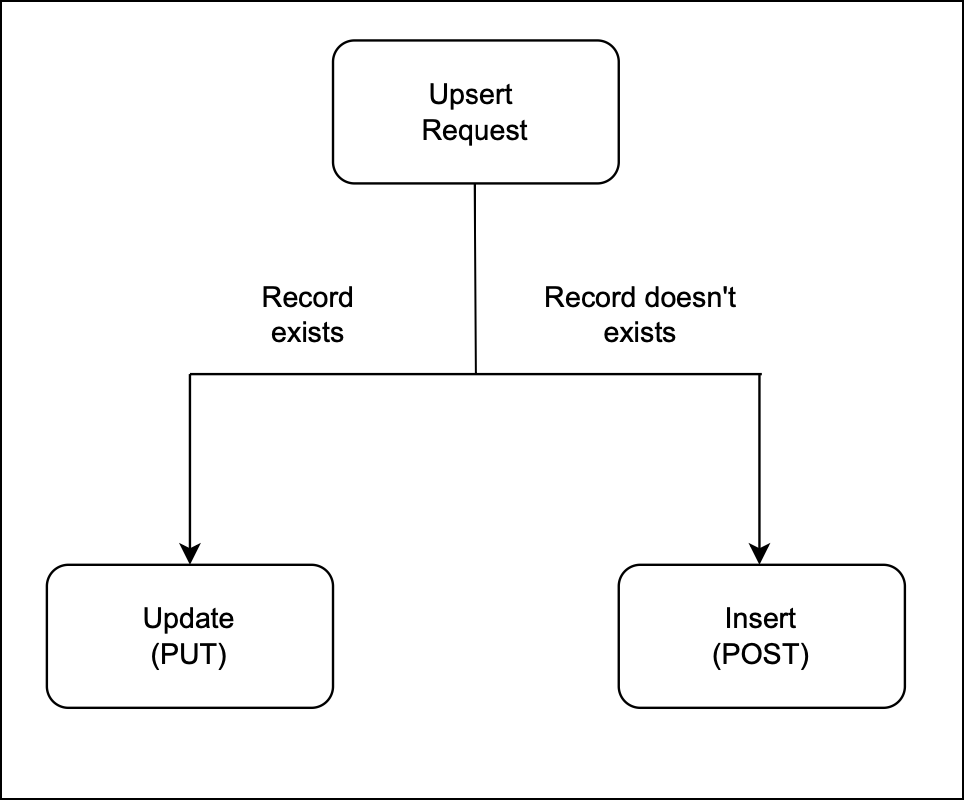
The Upsert API is a combination of "update" and "insert".
How it works?
You provide a unique identifier (e.g., email, phone number, or a custom field) to check for existing records.
If a record with the same identifier exists, it updates that record.
If no matching record is found, it creates a new one.
Use Case
- Update existing customer records details if the given unique identifier, such as email or phone number, matches an existing record in Zoho CRM.
- Insert a new record if no match is found. This way, Zylker ensures that new customers are added efficiently.
There are two types of duplicate check fields:
The table below lists the system-defined unique fields. When you create a record using the Upsert API, the system checks these fields for duplicate entries.
Leads | |
Contacts | |
Accounts | Account_Name |
Deals | Deal_Name |
Campaigns | Campaign_Name |
Cases | Subject |
Solutions | Solution_Title |
Products | Product_Name |
Vendors | Vendor_Name |
PriceBooks | Price_Book_Name |
Quotes | Subject |
SalesOrders | Subject |
PurchaseOrders | Subject |
Invoices | Subject |
Custom Module | Name |
ii. User-defined duplicate check fields
You can set a normal field as a duplicate check field by enabling "Do not allow duplicate values." Note that you can only set fields with the following field-types as unique— Single Line, Email, Phone, Number, Long Integer, and URL.
Sample Input JSON
Here, "Email," a system-defined field, has been used as a duplicate check field.
{ "data": [ { "Email": "alice@mail.com", "First_Name": "Alice", "Last_Name": "Brown", "Phone": "+1-555-222-3333", "Order_Date": "2024-01-10", "Order_Value": "$175.00" }, { "Email": "pat@mail.com", "First_Name": "pat", "Last_Name": "Davis", "Phone": "+1-555-666-7777", "Order_Date": "2024-01-15", "Order_Value": "$300.00" } ], "duplicate_check_fields": [ "Email" //You can set the order in which the system checks for duplicate records by specifying the duplicate_check_field array in the input. ] } |
Response
{ "data": [ { "code": "SUCCESS", "duplicate_field": null, "action": "insert", "details": { "Modified_Time": "2025-02-08T09:43:08-08:00", "Modified_By": { "name": "Patricia Boyle", "id": "5725767000000411001" }, "Created_Time": "2025-02-08T09:43:08-08:00", "id": "5725767000005425036", "Created_By": { "name": "Patricia Boyle", "id": "5725767000000411001" } }, "message": "record added", "status": "success" }, { "code": "SUCCESS", "duplicate_field": "Email", "action": "update", "details": { "Modified_Time": "2025-02-08T09:43:08-08:00", "Modified_By": { "name": "Patricia Boyle", "id": "5725767000000411001" }, "Created_Time": "2025-02-08T08:52:22-08:00", "id": "5725767000005425002", "Created_By": { "name": "Patricia Boyle", "id": "5725767000000411001" } }, "message": "record updated", "status": "success" } ] } |
Differences between Duplicate Check Preferences API and Upsert API
Duplicate Check API | Upsert API |
Duplicate Check Preferences can be enabled only in the Leads module. | Supports all modules. |
Throws a "DUPLICATE_DATA" error if a duplicate is detected. | Updates the existing record with new field values if a match is found for the unique fields; otherwise, inserts a new record. |

- More enhancements in the COQL API are now live in Zoho CRM API Version 7. Check out the V7 Changelog
for detailed information on these updates. ✨
- OAuth Scopes Page for Zoho CRM APIs. ✨

Topic Participants
Subramanian K
Andres
Jeganprabhu S
Sticky Posts
Kaizen #198: Using Client Script for Custom Validation in Blueprint
Nearing 200th Kaizen Post – 1 More to the Big Two-Oh-Oh! Do you have any questions, suggestions, or topics you would like us to cover in future posts? Your insights and suggestions help us shape future content and make this series better for everyone.Kaizen #226: Using ZRC in Client Script
Hello everyone! Welcome to another week of Kaizen. In today's post, lets see what is ZRC (Zoho Request Client) and how we can use ZRC methods in Client Script to get inputs from a Salesperson and update the Lead status with a single button click. In thisKaizen #222 - Client Script Support for Notes Related List
Hello everyone! Welcome to another week of Kaizen. The final Kaizen post of the year 2025 is here! With the new Client Script support for the Notes Related List, you can validate, enrich, and manage notes across modules. In this post, we’ll explore howKaizen #217 - Actions APIs : Tasks
Welcome to another week of Kaizen! In last week's post we discussed Email Notifications APIs which act as the link between your Workflow automations and you. We have discussed how Zylker Cloud Services uses Email Notifications API in their custom dashboard.Kaizen #216 - Actions APIs : Email Notifications
Welcome to another week of Kaizen! For the last three weeks, we have been discussing Zylker's workflows. We successfully updated a dormant workflow, built a new one from the ground up and more. But our work is not finished—these automated processes are
Recent Topics
Plug Sample #15 - Enable Human-Like, Contextual Interactions in SalesIQ with Zia Agents
Zia Agents are conversational AI assistants designed to understand user intent and respond intelligently, helping businesses automate conversations and offer personalized support at scale. While Zia Agents are yet to be publicly released, access is currentlyBest way to schedule bill payments to vendors
I've integrated Forte so that I can convert POs to bills and make payments to my vendors all through Books. Is there a way to schedule the bill payments as some of my vendors are net 30, net 60 and even net 90 days. If I can't get this to work, I'll haveSeamless Round-Trip Navigation for Related Blocks (Detail View)
As highlighted previously in this post (and here, here, here, and here), we still lack a fundamental capability for seamless navigation in Related Blocks. The popup that appears when adding a related record doesn't exist for viewing/editing existing records,Social Profile Logo Format
Hello, I'm using Zoho Sites and am attempting to add a couple of social media accounts to my profile that aren't included in the default platforms that are available. What format is the logo required to be in? I have tried .png and .jpg with no success.How to create Sepa Direct Debit XML file: solution and code
Even though Books provides a payment integration for Stripe and Gocardless (in Europe) there are customers that want to use the Sepa services of their own bank. Mainly because Stripe and Gocardless are quite expensive. In that case they would need a SepaTraditional Spreadsheet vs Zoho Tables
Hello everyone, This article explains the differences between Spreadsheet applications and no-code databases, such as Zoho Tables. While both tools belong to the "grid" family, the core difference lies in their purpose. A spreadsheet (such as Zoho Sheet,RFQ MODEL
A Request for quotation model is used for Purchase Inquiries to multiple vendors. The Item is Created and then selected to send it to various vendors , once the Prices are received , a comparative chart is made for the user. this will help Zoho booksDelegate Access - Mobile iOS/iPad
We’re over the moon that delegate access is now available in Zoho Mail as we were nearly ready to switch platforms because of it! Is there a timeline on when delegate mailboxes will be accessible from the iOS and iPad OS applications? Thanks, JakeRequest For Quotation (RFQ) module
Hello, Do you have any plans to implement a RFQ module in to ZOHO Inventory? I would like to chose items that I require a price for, select a number of different suppliers to e-mail and have them submit there pricing online. I would then like to see aSupport for Developing Zoho Recruit Extensions via Zoho Sigma
Hi, I’m interested in building an extension for Zoho Recruit using Zoho Sigma. However, when I navigate to Sigma and attempt to create a new extension (via the "New Extension" option), Zoho Recruit does not appear as a listed service—only options likeFOLDER DISAPPEARED
Hello Zoho Community. I recently found a problem with no explanation: a folder in Zoho Analytics just disappeared, but the tables and SQL sentences still existed, the folder was not deleted. The solution for me in this case was to create a new folder,How to create estimates/Invoices with sub-totals
Every other accounting package can create estimates and invoices with Sub-totals. How can I do that in ZohoBooks?Social media simplified with Zoho Social: Why should brands have a Threads profile?
Just over a year ago, Instagram launched Threads, the all new social media app primarily focusing on sharing text online. It was welcomed by people worldwide with more than 10 million users in just seven hours, and it currently has over 175 million activeAuto tracking URL generation based on Carrier
Hi, While creating a shipment order for a package in Zoho Books, I have a requirement that for example, if the carrier is Delhivery and tracking number is 1234, then can automatically the tracking link/URL be generated as www.delhivery.com/1234. Similary,New Beginnings with Zoho Desk mobile app best practices: Part 3
In focus: Scaling consistency, intelligence, and customization In our third installment, we'd like to share tips to help you elevate your customer experience as you handle support operations seamlessly on mobile. Let's reconnect with Omniserve, the fieldHighlights of 2025: Milestones and moments
Hey everyone! As we step into 2026, it’s a great time to look back at everything 2025 brought to Zoho Social. This year was big, packed with powerful new features, smart enhancements, exciting events, and a major milestone: a whole decade of Zoho Social.Introducing the sandbox environment in Zoho Sign
Hey there! Customer and partners across the globe have been requesting a testing environment—also called a sandbox—for quite some time. Sandboxes help you try out document workflows before using them in your production setup. This new year, we are excitedCan I share the drive with another Windows user?
We use the WorkDrive Sync application on a server with several remote desktop users. Our question is: Can the drive created by WorkDrive Sync be shared from one of these remote users with the other users so they can access the files, or do we need toSyncing Bills in Zoho Books to Zoho CRM
Is there any way to sync the Bills in Zoho Books in Zoho CRMAuto CheckOut Based On Shift.
This Deluge script runs on a scheduled basis to automatically set the 'Actual_Check_Out' time for employees who haven't manually checked out. If the current time is past their scheduled 'Shift_End_Time', the script updates the check-out time to matchERROR: Product type cannot be changed for Items having transactions.
I have mistakenly added a product type as goods for an item that was a digital service. Now when HSN/SAC became mandatory, this brought my attention to this error I did. So I tried changing the product type but it displayed this error message ProductBoost your CRM accuracy with smart Data Enrichment
Hello all! In this post let's look at data enrichment from a holistic perspective to gain more clarity on how you can use it. So, here's a quick recap of what data enrichment is and how you set it up it to enhance your existing module data! What is dataIs it possible to set a region lookup table so that my deal country can lookup this lookup table
Hi there, I would like to be able to add a data lookup table with the following fields: Country, Region. And then in my deal report, i can then lookup this table to fish out the region in my report. This will be important for my sales process to categoriseTest Emails Show Sent "via zcsend.net" in My Gmail Account
I noticed the following info... However, a few email service providers such as Outlook and Gmail will display that the email was sent by zcsend.net (Zoho campaigns’ server) on your behalf instead of just your from email address. In order to prevent this, you can go for either of these options: Do not select the check box meant for DomainKey Signature which is listed under Unverified sender domains. Include our mail servers by advanced authentication method such as SPF/ Sender ID and DomainKey/ DKIM.'UnAuthenticated Connection: zbooks_connection'
I have a zoho connection in Zoho Books, the link name es zbooks_connection, but I like to validate if exist, by example if I use this line in my code: response=zoho.books.getTemplates("", "","zbooks_connection"); But I don't have the connection I likeCalling the new 'Custom API' feature from within a Custom Widget
From what I've learned it is not possible to call an endpoint from the new "Custom API" feature within a Creator Widget. The SDK's doesn't support it yet, when calling it natively you end up with CORS issues or at least I couldn't get it working evenCannot post to Instagram. I get the error: Insufficient permission to publish on this page. Check with your page Admin to update permissions.
We had another admin that left the company. Since he left, we get this error when posting to Instagram.Zoho desk desktop application
does zoho desk has a destop applicaion?Ability to re-order Workflow Rules
We really need the ability to re-order workflow rules within departments. Either the ability to drag/drop them into a different order or something.Create an article template
I have a question concern the Knolwedge Database from Zoho Desk. There is any possibility to create an article template ? Exemple of what I research : TODAY : I want to create a lot af articles with the same baseline > I create one article > I copy/pasteChange of Blog Author
Hi, I am creating the blog post on behalf of my colleague. When I publish the post, it is showing my name as author of the post which is not intended and needs to be changed to my colleague's name. How can I change the name of the author in the blogs?? Thanks, RamananZoho FSM API Delete Record
Hi FSM Team, It would be great if you could delete a record via API. Thank you,Instant Messaging Update | Now migrate your WhatsApp Business phonenumber from another BSP to Zoho Desk | Dec'23
Hi All, Everything seems to move at lightning speed these days, and time is certainly flying by for the IM team. But we are delighted at how much ground we covered this year. 🚀 For one, we enabled WhatsApp business phone number migration so that youUpload ticket attachments via Drag-&-Drop
Hello, if you want to upload a file to the ticket attachment you need to click the button and use the file browser to select and upload the desired file. In many cases, it would be much more efficient if you could simply drag the file to the browser window...Can we disable add to cart in Zoho Commerce?
Hello, Our sales happen on the phone. During the call the customer is directed to our website to inspect the products together with the sales rep. So we need a way to present our inventory. I figured Zoho Commerce is a good fit for this use case. HoweverIntroducing WhatsApp integration in Bigin
Greetings! In today's business landscape, messaging apps play a significant role in customer operations. Customers can engage with businesses, seek support, ask questions, receive personalized recommendations, read reviews, and even make purchases—allZoho One account closure vs deactivation
I wonder what are the best practices and guidelines around deactivating vs deleting Zoho accounts in organisations? Any practical considerations?Schedule Zoho CRM reports only on Business Days
Hello, Is it possible to schedule reports only on business days ? We currently get daily sales reports on weekend which has no value since the sales team doesn't work on weekends. ThanksHow to install Widget in inventory module
Hi, I am trying to install a app into Sales Order Module related list, however there is no button allow me to do that. May I ask how to install widget to inventory module related list?How to track a contact or customer's past product purchases in Bigin Premiere?
Hello there. I am the sole user of Bigin for a small company (chess club), and would like to track current and past purchases made by a contact (player) or company (family which includes the player). Players may register for multiple tournaments, takeNext Page