Psychiatrists: Create Fantastic Appointment Scheduling Sites
Gone are the days where clients used to call a psychiatrist's practice to book an appointment. Today, where everyone is on the internet, most of them prefer to schedule an appointment online which is a much easier way of doing it.
Having an appointment scheduling site will also allow you to focus more on your job rather than spend time on managing the appointments which will in turn increase your productivity.
Also, you need to have an appointment scheduling site that is inviting and pleasing to your clients. This will help you compete with other practices who have a similar way of managing appointments online.
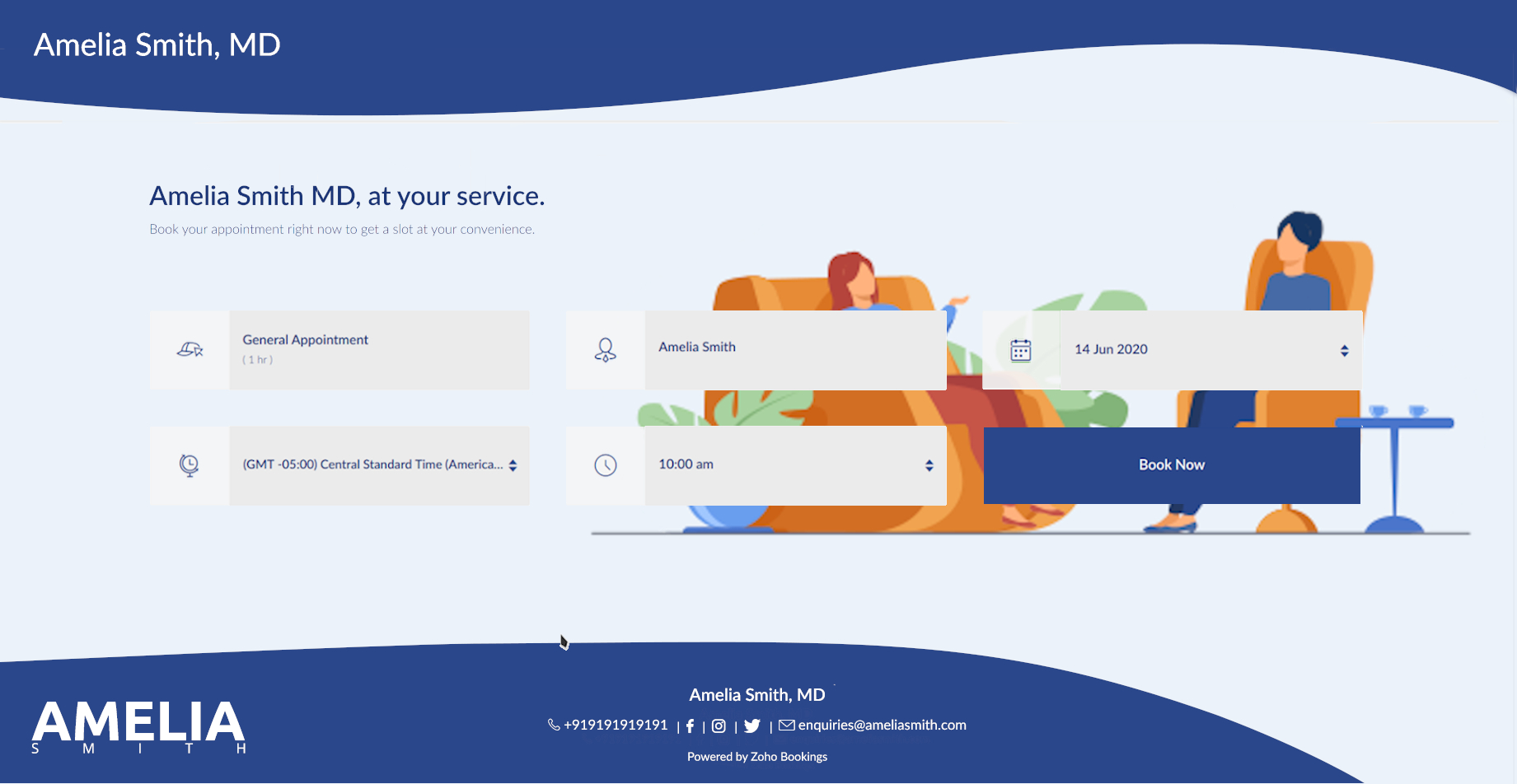
In this guide, we will have a brief look as to how you can do that for yourself without spending too much time and effort for something as important as this.
Do you really need an attractive appointment scheduling site for your company?
Psychiatrists provide a service to their customers that is intangible. Therefore, businesses that offer services like these need other ways to show their excellence in service quality.
In today's age, where every business has an online presence to stay relevant, you need to have one as well to compete with those in your industry. This is crucial as many even lose clients to those who make themselves more attractive to these clients on the internet.
Hence, in order to communicate to your clients about your quality in service and stay ahead of the competition in doing so, you need an attractive appointment scheduling site so that you show your business in the best way possible.
Certain rules and guidelines need to be followed while doing this. But why?
Every industry has certain designs and colors associated with them because that helps others communicate the feel of the products or services of that industry. Similarly, psychiatrists also need to follow a certain design language to help make the client feel safe and confident while deciding to obtain your service.
This is important because using a wrong design on your booking page can sometimes be disastrous to your business.
Additionally, you will also end up losing customers to your competition who have a more accommodating online presence than you. Therefore, doing every step the right way will help you make sure that you are in your best form on the internet. Be it the Motel Industry, Digital Marketing Agencies, Accountants or any other industry for that matter, having an attractive and good-looking appointment scheduling website can only work wonders for your business.
This guide gives an overview of what you need to know when designing your scheduling appointment page in your industry. If you need directions for every step of the process, we have a guide made for that very purpose.
All right, so, how should you go about making an appointment scheduling site?

As a psychiatrist, you cannot effectively show your service visually on your booking page.
Instead, your focus should be on how the client should feel when they are on your booking page. A pleasant and calming theme will help with this. Additionally, you can also provide any information on the booking page that the client should know about before scheduling an appointment with your practice.
This way you can make sure that the client has everything that they need right from the site without having to look elsewhere for it. This makes it convenient for them and they will appreciate such a thought from your site to do so.
The best place to start is your background image.
You need to get an understanding of how your booking page will look like at the end to get going with designing. To assist with this, you should search for ideas from other websites or booking pages from your industry.
While you can choose whatever color you want, we will encourage you to choose a color that makes reading the text on top of it easier.
White or whitish colors are typically the best options in this respect. This allows us to hold the reader's focus to the text rather than to the design, while at the same time complementing it, which is what we want on our website.
If you would rather go with a darker color in nature, make sure that the color allows the text to be read easily on top, which should have a contrasting color.
You can also go with an image if you like. Try to pick an image that has lots of whitish shades that dominate the photo for the reasons we have just been talking about, if that is the option you would like to go ahead with.
Let us assume that, for the purposes of this tutorial, you choose white as the primary color. Now that we are going to use one color in the color scheme that we have defined; we have got to include another color that can be included with white.
The benefit of having a color based on white in a color scheme is that it can be used in combination with virtually all colors. How would we choose the second one for our scheme as there are too many colors to choose from?
Another look at some of the popular websites or pages to book can help. You may also check on the internet for paint combinations for your primary color and choose one that looks pleasant and soothing. Many companies have a color scheme that they use for their websites on a regular basis and that is where you need to choose the color. Given the combination of these two colors, try looking for a background image that incorporates these very well.
That is because it gives your booking page a rather pleasant and appealing feel as this color scheme is heavily used on all elements of your booking page. An exception to this is that if you do have a website that uses a certain color scheme, it would be easier to stick to it precisely if the organization exclusively follows the design language.
You can even use photos which you have from your practice. If not, pictures from websites such as Shutterstock and 123rf can be checked for pictures provided for this particular reason or you can also look for royalty-free pictures from other websites.
Make sure that the picture you choose is not too cluttered with topics, because on the booking page you can see clearly the text that will fall across it. If you want to add the logo to the background in place of the website's default logo on the top left corner, please keep in mind that for this purpose you may need to use applications such as Canva or advanced resources such as Photoshop.
Now that you have finalized your background picture, let us go through next color customization.
What about the other things on your site, then?
We had already discussed that the color scheme used in the page would be used on other elements as well. That is such that when it comes to visual design we are going to make sure the backdrop and the components go together.
When adding the same for both the text and the buttons, make sure the right color is applied which contrasts with the color below. For example, if the background color on the screen where the text is being filled is white, then the other color you have chosen in your color scheme will be the text color.
In addition, one should always ensure that the company logo used on the booking page also matches in well against the background for the same purposes.
Check the website after both of these have been completed by clicking the Go To button at the very end of the customization options to test if all is the way you need it.
Depending on this, you may then determine whether anything you have applied to the website needs to be changed or modified so it appears better than before.
The text on your site is probably the most powerful part.
The text on your booking page primarily consists of two lines and can be used according to your needs.
While others will use this to show phrases used to advertise their brand, others will use it to include specific instructions that should be taken into consideration while making appointments.
So when you book the appointments with your practice, your text on the page is really down to what your clients need to see. This space can also be used for subtle marketing using creative words.
Make sure customers understand the text clearly and quickly, and be knowledgeable of what they need to understand before scheduling their appointments.
Additionally, editing the picture will allow you to add it to the background content should you want to display additional text other than those two sections. For this scenario, make sure that the text is not applied to the image where the buttons overlap, and you can avoid the buttons on the booking page.
Keep in mind that the document's color will match the color you are using on the other text-based components to make sure the template is legible and consistent.
Is that everything that you need to do? Not quite!
Look at the top of the article to see how you have done what you desired. You can also ask others for opinions about your work, so you can get a different perspective on it.
We will recommend that you keep reviewing your page for any updates you make so that you can make further adjustments while continuing through the editing method.
Overall, you need to be sure that your booking page is not too cluttered, that it is beautifully appealing, and that it is readable to anyone who could use it very clearly. You should also ensure that all relevant details are provided with which the consumer should be informed before scheduling an appointment with your meeting room.
We hope that this guide has helped you! If in case you have any questions regarding this guide, let us know in the comments below.
Image Credits:
Topic Participants
Akarsh Madhav
Recent Topics
Kiosk Page Refresh
We have a Kiosk running from a button in contacts to update values and also add related lists, which works great, but when the kiosk is finished the page does not refresh to show the changes. Is there a way to force the contact to refresh/update whenSetting GC session variable programatically in a website
Hi! Is there a way now to programatically set session variables from a website for a Guided Conversations? The current available methods are dependent on react-native.Ticket Merge Error
Refresh frequency
Dear Zoho Team, I really, truly appreciate that Zoho Books gets frequent updates. As a matter of fact this is how a good SaaS company should stay on top. However, I feel that I have to hit refresh almost every day. This was exciting at the beginning butUpdate application by uploading an updated DS file
Is it possible? I have been working with AI on my desktop improving my application, and I have to keep copy pasting stuff... Would it be possible to import the DS file on top of an existing application to update the app accordingly?Two-factor authentication (2FA) Log-in Problems
The Two-factor authentication (2FA) Login on my passwords doesn't match , so it wont accept login I'm down to my last backup code.Remove my video
Hi, How can I remove my video so that I don't have to see myself. It's weird so I always remove my own video from what I see but cannot find this feature here. Thanks!Client Script: Any plans to add support for multi-select field with onChange
Client Script is fantastic and the documentation lists multiselect form fields as unsupported. Just wondering if there are any plans to make this a supported field. https://www.zoho.com/crm/developer/docs/client-script/client-script-events.html 2. FieldFeature Reqeust - Include MPN In Selectable FIelds
I have noticed that the MPN is not available to show in the list view of Items. Please consider adding it as EAN, UPC and ISBN are all available, so it doesn't make much sense to exclude this similar option. Thanks for considering my feedback.Experience effortless record management in CRM For Everyone with the all-new Grid View!
Hello Everyone, Hope you are well! As part of our ongoing series of feature announcements for Zoho CRM For Everyone, we’re excited to bring you another type of module view : Grid View. In addition to Kanban view, List view, Canvas view, Chart view andWindows Desktop Application for Bigin
I'm finding the need for a standalone Bigin desktop app for Windows users. Most of my daily work is done through a browser, so I often have several open tabs while working with customers and checking product information, etc. With Bigin currently onlySet another Layout as Standard
We created a few layouts and we want to set another one to standard:Salesforceに添付ファイルを格納したい
お世話になっております。 Salesforceに添付ファイルを格納したく、カスタムオブジェクトに連携し、 「ファイルのアップロード」項目を設けました。 実際、エラーもなく送信出来たのですが、実際生成されたカスタムオブジェクトのレコードを見ると、どこにも添付ファイルがありません。仕様として、この添付ファイルはSalesforceのどこに格納されるのでしょうか? 今回作りたいフォームは、複数の書類を添付するため、Zohoformのファイルアップロード項目「本人確認書類」「源泉徴収票」などの項目を、Salesforce側にも設けた「本人確認書類」「源泉徴収票」という各項目にURLリンクとして紐づけたいと思っておりました。Knowledge Base article lists
Is it possible to adjust the number of articles that are visible under a category of the Knowledge Base portal? Currently it looks like by default it populates about 5 articles before it puts the "more" option at the bottom. Looking to see if I can extendDiscrepancy in Contracts with Fields list/Layout
The Support Plan field on the layout isn't in the fields list. What am I missing?Migrating all workflows to another Zoho account
We are going to transfer into another company, and we are going to get new emails and new Zoho accounts. Is there a way to migrate (or save in some sort of external file) all presets and settings that we have on this account? That includes primarily workflows,Edit The Newsletter
There doesn't seem to be the ability add a title and a caption below the button. Can this be done?Unable to Delete Items – No Visible Transactions but Error “Items which are a part of other transactions cannot be deleted…”
Hello Community, We are using Zoho Inventory for our business and encountered a persistent issue that is preventing us from deleting certain items. The message shown is: “Items which are a part of other transactions cannot be deleted. Instead, mark themKeyboard UX for Assemblies
The new Assembly module has a counter-intuitive behavior that ought to be corrected. When an Assembly is ready to be entered, there are two options given, the blue-highlighted "Assemble" and the gray "Save as Draft". This correctly implies that the normallanded cost-need help with different currency under the same bill
I’m having trouble recording landed costs in Zoho Inventory/Books. My purchase order is in CNY, but the landed cost (freight) I pay is in USD. Zoho forces everything under the same bill to use one currency, so I can’t enter the landed cost in its actualImproved Functionality PO Bill SO Invoice
Hello, I need to enter over 100 items, it's frustrating to scroll a few item rows and wait for more to load, then scroll again. It would be nice to have buttons that scroll to the top or bottom with one click. Furthermore, these items I'm adding are VATGenerate a link for Zoho Sign we can copy and use in a separate email
Please consider adding functionality that would all a user to copy a reminder link so that we can include it in a personalized email instead of sending a Zoho reminder. Or, allow us to customize the reminder email. Use Case: We have clients we need toI would like to request a new feature or setting for SalesIQ.
Hello Zoho Team, I would like to request a new feature or setting for SalesIQ. Currently, when a user opens our contact widget and clicks on the "Chat with us" option, it opens a standard chat window that remains empty until either the user types a messageIn Zoho inventory Converting sales return to cerdit note from using Api from Creator Error details: {"code":-1,"message":"Invalid Sales Return ID."}
In Zoho inventory Converting sales return to cerdit note from using Api from Creator Error details: {"code":-1,"message":"Invalid Sales Return ID."} this is button Function used in the Creator map Inventory.Create_Credit_note(int CRE_ID) { return_valueZia should track how customer relationships evolve over time
Here's a feature idea that I've been thinking about The Problem Zia is great at analyzing individual interactions email sentiment, call transcription, best time to contact. But here's what it can't do: tell you how a relationship has evolved over time.FSM integration with Books
Hi, I have spent a few months working with FSM and have come across a critical gap in the functionality, which I find almost shocking....either that, or I am an idiot. The lack of bi-directional sync between Books and FSM on Sales Orders/ Work OrdersHow to Track Inventory Usage from Zoho FSM to Zoho Inventory?
Hi everyone, We’re currently working on integrating Zoho FSM with Zoho Inventory, and we’ve encountered a challenge we’re hoping the community can help us understand better. Here’s the context: When we create a Work Order in Zoho FSM that involves partsSet Field Mandatory by Client Script ZOHO CRM
#Tips of the day We can set the field as mandatory by the client script var field_obj = ZDK.Page.getField('Custom_Field1'); field_obj.setMandatory(true); Custom_Field1 = Field API Name Apart from is if you have required any kind of Zoho work please doassociating products with accounts
I have all my accounts and products in zoho now. I need to generate a sales order for an account. The product lookup feature on the sales order shows no products...how can I get them to appear.Can we rely on order of returned ids when inserting multiple records?
Hello! API https://www.zoho.com/crm/developer/docs/api/v8/insert-records.html does not mention that the response array will match the input array*, keeping this important information implicit and someone might have doubts to rely on it. (*the responseNew UI for Writer - Disappointed
I've been enjoying Zoho Writer as a new user for about 6 months, and I really like it. One of my favorite things about it is the menu bar, which you can hide or leave out while still seeing most of your page because it is off to the left. I think thisZoho CRM Community Digest - February 2026 | Part 2
In this edition, we’re highlighting a few more product enhancements, along with some helpful community discussions that explore everyday CRM scenarios from automating reminders and managing lead outreach to making the most of APIs and client scripts.Dont want to list inactive items.
If an item is made inactive, there is no point in showing it in the item list. Please provide an option to hide all inactive items in 'Preferences'.Client Script event on any field of a Detail page
Hi everyone! I'd like to trigger a Client Script when a user modifies a field - any field - from the Account Details page, how can I do this? I don't want to trigger it on a specific field, but on all of them. Thanks in advance!Tip #66 - Exploring Technician Console: Network Statistics - 'Insider Insights'
Hello Zoho Assist Community! Have you ever wondered why a remote session feels sluggish, or wanted to check whether connectivity issues are on your end or the customer's? That's exactly where the Network Statistics feature in Zoho Assist comes to theREFUND REQUEST FOR PLAN SUBSCRIPTION CANCELLED
I have cancelled my Zoho Books subscription and would like to request a full refund for the subscription. Kindly process the refund at your earliest convenience.Sales IQ - Bot Builder - Forward to Operator Action Card Improvement
Hi team, It would be a great improvement to have an additional branch out of the Forward to Operator Action Card. I would like to allow 10 seconds for an operator to pick up the chat, if they don't or if they reject the chat I would like the Bot to continuepurchasing a pagkage
goodmorning i want to pay for my monthly package but your app is sayinng i have insufficient funds yet i loaded money on my account yesterday though in our currency of ugxEdit Receipt, how?
Do you notice the big blank space in Receipt? I want to remove that. I know there is a template but that blank space, I can't seem to remove it. Please help. Thank you!Can I export a TXF (TurboTax exchange format) file out of Zoho Books?
Hello, I'm trying to do my US Small Business Taxes using Intuit's Turbo Tax. Can I export my expenses from Zoho Books to a TXF format file, so that it can then be imported into Turbo Tax? Thanks, RajneshNext Page