Track your form events in Google Analytics using Google Tag Manager

Track your form events in Google Analytics using Google Tag Manager

Hello fellow form builders, 


Tracking your web forms is a crucial task that helps you determine how well your customers are responding to your business strategies. With tracking, you can analyze user behavior to identify the fields or pages where users frequently abandon your form, note when forms are filled out partially and saved, and more. With this data, you can build better forms by updating, removing, and re-ordering your fields or pages to improve conversions.


Zoho Forms offers a variety of tracking techniques. Check out the options and choose the tracking technique that suits your business best.


Why should you use Google Tag Manager to track forms in Google Analytics? 
Google Analytics is a tool that gives you most of the comprehensive data required to analyze and monitor your business forms. If you wish to get data specific to form fields, pages, and more, combining Google Tag Manager with Google Analytics will help you do this so easily and efficiently.


Here are a few advantages of using Google Tag Manager with Google Analytics:

  • Trigger form events from Google Tag Manager without writing any code
  • Test and debug your configuration before publishing
  • Keep all the code for numerous tags and events in one place, without having to make any modifications.

What can you track in Google Analytics using Google Tag Manager?

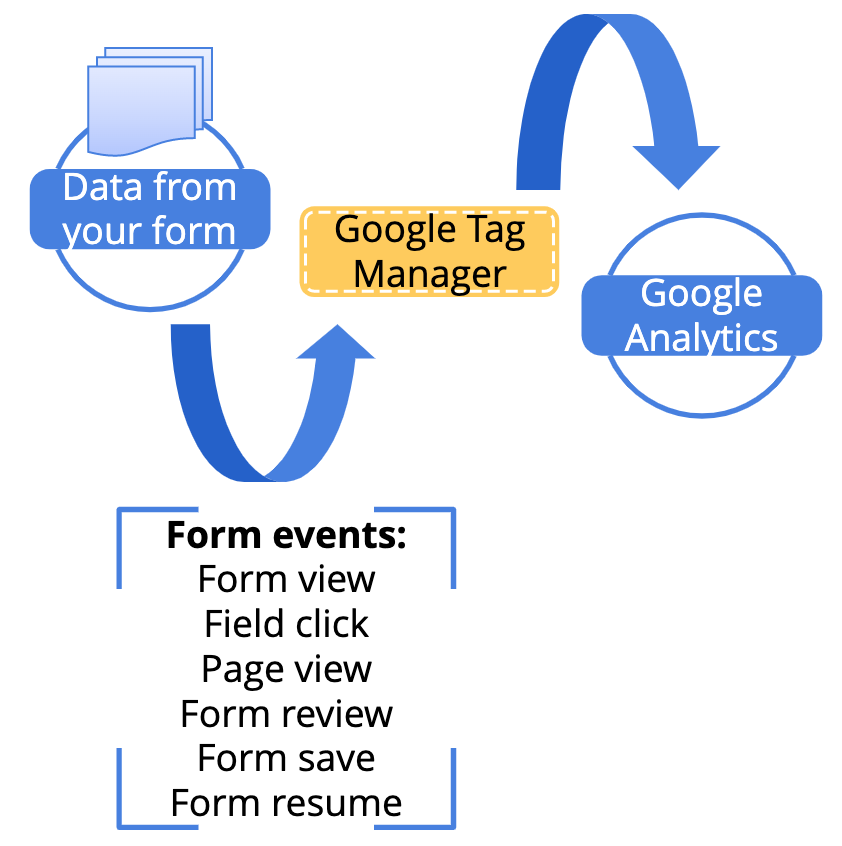
Google Tag Manager helps you add and manage analytics and measurement tags to your form to track events in Google Analytics,namely when respondents:
  • View your form
  • Click the form fields
  • View form pages
  • Review the form
  • Save the form
  • Submit the form


 How does this setup work? 


What else should you know?


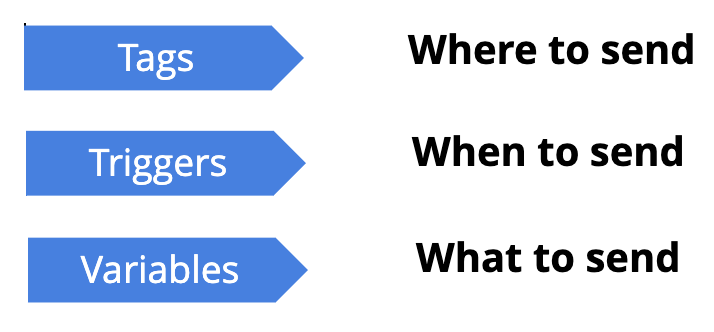
Google Tag Manager requires 3 main components to capture events:


Triggers

Triggers instruct Google Tag Manager to fire a tag based on events detected in your form, such as field clicks or form submissions. When an event matching the trigger definition is detected, the tag associated with that trigger will be applied. You must configure Custom Event Triggers in Google Tag Manager to capture events triggered from Zoho Forms.


Variables 

Variables are used to capture additional details related to an event. You can use variables to pass information to tags or trigger conditions. In order to capture triggered form event data from Zoho Forms, you need to configure Data Layer Variables.
 

Tags

Tags are the destinations where Google Tag Manager pushes your form data. Any tag you create in Google Tag Manager gets fired in response to the event trigger associated with it.


How do you configure Google Tag Manager? 

To configure Google Tag Manager and track your form events in Google Analytics:


  1. Create a Google Analytics account with a Google Analytics Property and an account at tagmanager.google.com.

  2. Install Google Tag Manager in your form, and select the form events you wish to track.

  3. In Google Tag Manager, configure Triggers, Variables, and Tags that need to fire when the selected form events occur.

  4. Preview to test and debug your configuration.

  5. If you have a Universal Analytics Property configured, refer to these detailed step-by-step instructions about configuring Google Tag Manager.

  6. Check out the video on GTM configuration with a Universal Analytics property.


  7. If you have a Google Analytics 4 Property configured, refer to these detailed step-by-step instructions about configuring Google Tag Manager.

  8. If you have configured Google Tag Manager and encounter issues with tracking, refer to these step-by-step instructions to debug your configuration.
    Refer to these frequently asked questions about Google Tag Manager for further clarification.


Over to you...


Track your form, analyze form engagement, learn from user behavior patterns, build better forms, and improve conversions with Zoho Forms! If you've used this tracking technique in Zoho Forms, we'd love to hear how it helped you expand your target audience. If you have any questions or feedback to share, feel free to comment below or drop us an email at support@zohoforms.com.


Cheers,
Samhita


    • Sticky Posts

    • DKIM Now Mandatory - Changes to Zoho Forms Email Policies

      Hello Zoho Forms Users, This post is to inform you about an important update regarding the authentication of all email domains in your Zoho Forms account. This year, we are doubling down on our commitment to deliver a secure, seamless, and empowering
    • Cloudflare Turnstile is now available in Zoho Forms!

      Hello form builders! We have added a new layer of protection to help you keep your forms free from bots. Instead of forcing users to prove they are human, Cloudflare Turnstile quietly checks browser signals in the background. Your real users glide through,
    • This festive season, offer discounts with coupon code support in Stripe Checkout

      Hello form builders! It’s the festive season, the perfect time to spread joy and great deals! Now, with Zoho Forms’ latest enhancement for Stripe Checkout, you can do exactly that with coupon codes! Your payment forms integrated with Stripe Checkout can
    • New in Zoho Forms: Google reCAPTCHA v3 for smarter spam protection

      Hello form builders, Spam submissions are one of the biggest challenges when you share your forms online. They not only clutter your data but can also waste valuable time. To help you combat this without making life harder for genuine respondents, we’re
    • New in Zoho Forms: Inline OTP Verification

      Hello form builders, We are excited to announce the launch of Inline OTP Verification in Zoho Forms, a smarter way to ensure the authenticity of the contact details you collect. Until now, OTP Verification in Zoho Forms worked as a pre-access step: respondents
      • Recent Topics

      • Creator Simplified #11: Create a custom button to download files

        Hey there! This time, let's see how to create custom buttons to download the files uploaded in the file upload field. Sample use-case A training app has a module that provides the materials for all the available courses. Students can click on the corresponding
      • Hide horizontal lines at bottom of form

        Hi I have a page with 3 forms embedded in html snippets. On each of the forms I can hide the submit button easily but I am left with the horizontal lines that bound that section and I cannot figure out to remove them (see below for the two sets of horizontal
      • Autosaving of Form Field

        HI can anyone suggest a way of autosaving or simulating an autosave function for a specific field in a form. The story is as follows. I have a bunch of technicians who write notes on how they do a repair. Sometimes they write for a couple of hours the troubleshooting process. If they click incorrectly, press ESC, Cancel or the browser crashes the information is lost which can be heartbreaking so my guys use notepad and then copy the information in. The only way around this is to click submit on the
      • Zoho Tracking Image location

        So we've been having an issue with tracking email opens. Specifically in Gmail. Our emails are not that long either, maybe 4 sections of image/250 characters of text/button per section.  But all my test accounts I used via Gmail we're showing opens. But then come to find out the tracking image is at the very bottom of the email. So If the message is clipped (It always just clips our social icons on the bottom) and the user doesn't click the show more button it never tracks the open.  Looking at other
      • AI Interview Insights: Turn Recorded Interviews into Quick Transcripts & Summaries

        Evaluating interviews shouldn’t require replaying long recordings or taking manual notes. With AI Interview Insights, you can now review complete transcripts and AI-generated summaries of your One-way (Recorded) interviews right inside Zoho Recruit. This
      • How do I associate pricebooks to a customer?

        I setup a few pricebooks, that worked fine. But now the only thing I can do with it, when I enter a quote or sales order, I can select which pricebook to use, but I have to do this product by product every time I add one. Is there a way to connect a pricebook
      • Desk DMARC forwarding failure for some senders

        I am not receiving important emails into Desk, because of DMARC errors. Here's what's happening: 1. email is sent from customer e.g. john@doe.com, to my email address, e.g info@acme.com 2. email is delivered successfully to info@acme.com (a shared inbox
      • Employee Appraisal Applicability - Why is Date of Joining Hard-Coded?

        In the new (to me, at least) Performance Appraisal Cycle wizard, it's possible to set criteria to determine for whom the appraisal process should apply. This makes sense on its face. However, one MUST use the Date of Joining criterion as a filter. Why
      • Spotlight series #6: The Show app for Android TV has a new look!

        Hello everyone! We are delighted to introduce our revamped and redesigned Show app for Android TV.  Smart TVs are exploding in popularity. Android TV alone has over 110 million active monthly devices. Zoho Show, as part of a constant effort to improve
      • Ask the Experts 26: Brighten every customer interaction with Zoho Desk all year long

        Hello everyone, Greetings and welcome to Ask the Experts 26. As we wrap up 2025, we are excited to invite you to the 26th episode of our Ask the Expert series. 🎄The Merry Metrics Edition = Best of Zoho Desk [Best Practices + Holiday Automation + Year-End
      • Pricing calculator

        Alright, so I'm trying to create a pricing calculator/pricing report generator to use in a cabinet shop. I did all the logic and such, and the calculator works. I have a few other things that I would need it to be able to do though, I'll do my best to
      • Bug Details

        In the Bug detail the milestoneid is missing
      • Group by Owner/ Owner Kanban /Group by Custom Field

        Hi, We are missing the option of viewing Tasks grouped by their owner, as it is an essential function for us to manage our employees' working tasks. We find it hard to inspect what are the tasks that our employees are working on.  We are seeking an option
      • Stop completed task lists from disappearing?

        Is there any way to stop projects from making tasks lists disappear when all the tasks in the list are completed? That's one of those little things where we're constantly fighting the product. For instance we have some projects which are ongoing - no start and end date. We use Kanban view to show the various task lists. We don't want the kanban list to disappear every time the items on it happen to be closed out. Thanks
      • SMS to customers from within Bigin

        Hi All, Is there anyone else crying out for Bigin SMS capability to send an SMS to customers directly from the Bigin interface? We have inbuilt telephony already with call recordings which works well. What's lacking is the ability to send and receive
      • Exciting Updates to the Kiosk Studio Feature in Zoho CRM!

        Hello Everyone, We are here again with a series of new enhancements to Kiosk Studio, designed to elevate your experience and bring even greater efficiency to your business processes. These updates build upon our ongoing commitment to making Kiosk a powerful
      • Passing a form object to a function

        Suppose I have a sort_order field in multiple tables and I want to increment it by +1 onCreate of a new record. Is there a way to pass the form object as an argument into the function to keep things DRY? The following function from Zia works, but I'd
      • Change of Blog Author

        Hi, I am creating the blog post on behalf of my colleague. When I publish the post, it is showing my name as author of the post which is not intended and needs to be changed to my colleague's name. How can I change the name of the author in the blogs?? Thanks, Ramanan
      • Allow customers to choose meeting venue and meeting duration on booking page

        My business primarily involves one-to-one meetings with my clients. Given the hybrid-work world we now find ourselves in, these meetings can take several forms (which I think of as the meeting "venue"): In-person Zoom Phone call I currently handle these
      • Booking outside of scheduled availability

        Is there a way for staff (such as the secretary) to book appointments outside of the scheduled availability? Right now to do this special hours must be set each time. There should be a quicker way. Am I missing something?
      • Operation Questions.

        Hello, I hope you are well. To explain a little, we are a company that sells services and products with a technical team responsible for installation and maintenance. Zoho FSM can be useful for the technical team, namely for the technical coordinator
      • Direct Access and Better Search for Zoho Quartz Recordings

        Hi Zoho Team, We would like to request a few enhancements to improve how Zoho Quartz recordings are accessed and managed after being submitted to Zoho Support. Current Limitation: After submitting a Quartz recording, the related Zoho Support ticket displays
      • Update date & time when a cell is edited

        Hi All, I am desiring to have a cell update with the current date and time when another cell is edited. Any ideas?  Thank you
      • Add "Groups" to "Share With" on Reports & All Entries

        Hi, On Forms we can share Publicly, with Specific Users And/Or Specific Groups or All Users. With Reports and All Entries we lack the "Groups" option, please add this as with many users this saves a lot of work. Thanks Dan
      • Add Pause / Resume Option to Zoho Quartz Recordings

        Hi Zoho Team, We would like to request an enhancement to Zoho Quartz recordings: the ability to pause and resume an ongoing recording. Current Limitation: At the moment, when recording an issue with Zoho Quartz, the recording continues even when we are
      • Custom Fields Not Showing Up in Invoice PDF Template Document Information

        I have added 2 custom fields under Sales > Invoices > Manage Custom Fields. They are set to show in all PDFs. However when I am editing my Invoice PDF template, i do not see the custom fields under Document Information.
      • Tracking Non-Inventory Items

        We have several business locations and currently use zoho inventory to track retail items (sales and purchase orders). We were hoping to use zoho inventory to track our non-inventory items as well (toilet paper, paper towels, etc). I understand that we
      • Can I use a Standalone CRM Function as the Callback URL For Async Export Data API?

        I am creating an export job using this API https://www.zoho.com/analytics/api/v2/bulk-api/export-data-async/create-export/view-id.html There is a "callbackUrl" key in the CONFIG object. I tried copying the URL for a standalone function in CRM which can
      • ZOHO Books

        Hi there, Why after I upgrade my Zoho invoice > Books then i wanted to add plugin which i cannot do. Please advise.
      • How is Your eCommerce Experience w/Zoho Inventory?

        First off, I'm SUPER grateful for the advent of Zoho Inventory and now the Zoho Commerce Suite. Overall, Inventory is a great product, especially for customers without an eCommerce presence. For eCommerce companies (especially those shipping more than ~10 packages/day), however, there are certain drawbacks that keep my clients from moving over to Zoho Inventory: Cons: 1. Invoice + Package Creation from Shopify/Other eCommerce Integrations: Zoho Inventory makes the somewhat perplexing decision to
      • Cliq iOS can't see shared screen

        Hello, I had this morning a video call with a colleague. She is using Cliq Desktop MacOS and wanted to share her screen with me. I'm on iPad. I noticed, while she shared her screen, I could only see her video, but not the shared screen... Does Cliq iOS is able to display shared screen, or is it somewhere else to be found ? Regards
      • Error AS101 when adding new email alias

        Hi, I am trying to add apple@(mydomain).com The error AS101 is shown while I try to add the alias.
      • Simplify Mass Replies with Predefined Templates and Snippets

        Hello everyone, We are happy to introduce a new enhancement to Mass Reply that helps agents respond to customers quickly and consistently. With the addition of Email Templates and Snippets in the reply window, agents can use predefined messages while
      • Add "Groups" above "Users" in the Zoho Forms Left Menu

        Hi, We have Groups but you have to go to a Form and Share or use the Directory App to manage them, please add "Groups" above "Users" in the Zoho Forms Left Menu so you can manage them in 1 place within Zoho Forms too. Thanks Dan
      • Mapping custom fields from one module to another

        I have a custom field, "Subscription Period" that appears as a required field in every Opportunity (Potential). I want that field to appear on any Quotes derived from that Opportunity (and have created a custom field of the same name in Quotes for that
      • Inquiry on Help Centre Tab Customisation

        Hi Zoho team, I’m wondering if it’s possible to further customise the Help Center tabs, specifically the descriptions under Knowledge Base, Community, and Tickets. While the current setup allows customising tab names, being able to tailor the descriptions
      • Passing the CRM

        Hi, I am hoping someone can help. I have a zoho form that has a CRM lookup field. I was hoping to send this to my publicly to clients via a text message and the form then attaches the signed form back to the custom module. This work absolutely fine when
      • The Social Wall: November 2025

        We’re nearing the end of the year, and the holiday season is officially kicking in! It’s that time when sales peak and your social media game needs to be stronger than ever. We’re back with exciting new updates across AI, analytics, and the mobile app
      • Item name special charaters <>

        Im trying to input speical characters such as < and > into item name and item description but comes up with following error: Invalid value passed for Item Name and Invalid value passed for Item Description How do i allow speical characters?
      • How to update Multi File upload field

        Assume that i have a multi file upload field,how can i update the same field again?
      • Next Page